spring boot

Error PKIX path building failed When Connecting to Keycloak with a Self Signed Certificate

For this scenario im using Keycloak version 17, which are being installed by using below command.

docker pull quay.io/keycloak/keycloak:17.0.0

And being run by using below command,

docker run -p 8443:8443 -e KC_HOSTNAME=localhost:8443 \ 
	-e KC_HOSTNAME_URL=https://localhost:8443 -e KC_DB=mysql \ 
	-e KC_DB_USERNAME=keycloak -e KC_DB_PASSWORD=password \ 
	-e KC_DB_URL=jdbc:mysql://192.168.56.1:3306/keycloak_db \
	quay.io/keycloak/keycloak:17.0.0 start

As for the Spring Boot sourcecode, we are utilizing the same code that are being used in below article,

https://github.com/edwin/spring-boot-and-rhsso

So lets start by setting up our application.properties to pointing to Keycloak’s HTTPS port

keycloak.auth-server-url=https://localhost:8443/
keycloak.realm=external
keycloak.resource=client
keycloak.public-client=false
keycloak.bearer-only=false
keycloak.principal-attribute=preferred_username
keycloak.credentials.secret=xxxxxx

But when HTTPS is created by using a self signed certificate, it will display below error from the Java application console.

o.k.adapters.KeycloakDeployment - Failed to load URLs from https://localhost:8443/realms/external/.well-known/openid-configuration
javax.net.ssl.SSLHandshakeException: PKIX path building failed: sun.security.provider.certpath.SunCertPathBuilderException: unable to find valid certification path to requested target
	at java.base/sun.security.ssl.Alert.createSSLException(Alert.java:131)
	at java.base/sun.security.ssl.TransportContext.fatal(TransportContext.java:349)
	at java.base/sun.security.ssl.TransportContext.fatal(TransportContext.java:292)
	at java.base/sun.security.ssl.TransportContext.fatal(TransportContext.java:287)
Caused by: sun.security.validator.ValidatorException: PKIX path building failed: sun.security.provider.certpath.SunCertPathBuilderException: unable to find valid certification path to requested target
	at java.base/sun.security.validator.PKIXValidator.doBuild(PKIXValidator.java:439)
	at java.base/sun.security.validator.PKIXValidator.engineValidate(PKIXValidator.java:306)
	at java.base/sun.security.validator.Validator.validate(Validator.java:264)
	at java.base/sun.security.ssl.X509TrustManagerImpl.validate(X509TrustManagerImpl.java:313)
	at java.base/sun.security.ssl.X509TrustManagerImpl.checkTrusted(X509TrustManagerImpl.java:222)
	at java.base/sun.security.ssl.X509TrustManagerImpl.checkServerTrusted(X509TrustManagerImpl.java:129)
	at java.base/sun.security.ssl.CertificateMessage$T13CertificateConsumer.checkServerCerts(CertificateMessage.java:1340)
	... 86 common frames omitted
Caused by: sun.security.provider.certpath.SunCertPathBuilderException: unable to find valid certification path to requested target
	at java.base/sun.security.provider.certpath.SunCertPathBuilder.build(SunCertPathBuilder.java:141)
	at java.base/sun.security.provider.certpath.SunCertPathBuilder.engineBuild(SunCertPathBuilder.java:126)
	at java.base/java.security.cert.CertPathBuilder.build(CertPathBuilder.java:297)
	at java.base/sun.security.validator.PKIXValidator.doBuild(PKIXValidator.java:434)
	... 92 common frames omitted

Thats why we need to include Keycloak’s custom SSL certificate into our Spring Boot application so that Spring Boot able to recognize a self sign certificate.

We can start by using OpenSSL to capture Keycloak’s SSL Certificate

echo "" | openssl s_client -connect localhost:8443  -showcerts 2>/dev/null | openssl x509 -out certfile.cert

It will generate a certificate which is belongs to Keycloak, next step is to create a truststore to contain the corresponding certificate. Below command will create a keystore with the name of “customcacerts” and its password which is “changeit”

keytool -import -alias ca -file certfile.cert \
         -keystore customcacerts  -storepass changeit

And we can run our Spring Boot application with below command, using the created truststore and its password as parameter.

java -Djavax.net.ssl.trustStore=customcacerts \
         -Djavax.net.ssl.trustStorePassword=changeit -jar spring-boot.jar

[Spring Boot] Create application.properties Default Value from Environment Variables

Usually we have below code on application.properties

hello=${HELLO_ENV_VARIABLE}

It means that we are setting the value of variable “hello” from “HELLO_ENV_VARIABLE” which are being passed on thru environment variables. Which later on we can set on IntelliJ

Later on, we can call it from our Java Class,

@RestController
public class HelloWorldController {

    @Value("${hello}")
    private String hello;

    @GetMapping("/")
    public Map index() {
        return new HashMap() {{
            put("hello", hello);
        }};
    }
}

We can also create a default value, in case of “HELLO_ENV_VARIABLE” is not being set,

hello=${HELLO_ENV_VARIABLE:something not world}

But what most people forgot is that we can also create a default value from other environment variable

hello=${HELLO_ENV_VARIABLE:${HELLO_ENV_VARIABLE_BACKUP}}

And set it up on IntelliJ

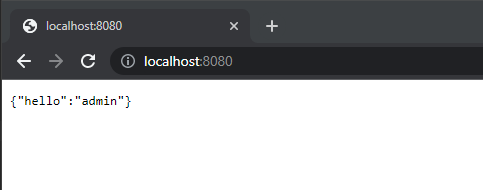
It will result in something like this,

{"hello":"this is a backup variable"}

Using Infinispan to Store Spring Boot’s HTTP Session

There are multiple ways of externalizing http session in Spring Boot, we can use a regular SQL database, or even a no-sql approach such as using Infinispan. For this sample, we are trying to integrate Spring Boot with Spring Security and externalizing its session to Infinispan.

So lets start with running an Infinispan instances,

$ docker pull infinispan/server:latest

$ docker run -p 11222:11222 -e USER=admin -e PASS=password infinispan/server

And create a new cache with the name of “app-session”, with a lifespan of one day, and and idle time of 5 minutes.

<?xml version="1.0"?>
<distributed-cache name="app-session" owners="1" mode="SYNC" statistics="true">
	<encoding>
		<key media-type="application/x-protostream"/>
		<value media-type="application/x-protostream"/>
	</encoding>
	<locking isolation="REPEATABLE_READ"/>
	<expiration lifespan="86400000" max-idle="300000"/>
</distributed-cache>

After that, we can focus on creating a new Java apps. We can start with a new pom.xml file,

<?xml version="1.0" encoding="UTF-8"?>
<project xmlns="http://maven.apache.org/POM/4.0.0"
         xmlns:xsi="http://www.w3.org/2001/XMLSchema-instance"
         xsi:schemaLocation="http://maven.apache.org/POM/4.0.0 http://maven.apache.org/xsd/maven-4.0.0.xsd">
    <modelVersion>4.0.0</modelVersion>

    <groupId>org.example</groupId>
    <artifactId>spring-infinispan-session</artifactId>
    <version>1.0-SNAPSHOT</version>

    <properties>
        <maven.compiler.source>11</maven.compiler.source>
        <maven.compiler.target>11</maven.compiler.target>
        <project.build.sourceEncoding>UTF-8</project.build.sourceEncoding>
        <infinispan.version>14.0.1.Final</infinispan.version>
        <spring-session.version>2.7.0</spring-session.version>
        <spring-boot.version>2.7.0</spring-boot.version>
    </properties>

    <dependencyManagement>
        <dependencies>
            <dependency>
                <groupId>org.infinispan</groupId>
                <artifactId>infinispan-bom</artifactId>
                <version>${infinispan.version}</version>
                <type>pom</type>
                <scope>import</scope>
            </dependency>
            <dependency>
                <groupId>org.springframework.boot</groupId>
                <artifactId>spring-boot-starter-parent</artifactId>
                <version>${spring-boot.version}</version>
                <type>pom</type>
                <scope>import</scope>
            </dependency>
        </dependencies>
    </dependencyManagement>

    <dependencies>
        <!-- spring boot -->
        <dependency>
            <groupId>org.springframework.boot</groupId>
            <artifactId>spring-boot-starter</artifactId>
        </dependency>
        <dependency>
            <groupId>org.springframework.boot</groupId>
            <artifactId>spring-boot-starter-web</artifactId>
        </dependency>

        <!-- spring security -->
        <dependency>
            <groupId>org.springframework.boot</groupId>
            <artifactId>spring-boot-starter-security</artifactId>
        </dependency>

        <!-- storing session in external storage -->
        <dependency>
            <groupId>org.springframework.session</groupId>
            <artifactId>spring-session-core</artifactId>
            <version>${spring-session.version}</version>
        </dependency>
        <dependency>
            <groupId>org.infinispan</groupId>
            <artifactId>infinispan-spring-boot-starter-remote</artifactId>
            <version>${infinispan.version}</version>
        </dependency>

    </dependencies>
</project>

And application.properties,

# spring boot
server.port=8080

# infinispan
infinispan.remote.server-list=127.0.0.1:11222
infinispan.remote.auth-username=admin
infinispan.remote.auth-password=password

# serialization
infinispan.remote.java-serial-whitelist=java.lang.*

And we can start with to code our Java files,

package com.edw;

import org.infinispan.spring.remote.session.configuration.EnableInfinispanRemoteHttpSession;
import org.springframework.boot.SpringApplication;
import org.springframework.boot.autoconfigure.SpringBootApplication;
import org.springframework.cache.annotation.EnableCaching;

@SpringBootApplication
@EnableCaching
@EnableInfinispanRemoteHttpSession(cacheName = "app-session")
public class Application {
    public static void main(String[] args) {
        SpringApplication.run(Application.class, args);
    }
}
package com.edw.controller;

import org.infinispan.spring.remote.provider.SpringRemoteCacheManager;
import org.springframework.beans.factory.annotation.Autowired;
import org.springframework.security.core.Authentication;
import org.springframework.security.core.context.SecurityContextHolder;
import org.springframework.web.bind.annotation.GetMapping;
import org.springframework.web.bind.annotation.RestController;

import java.util.HashMap;

@RestController
public class IndexController {

    @Autowired
    SpringRemoteCacheManager cacheManager;

    @GetMapping(path = "/")
    public HashMap index() {
        Authentication auth = SecurityContextHolder.getContext().getAuthentication();
        return new HashMap(){{
            put("hello", auth.getName());
        }};
    }
}
package com.edw.config;

import org.springframework.security.config.annotation.authentication.builders.AuthenticationManagerBuilder;
import org.springframework.security.config.annotation.method.configuration.EnableGlobalMethodSecurity;
import org.springframework.security.config.annotation.web.builders.HttpSecurity;
import org.springframework.security.config.annotation.web.configuration.WebSecurityConfigurerAdapter;
import org.springframework.security.web.util.matcher.AntPathRequestMatcher;

@EnableGlobalMethodSecurity(prePostEnabled = true)
public class SecurityConfiguration extends WebSecurityConfigurerAdapter {

    @Override
    protected void configure(AuthenticationManagerBuilder auth) throws Exception {
        auth
                .inMemoryAuthentication()
                .withUser("admin")
                .password("{noop}password")
                .roles("ADMIN")
            .and()
                .withUser("user")
                .password("{noop}password")
                .roles("USER");
    }

    @Override
    protected void configure(HttpSecurity http) throws Exception{
        super.configure(http);
        http
                .logout()
                .logoutRequestMatcher(new AntPathRequestMatcher("/logout"))
            .and()
                .csrf()
                .disable();
    }
}
package com.edw.config;

import org.infinispan.commons.marshall.ProtoStreamMarshaller;
import org.infinispan.spring.starter.remote.InfinispanRemoteCacheCustomizer;
import org.springframework.context.annotation.Bean;
import org.springframework.context.annotation.Configuration;
import org.springframework.core.Ordered;
import org.springframework.core.annotation.Order;

@Configuration
public class InfinispanConfiguration {

    @Bean
    @Order(Ordered.HIGHEST_PRECEDENCE)
    public InfinispanRemoteCacheCustomizer remoteCacheCustomizer() {
        return b -> {
            b.remoteCache("app-session").marshaller(ProtoStreamMarshaller.class);
        };
    }
}

If some NullPointerException happens, make sure that your cache is created first before we start our Java apps.

We can run the code and see our Spring Security default login page,

User admin as username, and password as its password to login, and we can see the login result,

And we can see the number of entries in increased on our app-session cache,

Code for this application can be found in below repository,

https://github.com/edwin/spring-boot-and-infinispan-http-session

Keycloak redirect_uri is Not HTTPS when Spring Boot is Behind Reverse Proxy

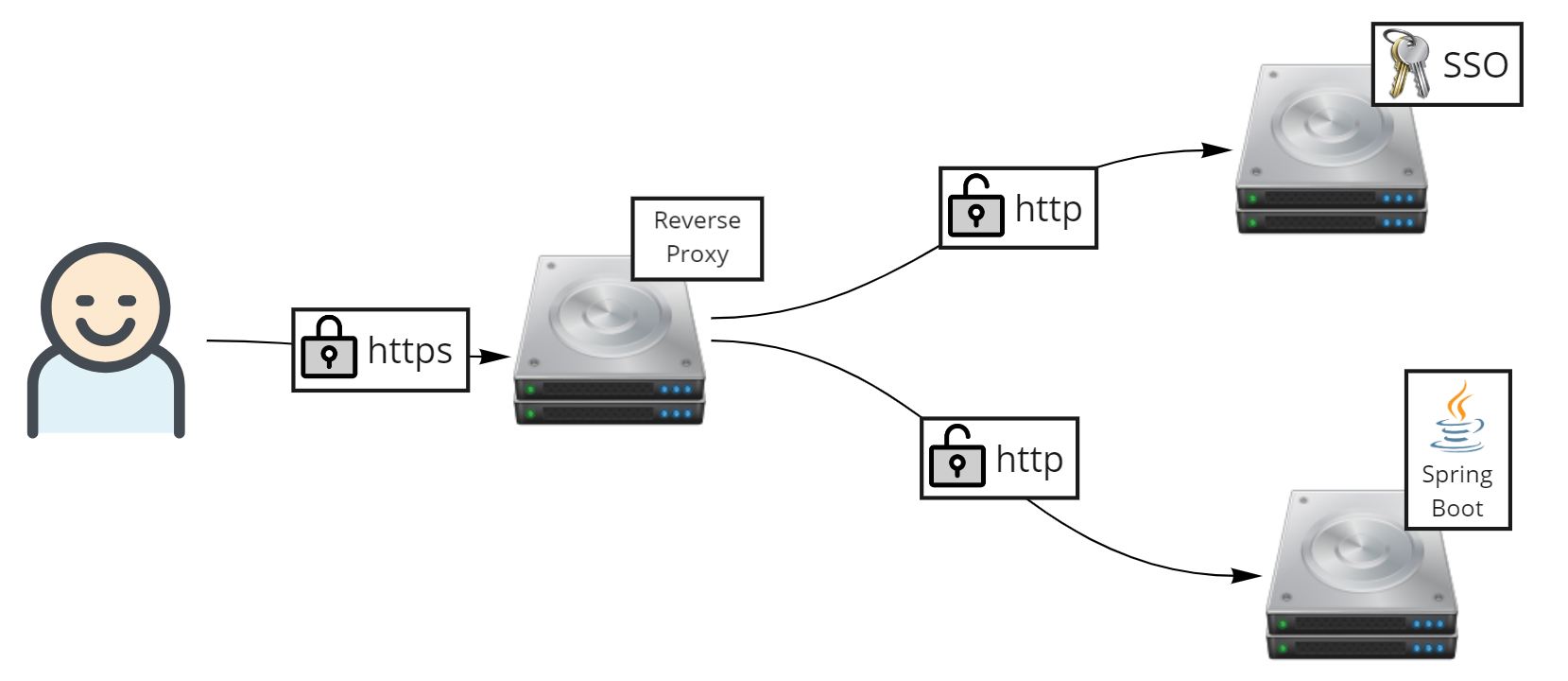
Recently i have a regular Keycloak deployment with the high level concept like below image,

But during implementation, i had this weird condition when Keycloak, behind a reverse proxy for SSL offloader, is redirecting to my Spring Boot application. But Keycloak is not detecting my Spring Boot application as https.

https://keycloak/auth/realms/realm/protocol/openid-connect/auth?
response_type=code&client_id=client-id&redirect_uri=http%3A%2F%2Fspring-boot-app%2Fsso&state=123&
login=true&scope=openid

As we can see, redirect_uri is having http as its protocol, instead of https. Despite my Spring Boot application is being deployed behind a reverse proxy with an SSL offloader.

The workaround is actually quite simple, first thing is that we need to forward request from users into downstream apps, which is Keycloak and Spring Boot. This is primarily being done on reverse proxy or Load Balancer such as F5 or Nginx

X-Forwarded-For: 10.20.81.131
X-Forwarded-Proto: https
X-Forwarded-Host: my.apps.com

But sometimes even after above headers being forwarded, Spring Boot still unaware that it is being accessed as HTTPS. Therefore we need to add one more configuration line in our Spring Boot’s application.properties configuration.

server.forward-headers-strategy=NATIVE

This should be sufficient enough.

Hello World App Using Spring Boot and Apache Camel

Based on wikipedia, Apache Camel is an open source framework for message-oriented middleware with a rule-based routing and mediation engine that provides a Java object-based implementation of the Enterprise Integration Patterns.

The good thing about Apache Camel is that it also has a great flexibility where we can deploy Apache Camel on top of Spring Boot, providing an agile microservice EIP and SOA approach.

So lets start by defining what kind of libraries needed for this project,

<?xml version="1.0" encoding="UTF-8"?>
<project xmlns="http://maven.apache.org/POM/4.0.0"
         xmlns:xsi="http://www.w3.org/2001/XMLSchema-instance"
         xsi:schemaLocation="http://maven.apache.org/POM/4.0.0 http://maven.apache.org/xsd/maven-4.0.0.xsd">
    <modelVersion>4.0.0</modelVersion>

    <groupId>com.edw</groupId>
    <artifactId>camel-hello-world</artifactId>
    <version>1.0-SNAPSHOT</version>

    <properties>
        <project.build.sourceEncoding>UTF-8</project.build.sourceEncoding>
        <camel.version>3.17.0</camel.version>
        <spring-boot.version>2.7.1</spring-boot.version>
        <start-class>com.edw.Applicationn</start-class>
    </properties>

    <dependencyManagement>
        <dependencies>
            <dependency>
                <groupId>org.springframework.boot</groupId>
                <artifactId>spring-boot-dependencies</artifactId>
                <version>${spring-boot.version}</version>
                <type>pom</type>
                <scope>import</scope>
            </dependency>
            <dependency>
                <groupId>org.apache.camel.springboot</groupId>
                <artifactId>camel-spring-boot-dependencies</artifactId>
                <version>${camel.version}</version>
                <type>pom</type>
                <scope>import</scope>
            </dependency>
        </dependencies>
    </dependencyManagement>

    <dependencies>
        <!--        spring boot     -->
        <dependency>
            <groupId>org.springframework.boot</groupId>
            <artifactId>spring-boot-starter</artifactId>
        </dependency>
        <dependency>
            <groupId>org.springframework.boot</groupId>
            <artifactId>spring-boot-starter-web</artifactId>
            <exclusions>
                <exclusion>
                    <groupId>org.springframework.boot</groupId>
                    <artifactId>spring-boot-starter-tomcat</artifactId>
                </exclusion>
            </exclusions>
        </dependency>
        <dependency>
            <groupId>org.springframework.boot</groupId>
            <artifactId>spring-boot-starter-undertow</artifactId>
        </dependency>
        <dependency>
            <groupId>org.springframework.boot</groupId>
            <artifactId>spring-boot-starter-actuator</artifactId>
        </dependency>
        <dependency>
            <groupId>org.springframework.boot</groupId>
            <artifactId>spring-boot-starter-test</artifactId>
            <scope>test</scope>
            <exclusions>
                <exclusion>
                    <groupId>junit</groupId>
                    <artifactId>junit</artifactId>
                </exclusion>
                <exclusion>
                    <groupId>org.junit.vintage</groupId>
                    <artifactId>junit-vintage-engine</artifactId>
                </exclusion>
            </exclusions>
        </dependency>

        <!--        camel   -->
        <dependency>
            <groupId>org.apache.camel.springboot</groupId>
            <artifactId>camel-spring-boot-starter</artifactId>
        </dependency>
        <dependency>
            <groupId>org.apache.camel</groupId>
            <artifactId>camel-test-spring-junit5</artifactId>
            <scope>test</scope>
        </dependency>

        <!--        unit test   -->
        <dependency>
            <groupId>org.junit.jupiter</groupId>
            <artifactId>junit-jupiter-api</artifactId>
            <scope>test</scope>
        </dependency>
        <dependency>
            <groupId>org.junit.jupiter</groupId>
            <artifactId>junit-jupiter-engine</artifactId>
            <scope>test</scope>
        </dependency>
        <dependency>
            <groupId>io.rest-assured</groupId>
            <artifactId>rest-assured</artifactId>
            <scope>test</scope>
        </dependency>
        <dependency>
            <groupId>io.rest-assured</groupId>
            <artifactId>json-path</artifactId>
            <scope>test</scope>
        </dependency>
    </dependencies>

    <build>
        <plugins>
            <plugin>
                <groupId>org.springframework.boot</groupId>
                <artifactId>spring-boot-maven-plugin</artifactId>
                <version>${spring-boot.version}</version>
                <configuration>
                    <mainClass>${start-class}</mainClass>
                </configuration>
                <executions>
                    <execution>
                        <goals>
                            <goal>repackage</goal>
                        </goals>
                    </execution>
                </executions>
            </plugin>
            <plugin>
                <artifactId>maven-compiler-plugin</artifactId>
                <configuration>
                    <source>11</source>
                    <target>11</target>
                </configuration>
            </plugin>

            <plugin>
                <groupId>org.apache.maven.plugins</groupId>
                <artifactId>maven-failsafe-plugin</artifactId>
                <version>3.0.0-M5</version>
                <executions>
                    <execution>
                        <goals>
                            <goal>integration-test</goal>
                            <goal>verify</goal>
                        </goals>
                    </execution>
                </executions>

                <configuration>
                    <classpathDependencyExcludes>
                        <classpathDependencyExcludes>${project.groupId}:${project.artifactId}
                        </classpathDependencyExcludes>
                    </classpathDependencyExcludes>
                    <additionalClasspathElements>
                        <additionalClasspathElement>${project.build.outputDirectory}</additionalClasspathElement>
                    </additionalClasspathElements>
                    <reportsDirectory>${project.build.directory}/surefire-reports</reportsDirectory>
                </configuration>
            </plugin>

        </plugins>
    </build>

</project>

Create a java main class,

package com.edw;

import org.springframework.boot.SpringApplication;
import org.springframework.boot.autoconfigure.SpringBootApplication;

@SpringBootApplication
public class Application {
    public static void main(String[] args) {
        SpringApplication.run(Application.class, args);
    }
}

A Spring controller, where we call Camel’s route

package com.edw.controller;

import org.apache.camel.ProducerTemplate;
import org.springframework.beans.factory.annotation.Autowired;
import org.springframework.web.bind.annotation.GetMapping;
import org.springframework.web.bind.annotation.RequestMapping;
import org.springframework.web.bind.annotation.RequestParam;
import org.springframework.web.bind.annotation.RestController;
import java.util.HashMap;

@RestController
@RequestMapping("/api")
public class ApiController {

    @Autowired
    private ProducerTemplate template;

    @GetMapping("/v1/hello")
    public HashMap getHello(@RequestParam("name") String name) {
        return (HashMap) template.requestBody("direct:getHelloWorld", name);
    }
}

And a Camel Route to do all the Enterprise Integration Pattern, where it do a json response

package com.edw.route;

import org.apache.camel.builder.RouteBuilder;
import org.springframework.stereotype.Component;
import java.util.HashMap;

@Component
public class ApiRoute extends RouteBuilder {

    @Override
    public void configure() {
        // say helloworld
        from("direct:getHelloWorld")
                .routeId("getHelloWorld")
                .tracing()
                .log("calling getHelloWorld")
                .process(exchange -> {
                    String name = (String) exchange.getIn().getBody();
                    exchange.getMessage().setBody(new HashMap<>(){{
                        put("hello", name);
                    }});
                })
                .end();
    }
}

Code for this post can be found on below github repo,

https://github.com/edwin/spring-boot-camel-hello-world

Have fun with Spring Boot and Camel 🙂