Java

java

How to Use S2I to Deploy Dockerfile to Openshift Container Platform

Lets say i have a Java application,

<?xml version="1.0" encoding="UTF-8"?>
<project xmlns="http://maven.apache.org/POM/4.0.0"
         xmlns:xsi="http://www.w3.org/2001/XMLSchema-instance"
         xsi:schemaLocation="http://maven.apache.org/POM/4.0.0 http://maven.apache.org/xsd/maven-4.0.0.xsd">
    <modelVersion>4.0.0</modelVersion>

    <groupId>com.edw</groupId>
    <artifactId>hello-world-containerized-quarkus-on-jvm</artifactId>
    <version>1.0-SNAPSHOT</version>

    <properties>
        <compiler-plugin.version>3.15.0</compiler-plugin.version>
        <maven.compiler.release>21</maven.compiler.release>
        <project.build.sourceEncoding>UTF-8</project.build.sourceEncoding>
        <project.reporting.outputEncoding>UTF-8</project.reporting.outputEncoding>
        <quarkus.platform.artifact-id>quarkus-bom</quarkus.platform.artifact-id>
        <quarkus.platform.group-id>io.quarkus.platform</quarkus.platform.group-id>
        <quarkus.platform.version>3.39.2</quarkus.platform.version>
        <skipITs>true</skipITs>
        <surefire-plugin.version>3.5.6</surefire-plugin.version>
    </properties>

    <dependencyManagement>
        <dependencies>
            <dependency>
                <groupId>${quarkus.platform.group-id}</groupId>
                <artifactId>${quarkus.platform.artifact-id}</artifactId>
                <version>${quarkus.platform.version}</version>
                <type>pom</type>
                <scope>import</scope>
            </dependency>
        </dependencies>
    </dependencyManagement>

    <dependencies>
        <dependency>
            <groupId>io.quarkus</groupId>
            <artifactId>quarkus-arc</artifactId>
        </dependency>
        <dependency>
            <groupId>io.quarkus</groupId>
            <artifactId>quarkus-rest</artifactId>
        </dependency>
        <dependency>
            <groupId>io.quarkus</groupId>
            <artifactId>quarkus-junit</artifactId>
            <scope>test</scope>
        </dependency>
        <dependency>
            <groupId>io.rest-assured</groupId>
            <artifactId>rest-assured</artifactId>
            <scope>test</scope>
        </dependency>
    </dependencies>

    <build>
        <plugins>
            <plugin>
                <groupId>${quarkus.platform.group-id}</groupId>
                <artifactId>quarkus-maven-plugin</artifactId>
                <version>${quarkus.platform.version}</version>
                <extensions>true</extensions>
                <executions>
                    <execution>
                        <goals>
                            <goal>build</goal>
                            <goal>generate-code</goal>
                            <goal>generate-code-tests</goal>
                        </goals>
                    </execution>
                </executions>
            </plugin>
            <plugin>
                <artifactId>maven-compiler-plugin</artifactId>
                <version>${compiler-plugin.version}</version>
                <configuration>
                    <parameters>true</parameters>
                </configuration>
            </plugin>
            <plugin>
                <artifactId>maven-surefire-plugin</artifactId>
                <version>${surefire-plugin.version}</version>
                <configuration>
                    <argLine>@{argLine}</argLine>
                    <systemPropertyVariables>
                        <java.util.logging.manager>org.jboss.logmanager.LogManager</java.util.logging.manager>
                        <maven.home>${maven.home}</maven.home>
                    </systemPropertyVariables>
                </configuration>
            </plugin>
            <plugin>
                <artifactId>maven-failsafe-plugin</artifactId>
                <version>${surefire-plugin.version}</version>
                <executions>
                    <execution>
                        <goals>
                            <goal>integration-test</goal>
                            <goal>verify</goal>
                        </goals>
                    </execution>
                </executions>
                <configuration>
                    <argLine>@{argLine}</argLine>
                    <systemPropertyVariables>
                        <native.image.path>${project.build.directory}/${project.build.finalName}-runner</native.image.path>
                        <java.util.logging.manager>org.jboss.logmanager.LogManager</java.util.logging.manager>
                        <maven.home>${maven.home}</maven.home>
                    </systemPropertyVariables>
                </configuration>
            </plugin>
        </plugins>
    </build>

    <profiles>
        <profile>
            <id>native</id>
            <activation>
                <property>
                    <name>native</name>
                </property>
            </activation>
            <properties>
                <quarkus.package.jar.enabled>false</quarkus.package.jar.enabled>
                <skipITs>false</skipITs>
                <quarkus.native.enabled>true</quarkus.native.enabled>
            </properties>
        </profile>
    </profiles>

</project>
package com.edw.controller;

import jakarta.ws.rs.GET;
import jakarta.ws.rs.Path;
import jakarta.ws.rs.Produces;
import jakarta.ws.rs.core.MediaType;
import jakarta.ws.rs.core.Response;

import java.util.HashMap;

@Path("/")
public class IndexController {
    @GET
    @Produces(MediaType.APPLICATION_JSON)
    public Response index() {
        return Response.ok(new HashMap(){{
                    put("hello", "world");
                }})
                .build();
    }
}

And a very simple Dockerfile for a multistage build, where we do a maven build there

## Stage 1 : build with maven builder image with native capabilities
FROM registry.redhat.io/ubi9/openjdk-21:1.24 AS build
COPY --chown=185 --chmod=0755 mvnw /code/mvnw
COPY --chown=185 .mvn /code/.mvn
COPY --chown=185 pom.xml /code/
USER 185
WORKDIR /code
COPY src /code/src
RUN ./mvnw clean package


## Stage 2 : create the docker final image
FROM registry.access.redhat.com/ubi9/openjdk-21-runtime:1.24

LABEL BASE_IMAGE="registry.access.redhat.com/ubi9/openjdk-21-runtime:1.24"
LABEL JAVA_VERSION="21"

ENV LANGUAGE='en_US:en'
ENV TZ='Asia/Jakarta'

ENV JAVA_OPTS_APPEND="-Dquarkus.http.host=0.0.0.0 -Djava.util.logging.manager=org.jboss.logmanager.LogManager -XX:TieredStopAtLevel=1 -noverify -XX:+AlwaysPreTouch -XX:+UseNUMA -Xlog:gc*,safepoint=debug:file=/tmp/gc.log.%p:time,uptime:filecount=5,filesize=50M -XX:+HeapDumpOnOutOfMemoryError -XX:HeapDumpPath=/tmp/"
ENV JAVA_APP_JAR="/deployments/quarkus-run.jar"
ENV GC_CONTAINER_OPTIONS="-XX:+UseShenandoahGC"

COPY --from=build --chown=185 /code/target/quarkus-app/lib/ /deployments/lib/
COPY --from=build --chown=185 /code/target/quarkus-app/*.jar /deployments/
COPY --from=build --chown=185 /code/target/quarkus-app/app/ /deployments/app/
COPY --from=build --chown=185 /code/target/quarkus-app/quarkus/ /deployments/quarkus/

EXPOSE 8080
USER 185

ENTRYPOINT [ "/opt/jboss/container/java/run/run-java.sh" ]

This is the project structure,

$ tree
.
- Dockerfile
- mvnw
- pom.xml
- readme.md
- src
    + main
        + java
        |   + com
        |       + edw
        |           + controller
        |               + IndexController.java
        + resources
            + application.properties

We can use the below command to build this Dockerfile inside Openshift,

$ oc new-build --strategy docker --binary \ 
	--name hello-world-containerized-quarkus-on-jvm
    
	* A Docker build using binary input will be created
      * The resulting image will be pushed to image stream tag "hello-world-containerized-quarkus-on-jvm:latest"
      * A binary build was created, use 'oc start-build --from-dir' to trigger a new build

--> Creating resources with label build=hello-world-containerized-quarkus-on-jvm ...
    imagestream.image.openshift.io "hello-world-containerized-quarkus-on-jvm" created
    buildconfig.build.openshift.io "hello-world-containerized-quarkus-on-jvm" created
--> Success


$ oc start-build hello-world-containerized-quarkus-on-jvm \
	--from-dir . --follow
	
Uploading directory "." as binary input for the build ...
..........
Uploading finished
build.build.openshift.io/hello-world-containerized-quarkus-on-jvm-1 started
Receiving source from STDIN as archive ...
time="2026-09-12T08:10:52Z" level=info msg="Not using native diff for overlay, this may cause degraded performance for building images: kernel has CONFIG_OVERLAY_FS_REDIRECT_DIR enabled"
I0912 08:10:52.582538       1 defaults.go:112] Defaulting to storage driver "overlay" with options [mountopt=metacopy=on].
Caching blobs under "/var/cache/blobs".

.....

Pushing image image-registry.openshift-image-registry.svc:5000/api/hello-world-containerized-quarkus-on-jvm:latest ...
Getting image source signatures
Copying blob sha256:b8969f72c7c3e136de5b0da7xx354ab8c17d19792f4149091e7141cfad15xxxx
Copying config sha256:132e66ed9a99d36f7cd493xxc7158a19235665e71914157ec7d4f2cfc9xxxx
Writing manifest to image destination
Successfully pushed image-registry.openshift-image-registry.svc:5000/api/hello-world-containerized-quarkus-on-jvm@sha256:f466627c0e10aad58037e3059b5f8d15bf9d8e26d9c2c2a60f09be9a98999e39
Push successful


$ oc new-app --name hello-world-containerized-quarkus-on-jvm \ 
	--image-stream=api/hello-world-containerized-quarkus-on-jvm:latest
	
--> Found image 132e66e (28 minutes old) in image stream "api/hello-world-containerized-quarkus-on-jvm" under tag "latest" for "api/hello-world-containerized-quarkus-on-jvm:latest"

    Java Applications
    -----------------
    Platform for running plain Java applications (fat-jar and flat classpath)

    Tags: java


--> Creating resources ...
    deployment.apps "hello-world-containerized-quarkus-on-jvm" created
    service "hello-world-containerized-quarkus-on-jvm" created
--> Success
    Application is not exposed. You can expose services to the outside world by executing one or more of the commands below:
     'oc expose service/hello-world-containerized-quarkus-on-jvm'
    Run 'oc status' to view your app.

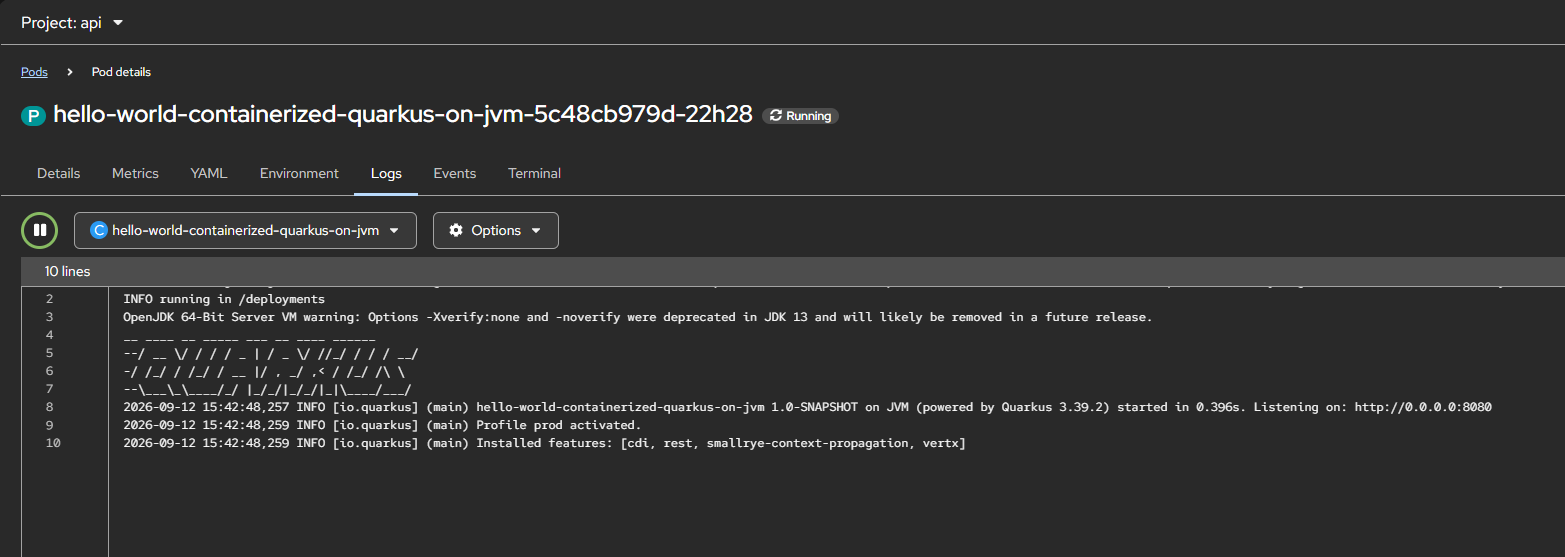
And we can see that our application is deployed successfully,
Source code for this project can be accessed here,

https://github.com/edwin/hello-world-containerized-quarkus-on-jvm
Creating a Sample Distributable WAR File for JBoss EAP 8.1

JBoss EAP 8.1 supports HTTP session clustering, replicating a session across multiple JBoss EAP instances. This post won’t go deep into configuring the cluster itself, instead it focuses on the application side. Here’s a minimal WAR file you can deploy to an already-clustered JBoss EAP 8.1 environment to verify that session replication is working.

Below is my pom.xml

<?xml version="1.0" encoding="UTF-8"?>
<project xmlns="http://maven.apache.org/POM/4.0.0"
         xmlns:xsi="http://www.w3.org/2001/XMLSchema-instance"
         xsi:schemaLocation="http://maven.apache.org/POM/4.0.0 http://maven.apache.org/xsd/maven-4.0.0.xsd">
    <modelVersion>4.0.0</modelVersion>

    <groupId>com.edw</groupId>
    <artifactId>jboss-eap-distributable</artifactId>
    <version>1.0-SNAPSHOT</version>
    <packaging>war</packaging>

    <properties>
        <maven.compiler.source>21</maven.compiler.source>
        <maven.compiler.target>21</maven.compiler.target>
        <project.build.sourceEncoding>UTF-8</project.build.sourceEncoding>
        <failOnMissingWebXml>false</failOnMissingWebXml>
    </properties>

    <dependencyManagement>
        <dependencies>
            <dependency>
                <groupId>org.jboss.bom</groupId>
                <artifactId>jboss-eap-ee</artifactId>
                <version>8.1.0.GA-redhat-00001</version>
                <type>pom</type>
                <scope>import</scope>
            </dependency>
        </dependencies>
    </dependencyManagement>

    <dependencies>
        <dependency>
            <groupId>jakarta.servlet</groupId>
            <artifactId>jakarta.servlet-api</artifactId>
            <scope>provided</scope>
        </dependency>
    </dependencies>

    <build>
        <finalName>${project.artifactId}</finalName>
        <plugins>
            <plugin>
                <groupId>org.apache.maven.plugins</groupId>
                <artifactId>maven-war-plugin</artifactId>
                <version>3.3.2</version>
            </plugin>
        </plugins>
    </build>

</project>

And web.xml

<?xml version="1.0" encoding="UTF-8"?>
<web-app xmlns="https://jakarta.ee/xml/ns/jakartaee"
         xmlns:xsi="http://www.w3.org/2001/XMLSchema-instance"
         xsi:schemaLocation="https://jakarta.ee/xml/ns/jakartaee https://jakarta.ee/xml/ns/jakartaee/web-app_6_0.xsd"
         version="6.0">

    <display-name>JBoss EAP Distributable Hello World</display-name>

    <distributable/>

</web-app>

The element is what tells EAP this webapp’s sessions are eligible for replication across the cluster.

This is my Java file which i use,

package com.edw;

import jakarta.servlet.ServletException;
import jakarta.servlet.annotation.WebServlet;
import jakarta.servlet.http.HttpServlet;
import jakarta.servlet.http.HttpServletRequest;
import jakarta.servlet.http.HttpServletResponse;
import jakarta.servlet.http.HttpSession;
import java.io.IOException;
import java.io.PrintWriter;
import java.util.Date;

@WebServlet("/hello")
public class HelloWorldServlet extends HttpServlet {

    private static final String COUNT_KEY = "count";

    @Override
    protected void doGet(HttpServletRequest req, HttpServletResponse resp) throws ServletException, IOException {
        HttpSession session = req.getSession(true);
        Integer count = (Integer) session.getAttribute(COUNT_KEY);
        if (count == null) {
            count = 0;
        }
        count++;
        session.setAttribute(COUNT_KEY, count);

        resp.setContentType("text/html");
        PrintWriter out = resp.getWriter();
        out.println("<html><body>");
        out.println("<h1>Hello World!</h1>");
        out.println("<p>This application is cluster-aware (distributable).</p>");
        out.println("<p>Session ID: " + session.getId() + "</p>");
        out.println("<p>Session Count: " + count + "</p>");
        out.println("<p>Server Time: " + new Date() + "</p>");
        out.println("<p>Check your server logs to see session replication in action if running in a cluster.</p>");
        out.println("</body></html>");
    }
}

Once we have deployed this WAR to a cluster, say two EAP instances at 192.168.5.180 and 192.168.5.181, we can confirm the session is being replicated by reusing the same cookie jar across both nodes,

$ curl -kv http://192.168.5.180:8080/jboss-eap-distributable/hello -c cookies.txt -b cookies.txt

$ curl -kv http://192.168.5.181:8080/jboss-eap-distributable/hello -c cookies.txt -b cookies.txt

If clustering is configured correctly, the second request should return the same session ID and an incremented session count, even though it hit a different node. If the session ID changes or the count resets to 1, that’s a sign session replication (or your load balancer’s sticky-session config) isn’t working as expected.

The whole source code for this project can be seen on the below repository,

https://github.com/edwin/jboss-eap-distributable

[Spring Boot] Implementing Multiple Cache Managers

Typically, we leverage a single cache for a specific purpose. however, there are scenarios where we need to integrate multiple caching mechanisms, each serving a different role. In this tutorial, I will demonstrate how to configure multiple Cache Managers in Spring Boot and illustrate the integration between the application layer, database, local cache, and remote cache.

In this scenario, we will use both a local cache (Caffeine) and a remote cache (Infinispan) to store query results.

First we’ll start with a simple pom.xml which contains Spring Boot, MySQL, Infinispan server, and Caffeine for local caches.

<?xml version="1.0" encoding="UTF-8"?>
<project xmlns="http://maven.apache.org/POM/4.0.0"
         xmlns:xsi="http://www.w3.org/2001/XMLSchema-instance"
         xsi:schemaLocation="http://maven.apache.org/POM/4.0.0 http://maven.apache.org/xsd/maven-4.0.0.xsd">
    <modelVersion>4.0.0</modelVersion>

    <groupId>com.edw</groupId>
    <artifactId>spring-boot-multiple-cacheable</artifactId>
    <version>1.0-SNAPSHOT</version>

    <parent>
        <groupId>org.springframework.boot</groupId>
        <artifactId>spring-boot-starter-parent</artifactId>
        <version>3.5.9</version>
        <relativePath/> <!-- lookup parent from repository -->
    </parent>

    <properties>
        <maven.compiler.source>21</maven.compiler.source>
        <maven.compiler.target>21</maven.compiler.target>
        <project.build.sourceEncoding>UTF-8</project.build.sourceEncoding>
    </properties>

    <dependencyManagement>
        <dependencies>
            <dependency>
                <groupId>org.infinispan</groupId>
                <artifactId>infinispan-bom</artifactId>
                <version>16.0.5</version>
                <type>pom</type>
                <scope>import</scope>
            </dependency>
        </dependencies>
    </dependencyManagement>

    <dependencies>
        <dependency>
            <groupId>org.springframework.boot</groupId>
            <artifactId>spring-boot-starter-web</artifactId>
        </dependency>
        <dependency>
            <groupId>org.springframework.boot</groupId>
            <artifactId>spring-boot-starter-data-jpa</artifactId>
        </dependency>

        <dependency>
            <groupId>com.fasterxml.jackson.core</groupId>
            <artifactId>jackson-databind</artifactId>
        </dependency>
        <dependency>
            <groupId>com.mysql</groupId>
            <artifactId>mysql-connector-j</artifactId>
            <scope>runtime</scope>
        </dependency>

        <dependency>
            <groupId>org.projectlombok</groupId>
            <artifactId>lombok</artifactId>
            <optional>true</optional>
        </dependency>

        <!-- caches -->
        <dependency>
            <groupId>org.infinispan</groupId>
            <artifactId>infinispan-spring-boot3-starter-remote</artifactId>
        </dependency>
        <dependency>
            <groupId>org.infinispan</groupId>
            <artifactId>infinispan-jboss-marshalling</artifactId>
        </dependency>

        <dependency>
            <groupId>org.springframework.boot</groupId>
            <artifactId>spring-boot-starter-cache</artifactId>
        </dependency>
        <dependency>
            <groupId>com.github.ben-manes.caffeine</groupId>
            <artifactId>caffeine</artifactId>
        </dependency>

        <dependency>
            <groupId>org.springframework.boot</groupId>
            <artifactId>spring-boot-starter-test</artifactId>
            <scope>test</scope>
        </dependency>
    </dependencies>

    <build>
        <plugins>
            <plugin>
                <groupId>org.springframework.boot</groupId>
                <artifactId>spring-boot-maven-plugin</artifactId>
                <configuration>
                    <layout>JAR</layout>
                </configuration>
                <executions>
                    <execution>
                        <goals>
                            <goal>repackage</goal>
                        </goals>
                    </execution>
                </executions>
            </plugin>
        </plugins>
    </build>

</project>

its configuration on application.properties

### server
server.port=8080
spring.application.name=spring-boot-multiple-cacheable

## log
logging.level.root=INFO
logging.level.com.edw=DEBUG

spring.jpa.show-sql=true
logging.level.org.hibernate.SQL=DEBUG
logging.level.org.hibernate.type.descriptor.sql=TRACE

## db
spring.datasource.url=jdbc:mysql://localhost:3306/test_db
spring.datasource.driverClassName=com.mysql.cj.jdbc.Driver
spring.datasource.username=root
spring.datasource.password=password

## infinispan
jdg.servers=localhost:11222
jdg.userName=admin2
jdg.password=password

## caffeine
caffeine.spec=maximumSize=500,expireAfterAccess=10m

And some Java files,

package com.edw;

import org.springframework.boot.SpringApplication;
import org.springframework.boot.autoconfigure.SpringBootApplication;
import org.springframework.cache.annotation.EnableCaching;

@SpringBootApplication
@EnableCaching
public class Main {
    public static void main(String[] args) {
        SpringApplication.run(Main.class, args);
    }
}
package com.edw.model;

import jakarta.persistence.Column;
import jakarta.persistence.Entity;
import jakarta.persistence.Id;
import jakarta.persistence.Table;
import lombok.AllArgsConstructor;
import lombok.Data;
import lombok.NoArgsConstructor;
import org.infinispan.api.annotations.indexing.Indexed;

import java.io.Serializable;

@Data
@NoArgsConstructor
@AllArgsConstructor

@Indexed

@Entity
@Table(name = "t_employee")
public class Employee implements Serializable {
    @Id
    public Long id;

    @Column(name = "gender")
    public String gender;

    @Column(name = "firstname")
    public String firstname;

    @Column(name = "lastname")
    public String lastname;
}
package com.edw.repository;

import com.edw.model.Employee;
import org.springframework.data.repository.CrudRepository;
import org.springframework.stereotype.Repository;

import java.util.List;

@Repository
public interface EmployeeRepository extends CrudRepository<Employee, Long> {
    List<Employee> findTop10ByFirstnameLikeAndLastnameLikeIgnoreCase(String firstname, String lastname);
}
package com.edw.service;

import com.edw.model.Employee;
import com.edw.repository.EmployeeRepository;
import org.springframework.beans.factory.annotation.Autowired;
import org.springframework.cache.annotation.Cacheable;
import org.springframework.stereotype.Service;

import java.util.List;

@Service
public class EmployeeService {

    private final EmployeeRepository employeeRepository;

    public EmployeeService(@Autowired EmployeeRepository employeeRepository) {
        this.employeeRepository = employeeRepository;
    }

    @Cacheable(value = "query-cache",
            key = "#id",
            cacheManager = "infinispanCacheManager")
    public Employee getEmployee(Long id) {
        return employeeRepository.findById(id).orElse(new Employee());
    }

    @Cacheable(value = "employee-cache",
            key = "#root.methodName + '-' + #firstname + '-' +  #lastname",
            cacheManager = "caffeineCacheManager")
    public List<Employee> findEmployeesByFirstnameAndLastname(String firstname, String lastname) {
        return employeeRepository.findTop10ByFirstnameLikeAndLastnameLikeIgnoreCase(firstname + "%", lastname + "%");
    }
}
package com.edw.controller;

import com.edw.model.Employee;
import com.edw.service.EmployeeService;
import lombok.extern.slf4j.Slf4j;
import org.springframework.beans.factory.annotation.Autowired;
import org.springframework.http.ResponseEntity;
import org.springframework.web.bind.annotation.GetMapping;
import org.springframework.web.bind.annotation.PathVariable;
import org.springframework.web.bind.annotation.RestController;

import java.util.List;

@Slf4j
@RestController
public class EmployeeController {

    private final EmployeeService employeeService;

    public EmployeeController(@Autowired EmployeeService employeeService) {
        this.employeeService = employeeService;
    }

    @GetMapping("/employee/{id}")
    public ResponseEntity getEmployeeById (@PathVariable Long id) {
        log.info("getEmployeeById");

        Employee employee = employeeService.getEmployee(id);
        if(employee.getId() == null)
            return ResponseEntity.notFound().build();

        return ResponseEntity.ok(employee);
    }

    @GetMapping("/employee/find-by-firstname-and-lastname/{firstname}/{lastname}")
    public ResponseEntity getEmployeeByFirstnameAndLastname (@PathVariable String firstname, @PathVariable String lastname) {
        log.info("getEmployeeByFirstnameAndLastname");

        List<Employee> employees = employeeService.findEmployeesByFirstnameAndLastname(firstname, lastname);
        if(employees.isEmpty())
            return ResponseEntity.notFound().build();

        return ResponseEntity.ok(employees);
    }

}

And this is the most important part, where we configure our Cache connections. We use @Primary on the Infinispan manager to set it as the default, but we use explicit bean names (caffeineCacheManager and infinispanCacheManager) to distinguish them in the service layer.

package com.edw.config;

import org.infinispan.client.hotrod.RemoteCacheManager;
import org.infinispan.client.hotrod.configuration.ClientIntelligence;
import org.infinispan.client.hotrod.configuration.ConfigurationBuilder;
import org.infinispan.jboss.marshalling.commons.GenericJBossMarshaller;
import org.infinispan.spring.remote.provider.SpringRemoteCacheManager;
import org.springframework.beans.factory.annotation.Value;
import org.springframework.cache.CacheManager;
import org.springframework.context.annotation.Bean;
import org.springframework.context.annotation.Configuration;
import org.springframework.context.annotation.Primary;

@Configuration
public class InfinispanConfiguration {
    @Value("${jdg.servers}")
    private String jdgHostAddress;

    @Value("${jdg.userName}")
    private String userName;

    @Value("${jdg.password}")
    private String password;

    @Primary
    @Bean(name="infinispanCacheManager")
    public CacheManager infinispanCacheManager() {
        return new SpringRemoteCacheManager(remoteCacheManager());
    }

    @Bean
    public RemoteCacheManager remoteCacheManager() {
        return new RemoteCacheManager(
                new ConfigurationBuilder()
                        .addServers(jdgHostAddress)
                        .security().authentication().username(userName).password(password)
                        .clientIntelligence(ClientIntelligence.HASH_DISTRIBUTION_AWARE)
                        .marshaller(new GenericJBossMarshaller())
                        .build());
    }
}
package com.edw.config;

import com.github.benmanes.caffeine.cache.Caffeine;
import org.springframework.beans.factory.annotation.Value;
import org.springframework.cache.CacheManager;
import org.springframework.cache.caffeine.CaffeineCacheManager;
import org.springframework.context.annotation.Bean;
import org.springframework.context.annotation.Configuration;

@Configuration
public class CaffeineConfiguration {

    @Value("${caffeine.spec}")
    private String spec;

    @Bean(name = "caffeineCacheManager")
    public CacheManager caffeineCacheManager() {
        CaffeineCacheManager manager = new CaffeineCacheManager("employee-cache");
        manager.setCaffeine(Caffeine.from(spec));
        return manager;
    }

}

We can try to trigger API call and can see that the first hit will go to the database, but after that it will always go to Cache to reduce the database workload.

$ curl -kv http://localhost:8080/employee/1

Code for this project can be accessed in the below repository,

https://github.com/edwin/spring-boot-multiple-cacheable

Increasing Resource for Red Hat Migration Toolkit for Applications

I am currently working on a project that involves migrating a legacy Java web application from Java 8 to Java 21. Fortunately, Red Hat offers a specialized tool for this exact use case: the Red Hat Migration Toolkit for Applications (MTA). It can be installed as a CLI on a VM or as an Operator on OpenShift.

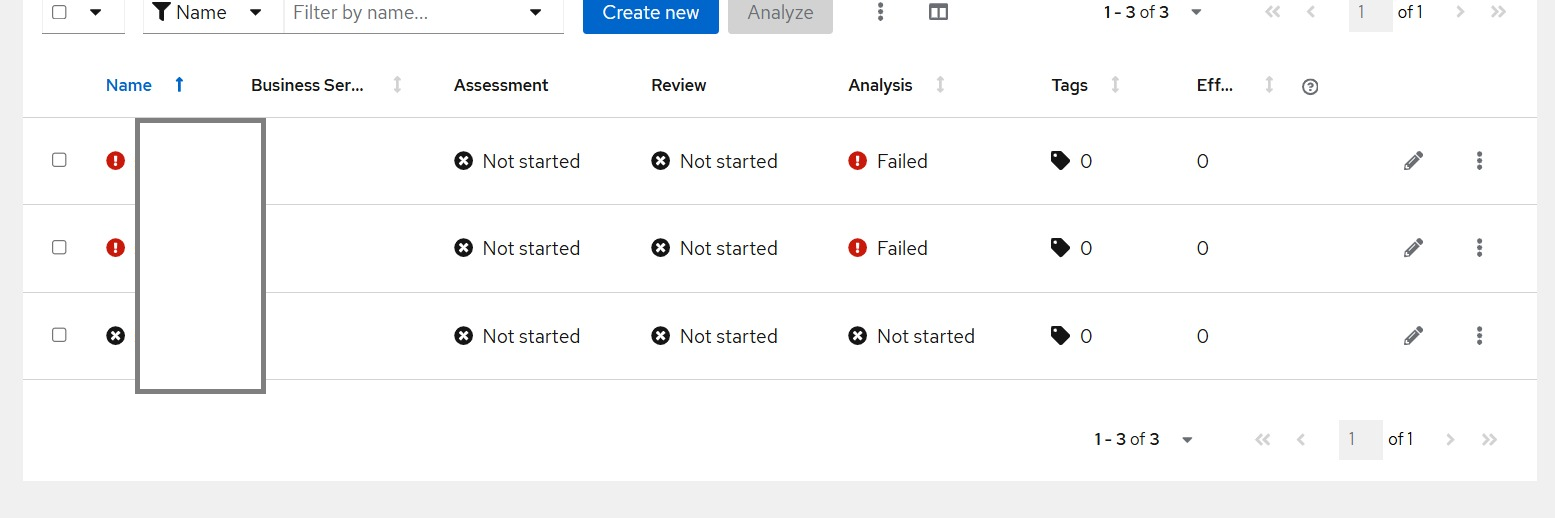
For this specific project, I am leveraging Red Hat MTA on OpenShift via the Operator. While it works seamlessly for most scenarios, I encountered an interesting issue where the analysis process would hang and eventually throw an error.

The root cause is that MTA “Tackle” tasks have default resource limits. These limits can prevent the tool from processing large .WAR files efficiently. When the file is too large for the allocated overhead, the process simply stalls.

The workaround is straightforward: we can increase the MTA resource limits by modifying the Tackle YAML file. In the example below, I have adjusted the configuration to a 4 CPU limit and an 8 GB RAM limit to provide enough headroom for heavy analysis.

apiVersion: tackle.konveyor.io/v1alpha1
kind: Tackle
metadata:
  name: tackle
  namespace: openshift-mta
spec:
  analyzer_container_requests_cpu: 4
  analyzer_container_requests_memory: 8Gi
  feature_auth_required: 'true'
  provider_java_container_limits_cpu: 4
  provider_java_container_requests_memory: 8Gi
  analyzer_container_limits_memory: 8Gi
  analyzer_container_limits_cpu: 4
  provider_java_container_requests_cpu: 4
  provider_java_container_limits_memory: 8Gi

Compiling Spring Boot into a Native Executable and Containerizing It

One of Spring Boot’s latest features is the ability to perform native compilation. This generates an application with a smaller binary size and a reduced memory footprint. This is particularly beneficial for deployments in containerized environments such as the OpenShift Container Platform.

Let’s start by installing GraalVM in our environment. I am using Fedora, so the installation process might differ for other operating systems.

$ wget https://github.com/graalvm/mandrel/releases/download/mandrel-24.2.2.0-Final/mandrel-java24-linux-amd64-24.2.2.0-Final.tar.gz
$ sudo mkdir -p /opt/mandrel
$ sudo tar -xzf mandrel-java24-linux-amd64-24.2.2.0-Final.tar.gz -C /opt/mandrel/
$ sudo ln -s /opt/mandrel/mandrel-java24-24.2.2.0-Final /opt/mandrel/current

$ export GRAALVM_HOME=/opt/mandrel/current

Next, we create a Maven pom.xml file,

<?xml version="1.0" encoding="UTF-8"?>
<project xmlns="http://maven.apache.org/POM/4.0.0"
         xmlns:xsi="http://www.w3.org/2001/XMLSchema-instance"
         xsi:schemaLocation="http://maven.apache.org/POM/4.0.0 http://maven.apache.org/xsd/maven-4.0.0.xsd">
    <modelVersion>4.0.0</modelVersion>

    <groupId>com.edw</groupId>
    <artifactId>spring-boot-postgresql</artifactId>
    <version>1.0-SNAPSHOT</version>

    <parent>
        <groupId>org.springframework.boot</groupId>
        <artifactId>spring-boot-starter-parent</artifactId>
        <version>3.5.9</version>
        <relativePath/>
    </parent>

    <properties>
        <maven.compiler.source>21</maven.compiler.source>
        <maven.compiler.target>21</maven.compiler.target>
        <project.build.sourceEncoding>UTF-8</project.build.sourceEncoding>
    </properties>

    <dependencyManagement>
        <dependencies>
            <dependency>
                <groupId>io.opentelemetry.instrumentation</groupId>
                <artifactId>opentelemetry-instrumentation-bom</artifactId>
                <version>2.15.0</version>
                <type>pom</type>
                <scope>import</scope>
            </dependency>
        </dependencies>
    </dependencyManagement>

    <dependencies>
        <dependency>
            <groupId>org.springframework.boot</groupId>
            <artifactId>spring-boot-starter-web</artifactId>
        </dependency>
        <dependency>
            <groupId>org.springframework.boot</groupId>
            <artifactId>spring-boot-starter-data-jpa</artifactId>
        </dependency>

        <dependency>
            <groupId>com.fasterxml.jackson.core</groupId>
            <artifactId>jackson-databind</artifactId>
        </dependency>
        <dependency>
            <groupId>org.postgresql</groupId>
            <artifactId>postgresql</artifactId>
            <version>42.7.7</version>
        </dependency>

        <!-- OpenTelemetry  -->
        <dependency>
            <groupId>io.opentelemetry.instrumentation</groupId>
            <artifactId>opentelemetry-spring-boot-starter</artifactId>
        </dependency>

        <dependency>
            <groupId>org.projectlombok</groupId>
            <artifactId>lombok</artifactId>
            <version>1.18.30</version>
            <scope>provided</scope>
        </dependency>

        <dependency>
            <groupId>org.springframework.boot</groupId>
            <artifactId>spring-boot-starter-test</artifactId>
            <scope>test</scope>
        </dependency>
    </dependencies>

    <build>
        <plugins>
            <plugin>
                <groupId>org.springframework.boot</groupId>
                <artifactId>spring-boot-maven-plugin</artifactId>
                <configuration>
                    <layout>JAR</layout>
                </configuration>
                <executions>
                    <execution>
                        <goals>
                            <goal>repackage</goal>
                        </goals>
                    </execution>
                </executions>
            </plugin>
        </plugins>
    </build>

</project>

We also need the following Java files,

package com.edw;

import org.springframework.boot.SpringApplication;
import org.springframework.boot.autoconfigure.SpringBootApplication;

@SpringBootApplication
public class Main {
    public static void main(String[] args) {
        SpringApplication.run(Main.class, args);
    }
}
package com.edw.model;

import jakarta.persistence.*;
import lombok.AllArgsConstructor;
import lombok.Data;
import lombok.NoArgsConstructor;

import java.io.Serializable;

@Entity
@Table(name = "t_customer")

@Data
@AllArgsConstructor
@NoArgsConstructor
public class Customer implements Serializable {

    @Id
    @GeneratedValue(strategy= GenerationType.AUTO)
    @Column(name = "customer_id")
    private Long customerId;

    @Column(name = "customer_name")
    private String customerName;

}
package com.edw.repository;

import com.edw.model.Customer;
import org.springframework.data.jpa.repository.JpaRepository;
import org.springframework.stereotype.Repository;

@Repository
public interface CustomerRepository extends JpaRepository<Customer, Long> {
}
package com.edw.service;

import com.edw.model.Customer;
import com.edw.repository.CustomerRepository;
import jakarta.transaction.Transactional;
import org.springframework.beans.factory.annotation.Autowired;
import org.springframework.data.domain.Sort;
import org.springframework.stereotype.Service;

import java.util.List;

@Service
@Transactional
public class CustomerService {

    private final CustomerRepository customerRepository;

    public CustomerService(@Autowired CustomerRepository customerRepository) {
        this.customerRepository = customerRepository;
    }

    public List<Customer> findAll(){
        return customerRepository.findAll(Sort.by(Sort.Direction.ASC, "customerId"));
    }
}
package com.edw.controller;

import com.edw.service.CustomerService;
import org.springframework.beans.factory.annotation.Autowired;
import org.springframework.http.ResponseEntity;
import org.springframework.web.bind.annotation.GetMapping;
import org.springframework.web.bind.annotation.RestController;

@RestController
public class CustomerController {

    private final CustomerService customerService;

    public CustomerController(@Autowired CustomerService customerService) {
        this.customerService = customerService;
    }

    @GetMapping("/")
    public ResponseEntity findAll () {
        return ResponseEntity.ok(customerService.findAll());
    }

}

Now, build the native application using the following command,

$ mvn clean package -Pnative native:compile

......

Finished generating 'spring-boot-postgresql' in 1m 30s.
[INFO] ------------------------------------------------------------------------
[INFO] BUILD SUCCESS
[INFO] ------------------------------------------------------------------------
[INFO] Total time:  01:41 min
[INFO] Finished at: 2026-01-13T11:44:54+07:00
[INFO] ------------------------------------------------------------------------

If we look closely at the pom.xml provided above, we might notice something interesting. There is no profile named native explicitly defined in the file. Yet, the mvn command works perfectly.

The reason is that “spring-boot-starter-parent” comes with a pre-configured native profile out of the box. When we run Maven with the -Pnative flag, it activates this inherited profile, which automatically sets up the necessary configuration and AOT processing for GraalVM.

Create a file named Dockerfile.native-ubi9,

FROM registry.access.redhat.com/ubi9/ubi-minimal:9.7

WORKDIR /work

RUN chown 1001 /work \
    && chmod "g+rwX" /work \
    && chown 1001:root /work

COPY target/spring-boot-postgresql /work/application
COPY target/*.so /work/

ENV LD_LIBRARY_PATH=/work

EXPOSE 8080

USER 1001

CMD ["./application"]

Then, build the container image,

$ podman build -t default-route-openshift-image-registry.apps-crc.testing/api/spring-boot-postgresql:native-ubi9 -f Dockerfile.native-ubi9 .

After deploying to OpenShift, we can see a significant resource difference between a traditional Spring Boot app and a native one


$ oc adm top pod -n api spring-boot-postgresql-jvm-64b5ff9967-5pp76
NAME                                          CPU(cores)   MEMORY(bytes)
spring-boot-postgresql-jvm-64b5ff9967-5pp76   1m           237Mi

$ oc adm top pod -n api spring-boot-postgresql-native-85db64b4cd-2cpt9
NAME                                             CPU(cores)   MEMORY(bytes)
spring-boot-postgresql-native-85db64b4cd-2cpt9   1m           81Mi

The code for this project can be found in this repository,

https://github.com/edwin/spring-boot-postgresql