servlet

Creating a Sample Distributable WAR File for JBoss EAP 8.1

JBoss EAP 8.1 supports HTTP session clustering, replicating a session across multiple JBoss EAP instances. This post won’t go deep into configuring the cluster itself, instead it focuses on the application side. Here’s a minimal WAR file you can deploy to an already-clustered JBoss EAP 8.1 environment to verify that session replication is working.

Below is my pom.xml

<?xml version="1.0" encoding="UTF-8"?>
<project xmlns="http://maven.apache.org/POM/4.0.0"
         xmlns:xsi="http://www.w3.org/2001/XMLSchema-instance"
         xsi:schemaLocation="http://maven.apache.org/POM/4.0.0 http://maven.apache.org/xsd/maven-4.0.0.xsd">
    <modelVersion>4.0.0</modelVersion>

    <groupId>com.edw</groupId>
    <artifactId>jboss-eap-distributable</artifactId>
    <version>1.0-SNAPSHOT</version>
    <packaging>war</packaging>

    <properties>
        <maven.compiler.source>21</maven.compiler.source>
        <maven.compiler.target>21</maven.compiler.target>
        <project.build.sourceEncoding>UTF-8</project.build.sourceEncoding>
        <failOnMissingWebXml>false</failOnMissingWebXml>
    </properties>

    <dependencyManagement>
        <dependencies>
            <dependency>
                <groupId>org.jboss.bom</groupId>
                <artifactId>jboss-eap-ee</artifactId>
                <version>8.1.0.GA-redhat-00001</version>
                <type>pom</type>
                <scope>import</scope>
            </dependency>
        </dependencies>
    </dependencyManagement>

    <dependencies>
        <dependency>
            <groupId>jakarta.servlet</groupId>
            <artifactId>jakarta.servlet-api</artifactId>
            <scope>provided</scope>
        </dependency>
    </dependencies>

    <build>
        <finalName>${project.artifactId}</finalName>
        <plugins>
            <plugin>
                <groupId>org.apache.maven.plugins</groupId>
                <artifactId>maven-war-plugin</artifactId>
                <version>3.3.2</version>
            </plugin>
        </plugins>
    </build>

</project>

And web.xml

<?xml version="1.0" encoding="UTF-8"?>
<web-app xmlns="https://jakarta.ee/xml/ns/jakartaee"
         xmlns:xsi="http://www.w3.org/2001/XMLSchema-instance"
         xsi:schemaLocation="https://jakarta.ee/xml/ns/jakartaee https://jakarta.ee/xml/ns/jakartaee/web-app_6_0.xsd"
         version="6.0">

    <display-name>JBoss EAP Distributable Hello World</display-name>

    <distributable/>

</web-app>

The element is what tells EAP this webapp’s sessions are eligible for replication across the cluster.

This is my Java file which i use,

package com.edw;

import jakarta.servlet.ServletException;
import jakarta.servlet.annotation.WebServlet;
import jakarta.servlet.http.HttpServlet;
import jakarta.servlet.http.HttpServletRequest;
import jakarta.servlet.http.HttpServletResponse;
import jakarta.servlet.http.HttpSession;
import java.io.IOException;
import java.io.PrintWriter;
import java.util.Date;

@WebServlet("/hello")
public class HelloWorldServlet extends HttpServlet {

    private static final String COUNT_KEY = "count";

    @Override
    protected void doGet(HttpServletRequest req, HttpServletResponse resp) throws ServletException, IOException {
        HttpSession session = req.getSession(true);
        Integer count = (Integer) session.getAttribute(COUNT_KEY);
        if (count == null) {
            count = 0;
        }
        count++;
        session.setAttribute(COUNT_KEY, count);

        resp.setContentType("text/html");
        PrintWriter out = resp.getWriter();
        out.println("<html><body>");
        out.println("<h1>Hello World!</h1>");
        out.println("<p>This application is cluster-aware (distributable).</p>");
        out.println("<p>Session ID: " + session.getId() + "</p>");
        out.println("<p>Session Count: " + count + "</p>");
        out.println("<p>Server Time: " + new Date() + "</p>");
        out.println("<p>Check your server logs to see session replication in action if running in a cluster.</p>");
        out.println("</body></html>");
    }
}

Once we have deployed this WAR to a cluster, say two EAP instances at 192.168.5.180 and 192.168.5.181, we can confirm the session is being replicated by reusing the same cookie jar across both nodes,

$ curl -kv http://192.168.5.180:8080/jboss-eap-distributable/hello -c cookies.txt -b cookies.txt

$ curl -kv http://192.168.5.181:8080/jboss-eap-distributable/hello -c cookies.txt -b cookies.txt

If clustering is configured correctly, the second request should return the same session ID and an incremented session count, even though it hit a different node. If the session ID changes or the count resets to 1, that’s a sign session replication (or your load balancer’s sticky-session config) isn’t working as expected.

The whole source code for this project can be seen on the below repository,

https://github.com/edwin/jboss-eap-distributable
Monitoring Jboss EAP 8 DataSource and Application’s Query

JBoss EAP provide a convenient way of monitoring its Datasource where it can be monitored within a same JBoss EAP dashboard console. For this sample, i have a very simple Servlet class where it would do a Select query using JBoss EAP Datasource

package com.edw;

import jakarta.servlet.ServletException;
import jakarta.servlet.annotation.WebServlet;
import jakarta.servlet.http.HttpServlet;
import jakarta.servlet.http.HttpServletRequest;
import jakarta.servlet.http.HttpServletResponse;

import javax.naming.InitialContext;
import javax.sql.DataSource;
import java.io.IOException;
import java.sql.*;

@WebServlet(name = "HelloServlet", urlPatterns = "/")
public class HelloServlet extends HttpServlet {

    @Override
    protected void doGet(HttpServletRequest request, HttpServletResponse response)
            throws ServletException, IOException {
        DataSource ds = null;
        Connection connection = null;
        PreparedStatement statement = null;
        ResultSet rs = null;

        try {
            InitialContext ic = new InitialContext();
            ds = (DataSource) ic.lookup("java:/my-db");
            connection = ds.getConnection();

            statement = connection.prepareStatement("SELECT * FROM tb_testing ORDER BY id ASC");
            rs = statement.executeQuery();

            StringBuilder htmlTable = new StringBuilder("<table>");

            ResultSetMetaData metaData = rs.getMetaData();
            int columnCount = metaData.getColumnCount();

            // table header
            htmlTable.append("<thead><tr>");
            for (int i = 1; i <= columnCount; i++) {
                htmlTable.append("<th>").append(metaData.getColumnName(i)).append("</th>");
            }
            htmlTable.append("</tr></thead>");

            // table body
            htmlTable.append("<tbody>");
            while (rs.next()) {
                htmlTable.append("<tr>");
                for (int i = 1; i <= columnCount; i++) {
                    htmlTable.append("<td>").append(rs.getString(i)).append("</td>");
                }
                htmlTable.append("</tr>");
            }
            htmlTable.append("</tbody></table>");

            response.getWriter().write(htmlTable.toString());

        } catch (Exception e) {
            e.printStackTrace();
        } finally {
            // Make sure ResultSet, Statement and Connection are all closed at the end
            if (rs != null) {
                try {
                    rs.close();
                } catch (SQLException e) {
                    e.printStackTrace();
                }
            }
            if (statement != null) {
                try {
                    statement.close();
                } catch (SQLException e) {
                    e.printStackTrace();
                }
            }
            if (connection != null) {
                try {
                    connection.close();
                } catch (SQLException e) {
                    e.printStackTrace();
                }
            }
        }
    }
}

Which is connect to a mysql table,

create table test_db.tb_testing
(
    id       int auto_increment
        primary key,
    username varchar(60) null
);

and we have this datasource configuration on our JBoss EAP 8, where we are activating Statistics and SQL Statements spying feature

<datasource jndi-name="java:/my-db" pool-name="my-db" 
	spy="true" 
	statistics-enabled="true">
	<connection-url>jdbc:mysql://localhost:3306/test_db</connection-url>
	<driver-class>com.mysql.cj.jdbc.Driver</driver-class>
	<driver>mysql-connector-j-9.3.0.jar</driver>
	<security>
		<user-name>root</user-name>
		<password>password</password>
	</security>
	<validation>
		<valid-connection-checker class-name="org.jboss.jca.adapters.jdbc.extensions.mysql.MySQLValidConnectionChecker"/>
		<check-valid-connection-sql>SELECT 1</check-valid-connection-sql>
		<validate-on-match>true</validate-on-match>
		<background-validation>false</background-validation>
		<exception-sorter class-name="org.jboss.jca.adapters.jdbc.extensions.mysql.MySQLExceptionSorter"/>
	</validation>
	<statement>
		<track-statements>true</track-statements>
		<prepared-statement-cache-size>50</prepared-statement-cache-size>
	</statement>
</datasource>

And put this logging configuration to make sure that all the SQL statements are properly printed on log file,

<logger category="jboss.jdbc.spy">
	<level name="DEBUG"/>
	<handlers>
		<handler name="CONSOLE"/>
	</handlers>
</logger>

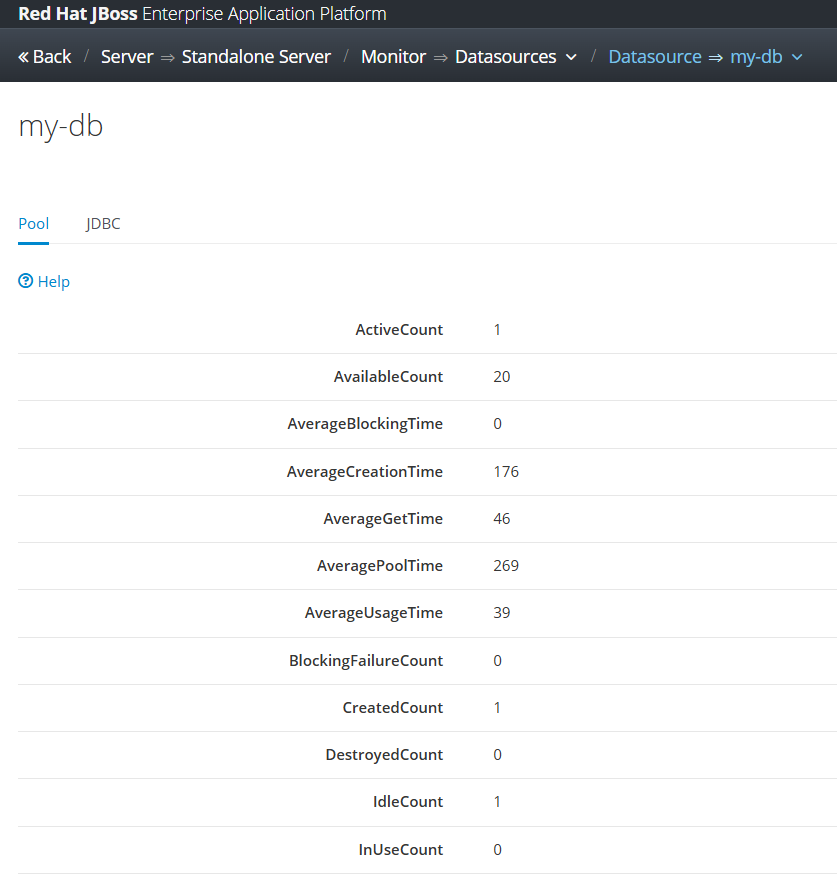
Deploy our custom application on JBoss EAP, do some transactions, and we can see that Datasource statistics on JBoss admin console,

and we can see our detail SQL statements on server.log file, for example is based on the below log we can see that our query took around 70ms to be executed


2025-10-23 13:21:27,852 DEBUG [jboss.jdbc.spy] (default task-1) java:/my-db [DataSource] getConnection()
2025-10-23 13:21:27,853 DEBUG [jboss.jdbc.spy] (default task-1) java:/my-db [Connection] prepareStatement(SELECT * FROM tb_testing ORDER BY id ASC)
2025-10-23 13:21:27,854 DEBUG [jboss.jdbc.spy] (default task-1) java:/my-db [PreparedStatement] executeQuery()
........ ........ ........ 
2025-10-23 13:21:27,929 DEBUG [jboss.jdbc.spy] (default task-1) java:/my-db [PreparedStatement] isClosed()
2025-10-23 13:21:27,929 DEBUG [jboss.jdbc.spy] (default task-1) java:/my-db [PreparedStatement] close()
2025-10-23 13:21:27,929 DEBUG [jboss.jdbc.spy] (default task-1) java:/my-db [Connection] isClosed()
2025-10-23 13:21:27,929 DEBUG [jboss.jdbc.spy] (default task-1) java:/my-db [Connection] close()

Code for this project can be accessed on the below repository,

https://github.com/edwin/hello-world-servlet-and-jboss-eap-connection-pool

Multi-Tenancy System with JBoss EAP 8 Connection Pooling

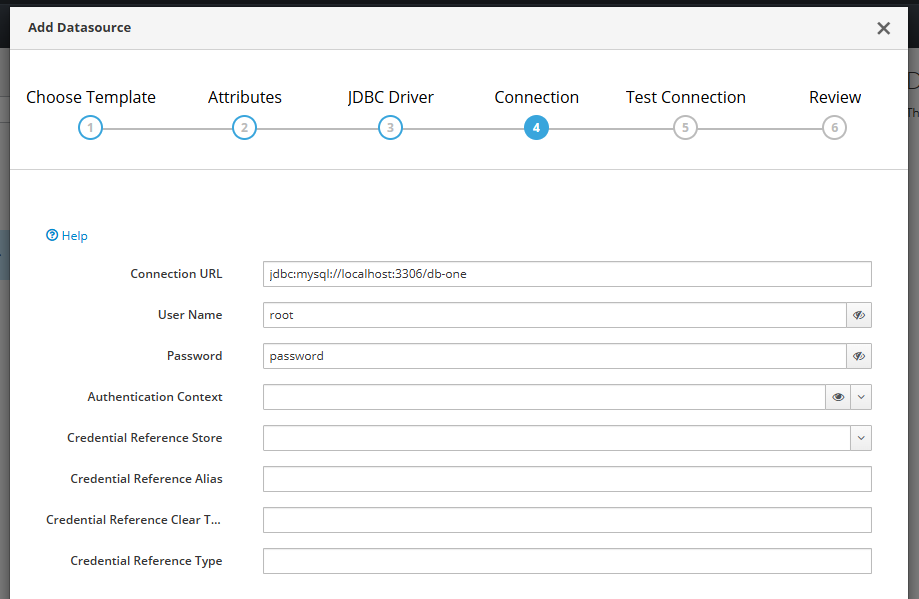
Basically a multi-tenancy system is a condition where one single instance of a software is able to handle multple distinct customers with each having their own database. The concept is perhaps can be seen in below image,

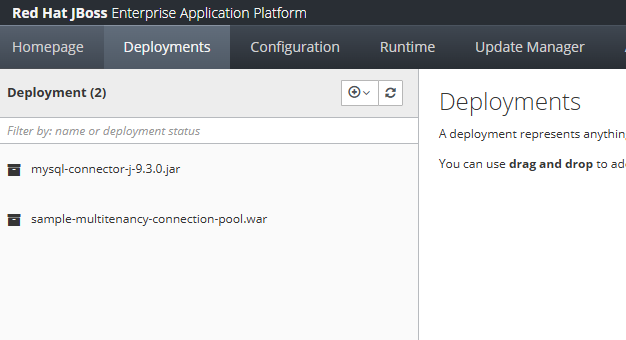
We can start by uploading database driver that is required to connect to the existing database, for this sample we are using MySql Database

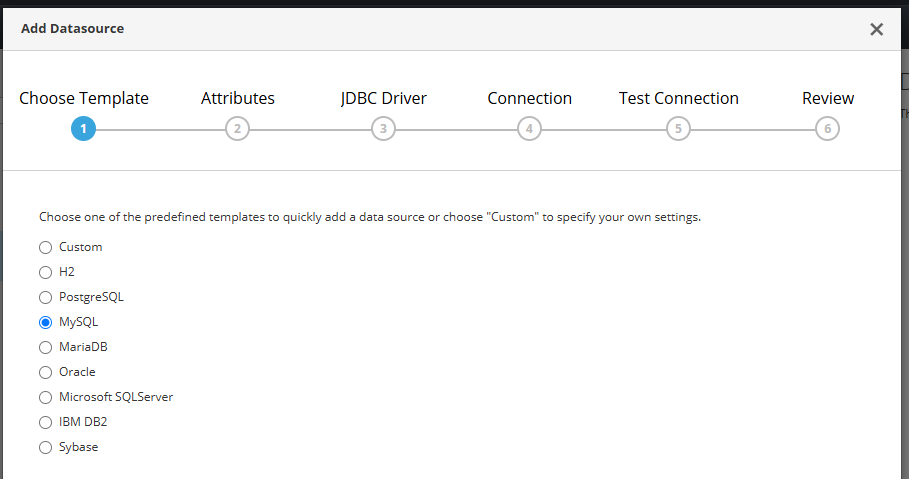
creating a Database connection on JBoss EAP Datasource,

choose MySql,

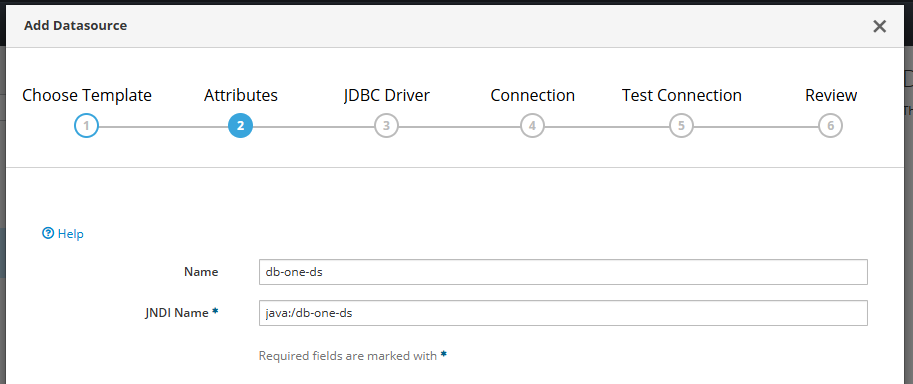
create JNDI name

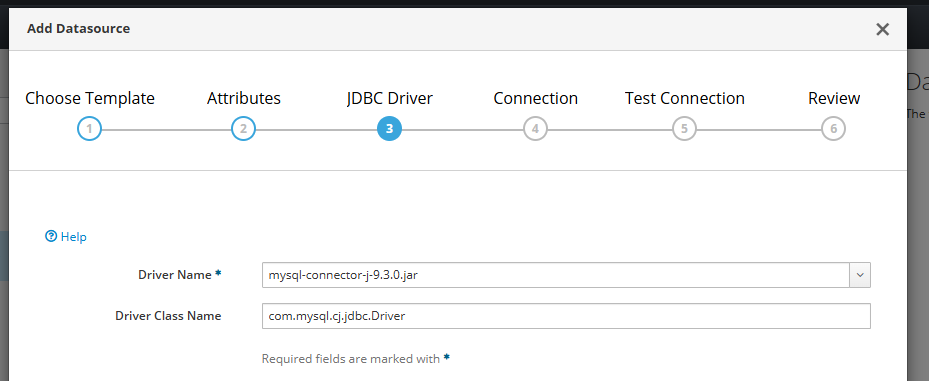
and select driver,

put database credentials there,

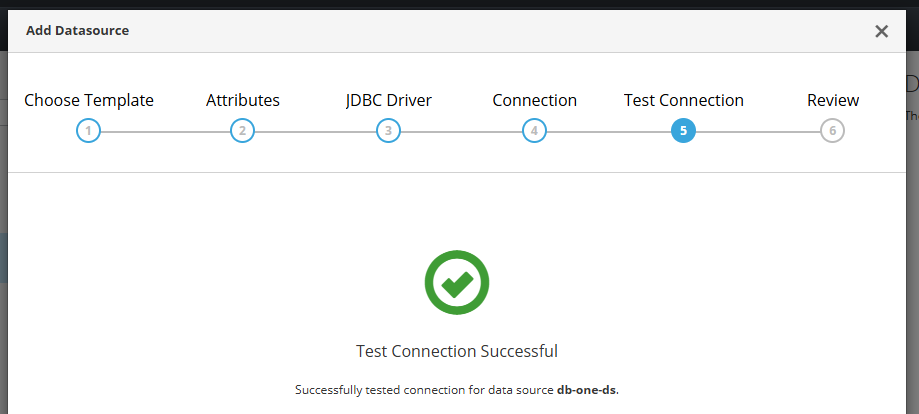
test the connection,

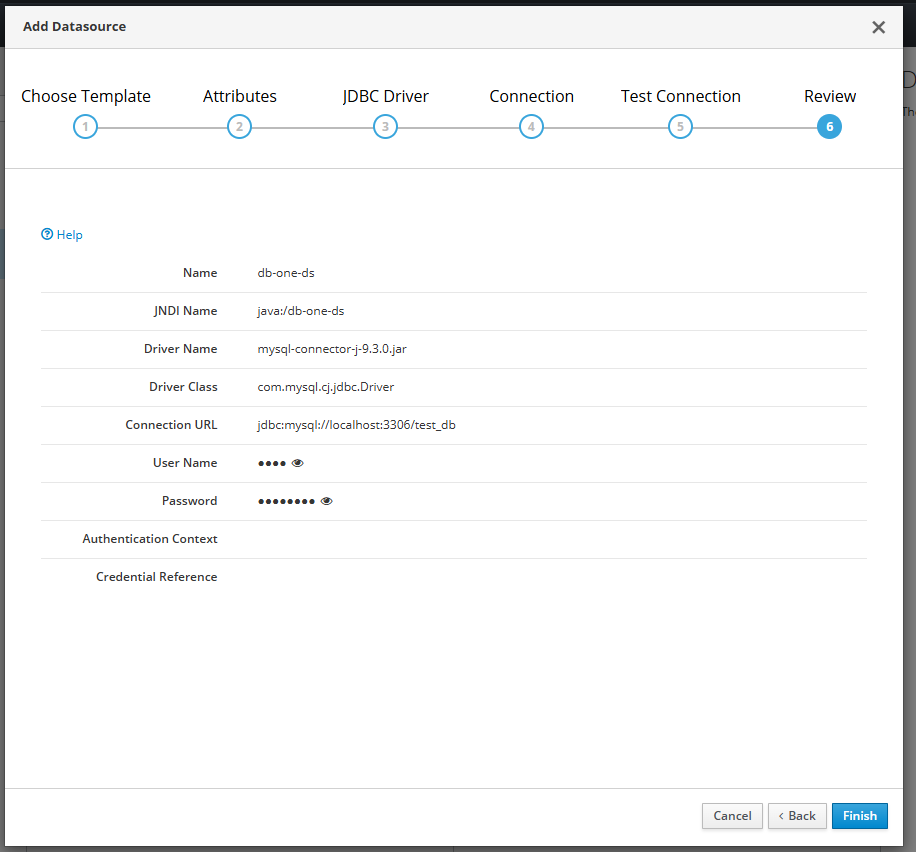
and save it.

If we have lots of different database connection, we can define it on our JBoss EAP standalone.xml manually instead of putting them one by one from JBoss EAP console,

<datasource jndi-name="java:/db-one-ds" pool-name="db-one-ds">
    <connection-url>jdbc:mysql://localhost:3306/db-one</connection-url>
    <driver-class>com.mysql.cj.jdbc.Driver</driver-class>
    <driver>mysql-connector-j-9.3.0.jar</driver>
    <security>
        <user-name>aaaa</user-name>
        <password>bbbb</password>
    </security>
</datasource>

<datasource jndi-name="java:/db-two-ds" pool-name="db-two-ds">
    <connection-url>jdbc:mysql://localhost:3306/db-two</connection-url>
    <driver-class>com.mysql.cj.jdbc.Driver</driver-class>
    <driver>mysql-connector-j-9.3.0.jar</driver>
    <security>
        <user-name>aaaa</user-name>
        <password>bbbb</password>
    </security>
</datasource>

Next is to create a database connection in our Java file

package com.edw.helper;

import javax.naming.Context;
import javax.naming.InitialContext;
import javax.sql.DataSource;
import java.sql.Connection;
import java.sql.SQLException;

public class DatabaseHelper {

    private DataSource ds = null;

    public DatabaseHelper() {
    }

    public DatabaseHelper(String customerId) {
        try {
            Context initCxt = new InitialContext();
            ds = (DataSource) initCxt.lookup(String.format("java:/%s-ds", customerId));
        } catch (Exception e) {
            e.printStackTrace();
        }
    }

    public Connection getConnection() throws SQLException {
        return ds.getConnection();
    }
}

and create a service class.

package com.edw.service;

import com.edw.helper.DatabaseHelper;

import java.util.ArrayList;
import java.util.HashMap;
import java.util.List;
import java.util.Map;

import java.sql.Connection;
import java.sql.PreparedStatement;
import java.sql.ResultSet;

public class UserService {

    private DatabaseHelper databaseHelper;

    public UserService() {
    }

    public List<Map> select(String customerId, Integer start, Integer limit) {

        List<Map> list = new ArrayList<>();

        databaseHelper = new DatabaseHelper(customerId);
        String sql = "select * from tb_testing order by id limit ?, ?";

        try (Connection conn = databaseHelper.getConnection();
             PreparedStatement preparedStmt = conn.prepareStatement(sql)) {

            preparedStmt.setInt(1, start);
            preparedStmt.setInt(2, limit);

            try (ResultSet resultSet = preparedStmt.executeQuery()) {
                while (resultSet.next()) {
                    Integer id = resultSet.getInt(1);
                    String username = resultSet.getString(2);

                    list.add(new HashMap() {{
                        put("id", id);
                        put("username", username);
                    }});
                }
            }
        } catch (Exception e) {
            e.printStackTrace();
        }

        return list;
    }

}

and our controller file,

package com.edw.controller;

import com.edw.service.UserService;

import com.google.gson.Gson;
import jakarta.servlet.ServletException;
import jakarta.servlet.annotation.WebServlet;
import jakarta.servlet.http.HttpServlet;
import jakarta.servlet.http.HttpServletRequest;
import jakarta.servlet.http.HttpServletResponse;
import java.io.IOException;
import java.io.PrintWriter;
import java.util.List;
import java.util.Map;

@WebServlet(name = "IndexController", urlPatterns = "/index")
public class IndexController extends HttpServlet {

    private static final long serialVersionUID = 1L;

    private UserService userService = new UserService();

    @Override
    protected void doGet(HttpServletRequest request,
                         HttpServletResponse response)
            throws ServletException, IOException {

        String customerId = request.getParameter("customerId");
        List<Map> result = userService.select(customerId, 0, 10);

        response.setContentType("application/json");

        PrintWriter out = response.getWriter();
        out.println(new Gson().toJson(result));
    }
}

with pom.xml

<?xml version="1.0" encoding="UTF-8"?>
<project xmlns="http://maven.apache.org/POM/4.0.0"
         xmlns:xsi="http://www.w3.org/2001/XMLSchema-instance"
         xsi:schemaLocation="http://maven.apache.org/POM/4.0.0 http://maven.apache.org/xsd/maven-4.0.0.xsd">
    <modelVersion>4.0.0</modelVersion>

    <groupId>com.edw</groupId>
    <artifactId>multitenancy-connection-pool-with-jboss-8</artifactId>
    <version>1.0-SNAPSHOT</version>
    <packaging>war</packaging>

    <properties>
        <maven.compiler.source>21</maven.compiler.source>
        <maven.compiler.target>21</maven.compiler.target>
        <project.build.sourceEncoding>UTF-8</project.build.sourceEncoding>
    </properties>

    <dependencies>
        <dependency>
            <groupId>jakarta.platform</groupId>
            <artifactId>jakarta.jakartaee-web-api</artifactId>
            <version>10.0.0</version>
            <scope>provided</scope>
        </dependency>
        <dependency>
            <groupId>com.google.code.gson</groupId>
            <artifactId>gson</artifactId>
            <version>2.13.1</version>
        </dependency>
    </dependencies>

    <build>
        <plugins>
            <plugin>
                <groupId>org.apache.maven.plugins</groupId>
                <artifactId>maven-compiler-plugin</artifactId>
                <version>3.13.0</version>
            </plugin>
            <plugin>
                <groupId>org.apache.maven.plugins</groupId>
                <artifactId>maven-war-plugin</artifactId>
                <version>3.4.0</version>
                <configuration>
                    <warName>${project.name}</warName>
                    <failOnMissingWebXml>false</failOnMissingWebXml>
                </configuration>
            </plugin>
        </plugins>
    </build>
</project>

and finally we can test our application connectivity by using below command,

$ curl -kv http://127.0.0.1:8080/index?customerId=db-one
*   Trying 127.0.0.1:8080...
* Connected to 127.0.0.1 (127.0.0.1) port 8080
> GET /index?customerId=db-one HTTP/1.1
> Host: 127.0.0.1:8080
> User-Agent: curl/8.4.0
> Accept: */*
>
< HTTP/1.1 200 OK
< Connection: keep-alive
< Content-Type: application/json;charset=ISO-8859-1
< Content-Length: 594
< Date: Sun, 25 May 2025 15:31:57 GMT
<
[{"id":1,"username":"username 001"}]
* Connection #0 to host 127.0.0.1 left intact

Sample for the code can be found on below Github link,

https://github.com/edwin/multitenancy-connection-pool-with-jboss-8

Deploying a Java Apps and JBoss EAP into Openshift 4

Sometimes we still have to maintain an application which is still deployed on top of JBoss EAP and in a Virtual Machine, and planning in onboarding them into Openshift.

Deploying this kind of applications is almost the same as deploying a Spring Boot applications on Openshift. Only need one command for doing it.

So lets start with a basic maven file,

<?xml version="1.0" encoding="UTF-8"?>
<project xmlns="http://maven.apache.org/POM/4.0.0"
         xmlns:xsi="http://www.w3.org/2001/XMLSchema-instance"
         xsi:schemaLocation="http://maven.apache.org/POM/4.0.0 http://maven.apache.org/xsd/maven-4.0.0.xsd">
    <modelVersion>4.0.0</modelVersion>

    <groupId>com.edw</groupId>
    <artifactId>HelloWorldWar</artifactId>
    <version>1.0-SNAPSHOT</version>
    <packaging>war</packaging>
    <dependencies>
        <dependency>
            <groupId>javax.servlet</groupId>
            <artifactId>javax.servlet-api</artifactId>
            <version>3.1.0</version>
        </dependency>
    </dependencies>

    <build>
        <plugins>
            <plugin>
                <groupId>org.apache.maven.plugins</groupId>
                <artifactId>maven-compiler-plugin</artifactId>
                <version>3.1</version>
                <configuration>
                    <source>1.8</source>
                    <target>1.8</target>
                    <optimize>true</optimize>
                    <debug>true</debug>
                </configuration>
            </plugin>
            <plugin>
                <groupId>org.apache.maven.plugins</groupId>
                <artifactId>maven-war-plugin</artifactId>
                <version>2.6</version>
                <configuration>
                    <warName>${project.name}</warName>
                    <failOnMissingWebXml>false</failOnMissingWebXml>
                </configuration>
            </plugin>
        </plugins>
    </build>

</project>

Lets set the context root of this app,

<jboss-web>
    <context-root>/</context-root>
</jboss-web>

And a servlet for serving some content,

package com.edw;

import javax.servlet.ServletException;
import javax.servlet.annotation.WebServlet;
import javax.servlet.http.HttpServlet;
import javax.servlet.http.HttpServletRequest;
import javax.servlet.http.HttpServletResponse;
import java.io.IOException;
import java.io.PrintWriter;

@WebServlet(name = "HelloServlet", urlPatterns = "/")
public class HelloServlet extends HttpServlet {

    @Override
    protected void doGet(HttpServletRequest request,
                         HttpServletResponse response)
            throws ServletException, IOException {

        response.setContentType("text/html");

        PrintWriter out = response.getWriter();
        out.println("<h1> Hello World </h1>");

    }
}

And make sure the structure of our project is like below,

+--- .gitignore
+--- pom.xml
+--- README.md
+--- src
|   +--- main
|   |   +--- java
|   |   |   +--- com
|   |   |   |   +--- edw
|   |   |   |   |   +--- HelloServlet.java
|   |   +--- webapp
|   |   |   +--- WEB-INF
|   |   |   |   +--- jboss-web.xml

We can deploy our code to test-project namespace in our Openshift by using below command,

$ oc new-app openshift/jboss-eap73-openjdk11-openshift:latest~. \ 
	--name=hello-world -n test-project

Code for this tutorial can be seen in below Github url

https://github.com/edwin/hello-world-jboss-eap

Using Sitemesh and Got Error 330 (net::ERR_CONTENT_DECODING_FAILED) on Google Chrome

Basically i never had this error before, it become so challenging because it happen after i adding sitemesh library on my maven project. My first guess is, somehow Sitemesh have a conflicting configuration with other libraries. But i never found any reference nor article to support my theory. Even after i heavily removed several library, the error still happens.

Suddenly i have an enlightenment, after i remove my ehcache gzip compression filter. It turns out that in order to work i need to put sitemesh filter location after ehcache gzip filter.

Here is my final web.xml looks like,

<?xml version="1.0" encoding="UTF-8"?>
<web-app version="3.0" xmlns="http://java.sun.com/xml/ns/javaee" xmlns:xsi="http://www.w3.org/2001/XMLSchema-instance" xsi:schemaLocation="http://java.sun.com/xml/ns/javaee http://java.sun.com/xml/ns/javaee/web-app_3_0.xsd">
    
    <!-- gzip -->
    <filter>
        <filter-name>CompressionFilter</filter-name>
        <filter-class>net.sf.ehcache.constructs.web.filter.GzipFilter</filter-class>
    </filter>
    <filter-mapping>
        <filter-name>CompressionFilter</filter-name>
        <url-pattern>/*</url-pattern>
    </filter-mapping>
    
    <!-- sitemesh -->
    <filter>
        <filter-name>sitemesh</filter-name>
        <filter-class>com.opensymphony.sitemesh.webapp.SiteMeshFilter</filter-class>
    </filter>
    <filter-mapping>
        <filter-name>sitemesh</filter-name>
        <url-pattern>/*</url-pattern>
    </filter-mapping>
    
</web-app>