javaee

Deploying a Binary WAR File to Openshift 4 Using s2i

We can leverage s2i to deploy an existing war file into Openshift 4. How to do it is pretty much simple and straight forward, basically just running some oc command and you can have your war file deployed on Openshift.

But before we go far, we need to have a sample application to be deployed and for this sample, i have a hello world apps which is created by using Java Servlet.

https://github.com/edwin/jboss-eap-hello-world

We can clone this application, and build it using a simple maven command.

$ mvn clean package

Next step is create an empty folder where we would run our oc command,

$ mkdir -p jboss-eap/deployments

and we can put our ROOT.war file inside deployment folder,

$ tree .
.
+---- deployments
    +---- ROOT.war

Next is creating a new BuildConfig,

$ oc new-build --name=custom-eap-application \
	--binary=true --image-stream=jboss-eap74-openjdk11-openshift:latest

and start building it by using a start-build command, we can also repeat this step again if there is a new changes to our war file

$ oc start-build custom-eap-application --from-dir . --follow

and finally we can deploy our application directly by using new-app command,

$ oc new-app --name=custom-eap-application \ 
	--image-stream=edwin-ns/custom-eap-application:latest

So deployment can be done easily by using just 3 simple steps.

Changing JAX-WS Webservice Client’s Target Endpoint Url

Let say you have a wsdl that you get from an url, but you want to fire the webservice generated from it to a different url, see my code below for example,

<service name="TestingService">
	<port name="TestingServicePort" binding="tns:TestingServicePortBinding">
		<soap:address location="http://localhost:8084/WSDLTest/TestingService" />
	</port>
</service>

as you can see, my wsdl is pointing at “http://localhost:8084/WSDLTest/TestingService”. But what if i want to fire my webservice client into another url, without changing the original wsdl. For example, my new url would be http://192.168.0.101/WSDLTest/TestingService.

Well, it’s actualy quite easy. All you need to do is only casting the service interface into interface BindingProvider, and add a new url property. This is what my code would look like,


             TestingService_Service tss = new TestingService_Service();
             TestingService testingService = tss.getTestingServicePort();
             ((BindingProvider) testingService).getRequestContext()
                .put(BindingProvider.ENDPOINT_ADDRESS_PROPERTY, "http://192.168.0.101/WSDLTest/TestingService");

If you fire your service again, it will point to a new url (http://192.168.0.101/WSDLTest/TestingService) instead of the old one (http://localhost:8084/WSDLTest/TestingService).

How to Fix WebSphere’s Failed to Start Service

Today im trying to start my IBM WebSphere from Windows Service, but it keeps showing error. And i cant even starting WebSphere from Command Prompt. This is the error on my WebSphere error log file.

[18/10/12 18:59:12:760 ICT] 00000000 WindowsServic 3   Timed out waiting for service to respond to command, after 60 seconds. Failed to start service, or timed out while waiting for start to complete. Check the logs for details.
[18/10/12 18:59:12:760 ICT] 00000000 AdminTool     A   ADMU7704E: Failed while trying to start the Windows Service associated with server: server1; 
probable error executing WASService.exe: Starting Service: XNode01
Timed out waiting for service to respond to command, after 60 seconds. Failed to start service, or timed out while waiting for start to complete. Check the logs for details.

How to fix it is actually not too hard, i just delete server1.pid which located under my WebSphere logs folder and start my WebSphere again. Somehow WebSphere wont start if server1.pid exists.

This is the location for my logs folder

C:\Program Files\IBM\WebSphere\AppServer\profiles\AppSrv01\logs\server1

Have fun (F)

Weird Error on Websphere : java.lang.NoClassDefFoundError: com.ibm.ws.management.configservice.TypeRegistry

I had a very weird error today on WebSphere, very weird because i never had this kind of error before. This error shows up on WebSphere administrative console. This is part of the error’s stacktrace.

An error occurred while processing request:
/ibm/console/secure/layouts/contentLayout.jsp

java.lang.NoClassDefFoundError: com.ibm.ws.management.configservice.TypeRegistry

How to remove is actually very easy, i just delete the tranlog folder on your Websphere folder. This is my complete path of tranlog folder.

C:\Program Files\IBM\WebSphere\AppServer\profiles\AppSrv01\tranlog

Hope it will help others, good luck 😉

Executing EJB3 Using Glassfish 3 AppClient

On my last EJB3 tutorial, im still using the old fashioned way of EJB3. Still importing lots of jars, which is very dangerous due to the fact that sometimes i forgot which jar i need to include.

That’s why now im trying to use one of Glassfish’s feature application, appclient. It can bundle all the libraries and dependencies your EJB client needed, so it save your time from including various Glassfish’s jars to your project.

Lets start with a very simple ejb interface class,

package com.edw.facade;

public interface ConnectionFacadeRemote {
    String sayHello(String string);
    int sayAge(int age);
}

And a simple main class,

package com.edw.main;

import com.edw.facade.ConnectionFacadeRemote;
import java.util.Properties;
import javax.naming.Context;
import javax.naming.InitialContext;
import org.apache.log4j.Logger;

public class Main {

    private Logger logger = Logger.getLogger(Main.class);
    
    private void connect() {
        try{
            Properties props = new Properties();
            props.put(Context.INITIAL_CONTEXT_FACTORY, "com.sun.enterprise.naming.SerialInitContextFactory");
            props.setProperty("org.omg.CORBA.ORBInitialHost", "localhost");
            props.setProperty("org.omg.CORBA.ORBInitialPort", "3700");
            
            InitialContext ctx = new InitialContext();
            ConnectionFacadeRemote connectionFacadeRemote = (ConnectionFacadeRemote) ctx.lookup("com.edw.facade.ConnectionFacadeRemote");
            logger.debug(connectionFacadeRemote.sayHello("edwin ")); 
            logger.debug("my age is " + connectionFacadeRemote.sayAge(12) + " years");
        }catch(Exception ex){
            logger.error(ex,ex);
        }
    }

    public static void main(String[] args) {
        Main tejbc = new Main();
        tejbc.connect();
    }
}

After you create all classes needed, you have to build your application into .jar.
Next is to pull all the jar needed for this EJB client application to run smoothly. First go to your Server glassfish’s bin folder located in your Server glassfish installation folder, in my PC it would be (C:\Program Files\glassfish-3.0.1\glassfish\bin). And execute the package-appclient command.

C:\Program Files\glassfish-3.0.1\glassfish\bin>package-appclient
Creating C:\Program Files\glassfish-3.0.1\glassfish\lib\appclient.jar

It would create a jar file, appclient.jar, which located in your glassfish lib installation folder.

Next is copy your appclient.jar into your client computers. Extract it, and execute appclient command. The appclient format would be, appclient -jar .

C:\Users\edw\Documents\appclient\appclient\glassfish\bin>appclient -jar "C:\Users\edw\Documents\NetBeansProjects\TestEJBClient\dist\TestEJBClient.jar"
Apr 19, 2012 6:28:03 PM com.sun.enterprise.transaction.JavaEETransactionManagerSimplified initDelegates
INFO: Using com.sun.enterprise.transaction.jts.JavaEETransactionManagerJTSDelegate as the delegate
2012-04-19 18:28:10,067 [Main] DEBUG com.edw.main.Main:22 - hello edwin
2012-04-19 18:28:10,072 [Main] DEBUG com.edw.main.Main:23 - my age is 24 years

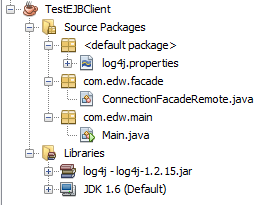
You can see the server side’s source code here. And here is my netbeans project structure
Not too hard right 😉