PHP

Canary Deployment with Openshift 4 Route

Doing a Canary deployment using Openshift is pretty much straight forward, where we can leverage Openshift’s Route feature to do routing to multiple different application versions.

Before we go far, we need to understand the difference between a Blue Green deployment, and Canary deployment. Basically in Blue Green deployment, we are having the same application but with 2 different version (blue and green version) and we can route all the request to either blue, or green version. So at Blue Green deployment, all the requests would go either to blue, or to green version.

But on Canary, it’s like Blue Green deployment but we can change the traffic percentage partially. For example 90percent of the traffic would go to blue version while 10percent go to green one.

For this demo, lets create two different apps. Both apps are using PHP, with a different content for simulating blue-green deployment.

First create our first PHP app,

$ mkdir php-hello-world-1

and create index.php file inside it

<?php
echo "<h2>We are at version one</h2>";
echo "Hello world!<br>";

Build it and deploy into Openshift

$ oc new-build --name=php-app-01 --image-stream=php:7.4-ubi8 --binary=true
$ oc start-build php-app-01  --from-dir=.
$ oc new-app php-app-01 --name=php-app-01

Next is creating our second PHP app,

$ mkdir php-hello-world-2

With index.php inside it,

<?php
echo "<h2>We are at version TWO</h2>";
echo "Hello world!<br>";

Build and deploy our second PHP app into Openshift

$ oc new-build --name=php-app-02 --image-stream=php:7.4-ubi8 --binary=true
$ oc start-build php-app-02  --from-dir=.
$ oc new-app php-app-02 --name=php-app-02

We can see the result on our Openshift dashboard
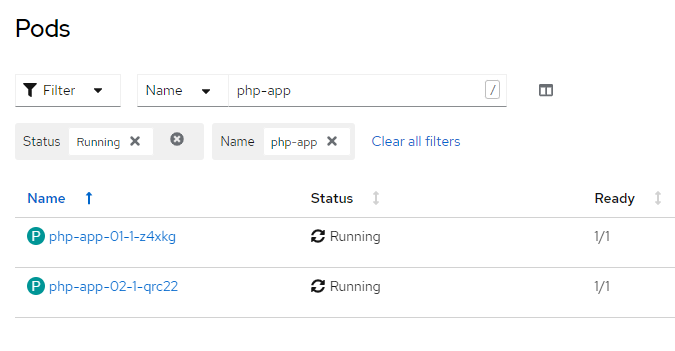
Now lets create a route,

$ oc create route edge --service php-app-01 php-app

And split the route traffic, 80 percent goes to app version 1, and 20 percent goes to app version 2.

$ oc set route-backends php-app php-app-01=80 php-app-02=20

And check the result on Openshift dashboard,
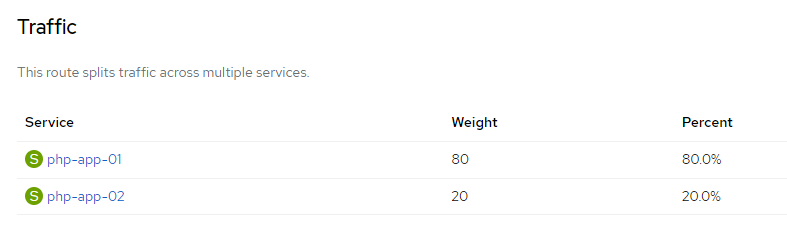
Now, lets do curl testing to see whether request to that corresponding route are being distibuted into 2 different application version,

$ for i in `seq 1 20`; do curl -k https://php-app-route-url ;echo ; done
<h2>We are at version one</h2>Hello world!<br>
<h2>We are at version TWO</h2>Hello world!<br>
<h2>We are at version one</h2>Hello world!<br>
<h2>We are at version TWO</h2>Hello world!<br>
<h2>We are at version one</h2>Hello world!<br>
<h2>We are at version TWO</h2>Hello world!<br>
<h2>We are at version one</h2>Hello world!<br>
<h2>We are at version TWO</h2>Hello world!<br>

And we can see that 4 out of 20 request are being served from the second PHP application. For more testing, lets change the distribution weight

oc set route-backends php-app php-app-01=50 php-app-02=50

And do more testing,

$ for i in `seq 1 20`; do curl -k https://php-app-route-url ;echo ; done
<h2>We are at version one</h2>Hello world!<br>
<h2>We are at version TWO</h2>Hello world!<br>
<h2>We are at version one</h2>Hello world!<br>
<h2>We are at version TWO</h2>Hello world!<br>
<h2>We are at version one</h2>Hello world!<br>
<h2>We are at version TWO</h2>Hello world!<br>
<h2>We are at version one</h2>Hello world!<br>
<h2>We are at version TWO</h2>Hello world!<br>
<h2>We are at version one</h2>Hello world!<br>
<h2>We are at version TWO</h2>Hello world!<br>
<h2>We are at version one</h2>Hello world!<br>
<h2>We are at version TWO</h2>Hello world!<br>
<h2>We are at version one</h2>Hello world!<br>
<h2>We are at version TWO</h2>Hello world!<br>
<h2>We are at version one</h2>Hello world!<br>
<h2>We are at version TWO</h2>Hello world!<br>
<h2>We are at version one</h2>Hello world!<br>
<h2>We are at version TWO</h2>Hello world!<br>
<h2>We are at version one</h2>Hello world!<br>
<h2>We are at version TWO</h2>Hello world!<br>

And there we can see that requests are being split, half goes to version 1 and the rest goes to version 2.

How to Deploy Source Code from Local Folder to Openshift Using S2I Build

First lets create a simple PHP code, and name it index.php

<?php
echo "hello world";
?>

We want to deploy it on top of PHP 7 images, and make it online on Openshift Platform.

So how to do it basically consist of 3 steps.
1. First we need to create a new binary build, using preferred image stream as its base image

oc new-build --name=my-php --image-stream=php:7.0 --binary=true

2. Next is start building image using sourcecode’s directory

oc start-build my-php --from-dir=.

3. Last is create application using previously built image

oc new-app my-php --name=my-php

So simple right 🙂

Create A Docker for Running Apache and PHP

Below is the script for creating a docker which contain Apache and PHP,

docker run --rm \
--detach \
--name=web_01 \
--net mynet \
--ip 192.168.0.29 \
--publish 10209:80 \
--volume="$PWD"/apps:/app \
--volume="$PWD"/logs:/app/application/logs \
--workdir=/app \
-e PHP_DATE_TIMEZONE='Asia/Jakarta' \
-e LOG_STDOUT='/logs' \
-e LOG_STDERR='/logs' \
webdevops/php-apache:alpine

How to Convert from a Point to a KML files and Generate a Circle with Radius on Each Point

Yesterday I got a challenging assignment to generate a telco network coverage map. But the only data i got is BTS (Base Transceiver Station) location, which is only latitude, longitude and coverage radius given on excel file. I need to convert those excel sheet data into a google map page, and displayed it to subscribers accordingly.

The biggest problem that i had is the number of data is quite big, i need to map more than 20k BTS location and need displayed it fast and without lagging. So a simple google maps script wont work because google maps have a limitation for this.

So i need to create a workaround, and after researching for quite some times i pick KML and Google FusionTable. KML data format for creating radius, and Google FusionTable for displaying it.

This is my PHP code for converting latitude, longitude and radius into KML code.

<?
$lats = array('4.53191944444444','5.34593888888889');
$longs = array('97.93600000000001','95.99299999999999');
$meter = 2000; 
 
$kml = '<?xml version="1.0" encoding="UTF-8"?><kml xmlns="http://www.opengis.net/kml/2.2" xmlns:atom="http://www.w3.org/2005/Atom"><Document>        
            <Style id="style0">
                    <LineStyle>
                      <color>ff000000</color>
                      <width>1</width>
                    </LineStyle>
                    <PolyStyle>
                      <color>7FAAAAAA</color>
                      <fill>1</fill>
                      <outline>1</outline>
                    </PolyStyle>               
            </Style>';

for($i = 0; $i < count($lats); $i++) {

    $lat = $lats[$i];
    $long = $longs[$i];

    // Get circle coordinates
    $coordinatesList = getCirclecoordinates($lat, $long, $meter);

    // Output
    $kml  .= '<Placemark><name>Circle '.$i.'</name><styleUrl>#style0</styleUrl><Polygon><outerBoundaryIs><LinearRing><coordinates>'.$coordinatesList.'</coordinates></LinearRing></outerBoundaryIs></Polygon></Placemark>';
}


$kml .= '</Document></kml>';
 
function getCirclecoordinates($lat, $long, $meter) {
  // convert coordinates to radians
  $lat1 = deg2rad($lat);
  $long1 = deg2rad($long);
  $d_rad = $meter/6378137;
 
  $coordinatesList = "";
  // loop through the array and write path linestrings
  for($i=0; $i<=360; $i+=3) {
    $radial = deg2rad($i);
    $lat_rad = asin(sin($lat1)*cos($d_rad) + cos($lat1)*sin($d_rad)*cos($radial));
    $dlon_rad = atan2(sin($radial)*sin($d_rad)*cos($lat1), cos($d_rad)-sin($lat1)*sin($lat_rad));
    $lon_rad = fmod(($long1+$dlon_rad + M_PI), 2*M_PI) - M_PI;
    $coordinatesList .= rad2deg($lon_rad).",".rad2deg($lat_rad).",0 ";
  }
  return $coordinatesList;
}

$fp = fopen('e:\lele.kml', 'w');
fwrite($fp, $kml);
fclose($fp);
?>

After KML is done, i just need to upload it to Google FusionTable and display it on my web page.
kmlcircle

How to Simulate JSon POST Request Using PHP and CURL

Basically, im trying to do a PHP POST request using JSon string as its format and able to consume JSon array string as responses. Dont forget to activate CURL in your php.ini file.

<?php

//set POST variables address and json string
$url = 'http://localhost:81/dudu.php';
$fields = array(
		'userName'=>'yyy@xxx.com',
		'password'=>'yyyy',
		'emailProvider'=>'xxxx'
                );
//{"userName":"yyy@xxx.com","password":"yyyy","emailProvider":"xxxx"}

//url-ify the data for the JSON POST
$fields_string = json_encode($fields);

//open connection
$ch = curl_init();

//set the url, number of POST vars, POST data
curl_setopt($ch,CURLOPT_URL,$url);
curl_setopt($ch,CURLOPT_POST,count($fields));
curl_setopt($ch,CURLOPT_POSTFIELDS,$fields_string);
curl_setopt($ch, CURLOPT_RETURNTRANSFER , 1);

//execute post
$jsonResult = curl_exec($ch);

//close connection
curl_close($ch);

// [{"name":0,"email":"yyy@xxx.com"},{"name":1,"email":"yyy@xxx.com"},
// {"name":2,"email":"yyy@xxx.com"},{"name":3,"email":"yyy@xxx.com"}]
$results = json_decode($jsonResult, true);
foreach ( $results as $result )
{
    echo "name : {$result['name']} and email {$result['email']} <br />";
}

?>

This is what my browser will look like after im testing my JSon POST

Have fun with CURL 🙂