servlet

[Java] Creating a Microsoft Word Report Easily using Servlet and A Plain HTML Template

Yesterday one of my friend, Edward Barchia, asked me a very simple question, “how can i creating an MSWord Report without using Jasper Report”. Because somehow, jasper report creates a very weird output when exported into Word file (.doc).

One fastest solution is using a html file, and renamed into .doc. Not an elegant solution, but perhaps (at that moment) is the best solution we had.

Okay, so basically what i need is only 2 files, 1 html template and a java servlet files. This is my HTML template, i put it on drie E and name it hello.html

<html>
	<head></head>
	<body>
		Test, hello ${name}
	</body>
</html>

And this is my servlet file,

package com.edw.testdownloaddoc.servlet;

import java.io.BufferedReader;
import java.io.FileInputStream;
import java.io.FileReader;
import java.io.IOException;
import java.io.OutputStream;
import javax.servlet.ServletException;
import javax.servlet.annotation.WebServlet;
import javax.servlet.http.HttpServlet;
import javax.servlet.http.HttpServletRequest;
import javax.servlet.http.HttpServletResponse;
import org.apache.commons.io.IOUtils;

@WebServlet(name = "downloadServlet", urlPatterns = {"/downloadServlet"})
public class DownloadServlet extends HttpServlet {

    protected void processRequest(HttpServletRequest request, HttpServletResponse response)
            throws ServletException, IOException {
        BufferedReader downloadFile = new BufferedReader(new FileReader("e:\\hello.html"));
        FileInputStream inputStream = null;
        OutputStream outStream = null;
        try {
            String s;
            StringBuilder sb = new StringBuilder();
            while ((s=downloadFile.readLine()) != null) {
                if(s.contains("${name}"))
                    s = s.replace("${name}", "Edwin");
                sb.append(s);
            }
 
            response.setContentLength((int) sb.toString().length());
            response.setContentType("application/msword");           
 
            // response header
            String nameFile = "hello.doc";
            String headerKey = "Content-Disposition";
            String headerValue = String.format("attachment; filename=\"%s\"",nameFile);
            response.setHeader(headerKey, headerValue);
 
            // Write response
            outStream = response.getOutputStream();
            IOUtils.write(sb.toString(), outStream);
        } catch (Exception e) {
            e.printStackTrace();
        } finally{
            IOUtils.closeQuietly(downloadFile);
            IOUtils.closeQuietly(inputStream);
            IOUtils.closeQuietly(outStream);
        }
    }

    @Override
    protected void doGet(HttpServletRequest request, HttpServletResponse response)
            throws ServletException, IOException {
        processRequest(request, response);
    }
}

Oh, and before i forgot, this is my pom.xml dependencies

<dependencies>
	<dependency>
		<groupId>commons-io</groupId>
		<artifactId>commons-io</artifactId>
		<version>2.2</version>
	</dependency>
	<dependency>
		<groupId>javax</groupId>
		<artifactId>javaee-web-api</artifactId>
		<version>7.0</version>
		<scope>provided</scope>
	</dependency>
</dependencies>

This is the final output looks like,
helloworld

Logging HTTP Request Parameters using HTTP Servlet

This is a servlet filter that i use if i want to log what parameters fired by my REST client, basically it’s just a simple http servlet filter.

package com.edw;

import java.io.IOException;
import java.util.Enumeration;
import javax.servlet.Filter;
import javax.servlet.FilterChain;
import javax.servlet.FilterConfig;
import javax.servlet.ServletException;
import javax.servlet.ServletRequest;
import javax.servlet.ServletResponse;
import javax.servlet.http.HttpServletRequest;
import org.apache.log4j.Logger;

public class LoggingFilter implements Filter {

    private Logger logger = Logger.getLogger(this.getClass());
    
    @Override
    public void init(FilterConfig filterConfig) throws ServletException {
    }

    @Override
    public void doFilter(ServletRequest request, ServletResponse response, FilterChain chain) throws IOException, ServletException {
        
        try {
            HttpServletRequest req = (HttpServletRequest) request;
            
            String uri = req.getRequestURI();
            logger.debug("Requested Resource::"+uri);
            
            Enumeration<String> enumeration = req.getParameterNames();
            
            while(enumeration.hasMoreElements()) {
                String parametername = enumeration.nextElement();
                logger.debug(parametername + " : " +req.getParameter(parametername));
            }
        } catch (Exception e) {
            logger.error(e,e);
        }
        
        chain.doFilter(request, response);
    }

    @Override
    public void destroy() {
    }
}

Add your servlet filer to your web.xml and listen for a specific url request, on this example i listen for requests to /services/ url.

<?xml version="1.0" encoding="UTF-8"?>
<web-app version="3.0" xmlns="http://java.sun.com/xml/ns/javaee" xmlns:xsi="http://www.w3.org/2001/XMLSchema-instance" xsi:schemaLocation="http://java.sun.com/xml/ns/javaee http://java.sun.com/xml/ns/javaee/web-app_3_0.xsd">    
    <session-config>
        <session-timeout>
            30
        </session-timeout>
    </session-config>
    
    <filter>
	<filter-name>LogFilter</filter-name>
	<filter-class>
		com.edw.LoggingFilter
	</filter-class>
    </filter>
    <filter-mapping>
            <filter-name>LogFilter</filter-name>
            <url-pattern>/services/*</url-pattern>
    </filter-mapping>    
</web-app>

How to Create A Simple Captcha Using Java Servlet

On this article im going to create a simple image captcha that will show a 5-random alphanumeric letters, im using SimpleCaptha library to help me creating images and validating user’s input.

First is a simple java servlet, it will build random images and store its value on httpsession.

package com.edw.captcha;

import java.awt.Color;
import java.awt.Font;
import java.io.IOException;
import java.util.ArrayList;
import java.util.List;
import javax.servlet.ServletException;
import javax.servlet.http.HttpServlet;
import javax.servlet.http.HttpServletRequest;
import javax.servlet.http.HttpServletResponse;
import nl.captcha.Captcha;
import nl.captcha.backgrounds.GradiatedBackgroundProducer;
import nl.captcha.servlet.CaptchaServletUtil;
import nl.captcha.text.renderer.DefaultWordRenderer;

public class EdwCaptcha extends HttpServlet {

    @Override
    protected void doGet(HttpServletRequest request, HttpServletResponse response)
            throws ServletException, IOException {
        List<Color> colors = new ArrayList<Color> ();
        colors.add(Color.black);
        colors.add(Color.red);
        
        List<Font> fonts = new ArrayList<Font>();
        fonts.add(new Font("Arial", Font.ITALIC, 40));
        
        Captcha captcha = new Captcha.Builder(120, 50)
                .addText(new DefaultWordRenderer(colors, fonts))
                .addBackground(new GradiatedBackgroundProducer(Color.white, Color.white))
                .gimp()
                .addBorder()
                .build();

        // display the image produced
        CaptchaServletUtil.writeImage(response, captcha.getImage());

        // save the captcha value on session
        request.getSession().setAttribute("simpleCaptcha", captcha); 
    }
}

And now im registering my servlet on my web.xml,

<?xml version="1.0" encoding="UTF-8"?>
<web-app version="3.0" xmlns="http://java.sun.com/xml/ns/javaee" xmlns:xsi="http://www.w3.org/2001/XMLSchema-instance" xsi:schemaLocation="http://java.sun.com/xml/ns/javaee http://java.sun.com/xml/ns/javaee/web-app_3_0.xsd">
    <session-config>
        <session-timeout>
            30
        </session-timeout>
    </session-config>
    
    <servlet>
        <servlet-name>Captcha</servlet-name>
        <servlet-class>com.edw.captcha.EdwCaptcha</servlet-class>
    </servlet>
    <servlet-mapping>
        <servlet-name>Captcha</servlet-name>
        <url-pattern>/Captcha.jpg</url-pattern>
    </servlet-mapping>    
</web-app>

Here is the result image generated from my servlet,

You can validate the submitted captcha values by comparing it with the values that you store in httpsession.

Connecting MyBatis ORM to C3P0 Connection Pooling

In this example, im trying to connecting my MyBatis application to my database through C3P0 connection pooling. According to its website, C3P0 is an easy-to-use library for making traditional JDBC drivers “enterprise-ready” by augmenting them with functionality defined by the jdbc3 spec and the optional extensions to jdbc2.

Okay, so the first thing i do is, creating a database named “Test” and table “Testing”

CREATE DATABASE `Test`;
USE `Test`;
CREATE TABLE `testing` (
  `Id` int(11) NOT NULL AUTO_INCREMENT,
  `name` varchar(30) NOT NULL DEFAULT '',
  `address` varchar(255) NOT NULL DEFAULT '',
  PRIMARY KEY (`Id`),
  UNIQUE KEY `ix` (`name`)
) ENGINE=InnoDB AUTO_INCREMENT=5 DEFAULT CHARSET=latin1;

insert into `table`(`Id`,`name`,`address`) values (1,'edw','Ciledug');
insert into `table`(`Id`,`name`,`address`) values (2,'kamplenk','Cikokol');
insert into `table`(`Id`,`name`,`address`) values (3,'nugie','Pamulang');
insert into `table`(`Id`,`name`,`address`) values (4,'tebek','Karawaci');

And a java bean class to represent my sql table,

package com.edw.bean;

public class Testing {

    private int id;
    private String name;
    private String address;

    public Testing() {
    }

    // setter and getter method

    @Override
    public String toString() {
        return "Testing{" + "id=" + id + ", name=" + name + ", address=" + address + '}';
    }
}

and dont forget, a java interface class to handle my query

package com.edw.mapper;

import com.edw.bean.Testing;
import java.util.List;
import org.apache.ibatis.annotations.Select;
 
public interface TestingMapper {
    @Select("SELECT * FROM testing")
    List<Testing> selectAll();
}

Next is creating c3p0 connection configuration on context.xml file under META-INF folder

<?xml version="1.0" encoding="UTF-8"?>
<Context antiJARLocking="true" path="/MyBatisC3P0">
	
    <Resource name="testjndi" 
		 auth="Container"
		 driverClass="com.mysql.jdbc.Driver"
         jdbcUrl="jdbc:mysql://localhost:3306/test"
         user="root"
         password="xxxx"					 		 
         factory="org.apache.naming.factory.BeanFactory" 
         type="com.mchange.v2.c3p0.ComboPooledDataSource" 
         maxPoolSize="30" 					 
         minPoolSize="10" 
         acquireIncrement="3" 
         acquireRetryAttempts = "0"
         acquireRetryDelay = "3000"
         breakAfterAcquireFailure = "false"
         maxConnectionAge = "20"
         maxIdleTime = "15"
         maxIdleTimeExcessConnections = "15"
         idleConnectionTestPeriod = "10"
         testConnectionOnCheckout = "true"					 
         preferredTestQuery = "SELECT 1"
         debugUnreturnedConnectionStackTraces = "true"					 
         autoCommitOnClose="true"
        />	
</Context>

next is registering your JNDI on web.xml

<?xml version="1.0" encoding="UTF-8"?>
<web-app version="3.0" xmlns="http://java.sun.com/xml/ns/javaee" xmlns:xsi="http://www.w3.org/2001/XMLSchema-instance" xsi:schemaLocation="http://java.sun.com/xml/ns/javaee http://java.sun.com/xml/ns/javaee/web-app_3_0.xsd">
    <servlet>
        <servlet-name>myBatisServlet</servlet-name>
        <servlet-class>com.edw.servlet.MyBatisServlet</servlet-class>
    </servlet>
    <servlet-mapping>
        <servlet-name>myBatisServlet</servlet-name>
        <url-pattern>/myBatisServlet</url-pattern>
    </servlet-mapping>
    <welcome-file-list>
        <welcome-file>myBatisServlet</welcome-file>
    </welcome-file-list>
    <resource-ref>
        <description>My Connection Pool</description>
        <res-ref-name>testjndi</res-ref-name>
        <res-type>javax.sql.DataSource</res-type>
        <res-auth>Container</res-auth>
    </resource-ref>
</web-app>

and calling your connection pooling jndi from MyBatis’ xml code

<?xml version="1.0" encoding="UTF-8" ?>
<!DOCTYPE configuration
PUBLIC "-//mybatis.org//DTD Config 3.0//EN"
"http://mybatis.org/dtd/mybatis-3-config.dtd">
<configuration>
    <environments default="development">
       <environment id="development">
            <transactionManager type="JDBC"/>
            <dataSource type="JNDI">
                <property name="data_source" value="java:/comp/env/testjndi"/>
            </dataSource>
        </environment>          
    </environments>
    <mappers />
</configuration>

next is creating a java class to load my MyBatis’ xml configuration

package com.edw.config;

import com.edw.mapper.TestingMapper;
import java.io.Reader;
import org.apache.ibatis.io.Resources;
import org.apache.ibatis.session.SqlSessionFactory;
import org.apache.ibatis.session.SqlSessionFactoryBuilder;

public class MyBatisSqlSessionFactory {

    private static final SqlSessionFactory FACTORY;

    static {
        try {
            Reader reader = Resources.getResourceAsReader("com/edw/sqlmap/Configuration.xml");
            FACTORY = new SqlSessionFactoryBuilder().build(reader);
            FACTORY.getConfiguration().addMapper(TestingMapper.class);
        } catch (Exception e){
            throw new RuntimeException("Fatal Error.  Cause: " + e, e);
        }
    }

    public static SqlSessionFactory getSqlSessionFactory() {
        return FACTORY;
    }
}

and finally, i create a servlet as my presentation layer

package com.edw.servlet;

import com.edw.bean.Testing;
import com.edw.config.MyBatisSqlSessionFactory;
import com.edw.mapper.TestingMapper;
import java.io.IOException;
import java.io.PrintWriter;
import java.util.List;
import javax.servlet.ServletException;
import javax.servlet.http.HttpServlet;
import javax.servlet.http.HttpServletRequest;
import javax.servlet.http.HttpServletResponse;
import org.apache.ibatis.session.SqlSession;

public class MyBatisServlet extends HttpServlet {

    protected void processRequest(HttpServletRequest request, HttpServletResponse response)
            throws ServletException, IOException {
        response.setContentType("text/html;charset=UTF-8");
        PrintWriter out = response.getWriter();
        SqlSession sqlSession = MyBatisSqlSessionFactory.getSqlSessionFactory().openSession(true);
        try {
            out.println("<html>");
            out.println("<head>");
            out.println("<title>Servlet MyBatisServlet</title>");
            out.println("</head>");
            out.println("<body>");

            TestingMapper testingMapper = sqlSession.getMapper(TestingMapper.class);
            List<Testing> testings = testingMapper.selectAll();
            for (Testing testing : testings) {
                out.println(testing.getName()+" - "+testing.getAddress()+"<br />");
            }
            
            out.println("</body>");
            out.println("</html>");
        } finally {
            sqlSession.close();
            out.flush();            
            out.close();            
        }
    }

    @Override
    protected void doGet(HttpServletRequest request, HttpServletResponse response)
            throws ServletException, IOException {
        processRequest(request, response);
    }
}

This is what the result of my servlet when im running it on my browser

This is the screenshot of my database connection, you can see that c3p0 automatically create 10 free connections.

And this is the screenshot of my netbeans project

Have fun with C3P0 and MyBatis (H)

Beginning REST Using JBoss RESTEasy

On today’s demo im trying to use RESTEasy to handle multiple REST requests. According to Wikipedia, REST (Representational state transfer) is a style of software architecture for distributed hypermedia systems such as the World Wide Web. While RESTEasy is a JBoss project that provides various frameworks to help you build RESTful Web Services and RESTful Java applications. It is a fully certified and portable implementation of the JAX-RS specification. JAX-RS is a new JCP specification that provides a Java API for RESTful Web Services over the HTTP protocol.

On this project, im trying to create 2 different services. 1 service to get all objects, while another one for fetching a single objects. I create 2 different responses type for each service, JSON and XML. Okay, so lets try with 2 simple javabeans.

package com.edw.bean;

import java.util.List;
import javax.xml.bind.annotation.XmlAccessType;
import javax.xml.bind.annotation.XmlAccessorType;
import javax.xml.bind.annotation.XmlElement;
import javax.xml.bind.annotation.XmlElementWrapper;
import javax.xml.bind.annotation.XmlRootElement;

@XmlRootElement
@XmlAccessorType(XmlAccessType.FIELD)
public class Student {

    private String name;
    private String address;
    private int age;

    @XmlElement(name="book")
    @XmlElementWrapper(name = "books")
    private List<Book> books;

    public Student() {
    }

    public Student(String name, String address, int age, List<Book> books) {
        this.name = name;
        this.address = address;
        this.age = age;
        this.books = books;
    }

	// other setter getter

    @Override
    public String toString() {
        return "Student{" + "name=" + name + ", address=" + address + ", age=" + age + ", books=" + books + '}';
    }
}
package com.edw.bean;

import javax.xml.bind.annotation.XmlAccessType;
import javax.xml.bind.annotation.XmlAccessorType;
import javax.xml.bind.annotation.XmlRootElement;

@XmlRootElement
@XmlAccessorType(XmlAccessType.FIELD)
public class Book {

    private String title;
    private double price;

    public Book() {
    }

    public Book(String title, double price) {
        this.title = title;
        this.price = price;
    }

	// other setter getter

    @Override
    public String toString() {
        return "Book{" + "title=" + title + ", price=" + price + '}';
    }
}

Now, you need to create a java class to handle all REST services,

package com.edw.rest;

import com.edw.bean.Book;
import com.edw.bean.Student;
import java.util.ArrayList;
import java.util.List;
import javax.ws.rs.GET;
import javax.ws.rs.Path;
import javax.ws.rs.PathParam;
import javax.ws.rs.Produces;
import javax.ws.rs.core.MediaType;

@Path("/service/student")
public class StudentRest {

    @GET
    @Path("/json")
    @Produces(MediaType.APPLICATION_JSON)
    // path would be http://localhost:8080/YourProject/service/student/json
    public List<Student> getStudentsJSON() {
        return getStudents();
    }

    @GET
    @Path("/xml")
    @Produces(MediaType.APPLICATION_XML)
    // path would be http://localhost:8080/YourProject/service/student/xml
    public List<Student> getStudentsXML() {
        return getStudents();
    }

    @GET
    @Path("/json/{name}")
    @Produces(MediaType.APPLICATION_JSON)
    // path would be http://localhost:8080/YourProject/service/student/json/insertyournamehere
    public Student getStudentJSON(@PathParam("name") String name) {
        return new Student(name, name + " Address", 10, getBooks());
    }

    @GET
    @Path("/xml/{name}")
    @Produces(MediaType.APPLICATION_XML)
    // path would be http://localhost:8080/YourProject/service/student/xml/insertyournamehere
    public Student getStudentXML(@PathParam("name") String name) {
        return new Student(name, name + " Address", 10, getBooks());
    }

    private List<Book> getBooks() {
        List<Book> books = new ArrayList<Book>();
        books.add(new Book("Harry Potter", 100d));
        books.add(new Book("Lord of the Ring", 120d));
        books.add(new Book("Chicken Soup", 20d));
        books.add(new Book("Doraemon", 190d));
        books.add(new Book("Laskar Pelangi", 200d));
        return books;
    }

    private List<Student> getStudents() {
        List<Student> students = new ArrayList<Student>();
        students.add(new Student("Edwin", "Jakarta", 25, getBooks()));
        students.add(new Student("Kamplenk", "Ciledug", 29, getBooks()));
        students.add(new Student("Tebek", "Pamulang", 38, getBooks()));
        students.add(new Student("Syamsu", "Bandung", 60, getBooks()));
        return students;
    }
}

And dont forget to register your service class

package com.edw.config;

import com.edw.rest.StudentRest;
import java.util.Set;
import java.util.HashSet;
import javax.ws.rs.core.Application;

public class ApplicationConfig extends Application {

    private Set<Object> singletons = new HashSet<Object>();
    private Set<Class<?>> empty = new HashSet<Class<?>>();

    public ApplicationConfig() {
        singletons.add(new StudentRest());
    }

    @Override
    public Set<Class<?>> getClasses() {
        return empty;
    }

    @Override
    public Set<Object> getSingletons() {
        return singletons;
    }
}

And last, register all in your web.xml file

<?xml version="1.0" encoding="UTF-8"?>
<web-app version="2.5" xmlns="http://java.sun.com/xml/ns/javaee" xmlns:xsi="http://www.w3.org/2001/XMLSchema-instance" xsi:schemaLocation="http://java.sun.com/xml/ns/javaee http://java.sun.com/xml/ns/javaee/web-app_2_5.xsd">
    <servlet>
        <servlet-name>Resteasy</servlet-name>
        <servlet-class>
            org.jboss.resteasy.plugins.server.servlet.HttpServletDispatcher
        </servlet-class>
        <init-param>
            <param-name>javax.ws.rs.Application</param-name>
            <param-value>com.edw.config.ApplicationConfig</param-value>
        </init-param>
    </servlet>

    <servlet-mapping>
        <servlet-name>Resteasy</servlet-name>
        <url-pattern>/service/*</url-pattern>
    </servlet-mapping>

    <welcome-file-list>
        <welcome-file>index.jsp</welcome-file>
    </welcome-file-list>
</web-app>

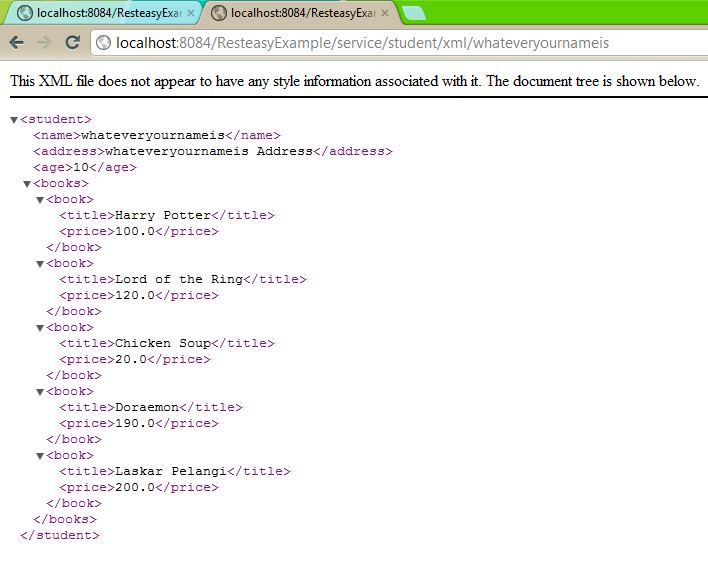
Here are some screenshots,

Have fun with RESTEasy 😉