quarkus

How to Use S2I to Deploy Dockerfile to Openshift Container Platform

Lets say i have a Java application,

<?xml version="1.0" encoding="UTF-8"?>
<project xmlns="http://maven.apache.org/POM/4.0.0"
         xmlns:xsi="http://www.w3.org/2001/XMLSchema-instance"
         xsi:schemaLocation="http://maven.apache.org/POM/4.0.0 http://maven.apache.org/xsd/maven-4.0.0.xsd">
    <modelVersion>4.0.0</modelVersion>

    <groupId>com.edw</groupId>
    <artifactId>hello-world-containerized-quarkus-on-jvm</artifactId>
    <version>1.0-SNAPSHOT</version>

    <properties>
        <compiler-plugin.version>3.15.0</compiler-plugin.version>
        <maven.compiler.release>21</maven.compiler.release>
        <project.build.sourceEncoding>UTF-8</project.build.sourceEncoding>
        <project.reporting.outputEncoding>UTF-8</project.reporting.outputEncoding>
        <quarkus.platform.artifact-id>quarkus-bom</quarkus.platform.artifact-id>
        <quarkus.platform.group-id>io.quarkus.platform</quarkus.platform.group-id>
        <quarkus.platform.version>3.39.2</quarkus.platform.version>
        <skipITs>true</skipITs>
        <surefire-plugin.version>3.5.6</surefire-plugin.version>
    </properties>

    <dependencyManagement>
        <dependencies>
            <dependency>
                <groupId>${quarkus.platform.group-id}</groupId>
                <artifactId>${quarkus.platform.artifact-id}</artifactId>
                <version>${quarkus.platform.version}</version>
                <type>pom</type>
                <scope>import</scope>
            </dependency>
        </dependencies>
    </dependencyManagement>

    <dependencies>
        <dependency>
            <groupId>io.quarkus</groupId>
            <artifactId>quarkus-arc</artifactId>
        </dependency>
        <dependency>
            <groupId>io.quarkus</groupId>
            <artifactId>quarkus-rest</artifactId>
        </dependency>
        <dependency>
            <groupId>io.quarkus</groupId>
            <artifactId>quarkus-junit</artifactId>
            <scope>test</scope>
        </dependency>
        <dependency>
            <groupId>io.rest-assured</groupId>
            <artifactId>rest-assured</artifactId>
            <scope>test</scope>
        </dependency>
    </dependencies>

    <build>
        <plugins>
            <plugin>
                <groupId>${quarkus.platform.group-id}</groupId>
                <artifactId>quarkus-maven-plugin</artifactId>
                <version>${quarkus.platform.version}</version>
                <extensions>true</extensions>
                <executions>
                    <execution>
                        <goals>
                            <goal>build</goal>
                            <goal>generate-code</goal>
                            <goal>generate-code-tests</goal>
                        </goals>
                    </execution>
                </executions>
            </plugin>
            <plugin>
                <artifactId>maven-compiler-plugin</artifactId>
                <version>${compiler-plugin.version}</version>
                <configuration>
                    <parameters>true</parameters>
                </configuration>
            </plugin>
            <plugin>
                <artifactId>maven-surefire-plugin</artifactId>
                <version>${surefire-plugin.version}</version>
                <configuration>
                    <argLine>@{argLine}</argLine>
                    <systemPropertyVariables>
                        <java.util.logging.manager>org.jboss.logmanager.LogManager</java.util.logging.manager>
                        <maven.home>${maven.home}</maven.home>
                    </systemPropertyVariables>
                </configuration>
            </plugin>
            <plugin>
                <artifactId>maven-failsafe-plugin</artifactId>
                <version>${surefire-plugin.version}</version>
                <executions>
                    <execution>
                        <goals>
                            <goal>integration-test</goal>
                            <goal>verify</goal>
                        </goals>
                    </execution>
                </executions>
                <configuration>
                    <argLine>@{argLine}</argLine>
                    <systemPropertyVariables>
                        <native.image.path>${project.build.directory}/${project.build.finalName}-runner</native.image.path>
                        <java.util.logging.manager>org.jboss.logmanager.LogManager</java.util.logging.manager>
                        <maven.home>${maven.home}</maven.home>
                    </systemPropertyVariables>
                </configuration>
            </plugin>
        </plugins>
    </build>

    <profiles>
        <profile>
            <id>native</id>
            <activation>
                <property>
                    <name>native</name>
                </property>
            </activation>
            <properties>
                <quarkus.package.jar.enabled>false</quarkus.package.jar.enabled>
                <skipITs>false</skipITs>
                <quarkus.native.enabled>true</quarkus.native.enabled>
            </properties>
        </profile>
    </profiles>

</project>
package com.edw.controller;

import jakarta.ws.rs.GET;
import jakarta.ws.rs.Path;
import jakarta.ws.rs.Produces;
import jakarta.ws.rs.core.MediaType;
import jakarta.ws.rs.core.Response;

import java.util.HashMap;

@Path("/")
public class IndexController {
    @GET
    @Produces(MediaType.APPLICATION_JSON)
    public Response index() {
        return Response.ok(new HashMap(){{
                    put("hello", "world");
                }})
                .build();
    }
}

And a very simple Dockerfile for a multistage build, where we do a maven build there

## Stage 1 : build with maven builder image with native capabilities
FROM registry.redhat.io/ubi9/openjdk-21:1.24 AS build
COPY --chown=185 --chmod=0755 mvnw /code/mvnw
COPY --chown=185 .mvn /code/.mvn
COPY --chown=185 pom.xml /code/
USER 185
WORKDIR /code
COPY src /code/src
RUN ./mvnw clean package


## Stage 2 : create the docker final image
FROM registry.access.redhat.com/ubi9/openjdk-21-runtime:1.24

LABEL BASE_IMAGE="registry.access.redhat.com/ubi9/openjdk-21-runtime:1.24"
LABEL JAVA_VERSION="21"

ENV LANGUAGE='en_US:en'
ENV TZ='Asia/Jakarta'

ENV JAVA_OPTS_APPEND="-Dquarkus.http.host=0.0.0.0 -Djava.util.logging.manager=org.jboss.logmanager.LogManager -XX:TieredStopAtLevel=1 -noverify -XX:+AlwaysPreTouch -XX:+UseNUMA -Xlog:gc*,safepoint=debug:file=/tmp/gc.log.%p:time,uptime:filecount=5,filesize=50M -XX:+HeapDumpOnOutOfMemoryError -XX:HeapDumpPath=/tmp/"
ENV JAVA_APP_JAR="/deployments/quarkus-run.jar"
ENV GC_CONTAINER_OPTIONS="-XX:+UseShenandoahGC"

COPY --from=build --chown=185 /code/target/quarkus-app/lib/ /deployments/lib/
COPY --from=build --chown=185 /code/target/quarkus-app/*.jar /deployments/
COPY --from=build --chown=185 /code/target/quarkus-app/app/ /deployments/app/
COPY --from=build --chown=185 /code/target/quarkus-app/quarkus/ /deployments/quarkus/

EXPOSE 8080
USER 185

ENTRYPOINT [ "/opt/jboss/container/java/run/run-java.sh" ]

This is the project structure,

$ tree
.
- Dockerfile
- mvnw
- pom.xml
- readme.md
- src
    + main
        + java
        |   + com
        |       + edw
        |           + controller
        |               + IndexController.java
        + resources
            + application.properties

We can use the below command to build this Dockerfile inside Openshift,

$ oc new-build --strategy docker --binary \ 
	--name hello-world-containerized-quarkus-on-jvm
    
	* A Docker build using binary input will be created
      * The resulting image will be pushed to image stream tag "hello-world-containerized-quarkus-on-jvm:latest"
      * A binary build was created, use 'oc start-build --from-dir' to trigger a new build

--> Creating resources with label build=hello-world-containerized-quarkus-on-jvm ...
    imagestream.image.openshift.io "hello-world-containerized-quarkus-on-jvm" created
    buildconfig.build.openshift.io "hello-world-containerized-quarkus-on-jvm" created
--> Success


$ oc start-build hello-world-containerized-quarkus-on-jvm \
	--from-dir . --follow
	
Uploading directory "." as binary input for the build ...
..........
Uploading finished
build.build.openshift.io/hello-world-containerized-quarkus-on-jvm-1 started
Receiving source from STDIN as archive ...
time="2026-09-12T08:10:52Z" level=info msg="Not using native diff for overlay, this may cause degraded performance for building images: kernel has CONFIG_OVERLAY_FS_REDIRECT_DIR enabled"
I0912 08:10:52.582538       1 defaults.go:112] Defaulting to storage driver "overlay" with options [mountopt=metacopy=on].
Caching blobs under "/var/cache/blobs".

.....

Pushing image image-registry.openshift-image-registry.svc:5000/api/hello-world-containerized-quarkus-on-jvm:latest ...
Getting image source signatures
Copying blob sha256:b8969f72c7c3e136de5b0da7xx354ab8c17d19792f4149091e7141cfad15xxxx
Copying config sha256:132e66ed9a99d36f7cd493xxc7158a19235665e71914157ec7d4f2cfc9xxxx
Writing manifest to image destination
Successfully pushed image-registry.openshift-image-registry.svc:5000/api/hello-world-containerized-quarkus-on-jvm@sha256:f466627c0e10aad58037e3059b5f8d15bf9d8e26d9c2c2a60f09be9a98999e39
Push successful


$ oc new-app --name hello-world-containerized-quarkus-on-jvm \ 
	--image-stream=api/hello-world-containerized-quarkus-on-jvm:latest
	
--> Found image 132e66e (28 minutes old) in image stream "api/hello-world-containerized-quarkus-on-jvm" under tag "latest" for "api/hello-world-containerized-quarkus-on-jvm:latest"

    Java Applications
    -----------------
    Platform for running plain Java applications (fat-jar and flat classpath)

    Tags: java


--> Creating resources ...
    deployment.apps "hello-world-containerized-quarkus-on-jvm" created
    service "hello-world-containerized-quarkus-on-jvm" created
--> Success
    Application is not exposed. You can expose services to the outside world by executing one or more of the commands below:
     'oc expose service/hello-world-containerized-quarkus-on-jvm'
    Run 'oc status' to view your app.

And we can see that our application is deployed successfully,
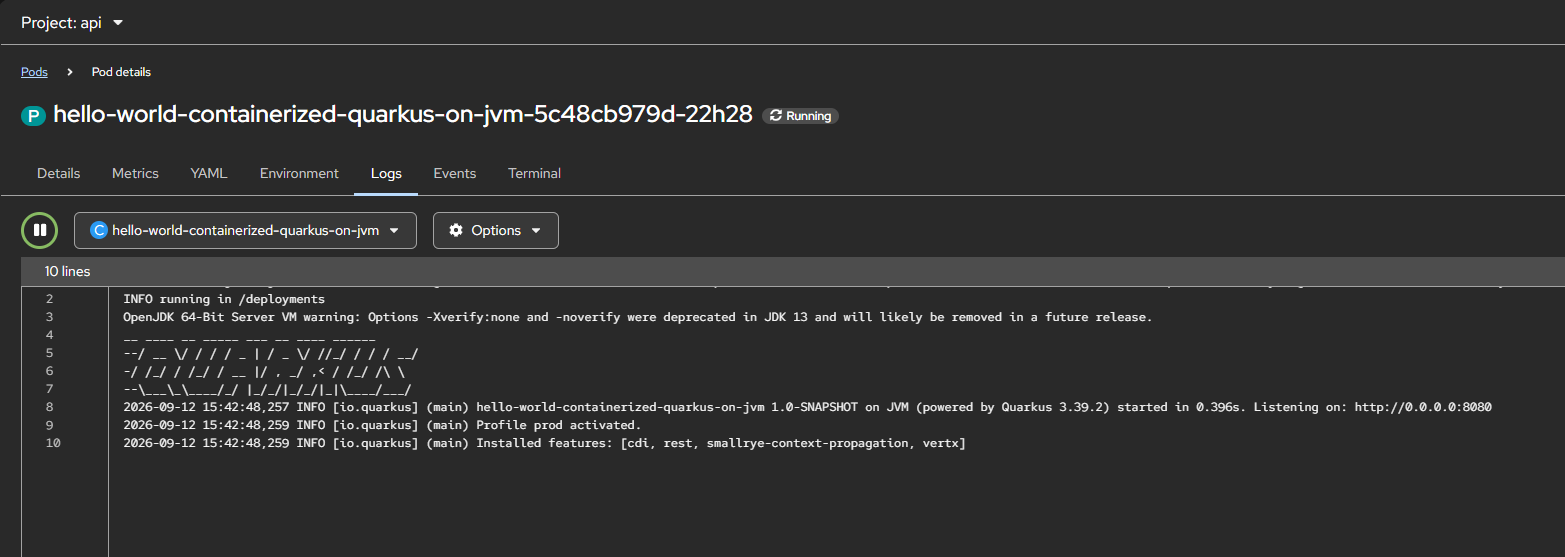
Source code for this project can be accessed here,

https://github.com/edwin/hello-world-containerized-quarkus-on-jvm

Integrating Quarkus and OpenTelemetry with a PostgreSQL Database

In this tutorial, we will integrate the Quarkus framework with a PostgreSQL database and compile the application as a native image to observe Quarkus performance when running in native mode.

We will also examine the result of each request and including database queries, using Jaeger distributed tracing.

First, we’ll start with a Maven pom.xml,

<?xml version="1.0" encoding="UTF-8"?>
<project xmlns="http://maven.apache.org/POM/4.0.0"
         xmlns:xsi="http://www.w3.org/2001/XMLSchema-instance"
         xsi:schemaLocation="http://maven.apache.org/POM/4.0.0 http://maven.apache.org/xsd/maven-4.0.0.xsd">
    <modelVersion>4.0.0</modelVersion>

    <groupId>com.edw</groupId>
    <artifactId>quarkus-postgresql</artifactId>
    <version>1.0-SNAPSHOT</version>

    <properties>
        <compiler-plugin.version>3.14.0</compiler-plugin.version>
        <maven.compiler.release>21</maven.compiler.release>
        <project.build.sourceEncoding>UTF-8</project.build.sourceEncoding>
        <project.reporting.outputEncoding>UTF-8</project.reporting.outputEncoding>
        <quarkus.platform.artifact-id>quarkus-bom</quarkus.platform.artifact-id>
        <quarkus.platform.group-id>com.redhat.quarkus.platform</quarkus.platform.group-id>
        <quarkus.platform.version>3.27.1.redhat-00003</quarkus.platform.version>
        <skipITs>true</skipITs>
        <surefire-plugin.version>3.5.2</surefire-plugin.version>

        <maven.compiler.parameters>true</maven.compiler.parameters>
    </properties>

    <repositories>
        <repository>
            <releases>
                <enabled>true</enabled>
            </releases>
            <snapshots>
                <enabled>false</enabled>
            </snapshots>
            <id>redhat</id>
            <url>https://maven.repository.redhat.com/ga</url>
        </repository>
    </repositories>

    <pluginRepositories>
        <pluginRepository>
            <releases>
                <enabled>true</enabled>
            </releases>
            <snapshots>
                <enabled>false</enabled>
            </snapshots>
            <id>redhat</id>
            <url>https://maven.repository.redhat.com/ga</url>
        </pluginRepository>
    </pluginRepositories>

    <dependencyManagement>
        <dependencies>
            <dependency>
                <groupId>${quarkus.platform.group-id}</groupId>
                <artifactId>${quarkus.platform.artifact-id}</artifactId>
                <version>${quarkus.platform.version}</version>
                <type>pom</type>
                <scope>import</scope>
            </dependency>
        </dependencies>
    </dependencyManagement>
    <dependencies>
        <dependency>
            <groupId>io.quarkus</groupId>
            <artifactId>quarkus-hibernate-orm</artifactId>
        </dependency>
        <dependency>
            <groupId>io.quarkus</groupId>
            <artifactId>quarkus-resteasy</artifactId>
        </dependency>
        <dependency>
            <groupId>io.quarkus</groupId>
            <artifactId>quarkus-resteasy-jsonb</artifactId>
        </dependency>
        <dependency>
            <groupId>io.quarkus</groupId>
            <artifactId>quarkus-jdbc-postgresql</artifactId>
        </dependency>
        <dependency>
            <groupId>io.quarkus</groupId>
            <artifactId>quarkus-arc</artifactId>
        </dependency>

        <dependency>
            <groupId>io.quarkus</groupId>
            <artifactId>quarkus-opentelemetry</artifactId>
        </dependency>

        <dependency>
            <groupId>org.projectlombok</groupId>
            <artifactId>lombok</artifactId>
            <version>1.18.30</version>
            <scope>provided</scope>
        </dependency>

        <dependency>
            <groupId>io.quarkus</groupId>
            <artifactId>quarkus-junit5</artifactId>
            <scope>test</scope>
        </dependency>
        <dependency>
            <groupId>io.rest-assured</groupId>
            <artifactId>rest-assured</artifactId>
            <scope>test</scope>
        </dependency>
    </dependencies>
    <build>
        <plugins>
            <plugin>
                <groupId>${quarkus.platform.group-id}</groupId>
                <artifactId>quarkus-maven-plugin</artifactId>
                <version>${quarkus.platform.version}</version>
                <extensions>true</extensions>
                <executions>
                    <execution>
                        <goals>
                            <goal>build</goal>
                            <goal>generate-code</goal>
                            <goal>generate-code-tests</goal>
                        </goals>
                    </execution>
                </executions>
            </plugin>
            <plugin>
                <artifactId>maven-compiler-plugin</artifactId>
                <version>${compiler-plugin.version}</version>
                <configuration>
                    <parameters>${maven.compiler.parameters}</parameters>
                </configuration>
            </plugin>
            <plugin>
                <artifactId>maven-surefire-plugin</artifactId>
                <version>${surefire-plugin.version}</version>
                <configuration>
                    <systemPropertyVariables>
                        <java.util.logging.manager>org.jboss.logmanager.LogManager</java.util.logging.manager>
                        <maven.home>${maven.home}</maven.home>
                    </systemPropertyVariables>
                </configuration>
            </plugin>
        </plugins>
    </build>
    <profiles>
        <profile>
            <id>native</id>
            <activation>
                <property>
                    <name>native</name>
                </property>
            </activation>
            <build>
                <plugins>
                    <plugin>
                        <artifactId>maven-failsafe-plugin</artifactId>
                        <version>${surefire-plugin.version}</version>
                        <executions>
                            <execution>
                                <goals>
                                    <goal>integration-test</goal>
                                    <goal>verify</goal>
                                </goals>
                                <configuration>
                                    <systemPropertyVariables>
                                        <native.image.path>
                                            ${project.build.directory}/${project.build.finalName}-runner
                                        </native.image.path>
                                        <java.util.logging.manager>org.jboss.logmanager.LogManager
                                        </java.util.logging.manager>
                                        <maven.home>${maven.home}</maven.home>
                                    </systemPropertyVariables>
                                </configuration>
                            </execution>
                        </executions>
                    </plugin>
                </plugins>
            </build>
            <properties>
                <quarkus.package.type>native</quarkus.package.type>
            </properties>
        </profile>
    </profiles>
</project>

And with the following configuration,

quarkus.application.name=customers-svc
quarkus.http.port=${HTTP_PORT:8080}
quarkus.log.level=INFO
quarkus.log.category."com.edw".level=${LOG_LEVEL:DEBUG}

quarkus.log.console.format=%d{yyyy-MM-dd HH:mm:ss,SSS} %h %-5p [%c{3.}] [%X{traceId},%X{spanId}] (%t) %s%e%n

# opentelemetry
quarkus.otel.exporter.otlp.endpoint=${OTEL_URL:http\://192.168.8.140:4317}
quarkus.otel.sdk.disabled=false
quarkus.datasource.jdbc.telemetry=true

# database
quarkus.datasource.jdbc.url=${JDBC_URL:jdbc\:postgresql\://localhost\:5432/test_db}
quarkus.datasource.jdbc.driver=org.postgresql.Driver
quarkus.datasource.jdbc.max-size=20
quarkus.datasource.jdbc.min-size=2

quarkus.datasource.username=${JDBC_USERNAME:postgres}
quarkus.datasource.password=${JDBC_PASSWORD:postgres}

And the following Java files,

package com.edw.model;

import jakarta.persistence.*;
import lombok.AllArgsConstructor;
import lombok.Data;
import lombok.NoArgsConstructor;

import java.io.Serializable;

@Entity
@Table(name = "t_customer")

@Data
@AllArgsConstructor
@NoArgsConstructor
public class Customer implements Serializable {

    @Id
    @GeneratedValue(strategy= GenerationType.AUTO)
    @Column(name = "customer_id")
    private Long customerId;

    @Column(name = "customer_name")
    private String customerName;
}
package com.edw.service;

import com.edw.model.Customer;
import jakarta.enterprise.context.ApplicationScoped;
import jakarta.inject.Inject;
import jakarta.persistence.EntityManager;
import jakarta.transaction.Transactional;
import java.util.List;

@Transactional
@ApplicationScoped
public class CustomerService {

    @Inject
    EntityManager em;

    public List<Customer> findAll() {
        return em.createQuery("select c from Customer c order by customerId", Customer.class).getResultList();
    }
}
package com.edw.controller;

import com.edw.service.CustomerService;
import jakarta.inject.Inject;
import jakarta.ws.rs.GET;
import jakarta.ws.rs.Path;
import jakarta.ws.rs.Produces;
import jakarta.ws.rs.core.MediaType;
import jakarta.ws.rs.core.Response;
import org.slf4j.Logger;
import org.slf4j.LoggerFactory;

@Path("/api/v1/customers")
public class CustomerController {

    private Logger logger = LoggerFactory.getLogger(CustomerController.class);

    @Inject
    CustomerService customerService;

    @GET
    @Path("/")
    @Produces(MediaType.APPLICATION_JSON)
    public Response findAll() {
        logger.debug("on findAll() method");
        return Response
                .ok(customerService.findAll())
                .build();
    }
}

With the following Dockerfile,

FROM quay.io/quarkus/quarkus-distroless-image:2.0

ENV LANGUAGE='en_US:en'
ENV TZ='Asia/Jakarta'

COPY target/*-runner /application

EXPOSE 8080
USER nonroot

CMD ["./application", "-Dquarkus.http.host=0.0.0.0"]

Build the application as a native image,

$ mvn clean package -Dnative

......

Finished generating 'quarkus-postgresql-1.0-SNAPSHOT-runner' in 1m 24s.
[INFO] [io.quarkus.deployment.pkg.steps.NativeImageBuildRunner] podman run --env LANG=C --rm --user 115870:115870 --userns=keep-id -v /home/edwin/quarkus-postgresql/target/quarkus-postgresql-1.0-SNAPSHOT-native-image-source-jar:/project:z --entrypoint /bin/bash registry.access.redhat.com/quarkus/mandrel-for-jdk-21-rhel8:23.1 -c objcopy --strip-debug quarkus-postgresql-1.0-SNAPSHOT-runner
[INFO] [io.quarkus.deployment.QuarkusAugmentor] Quarkus augmentation completed in 97642ms
[INFO] ------------------------------------------------------------------------
[INFO] BUILD SUCCESS
[INFO] ------------------------------------------------------------------------
[INFO] Total time:  01:41 min
[INFO] Finished at: 2025-12-29T11:10:07+07:00
[INFO] ------------------------------------------------------------------------

And containerized it

$ podman build -t quarkus-postgresql:original -f Dockerfile.distroless .

For monitoring, we can use a containerized Jaeger instance to display the distributed tracing of our application,

$ podman run -d --name jaeger \
        -e COLLECTOR_OTLP_ENABLED=true \
        -p 16686:16686 \
        -p 4317:4317 \
        jaegertracing/all-in-one:latest

Run the image and make some API calls to the Quarkus application.
We will also be able to see the distributed tracing in the Jaeger UI, including database query spans.

Code for this post can be found on the below repository,

https://github.com/edwin/quarkus-postgresql

Java 21 and Maven Error PKIX when Connecting to Self Signed Nexus Registry

Had this error while doing a maven build

PKIX path building failed: sun.security.provider.certpath.SunCertPathBuilderException: unable to find valid certification path to requested target

With a complete error log,

$ mvn clean package -s settings.xml

.......

[ERROR] [ERROR] Some problems were encountered while processing the POMs:
[ERROR] Unresolveable build extension: Plugin com.redhat.quarkus.platform:quarkus-maven-plugin:3.15.3.SP1-redhat-00002 or one of its dependencies could not be resolved: Failed to collect dependencies at com.redhat.quarkus.platform:quarkus-maven-plugin:jar:3.15.3.SP1-redhat-00002 -> io.quarkus:quarkus-bootstrap-maven-resolver:jar:3.15.3.redhat-00004 -> io.smallrye.beanbag:smallrye-beanbag-maven:jar:1.5.2.redhat-00001 -> io.smallrye.beanbag:smallrye-beanbag-sisu:jar:1.5.2.redhat-00001 -> javax.inject:javax.inject:jar:1.0.0.redhat-00014 @
[ERROR] Non-resolvable import POM: The following artifacts could not be resolved: com.redhat.quarkus.platform:quarkus-camel-bom:pom:3.15.3.SP1-redhat-00002 (present, but unavailable): Could not transfer artifact com.redhat.quarkus.platform:quarkus-camel-bom:pom:3.15.3.SP1-redhat-00002 from/to mvn-repository (https://nexus/maven-group/): PKIX path building failed: sun.security.provider.certpath.SunCertPathBuilderException: unable to find valid certification path to requested target @ line 32, column 25

But somehow the previous solution on my previous post is not working. Maybe because of a different Java version or Maven version. So I need to find another solution, and this is what was working on my end.

First we need to take the self-signed certificate that belongs to the remote Nexus instance

$ echo "" | openssl s_client -connect nexus:8443  -showcerts 2>/dev/null | openssl x509 -out nexus.crt

Import it into our key

$ keytool -import -alias mycert -keystore /tmp/customcacerts -file nexus.crt -storepass changeit -noprompt

And use it on our Maven build

$ ./mvnw -Djavax.net.ssl.trustStore=/tmp/customcacerts \
        -Djavax.net.ssl.trustStorePassword=changeit clean install \ 
		-s settings.xml 

Everything is working well after that.

Build a Native Quarkus and Camel Application using Mandrel and Docker

Apache Camel is a Java framework for routing and integration, and when we talk about integration means we are talking about lightweight and fast response time. And this is where Apache Camel and Quarkus comes into the picture.

Utilizing Quarkus capability of native compilation, we can compile our Camel Framework application into a native application without the necessity of using JVM. Therefore making a lightweight Apache Camel into more lighweight and faster.

For this project, we will start with a simple Maven file

<?xml version="1.0" encoding="UTF-8"?>
<project xmlns="http://maven.apache.org/POM/4.0.0"
         xmlns:xsi="http://www.w3.org/2001/XMLSchema-instance"
         xsi:schemaLocation="http://maven.apache.org/POM/4.0.0 http://maven.apache.org/xsd/maven-4.0.0.xsd">
    <modelVersion>4.0.0</modelVersion>

    <groupId>com.edw</groupId>
    <artifactId>quarkus-camel-native</artifactId>
    <version>1.0-SNAPSHOT</version>

    <properties>
        <compiler-plugin.version>3.13.0</compiler-plugin.version>
        <maven.compiler.release>21</maven.compiler.release>
        <project.build.sourceEncoding>UTF-8</project.build.sourceEncoding>
        <project.reporting.outputEncoding>UTF-8</project.reporting.outputEncoding>
        <quarkus.platform.artifact-id>quarkus-bom</quarkus.platform.artifact-id>
        <quarkus.platform.group-id>io.quarkus.platform</quarkus.platform.group-id>
        <quarkus.platform.version>3.16.3</quarkus.platform.version>
        <skipITs>true</skipITs>
        <surefire-plugin.version>3.5.0</surefire-plugin.version>
    </properties>

    <dependencyManagement>
        <dependencies>
            <dependency>
                <groupId>${quarkus.platform.group-id}</groupId>
                <artifactId>${quarkus.platform.artifact-id}</artifactId>
                <version>${quarkus.platform.version}</version>
                <type>pom</type>
                <scope>import</scope>
            </dependency>
            <dependency>
                <groupId>${quarkus.platform.group-id}</groupId>
                <artifactId>quarkus-camel-bom</artifactId>
                <version>${quarkus.platform.version}</version>
                <type>pom</type>
                <scope>import</scope>
            </dependency>
        </dependencies>
    </dependencyManagement>

    <dependencies>
        <dependency>
            <groupId>org.apache.camel.quarkus</groupId>
            <artifactId>camel-quarkus-direct</artifactId>
        </dependency>
        <dependency>
            <groupId>org.apache.camel.quarkus</groupId>
            <artifactId>camel-quarkus-jackson</artifactId>
        </dependency>
        <dependency>
            <groupId>org.apache.camel.quarkus</groupId>
            <artifactId>camel-quarkus-rest</artifactId>
        </dependency>
        <dependency>
            <groupId>io.quarkus</groupId>
            <artifactId>quarkus-arc</artifactId>
        </dependency>
        <dependency>
            <groupId>io.quarkus</groupId>
            <artifactId>quarkus-junit5</artifactId>
            <scope>test</scope>
        </dependency>
    </dependencies>

    <build>
        <plugins>
            <plugin>
                <groupId>${quarkus.platform.group-id}</groupId>
                <artifactId>quarkus-maven-plugin</artifactId>
                <version>${quarkus.platform.version}</version>
                <extensions>true</extensions>
                <executions>
                    <execution>
                        <goals>
                            <goal>build</goal>
                            <goal>generate-code</goal>
                            <goal>generate-code-tests</goal>
                            <goal>native-image-agent</goal>
                        </goals>
                    </execution>
                </executions>
            </plugin>
            <plugin>
                <artifactId>maven-compiler-plugin</artifactId>
                <version>${compiler-plugin.version}</version>
                <configuration>
                    <parameters>true</parameters>
                </configuration>
            </plugin>
            <plugin>
                <artifactId>maven-surefire-plugin</artifactId>
                <version>${surefire-plugin.version}</version>
                <configuration>
                    <systemPropertyVariables>
                        <java.util.logging.manager>org.jboss.logmanager.LogManager</java.util.logging.manager>
                        <maven.home>${maven.home}</maven.home>
                    </systemPropertyVariables>
                </configuration>
            </plugin>
            <plugin>
                <artifactId>maven-failsafe-plugin</artifactId>
                <version>${surefire-plugin.version}</version>
                <executions>
                    <execution>
                        <goals>
                            <goal>integration-test</goal>
                            <goal>verify</goal>
                        </goals>
                    </execution>
                </executions>
                <configuration>
                    <systemPropertyVariables>
                        <native.image.path>${project.build.directory}/${project.build.finalName}-runner</native.image.path>
                        <java.util.logging.manager>org.jboss.logmanager.LogManager</java.util.logging.manager>
                        <maven.home>${maven.home}</maven.home>
                    </systemPropertyVariables>
                </configuration>
            </plugin>
        </plugins>
    </build>

    <profiles>
        <profile>
            <id>native</id>
            <activation>
                <property>
                    <name>native</name>
                </property>
            </activation>
            <properties>
                <skipITs>false</skipITs>
                <quarkus.native.enabled>true</quarkus.native.enabled>
            </properties>
        </profile>
    </profiles>

</project>

a properties file,

# default
quarkus.http.port=8080
quarkus.log.level=INFO
quarkus.log.category."com.edw".level=DEBUG

quarkus.log.console.format=%d{yyyy-MM-dd HH:mm:ss,SSS} %h %N[%i] %-5p [%c{3.}] (%t) %s%e%n

# disable sending anonymous statistics
quarkus.analytics.disabled=true

and with a simple Java file,

package com.edw.route;

import jakarta.enterprise.context.ApplicationScoped;
import org.apache.camel.builder.RouteBuilder;

@ApplicationScoped
public class HelloWorldRoute extends RouteBuilder {

    @Override
    public void configure() throws Exception {
        rest("/api")
                .get("/hello-world")
                .produces("application/json")
                .to("direct:hello-world");

        from("direct:hello-world")
                .routeId("hello-world-api")
                .log("calling getHelloWorld")
                .setBody(constant("{\"hello\":\"world\"}"));
    }
}

and finally, a Dockerfile

## Stage 1 : build with maven builder image with native capabilities
FROM quay.io/quarkus/ubi-quarkus-mandrel-builder-image:jdk-21 AS build
COPY --chown=quarkus:quarkus --chmod=0755 mvnw /code/mvnw
COPY --chown=quarkus:quarkus .mvn /code/.mvn
COPY --chown=quarkus:quarkus pom.xml /code/
USER quarkus
WORKDIR /code
RUN ./mvnw -B org.apache.maven.plugins:maven-dependency-plugin:3.1.2:go-offline
COPY src /code/src
RUN ./mvnw package -Dnative

## Stage 2 : create the docker final image
FROM quay.io/quarkus/quarkus-micro-image:2.0
WORKDIR /work/
COPY --from=build /code/target/*-runner /work/application

# set up permissions for user `1001`
RUN chmod 775 /work /work/application \
  && chown -R 1001 /work \
  && chmod -R "g+rwX" /work \
  && chown -R 1001:root /work

EXPOSE 8080
USER 1001

CMD ["./application", "-Dquarkus.http.host=0.0.0.0"]

As we can see, it is a multi-stage docker build and we are using Mandrel to compile Quarkus into a native application. Next is to do a docker build, and see our Quarkus add compiled into native

$ podman build -t quarkus-camel-native -f multistage.dockerfile  .

[1/8] Initializing...                                                                                   (11.5s @ 0.12GB)
 Java version: 21.0.5+11-LTS, vendor version: Mandrel-23.1.5.0-Final
 Graal compiler: optimization level: 2, target machine: x86-64-v3
 C compiler: gcc (redhat, x86_64, 8.5.0)
 Garbage collector: Serial GC (max heap size: 80% of RAM)
 4 user-specific feature(s):
 - com.oracle.svm.thirdparty.gson.GsonFeature
 - io.quarkus.runner.Feature: Auto-generated class by Quarkus from the existing extensions
 - io.quarkus.runtime.graal.DisableLoggingFeature: Disables INFO logging during the analysis phase
 - org.eclipse.angus.activation.nativeimage.AngusActivationFeature
 
 .......
 
Produced artifacts:
 /code/target/quarkus-camel-native-1.0-SNAPSHOT-native-image-source-jar/build-artifacts.json (build_info)
 /code/target/quarkus-camel-native-1.0-SNAPSHOT-native-image-source-jar/quarkus-camel-native-1.0-SNAPSHOT-runner (executable)
 /code/target/quarkus-camel-native-1.0-SNAPSHOT-native-image-source-jar/quarkus-camel-native-1.0-SNAPSHOT-runner-build-output-stats.json (build_info)
========================================================================================================================
Finished generating 'quarkus-camel-native-1.0-SNAPSHOT-runner' in 3m 24s.

We can gain some benefits from native compilation such as a lighter image and less utilization

$ podman stats -a
ID            NAME               CPU %       MEM USAGE / LIMIT  MEM %       NET IO      BLOCK IO      PIDS        CPU TIME    AVG CPU %
f8745a7b7ce2  gracious_goldberg  0.01%       37.86MB / 4.097GB  0.92%       0B / 0B     0B / 12.29kB  12          1.155723s   0.41%

Code for this activity can be found here,

https://github.com/edwin/quarkus-camel-native

Creating Java 21 Runtime on top of an UBI Base Image

Just recently had a request to create a custom image based on UBI but extendable, means able to be installed custom package for other functionality.

For this sample, im using UBI9 latest version which is 9.4. We can find our Dockerfile below,

FROM registry.access.redhat.com/ubi9/ubi-minimal:9.4

LABEL BASE_IMAGE="registry.access.redhat.com/ubi9/ubi-minimal:9.4"
LABEL JAVA_VERSION="21"

ENV LANGUAGE='en_US:en'
ENV TZ='Asia/Jakarta'

RUN microdnf install -y --nodocs java-21-openjdk-headless  \
    && microdnf clean all  \
    && echo "securerandom.source=file:/dev/urandom" >> /etc/alternatives/jre/lib/security/java.security

WORKDIR /work/

COPY --chown=185 target/quarkus-app/lib/ /work/lib/
COPY --chown=185 target/quarkus-app/*.jar /work/application.jar
COPY --chown=185 target/quarkus-app/app/ /work/app/
COPY --chown=185 target/quarkus-app/quarkus/ /work/quarkus/

ENV JAVA_OPTS="-Dquarkus.http.host=0.0.0.0 -Djava.util.logging.manager=org.jboss.logmanager.LogManager -XX:TieredStopAtLevel=1 -noverify -XX:+UseShenandoahGC -XX:+AlwaysPreTouch -XX:+UseNUMA -Xlog:gc*,safepoint=debug:file=/tmp/gc.log.%p:time,uptime:filecount=5,filesize=50M -XX:+HeapDumpOnOutOfMemoryError -XX:HeapDumpPath=/tmp/"

EXPOSE 8080
USER 185

CMD java $JAVA_OPTS -jar application.jar

Based on above script, we are using UBI9 and installing some packages using microdnf with a custom JAVA_OPTS variables.

Code can be found on this URL,

https://github.com/edwin/quarkus-and-java21