cache

[Spring Boot] Implementing Multiple Cache Managers

Typically, we leverage a single cache for a specific purpose. however, there are scenarios where we need to integrate multiple caching mechanisms, each serving a different role. In this tutorial, I will demonstrate how to configure multiple Cache Managers in Spring Boot and illustrate the integration between the application layer, database, local cache, and remote cache.

In this scenario, we will use both a local cache (Caffeine) and a remote cache (Infinispan) to store query results.

First we’ll start with a simple pom.xml which contains Spring Boot, MySQL, Infinispan server, and Caffeine for local caches.

<?xml version="1.0" encoding="UTF-8"?>
<project xmlns="http://maven.apache.org/POM/4.0.0"
         xmlns:xsi="http://www.w3.org/2001/XMLSchema-instance"
         xsi:schemaLocation="http://maven.apache.org/POM/4.0.0 http://maven.apache.org/xsd/maven-4.0.0.xsd">
    <modelVersion>4.0.0</modelVersion>

    <groupId>com.edw</groupId>
    <artifactId>spring-boot-multiple-cacheable</artifactId>
    <version>1.0-SNAPSHOT</version>

    <parent>
        <groupId>org.springframework.boot</groupId>
        <artifactId>spring-boot-starter-parent</artifactId>
        <version>3.5.9</version>
        <relativePath/> <!-- lookup parent from repository -->
    </parent>

    <properties>
        <maven.compiler.source>21</maven.compiler.source>
        <maven.compiler.target>21</maven.compiler.target>
        <project.build.sourceEncoding>UTF-8</project.build.sourceEncoding>
    </properties>

    <dependencyManagement>
        <dependencies>
            <dependency>
                <groupId>org.infinispan</groupId>
                <artifactId>infinispan-bom</artifactId>
                <version>16.0.5</version>
                <type>pom</type>
                <scope>import</scope>
            </dependency>
        </dependencies>
    </dependencyManagement>

    <dependencies>
        <dependency>
            <groupId>org.springframework.boot</groupId>
            <artifactId>spring-boot-starter-web</artifactId>
        </dependency>
        <dependency>
            <groupId>org.springframework.boot</groupId>
            <artifactId>spring-boot-starter-data-jpa</artifactId>
        </dependency>

        <dependency>
            <groupId>com.fasterxml.jackson.core</groupId>
            <artifactId>jackson-databind</artifactId>
        </dependency>
        <dependency>
            <groupId>com.mysql</groupId>
            <artifactId>mysql-connector-j</artifactId>
            <scope>runtime</scope>
        </dependency>

        <dependency>
            <groupId>org.projectlombok</groupId>
            <artifactId>lombok</artifactId>
            <optional>true</optional>
        </dependency>

        <!-- caches -->
        <dependency>
            <groupId>org.infinispan</groupId>
            <artifactId>infinispan-spring-boot3-starter-remote</artifactId>
        </dependency>
        <dependency>
            <groupId>org.infinispan</groupId>
            <artifactId>infinispan-jboss-marshalling</artifactId>
        </dependency>

        <dependency>
            <groupId>org.springframework.boot</groupId>
            <artifactId>spring-boot-starter-cache</artifactId>
        </dependency>
        <dependency>
            <groupId>com.github.ben-manes.caffeine</groupId>
            <artifactId>caffeine</artifactId>
        </dependency>

        <dependency>
            <groupId>org.springframework.boot</groupId>
            <artifactId>spring-boot-starter-test</artifactId>
            <scope>test</scope>
        </dependency>
    </dependencies>

    <build>
        <plugins>
            <plugin>
                <groupId>org.springframework.boot</groupId>
                <artifactId>spring-boot-maven-plugin</artifactId>
                <configuration>
                    <layout>JAR</layout>
                </configuration>
                <executions>
                    <execution>
                        <goals>
                            <goal>repackage</goal>
                        </goals>
                    </execution>
                </executions>
            </plugin>
        </plugins>
    </build>

</project>

its configuration on application.properties

### server
server.port=8080
spring.application.name=spring-boot-multiple-cacheable

## log
logging.level.root=INFO
logging.level.com.edw=DEBUG

spring.jpa.show-sql=true
logging.level.org.hibernate.SQL=DEBUG
logging.level.org.hibernate.type.descriptor.sql=TRACE

## db
spring.datasource.url=jdbc:mysql://localhost:3306/test_db
spring.datasource.driverClassName=com.mysql.cj.jdbc.Driver
spring.datasource.username=root
spring.datasource.password=password

## infinispan
jdg.servers=localhost:11222
jdg.userName=admin2
jdg.password=password

## caffeine
caffeine.spec=maximumSize=500,expireAfterAccess=10m

And some Java files,

package com.edw;

import org.springframework.boot.SpringApplication;
import org.springframework.boot.autoconfigure.SpringBootApplication;
import org.springframework.cache.annotation.EnableCaching;

@SpringBootApplication
@EnableCaching
public class Main {
    public static void main(String[] args) {
        SpringApplication.run(Main.class, args);
    }
}
package com.edw.model;

import jakarta.persistence.Column;
import jakarta.persistence.Entity;
import jakarta.persistence.Id;
import jakarta.persistence.Table;
import lombok.AllArgsConstructor;
import lombok.Data;
import lombok.NoArgsConstructor;
import org.infinispan.api.annotations.indexing.Indexed;

import java.io.Serializable;

@Data
@NoArgsConstructor
@AllArgsConstructor

@Indexed

@Entity
@Table(name = "t_employee")
public class Employee implements Serializable {
    @Id
    public Long id;

    @Column(name = "gender")
    public String gender;

    @Column(name = "firstname")
    public String firstname;

    @Column(name = "lastname")
    public String lastname;
}
package com.edw.repository;

import com.edw.model.Employee;
import org.springframework.data.repository.CrudRepository;
import org.springframework.stereotype.Repository;

import java.util.List;

@Repository
public interface EmployeeRepository extends CrudRepository<Employee, Long> {
    List<Employee> findTop10ByFirstnameLikeAndLastnameLikeIgnoreCase(String firstname, String lastname);
}
package com.edw.service;

import com.edw.model.Employee;
import com.edw.repository.EmployeeRepository;
import org.springframework.beans.factory.annotation.Autowired;
import org.springframework.cache.annotation.Cacheable;
import org.springframework.stereotype.Service;

import java.util.List;

@Service
public class EmployeeService {

    private final EmployeeRepository employeeRepository;

    public EmployeeService(@Autowired EmployeeRepository employeeRepository) {
        this.employeeRepository = employeeRepository;
    }

    @Cacheable(value = "query-cache",
            key = "#id",
            cacheManager = "infinispanCacheManager")
    public Employee getEmployee(Long id) {
        return employeeRepository.findById(id).orElse(new Employee());
    }

    @Cacheable(value = "employee-cache",
            key = "#root.methodName + '-' + #firstname + '-' +  #lastname",
            cacheManager = "caffeineCacheManager")
    public List<Employee> findEmployeesByFirstnameAndLastname(String firstname, String lastname) {
        return employeeRepository.findTop10ByFirstnameLikeAndLastnameLikeIgnoreCase(firstname + "%", lastname + "%");
    }
}
package com.edw.controller;

import com.edw.model.Employee;
import com.edw.service.EmployeeService;
import lombok.extern.slf4j.Slf4j;
import org.springframework.beans.factory.annotation.Autowired;
import org.springframework.http.ResponseEntity;
import org.springframework.web.bind.annotation.GetMapping;
import org.springframework.web.bind.annotation.PathVariable;
import org.springframework.web.bind.annotation.RestController;

import java.util.List;

@Slf4j
@RestController
public class EmployeeController {

    private final EmployeeService employeeService;

    public EmployeeController(@Autowired EmployeeService employeeService) {
        this.employeeService = employeeService;
    }

    @GetMapping("/employee/{id}")
    public ResponseEntity getEmployeeById (@PathVariable Long id) {
        log.info("getEmployeeById");

        Employee employee = employeeService.getEmployee(id);
        if(employee.getId() == null)
            return ResponseEntity.notFound().build();

        return ResponseEntity.ok(employee);
    }

    @GetMapping("/employee/find-by-firstname-and-lastname/{firstname}/{lastname}")
    public ResponseEntity getEmployeeByFirstnameAndLastname (@PathVariable String firstname, @PathVariable String lastname) {
        log.info("getEmployeeByFirstnameAndLastname");

        List<Employee> employees = employeeService.findEmployeesByFirstnameAndLastname(firstname, lastname);
        if(employees.isEmpty())
            return ResponseEntity.notFound().build();

        return ResponseEntity.ok(employees);
    }

}

And this is the most important part, where we configure our Cache connections. We use @Primary on the Infinispan manager to set it as the default, but we use explicit bean names (caffeineCacheManager and infinispanCacheManager) to distinguish them in the service layer.

package com.edw.config;

import org.infinispan.client.hotrod.RemoteCacheManager;
import org.infinispan.client.hotrod.configuration.ClientIntelligence;
import org.infinispan.client.hotrod.configuration.ConfigurationBuilder;
import org.infinispan.jboss.marshalling.commons.GenericJBossMarshaller;
import org.infinispan.spring.remote.provider.SpringRemoteCacheManager;
import org.springframework.beans.factory.annotation.Value;
import org.springframework.cache.CacheManager;
import org.springframework.context.annotation.Bean;
import org.springframework.context.annotation.Configuration;
import org.springframework.context.annotation.Primary;

@Configuration
public class InfinispanConfiguration {
    @Value("${jdg.servers}")
    private String jdgHostAddress;

    @Value("${jdg.userName}")
    private String userName;

    @Value("${jdg.password}")
    private String password;

    @Primary
    @Bean(name="infinispanCacheManager")
    public CacheManager infinispanCacheManager() {
        return new SpringRemoteCacheManager(remoteCacheManager());
    }

    @Bean
    public RemoteCacheManager remoteCacheManager() {
        return new RemoteCacheManager(
                new ConfigurationBuilder()
                        .addServers(jdgHostAddress)
                        .security().authentication().username(userName).password(password)
                        .clientIntelligence(ClientIntelligence.HASH_DISTRIBUTION_AWARE)
                        .marshaller(new GenericJBossMarshaller())
                        .build());
    }
}
package com.edw.config;

import com.github.benmanes.caffeine.cache.Caffeine;
import org.springframework.beans.factory.annotation.Value;
import org.springframework.cache.CacheManager;
import org.springframework.cache.caffeine.CaffeineCacheManager;
import org.springframework.context.annotation.Bean;
import org.springframework.context.annotation.Configuration;

@Configuration
public class CaffeineConfiguration {

    @Value("${caffeine.spec}")
    private String spec;

    @Bean(name = "caffeineCacheManager")
    public CacheManager caffeineCacheManager() {
        CaffeineCacheManager manager = new CaffeineCacheManager("employee-cache");
        manager.setCaffeine(Caffeine.from(spec));
        return manager;
    }

}

We can try to trigger API call and can see that the first hit will go to the database, but after that it will always go to Cache to reduce the database workload.

$ curl -kv http://localhost:8080/employee/1

Code for this project can be accessed in the below repository,

https://github.com/edwin/spring-boot-multiple-cacheable

Connecting Spring Boot to an Infinispan Cluster

Infinispan, or its supported product which is Red Hat DataGrid, is a very strong in-memory data grid product which offers flexible deployment options and robust capabilities for storing, managing, and processing data. And to maintain high availability and fault tolerance, Infinispan provides a clustering mechanism which have a multiple members.

For this article, im trying to create a cluster which consist of 3 Infinispan instances and all instances are being installed by using docker images. First we need to pull a specific Infinispan image,

$ docker pull infinispan/server:14.0.2.Final

And run 3 different instances of Infinispan,

$ docker run -p 11222:11222 -e USER=admin -e PASS=password \
        --add-host=HOST:192.168.56.1 \ 
        infinispan/server:14.0.2.Final
		
$ docker run -p 11223:11222 -e USER=admin -e PASS=password \
        --add-host=HOST:192.168.56.1 \ 
        infinispan/server:14.0.2.Final		

$ docker run -p 11224:11222 -e USER=admin -e PASS=password \
        --add-host=HOST:192.168.56.1 \ 
        infinispan/server:14.0.2.Final

Next is login to one of Infinispan instances which is located in localhost:11222, and login with credential of “admin” and “password”. A successfully cluster will give this display,

Once every Infinispan instances are started, we can now focus on our Java project. Lets start with pom.xml

<?xml version="1.0" encoding="UTF-8"?>
<project xmlns="http://maven.apache.org/POM/4.0.0"
         xmlns:xsi="http://www.w3.org/2001/XMLSchema-instance"
         xsi:schemaLocation="http://maven.apache.org/POM/4.0.0 http://maven.apache.org/xsd/maven-4.0.0.xsd">
    <modelVersion>4.0.0</modelVersion>

    <groupId>com.edw</groupId>
    <artifactId>spring-boot-and-clustered-infinispan</artifactId>
    <version>1.0-SNAPSHOT</version>

    <properties>
        <maven.compiler.source>17</maven.compiler.source>
        <maven.compiler.target>17</maven.compiler.target>
        <project.build.sourceEncoding>UTF-8</project.build.sourceEncoding>

        <version.infinispan>14.0.7.Final</version.infinispan>
        <version.protostream>4.6.2.Final</version.protostream>
        <version.spring.boot3>3.0.4</version.spring.boot3>
    </properties>

    <dependencyManagement>
        <dependencies>
            <dependency>
                <groupId>org.infinispan</groupId>
                <artifactId>infinispan-bom</artifactId>
                <version>${version.infinispan}</version>
                <type>pom</type>
                <scope>import</scope>
            </dependency>
            <dependency>
                <groupId>org.springframework.boot</groupId>
                <artifactId>spring-boot-starter-parent</artifactId>
                <version>${version.spring.boot3}</version>
                <type>pom</type>
                <scope>import</scope>
            </dependency>
        </dependencies>
    </dependencyManagement>


    <dependencies>
        <!-- Spring Boot -->
        <dependency>
            <groupId>org.springframework.boot</groupId>
            <artifactId>spring-boot-starter-web</artifactId>
        </dependency>

        <!-- infinispan -->
        <dependency>
            <groupId>org.infinispan</groupId>
            <artifactId>infinispan-spring-boot3-starter-remote</artifactId>
        </dependency>
        <dependency>
            <groupId>org.infinispan</groupId>
            <artifactId>infinispan-query</artifactId>
        </dependency>
        <dependency>
            <groupId>org.infinispan</groupId>
            <artifactId>infinispan-remote-query-client</artifactId>
        </dependency>
        <dependency>
            <groupId>org.infinispan.protostream</groupId>
            <artifactId>protostream-processor</artifactId>
            <scope>provided</scope>
        </dependency>
        <dependency>
            <groupId>org.infinispan</groupId>
            <artifactId>infinispan-client-hotrod</artifactId>
        </dependency>

    </dependencies>

    <build>
        <plugins>
            <plugin>
                <groupId>org.springframework.boot</groupId>
                <artifactId>spring-boot-maven-plugin</artifactId>
            </plugin>
        </plugins>
    </build>

</project>

And an application.properties, in here we can define how many instances of Infinispan that we are connecting to. For this sample, im putting 3 instances which are each having their own ip.

### server port
server.port=8080
spring.application.name=Spring Boot and Clustered Infinispan

## logging
logging.level.root=INFO
logging.pattern.console=%d{dd-MM-yyyy HH:mm:ss} %magenta([%thread]) %highlight(%-5level) %logger.%M - %msg%n

# infinispan
infinispan.remote.server-list=172.17.0.2:11222;172.17.0.3:11222;172.17.0.4:11222
infinispan.remote.auth-username=admin
infinispan.remote.auth-password=password
infinispan.remote.marshaller=org.infinispan.commons.marshall.ProtoStreamMarshaller

And create several Spring Boot’s Java classes, such as main class, controllers, beans, and configs.

@EnableCaching
@SpringBootApplication
public class Main {
    public static void main(String[] args) {
        SpringApplication.run(Main.class, args);
    }
}
@RestController
public class IndexController {

    @Autowired
    private RemoteCacheManager cacheManager;

    @GetMapping(path = "/")
    public HashMap index() {
        return new HashMap(){{
            put("hello", "world");
        }};
    }

    @GetMapping(path = "/get-user")
    public User getUsers(@RequestParam String name) {
        return (User) cacheManager.getCache("user-cache").getOrDefault(name, new User());
    }

    @GetMapping(path = "/add-user")
    public User addUsers(@RequestParam String name, @RequestParam Integer age, @RequestParam String address) {
        cacheManager.getCache("user-cache").put(name, new User(name, age, address));
        return (User) cacheManager.getCache("user-cache").getOrDefault(name, new User());
    }

}
public class User implements Serializable {
    private String name;

    private Integer age;

    private String address;

    public User() {
    }

    public User(String name, Integer age, String address) {
        this.name = name;
        this.age = age;
        this.address = address;
    }

    @ProtoField(number = 1, required = true)
    public String getName() {
        return name;
    }

    public void setName(String name) {
        this.name = name;
    }

    @ProtoField(number = 2)
    public Integer getAge() {
        return age;
    }

    public void setAge(Integer age) {
        this.age = age;
    }

    @ProtoField(number = 3)
    public String getAddress() {
        return address;
    }

    public void setAddress(String address) {
        this.address = address;
    }
}
@Configuration
public class InfinispanConfiguration {
    @Bean
    @Order(Ordered.HIGHEST_PRECEDENCE)
    public InfinispanRemoteCacheCustomizer remoteCacheCustomizer() {
        return b -> {
            b.remoteCache("user-cache").marshaller(ProtoStreamMarshaller.class);
        };
    }
}
@Component
public class InfinispanInitializer implements CommandLineRunner {

    @Autowired
    private RemoteCacheManager cacheManager;

    @Override
    public void run(String...args) throws Exception {
        SerializationContext ctx = MarshallerUtil.getSerializationContext(cacheManager);
        RemoteCache<String, String> protoMetadataCache = cacheManager.getCache(ProtobufMetadataManagerConstants.PROTOBUF_METADATA_CACHE_NAME);

        String msgSchemaFile = null;
        try {
            ProtoSchemaBuilder protoSchemaBuilder = new ProtoSchemaBuilder();
            msgSchemaFile = protoSchemaBuilder.fileName("user.proto").packageName("user").addClass(User.class).build(ctx);
            protoMetadataCache.put("user.proto", msgSchemaFile);
        } catch (Exception e) {
            throw new RuntimeException("Failed to build protobuf definition from 'User class'", e);
        }

        String errors = protoMetadataCache.get(ProtobufMetadataManagerConstants.ERRORS_KEY_SUFFIX);
        if (errors != null) {
            throw new IllegalStateException("Some Protobuf schema files contain errors: " + errors + "\nSchema :\n" + msgSchemaFile);
        }
    }
}

Run the code and try do some curl to add and retrieve data from cache,

$ curl -kv http://localhost:8080/add-user?name=lele&age=14&address=Jogja
{"name":"lele","age":14,"address":"Jogja"} 

$ curl -kv http://localhost:8080/get-user?name=lele
{"name":"lele","age":14,"address":"Jogja"} 

And we can check the content of our cache from our dashboard,

Have fun with Infinispan.

https://github.com/edwin/spring-boot-and-clustered-infinispan

Creating a Simple Spring Boot @Cacheable Cache using JBoss DataGrid on top of Openshift

Creating a Simple Spring Boot @Cacheable Cache using JBoss DataGrid on top of Openshift

Several days ago, one of my team member were asking me on how to connect Spring Boot to JBoss Datagrid as its primary cache server. Since we are using Openshift, im using Openshift template “Red Hat JBoss Data Grid 7.2 (Ephemeral, no https)” as base image deployment.

First we need to create instance of Datagrid on Openshift,

Create our cache name,

And finally, we can see our JBoss Datagrid endpoint here, and fyi we are using HotRod protocol to connect to JDG so our endpoint name should be “jdg-datagrid-app-01-hotrod” with port “11333”.

And start our project by creating a pom.xml

<?xml version="1.0" encoding="UTF-8"?>
<project xmlns="http://maven.apache.org/POM/4.0.0"
         xmlns:xsi="http://www.w3.org/2001/XMLSchema-instance"
         xsi:schemaLocation="http://maven.apache.org/POM/4.0.0 http://maven.apache.org/xsd/maven-4.0.0.xsd">

    <modelVersion>4.0.0</modelVersion>
    <parent>
        <groupId>org.springframework.boot</groupId>
        <artifactId>spring-boot-starter-parent</artifactId>
        <version>2.1.7.RELEASE</version>
        <relativePath/> <!-- lookup parent from repository -->
    </parent>

    <groupId>com.edw</groupId>
    <artifactId>TestingJDGCacheable</artifactId>
    <version>1.0</version>

    <dependencies>
        <dependency>
            <groupId>org.springframework.boot</groupId>
            <artifactId>spring-boot-starter-cache</artifactId>
        </dependency>
        <dependency>
            <groupId>org.springframework.boot</groupId>
            <artifactId>spring-boot-starter-web</artifactId>
        </dependency>


        <dependency>
            <groupId>org.infinispan</groupId>
            <artifactId>infinispan-client-hotrod</artifactId>
            <version>8.4.0.Final-redhat-2</version>
        </dependency>

        <dependency>
            <groupId>org.springframework.boot</groupId>
            <artifactId>spring-boot-starter-test</artifactId>
            <scope>test</scope>
        </dependency>


    </dependencies>

    <profiles>
        <profile>
            <id>openshift</id>
            <build>
                <plugins>
                    <plugin>
                        <groupId>io.fabric8</groupId>
                        <artifactId>fabric8-maven-plugin</artifactId>
                        <version>3.5.28</version>
                        <executions>
                            <execution>
                                <id>fmp</id>
                                <phase>package</phase>
                                <goals>
                                    <goal>resource</goal>
                                    <goal>build</goal>
                                </goals>
                            </execution>
                        </executions>
                        <configuration>
                            <generator>
                                <config>
                                    <spring-boot>
                                        <fromMode>isTag</fromMode>
                                        <from>redhat-openjdk18-openshift:1.2</from>
                                    </spring-boot>
                                </config>
                            </generator>
                        </configuration>
                    </plugin>
                </plugins>
            </build>
        </profile>
    </profiles>

    <repositories>
        <repository>
            <id>jboss</id>
            <url>https://repository.jboss.org/nexus/content/groups/public-jboss/</url>
            <releases>
                <enabled>true</enabled>
            </releases>
            <snapshots>
                <enabled>false</enabled>
            </snapshots>
        </repository>
        <repository>
            <id>redhat-techpreview</id>
            <name>Red Hat Tech Preview</name>
            <url>https://maven.repository.redhat.com/techpreview/all/</url>
            <layout>default</layout>
            <releases>
                <enabled>true</enabled>
                <updatePolicy>never</updatePolicy>
            </releases>
            <snapshots>
                <enabled>false</enabled>
            </snapshots>
        </repository>
        <repository>
            <id>redhat-ga</id>
            <name>Red Hat GA</name>
            <url>https://maven.repository.redhat.com/ga/</url>
            <layout>default</layout>
            <releases>
                <enabled>true</enabled>
                <updatePolicy>never</updatePolicy>
            </releases>
            <snapshots>
                <enabled>false</enabled>
            </snapshots>
        </repository>
    </repositories>

    <pluginRepositories>
        <pluginRepository>
            <id>jboss-plugins</id>
            <url>https://repository.jboss.org/nexus/content/groups/public-jboss/</url>
            <releases>
                <enabled>true</enabled>
            </releases>
            <snapshots>
                <enabled>false</enabled>
            </snapshots>
        </pluginRepository>
        <pluginRepository>
            <id>redhat-techpreview</id>
            <url>https://maven.repository.redhat.com/techpreview/all/</url>
            <releases>
                <enabled>true</enabled>
            </releases>
            <snapshots>
                <enabled>false</enabled>
            </snapshots>
        </pluginRepository>
        <pluginRepository>
            <id>redhat-ga</id>
            <url>https://maven.repository.redhat.com/ga/</url>
            <releases>
                <enabled>true</enabled>
            </releases>
            <snapshots>
                <enabled>false</enabled>
            </snapshots>
        </pluginRepository>
    </pluginRepositories>

    <build>
        <plugins>
            <plugin>
                <groupId>org.springframework.boot</groupId>
                <artifactId>spring-boot-maven-plugin</artifactId>
            </plugin>
        </plugins>
    </build>
</project>

After that, we can create our Spring Boot project, and start with a main java class,

@SpringBootApplication
@EnableCaching
public class Application {
    public static void main(String[] args) {
        SpringApplication.run(Application.class, args);
    }
}

Register your JBoss Datagrid cache

@Configuration
public class CacheConfig {
    @Bean
    public RemoteCacheManager remoteCacheManager() {
        ConfigurationBuilder builder = new ConfigurationBuilder();
        builder.addServers("jdg-datagrid-app-01-hotrod:11333");
        return new RemoteCacheManager(builder.build());
    }
}

And a simple controller where our cache will be used, as on below code we are using “bakerooo” cache.

@RestController
public class IndexController {
    @GetMapping("/")
    @Cacheable("bakerooo")
    public Long getNow() {
        return System.currentTimeMillis();
    }
}

We can deploy our code by using maven’s fabric8 plugin,

mvn clean package fabric8:deploy

And test it by using a simple curl command.
Feel free to ask question, and you can download the full code at my github repo here.

[Java] Cara Cache Data Hasil Query dengan SpringMVC

Pada tulisan kali ini, saya coba membuat suatu metode caching untuk menyimpan data-data master kedalam memory, sehingga tidak perlu query ke database lagi. Hal ini cocok digunakan untuk menyimpan data-data master yang sangat jarang berubah, seperti kode provinsi ataupun kode cabang.

Okay, di tutorial ini saya menggunakan Spring MVC 4, Hibernate dan ehCache sebagai cache provider. Berikut adalah pom.xml yang digunakan,

<?xml version="1.0" encoding="UTF-8"?>
<project xmlns="http://maven.apache.org/POM/4.0.0" xmlns:xsi="http://www.w3.org/2001/XMLSchema-instance" xsi:schemaLocation="http://maven.apache.org/POM/4.0.0 http://maven.apache.org/xsd/maven-4.0.0.xsd">
    <modelVersion>4.0.0</modelVersion>

    <groupId>com.edw</groupId>
    <artifactId>mavenproject5</artifactId>
    <version>1</version>
    <packaging>war</packaging>

    <name>mavenproject5</name>

    <properties>
        <endorsed.dir>${project.build.directory}/endorsed</endorsed.dir>
        <project.build.sourceEncoding>UTF-8</project.build.sourceEncoding>
    </properties>
    
    <dependencies>
        <dependency>
            <groupId>javax</groupId>
            <artifactId>javaee-web-api</artifactId>
            <version>6.0</version>
            <scope>provided</scope>
        </dependency>
        <dependency>
            <groupId>javax.servlet</groupId>
            <artifactId>jstl</artifactId>
            <version>1.2</version>
        </dependency>
        
        
        <!-- Spring 4 dependencies -->
        <dependency>
            <groupId>org.springframework</groupId>
            <artifactId>spring-core</artifactId>
            <version>4.1.2.RELEASE</version>
        </dependency>
        <dependency>
            <groupId>org.springframework</groupId>
            <artifactId>spring-web</artifactId>
            <version>4.1.2.RELEASE</version>
        </dependency>
        <dependency>
            <groupId>org.springframework</groupId>
            <artifactId>spring-webmvc</artifactId>
            <version>4.1.2.RELEASE</version>
        </dependency>
        <dependency>
            <groupId>org.springframework</groupId>
            <artifactId>spring-tx</artifactId>
            <version>4.1.2.RELEASE</version>
        </dependency>
        <dependency>
            <groupId>org.springframework</groupId>
            <artifactId>spring-orm</artifactId>
            <version>4.1.2.RELEASE</version>
        </dependency>
        <dependency>
            <groupId>cglib</groupId>
            <artifactId>cglib</artifactId>
            <version>2.2</version>
        </dependency>
        <dependency>
            <groupId>org.springframework</groupId>
            <artifactId>spring-context-support</artifactId>
            <version>4.1.2.RELEASE</version>
         </dependency>
         
        <dependency>
            <groupId>log4j</groupId>
            <artifactId>log4j</artifactId>
            <version>1.2.17</version>
        </dependency>
        <dependency>
            <groupId>mysql</groupId>
            <artifactId>mysql-connector-java</artifactId>
            <version>5.1.6</version>
        </dependency>
        
        
        <dependency>
            <groupId>commons-dbcp</groupId>
            <artifactId>commons-dbcp</artifactId>
            <version>1.2.2</version>
        </dependency>
        
        <!--ehcache-->
        <dependency>
            <groupId>net.sf.ehcache</groupId>
            <artifactId>ehcache</artifactId>
            <version>2.7.0</version>
        </dependency>
        <dependency>
            <groupId>org.slf4j</groupId>
            <artifactId>slf4j-log4j12</artifactId>
            <version>1.7.5</version>
        </dependency>
        
        <!--hibernate-->
        <dependency>
            <groupId>org.hibernate</groupId>
            <artifactId>hibernate-core</artifactId>
            <version>4.3.8.Final</version>
        </dependency>
        
    </dependencies>

    <build>
        <plugins>
            <plugin>
                <groupId>org.apache.maven.plugins</groupId>
                <artifactId>maven-compiler-plugin</artifactId>
                <version>3.1</version>
                <configuration>
                    <source>1.7</source>
                    <target>1.7</target>
                    <compilerArguments>
                        <endorseddirs>${endorsed.dir}</endorseddirs>
                    </compilerArguments>
                </configuration>
            </plugin>
            <plugin>
                <groupId>org.apache.maven.plugins</groupId>
                <artifactId>maven-war-plugin</artifactId>
                <version>2.3</version>
                <configuration>
                    <failOnMissingWebXml>false</failOnMissingWebXml>
                </configuration>
            </plugin>
            <plugin>
                <groupId>org.apache.maven.plugins</groupId>
                <artifactId>maven-dependency-plugin</artifactId>
                <version>2.6</version>
                <executions>
                    <execution>
                        <phase>validate</phase>
                        <goals>
                            <goal>copy</goal>
                        </goals>
                        <configuration>
                            <outputDirectory>${endorsed.dir}</outputDirectory>
                            <silent>true</silent>
                            <artifactItems>
                                <artifactItem>
                                    <groupId>javax</groupId>
                                    <artifactId>javaee-endorsed-api</artifactId>
                                    <version>7.0</version>
                                    <type>jar</type>
                                </artifactItem>
                            </artifactItems>
                        </configuration>
                    </execution>
                </executions>
            </plugin>
        </plugins>
    </build>

</project>

Kemudian konfigurasi standard yang digunakan di SpringMVC, applicationContext.xml

<?xml version="1.0" encoding="UTF-8"?>
<beans xmlns="http://www.springframework.org/schema/beans"
       xmlns:xsi="http://www.w3.org/2001/XMLSchema-instance" xmlns:p="http://www.springframework.org/schema/p"
       xmlns:context="http://www.springframework.org/schema/context"
       xmlns:tx="http://www.springframework.org/schema/tx"
       xmlns:cache="http://www.springframework.org/schema/cache"
       xsi:schemaLocation="http://www.springframework.org/schema/beans http://www.springframework.org/schema/beans/spring-beans-3.0.xsd
        http://www.springframework.org/schema/aop http://www.springframework.org/schema/aop/spring-aop-3.0.xsd
        http://www.springframework.org/schema/context http://www.springframework.org/schema/context/spring-context-3.0.xsd
        http://www.springframework.org/schema/jee http://www.springframework.org/schema/jee/spring-jee-3.0.xsd
        http://www.springframework.org/schema/tx http://www.springframework.org/schema/tx/spring-tx-3.0.xsd
        http://www.springframework.org/schema/cache http://www.springframework.org/schema/cache/spring-cache.xsd">

    <context:annotation-config/>
    
    <tx:annotation-driven/>
    
    <cache:annotation-driven />
    
    <context:component-scan base-package="com.edw.mavenproject5.service"/>
    
     <!-- datasource  -->
    <bean id="ds" class="org.apache.tomcat.jdbc.pool.DataSource" destroy-method="close"
          p:driverClassName="com.mysql.jdbc.Driver" p:url="jdbc:mysql://localhost/test"
          p:username="root" p:password=""
          p:initialSize="10"
          p:maxActive="50"
          p:maxIdle="10"
          p:minIdle="3"
          p:maxWait="30000"
          p:removeAbandoned="true"
          p:removeAbandonedTimeout="30"
          p:validationQuery="SELECT 1" />
    
    <bean id="sessionFactory"
        class="org.springframework.orm.hibernate4.LocalSessionFactoryBean"
        p:dataSource-ref="ds" p:configLocations="classpath:hibernate.cfg.xml" depends-on="ds">
        <property name="hibernateProperties">
            <value>
                hibernate.dialect=org.hibernate.dialect.MySQLDialect
                hibernate.query.substitutions=true
                hibernate.show_sql=true
                hibernate.enable_lazy_load_no_trans=true
            </value>
        </property>
    </bean> 
    
    <bean id="transactionManager" class="org.springframework.orm.hibernate4.HibernateTransactionManager">
        <property name="sessionFactory" ref="sessionFactory" />
    </bean>
    
    <bean id="cacheManager" 
          class="org.springframework.cache.ehcache.EhCacheCacheManager" 
          p:cache-manager-ref="ehcache"/>
    <bean id="ehcache" class="org.springframework.cache.ehcache.EhCacheManagerFactoryBean"
          p:config-location="classpath:ehcache.xml"/>
    
</beans>

dan dispatcher-servlet.xml,

<?xml version="1.0" encoding="UTF-8"?>
<beans xmlns="http://www.springframework.org/schema/beans"
       xmlns:xsi="http://www.w3.org/2001/XMLSchema-instance"
       xmlns:p="http://www.springframework.org/schema/p"
       xmlns:context="http://www.springframework.org/schema/context"
       xmlns:mvc="http://www.springframework.org/schema/mvc"
       xsi:schemaLocation="http://www.springframework.org/schema/beans http://www.springframework.org/schema/beans/spring-beans-3.0.xsd
        http://www.springframework.org/schema/mvc http://www.springframework.org/schema/mvc/spring-mvc-3.0.xsd
        http://www.springframework.org/schema/context http://www.springframework.org/schema/context/spring-context-3.0.xsd">


    <context:component-scan base-package="com.edw.mavenproject5.controller" />
	
    <mvc:annotation-driven />
    <mvc:default-servlet-handler />

    <bean id="viewResolver"
          class="org.springframework.web.servlet.view.InternalResourceViewResolver"
          p:prefix="/WEB-INF/jsp/"
          p:suffix=".jsp" />
</beans>

yang kemudian dipanggil dari web.xml,

<?xml version="1.0" encoding="UTF-8"?>
<web-app version="3.0" xmlns="http://java.sun.com/xml/ns/javaee" xmlns:xsi="http://www.w3.org/2001/XMLSchema-instance" xsi:schemaLocation="http://java.sun.com/xml/ns/javaee http://java.sun.com/xml/ns/javaee/web-app_3_0.xsd">
    <context-param>
        <param-name>contextConfigLocation</param-name>
        <param-value>/WEB-INF/applicationContext.xml</param-value>
    </context-param>
    <listener>
        <listener-class>org.springframework.web.context.ContextLoaderListener</listener-class>
    </listener>
    <servlet>
        <servlet-name>dispatcher</servlet-name>
        <servlet-class>org.springframework.web.servlet.DispatcherServlet</servlet-class>
        <load-on-startup>2</load-on-startup>
    </servlet>
    <servlet-mapping>
        <servlet-name>dispatcher</servlet-name>
        <url-pattern>/</url-pattern>
    </servlet-mapping>
</web-app>

Nah, ada satu konfigurasi xml yang penting dalam membuat cache. Yaitu ehcache.xml, disana disimpan nama cache serta lama waktu hidupnya

<?xml version="1.0" encoding="UTF-8"?>
<!--
    caching configuration
-->
<ehcache>
    
    <defaultCache
        maxElementsInMemory="5000"
        eternal="true"
        overflowToDisk="false"
        memoryStoreEvictionPolicy="LRU"
    />
    
    <!--2menit-->
    <cache name="duaMenit"
           maxElementsInMemory="10000"
           timeToLiveSeconds="120"
           memoryStoreEvictionPolicy="LRU" 
    />
    
    <!--1menit-->
    <cache name="satuMenit"
           maxElementsInMemory="10000"
           timeToLiveSeconds="60"
           memoryStoreEvictionPolicy="LRU" 
    />
</ehcache>

Nah sekarang kita buat class java-nya, dimulai dari service layer. Perhatikan annotation Cacheable, konfigurasi tersebut adalah konfigurasi yang menandakan lokasi method yang kita cache.

package com.edw.mavenproject5.service;

import com.edw.mavenproject5.bean.Dosen;
import java.util.List;
import org.hibernate.SessionFactory;
import org.springframework.beans.factory.annotation.Autowired;
import org.springframework.cache.annotation.Cacheable;
import org.springframework.stereotype.Service;
import org.springframework.transaction.annotation.Transactional;

@Service
@Transactional
public class DosenService {

    @Autowired
    private SessionFactory sessionFactory;
    
    @Cacheable(key = "#root.methodName", value = "duaMenit")
    public List<Dosen> getDosens() {
        return sessionFactory.getCurrentSession().createCriteria(Dosen.class).list();
    }
    
    @Cacheable(key = "#root.methodName + #idDosen", value = "satuMenit")
    public Dosen getDosen(String idDosen) {
        return (Dosen) sessionFactory.getCurrentSession().get(Dosen.class, idDosen);
    }
    
}

Yang kemudian dipanggil dari controller,

package com.edw.mavenproject5.controller;

import com.edw.mavenproject5.service.DosenService;
import org.springframework.beans.factory.annotation.Autowired;
import org.springframework.stereotype.Controller;
import org.springframework.ui.ModelMap;
import org.springframework.web.bind.annotation.RequestMapping;
import org.springframework.web.bind.annotation.RequestMethod;

@Controller
public class IndexController {
    
    @Autowired
    private DosenService dosenService;
    
    @RequestMapping(value = "/", method = RequestMethod.GET)
    public String index(ModelMap modelMap){
        modelMap.put("dosens", dosenService.getDosens());
        return "index";
    }
    
    @RequestMapping(value = "/get", method = RequestMethod.GET)
    public String get(ModelMap modelMap, String id){
        modelMap.put("dosen", dosenService.getDosen(id));
        return "index";
    }
}

Dan berikut adalah ui yang digunakan untuk menampilkan hasil query didatabase,

<%@page contentType="text/html" pageEncoding="UTF-8"%>
<%@ taglib prefix="c" uri="http://java.sun.com/jsp/jstl/core" %>

<!DOCTYPE html>
<html>
    <head>
        <meta http-equiv="Content-Type" content="text/html; charset=UTF-8">
        <title>JSP Page</title>
    </head>
    <body>
        <h1>Hello World!</h1>
        
        <c:if test="${not empty dosens}">
        <table class="table table-hover table-striped">
            <thead>
                <tr>
                    <th>ID Dosen</th>
                    <th>Nama Dosen</th>
                </tr>
            </thead>
            <tbody>
            <c:forEach items="${dosens}" var="dosen">
                <tr>
                    <td>${dosen.iddosen}</td>
                    <td>${dosen.namadosen}</td>
                </tr>
            </c:forEach>
            </tbody>
        </table>
        </c:if>
        
        <c:if test="${not empty dosen}">
            <h1>Hello Dosen ${dosen.namadosen}!</h1>
        </c:if>
    </body>
</html>

Hasil akhirnya adalah sebagai berikut, data dengan kode 02 dan 321 sudah diubah secara langsung didatabase, namun walaupun browser di-refresh berulang kali, tetap menampilkan data yang lama, yaitu “Dodol” dan “Testing 123 123”.
capture1

Untuk sourcecode lengkapnya bisa diunduh di github, https://github.com/edwinkun/CachingWithSpringMVC. (*)

A Simple MyBatis Caching using Redis

Mybatis recently introduce a new caching mechanism using Redis (http://mybatis.github.io/redis-cache/index.html), and in this tutorial i’m trying to create a simple demonstration for it. MyBatis’ Redis caching is a little bit different with other MyBatis’ caching provider, such as EhCache or OsCache because you need to install Redis server before using it.

Because Redis project does not officially support Windows and i need Redis to run as a windows service so im downloading redis-service.exe from this url (https://github.com/rgl/redis/downloads), install and run it. You can see Redis is running on port 6379.

Because MyBatis Redis Cache hasnt available on Maven repository, so next step is download MyBatis Redis Cache project from github (https://github.com/mybatis/redis-cache), build it into jar and install it manually into our pom.xml file from local folder.

Okay, so here is my pom.xml file, you can see im manually installing mybatis-redis from local repository,

<?xml version="1.0" encoding="UTF-8"?>
<project xmlns="http://maven.apache.org/POM/4.0.0" xmlns:xsi="http://www.w3.org/2001/XMLSchema-instance" xsi:schemaLocation="http://maven.apache.org/POM/4.0.0 http://maven.apache.org/xsd/maven-4.0.0.xsd">
    <modelVersion>4.0.0</modelVersion>
    <groupId>com.edw</groupId>
    <artifactId>MybatisRedisExample</artifactId>
    <version>0.0.1-SNAPSHOT</version>
    <packaging>jar</packaging>
    
    <repositories>
        <repository>
            <id>local</id>
            <url>file://${basedir}/lib</url>
        </repository>
    </repositories>
    
    <properties>
        <project.build.sourceEncoding>UTF-8</project.build.sourceEncoding>
        <maven.compiler.source>1.7</maven.compiler.source>
        <maven.compiler.target>1.7</maven.compiler.target>
    </properties>
    <dependencies>
        <dependency>
            <groupId>log4j</groupId>
            <artifactId>log4j</artifactId>
            <version>1.2.17</version>
        </dependency>
        <dependency>
            <groupId>mysql</groupId>
            <artifactId>mysql-connector-java</artifactId>
            <version>5.1.6</version>
        </dependency>
        <dependency>
            <groupId>org.mybatis</groupId>
            <artifactId>mybatis</artifactId>
            <version>3.2.2</version>
        </dependency>
        
        <dependency>
            <groupId>org.mybatis.caches</groupId>
            <artifactId>mybatis-redis</artifactId>
            <version>1.0.0-SNAPSHOT</version>
        </dependency>
        <dependency>
            <groupId>org.apache.commons</groupId>
            <artifactId>commons-pool2</artifactId>
            <version>2.3</version>
        </dependency>
        
        <dependency>
            <groupId>redis.clients</groupId>
            <artifactId>jedis</artifactId>
            <version>2.6.2</version>
        </dependency>
    </dependencies>
</project>

Now create a database and a simple table for example,

CREATE DATABASE `test`;
DROP TABLE IF EXISTS `testing`;
CREATE TABLE `testing` (
  `id` int(11) NOT NULL AUTO_INCREMENT,
  `name` varchar(20) NOT NULL,
  `address` varchar(50) NOT NULL,
  PRIMARY KEY (`id`)
) ENGINE=InnoDB AUTO_INCREMENT=4 DEFAULT CHARSET=latin1;


INSERT INTO `testing` VALUES ('1', 'edw', '123');
INSERT INTO `testing` VALUES ('2', 'pepe', 'epep');
INSERT INTO `testing` VALUES ('3', 'dodol', 'dodll');

And a java bean for our table representation

package com.edw.mybatisredisexample.bean;

public class Testing {

    private String name;
    private String address;

    public String getName() {
        return name;
    }

    public void setName(String name) {
        this.name = name;
    }

    public String getAddress() {
        return address;
    }

    public void setAddress(String address) {
        this.address = address;
    }

    public Testing() {
    }
}

And an xml file and a java file, named TestingMapper to handle all the queries,

package com.edw.mybatisredisexample.mapper;

import com.edw.mybatisredisexample.bean.Testing;
import java.util.List;
import java.util.Map;

public interface TestingMapper {
    void insert(Testing testing);
    List<Map> select();
}
<?xml version="1.0" encoding="UTF-8" ?>
<!DOCTYPE mapper PUBLIC "-//mybatis.org//DTD Mapper 3.0//EN" "http://mybatis.org/dtd/mybatis-3-mapper.dtd" >
<mapper namespace="com.edw.mybatisredisexample.mapper.TestingMapper" >
    
    <cache type="org.mybatis.caches.redis.RedisCache" />
    
    <select id="insert" parameterType="com.edw.mybatisredisexample.bean.Testing" >
        insert into testing (name, address)
        values ( #{name,jdbcType=VARCHAR}, #{address,jdbcType=VARCHAR} )
    </select>
    
    <select resultType="java.util.Map" id="select" >
        SELECT
            *
        FROM
            testing
    </select>
</mapper>

Dont forget to register our xml file on MyBatis’ Configuration.xml

<?xml version="1.0" encoding="UTF-8" ?>
<!DOCTYPE configuration
PUBLIC "-//mybatis.org//DTD Config 3.0//EN"
"http://mybatis.org/dtd/mybatis-3-config.dtd">
<configuration>
    <environments default="development">
        <environment id="development">
            <transactionManager type="JDBC"/>
            <dataSource type="UNPOOLED">
                <property name="driver" value="com.mysql.jdbc.Driver"/>
                <property name="url" value="jdbc:mysql://localhost/test"/>
                <property name="username" value="root"/>
                <property name="password" value="password"/>
            </dataSource>
        </environment>
    </environments>
    <mappers>
        <mapper resource="TestingMapper.xml" />
    </mappers>
</configuration>

And a java class to load our MyBatis xml configuration

package com.edw.mybatisredisexample.config;

import java.io.IOException;
import java.io.Reader;
import org.apache.ibatis.io.Resources;
import org.apache.ibatis.session.SqlSessionFactory;
import org.apache.ibatis.session.SqlSessionFactoryBuilder;

public class MyBatisSqlSessionFactory {

    private static final SqlSessionFactory FACTORY;

    static {
        try {
            Reader reader = Resources.getResourceAsReader("Configuration.xml");
            FACTORY = new SqlSessionFactoryBuilder().build(reader);
        } catch (IOException e) {
            throw new RuntimeException("Fatal Error. Cause: " + e, e);
        }
    }

    public static SqlSessionFactory getSqlSessionFactory() {
        return FACTORY;
    }
}

Next is creating our Redis connection configuration, redis.properties

redis.host=localhost
redis.port=6379
redis.timeout=5000
redis.password=
redis.namespace=edw
redis.database=0

After everything is ready, next is create a Main file

package com.edw.mybatisredisexample;

import com.edw.mybatisredisexample.config.MyBatisSqlSessionFactory;
import com.edw.mybatisredisexample.mapper.TestingMapper;
import java.util.List;
import java.util.Map;
import org.apache.ibatis.session.SqlSession;
import org.apache.log4j.Logger;

public class Main {

    private Logger logger = Logger.getLogger(this.getClass());

    public static void main(String[] args) throws Exception {
        new Main().testQuery();
    }

    private void testQuery() throws Exception {
        logger.debug("start ----");

        for (int i = 0; i < 10; i++) {
            SqlSession sqlSession = null;
            try {
                sqlSession = MyBatisSqlSessionFactory.getSqlSessionFactory().openSession(true);
                TestingMapper testingMapper = sqlSession.getMapper(TestingMapper.class);
                List<Map> maps = testingMapper.select();

                for (Map map : maps) {
                    logger.debug(map);
                }
            } catch (Exception e) {
                logger.error(e.getMessage(), e);
            } finally {
                if (sqlSession != null) {
                    sqlSession.close();
                }
            }
            
            Thread.sleep(5000);
        }

        logger.debug("end ----");
    }
}

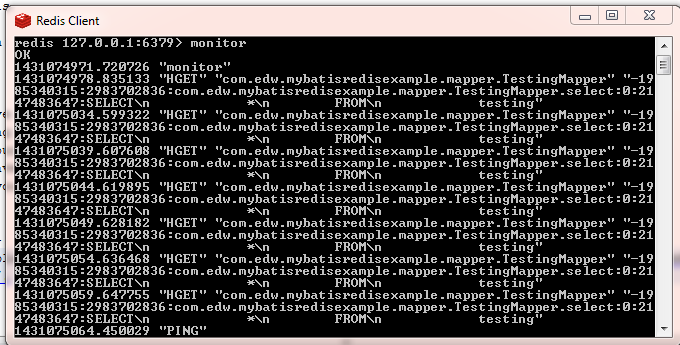
Using monitor command, this is what you will see on your Redis console,
redis console

And on my netbeans console,mybatis redis result log 2

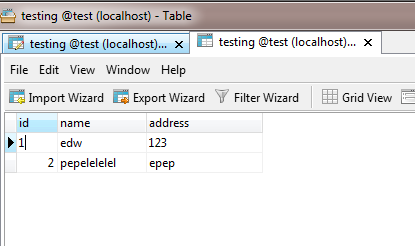
It will keep showing the same value despite i’ve delete and update some values on database directly,
mysql data redis

You can see my complete sourcecode on my github page (https://github.com/edwinkun/MybatisRedisExample).