jboss eap

Creating a Sample Distributable WAR File for JBoss EAP 8.1

JBoss EAP 8.1 supports HTTP session clustering, replicating a session across multiple JBoss EAP instances. This post won’t go deep into configuring the cluster itself, instead it focuses on the application side. Here’s a minimal WAR file you can deploy to an already-clustered JBoss EAP 8.1 environment to verify that session replication is working.

Below is my pom.xml

<?xml version="1.0" encoding="UTF-8"?>
<project xmlns="http://maven.apache.org/POM/4.0.0"
         xmlns:xsi="http://www.w3.org/2001/XMLSchema-instance"
         xsi:schemaLocation="http://maven.apache.org/POM/4.0.0 http://maven.apache.org/xsd/maven-4.0.0.xsd">
    <modelVersion>4.0.0</modelVersion>

    <groupId>com.edw</groupId>
    <artifactId>jboss-eap-distributable</artifactId>
    <version>1.0-SNAPSHOT</version>
    <packaging>war</packaging>

    <properties>
        <maven.compiler.source>21</maven.compiler.source>
        <maven.compiler.target>21</maven.compiler.target>
        <project.build.sourceEncoding>UTF-8</project.build.sourceEncoding>
        <failOnMissingWebXml>false</failOnMissingWebXml>
    </properties>

    <dependencyManagement>
        <dependencies>
            <dependency>
                <groupId>org.jboss.bom</groupId>
                <artifactId>jboss-eap-ee</artifactId>
                <version>8.1.0.GA-redhat-00001</version>
                <type>pom</type>
                <scope>import</scope>
            </dependency>
        </dependencies>
    </dependencyManagement>

    <dependencies>
        <dependency>
            <groupId>jakarta.servlet</groupId>
            <artifactId>jakarta.servlet-api</artifactId>
            <scope>provided</scope>
        </dependency>
    </dependencies>

    <build>
        <finalName>${project.artifactId}</finalName>
        <plugins>
            <plugin>
                <groupId>org.apache.maven.plugins</groupId>
                <artifactId>maven-war-plugin</artifactId>
                <version>3.3.2</version>
            </plugin>
        </plugins>
    </build>

</project>

And web.xml

<?xml version="1.0" encoding="UTF-8"?>
<web-app xmlns="https://jakarta.ee/xml/ns/jakartaee"
         xmlns:xsi="http://www.w3.org/2001/XMLSchema-instance"
         xsi:schemaLocation="https://jakarta.ee/xml/ns/jakartaee https://jakarta.ee/xml/ns/jakartaee/web-app_6_0.xsd"
         version="6.0">

    <display-name>JBoss EAP Distributable Hello World</display-name>

    <distributable/>

</web-app>

The element is what tells EAP this webapp’s sessions are eligible for replication across the cluster.

This is my Java file which i use,

package com.edw;

import jakarta.servlet.ServletException;
import jakarta.servlet.annotation.WebServlet;
import jakarta.servlet.http.HttpServlet;
import jakarta.servlet.http.HttpServletRequest;
import jakarta.servlet.http.HttpServletResponse;
import jakarta.servlet.http.HttpSession;
import java.io.IOException;
import java.io.PrintWriter;
import java.util.Date;

@WebServlet("/hello")
public class HelloWorldServlet extends HttpServlet {

    private static final String COUNT_KEY = "count";

    @Override
    protected void doGet(HttpServletRequest req, HttpServletResponse resp) throws ServletException, IOException {
        HttpSession session = req.getSession(true);
        Integer count = (Integer) session.getAttribute(COUNT_KEY);
        if (count == null) {
            count = 0;
        }
        count++;
        session.setAttribute(COUNT_KEY, count);

        resp.setContentType("text/html");
        PrintWriter out = resp.getWriter();
        out.println("<html><body>");
        out.println("<h1>Hello World!</h1>");
        out.println("<p>This application is cluster-aware (distributable).</p>");
        out.println("<p>Session ID: " + session.getId() + "</p>");
        out.println("<p>Session Count: " + count + "</p>");
        out.println("<p>Server Time: " + new Date() + "</p>");
        out.println("<p>Check your server logs to see session replication in action if running in a cluster.</p>");
        out.println("</body></html>");
    }
}

Once we have deployed this WAR to a cluster, say two EAP instances at 192.168.5.180 and 192.168.5.181, we can confirm the session is being replicated by reusing the same cookie jar across both nodes,

$ curl -kv http://192.168.5.180:8080/jboss-eap-distributable/hello -c cookies.txt -b cookies.txt

$ curl -kv http://192.168.5.181:8080/jboss-eap-distributable/hello -c cookies.txt -b cookies.txt

If clustering is configured correctly, the second request should return the same session ID and an incremented session count, even though it hit a different node. If the session ID changes or the count resets to 1, that’s a sign session replication (or your load balancer’s sticky-session config) isn’t working as expected.

The whole source code for this project can be seen on the below repository,

https://github.com/edwin/jboss-eap-distributable
Creating a Self-Signed Certificate on JBoss EAP 8.1

There are times when we want our JBoss EAP instances to be accessed via a secure connection (HTTPS) instead of plain, insecure HTTP. The fastest way to achieve this in a development or testing environment is to generate and apply a self-signed certificate.

First, let’s create the self-signed certificate. Be sure to replace your-hostname and your-ipaddress with the actual details of your JBoss EAP server:

$ keytool -genkeypair -alias server \ 
	-keyalg RSA -keysize 4096 -sigalg SHA256withRSA \ 
	-validity 3650 -storetype PKCS12 -keystore keystore.p12 \ 
	-storepass password -keypass password \ 
	-dname "CN=jboss,OU=RH,O=Edwin,C=ID" -ext SAN=dns:your-hostname,ip:your-ipaddress

This command generates a keystore.p12 file. Move this file into your JBOSS_HOME/standalone/configuration/ directory.

Next, we need to reference this new keystore in our standalone.xml. Locate the section within the elytron subsystem and update the applicationKS definition to point to your new keystore.p12 file:

<tls>
	<key-stores>
		<key-store name="applicationKS">
			<credential-reference clear-text="password"/>
			<implementation type="PKCS12"/>
			<file path="keystore.p12" relative-to="jboss.server.config.dir"/>
		</key-store>
	</key-stores>
	
	<key-managers>
		<key-manager name="applicationKM" key-store="applicationKS">
			<credential-reference clear-text="password"/>
		</key-manager>
	</key-managers>
	
	<server-ssl-contexts>
		<server-ssl-context name="applicationSSC" key-manager="applicationKM"/>
	</server-ssl-contexts>
</tls>

Start your JBoss EAP and see whether JBoss EAP is leveraging our certificate or not by using a curl command,

$ curl -Ikv https://localhost:8443
* Host localhost:8443 was resolved.
* IPv6: ::1
* IPv4: 127.0.0.1
*   Trying [::1]:8443...
* connect to ::1 port 8443 from ::1 port 40968 failed: Connection refused
*   Trying 127.0.0.1:8443...
* ALPN: curl offers h2,http/1.1
* TLSv1.3 (OUT), TLS handshake, Client hello (1):
* TLSv1.3 (IN), TLS handshake, Server hello (2):
* TLSv1.2 (IN), TLS handshake, Certificate (11):
* TLSv1.2 (IN), TLS handshake, Server key exchange (12):
* TLSv1.2 (IN), TLS handshake, Server finished (14):
* TLSv1.2 (OUT), TLS handshake, Client key exchange (16):
* TLSv1.2 (OUT), TLS change cipher, Change cipher spec (1):
* TLSv1.2 (OUT), TLS handshake, Finished (20):
* TLSv1.2 (IN), TLS handshake, Finished (20):
* SSL connection using TLSv1.2 / ECDHE-RSA-AES256-GCM-SHA384 / x25519 / RSASSA-PSS
* ALPN: server accepted h2
* Server certificate:
*  subject: C=ID; O=Edwin; OU=RH; CN=jboss
*  start date: Jul 27 12:42:48 2026 GMT
*  expire date: Jul 24 12:42:48 2036 GMT
*  issuer: C=ID; O=Edwin; OU=RH; CN=jboss
*  SSL certificate verify result: self-signed certificate (18), continuing anyway.
*   Certificate level 0: Public key type RSA (4096/152 Bits/secBits), signed using sha256WithRSAEncryption
* Connected to localhost (127.0.0.1) port 8443
* using HTTP/2
* [HTTP/2] [1] OPENED stream for https://localhost:8443/
* [HTTP/2] [1] [:method: HEAD]
* [HTTP/2] [1] [:scheme: https]
* [HTTP/2] [1] [:authority: localhost:8443]
* [HTTP/2] [1] [:path: /]
* [HTTP/2] [1] [user-agent: curl/8.15.0]
* [HTTP/2] [1] [accept: */*]
> HEAD / HTTP/2
> Host: localhost:8443
> User-Agent: curl/8.15.0
> Accept: */*
>
* Request completely sent off
< HTTP/2 200
HTTP/2 200
< last-modified: Tue, 29 Jul 2025 01:49:24 GMT
last-modified: Tue, 29 Jul 2025 01:49:24 GMT
< content-length: 1720
content-length: 1720
< content-type: text/html
content-type: text/html
< accept-ranges: bytes
accept-ranges: bytes
< date: Mon, 27 Jul 2026 12:50:15 GMT
date: Mon, 27 Jul 2026 12:50:15 GMT
<

JBoss EAP 8.1 Daily and Size-Based Rolling File Logging

I recently had a requirement to configure JBoss logging to rotate both on a daily basis and by file size. The goal was to generate an output structure that looks like this

server.log.2026-06-24.3
server.log.2026-06-24.2
server.log.2026-06-24.1
server.log

To achieve this, I use the in my JBoss configuration. Here is the XML snippet:

        <subsystem xmlns="urn:jboss:domain:logging:8.0">

			<periodic-size-rotating-file-handler name="DAILY_SIZE_FILE" autoflush="true">
				<formatter>
					<named-formatter name="PATTERN"/>
				</formatter>
				<file relative-to="jboss.server.log.dir" path="server.log"/>
				<suffix value=".yyyy-MM-dd"/>
				<rotate-size value="200m"/>
				<max-backup-index value="30"/>
				<append value="true"/>
			</periodic-size-rotating-file-handler>
			
            <root-logger>
                <level name="INFO"/>
                <handlers>
                    <handler name="DAILY_SIZE_FILE"/>
                </handlers>
            </root-logger>

        </subsystem>

The configuration above perfectly combines both strategies. It performs a daily log rotation, but it will also trigger the creation of a newly indexed log file whenever the current file size exceeds 200MB within that same day.

Monitoring Jboss EAP 8 DataSource and Application’s Query

JBoss EAP provide a convenient way of monitoring its Datasource where it can be monitored within a same JBoss EAP dashboard console. For this sample, i have a very simple Servlet class where it would do a Select query using JBoss EAP Datasource

package com.edw;

import jakarta.servlet.ServletException;
import jakarta.servlet.annotation.WebServlet;
import jakarta.servlet.http.HttpServlet;
import jakarta.servlet.http.HttpServletRequest;
import jakarta.servlet.http.HttpServletResponse;

import javax.naming.InitialContext;
import javax.sql.DataSource;
import java.io.IOException;
import java.sql.*;

@WebServlet(name = "HelloServlet", urlPatterns = "/")
public class HelloServlet extends HttpServlet {

    @Override
    protected void doGet(HttpServletRequest request, HttpServletResponse response)
            throws ServletException, IOException {
        DataSource ds = null;
        Connection connection = null;
        PreparedStatement statement = null;
        ResultSet rs = null;

        try {
            InitialContext ic = new InitialContext();
            ds = (DataSource) ic.lookup("java:/my-db");
            connection = ds.getConnection();

            statement = connection.prepareStatement("SELECT * FROM tb_testing ORDER BY id ASC");
            rs = statement.executeQuery();

            StringBuilder htmlTable = new StringBuilder("<table>");

            ResultSetMetaData metaData = rs.getMetaData();
            int columnCount = metaData.getColumnCount();

            // table header
            htmlTable.append("<thead><tr>");
            for (int i = 1; i <= columnCount; i++) {
                htmlTable.append("<th>").append(metaData.getColumnName(i)).append("</th>");
            }
            htmlTable.append("</tr></thead>");

            // table body
            htmlTable.append("<tbody>");
            while (rs.next()) {
                htmlTable.append("<tr>");
                for (int i = 1; i <= columnCount; i++) {
                    htmlTable.append("<td>").append(rs.getString(i)).append("</td>");
                }
                htmlTable.append("</tr>");
            }
            htmlTable.append("</tbody></table>");

            response.getWriter().write(htmlTable.toString());

        } catch (Exception e) {
            e.printStackTrace();
        } finally {
            // Make sure ResultSet, Statement and Connection are all closed at the end
            if (rs != null) {
                try {
                    rs.close();
                } catch (SQLException e) {
                    e.printStackTrace();
                }
            }
            if (statement != null) {
                try {
                    statement.close();
                } catch (SQLException e) {
                    e.printStackTrace();
                }
            }
            if (connection != null) {
                try {
                    connection.close();
                } catch (SQLException e) {
                    e.printStackTrace();
                }
            }
        }
    }
}

Which is connect to a mysql table,

create table test_db.tb_testing
(
    id       int auto_increment
        primary key,
    username varchar(60) null
);

and we have this datasource configuration on our JBoss EAP 8, where we are activating Statistics and SQL Statements spying feature

<datasource jndi-name="java:/my-db" pool-name="my-db" 
	spy="true" 
	statistics-enabled="true">
	<connection-url>jdbc:mysql://localhost:3306/test_db</connection-url>
	<driver-class>com.mysql.cj.jdbc.Driver</driver-class>
	<driver>mysql-connector-j-9.3.0.jar</driver>
	<security>
		<user-name>root</user-name>
		<password>password</password>
	</security>
	<validation>
		<valid-connection-checker class-name="org.jboss.jca.adapters.jdbc.extensions.mysql.MySQLValidConnectionChecker"/>
		<check-valid-connection-sql>SELECT 1</check-valid-connection-sql>
		<validate-on-match>true</validate-on-match>
		<background-validation>false</background-validation>
		<exception-sorter class-name="org.jboss.jca.adapters.jdbc.extensions.mysql.MySQLExceptionSorter"/>
	</validation>
	<statement>
		<track-statements>true</track-statements>
		<prepared-statement-cache-size>50</prepared-statement-cache-size>
	</statement>
</datasource>

And put this logging configuration to make sure that all the SQL statements are properly printed on log file,

<logger category="jboss.jdbc.spy">
	<level name="DEBUG"/>
	<handlers>
		<handler name="CONSOLE"/>
	</handlers>
</logger>

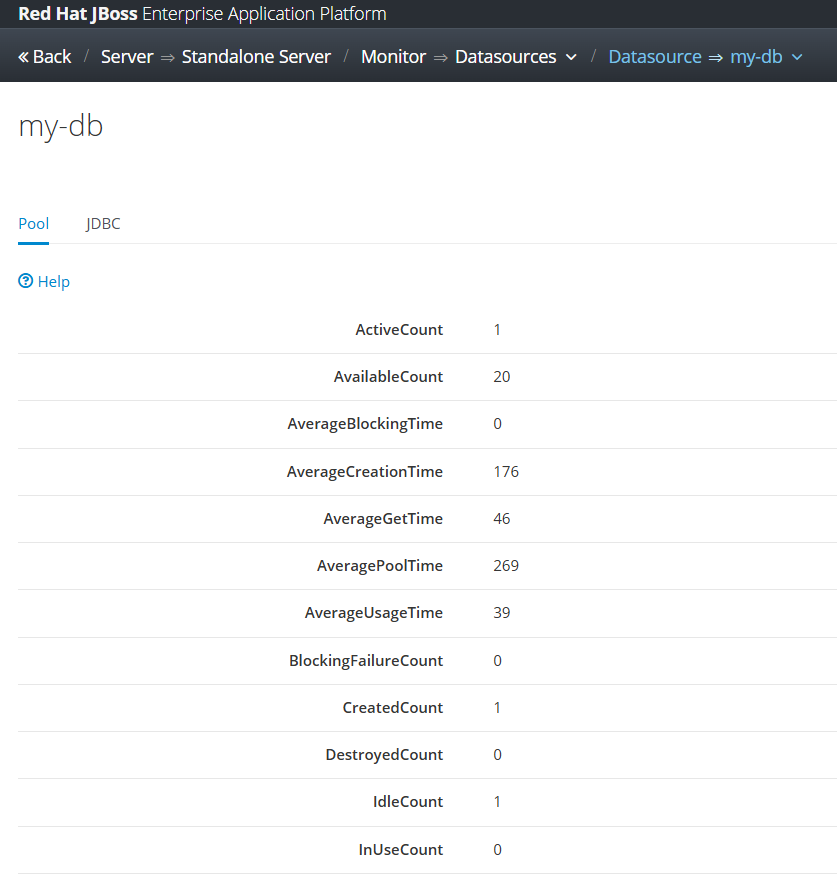
Deploy our custom application on JBoss EAP, do some transactions, and we can see that Datasource statistics on JBoss admin console,

and we can see our detail SQL statements on server.log file, for example is based on the below log we can see that our query took around 70ms to be executed


2025-10-23 13:21:27,852 DEBUG [jboss.jdbc.spy] (default task-1) java:/my-db [DataSource] getConnection()
2025-10-23 13:21:27,853 DEBUG [jboss.jdbc.spy] (default task-1) java:/my-db [Connection] prepareStatement(SELECT * FROM tb_testing ORDER BY id ASC)
2025-10-23 13:21:27,854 DEBUG [jboss.jdbc.spy] (default task-1) java:/my-db [PreparedStatement] executeQuery()
........ ........ ........ 
2025-10-23 13:21:27,929 DEBUG [jboss.jdbc.spy] (default task-1) java:/my-db [PreparedStatement] isClosed()
2025-10-23 13:21:27,929 DEBUG [jboss.jdbc.spy] (default task-1) java:/my-db [PreparedStatement] close()
2025-10-23 13:21:27,929 DEBUG [jboss.jdbc.spy] (default task-1) java:/my-db [Connection] isClosed()
2025-10-23 13:21:27,929 DEBUG [jboss.jdbc.spy] (default task-1) java:/my-db [Connection] close()

Code for this project can be accessed on the below repository,

https://github.com/edwin/hello-world-servlet-and-jboss-eap-connection-pool

A Round-Robin Load Balancer using JBoss EAP 8.1

Besides hosting applications that serve business logic, JBoss EAP 8.1 can also provide load-balancing capabilities. This is especially useful when JBoss EAP is placed as a reverse proxy in front of other systems.

Conceptually, it would look something like the image below. To keep things simple, every application involved will be located on the same server:

Let’s start by editing JBoss EAP’s standalone.xml and adding two new hosts behind it

<?xml version="1.0" encoding="UTF-8"?>

<server xmlns="urn:jboss:domain:20.0">
    
    <profile>
        <subsystem xmlns="urn:jboss:domain:undertow:14.0"
                   default-virtual-host="default-host"
                   default-servlet-container="default"
                   default-server="default-server"
                   statistics-enabled="${wildfly.undertow.statistics-enabled:${wildfly.statistics-enabled:false}}"
                   default-security-domain="other">
            
            <byte-buffer-pool name="default"/>
            <buffer-cache name="default"/>
            
            <server name="default-server">
                <http-listener name="default" socket-binding="http" redirect-socket="https" enable-http2="true"/>
                <https-listener name="https" socket-binding="https" ssl-context="applicationSSC" enable-http2="true"/>
                
                <host name="default-host" alias="localhost">
                    <location name="/" handler="proxy"/>
                    <http-invoker http-authentication-factory="application-http-authentication"/>
                </host>
            </server>
            
            <servlet-container name="default">
                <jsp-config/>
                <websockets/>
            </servlet-container>
            
            <handlers>
                <reverse-proxy name="proxy" connection-idle-timeout="60">
                    <host name="backend-host1" outbound-socket-binding="backend-host1" scheme="http" instance-id="backend-host1" path="/"/>
                    <host name="backend-host2" outbound-socket-binding="backend-host2" scheme="http" instance-id="backend-host2" path="/"/>
                </reverse-proxy>
            </handlers>
            
            <application-security-domains>
                <application-security-domain name="other" security-domain="ApplicationDomain"/>
            </application-security-domains>
        </subsystem>
    </profile>
    
    <socket-binding-group name="standard-sockets" default-interface="public" port-offset="${jboss.socket.binding.port-offset:0}">
        <outbound-socket-binding name="backend-host1">
            <remote-destination host="127.0.0.1" port="8081"/>
        </outbound-socket-binding>
        
        <outbound-socket-binding name="backend-host2">
            <remote-destination host="127.0.0.1" port="8082"/>
        </outbound-socket-binding>
    </socket-binding-group>
</server>

By default, the load balancing in JBoss EAP uses the round-robin strategy. This means the response alternates between each backend host with every request. For example,

$ curl -kv http://localhost:8080/
*   Trying [::1]:8080...
*   Trying 127.0.0.1:8080...
* Connected to localhost (127.0.0.1) port 8080
> GET / HTTP/1.1
> Host: localhost:8080
> User-Agent: curl/8.4.0
> Accept: */*
>
< HTTP/1.1 200 OK
< Connection: keep-alive
< Content-Type: application/json
< content-length: 23
< Date: Mon, 18 Aug 2025 07:45:21 GMT
<
* Connection #0 to host localhost left intact
{"hello":"from host 1"}                                       

$ curl -kv http://localhost:8080/
*   Trying [::1]:8080...
*   Trying 127.0.0.1:8080...
* Connected to localhost (127.0.0.1) port 8080
> GET / HTTP/1.1
> Host: localhost:8080
> User-Agent: curl/8.4.0
> Accept: */*
>
< HTTP/1.1 200 OK
< Connection: keep-alive
< transfer-encoding: chunked
< Content-Type: application/json
< Date: Mon, 18 Aug 2025 07:45:19 GMT
<
* Connection #0 to host localhost left intact
{"hello":"from host 2"}                                                                            ?

As shown above, the responses alternate between host 1 and host 2.

Conclusion
With just a few configuration changes, JBoss EAP 8.1 can be used as both a reverse proxy and a load balancer for HTTP requests. Its default round-robin strategy makes it straightforward to distribute traffic across multiple backends.