JBoss EAP provide a convenient way of monitoring its Datasource where it can be monitored within a same JBoss EAP dashboard console. For this sample, i have a very simple Servlet class where it would do a Select query using JBoss EAP Datasource
package com.edw;

import jakarta.servlet.ServletException;
import jakarta.servlet.annotation.WebServlet;
import jakarta.servlet.http.HttpServlet;
import jakarta.servlet.http.HttpServletRequest;
import jakarta.servlet.http.HttpServletResponse;

import javax.naming.InitialContext;
import javax.sql.DataSource;
import java.io.IOException;
import java.sql.*;

@WebServlet(name = "HelloServlet", urlPatterns = "/")
public class HelloServlet extends HttpServlet {

    @Override
    protected void doGet(HttpServletRequest request, HttpServletResponse response)
            throws ServletException, IOException {
        DataSource ds = null;
        Connection connection = null;
        PreparedStatement statement = null;
        ResultSet rs = null;

        try {
            InitialContext ic = new InitialContext();
            ds = (DataSource) ic.lookup("java:/my-db");
            connection = ds.getConnection();

            statement = connection.prepareStatement("SELECT * FROM tb_testing ORDER BY id ASC");
            rs = statement.executeQuery();

            StringBuilder htmlTable = new StringBuilder("<table>");

            ResultSetMetaData metaData = rs.getMetaData();
            int columnCount = metaData.getColumnCount();

            // table header
            htmlTable.append("<thead><tr>");
            for (int i = 1; i <= columnCount; i++) {
                htmlTable.append("<th>").append(metaData.getColumnName(i)).append("</th>");
            }
            htmlTable.append("</tr></thead>");

            // table body
            htmlTable.append("<tbody>");
            while (rs.next()) {
                htmlTable.append("<tr>");
                for (int i = 1; i <= columnCount; i++) {
                    htmlTable.append("<td>").append(rs.getString(i)).append("</td>");
                }
                htmlTable.append("</tr>");
            }
            htmlTable.append("</tbody></table>");

            response.getWriter().write(htmlTable.toString());

        } catch (Exception e) {
            e.printStackTrace();
        } finally {
            // Make sure ResultSet, Statement and Connection are all closed at the end
            if (rs != null) {
                try {
                    rs.close();
                } catch (SQLException e) {
                    e.printStackTrace();
                }
            }
            if (statement != null) {
                try {
                    statement.close();
                } catch (SQLException e) {
                    e.printStackTrace();
                }
            }
            if (connection != null) {
                try {
                    connection.close();
                } catch (SQLException e) {
                    e.printStackTrace();
                }
            }
        }
    }
}
Which is connect to a mysql table,
create table test_db.tb_testing
(
    id       int auto_increment
        primary key,
    username varchar(60) null
);
and we have this datasource configuration on our JBoss EAP 8, where we are activating Statistics and SQL Statements spying feature
<datasource jndi-name="java:/my-db" pool-name="my-db"
	spy="true"
	statistics-enabled="true">
	<connection-url>jdbc:mysql://localhost:3306/test_db</connection-url>
	<driver-class>com.mysql.cj.jdbc.Driver</driver-class>
	<driver>mysql-connector-j-9.3.0.jar</driver>
	<security>
		<user-name>root</user-name>
		<password>password</password>
	</security>
	<validation>
		<valid-connection-checker class-name="org.jboss.jca.adapters.jdbc.extensions.mysql.MySQLValidConnectionChecker"/>
		<check-valid-connection-sql>SELECT 1</check-valid-connection-sql>
		<validate-on-match>true</validate-on-match>
		<background-validation>false</background-validation>
		<exception-sorter class-name="org.jboss.jca.adapters.jdbc.extensions.mysql.MySQLExceptionSorter"/>
	</validation>
	<statement>
		<track-statements>true</track-statements>
		<prepared-statement-cache-size>50</prepared-statement-cache-size>
	</statement>
</datasource>
And put this logging configuration to make sure that all the SQL statements are properly printed on log file,
<logger category="jboss.jdbc.spy">
	<level name="DEBUG"/>
	<handlers>
		<handler name="CONSOLE"/>
	</handlers>
</logger>
Deploy our custom application on JBoss EAP, do some transactions, and we can see that Datasource statistics on JBoss admin console,
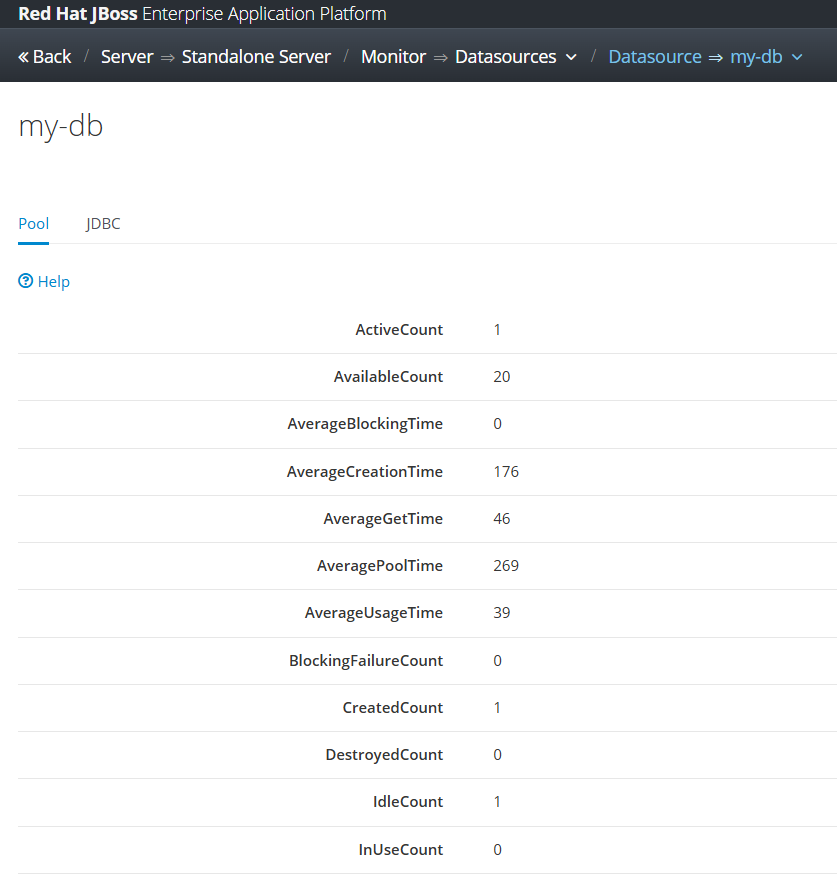

and we can see our detail SQL statements on server.log file, for example is based on the below log we can see that our query took around 70ms to be executed
2025-10-23 13:21:27,852 DEBUG [jboss.jdbc.spy] (default task-1) java:/my-db [DataSource] getConnection()
2025-10-23 13:21:27,853 DEBUG [jboss.jdbc.spy] (default task-1) java:/my-db [Connection] prepareStatement(SELECT * FROM tb_testing ORDER BY id ASC)
2025-10-23 13:21:27,854 DEBUG [jboss.jdbc.spy] (default task-1) java:/my-db [PreparedStatement] executeQuery()
........ ........ ........
2025-10-23 13:21:27,929 DEBUG [jboss.jdbc.spy] (default task-1) java:/my-db [PreparedStatement] isClosed()
2025-10-23 13:21:27,929 DEBUG [jboss.jdbc.spy] (default task-1) java:/my-db [PreparedStatement] close()
2025-10-23 13:21:27,929 DEBUG [jboss.jdbc.spy] (default task-1) java:/my-db [Connection] isClosed()
2025-10-23 13:21:27,929 DEBUG [jboss.jdbc.spy] (default task-1) java:/my-db [Connection] close()
Code for this project can be accessed on the below repository,
https://github.com/edwin/hello-world-servlet-and-jboss-eap-connection-pool