spring

Deploying Red Hat DataGrid 8 using Operator to Openshift 4 and Setting Up a Persistent Cache

Red Hat Data Grid, or its Open Source version which is Infinispan, is a good distributed cache and key-value NoSQL data store software developed by Red Hat which can be used as an embedded library or as a standalone server. It even can be deployed easily to a container management platform like Openshift by using Operator or Helm chart. And for this example, we are trying to deploy Red Hat Data Grid 8.4 to Openshift by using Operator.

First lets start by creating a namespace dedicated for Data Grid

$ oc new-project datagrid-ns

And create two new YAML file, one is datagrid-operator.yaml

apiVersion: operators.coreos.com/v1
kind: OperatorGroup
metadata:
 name: datagrid
 namespace: datagrid-ns

and another one is datagrid-subscription.yaml

apiVersion: operators.coreos.com/v1alpha1
kind: Subscription
metadata:
 name: datagrid-operator
 namespace: datagrid-ns
spec:
 channel: 8.4.x
 installPlanApproval: Manual
 name: datagrid
 source: redhat-operators
 sourceNamespace: openshift-marketplace

apply them,

$ oc apply -f datagrid-operator.yaml
$ oc apply -f datagrid-subscription.yaml

it would generate a new datagrid item on “Installed Operators” page,

select “Upgrade” and “Approve” to install Data Grid Operator

a successful installation is going to looks like this,

next is creating a new Infinispan cluster, this is for sample purpose only therefore we disable TLS certificate to connect with a very minimum CPU and memory

kind: Infinispan
apiVersion: infinispan.org/v1
metadata:
  name: datagrid-cluster
  namespace: datagrid-ns
spec:
  replicas: 1
  security:
    endpointEncryption:
      type: None
  container:
    cpu: "500m:100m"
    memory: "1Gi:500Mi"

a successful configuration it would generate pods like this,

next is to expose its endpoint so it can be accessible from external

$ oc create route edge --service datagrid-cluster --hostname=datagrid.apps-crc.testing

the result is looks like this,

we can login by using credentials which is stored in Openshift’s Secret. If we are able to successfully login, we can see below Data Grid dashboard

Now lets focus on the Java part. For this, we are using Spring Boot and Java 17 which is defined in our pom.xml file

<?xml version="1.0" encoding="UTF-8"?>
<project xmlns="http://maven.apache.org/POM/4.0.0"
         xmlns:xsi="http://www.w3.org/2001/XMLSchema-instance"
         xsi:schemaLocation="http://maven.apache.org/POM/4.0.0 http://maven.apache.org/xsd/maven-4.0.0.xsd">
    <modelVersion>4.0.0</modelVersion>

    <groupId>com.edw</groupId>
    <artifactId>spring-boot-with-datagrid-operator</artifactId>
    <version>1.0-SNAPSHOT</version>

    <properties>
        <maven.compiler.source>17</maven.compiler.source>
        <maven.compiler.target>17</maven.compiler.target>
        <project.build.sourceEncoding>UTF-8</project.build.sourceEncoding>

        <version.infinispan>14.0.2.Final</version.infinispan>
        <version.protostream>4.6.2.Final</version.protostream>
        <version.spring.boot3>3.0.4</version.spring.boot3>

        <start-class>com.edw.Main</start-class>
    </properties>

    <dependencyManagement>
        <dependencies>
            <dependency>
                <groupId>org.infinispan</groupId>
                <artifactId>infinispan-bom</artifactId>
                <version>${version.infinispan}</version>
                <type>pom</type>
                <scope>import</scope>
            </dependency>
            <dependency>
                <groupId>org.springframework.boot</groupId>
                <artifactId>spring-boot-starter-parent</artifactId>
                <version>${version.spring.boot3}</version>
                <type>pom</type>
                <scope>import</scope>
            </dependency>
        </dependencies>
    </dependencyManagement>


    <dependencies>
        <!-- Spring Boot -->
        <dependency>
            <groupId>org.springframework.boot</groupId>
            <artifactId>spring-boot-starter-web</artifactId>
        </dependency>

        <!-- infinispan -->
        <dependency>
            <groupId>org.infinispan</groupId>
            <artifactId>infinispan-spring-boot-starter-remote</artifactId>
        </dependency>
        <dependency>
            <groupId>org.infinispan</groupId>
            <artifactId>infinispan-jboss-marshalling</artifactId>
        </dependency>

        <dependency>
            <groupId>org.infinispan</groupId>
            <artifactId>infinispan-remote-query-client</artifactId>
        </dependency>
        <dependency>
            <groupId>org.infinispan</groupId>
            <artifactId>infinispan-client-hotrod</artifactId>
        </dependency>
        <dependency>
            <groupId>org.infinispan</groupId>
            <artifactId>infinispan-api</artifactId>
        </dependency>

        <dependency>
            <groupId>org.infinispan</groupId>
            <artifactId>infinispan-spring-boot-starter-embedded</artifactId>
        </dependency>

        <dependency>
            <groupId>org.infinispan</groupId>
            <artifactId>infinispan-client-hotrod</artifactId>
        </dependency>
        <dependency>
            <groupId>javax.transaction</groupId>
            <artifactId>jta</artifactId>
            <version>1.1</version>
        </dependency>

        <dependency>
            <groupId>io.micrometer</groupId>
            <artifactId>micrometer-registry-prometheus</artifactId>
        </dependency>

    </dependencies>

    <build>
        <plugins>
            <plugin>
                <groupId>org.springframework.boot</groupId>
                <artifactId>spring-boot-maven-plugin</artifactId>
                <version>${version.spring.boot3}</version>
                <configuration>
                    <layout>JAR</layout>
                </configuration>
                <executions>
                    <execution>
                        <goals>
                            <goal>repackage</goal>
                        </goals>
                    </execution>
                </executions>
            </plugin>
        </plugins>
    </build>

</project>

a Java file for configuration,

package com.edw.configuration;

import org.infinispan.client.hotrod.RemoteCacheManager;
import org.infinispan.client.hotrod.configuration.ClientIntelligence;
import org.infinispan.client.hotrod.configuration.ConfigurationBuilder;
import org.infinispan.jboss.marshalling.commons.GenericJBossMarshaller;
import org.springframework.context.annotation.Bean;
import org.springframework.context.annotation.Configuration;

@Configuration
public class InfinispanConfiguration {
    @Bean
    public RemoteCacheManager remoteCacheManager() {
        return new RemoteCacheManager(
                new ConfigurationBuilder()
                        .addServers("datagrid-cluster.datagrid-ns.svc.cluster.local:11222")
                        .security().authentication().username("developer").password("password")
                        .clientIntelligence(ClientIntelligence.HASH_DISTRIBUTION_AWARE)
                        .marshaller(new GenericJBossMarshaller())
                        .addJavaSerialWhiteList(".*")
                        .build());
    }
}

And this is perhaps most important class where we can define our caches. For this example, we are trying to create two different caches where one cache is persistent and another one is not.

package com.edw.helper;

import org.infinispan.client.hotrod.RemoteCache;
import org.infinispan.client.hotrod.RemoteCacheManager;
import org.infinispan.commons.configuration.XMLStringConfiguration;
import org.slf4j.Logger;
import org.slf4j.LoggerFactory;
import org.springframework.beans.factory.annotation.Autowired;
import org.springframework.stereotype.Service;

import java.util.HashMap;
import java.util.UUID;

@Service
public class CacheHelper {

    private RemoteCacheManager cacheManager;

    @Autowired
    public CacheHelper (RemoteCacheManager cacheManager) {
        this.cacheManager = cacheManager;
    }

    private Logger logger = LoggerFactory.getLogger(this.getClass());

    public void populate() {
        // build cache without persistence
        RemoteCache cacheWithoutPersistence = cacheManager.administration().getOrCreateCache("cache-without-persistence",
                new XMLStringConfiguration("<distributed-cache name=\"cache-without-persistence\" mode=\"ASYNC\">\n" +
                        "\t<encoding media-type=\"application/x-jboss-marshalling\" />\n" +
                        "</distributed-cache>")
        );
        for (int i = 0; i < 50; i++) {
            cacheWithoutPersistence.put("key"+i, UUID.randomUUID().toString());
        }

        // build cache with persistence
        RemoteCache cacheWithPersistence = cacheManager.administration().getOrCreateCache("cache-with-persistence",
                new XMLStringConfiguration("<distributed-cache name=\"cache-with-persistence\" mode=\"ASYNC\">\n" +
                        "\t<encoding media-type=\"application/x-jboss-marshalling\" />\n" +
                        "\t<persistence passivation=\"false\">\n" +
                        "\t\t<file-store>\n" +
                        "\t\t  <index path=\"/opt/infinispan/server/data\" />\n" +
                        "\t\t  <data path=\"/opt/infinispan/server/data\" />\n" +
                        "\t\t</file-store>\n" +
                        "\t</persistence>\n" +
                        "</distributed-cache>")
        );
        for (int i = 0; i < 50; i++) {
            cacheWithPersistence.put("key"+i, UUID.randomUUID().toString());
        }
    }

    public HashMap getCacheWithoutPersistence() {
        RemoteCache<String, String> cache = cacheManager.getCache("cache-without-persistence");

        HashMap hashMap = new HashMap();
        for (Object key : cache.keySet()) {
            hashMap.put(key, cache.get(key));
        }
        return hashMap;
    }

    public HashMap getCacheWithPersistence() {
        RemoteCache<String, String> cache = cacheManager.getCache("cache-with-persistence");

        HashMap hashMap = new HashMap();
        for (Object key : cache.keySet()) {
            hashMap.put(key, cache.get(key));
        }
        return hashMap;
    }
}

with one controller file,

package com.edw.controller;

import com.edw.helper.CacheHelper;
import org.springframework.beans.factory.annotation.Autowired;
import org.springframework.web.bind.annotation.GetMapping;
import org.springframework.web.bind.annotation.RestController;

import java.util.HashMap;

@RestController
public class IndexController {

    private CacheHelper cacheHelper;

    @Autowired
    public IndexController (CacheHelper cacheHelper) {
        this.cacheHelper = cacheHelper;
    }

    @GetMapping(path = "/cache-without-persistence")
    public HashMap cacheWithoutPersistence() {
        return cacheHelper.getCacheWithoutPersistence();
    }

    @GetMapping(path = "/cache-with-persistence")
    public HashMap cacheWithPersistence() {
        return cacheHelper.getCacheWithPersistence();
    }

    @GetMapping(path = "/populate")
    public HashMap populate() {
        cacheHelper.populate();
        return new HashMap() {{
            put("status", "success");
        }};
    }
}

After that we can build and deploy our Java application to Openshift,

Trigger populate endpoint from our Spring Boot to generate Caches and its contents,

$ curl -kv http://localhost:8080/populate
*   Trying ::1:8080...
* Connected to localhost (::1) port 8080 (#0)
> GET /populate HTTP/1.1
> Host: localhost:8080
> User-Agent: curl/7.76.1
> Accept: */*
> 
* Mark bundle as not supporting multiuse
< HTTP/1.1 200 
< Content-Type: application/json
< Transfer-Encoding: chunked
< Date: Sat, 14 Sep 2024 17:22:03 GMT
< 
* Connection #0 to host localhost left intact
{"status":"success"}

We can check the content of each Caches stores,

Now lets try to delete Data Grid pod and see whether all the cache data is gone or not,

$ oc delete po --grace-period=0 --force datagrid-cluster-0

We can see that cache-with-persistence Cache Store still having its data

while cache-without-persistence Cache Store is not having any data at all

Source code for this tutorial can be found here,

https://github.com/edwin/spring-boot-with-datagrid-operator

Distributed Tracing with Spring Boot, Infinispan, and Jaeger

Distributed Tracing with Spring Boot, Infinispan, and Jaeger

Infinispan 14, or Datagrid 8.4, has the capability to implement a distributed tracing which will make distributed tracing easier and providing a better end-to-end view.

The concept of distributed tracing perhaps looks like this,

For this example, we are going to use Spring Boot 3 and OpenTelemetry for client side, and Jaeger all-in-one on for monitoring. So lets start with a simple pom.xml

<?xml version="1.0" encoding="UTF-8"?>
<project xmlns="http://maven.apache.org/POM/4.0.0"
         xmlns:xsi="http://www.w3.org/2001/XMLSchema-instance"
         xsi:schemaLocation="http://maven.apache.org/POM/4.0.0 http://maven.apache.org/xsd/maven-4.0.0.xsd">
    <modelVersion>4.0.0</modelVersion>

    <groupId>com.edw</groupId>
    <artifactId>spring-boot-infinispan-and-jaeger</artifactId>
    <version>1.0</version>

    <name>Spring Boot 3 with OpenTelemetry and Jaeger</name>
    <description>Spring Boot testing app with opentelemetry</description>

    <parent>
        <groupId>org.springframework.boot</groupId>
        <artifactId>spring-boot-starter-parent</artifactId>
        <version>3.0.5</version>
        <relativePath/> <!-- lookup parent from repository -->
    </parent>

    <properties>
        <maven.compiler.source>17</maven.compiler.source>
        <maven.compiler.target>17</maven.compiler.target>
        <project.build.sourceEncoding>UTF-8</project.build.sourceEncoding>

        <version.infinispan>14.0.2.Final</version.infinispan>
        <version.protostream>4.6.2.Final</version.protostream>
    </properties>

    <dependencyManagement>
        <dependencies>
            <dependency>
                <groupId>org.infinispan</groupId>
                <artifactId>infinispan-bom</artifactId>
                <version>${version.infinispan}</version>
                <type>pom</type>
                <scope>import</scope>
            </dependency>
        </dependencies>
    </dependencyManagement>

    <dependencies>
        <dependency>
            <groupId>org.springframework.boot</groupId>
            <artifactId>spring-boot-starter-actuator</artifactId>
        </dependency>
        <dependency>
            <groupId>org.springframework.boot</groupId>
            <artifactId>spring-boot-starter-web</artifactId>
        </dependency>

        <dependency>
            <groupId>org.springframework.boot</groupId>
            <artifactId>spring-boot-starter-test</artifactId>
            <scope>test</scope>
        </dependency>

        <!-- tracing -->
        <dependency>
            <groupId>io.micrometer</groupId>
            <artifactId>micrometer-tracing-bridge-otel</artifactId>
        </dependency>
        <dependency>
            <groupId>io.opentelemetry</groupId>
            <artifactId>opentelemetry-exporter-otlp</artifactId>
        </dependency>

        <!-- infinispan -->
        <dependency>
            <groupId>org.infinispan</groupId>
            <artifactId>infinispan-spring-boot-starter-remote</artifactId>
        </dependency>
        <dependency>
            <groupId>org.infinispan</groupId>
            <artifactId>infinispan-query</artifactId>
        </dependency>
        <dependency>
            <groupId>org.infinispan</groupId>
            <artifactId>infinispan-remote-query-client</artifactId>
        </dependency>
        <dependency>
            <groupId>org.infinispan</groupId>
            <artifactId>infinispan-api</artifactId>
        </dependency>

        <dependency>
            <groupId>org.infinispan</groupId>
            <artifactId>infinispan-spring-boot-starter-embedded</artifactId>
        </dependency>

        <dependency>
            <groupId>org.infinispan.protostream</groupId>
            <artifactId>protostream-processor</artifactId>
            <scope>provided</scope>
        </dependency>
        <dependency>
            <groupId>org.infinispan</groupId>
            <artifactId>infinispan-client-hotrod</artifactId>
        </dependency>
        <dependency>
            <groupId>javax.transaction</groupId>
            <artifactId>jta</artifactId>
            <version>1.1</version>
        </dependency>

    </dependencies>

    <build>
        <plugins>
            <plugin>
                <groupId>org.springframework.boot</groupId>
                <artifactId>spring-boot-maven-plugin</artifactId>
            </plugin>
        </plugins>
    </build>

</project>

Next is some Java classes,

@SpringBootApplication
public class Main {
    public static void main(String[] args) {
        SpringApplication.run(Main.class, args);
    }
}
@RestController
public class IndexController {

    private static final Logger logger = LoggerFactory.getLogger(IndexController.class);

    @Autowired
    private IndexService indexService;

    @GetMapping("/")
    public ResponseEntity path1() {

        logger.info("request at / ");
        indexService.createData();
        return ResponseEntity.ok().build();
    }

}
@Service
public class IndexService {

    @Autowired
    private RemoteCacheManager cacheManager;

    @Autowired
    private Tracer tracer;

    private Logger logger = LoggerFactory.getLogger(this.getClass());

    public void createData() {
        logger.info("starting ====================");

        // starting span
        Span span = tracer.spanBuilder()
                .name("cache-add")
                .tag("cache", "balance")
                .kind(Span.Kind.CLIENT).start();

        final RemoteCache cache = cacheManager.getCache("balance");

        // generate cache key
        String key = UUID.randomUUID().toString();

        // put it
        cache.put(key, Math.random());

        // get it -- somehow this is not monitored in Jaeger
        Double value = Double.parseDouble((String)cache.get(key));

        // and remove it
        cache.remove(key);

        span.end();

        logger.info("done processing {} - {} ====================", key, value);
    }
}
@Configuration
public class OtlpConfiguration {

    @Bean
    public OtlpHttpSpanExporter otlpHttpSpanExporter() {
        return OtlpHttpSpanExporter.builder()
                .build();
    }

}
@Configuration
public class InfinispanConfiguration {
    @Bean
    public RemoteCacheManager remoteCacheManager() {
        return new RemoteCacheManager(
                new org.infinispan.client.hotrod.configuration.ConfigurationBuilder()
                        .addServers("127.0.0.1:11222")
                        .security().authentication().username("admin").password("password")
                        .clientIntelligence(ClientIntelligence.HASH_DISTRIBUTION_AWARE)
                        .marshaller(ProtoStreamMarshaller.class)
                        .build());
    }
}
server.port=8080
spring.application.name=app-testing

management.tracing.sampling.probability=1.0
management.otlp.metrics.export.url=http://localhost:4318/v1/traces
management.otlp.metrics.export.step=5s

logging.pattern.level=%5p [${spring.application.name:},%X{traceId:-},%X{spanId:-}]

Once we have all Java classes ready, we’ll continue with setting Jaeger server up. We’ll need

docker run -d \ 
        -e COLLECTOR_OTLP_ENABLED=true \ 
        -p 16686:16686 \ 
        -p 4317:4317 \
        -p 4318:4318 \ 
        jaegertracing/all-in-one:1.40

Next is setting up our Infinispan cache,

<distributed-cache name="balance" mode="SYNC" remote-timeout="30000" statistics="true">
    <encoding media-type="text/plain"/>
    <locking concurrency-level="1000" isolation="READ_COMMITTED" acquire-timeout="60000" striping="false"/>
    <transaction mode="NON_XA" auto-commit="true" stop-timeout="30000" locking="PESSIMISTIC" reaper-interval="30000" complete-timeout="30000" notifications="true"/>
    <state-transfer timeout="30000"/>
</distributed-cache>

And dont forget to put this Java runtime variables on our Infinispan,

JAVA_OPTS="$JAVA_OPTS -Dinfinispan.tracing.enabled=true -Dotel.service.name=infinispan-server
            -Dotel.exporter.otlp.endpoint=http://localhost:4317 -Dotel.metrics.exporter=none"

We can run this app, and see the result on our Jaeger dashboard.

And this is the detail traces within one same request,

Code for this article can be found on below Github link

https://github.com/edwin/spring-boot-infinispan-and-jaeger

Have fun.

Using Settings.xml to handle Multiple Mirrors in Maven

The goal of having an internal artifactory is to host library for maven, so everytime we do java build, we dont need to pull the whole libraries from internet. Usally we have something like Nexus or JFrog for this.

But the thing is, sometimes we already have a working application that is running well when pulling libraries from online before, and now we need to change it into pointing into our artifact repository without have to change the maven’s pom.xml configuration.

for example, we have some pom.xml file which is pointing to a specific online repository like the sample below,

<?xml version="1.0" encoding="UTF-8"?>
<project xmlns="http://maven.apache.org/POM/4.0.0" xmlns:xsi="http://www.w3.org/2001/XMLSchema-instance"
	xsi:schemaLocation="http://maven.apache.org/POM/4.0.0 https://maven.apache.org/xsd/maven-4.0.0.xsd">
	<modelVersion>4.0.0</modelVersion>
	<parent>
		<groupId>org.springframework.boot</groupId>
		<artifactId>spring-boot-starter-parent</artifactId>
		<version>2.7.4</version>
		<relativePath /> 
	</parent>
	<groupId>com.something</groupId>
	<artifactId>some-java-app</artifactId>
	<version>0.0.1-SNAPSHOT</version>
	<name>some-java-app</name>
	<description>some java app</description>
	<properties>
		<java.version>17</java.version>
		<tomcat.version>9.0.68</tomcat.version>
	</properties>
	<repositories>
		<repository>
			<id>splunk-releases</id>
			<name>Splunk Releases</name>
			<url>https://splunk.jfrog.io/splunk/ext-releases-local</url>
		</repository>
		<repository>
			<id>spring-releases</id>
			<name>Spring Releases</name>
			<url>https://repo.spring.io/libs-release</url>
		</repository>
	</repositories>
	...
</project>

We can see that application is connecting to multiple maven repositories, such as Splunk JFrog and Spring Repository, other than the default Maven Central.

For this approach, we can create a custom settings.xml and implement a multiple mirror approach for handling to this problem. The result is looks like below xml,

<?xml version="1.0" encoding="UTF-8"?>
<settings xmlns="http://maven.apache.org/SETTINGS/1.0.0"
          xmlns:xsi="http://www.w3.org/2001/XMLSchema-instance"
          xsi:schemaLocation="http://maven.apache.org/SETTINGS/1.0.0 http://maven.apache.org/xsd/settings-1.0.0.xsd">
    <servers>
        <server>
            <id>default</id>
            <username>username</username>
            <password>password</password>
        </server>
        <server>
            <id>splunk-releases</id>
            <username>username</username>
            <password>password</password>
        </server>
		<server>
            <id>spring-releases</id>
            <username>username</username>
            <password>password</password>
        </server>
    </servers>

    <mirrors>
        <mirror>
            <id>default</id>
            <name>Default Repository</name>
            <url>https://my-artifact-repository/default/maven2/</url>
            <mirrorOf>*, !splunk-releases, !spring-releases</mirrorOf>
        </mirror>
        <mirror>
            <id>splunk-releases</id>
            <name>Splunk Local Repository</name>
            <url>https://my-artifact-repository/splunk/maven2/</url>
            <mirrorOf>splunk-releases</mirrorOf>
        </mirror>
		<mirror>
            <id>spring-releases</id>
            <name>Spring Local Repository</name>
            <url>https://my-artifact-repository/spring/maven2/</url>
            <mirrorOf>spring-releases</mirrorOf>
        </mirror>
    </mirrors>
</settings>

As we can see on above, we have multiple mirror of repositories with each pointing to different local artifact repository endpoints. We can run maven build with having this configuration as parameter.

$ mvn clean package -s settings.xml

[Spring Boot] Create application.properties Default Value from Environment Variables

Usually we have below code on application.properties

hello=${HELLO_ENV_VARIABLE}

It means that we are setting the value of variable “hello” from “HELLO_ENV_VARIABLE” which are being passed on thru environment variables. Which later on we can set on IntelliJ

Later on, we can call it from our Java Class,

@RestController
public class HelloWorldController {

    @Value("${hello}")
    private String hello;

    @GetMapping("/")
    public Map index() {
        return new HashMap() {{
            put("hello", hello);
        }};
    }
}

We can also create a default value, in case of “HELLO_ENV_VARIABLE” is not being set,

hello=${HELLO_ENV_VARIABLE:something not world}

But what most people forgot is that we can also create a default value from other environment variable

hello=${HELLO_ENV_VARIABLE:${HELLO_ENV_VARIABLE_BACKUP}}

And set it up on IntelliJ

It will result in something like this,

{"hello":"this is a backup variable"}

Using Infinispan to Store Spring Boot’s HTTP Session

There are multiple ways of externalizing http session in Spring Boot, we can use a regular SQL database, or even a no-sql approach such as using Infinispan. For this sample, we are trying to integrate Spring Boot with Spring Security and externalizing its session to Infinispan.

So lets start with running an Infinispan instances,

$ docker pull infinispan/server:latest

$ docker run -p 11222:11222 -e USER=admin -e PASS=password infinispan/server

And create a new cache with the name of “app-session”, with a lifespan of one day, and and idle time of 5 minutes.

<?xml version="1.0"?>
<distributed-cache name="app-session" owners="1" mode="SYNC" statistics="true">
	<encoding>
		<key media-type="application/x-protostream"/>
		<value media-type="application/x-protostream"/>
	</encoding>
	<locking isolation="REPEATABLE_READ"/>
	<expiration lifespan="86400000" max-idle="300000"/>
</distributed-cache>

After that, we can focus on creating a new Java apps. We can start with a new pom.xml file,

<?xml version="1.0" encoding="UTF-8"?>
<project xmlns="http://maven.apache.org/POM/4.0.0"
         xmlns:xsi="http://www.w3.org/2001/XMLSchema-instance"
         xsi:schemaLocation="http://maven.apache.org/POM/4.0.0 http://maven.apache.org/xsd/maven-4.0.0.xsd">
    <modelVersion>4.0.0</modelVersion>

    <groupId>org.example</groupId>
    <artifactId>spring-infinispan-session</artifactId>
    <version>1.0-SNAPSHOT</version>

    <properties>
        <maven.compiler.source>11</maven.compiler.source>
        <maven.compiler.target>11</maven.compiler.target>
        <project.build.sourceEncoding>UTF-8</project.build.sourceEncoding>
        <infinispan.version>14.0.1.Final</infinispan.version>
        <spring-session.version>2.7.0</spring-session.version>
        <spring-boot.version>2.7.0</spring-boot.version>
    </properties>

    <dependencyManagement>
        <dependencies>
            <dependency>
                <groupId>org.infinispan</groupId>
                <artifactId>infinispan-bom</artifactId>
                <version>${infinispan.version}</version>
                <type>pom</type>
                <scope>import</scope>
            </dependency>
            <dependency>
                <groupId>org.springframework.boot</groupId>
                <artifactId>spring-boot-starter-parent</artifactId>
                <version>${spring-boot.version}</version>
                <type>pom</type>
                <scope>import</scope>
            </dependency>
        </dependencies>
    </dependencyManagement>

    <dependencies>
        <!-- spring boot -->
        <dependency>
            <groupId>org.springframework.boot</groupId>
            <artifactId>spring-boot-starter</artifactId>
        </dependency>
        <dependency>
            <groupId>org.springframework.boot</groupId>
            <artifactId>spring-boot-starter-web</artifactId>
        </dependency>

        <!-- spring security -->
        <dependency>
            <groupId>org.springframework.boot</groupId>
            <artifactId>spring-boot-starter-security</artifactId>
        </dependency>

        <!-- storing session in external storage -->
        <dependency>
            <groupId>org.springframework.session</groupId>
            <artifactId>spring-session-core</artifactId>
            <version>${spring-session.version}</version>
        </dependency>
        <dependency>
            <groupId>org.infinispan</groupId>
            <artifactId>infinispan-spring-boot-starter-remote</artifactId>
            <version>${infinispan.version}</version>
        </dependency>

    </dependencies>
</project>

And application.properties,

# spring boot
server.port=8080

# infinispan
infinispan.remote.server-list=127.0.0.1:11222
infinispan.remote.auth-username=admin
infinispan.remote.auth-password=password

# serialization
infinispan.remote.java-serial-whitelist=java.lang.*

And we can start with to code our Java files,

package com.edw;

import org.infinispan.spring.remote.session.configuration.EnableInfinispanRemoteHttpSession;
import org.springframework.boot.SpringApplication;
import org.springframework.boot.autoconfigure.SpringBootApplication;
import org.springframework.cache.annotation.EnableCaching;

@SpringBootApplication
@EnableCaching
@EnableInfinispanRemoteHttpSession(cacheName = "app-session")
public class Application {
    public static void main(String[] args) {
        SpringApplication.run(Application.class, args);
    }
}
package com.edw.controller;

import org.infinispan.spring.remote.provider.SpringRemoteCacheManager;
import org.springframework.beans.factory.annotation.Autowired;
import org.springframework.security.core.Authentication;
import org.springframework.security.core.context.SecurityContextHolder;
import org.springframework.web.bind.annotation.GetMapping;
import org.springframework.web.bind.annotation.RestController;

import java.util.HashMap;

@RestController
public class IndexController {

    @Autowired
    SpringRemoteCacheManager cacheManager;

    @GetMapping(path = "/")
    public HashMap index() {
        Authentication auth = SecurityContextHolder.getContext().getAuthentication();
        return new HashMap(){{
            put("hello", auth.getName());
        }};
    }
}
package com.edw.config;

import org.springframework.security.config.annotation.authentication.builders.AuthenticationManagerBuilder;
import org.springframework.security.config.annotation.method.configuration.EnableGlobalMethodSecurity;
import org.springframework.security.config.annotation.web.builders.HttpSecurity;
import org.springframework.security.config.annotation.web.configuration.WebSecurityConfigurerAdapter;
import org.springframework.security.web.util.matcher.AntPathRequestMatcher;

@EnableGlobalMethodSecurity(prePostEnabled = true)
public class SecurityConfiguration extends WebSecurityConfigurerAdapter {

    @Override
    protected void configure(AuthenticationManagerBuilder auth) throws Exception {
        auth
                .inMemoryAuthentication()
                .withUser("admin")
                .password("{noop}password")
                .roles("ADMIN")
            .and()
                .withUser("user")
                .password("{noop}password")
                .roles("USER");
    }

    @Override
    protected void configure(HttpSecurity http) throws Exception{
        super.configure(http);
        http
                .logout()
                .logoutRequestMatcher(new AntPathRequestMatcher("/logout"))
            .and()
                .csrf()
                .disable();
    }
}
package com.edw.config;

import org.infinispan.commons.marshall.ProtoStreamMarshaller;
import org.infinispan.spring.starter.remote.InfinispanRemoteCacheCustomizer;
import org.springframework.context.annotation.Bean;
import org.springframework.context.annotation.Configuration;
import org.springframework.core.Ordered;
import org.springframework.core.annotation.Order;

@Configuration
public class InfinispanConfiguration {

    @Bean
    @Order(Ordered.HIGHEST_PRECEDENCE)
    public InfinispanRemoteCacheCustomizer remoteCacheCustomizer() {
        return b -> {
            b.remoteCache("app-session").marshaller(ProtoStreamMarshaller.class);
        };
    }
}

If some NullPointerException happens, make sure that your cache is created first before we start our Java apps.

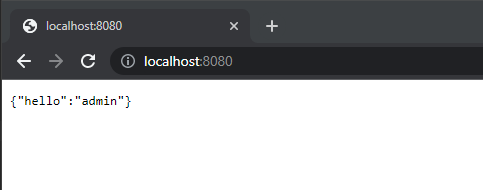
We can run the code and see our Spring Security default login page,

User admin as username, and password as its password to login, and we can see the login result,

And we can see the number of entries in increased on our app-session cache,

Code for this application can be found in below repository,

https://github.com/edwin/spring-boot-and-infinispan-http-session