servlet

How to Create a Simple Servlet to Handle JSon Requests

On this example, im trying to create a simple servlet to handle JSon request. Im using this servlet to handle JSon request from my front end such as web or even desktop application. Thanks to GSon library, it really helped on simplifying javabean convert to json strings and the other way around.

First as usual, a simple java bean to handle request and response format

package com.edw.bean;

public class Student {
 
    private String name;
    private int age;
    private byte gender;

	// other setter and getter
}
package com.edw.bean;

public class Status {
    private boolean success;
    private String description;
	
	// other setter and getter
}

And this is my servlet,

package com.edw.servlet;

import com.edw.bean.Status;
import com.edw.bean.Student;
import com.google.gson.Gson;
import java.io.IOException;
import javax.servlet.ServletException;
import javax.servlet.http.HttpServlet;
import javax.servlet.http.HttpServletRequest;
import javax.servlet.http.HttpServletResponse;

public class JsonParserServlet extends HttpServlet {

    protected void processRequest(HttpServletRequest request, HttpServletResponse response)
            throws ServletException, IOException {
        response.setContentType("application/json");        
        Gson gson = new Gson();

        try {
            StringBuilder sb = new StringBuilder();
            String s;
            while ((s = request.getReader().readLine()) != null) {
                sb.append(s);
            }

            Student student = (Student) gson.fromJson(sb.toString(), Student.class);

            Status status = new Status();
            if (student.getName().equalsIgnoreCase("edw")) {
                status.setSuccess(true);
                status.setDescription("success");
            } else {
                status.setSuccess(false);
                status.setDescription("not edw");
            }
            response.getOutputStream().print(gson.toJson(status));
            response.getOutputStream().flush();
        } catch (Exception ex) {
            ex.printStackTrace();
            Status status = new Status();
            status.setSuccess(false);
            status.setDescription(ex.getMessage());
            response.getOutputStream().print(gson.toJson(status));
            response.getOutputStream().flush();
        } 
    }

    @Override
    protected void doPost(HttpServletRequest request, HttpServletResponse response)
            throws ServletException, IOException {
        processRequest(request, response);
    }
}

This is a screenshot on how my message actually look like

Have Fun (H)

Get Absolute File Path Using ServletFilter

It’s all begin when i need to get a text file content from a servlet filter, after spent some amount of time googling i’ve found a good solution. This is how i do it.

package com.edw.filter;

import java.io.File;
import java.io.IOException;
import javax.servlet.Filter;
import javax.servlet.FilterChain;
import javax.servlet.FilterConfig;
import javax.servlet.ServletException;
import javax.servlet.ServletRequest;
import javax.servlet.ServletResponse;
import org.apache.log4j.Logger;

/**
 *
 * @author edw
 */
public class MyFilter implements Filter {

    private FilterConfig filterConfig = null;
    private Logger logger = Logger.getLogger(this.getClass());

    public MyFilter() {
        
    }    

    public void doFilter(ServletRequest request, ServletResponse response,
                         FilterChain chain)
	throws IOException, ServletException {
	
	try {
		String pathName = filterConfig.getServletContext().getRealPath("/");
		File file = new File(pathName);

		logger.debug(file.getAbsolutePath());

		chain.doFilter(request, response);
	}
	catch(Throwable t) {
	    logger.error(t,t);
	}
    }    

    public void destroy() { 
    }

    public void init(FilterConfig filterConfig) { 
		this.filterConfig = filterConfig;
    }    

}

Hope it can help others, thank you (*)

Beginning MyBatis : DataSource, JNDI and Apache DBCP

In this tutorial, im trying to connect a servlet to mysql database using Apache DBCP. Im using mybatis and accessing Apache DBCP’s datasource via JNDI. Btw, im using Netbeans 6.9 and Apache Tomcat 6.

First as always, a table named “contoh” on a database “test”

CREATE
    TABLE contoh
    (
        nama VARCHAR(30) NOT NULL,
        alamat VARCHAR(100),
        PRIMARY KEY (nama)
    )

insert into contoh (nama, alamat) values ('edwin', 'singapore');
insert into contoh (nama, alamat) values ('kamplenk', 'ciledug');
insert into contoh (nama, alamat) values ('nugie', 'pamulang');
insert into contoh (nama, alamat) values ('samsu', 'dago');
insert into contoh (nama, alamat) values ('tebek', 'karawaci');	

and a simple java bean

package com.edw.mybatis.bean;

import java.io.Serializable;

public class Contoh implements Serializable {
    private String nama;
    private String alamat;

	// other setter and getter
	
    @Override
    public String toString(){
        return nama+" : "+alamat;
    }
}

next is creating a simple xml query, ContohMapper.xml.

<?xml version="1.0" encoding="UTF-8" ?>
<!DOCTYPE mapper PUBLIC "-//mybatis.org//DTD Mapper 3.0//EN" "http://mybatis.org/dtd/mybatis-3-mapper.dtd" >
<mapper namespace="com.edw.mybatis.mapper.ContohMapper" >

    <resultMap id="ContohMap" type="com.edw.mybatis.bean.Contoh" >
        <id column="nama" property="nama" jdbcType="VARCHAR" />
        <result column="alamat" property="alamat" jdbcType="VARCHAR" />
    </resultMap>
    

    <select id="selectAll" resultMap="ContohMap">
        SELECT * FROM contoh
    </select>

</mapper>

and an interface class to map my queries

package com.edw.mybatis.mapper;

import com.edw.mybatis.bean.Contoh;
import java.util.List;

public interface ContohMapper {    
    List<Contoh> selectAll();
}

Dont forget to create a connection pooling configuration on context.xml, which located under META-INF folder.

<?xml version="1.0" encoding="UTF-8"?>
<Context antiJARLocking="true" path="/MyBatisDBCP">
    
    <Resource name="jdbc/test" auth="Container"
            type="javax.sql.DataSource"
            driverClassName="com.mysql.jdbc.Driver"
            url="jdbc:mysql://localhost:3306/test"
            username="root"
            password="xxxx"
            maxActive="100" maxIdle="30" maxWait="10000"
            removeAbandoned="true"
            removeAbandonedTimeout="60"
            logAbandoned="true"
            />
            
</Context>

an xml configuration, Configuration.xml. This is where i put my connection properties.

<?xml version="1.0" encoding="UTF-8" ?>
<!DOCTYPE configuration
PUBLIC "-//mybatis.org//DTD Config 3.0//EN"
"http://mybatis.org/dtd/mybatis-3-config.dtd">
<configuration>
    <environments default="development">
        <environment id="development">
            <transactionManager type="JDBC"/>
            <dataSource type="JNDI">
                <property name="data_source" value="java:/comp/env/jdbc/test"/>
            </dataSource>
        </environment>
    </environments>
    <mappers>
        <mapper resource="com/edw/mybatis/xml/ContohMapper.xml" />
    </mappers>
</configuration>

and a singleton class to load my configuration class,

package com.edw.mybatis.config;

import java.io.Reader;
import org.apache.ibatis.io.Resources;
import org.apache.ibatis.session.SqlSessionFactory;
import org.apache.ibatis.session.SqlSessionFactoryBuilder;


/**
 *
 * @author edw
 */
public class MyBatisSqlSessionFactory {

    protected static final SqlSessionFactory FACTORY;

    static {
        try {
            Reader reader = Resources.getResourceAsReader("com/edw/mybatis/xml/Configuration.xml");
            FACTORY = new SqlSessionFactoryBuilder().build(reader);
        } catch (Exception e){
            throw new RuntimeException("Fatal Error.  Cause: " + e, e);
        }
    }

    public static SqlSessionFactory getSqlSessionFactory() {
        return FACTORY;
    }
}

and a simple servlet to call mybatis query

package com.edw.servlet;

import com.edw.mybatis.bean.Contoh;
import com.edw.mybatis.config.MyBatisSqlSessionFactory;
import com.edw.mybatis.mapper.ContohMapper;
import java.io.IOException;
import java.io.PrintWriter;
import java.util.List;
import javax.servlet.ServletException;
import javax.servlet.http.HttpServlet;
import javax.servlet.http.HttpServletRequest;
import javax.servlet.http.HttpServletResponse;
import org.apache.ibatis.session.SqlSession;
import org.apache.log4j.Logger;

/**
 *
 * @author edw
 */
public class MainServlet extends HttpServlet {

    private Logger logger = Logger.getLogger(MainServlet.class);

    protected void processRequest(HttpServletRequest request, HttpServletResponse response)
    throws ServletException, IOException {
        response.setContentType("text/html;charset=UTF-8");
        PrintWriter out = response.getWriter();
        try {

            SqlSession session = MyBatisSqlSessionFactory.getSqlSessionFactory().openSession();

            ContohMapper contohMapper = session.getMapper(ContohMapper.class);
            List<Contoh> contohs = contohMapper.selectAll();

            out.println("<html>");
            out.println("<head>");
            out.println("<title>DBCP Example MainServlet</title>");
            out.println("</head>");
            out.println("<body>");
            
            for (Contoh contoh : contohs) {
                out.println(contoh.getNama()+" "+contoh.getAlamat()+"<br />");
                logger.debug(contoh.getNama()+" "+contoh.getAlamat());
            }

            out.println("</body>");
            out.println("</html>");

        }catch(Exception ex){
            logger.error(ex.getMessage(), ex);
            out.println(ex.getMessage());
        } finally {
            out.close();
        }
    } 

    @Override
    protected void doGet(HttpServletRequest request, HttpServletResponse response)
    throws ServletException, IOException {
        processRequest(request, response);
    } 

    @Override
    protected void doPost(HttpServletRequest request, HttpServletResponse response)
    throws ServletException, IOException {
        processRequest(request, response);
    }
}

and dont forget to register your jndi and servlet to web.xml

<?xml version="1.0" encoding="UTF-8"?>
<web-app version="2.5" xmlns="http://java.sun.com/xml/ns/javaee" xmlns:xsi="http://www.w3.org/2001/XMLSchema-instance" xsi:schemaLocation="http://java.sun.com/xml/ns/javaee http://java.sun.com/xml/ns/javaee/web-app_2_5.xsd">

    <!-- Session -->
    <session-config>
        <session-timeout>
            30
        </session-timeout>
    </session-config>

    <!-- Welcome file -->
    <welcome-file-list>
        <welcome-file>mainServlet</welcome-file>
    </welcome-file-list>

    <!--  Servlet -->
    <servlet>
        <servlet-name>mainServlet</servlet-name>
        <servlet-class>com.edw.servlet.MainServlet</servlet-class>
    </servlet>
    <servlet-mapping>
        <servlet-name>mainServlet</servlet-name>
        <url-pattern>/mainServlet</url-pattern>
    </servlet-mapping>

    <!-- JNDI -->
    <resource-ref>
        <description>DB Connection</description>
        <res-ref-name>jdbc/test</res-ref-name>
        <res-type>javax.sql.DataSource</res-type>
        <res-auth>Container</res-auth>
    </resource-ref>
    
</web-app>

And also, dont forget to put your mysql-connector.jar to tomcat lib. And if you see this error, Cannot create JDBC driver of class '' for connect URL 'null', it means there’s something wrong with your JNDI configuration on context.xml.

This is my netbeans project screenshot

and this is what the result will look like

Have fun, cheers. (B)

[Tutorial] Upload File atau Image Dengan JSP

Beberapa hari terakhir di forum programmer Kaskus lagi rame pertanyaan tentang caranya upload file pakek JSP. Daripada pusing-pusing mendingan gw pake library bawaan apache, yaitu Apache Commons FileUpload.

Aplikasi sederhana ini terdiri dari 1 buah JSP sebagai presentation layer dan 1 Servlet buat handle uploading file-nya. Konsep-nya sederhana, semua file yang keupload akan disimpan didalam folder /image yang terletak 1 folder dengan file index.jsp.

Oke, langsung kita mulai kalo gitu. Ini file index.jsp gw,

<!DOCTYPE HTML PUBLIC "-//W3C//DTD HTML 4.01 Transitional//EN"
   "http://www.w3.org/TR/html4/loose.dtd">

<html>
    <head>
        <meta http-equiv="Content-Type" content="text/html; charset=UTF-8">
        <title>JSP Page</title>
    </head>
    <body>
        <h1>Hello World!</h1>
        <form action="upload" method="POST" enctype="multipart/form-data">
            Select file : <input type="file" name="fileSelect" />
            <br />
            <input type="submit" />
        </form>
    </body>
</html>

dan ini servlet buat handle upload file ataupun image,

package com.baculsoft.servlet;

import java.io.File;
import java.io.IOException;
import java.io.PrintWriter;
import java.util.List;
import javax.servlet.ServletException;
import javax.servlet.http.HttpServlet;
import javax.servlet.http.HttpServletRequest;
import javax.servlet.http.HttpServletResponse;
import org.apache.commons.fileupload.FileItem;
import org.apache.commons.fileupload.disk.DiskFileItemFactory;
import org.apache.commons.fileupload.servlet.ServletFileUpload;

public class UploadServlet extends HttpServlet {

    protected void processRequest(HttpServletRequest request, HttpServletResponse response)
            throws ServletException, IOException {
        
        response.setContentType("text/html;charset=UTF-8");
        PrintWriter out = response.getWriter();

        // get your absolute path
        String uploadTo = getServletContext().getRealPath("/") + "image/";

        try {

            boolean isMultipart = ServletFileUpload.isMultipartContent(request);

            // no multipart form
            if (!isMultipart) {
                out.println("<html>");
                out.println("<head>");
                out.println("<title>Servlet UploadServlet</title>");
                out.println("</head>");
                out.println("<body>");
                out.println("<h1>No Multipart Files</h1>");
                out.println("</body>");
                out.println("</html>");
            }
            // multipart form
            else {
                // Create a new file upload handler
                ServletFileUpload upload = new ServletFileUpload(new DiskFileItemFactory());

                // parse requests
                List<FileItem> fileItems = upload.parseRequest(request);

                // Process the uploaded items
                for (FileItem fileItem : fileItems) {
                    // a regular form field
                    if (fileItem.isFormField()) {
                        
                    }
                    // upload field
                    else {
                        String fileName = fileItem.getName();
                        File fileTo = new File(uploadTo + fileName);
                        fileItem.write(fileTo);

                        out.println("<html>");
                        out.println("<head>");
                        out.println("<title>Servlet UploadServlet</title>");
                        out.println("</head>");
                        out.println("<body>");
                        out.println("<h1> success write to " + fileTo.getAbsolutePath() + "</h1>");
                        out.println("</body>");
                        out.println("</html>");

                    }
                }
            }
        } catch (Exception ex) {
            ex.printStackTrace();
        } finally {
            out.close();
        }
    }
   
    @Override
    protected void doGet(HttpServletRequest request, HttpServletResponse response)
            throws ServletException, IOException {
        processRequest(request, response);
    }

    @Override
    protected void doPost(HttpServletRequest request, HttpServletResponse response)
            throws ServletException, IOException {
        processRequest(request, response);
    }
}

abis itu gw register servlet gw di web.xml

<?xml version="1.0" encoding="UTF-8"?>
<web-app version="2.5" xmlns="http://java.sun.com/xml/ns/javaee" xmlns:xsi="http://www.w3.org/2001/XMLSchema-instance" xsi:schemaLocation="http://java.sun.com/xml/ns/javaee http://java.sun.com/xml/ns/javaee/web-app_2_5.xsd">
    <servlet>
        <servlet-name>upload</servlet-name>
        <servlet-class>com.baculsoft.servlet.UploadServlet</servlet-class>
    </servlet>
    <servlet-mapping>
        <servlet-name>upload</servlet-name>
        <url-pattern>/upload</url-pattern>
    </servlet-mapping>
    <session-config>
        <session-timeout>
            30
        </session-timeout>
    </session-config>
    <welcome-file-list>
        <welcome-file>index.jsp</welcome-file>
    </welcome-file-list>
</web-app>

ini struktur project gw di Netbeans.

Nah gampang kan 😉

nb.
untuk tutorial lebih lengkapnya bisa dicek disini

Connecting a Servlet, iBatis and Glassfish 3

This time im trying to change my programming style, from a simple JDBC connection to a bit more complicated JDBC Connection Pool so i could increase my application’s response time. Btw, what is a Connection Pools? Basically, it’s a cached connections that are kept in a runtime object pool and can be used and reused as needed by the application. For a more complete explanation, you can check here.

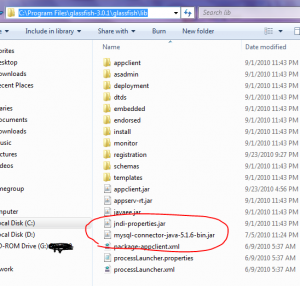
Im planning to deploy my application on a Glassfish v3 and change my iBatis’ setting from simple JDBC to JNDI connection, but first i have create a MySql DataSource on m Glassfish. In order to create a connection pool, i put my MySQL JDBC Jar in <glassfish installation folder>/lib.
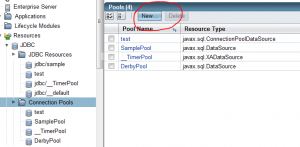
From my Glassfish console (http://localhost:4848/), i create a new Connection pools,
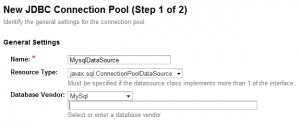
Start by giving its name, and selecting resource and database vendor type,
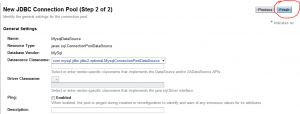
Connection type,
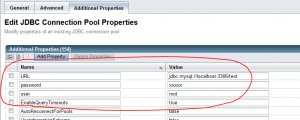
Dont forget adding these properties, so you can connect to your MySql Database,
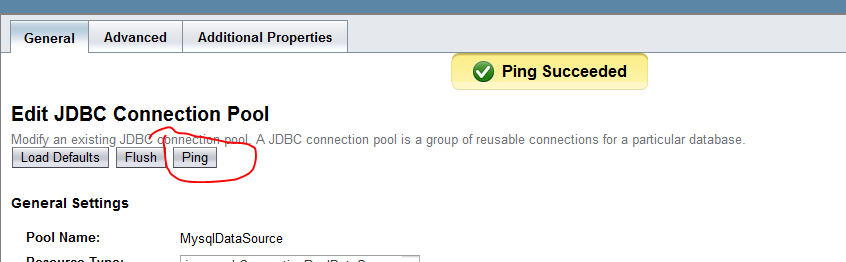
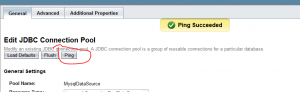
you can test your connection by pinging it,
Btw, if you cant find the which resource type you need, here are some hints

  1. javax.sql.DataSource: is a non-pooled direct connection
  2. javax.sql.ConnectionPoolDataSource: connection is coming from pool
  3. javax.sql.XADataSource: is for distributed transactions

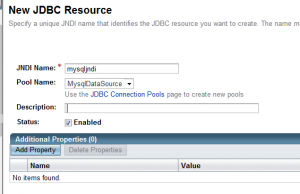
Create a new JDBC Resources using your new Connection Pool,
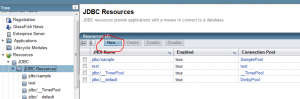
Next step is creating a simple web application using NetBeans 6.9. As usual, i create a simple table

CREATE DATABASE 'test'
USE 'test'

CREATE TABLE `contoh` (
  `nama` varchar(30) NOT NULL DEFAULT '',
  `alamat` varchar(100) DEFAULT NULL,
  PRIMARY KEY (`nama`)
)

insert into contoh (nama, alamat) values ('edwin', 'jakarta');
insert into contoh (nama, alamat) values ('kamplenk', 'ciledug');
insert into contoh (nama, alamat) values ('nugie', 'pamulang');
insert into contoh (nama, alamat) values ('samsu', 'dago');
insert into contoh (nama, alamat) values ('tebek', 'jayapura');

next step is creating a java bean for database mapping

package com.edw.bean;

/**
 *
 * @author edw
 */
public class Contoh {

    private String nama;
    private String alamat;

    public Contoh(String nama, String alamat) {
        this.nama = nama;
        this.alamat = alamat;
    }

    public Contoh() {
    }

    public String getAlamat() {
        return alamat;
    }

    public void setAlamat(String alamat) {
        this.alamat = alamat;
    }

    public String getNama() {
        return nama;
    }

    public void setNama(String nama) {
        this.nama = nama;
    }

    @Override
    public String toString() {
        return "Contoh{" + "nama=" + nama + " and alamat=" + alamat + '}';
    }        
}

and an xml mapping for database queries, i named it contoh.xml

<?xml version="1.0" encoding="UTF-8" ?>
<!DOCTYPE sqlMap PUBLIC "-//ibatis.apache.org//DTD SQL Map 2.0//EN" "http://ibatis.apache.org/dtd/sql-map-2.dtd" >
<sqlMap namespace="contoh" >

    <!--alias-->
    <typeAlias alias="Contoh" type="com.edw.bean.Contoh" />

    <resultMap id="result" class="Contoh">
        <result property="nama" column="NAMA" columnIndex="1"/>
        <result property="alamat" column="ALAMAT" columnIndex="2"/>
    </resultMap>

    <insert id="insertContoh" parameterClass="Contoh" >
    insert into contoh (nama, alamat)
    values (#nama:VARCHAR#, #alamat:VARCHAR#)
    </insert>

    <!--query select all-->
    <select id="selectAllContoh" resultMap="result">
    select nama, alamat
    from contoh
    </select>

    <!--query with Bean parameter-->
    <select id="selectContohWithPKfromBean" resultClass="Contoh" parameterClass="Contoh">
    select nama, alamat
    from contoh
    where nama like #nama:VARCHAR#
    </select>

    <!--query with String parameter-->
    <select id="selectContohWithPKfromString" resultClass="Contoh" parameterClass="java.lang.String">
    select nama, alamat
    from contoh
    where nama like #nama#
    </select>

    <!--query with Map parameter-->
    <select id="selectContohWithPKfromMap" resultClass="Contoh" parameterClass="java.util.Map">
    select nama, alamat
    from contoh
    where nama like #nama#
    </select>

</sqlMap>

and ibatis’ main xml configuration, sqlmapconfig.xml

<?xml version="1.0" encoding="UTF-8"?>
<!DOCTYPE sqlMapConfig
PUBLIC "-//ibatis.apache.org//DTD SQL Map Config 2.0//EN"
"http://ibatis.apache.org/dtd/sql-map-config-2.dtd">

<sqlMapConfig>
    <settings
        useStatementNamespaces="true"
        lazyLoadingEnabled="true"
        enhancementEnabled="true"
        />

    <transactionManager type="JDBC" commitRequired="false">
        <dataSource type="JNDI">
            <property name="DataSource" value="mysqljndi"/>
        </dataSource>
    </transactionManager>

    <sqlMap resource="com/edw/sqlmap/contoh.xml"/>
</sqlMapConfig>

next step is creating a simple java class to load all iBatis’ configuration file.

package com.edw.config;

import com.ibatis.common.resources.Resources;
import com.ibatis.sqlmap.client.SqlMapClient;
import com.ibatis.sqlmap.client.SqlMapClientBuilder;
import java.io.IOException;
import java.io.Reader;


/**
 *
 * @author edw
 */
public class SqlMapConfig {

    protected static final SqlMapClient sqlMap;

    static {
        try {
            Reader reader = Resources.getResourceAsReader("com/edw/sqlmap/sqlmapconfig.xml");
            sqlMap = SqlMapClientBuilder.buildSqlMapClient(reader);
        } catch (IOException e) {
            throw new RuntimeException("Fatal Error, ga dapet sqlmapconfignya.  Cause: " + e, e);
        } catch (Exception e){
            throw new RuntimeException("Fatal Error.  Cause: " + e, e);
        }
    }

    public static SqlMapClient getSqlMap() {
        return sqlMap;
    }
}

a simple Servlet

package com.edw.servlet;

import com.edw.bean.Contoh;
import com.edw.config.SqlMapConfig;
import java.io.IOException;
import java.io.PrintWriter;
import java.util.HashMap;
import java.util.List;
import java.util.Map;
import javax.servlet.ServletException;
import javax.servlet.http.HttpServlet;
import javax.servlet.http.HttpServletRequest;
import javax.servlet.http.HttpServletResponse;
import org.apache.log4j.Logger;

/**
 *
 * @author edw
 */
public class Main extends HttpServlet {

    private Logger logger = Logger.getLogger(this.getClass());

    protected void processRequest(HttpServletRequest request, HttpServletResponse response)
    throws ServletException, IOException {
        response.setContentType("text/html;charset=UTF-8");
        PrintWriter out = response.getWriter();
        try {
          
            out.println("<html>");
            out.println("<head>");
            out.println("<title>iBatis Test</title>");
            out.println("</head>");
            out.println("<body>");

            out.println("-----------------------");
            out.println("select all <br />");

            List<Contoh> contohs = SqlMapConfig.getSqlMap().queryForList("contoh.selectAllContoh");
            for (Contoh contoh : contohs) {
                out.println(contoh+"<br />");
            }

            out.println("<br />");
            out.println("<br />");
            
            out.println("-----------------------");
            out.println("select with Parameter Bean");
            out.println("<br />"+SqlMapConfig.getSqlMap().queryForObject("contoh.selectContohWithPKfromBean", new Contoh("samsu", null))+"<br /><br />");

            out.println("-----------------------");
            out.println("select with Parameter String");
            out.println("<br />"+SqlMapConfig.getSqlMap().queryForObject("contoh.selectContohWithPKfromString", "kamplenk")+"<br /><br />");

            out.println("-----------------------");
            out.println("select with Parameter Map");
            Map<String, String> map = new HashMap<String, String>();
            map.put("nama", "tebek");
            out.println("<br />"+SqlMapConfig.getSqlMap().queryForObject("contoh.selectContohWithPKfromMap", map)+"<br /><br />");
            
            out.println("</body>");
            out.println("</html>");

        } catch(Exception ex){
            logger.error(ex.getMessage(),ex);
        } finally {
            out.close();
        }
    } 

    @Override
    protected void doGet(HttpServletRequest request, HttpServletResponse response)
    throws ServletException, IOException {
        processRequest(request, response);
    } 
   
    @Override
    protected void doPost(HttpServletRequest request, HttpServletResponse response)
    throws ServletException, IOException {
        processRequest(request, response);
    }
  
    @Override
    public String getServletInfo() {
        return "My Main Servlet";
    }
}

and my web.xml configuration

<?xml version="1.0" encoding="UTF-8"?>
<web-app version="2.5" xmlns="http://java.sun.com/xml/ns/javaee" xmlns:xsi="http://www.w3.org/2001/XMLSchema-instance" xsi:schemaLocation="http://java.sun.com/xml/ns/javaee http://java.sun.com/xml/ns/javaee/web-app_2_5.xsd">
    <servlet>
        <servlet-name>Main</servlet-name>
        <servlet-class>com.edw.servlet.Main</servlet-class>
    </servlet>
    <servlet-mapping>
        <servlet-name>Main</servlet-name>
        <url-pattern>/Main</url-pattern>
    </servlet-mapping>
    <session-config>
        <session-timeout>
            30
        </session-timeout>
    </session-config>
    <welcome-file-list>
        <welcome-file>Main</welcome-file>
    </welcome-file-list>
</web-app>

this is the result on my browser when i run my application
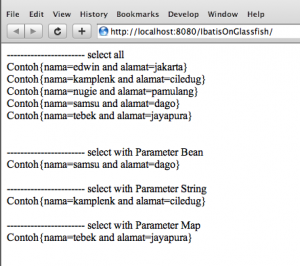
this is my netbeans project structure
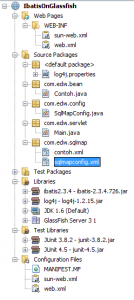
Again, i hope this simple tutorial could be useful for others. Cheers (B)
nb. im using Netbeans 6.9, iBatis 2.3.4 and Glassfish 3.