There are multiple ways of externalizing http session in Spring Boot, we can use a regular SQL database, or even a no-sql approach such as using Infinispan. For this sample, we are trying to integrate Spring Boot with Spring Security and externalizing its session to Infinispan.
So lets start with running an Infinispan instances,
$ docker pull infinispan/server:latest

$ docker run -p 11222:11222 -e USER=admin -e PASS=password infinispan/server
And create a new cache with the name of “app-session”, with a lifespan of one day, and and idle time of 5 minutes.
<?xml version="1.0"?>
<distributed-cache name="app-session" owners="1" mode="SYNC" statistics="true">
	<encoding>
		<key media-type="application/x-protostream"/>
		<value media-type="application/x-protostream"/>
	</encoding>
	<locking isolation="REPEATABLE_READ"/>
	<expiration lifespan="86400000" max-idle="300000"/>
</distributed-cache>
After that, we can focus on creating a new Java apps. We can start with a new pom.xml file,
<?xml version="1.0" encoding="UTF-8"?>
<project xmlns="http://maven.apache.org/POM/4.0.0"
         xmlns:xsi="http://www.w3.org/2001/XMLSchema-instance"
         xsi:schemaLocation="http://maven.apache.org/POM/4.0.0 http://maven.apache.org/xsd/maven-4.0.0.xsd">
    <modelVersion>4.0.0</modelVersion>

    <groupId>org.example</groupId>
    <artifactId>spring-infinispan-session</artifactId>
    <version>1.0-SNAPSHOT</version>

    <properties>
        <maven.compiler.source>11</maven.compiler.source>
        <maven.compiler.target>11</maven.compiler.target>
        <project.build.sourceEncoding>UTF-8</project.build.sourceEncoding>
        <infinispan.version>14.0.1.Final</infinispan.version>
        <spring-session.version>2.7.0</spring-session.version>
        <spring-boot.version>2.7.0</spring-boot.version>
    </properties>

    <dependencyManagement>
        <dependencies>
            <dependency>
                <groupId>org.infinispan</groupId>
                <artifactId>infinispan-bom</artifactId>
                <version>${infinispan.version}</version>
                <type>pom</type>
                <scope>import</scope>
            </dependency>
            <dependency>
                <groupId>org.springframework.boot</groupId>
                <artifactId>spring-boot-starter-parent</artifactId>
                <version>${spring-boot.version}</version>
                <type>pom</type>
                <scope>import</scope>
            </dependency>
        </dependencies>
    </dependencyManagement>

    <dependencies>
        <!-- spring boot -->
        <dependency>
            <groupId>org.springframework.boot</groupId>
            <artifactId>spring-boot-starter</artifactId>
        </dependency>
        <dependency>
            <groupId>org.springframework.boot</groupId>
            <artifactId>spring-boot-starter-web</artifactId>
        </dependency>

        <!-- spring security -->
        <dependency>
            <groupId>org.springframework.boot</groupId>
            <artifactId>spring-boot-starter-security</artifactId>
        </dependency>

        <!-- storing session in external storage -->
        <dependency>
            <groupId>org.springframework.session</groupId>
            <artifactId>spring-session-core</artifactId>
            <version>${spring-session.version}</version>
        </dependency>
        <dependency>
            <groupId>org.infinispan</groupId>
            <artifactId>infinispan-spring-boot-starter-remote</artifactId>
            <version>${infinispan.version}</version>
        </dependency>

    </dependencies>
</project>
And application.properties,
# spring boot
server.port=8080

# infinispan
infinispan.remote.server-list=127.0.0.1:11222
infinispan.remote.auth-username=admin
infinispan.remote.auth-password=password

# serialization
infinispan.remote.java-serial-whitelist=java.lang.*
And we can start with to code our Java files,
package com.edw;

import org.infinispan.spring.remote.session.configuration.EnableInfinispanRemoteHttpSession;
import org.springframework.boot.SpringApplication;
import org.springframework.boot.autoconfigure.SpringBootApplication;
import org.springframework.cache.annotation.EnableCaching;

@SpringBootApplication
@EnableCaching
@EnableInfinispanRemoteHttpSession(cacheName = "app-session")
public class Application {
    public static void main(String[] args) {
        SpringApplication.run(Application.class, args);
    }
}
package com.edw.controller;

import org.infinispan.spring.remote.provider.SpringRemoteCacheManager;
import org.springframework.beans.factory.annotation.Autowired;
import org.springframework.security.core.Authentication;
import org.springframework.security.core.context.SecurityContextHolder;
import org.springframework.web.bind.annotation.GetMapping;
import org.springframework.web.bind.annotation.RestController;

import java.util.HashMap;

@RestController
public class IndexController {

    @Autowired
    SpringRemoteCacheManager cacheManager;

    @GetMapping(path = "/")
    public HashMap index() {
        Authentication auth = SecurityContextHolder.getContext().getAuthentication();
        return new HashMap(){{
            put("hello", auth.getName());
        }};
    }
}
package com.edw.config;

import org.springframework.security.config.annotation.authentication.builders.AuthenticationManagerBuilder;
import org.springframework.security.config.annotation.method.configuration.EnableGlobalMethodSecurity;
import org.springframework.security.config.annotation.web.builders.HttpSecurity;
import org.springframework.security.config.annotation.web.configuration.WebSecurityConfigurerAdapter;
import org.springframework.security.web.util.matcher.AntPathRequestMatcher;

@EnableGlobalMethodSecurity(prePostEnabled = true)
public class SecurityConfiguration extends WebSecurityConfigurerAdapter {

    @Override
    protected void configure(AuthenticationManagerBuilder auth) throws Exception {
        auth
                .inMemoryAuthentication()
                .withUser("admin")
                .password("{noop}password")
                .roles("ADMIN")
            .and()
                .withUser("user")
                .password("{noop}password")
                .roles("USER");
    }

    @Override
    protected void configure(HttpSecurity http) throws Exception{
        super.configure(http);
        http
                .logout()
                .logoutRequestMatcher(new AntPathRequestMatcher("/logout"))
            .and()
                .csrf()
                .disable();
    }
}
package com.edw.config;

import org.infinispan.commons.marshall.ProtoStreamMarshaller;
import org.infinispan.spring.starter.remote.InfinispanRemoteCacheCustomizer;
import org.springframework.context.annotation.Bean;
import org.springframework.context.annotation.Configuration;
import org.springframework.core.Ordered;
import org.springframework.core.annotation.Order;

@Configuration
public class InfinispanConfiguration {

    @Bean
    @Order(Ordered.HIGHEST_PRECEDENCE)
    public InfinispanRemoteCacheCustomizer remoteCacheCustomizer() {
        return b -> {
            b.remoteCache("app-session").marshaller(ProtoStreamMarshaller.class);
        };
    }
}
If some NullPointerException happens, make sure that your cache is created first before we start our Java apps.
We can run the code and see our Spring Security default login page,

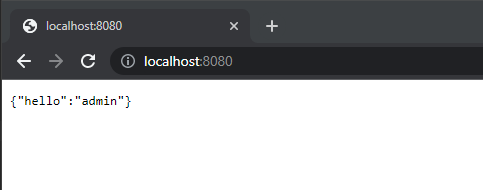
User admin as username, and password as its password to login, and we can see the login result,
And we can see the number of entries in increased on our app-session cache,

Code for this application can be found in below repository,
https://github.com/edwin/spring-boot-and-infinispan-http-session