spring boot

Creating a Logback with Masked Pattern to Hide Sensitive Data

I had one case where i need to send HTTP logs from Apache HTTP Client into console, the thing is this approach has a security impact since everything will be sent to console including credentials and authorization headers. This is one reason why we comes up with an approach to hide sensitive values based on specific pattern from Logback console logs.

Lets start with a simple Java project,

<?xml version="1.0" encoding="UTF-8"?>
<project xmlns="http://maven.apache.org/POM/4.0.0"
         xmlns:xsi="http://www.w3.org/2001/XMLSchema-instance"
         xsi:schemaLocation="http://maven.apache.org/POM/4.0.0 http://maven.apache.org/xsd/maven-4.0.0.xsd">
    <modelVersion>4.0.0</modelVersion>

    <groupId>com.edw</groupId>
    <artifactId>logback-with-masked-credentials</artifactId>
    <version>1.0</version>

    <properties>
        <maven.compiler.source>17</maven.compiler.source>
        <maven.compiler.target>17</maven.compiler.target>
        <project.build.sourceEncoding>UTF-8</project.build.sourceEncoding>
    </properties>

    <parent>
        <groupId>org.springframework.boot</groupId>
        <artifactId>spring-boot-starter-parent</artifactId>
        <version>3.0.4</version>
        <relativePath/>
    </parent>

    <dependencies>
        <dependency>
            <groupId>org.springframework.boot</groupId>
            <artifactId>spring-boot-starter-web</artifactId>
        </dependency>

        <dependency>
            <groupId>org.wiremock</groupId>
            <artifactId>wiremock</artifactId>
            <version>3.3.1</version>
            <scope>test</scope>
        </dependency>
        <dependency>
            <groupId>org.springframework.boot</groupId>
            <artifactId>spring-boot-starter-test</artifactId>
            <scope>test</scope>
        </dependency>
    </dependencies>

    <build>
        <plugins>
            <plugin>
                <groupId>org.springframework.boot</groupId>
                <artifactId>spring-boot-maven-plugin</artifactId>
            </plugin>
        </plugins>
    </build>


</project>

And create a Java class for doing a simple HTTP outbound request to a simulator,

package com.edw;


import com.github.tomakehurst.wiremock.WireMockServer;
import org.apache.hc.client5.http.classic.methods.HttpGet;
import org.apache.hc.client5.http.impl.classic.CloseableHttpClient;
import org.apache.hc.client5.http.impl.classic.CloseableHttpResponse;
import org.apache.hc.client5.http.impl.classic.HttpClients;
import org.junit.jupiter.api.Assertions;
import org.junit.jupiter.api.DisplayName;
import org.junit.jupiter.api.Test;
import org.slf4j.Logger;
import org.slf4j.LoggerFactory;
import org.springframework.boot.test.context.SpringBootTest;

import java.io.IOException;
import java.io.InputStream;
import java.util.Scanner;

import static com.github.tomakehurst.wiremock.client.WireMock.aResponse;
import static com.github.tomakehurst.wiremock.client.WireMock.configureFor;
import static com.github.tomakehurst.wiremock.client.WireMock.get;
import static com.github.tomakehurst.wiremock.client.WireMock.getRequestedFor;
import static com.github.tomakehurst.wiremock.client.WireMock.stubFor;
import static com.github.tomakehurst.wiremock.client.WireMock.urlEqualTo;
import static com.github.tomakehurst.wiremock.client.WireMock.verify;

@SpringBootTest
public class MainTest {

    private WireMockServer wireMockServer = new WireMockServer();
    private CloseableHttpClient httpClient = HttpClients.createDefault();

    private Logger logger = LoggerFactory.getLogger(MainTest.class);

    @Test
    @DisplayName("01. Testing Hello World Page")
    public void indexTest() throws IOException {
        wireMockServer.start();

        configureFor("localhost", 8080);
        stubFor(
                get(
                    urlEqualTo("/"))
                        .willReturn(
                                aResponse()
                                        .withBody("Hello World")
                        ));

        HttpGet request = new HttpGet("http://localhost:8080/");
        request.addHeader("Accept-Encoding", "text/plain");
        request.addHeader("Accept-Charset", "utf-8");

        // authentication header --- this is a sample of sensitive value that we are going to masked
        request.addHeader("Authorization", "Bearer eyJhbGciOiJSUzI1NiIsInR5cCIgOiAiS.jwt-sample.cpQcLckrTofjLZtCFFcMfThBNWD");

        CloseableHttpResponse httpResponse = httpClient.execute(request);
        String stringResponse = convertResponseToString(httpResponse);

        verify(getRequestedFor(urlEqualTo("/")));
        Assertions.assertEquals("Hello World", stringResponse);

        wireMockServer.stop();
    }

    private String convertResponseToString(CloseableHttpResponse response) throws IOException {
        InputStream responseStream = response.getEntity().getContent();
        Scanner scanner = new Scanner(responseStream, "UTF-8");
        String stringResponse = scanner.useDelimiter("\\Z").next();
        scanner.close();

        logger.debug("response is {}", stringResponse);

        return stringResponse;
    }

}

With below logback.xml configuration,

<?xml version="1.0" encoding="UTF-8"?>
<configuration>

    <appender name="CONSOLE"
              class="ch.qos.logback.core.ConsoleAppender">
        <encoder>
            <pattern>%d{HH:mm:ss.SSS} [%thread] %-5level %logger{36} - %msg%n</pattern>
            <charset>utf8</charset>
        </encoder>
    </appender>

    <logger name="com.edw" level="DEBUG" additivity="false">
        <appender-ref ref="CONSOLE" />
    </logger>

    <logger name="org.apache.hc.client5.http.wire" level="DEBUG" additivity="false">
        <appender-ref ref="CONSOLE" />
    </logger>

    <root level="WARN">
        <appender-ref ref="CONSOLE" />
    </root>
</configuration>

This will generate this log files, and as we can see theres an Authorization header printed there

16:41:35.164 [main] DEBUG org.apache.hc.client5.http.wire - http-outgoing-1 >> "GET / HTTP/1.1[\r][\n]"
16:41:35.165 [main] DEBUG org.apache.hc.client5.http.wire - http-outgoing-1 >> "Accept-Encoding: text/plain[\r][\n]"
16:41:35.165 [main] DEBUG org.apache.hc.client5.http.wire - http-outgoing-1 >> "Accept-Charset: utf-8[\r][\n]"
16:41:35.165 [main] DEBUG org.apache.hc.client5.http.wire - http-outgoing-1 >> "Authorization: Bearer eyJhbGciOiJSUzI1NiIsInR5cCIgOiAiS.jwt-sample.cpQcLckrTofjLZtCFFcMfThBNWD[\r][\n]"
16:41:35.165 [main] DEBUG org.apache.hc.client5.http.wire - http-outgoing-1 >> "Host: localhost:8080[\r][\n]"
16:41:35.165 [main] DEBUG org.apache.hc.client5.http.wire - http-outgoing-1 >> "Connection: keep-alive[\r][\n]"
16:41:35.165 [main] DEBUG org.apache.hc.client5.http.wire - http-outgoing-1 >> "User-Agent: Apache-HttpClient/5.1.4 (Java/17.0.6)[\r][\n]"
16:41:35.165 [main] DEBUG org.apache.hc.client5.http.wire - http-outgoing-1 >> "[\r][\n]"
16:41:35.175 [main] DEBUG org.apache.hc.client5.http.wire - http-outgoing-1 << "HTTP/1.1 200 OK[\r][\n]"
16:41:35.176 [main] DEBUG org.apache.hc.client5.http.wire - http-outgoing-1 << "Matched-Stub-Id: 584bed8e-a120-46c4-9139-ce3837b47ef6[\r][\n]"
16:41:35.176 [main] DEBUG org.apache.hc.client5.http.wire - http-outgoing-1 << "Transfer-Encoding: chunked[\r][\n]"
16:41:35.176 [main] DEBUG org.apache.hc.client5.http.wire - http-outgoing-1 << "[\r][\n]"
16:41:35.176 [main] DEBUG org.apache.hc.client5.http.wire - http-outgoing-1 << "b[\r][\n]"
16:41:35.176 [main] DEBUG org.apache.hc.client5.http.wire - http-outgoing-1 << "Hello World[\r][\n]"
16:41:35.179 [main] DEBUG org.apache.hc.client5.http.wire - http-outgoing-1 << "0[\r][\n]"
16:41:35.179 [main] DEBUG org.apache.hc.client5.http.wire - http-outgoing-1 << "[\r][\n]"

For hiding Authorization header, we can leverage Logback.xml replace function and use something like this.

<?xml version="1.0" encoding="UTF-8"?>
<configuration>
    <appender name="CONSOLE"
              class="ch.qos.logback.core.ConsoleAppender">
        <encoder>
            <pattern>%d{HH:mm:ss.SSS} [%thread] %-5level %logger{36} - %msg%n</pattern>
            <charset>utf8</charset>
        </encoder>
    </appender>
    <appender name="CUSTOM-HTTP-CONSOLE"
              class="ch.qos.logback.core.ConsoleAppender">
        <encoder>
            <pattern>%d{HH:mm:ss.SSS} [%thread] %-5level %logger{36} - %replace(%msg){"(Authorization.*$)", "Authorization: xxxxx"}%n</pattern>
            <charset>utf8</charset>
        </encoder>
    </appender>
    <logger name="com.edw" level="DEBUG" additivity="false">
        <appender-ref ref="CONSOLE" />
    </root>
</configuration>

Which will eventually generates logs like this,

08:56:23.046 [main] DEBUG org.apache.hc.client5.http.wire - http-outgoing-1 >> "GET / HTTP/1.1[\r][\n]"
08:56:23.046 [main] DEBUG org.apache.hc.client5.http.wire - http-outgoing-1 >> "Accept-Encoding: text/plain[\r][\n]"
08:56:23.047 [main] DEBUG org.apache.hc.client5.http.wire - http-outgoing-1 >> "Accept-Charset: utf-8[\r][\n]"
08:56:23.047 [main] DEBUG org.apache.hc.client5.http.wire - http-outgoing-1 >> "Authorization: xxxxx"
08:56:23.047 [main] DEBUG org.apache.hc.client5.http.wire - http-outgoing-1 >> "Host: localhost:8080[\r][\n]"
08:56:23.047 [main] DEBUG org.apache.hc.client5.http.wire - http-outgoing-1 >> "Connection: keep-alive[\r][\n]"
08:56:23.047 [main] DEBUG org.apache.hc.client5.http.wire - http-outgoing-1 >> "User-Agent: Apache-HttpClient/5.1.4 (Java/17.0.6)[\r][\n]"
08:56:23.047 [main] DEBUG org.apache.hc.client5.http.wire - http-outgoing-1 >> "[\r][\n]"
08:56:23.064 [main] DEBUG org.apache.hc.client5.http.wire - http-outgoing-1 << "HTTP/1.1 200 OK[\r][\n]"
08:56:23.064 [main] DEBUG org.apache.hc.client5.http.wire - http-outgoing-1 << "Matched-Stub-Id: eccc2faf-5b55-4850-981e-a0ef26219c87[\r][\n]"
08:56:23.064 [main] DEBUG org.apache.hc.client5.http.wire - http-outgoing-1 << "Transfer-Encoding: chunked[\r][\n]"
08:56:23.064 [main] DEBUG org.apache.hc.client5.http.wire - http-outgoing-1 << "[\r][\n]"
08:56:23.069 [main] DEBUG org.apache.hc.client5.http.wire - http-outgoing-1 << "b[\r][\n]"
08:56:23.069 [main] DEBUG org.apache.hc.client5.http.wire - http-outgoing-1 << "Hello World[\r][\n]"
08:56:23.069 [main] DEBUG org.apache.hc.client5.http.wire - http-outgoing-1 << "0[\r][\n]"
08:56:23.069 [main] DEBUG org.apache.hc.client5.http.wire - http-outgoing-1 << "[\r][\n]"

Code for this article can be found here,

https://github.com/edwin/logback-with-masked-credentials

Dynamic Logback Log Level in Spring Boot

There are times where we want to create a dynamic configuration for our logging level. Lets say for most of cases, logger with level INFO is sufficient enough, but we want a much more detail logger such as DEBUG or TRACE for debugging purpose.

We can achieve that condition by using a dynamic configuration in Logback. This is how we do it, we’ll start with using a specific logging library called Logback.

<?xml version="1.0" encoding="UTF-8"?>
<project xmlns="http://maven.apache.org/POM/4.0.0"
         xmlns:xsi="http://www.w3.org/2001/XMLSchema-instance"
         xsi:schemaLocation="http://maven.apache.org/POM/4.0.0 http://maven.apache.org/xsd/maven-4.0.0.xsd">
    <modelVersion>4.0.0</modelVersion>

    <groupId>com.edw</groupId>
    <artifactId>springboot-and-logback-xml</artifactId>
    <version>1.0-SNAPSHOT</version>

    <properties>
        <maven.compiler.source>17</maven.compiler.source>
        <maven.compiler.target>17</maven.compiler.target>
        <project.build.sourceEncoding>UTF-8</project.build.sourceEncoding>
    </properties>

    <parent>
        <groupId>org.springframework.boot</groupId>
        <artifactId>spring-boot-starter-parent</artifactId>
        <version>3.0.4</version>
        <relativePath/>
    </parent>

    <dependencies>
        <dependency>
            <groupId>org.springframework.boot</groupId>
            <artifactId>spring-boot-starter-web</artifactId>
        </dependency>
        <dependency>
            <groupId>org.springframework.boot</groupId>
            <artifactId>spring-boot-starter-test</artifactId>
            <scope>test</scope>
        </dependency>
    </dependencies>

    <build>
        <plugins>
            <plugin>
                <groupId>org.springframework.boot</groupId>
                <artifactId>spring-boot-maven-plugin</artifactId>
            </plugin>
        </plugins>
    </build>

</project>

And create a file called logback.xml,

<?xml version="1.0" encoding="UTF-8"?>
<configuration>

    <property name="APP_LOG_LEVEL" value="${APP_LOG_LEVEL:-INFO}" />
    <property name="ROOT_LOG_LEVEL" value="${ROOT_LOG_LEVEL:-WARN}" />
    
    <appender name="CONSOLE"
              class="ch.qos.logback.core.ConsoleAppender">
        <encoder>
            <pattern>%d{HH:mm:ss.SSS} [%thread] %-5level %logger{36} - %msg%n</pattern>
            <charset>utf8</charset>
        </encoder>
    </appender>

    <logger name="com.edw" level="${APP_LOG_LEVEL}" additivity="false">
        <appender-ref ref="CONSOLE" />
    </logger>

    <root level="${ROOT_LOG_LEVEL}">
        <appender-ref ref="CONSOLE" />
    </root>
</configuration>

We can test by using below Java code where we create two different logging line with different log level,

package com.edw.controller;

import org.slf4j.Logger;
import org.slf4j.LoggerFactory;
import org.springframework.web.bind.annotation.GetMapping;
import org.springframework.web.bind.annotation.RestController;

import java.util.HashMap;

@RestController
public class IndexController {

    private static final Logger logger = LoggerFactory.getLogger(IndexController.class);

    @GetMapping("/")
    public HashMap getIndexPage() {
        logger.debug("we are at index page using {}", "DEBUG");
        logger.info("we are at index page using {}", "INFO");

        return new HashMap() {{
            put("hello", "world");
        }};
    }
}

We can run the project using default command and see default log outputs

$  java -jar springboot-and-logback-xml-1.0-SNAPSHOT.jar

  .   ____          _            __ _ _    
 /\\ / ___'_ __ _ _(_)_ __  __ _ \ \ \ \   
( ( )\___ | '_ | '_| | '_ \/ _` | \ \ \ \  
 \\/  ___)| |_)| | | | | || (_| |  ) ) ) ) 
  '  |____| .__|_| |_|_| |_\__, | / / / /  
 =========|_|==============|___/=/_/_/_/   
 :: Spring Boot ::                (v3.0.4) 

14:12:49.321 [main] INFO  com.edw.Main - Starting Main v1.0-SNAPSHOT using Java 17.0.6 with PID 13480 
14:12:49.326 [main] INFO  com.edw.Main - No active profile set, falling back to 1 default profile: "default" 
14:12:51.122 [main] INFO  com.edw.Main - Started Main in 2.283 seconds (process running for 2.983) 
14:13:02.489 [http-nio-8080-exec-1] INFO  com.edw.controller.IndexController - we are at index page using INFO 

However for a much more detail outputs, we can use below command with configured “APP_LOG_LEVEL” and “ROOT_LOG_LEVEL”

$ java -DAPP_LOG_LEVEL=DEBUG -DROOT_LOG_LEVEL=INFO -jar springboot-and-logback-xml-1.0-SNAPSHOT.jar

  .   ____          _            __ _ _    
 /\\ / ___'_ __ _ _(_)_ __  __ _ \ \ \ \   
( ( )\___ | '_ | '_| | '_ \/ _` | \ \ \ \  
 \\/  ___)| |_)| | | | | || (_| |  ) ) ) ) 
  '  |____| .__|_| |_|_| |_\__, | / / / /  
 =========|_|==============|___/=/_/_/_/   
 :: Spring Boot ::                (v3.0.4) 
 
14:15:40.353 [main] INFO  com.edw.Main - Starting Main v1.0-SNAPSHOT using Java 17.0.6 with PID 9004 
14:15:40.356 [main] DEBUG com.edw.Main - Running with Spring Boot v3.0.4, Spring v6.0.6                      
14:15:40.357 [main] INFO  com.edw.Main - No active profile set, falling back to 1 default profile: "default" 
14:15:41.774 [main] INFO  o.s.b.w.e.tomcat.TomcatWebServer - Tomcat initialized with port(s): 8080 (http) 
14:15:41.788 [main] INFO  o.a.coyote.http11.Http11NioProtocol - Initializing ProtocolHandler ["http-nio-8080"] 
14:15:41.789 [main] INFO  o.a.catalina.core.StandardService - Starting service [Tomcat]
14:15:41.789 [main] INFO  o.a.catalina.core.StandardEngine - Starting Servlet engine: [Apache Tomcat/10.1.5]
14:15:41.903 [main] INFO  o.a.c.c.C.[Tomcat].[localhost].[/] - Initializing Spring embedded WebApplicationContext 
14:15:41.905 [main] INFO  o.s.b.w.s.c.ServletWebServerApplicationContext - Root WebApplicationContext: initialization completed in 1449 ms 
14:15:42.365 [main] INFO  o.a.coyote.http11.Http11NioProtocol - Starting ProtocolHandler ["http-nio-8080"] 
14:15:42.404 [main] INFO  o.s.b.w.e.tomcat.TomcatWebServer - Tomcat started on port(s): 8080 (http) with context path '' 
14:15:42.425 [main] INFO  com.edw.Main - Started Main in 2.604 seconds (process running for 3.422) 
14:17:29.454 [http-nio-8080-exec-1] INFO  o.a.c.c.C.[Tomcat].[localhost].[/] - Initializing Spring DispatcherServlet 'dispatcherServlet' 
14:17:29.455 [http-nio-8080-exec-1] INFO  o.s.web.servlet.DispatcherServlet - Initializing Servlet 'dispatcherServlet' 
14:17:29.456 [http-nio-8080-exec-1] INFO  o.s.web.servlet.DispatcherServlet - Completed initialization in 1 ms
14:17:29.490 [http-nio-8080-exec-1] DEBUG com.edw.controller.IndexController - we are at index page using DEBUG 
14:17:29.492 [http-nio-8080-exec-1] INFO  com.edw.controller.IndexController - we are at index page using INFO 

For Kubernetes delployments, we can also use below environment variables

  env:
	- name: APP_LOG_LEVEL
	  value: DEBUG
	- name: ROOT_LOG_LEVEL
	  value: INFO

Distributed Tracing with Spring Boot, Infinispan, and Jaeger

Distributed Tracing with Spring Boot, Infinispan, and Jaeger

Infinispan 14, or Datagrid 8.4, has the capability to implement a distributed tracing which will make distributed tracing easier and providing a better end-to-end view.

The concept of distributed tracing perhaps looks like this,

For this example, we are going to use Spring Boot 3 and OpenTelemetry for client side, and Jaeger all-in-one on for monitoring. So lets start with a simple pom.xml

<?xml version="1.0" encoding="UTF-8"?>
<project xmlns="http://maven.apache.org/POM/4.0.0"
         xmlns:xsi="http://www.w3.org/2001/XMLSchema-instance"
         xsi:schemaLocation="http://maven.apache.org/POM/4.0.0 http://maven.apache.org/xsd/maven-4.0.0.xsd">
    <modelVersion>4.0.0</modelVersion>

    <groupId>com.edw</groupId>
    <artifactId>spring-boot-infinispan-and-jaeger</artifactId>
    <version>1.0</version>

    <name>Spring Boot 3 with OpenTelemetry and Jaeger</name>
    <description>Spring Boot testing app with opentelemetry</description>

    <parent>
        <groupId>org.springframework.boot</groupId>
        <artifactId>spring-boot-starter-parent</artifactId>
        <version>3.0.5</version>
        <relativePath/> <!-- lookup parent from repository -->
    </parent>

    <properties>
        <maven.compiler.source>17</maven.compiler.source>
        <maven.compiler.target>17</maven.compiler.target>
        <project.build.sourceEncoding>UTF-8</project.build.sourceEncoding>

        <version.infinispan>14.0.2.Final</version.infinispan>
        <version.protostream>4.6.2.Final</version.protostream>
    </properties>

    <dependencyManagement>
        <dependencies>
            <dependency>
                <groupId>org.infinispan</groupId>
                <artifactId>infinispan-bom</artifactId>
                <version>${version.infinispan}</version>
                <type>pom</type>
                <scope>import</scope>
            </dependency>
        </dependencies>
    </dependencyManagement>

    <dependencies>
        <dependency>
            <groupId>org.springframework.boot</groupId>
            <artifactId>spring-boot-starter-actuator</artifactId>
        </dependency>
        <dependency>
            <groupId>org.springframework.boot</groupId>
            <artifactId>spring-boot-starter-web</artifactId>
        </dependency>

        <dependency>
            <groupId>org.springframework.boot</groupId>
            <artifactId>spring-boot-starter-test</artifactId>
            <scope>test</scope>
        </dependency>

        <!-- tracing -->
        <dependency>
            <groupId>io.micrometer</groupId>
            <artifactId>micrometer-tracing-bridge-otel</artifactId>
        </dependency>
        <dependency>
            <groupId>io.opentelemetry</groupId>
            <artifactId>opentelemetry-exporter-otlp</artifactId>
        </dependency>

        <!-- infinispan -->
        <dependency>
            <groupId>org.infinispan</groupId>
            <artifactId>infinispan-spring-boot-starter-remote</artifactId>
        </dependency>
        <dependency>
            <groupId>org.infinispan</groupId>
            <artifactId>infinispan-query</artifactId>
        </dependency>
        <dependency>
            <groupId>org.infinispan</groupId>
            <artifactId>infinispan-remote-query-client</artifactId>
        </dependency>
        <dependency>
            <groupId>org.infinispan</groupId>
            <artifactId>infinispan-api</artifactId>
        </dependency>

        <dependency>
            <groupId>org.infinispan</groupId>
            <artifactId>infinispan-spring-boot-starter-embedded</artifactId>
        </dependency>

        <dependency>
            <groupId>org.infinispan.protostream</groupId>
            <artifactId>protostream-processor</artifactId>
            <scope>provided</scope>
        </dependency>
        <dependency>
            <groupId>org.infinispan</groupId>
            <artifactId>infinispan-client-hotrod</artifactId>
        </dependency>
        <dependency>
            <groupId>javax.transaction</groupId>
            <artifactId>jta</artifactId>
            <version>1.1</version>
        </dependency>

    </dependencies>

    <build>
        <plugins>
            <plugin>
                <groupId>org.springframework.boot</groupId>
                <artifactId>spring-boot-maven-plugin</artifactId>
            </plugin>
        </plugins>
    </build>

</project>

Next is some Java classes,

@SpringBootApplication
public class Main {
    public static void main(String[] args) {
        SpringApplication.run(Main.class, args);
    }
}
@RestController
public class IndexController {

    private static final Logger logger = LoggerFactory.getLogger(IndexController.class);

    @Autowired
    private IndexService indexService;

    @GetMapping("/")
    public ResponseEntity path1() {

        logger.info("request at / ");
        indexService.createData();
        return ResponseEntity.ok().build();
    }

}
@Service
public class IndexService {

    @Autowired
    private RemoteCacheManager cacheManager;

    @Autowired
    private Tracer tracer;

    private Logger logger = LoggerFactory.getLogger(this.getClass());

    public void createData() {
        logger.info("starting ====================");

        // starting span
        Span span = tracer.spanBuilder()
                .name("cache-add")
                .tag("cache", "balance")
                .kind(Span.Kind.CLIENT).start();

        final RemoteCache cache = cacheManager.getCache("balance");

        // generate cache key
        String key = UUID.randomUUID().toString();

        // put it
        cache.put(key, Math.random());

        // get it -- somehow this is not monitored in Jaeger
        Double value = Double.parseDouble((String)cache.get(key));

        // and remove it
        cache.remove(key);

        span.end();

        logger.info("done processing {} - {} ====================", key, value);
    }
}
@Configuration
public class OtlpConfiguration {

    @Bean
    public OtlpHttpSpanExporter otlpHttpSpanExporter() {
        return OtlpHttpSpanExporter.builder()
                .build();
    }

}
@Configuration
public class InfinispanConfiguration {
    @Bean
    public RemoteCacheManager remoteCacheManager() {
        return new RemoteCacheManager(
                new org.infinispan.client.hotrod.configuration.ConfigurationBuilder()
                        .addServers("127.0.0.1:11222")
                        .security().authentication().username("admin").password("password")
                        .clientIntelligence(ClientIntelligence.HASH_DISTRIBUTION_AWARE)
                        .marshaller(ProtoStreamMarshaller.class)
                        .build());
    }
}
server.port=8080
spring.application.name=app-testing

management.tracing.sampling.probability=1.0
management.otlp.metrics.export.url=http://localhost:4318/v1/traces
management.otlp.metrics.export.step=5s

logging.pattern.level=%5p [${spring.application.name:},%X{traceId:-},%X{spanId:-}]

Once we have all Java classes ready, we’ll continue with setting Jaeger server up. We’ll need

docker run -d \ 
        -e COLLECTOR_OTLP_ENABLED=true \ 
        -p 16686:16686 \ 
        -p 4317:4317 \
        -p 4318:4318 \ 
        jaegertracing/all-in-one:1.40

Next is setting up our Infinispan cache,

<distributed-cache name="balance" mode="SYNC" remote-timeout="30000" statistics="true">
    <encoding media-type="text/plain"/>
    <locking concurrency-level="1000" isolation="READ_COMMITTED" acquire-timeout="60000" striping="false"/>
    <transaction mode="NON_XA" auto-commit="true" stop-timeout="30000" locking="PESSIMISTIC" reaper-interval="30000" complete-timeout="30000" notifications="true"/>
    <state-transfer timeout="30000"/>
</distributed-cache>

And dont forget to put this Java runtime variables on our Infinispan,

JAVA_OPTS="$JAVA_OPTS -Dinfinispan.tracing.enabled=true -Dotel.service.name=infinispan-server
            -Dotel.exporter.otlp.endpoint=http://localhost:4317 -Dotel.metrics.exporter=none"

We can run this app, and see the result on our Jaeger dashboard.

And this is the detail traces within one same request,

Code for this article can be found on below Github link

https://github.com/edwin/spring-boot-infinispan-and-jaeger

Have fun.

Spring Boot and Java Melody Stopwatch

Sometimes we need to measure how long does a java process or a specific method take. We can use some traditional method like below to do that but it wont be too elegant

private void someMethod() {
	Long timestamp = System.currentTimeMillis();
	// do some process
	logger.info(System.currentTimeMillis()-timestamp)
}

It looks good but we are unable to generate a report or statistics for this. And this is where Java Melody’s Stopwatch comes into the picture. It can measure the time needed for a specific process and generate report and statistics for it.

This is how it works,

public class RestService {
    public void callRestAPIOne() {
        try (Stopwatch stopwatch = new Stopwatch("stopwatch-for-one-todo")) {
            try {
                HttpRequest request = HttpRequest.newBuilder().uri(new URI("https://jsonplaceholder.typicode.com/todos/1"))
                        .GET().build();
                System.out.println(HttpClient.newHttpClient().send(request, HttpResponse.BodyHandlers.ofString()).body());
            } catch (Exception ex) {
                ex.printStackTrace();
            }
        }
    }

    public void callRestAPITwo() {
        try (Stopwatch stopwatch = new Stopwatch("stopwatch-for-users")) {
            try {
                HttpRequest request = HttpRequest.newBuilder().uri(new URI("https://jsonplaceholder.typicode.com/users"))
                        .GET().build();
                System.out.println(HttpClient.newHttpClient().send(request, HttpResponse.BodyHandlers.ofString()).body());
            } catch (Exception ex) {
                ex.printStackTrace();
            }
        }
    }

    public void callRestAPIThree() {
        try (Stopwatch stopwatch = new Stopwatch("stopwatch-for-posts")) {
            try {
                HttpRequest request = HttpRequest.newBuilder().uri(new URI("https://jsonplaceholder.typicode.com/posts"))
                        .GET().build();
                System.out.println(HttpClient.newHttpClient().send(request, HttpResponse.BodyHandlers.ofString()).body());
            } catch (Exception ex) {
                ex.printStackTrace();
            }
        }
    }
}

And it shall generate report like this,

Deploying RHPAM KJar on Top of Spring Boot and Integrate It To Business Central

Red Hat Process Automation Manager, or RHPAM, is an open-source business process management (BPMN 2.0) and a low-code development platform. RHPAM has extensible business nodes or plugins and is a pioneer in Business rules engine development, which uses Drools by using drool language or drl language and middleware applications.

In this article here, we are trying to deploy a BPMN workflow project as a jar file, deploy it into Spring Boot, and connecting it to RHPAM Business Central for Monitoring.

So lets start by creating a basic workflow, for this example im using Visual Studio Code with BPMN Editor extension.

Full code for it can be cloned from below Github url,

https://github.com/edwin/rhpam-hello-world-example

Run below command to build our workflow into Jar file, and install it into our local Maven repository,

$ mvn clean install

Next is lets create our Spring Boot project, and we can start with a Maven pom.xml where we can import our BPMN Jar there

<?xml version="1.0" encoding="UTF-8"?>
<project xmlns="http://maven.apache.org/POM/4.0.0"
         xmlns:xsi="http://www.w3.org/2001/XMLSchema-instance"
         xsi:schemaLocation="http://maven.apache.org/POM/4.0.0 https://maven.apache.org/xsd/maven-4.0.0.xsd">
    <modelVersion>4.0.0</modelVersion>
    <parent>
        <groupId>org.springframework.boot</groupId>
        <artifactId>spring-boot-starter-parent</artifactId>
        <version>2.3.4.RELEASE</version>
        <relativePath /> <!-- lookup parent from repository -->
    </parent>

    <groupId>com.edw</groupId>
    <artifactId>spring-boot-and-rhpam</artifactId>
    <version>1.0.0</version>
    <name>spring-boot-and-rhpam</name>
    <description>Demo deploying BPMN on Spring Boot</description>

    <properties>
        <project.build.sourceEncoding>UTF-8</project.build.sourceEncoding>
        <project.reporting.outputEncoding>UTF-8</project.reporting.outputEncoding>
        <java.version>1.8</java.version>
        <narayana.version>5.6.4.Final</narayana.version>

        <kjar.version>1.6.0</kjar.version>
        <kie.version>7.53.0.Final</kie.version>
    </properties>

    <dependencies>

        <dependency>
            <groupId>org.springframework.boot</groupId>
            <artifactId>spring-boot-starter-web</artifactId>
        </dependency>

        <dependency>
            <groupId>org.kie</groupId>
            <artifactId>kie-server-spring-boot-starter-jbpm</artifactId>
            <version>${kie.version}</version>
        </dependency>
        <dependency>
            <groupId>org.kie.server</groupId>
            <artifactId>kie-server-controller-websocket-client</artifactId>
            <version>${kie.version}</version>
        </dependency>
        <dependency>
            <groupId>org.kie.server</groupId>
            <artifactId>kie-server-client</artifactId>
            <version>${kie.version}</version>
        </dependency>

        <!-- kjar here -->
        <dependency>
            <groupId>com.edw</groupId>
            <artifactId>Project01</artifactId>
            <version>${kjar.version}</version>
        </dependency>

        <dependency>
            <groupId>org.apache.tomcat</groupId>
            <artifactId>tomcat-jdbc</artifactId>
            <scope>runtime</scope>
        </dependency>

        <dependency>
            <groupId>org.springframework.boot</groupId>
            <artifactId>spring-boot-starter-security</artifactId>
        </dependency>

        <dependency>
            <groupId>mysql</groupId>
            <artifactId>mysql-connector-java</artifactId>
            <scope>runtime</scope>
        </dependency>

        <dependency>
            <groupId>org.springframework.boot</groupId>
            <artifactId>spring-boot-starter-test</artifactId>
            <scope>test</scope>
        </dependency>
        <dependency>
            <groupId>org.springframework.security</groupId>
            <artifactId>spring-security-test</artifactId>
            <scope>test</scope>
        </dependency>
    </dependencies>

    <build>
        <plugins>
            <plugin>
                <groupId>org.springframework.boot</groupId>
                <artifactId>spring-boot-maven-plugin</artifactId>
            </plugin>
        </plugins>
    </build>

</project>

And we can put all configurations on application.properties, including database and BusinessCentral connectivity

## spring boot endpoint
server.address=127.0.0.1
server.port=8080

cxf.path=/rest

# kie-server
kieserver.serverId=kie-server-project01
kieserver.serverName=kie-server-project01
kieserver.location=http://127.0.0.1:8080/rest/server

kieserver.username=kieserver
kieserver.password=password

# url for BusinessCentral
kieserver.controllers=ws://127.0.0.1:8090/business-central/websocket/controller

kieserver.drools.enabled=true
kieserver.dmn.enabled=true
kieserver.jbpm.enabled=true
kieserver.jbpmui.enabled=true
kieserver.casemgmt.enabled=true
kieserver.scenariosimulation.enabled=true

# Dedicated jBPM properties
jbpm.executor.enabled=false

# data source
spring.datasource.username=root
spring.datasource.password=password
spring.datasource.url=jdbc:mysql://localhost:3306/db_rhpam
spring.datasource.driver-class-name=com.mysql.cj.jdbc.Driver
spring.datasource.type=org.apache.tomcat.jdbc.pool.XADataSource

# hibernate configuration
spring.jpa.properties.hibernate.dialect=org.hibernate.dialect.MySQL8Dialect
spring.jpa.properties.hibernate.show_sql=false
spring.jpa.properties.hibernate.hbm2ddl.auto=update
spring.jpa.hibernate.naming.physical-strategy=org.hibernate.boot.model.naming.PhysicalNamingStrategyStandardImpl

# transaction manager configuration
spring.jta.narayana.transaction-manager-id=1

narayana.dbcp.enabled=true
narayana.dbcp.maxTotal=20

# kjar
kjar.name=project01
kjar.groupid=com.edw
kjar.artifactid=Project01
kjar.version=1.6.0

And 2 Java classes, one is for Main class and another one for Security and access right.

package com.edw;

import org.springframework.beans.factory.annotation.Value;
import org.springframework.boot.CommandLineRunner;
import org.springframework.boot.SpringApplication;
import org.springframework.boot.autoconfigure.SpringBootApplication;

import org.kie.server.api.marshalling.MarshallingFormat;
import org.kie.server.api.model.KieContainerResource;
import org.kie.server.api.model.KieContainerStatus;
import org.kie.server.api.model.ReleaseId;
import org.kie.server.api.model.ServiceResponse;
import org.kie.server.client.KieServicesClient;
import org.kie.server.client.KieServicesConfiguration;
import org.kie.server.client.KieServicesFactory;
import org.springframework.context.annotation.Bean;

@SpringBootApplication
public class Main {
    public static void main(String[] args) {
        SpringApplication.run(Main.class, args);
    }

    @Value("${kieserver.username}")
    private String user;

    @Value("${kieserver.password}")
    private String password;

    @Value("${kieserver.location}")
    private String url;

    @Value("${kjar.name}")
    private String kjarName;

    @Value("${kjar.groupid}")
    private String kjarGroupid;

    @Value("${kjar.artifactid}")
    private String kjarArtifactId;

    @Value("${kjar.version}")
    private String kjarVersion;

    @Bean
    CommandLineRunner deployAndValidate() {
        return new CommandLineRunner() {
            public void run(String... strings) throws Exception {
                KieServicesConfiguration config = KieServicesFactory.newRestConfiguration(url, user, password, 60000);
                config.setMarshallingFormat(MarshallingFormat.JSON);

                KieServicesClient client = KieServicesFactory.newKieServicesClient(config);
                KieContainerResource kContainer = new KieContainerResource();
                kContainer.setContainerId(kjarName);
                kContainer.setReleaseId(new ReleaseId(kjarGroupid, kjarArtifactId, kjarVersion));

                ServiceResponse<KieContainerResource> resp = client.createContainer(kjarName, kContainer);
                KieContainerStatus status = resp.getResult().getStatus();
                if (!KieContainerStatus.STARTED.equals(status)) {
                    throw new IllegalStateException();
                }
            }
        };
    }
}
package com.edw.config;

import org.springframework.beans.factory.annotation.Autowired;
import org.springframework.context.annotation.Bean;
import org.springframework.context.annotation.Configuration;
import org.springframework.http.HttpMethod;
import org.springframework.security.config.annotation.authentication.builders.AuthenticationManagerBuilder;
import org.springframework.security.config.annotation.web.builders.HttpSecurity;
import org.springframework.security.config.annotation.web.configuration.EnableWebSecurity;
import org.springframework.security.config.annotation.web.configuration.WebSecurityConfigurerAdapter;
import org.springframework.security.crypto.factory.PasswordEncoderFactories;
import org.springframework.security.crypto.password.PasswordEncoder;
import org.springframework.web.cors.CorsConfiguration;
import org.springframework.web.cors.CorsConfigurationSource;
import org.springframework.web.cors.UrlBasedCorsConfigurationSource;

import java.util.Arrays;

@Configuration("kieServerSecurity")
@EnableWebSecurity
public class KieSecurityConfig extends WebSecurityConfigurerAdapter {

    @Override
    protected void configure(HttpSecurity http) throws Exception {
        http
                .csrf().disable()
                .authorizeRequests()
                .antMatchers("/rest/server*").authenticated()
                .and()
                .httpBasic();
    }

    @Autowired
    public void configureGlobal(AuthenticationManagerBuilder auth) throws Exception {
        PasswordEncoder encoder = PasswordEncoderFactories.createDelegatingPasswordEncoder();

        auth.inMemoryAuthentication()
                .withUser("kieserver").password(encoder.encode("password")).roles("kie-server");

        auth.inMemoryAuthentication()
                .withUser("wbadmin").password(encoder.encode("wbadmin")).roles("kie-server");
    }

    @Bean
    public CorsConfigurationSource corsConfigurationSource() {
        UrlBasedCorsConfigurationSource source = new UrlBasedCorsConfigurationSource();
        CorsConfiguration corsConfiguration = new CorsConfiguration();
        corsConfiguration.setAllowedOrigins(Arrays.asList("*"));
        corsConfiguration.setAllowCredentials(true);
        corsConfiguration.setAllowedMethods(Arrays.asList(HttpMethod.GET.name(), HttpMethod.HEAD.name(),
                HttpMethod.POST.name(), HttpMethod.DELETE.name(), HttpMethod.PUT.name()));
        corsConfiguration.applyPermitDefaultValues();
        source.registerCorsConfiguration("/**", corsConfiguration);
        return source;
    }
}

To see whether our BPMN has been deployed or not, we can run below CURL command

$ curl -kv http://kieserver:password@localhost:8080/rest/server/containers

Next, is to start Business Central. It’s basically a JBoss application which runs on port 8090. We can start it by running below command,

$ ./standalone.sh

If our Spring Boot successfully connected to Business Central, we can see the result on Menu > Deploy > Execution Servers.

We can do some sample transactions by using below CURL command,

$ curl -kv http://kieserver:password@localhost:8080/rest/server/containers/project01/processes/Project01.Business01/instances -H 'Content-Type: application/json' --data-raw '{
    "application": {
        "com.edw.project01.User": {
            "age": 37,
            "name":"edwin"
        }
    }
}'

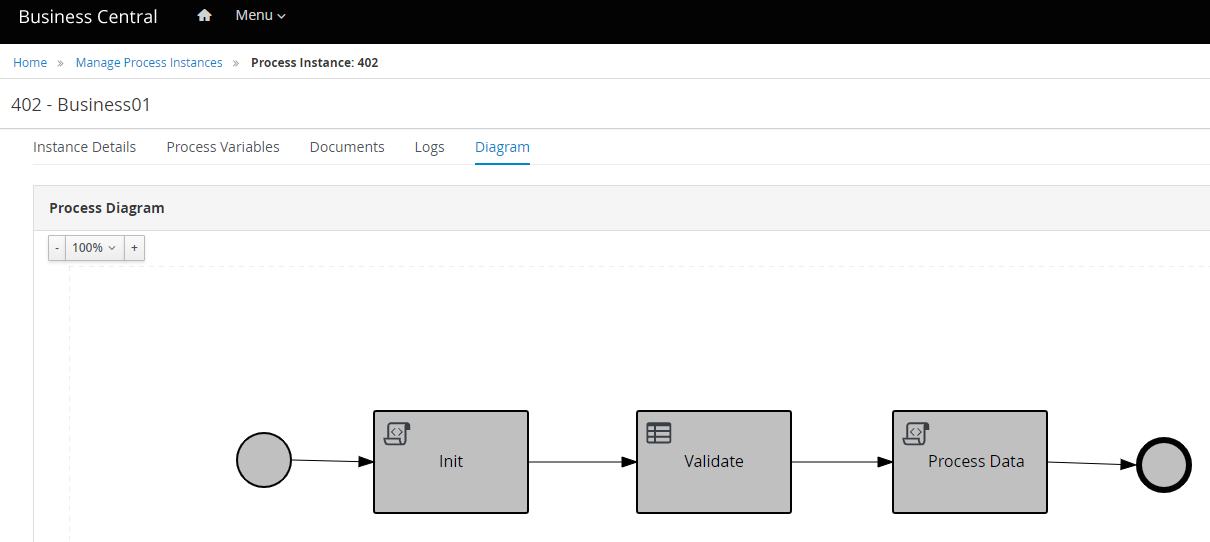
A succesful API call shall gives an Integer as a result, which we can see on Business Center’s UI. Go to Menu > Process Instances > Completed, and it shall display list of Process Instances with its detail.

Code for this article can be access on below Github url,

https://github.com/edwin/spring-boot-and-rhpam