Deploying RHPAM KJar on Top of Spring Boot and Integrate It To Business Central
Red Hat Process Automation Manager, or RHPAM, is an open-source business process management (BPMN 2.0) and a low-code development platform. RHPAM has extensible business nodes or plugins and is a pioneer in Business rules engine development, which uses Drools by using drool language or drl language and middleware applications.
In this article here, we are trying to deploy a BPMN workflow project as a jar file, deploy it into Spring Boot, and connecting it to RHPAM Business Central for Monitoring.
So lets start by creating a basic workflow, for this example im using Visual Studio Code with BPMN Editor extension.

Full code for it can be cloned from below Github url,
https://github.com/edwin/rhpam-hello-world-example
Run below command to build our workflow into Jar file, and install it into our local Maven repository,
$ mvn clean install
Next is lets create our Spring Boot project, and we can start with a Maven pom.xml where we can import our BPMN Jar there
<?xml version="1.0" encoding="UTF-8"?>
<project xmlns="http://maven.apache.org/POM/4.0.0"
         xmlns:xsi="http://www.w3.org/2001/XMLSchema-instance"
         xsi:schemaLocation="http://maven.apache.org/POM/4.0.0 https://maven.apache.org/xsd/maven-4.0.0.xsd">
    <modelVersion>4.0.0</modelVersion>
    <parent>
        <groupId>org.springframework.boot</groupId>
        <artifactId>spring-boot-starter-parent</artifactId>
        <version>2.3.4.RELEASE</version>
        <relativePath /> <!-- lookup parent from repository -->
    </parent>

    <groupId>com.edw</groupId>
    <artifactId>spring-boot-and-rhpam</artifactId>
    <version>1.0.0</version>
    <name>spring-boot-and-rhpam</name>
    <description>Demo deploying BPMN on Spring Boot</description>

    <properties>
        <project.build.sourceEncoding>UTF-8</project.build.sourceEncoding>
        <project.reporting.outputEncoding>UTF-8</project.reporting.outputEncoding>
        <java.version>1.8</java.version>
        <narayana.version>5.6.4.Final</narayana.version>

        <kjar.version>1.6.0</kjar.version>
        <kie.version>7.53.0.Final</kie.version>
    </properties>

    <dependencies>

        <dependency>
            <groupId>org.springframework.boot</groupId>
            <artifactId>spring-boot-starter-web</artifactId>
        </dependency>

        <dependency>
            <groupId>org.kie</groupId>
            <artifactId>kie-server-spring-boot-starter-jbpm</artifactId>
            <version>${kie.version}</version>
        </dependency>
        <dependency>
            <groupId>org.kie.server</groupId>
            <artifactId>kie-server-controller-websocket-client</artifactId>
            <version>${kie.version}</version>
        </dependency>
        <dependency>
            <groupId>org.kie.server</groupId>
            <artifactId>kie-server-client</artifactId>
            <version>${kie.version}</version>
        </dependency>

        <!-- kjar here -->
        <dependency>
            <groupId>com.edw</groupId>
            <artifactId>Project01</artifactId>
            <version>${kjar.version}</version>
        </dependency>

        <dependency>
            <groupId>org.apache.tomcat</groupId>
            <artifactId>tomcat-jdbc</artifactId>
            <scope>runtime</scope>
        </dependency>

        <dependency>
            <groupId>org.springframework.boot</groupId>
            <artifactId>spring-boot-starter-security</artifactId>
        </dependency>

        <dependency>
            <groupId>mysql</groupId>
            <artifactId>mysql-connector-java</artifactId>
            <scope>runtime</scope>
        </dependency>

        <dependency>
            <groupId>org.springframework.boot</groupId>
            <artifactId>spring-boot-starter-test</artifactId>
            <scope>test</scope>
        </dependency>
        <dependency>
            <groupId>org.springframework.security</groupId>
            <artifactId>spring-security-test</artifactId>
            <scope>test</scope>
        </dependency>
    </dependencies>

    <build>
        <plugins>
            <plugin>
                <groupId>org.springframework.boot</groupId>
                <artifactId>spring-boot-maven-plugin</artifactId>
            </plugin>
        </plugins>
    </build>

</project>
And we can put all configurations on application.properties, including database and BusinessCentral connectivity
## spring boot endpoint
server.address=127.0.0.1
server.port=8080

cxf.path=/rest

# kie-server
kieserver.serverId=kie-server-project01
kieserver.serverName=kie-server-project01
kieserver.location=http://127.0.0.1:8080/rest/server

kieserver.username=kieserver
kieserver.password=password

# url for BusinessCentral
kieserver.controllers=ws://127.0.0.1:8090/business-central/websocket/controller

kieserver.drools.enabled=true
kieserver.dmn.enabled=true
kieserver.jbpm.enabled=true
kieserver.jbpmui.enabled=true
kieserver.casemgmt.enabled=true
kieserver.scenariosimulation.enabled=true

# Dedicated jBPM properties
jbpm.executor.enabled=false

# data source
spring.datasource.username=root
spring.datasource.password=password
spring.datasource.url=jdbc:mysql://localhost:3306/db_rhpam
spring.datasource.driver-class-name=com.mysql.cj.jdbc.Driver
spring.datasource.type=org.apache.tomcat.jdbc.pool.XADataSource

# hibernate configuration
spring.jpa.properties.hibernate.dialect=org.hibernate.dialect.MySQL8Dialect
spring.jpa.properties.hibernate.show_sql=false
spring.jpa.properties.hibernate.hbm2ddl.auto=update
spring.jpa.hibernate.naming.physical-strategy=org.hibernate.boot.model.naming.PhysicalNamingStrategyStandardImpl

# transaction manager configuration
spring.jta.narayana.transaction-manager-id=1

narayana.dbcp.enabled=true
narayana.dbcp.maxTotal=20

# kjar
kjar.name=project01
kjar.groupid=com.edw
kjar.artifactid=Project01
kjar.version=1.6.0
And 2 Java classes, one is for Main class and another one for Security and access right.
package com.edw;

import org.springframework.beans.factory.annotation.Value;
import org.springframework.boot.CommandLineRunner;
import org.springframework.boot.SpringApplication;
import org.springframework.boot.autoconfigure.SpringBootApplication;

import org.kie.server.api.marshalling.MarshallingFormat;
import org.kie.server.api.model.KieContainerResource;
import org.kie.server.api.model.KieContainerStatus;
import org.kie.server.api.model.ReleaseId;
import org.kie.server.api.model.ServiceResponse;
import org.kie.server.client.KieServicesClient;
import org.kie.server.client.KieServicesConfiguration;
import org.kie.server.client.KieServicesFactory;
import org.springframework.context.annotation.Bean;

@SpringBootApplication
public class Main {
    public static void main(String[] args) {
        SpringApplication.run(Main.class, args);
    }

    @Value("${kieserver.username}")
    private String user;

    @Value("${kieserver.password}")
    private String password;

    @Value("${kieserver.location}")
    private String url;

    @Value("${kjar.name}")
    private String kjarName;

    @Value("${kjar.groupid}")
    private String kjarGroupid;

    @Value("${kjar.artifactid}")
    private String kjarArtifactId;

    @Value("${kjar.version}")
    private String kjarVersion;

    @Bean
    CommandLineRunner deployAndValidate() {
        return new CommandLineRunner() {
            public void run(String... strings) throws Exception {
                KieServicesConfiguration config = KieServicesFactory.newRestConfiguration(url, user, password, 60000);
                config.setMarshallingFormat(MarshallingFormat.JSON);

                KieServicesClient client = KieServicesFactory.newKieServicesClient(config);
                KieContainerResource kContainer = new KieContainerResource();
                kContainer.setContainerId(kjarName);
                kContainer.setReleaseId(new ReleaseId(kjarGroupid, kjarArtifactId, kjarVersion));

                ServiceResponse<KieContainerResource> resp = client.createContainer(kjarName, kContainer);
                KieContainerStatus status = resp.getResult().getStatus();
                if (!KieContainerStatus.STARTED.equals(status)) {
                    throw new IllegalStateException();
                }
            }
        };
    }
}
package com.edw.config;

import org.springframework.beans.factory.annotation.Autowired;
import org.springframework.context.annotation.Bean;
import org.springframework.context.annotation.Configuration;
import org.springframework.http.HttpMethod;
import org.springframework.security.config.annotation.authentication.builders.AuthenticationManagerBuilder;
import org.springframework.security.config.annotation.web.builders.HttpSecurity;
import org.springframework.security.config.annotation.web.configuration.EnableWebSecurity;
import org.springframework.security.config.annotation.web.configuration.WebSecurityConfigurerAdapter;
import org.springframework.security.crypto.factory.PasswordEncoderFactories;
import org.springframework.security.crypto.password.PasswordEncoder;
import org.springframework.web.cors.CorsConfiguration;
import org.springframework.web.cors.CorsConfigurationSource;
import org.springframework.web.cors.UrlBasedCorsConfigurationSource;

import java.util.Arrays;

@Configuration("kieServerSecurity")
@EnableWebSecurity
public class KieSecurityConfig extends WebSecurityConfigurerAdapter {

    @Override
    protected void configure(HttpSecurity http) throws Exception {
        http
                .csrf().disable()
                .authorizeRequests()
                .antMatchers("/rest/server*").authenticated()
                .and()
                .httpBasic();
    }

    @Autowired
    public void configureGlobal(AuthenticationManagerBuilder auth) throws Exception {
        PasswordEncoder encoder = PasswordEncoderFactories.createDelegatingPasswordEncoder();

        auth.inMemoryAuthentication()
                .withUser("kieserver").password(encoder.encode("password")).roles("kie-server");

        auth.inMemoryAuthentication()
                .withUser("wbadmin").password(encoder.encode("wbadmin")).roles("kie-server");
    }

    @Bean
    public CorsConfigurationSource corsConfigurationSource() {
        UrlBasedCorsConfigurationSource source = new UrlBasedCorsConfigurationSource();
        CorsConfiguration corsConfiguration = new CorsConfiguration();
        corsConfiguration.setAllowedOrigins(Arrays.asList("*"));
        corsConfiguration.setAllowCredentials(true);
        corsConfiguration.setAllowedMethods(Arrays.asList(HttpMethod.GET.name(), HttpMethod.HEAD.name(),
                HttpMethod.POST.name(), HttpMethod.DELETE.name(), HttpMethod.PUT.name()));
        corsConfiguration.applyPermitDefaultValues();
        source.registerCorsConfiguration("/**", corsConfiguration);
        return source;
    }
}
To see whether our BPMN has been deployed or not, we can run below CURL command
$ curl -kv http://kieserver:password@localhost:8080/rest/server/containers
Next, is to start Business Central. It’s basically a JBoss application which runs on port 8090. We can start it by running below command,
$ ./standalone.sh
If our Spring Boot successfully connected to Business Central, we can see the result on Menu > Deploy > Execution Servers.

We can do some sample transactions by using below CURL command,
$ curl -kv http://kieserver:password@localhost:8080/rest/server/containers/project01/processes/Project01.Business01/instances -H 'Content-Type: application/json' --data-raw '{
    "application": {
        "com.edw.project01.User": {
            "age": 37,
            "name":"edwin"
        }
    }
}'
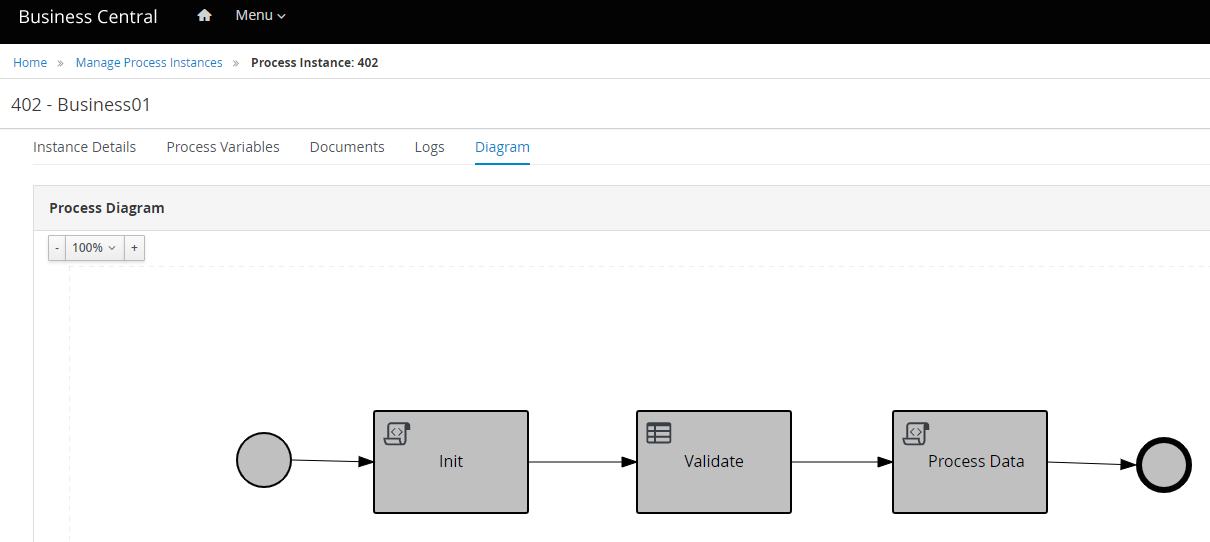
A succesful API call shall gives an Integer as a result, which we can see on Business Center’s UI. Go to Menu > Process Instances > Completed, and it shall display list of Process Instances with its detail.

Code for this article can be access on below Github url,
https://github.com/edwin/spring-boot-and-rhpam