Programming

basic programming

List All Pod’s IP with a Specific Labels

In OpenShift or plain Kubernetes, we can have a multiple pods for a specific Deployment or DeploymentConfigs. But sometimes we want to know what are the IPs of those pods, lets say for a token refresh or cache refresh purpose.

Listing all pod’s IPs can be achieved by running below command,

$ kubectl get pods --output custom-columns=POD:.status.podIP \
	-l app=your-application-label --no-headers

It will gives a result of something like this,

10.128.6.66
10.128.5.181
10.130.2.12
10.131.7.74

Deploy a Spring Boot App with HTTPS by using JKS File into OpenShift 4

For this sample, im planning on creating a spring boot but with an SSL endpoint and deploy it to OpenShift 4 with a passthrough route.

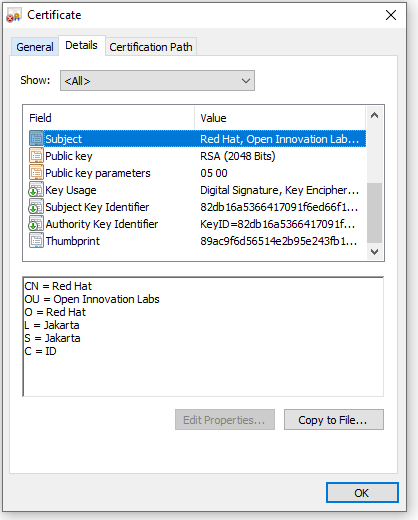
So lets start with creating a JKS file, and put “password” as its password variable.

$ keytool -genkey -alias app-key -keyalg RSA -keystore app.jks

where for this example im using below variables for creating JKS file

C=ID; ST=Jakarta; L=Jakarta; O=Red Hat; OU=Open Innovation Labs; CN=Red Hat

Now we start creating a spring boot app,

package com.redhat.openinnovationlabs.sample.jks;

import org.springframework.boot.SpringApplication;
import org.springframework.boot.autoconfigure.SpringBootApplication;

@SpringBootApplication
public class Application {
    public static void main(String[] args) {
        SpringApplication.run(Application.class, args);
    }
}
package com.redhat.openinnovationlabs.sample.jks.controller;

import org.springframework.web.bind.annotation.GetMapping;
import org.springframework.web.bind.annotation.RestController;

import java.util.HashMap;
import java.util.Map;

@RestController
public class HelloWorldController {
    @GetMapping("/")
    public Map index() {
        return new HashMap() {{
            put("hello", "world");
        }};
    }
}

Now is the most important thing, a properties file where we store all the configurations. For this sample, we would take the configurations from environment variables.

server.port=8443

server.ssl.enabled=true
server.ssl.key-alias=app-key
server.ssl.key-store-type=JKS
server.ssl.key-store-password=${JKS_PASSWORD}
server.ssl.key-store=file:${JKS_LOCATION}

Create a Dockerfile to create our java image

FROM openjdk:11.0.7-jre-slim-buster

LABEL base-image="openjdk:11.0.7-jre-slim-buster" \
      java-version="11.0.7" \
      purpose="Hello World with SSL, Java and Dockerfile"

MAINTAINER Muhammad Edwin < edwin at redhat dot com >

WORKDIR /deployments

COPY target/*.jar app.jar

USER 185

EXPOSE 8443

CMD ["java", "-jar","app.jar"]

And deploy it into OpenShift 4

$ oc new-build --strategy docker --binary \ 
	--docker-image openjdk:11.0.7-jre-slim-buster --name spring-boot-jks

$ oc start-build spring-boot-jks --from-dir . --follow

$ oc new-app --name=spring-boot-jks \ 
	--image-stream=test-project/spring-boot-jks:latest -n test-project

But apps will not work since it is missing a JKS file and some configurations. Therefore we need to create some Secrets in OpenShift 4 by using below command,

$ oc create secret generic spring-boot-jks-file --from-file app.jks

$ oc create secret generic spring-boot-secrets \
	--from-literal=JKS_PASSWORD=password \ 
	--from-literal=JKS_LOCATION=/tmp/jks/app.jks

And assign them into our apps,

$ oc set volume dc/spring-boot-jks --add \
	--name=spring-boot-jks-mnt --secret-name=spring-boot-jks-file \
	--mount-path=/tmp/jks/

$ oc set env dc/spring-boot-jks --from=secret/spring-boot-secrets

Expose our apps endpoint by using a passthrough Route

$ oc create route passthrough  --service spring-boot-jks --port=8443

And run some curl to our apps to see our application’s ssl configuration.

curl -kv https://<apps-ip>

* SSL connection using TLSv1.2 / ECDHE-RSA-AES256-GCM-SHA384
* ALPN, server did not agree to a protocol
* Server certificate:
*  subject: C=ID; ST=Jakarta; L=Jakarta; O=Red Hat; OU=Open Innovation Labs; CN=Red Hat
*  start date: Apr 11 12:27:14 2022 GMT
*  expire date: Jul 10 12:27:14 2022 GMT
*  issuer: C=ID; ST=Jakarta; L=Jakarta; O=Red Hat; OU=Open Innovation Labs; CN=Red Hat
*  SSL certificate verify result: self signed certificate (18), continuing anyway.

Code for this sample can be accessed here,

https://github.com/edwin/spring-boot-jks

Containerizing Python Flask App, and Deploy it into Openshift

Lets say for example i have a very simple python code, the goal is only to construct an html page and display it to user.

from flask import Flask, render_template

app = Flask(__name__)

@app.route("/")
def index():
    return render_template('index.html', message="Hello World..!!")

if __name__ == '__main__':
    app.run(host="0.0.0.0", port=5000, debug=True)

An HTML template file,

<!DOCTYPE html>
<html>
	<head>
		<title>Hello World Python</title>
	</head>
	<body>

		<h1>
			{{ message }}
		</h1>

	</body>
</html>

And requirements.txt

flask

Above Python code can be build into a container image by using a simple Dockerfile,

FROM registry.access.redhat.com/ubi8/python-39:latest

WORKDIR /deployment

COPY app.py /deployment
COPY templates/* /deployment/templates/
COPY requirements.txt /deployment

RUN pip3 install -r requirements.txt

EXPOSE 5000

CMD [ "python3", "-m" , "flask", "run", "--host=0.0.0.0"]

And make sure that the folder structure will be like below,

.
+--- app.py
+--- Dockerfile
+--- README.md
+--- requirements.txt
+--- templates
|   +--- index.html

Now the next thing to do is deploying this app into Openshift, we can start by running below command in the code’s folder.

$ oc new-build --strategy docker --binary --name=containerized-hello-world-python 

$ oc start-build containerized-hello-world-python  --from-dir=. --follow --wait

$ oc new-app containerized-hello-world-python  --name=containerized-hello-world-python 

$ oc create route edge --service=containerized-hello-world-python 

Code can be accessed in below git repository

https://github.com/edwin/containerized-hello-world-python

Have fun with Python.

Deploying a Dockerfile and Jar file into OpenShift 4

Lets say i have a spring boot Jar file, and i want to run it in directly. We can run it by using below command.

$ java -jar existing-app.jar

But somewhere in the future i want to containerized them so that we can run it anywhere have to worry about infrastructure dependencies. For that purpose I need to have a Dockerfile, copy, and run my jar file inside it.

FROM openjdk:11.0.7-jre-slim-buster

LABEL base-image="openjdk:11.0.7-jre-slim-buster" \
      java-version="11.0.7" \
      purpose="Hello World with Java and Dockerfile"

MAINTAINER Muhammad Edwin < edwin at redhat dot com >

# set working directory at /deployments
WORKDIR /deployments

# copy my jar file
COPY existing-app.jar app.jar

# gives uid
USER 185

EXPOSE 8080

# run it
CMD ["java", "-jar","app.jar"]

I can build the container by running below command,

$ docker build -t hello-world-snowdrop .

And run it.

$ docker run -p 8080:8080 hello-world-snowdrop

In order to have above commands runs well, we need to have below structure in our folder.

$ tree
.
+--- Dockerfile
+--- existing-app.jar

The same concept we can use when we want to deploy our app into Openshift. The only difference is the docker build process is being done in Openshift.

$ oc new-build --strategy docker --binary \ 
		--docker-image openjdk:11.0.7-jre-slim-buster \
		--name hello-world-snowdrop
		
$ oc start-build hello-world-snowdrop \ 
		--from-dir . --follow

And below are the commands we can use for deploy, run and expose our app into Openshift.

$ oc new-app hello-world-snowdrop

$ oc create route edge --service hello-world-snowdrop

Dont forget to run above command within the same folder with our Dockerfile and jar files.
Hope it helps, and dont forget to have fun with Openshift 4.

Dynamic Spring Boot Configuration using ConfigMap on top of OpenShift 4

OpenShift is a family of containerization software products developed by Red Hat. Its flagship product is the OpenShift Container Platform — an on-premises platform as a service built around Linux containers orchestrated and managed by Kubernetes on a foundation of Red Hat Enterprise Linux.

In this article im trying to leverage one of Kubernetes feature, which is ConfigMap and create an Spring Boot app that can read a ConfigMap dynamically. Which means we can replace, refresh, and reload the content of ConfigMap anytime and application will read it without have to restart.

Basically we can see on this diagram below what is the approach,

First lets create a file with the name of application-ocp-dev.properties,

spring.application.name=hello-world
spring.cloud.config.enabled=false
management.endpoints.web.exposure.include=refresh

name=edwin

and upload it into OpenShift as a ConfigMap,

$ oc create configmap ocp-dev-config --from-file=application-ocp-dev.properties

Next lets create a Spring Boot app. We can see that other than a regular Spring Boot libraries, i also add Spring Cloud libraries there as well.

<?xml version="1.0" encoding="UTF-8"?>
<project xmlns="http://maven.apache.org/POM/4.0.0"
         xmlns:xsi="http://www.w3.org/2001/XMLSchema-instance"
         xsi:schemaLocation="http://maven.apache.org/POM/4.0.0 http://maven.apache.org/xsd/maven-4.0.0.xsd">
    <modelVersion>4.0.0</modelVersion>

    <groupId>com.edw</groupId>
    <artifactId>spring-cloud-client</artifactId>
    <version>1.0-SNAPSHOT</version>

    <parent>
        <groupId>org.springframework.boot</groupId>
        <artifactId>spring-boot-starter-parent</artifactId>
        <version>2.5.10</version>
        <relativePath/> 
    </parent>

    <properties>
        <java.version>11</java.version>
        <spring-cloud.version>2020.0.5</spring-cloud.version>
    </properties>
    
    <dependencies>
        <dependency>
            <groupId>org.springframework.boot</groupId>
            <artifactId>spring-boot-starter-actuator</artifactId>
        </dependency>
        <dependency>
            <groupId>org.springframework.boot</groupId>
            <artifactId>spring-boot-starter-web</artifactId>
        </dependency>
        <dependency>
            <groupId>org.springframework.cloud</groupId>
            <artifactId>spring-cloud-starter-config</artifactId>
        </dependency>

        <dependency>
            <groupId>org.springframework.boot</groupId>
            <artifactId>spring-boot-starter-test</artifactId>
            <scope>test</scope>
        </dependency>
    </dependencies>
    <dependencyManagement>
        <dependencies>
            <dependency>
                <groupId>org.springframework.cloud</groupId>
                <artifactId>spring-cloud-dependencies</artifactId>
                <version>${spring-cloud.version}</version>
                <type>pom</type>
                <scope>import</scope>
            </dependency>
        </dependencies>
    </dependencyManagement>

    <build>
        <plugins>
            <plugin>
                <groupId>org.springframework.boot</groupId>
                <artifactId>spring-boot-maven-plugin</artifactId>
            </plugin>
        </plugins>
    </build>
</project>

Now lets create 2 Java files to make this apps runs,

package com.edw;

import org.springframework.boot.SpringApplication;
import org.springframework.boot.autoconfigure.SpringBootApplication;

@SpringBootApplication
public class Application {
    public static void main(String[] args) {
        SpringApplication.run(Application.class, args);
    }
}
package com.edw.controllers;

import org.springframework.beans.factory.annotation.Value;
import org.springframework.cloud.context.config.annotation.RefreshScope;
import org.springframework.web.bind.annotation.GetMapping;
import org.springframework.web.bind.annotation.RestController;

@RefreshScope
@RestController
public class IndexController {
    @Value("${name:Somewhat Default}")
    private String message;

    @GetMapping("/")
    public String getMessage() {
        return this.message;
    }
}

Lets deploy our Java app to Openshift using RHEL 8 with OpenJDK 11 as its based image

$ oc new-build . --name=spring-cloud-client -i openshift/openjdk-11-rhel8:1.0

$ oc start-build spring-cloud-client  --from-dir=. --follow --wait

$ oc new-app spring-cloud-client

We can see that apps would deployed to OpenShift but perhaps cannot start at all due to missing configuration. This is where we can leverage OpenShift ConfigMap, we can start with mounting ConfigMap into the apps where we mount it into /tmp/configs folder.

$ oc set volume dc/spring-cloud-client --add \
	--name=app-config-mnt --configmap-name=ocp-dev-config \
	--mount-path=/tmp/configs

And set our apps configuration so that it would point to the new ConfigMap by setting SPRING_CONFIG_LOCATION environment variables.

$ oc set env dc/spring-cloud-client \ 
	SPRING_CONFIG_LOCATION=/tmp/configs/application-ocp-dev.properties

We can see that application now able to read value from our application configuration which resides on ConfigMap.

$ curl -k https://spring-cloud-client.openshift.com/

edwin                                                 

Lets try to replace the content of our properties file,

Save it and wait for one-two minutes in order for Kubelet and ConfirMaps to sync. AFter that we can refresh our apps’s configuration by running a CURL command to this URL

curl -kv -L -X POST 'https://spring-cloud-client.openshift.com/actuator/refresh'

And see the result from CURL,

$ curl -k https://spring-cloud-client.openshift.com/

my other name                                                                                        

And all the code on this article can be accessed here,

https://github.com/edwin/dynamic-spring-boot-configuration-on-openshift-4

Have fun with Spring Boot.

ps. if we think that syncing ConfigMap into mounted Pods took too long (around 2mins), we can accelerate them by annotate the Pods where ConfigMaps are mounted to.

$ oc annotate pod -l app=spring-cloud-client random-annotate-value="put some random string here"  --overwrite