secret

Deploy and Use SealedSecret and KubeSeal on Openshift 4.x

Sealed Secrets are a way to encrypt Kubernetes Secrets value that can be created by anyone, but can only be decrypted by the controller running in the target cluster recovering the original object. This is a good way if we want to store our sensitive configuration values into a git repository, especially when doing a gitops approach.

First is we need to install helm and add sealed-secret repo to it,

$ brew install helm

$ helm repo add sealed-secrets https://bitnami-labs.github.io/sealed-secrets

Next is we need to create a specific Namespace and install our sealed-secret there,

$ oc project sealed-secrets

$ helm install my-sealed-secret  \
         --set containerSecurityContext.enabled=false \
		 --set podSecurityContext.enabled=false \
		 sealed-secrets/sealed-secrets	

Lets try to create a simple Kubernetes secret

$ oc create secret generic app-cred-secret \
		--from-literal=username=username123 \ 
		--from-literal=password=password123 \ 
		--dry-run=client -n edwin-ns -o yaml  > secret.yaml

Where the result would be like this,

apiVersion: v1
data:
  password: cGFzc3dvcmQxMjM=
  username: dXNlcm5hbWUxMjM=
kind: Secret
metadata:
  creationTimestamp: null
  name: app-cred-secret
  namespace: edwin-ns

Now lets try to use Kubeseal to generate a secret which is being encrypted. We can specify “controller-name” based on generated service name within “sealed-secrets” namespace.

$ brew install kubeseal

$ kubeseal --controller-name=my-sealed-secret-sealed-secrets \
       --controller-namespace=sealed-secrets -o yaml < secret.yaml > secret.sealed.yaml

We can see the result of the encrypted yaml,

apiVersion: bitnami.com/v1alpha1
kind: SealedSecret
metadata:
  creationTimestamp: null
  name: app-cred-secret
  namespace: edwin-ns
spec:
  encryptedData:
    password: AgBXkADvKsjAHS31UwWFT+........eJtODYDQw==
    username: AgAP40ssm84PhmNYDKPfDf/Cf......JDBQDtQ==
  template:
    metadata:
      creationTimestamp: null
      name: app-cred-secret
      namespace: edwin-ns

After that, we can implement it directly using “oc apply” command

$ oc apply -f secret.sealed.yaml -n edwin-ns

and we can validate by running below command,

$ oc get sealedsecrets

NAME               AGE
app-cred-secret    53m

We can see that our secret is succesfully created in our namespace

$ oc get secret app-cred-secret -n edwin-ns

NAME              TYPE     DATA   AGE
app-cred-secret   Opaque   2      55m
Deploy a Spring Boot App with HTTPS by using JKS File into OpenShift 4

For this sample, im planning on creating a spring boot but with an SSL endpoint and deploy it to OpenShift 4 with a passthrough route.

So lets start with creating a JKS file, and put “password” as its password variable.

$ keytool -genkey -alias app-key -keyalg RSA -keystore app.jks

where for this example im using below variables for creating JKS file

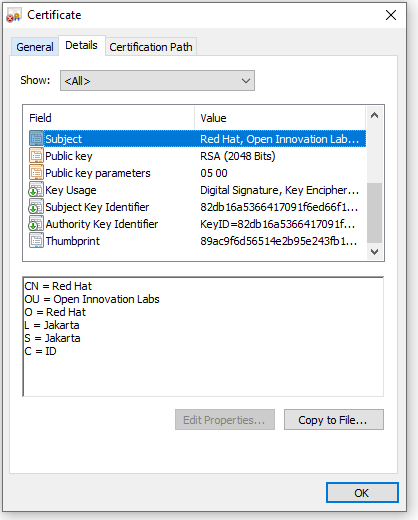
C=ID; ST=Jakarta; L=Jakarta; O=Red Hat; OU=Open Innovation Labs; CN=Red Hat

Now we start creating a spring boot app,

package com.redhat.openinnovationlabs.sample.jks;

import org.springframework.boot.SpringApplication;
import org.springframework.boot.autoconfigure.SpringBootApplication;

@SpringBootApplication
public class Application {
    public static void main(String[] args) {
        SpringApplication.run(Application.class, args);
    }
}
package com.redhat.openinnovationlabs.sample.jks.controller;

import org.springframework.web.bind.annotation.GetMapping;
import org.springframework.web.bind.annotation.RestController;

import java.util.HashMap;
import java.util.Map;

@RestController
public class HelloWorldController {
    @GetMapping("/")
    public Map index() {
        return new HashMap() {{
            put("hello", "world");
        }};
    }
}

Now is the most important thing, a properties file where we store all the configurations. For this sample, we would take the configurations from environment variables.

server.port=8443

server.ssl.enabled=true
server.ssl.key-alias=app-key
server.ssl.key-store-type=JKS
server.ssl.key-store-password=${JKS_PASSWORD}
server.ssl.key-store=file:${JKS_LOCATION}

Create a Dockerfile to create our java image

FROM openjdk:11.0.7-jre-slim-buster

LABEL base-image="openjdk:11.0.7-jre-slim-buster" \
      java-version="11.0.7" \
      purpose="Hello World with SSL, Java and Dockerfile"

MAINTAINER Muhammad Edwin < edwin at redhat dot com >

WORKDIR /deployments

COPY target/*.jar app.jar

USER 185

EXPOSE 8443

CMD ["java", "-jar","app.jar"]

And deploy it into OpenShift 4

$ oc new-build --strategy docker --binary \ 
	--docker-image openjdk:11.0.7-jre-slim-buster --name spring-boot-jks

$ oc start-build spring-boot-jks --from-dir . --follow

$ oc new-app --name=spring-boot-jks \ 
	--image-stream=test-project/spring-boot-jks:latest -n test-project

But apps will not work since it is missing a JKS file and some configurations. Therefore we need to create some Secrets in OpenShift 4 by using below command,

$ oc create secret generic spring-boot-jks-file --from-file app.jks

$ oc create secret generic spring-boot-secrets \
	--from-literal=JKS_PASSWORD=password \ 
	--from-literal=JKS_LOCATION=/tmp/jks/app.jks

And assign them into our apps,

$ oc set volume dc/spring-boot-jks --add \
	--name=spring-boot-jks-mnt --secret-name=spring-boot-jks-file \
	--mount-path=/tmp/jks/

$ oc set env dc/spring-boot-jks --from=secret/spring-boot-secrets

Expose our apps endpoint by using a passthrough Route

$ oc create route passthrough  --service spring-boot-jks --port=8443

And run some curl to our apps to see our application’s ssl configuration.

curl -kv https://<apps-ip>

* SSL connection using TLSv1.2 / ECDHE-RSA-AES256-GCM-SHA384
* ALPN, server did not agree to a protocol
* Server certificate:
*  subject: C=ID; ST=Jakarta; L=Jakarta; O=Red Hat; OU=Open Innovation Labs; CN=Red Hat
*  start date: Apr 11 12:27:14 2022 GMT
*  expire date: Jul 10 12:27:14 2022 GMT
*  issuer: C=ID; ST=Jakarta; L=Jakarta; O=Red Hat; OU=Open Innovation Labs; CN=Red Hat
*  SSL certificate verify result: self signed certificate (18), continuing anyway.

Code for this sample can be accessed here,

https://github.com/edwin/spring-boot-jks

Injecting Openshift Secret and Reading it as an Environment Variables in Spring Boot

In this writing, im planning to create a simple Spring Boot application but with a dynamic configuration that is going to be fetched from environment variables. Usually we are using this for securing some sensitive values such as Database credentials or endpoints.

For this scenario, im trying to make password variables as parameterized inside Spring Boot’s application.properties. Binds it with environment variables with the name of OPENSHIFT_APP_PASSWORD.

server.port=8080
server.password=${OPENSHIFT_APP_PASSWORD}

And call it from our controller,

package com.edw.controller;

import org.springframework.beans.factory.annotation.Value;
import org.springframework.web.bind.annotation.GetMapping;
import org.springframework.web.bind.annotation.RestController;

import java.util.HashMap;
import java.util.Map;

@RestController
public class IndexController {

    @Value("${server.password}")
    private String serverPassword;

    @GetMapping("/")
    public Map helloWorld() {
        return new HashMap() {{
            put("hello", "world");
            put("password", serverPassword);
        }};
    }
}

Dont forget setting up maven’s configuration,

<?xml version="1.0" encoding="UTF-8"?>
<project xmlns="http://maven.apache.org/POM/4.0.0"
         xmlns:xsi="http://www.w3.org/2001/XMLSchema-instance"
         xsi:schemaLocation="http://maven.apache.org/POM/4.0.0 http://maven.apache.org/xsd/maven-4.0.0.xsd">
    <modelVersion>4.0.0</modelVersion>

    <groupId>com.edw</groupId>
    <artifactId>ocpsecret</artifactId>
    <version>1.0-SNAPSHOT</version>

    <repositories>
        <repository>
            <id>redhat-early-access</id>
            <name>Red Hat Early Access Repository</name>
            <url>https://maven.repository.redhat.com/earlyaccess/all/</url>
        </repository>
        <repository>
            <id>redhat-ga</id>
            <name>Red Hat GA Repository</name>
            <url>https://maven.repository.redhat.com/ga/</url>
        </repository>
    </repositories>

    <pluginRepositories>
        <pluginRepository>
            <id>redhat-early-access</id>
            <name>Red Hat Early Access Repository</name>
            <url>https://maven.repository.redhat.com/earlyaccess/all/</url>
        </pluginRepository>
        <pluginRepository>
            <id>redhat-ga</id>
            <name>Red Hat GA Repository</name>
            <url>https://maven.repository.redhat.com/ga/</url>
        </pluginRepository>
    </pluginRepositories>

    <properties>
        <snowdrop-bom.version>2.3.6.Final-redhat-00001</snowdrop-bom.version>
        <spring-boot.version>2.1.4.RELEASE-redhat-00001</spring-boot.version>
        <maven.compiler.source>11</maven.compiler.source>
        <maven.compiler.target>11</maven.compiler.target>
        <start-class>com.edw.Main</start-class>
    </properties>

    <dependencyManagement>
        <dependencies>
            <dependency>
                <groupId>dev.snowdrop</groupId>
                <artifactId>snowdrop-dependencies</artifactId>
                <version>${snowdrop-bom.version}</version>
                <type>pom</type>
                <scope>import</scope>
            </dependency>
        </dependencies>
    </dependencyManagement>

    <dependencies>
        <dependency>
            <groupId>org.springframework.boot</groupId>
            <artifactId>spring-boot-starter-web</artifactId>
        </dependency>
    </dependencies>

    <build>
        <plugins>
            <plugin>
                <groupId>org.springframework.boot</groupId>
                <artifactId>spring-boot-maven-plugin</artifactId>
                <version>${spring-boot.version}</version>
                <executions>
                    <execution>
                        <goals>
                            <goal>repackage</goal>
                        </goals>
                    </execution>
                </executions>
            </plugin>
        </plugins>
    </build>
</project>

After we commit all the code into github, we can pull them from Openshift with a simple oc command.

$ oc new-app registry.access.redhat.com/ubi8/openjdk-11~https://github.com/edwin/spring-boot-and-ocp-secret

We can create a variable as a Secret by using below oc command

$ oc create secret generic mypassword --from-literal=OPENSHIFT_APP_PASSWORD=whatever

And inject it into our application,

$ oc set env --from=secret/mypassword dc/spring-boot-and-ocp-secret

Expose our app’s endpoint,

$ oc expose service spring-boot-and-ocp-secret

And do a curl to see that variable “password” has been filled with “whatever” which comes from our OCP Secret.

$ curl -kv http://ocp-endpoint/

* Mark bundle as not supporting multiuse
< HTTP/1.1 200
< Content-Type: application/json
<
{"password":"whatever","hello":"world"}

Code for this can be found on below link

https://github.com/edwin/spring-boot-and-ocp-secret