Deploy a Spring Boot App with HTTPS by using JKS File into OpenShift 4
For this sample, im planning on creating a spring boot but with an SSL endpoint and deploy it to OpenShift 4 with a passthrough route.
So lets start with creating a JKS file, and put “password” as its password variable.
$ keytool -genkey -alias app-key -keyalg RSA -keystore app.jks
where for this example im using below variables for creating JKS file
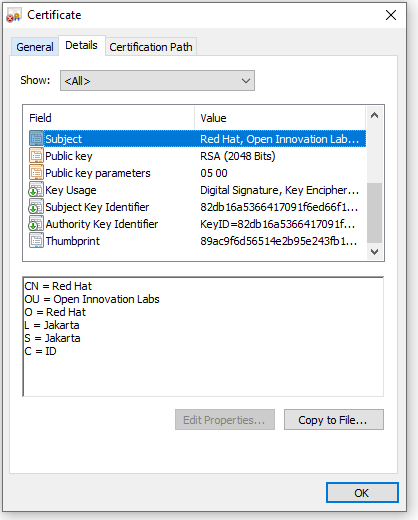
C=ID; ST=Jakarta; L=Jakarta; O=Red Hat; OU=Open Innovation Labs; CN=Red Hat
Now we start creating a spring boot app,
package com.redhat.openinnovationlabs.sample.jks;

import org.springframework.boot.SpringApplication;
import org.springframework.boot.autoconfigure.SpringBootApplication;

@SpringBootApplication
public class Application {
    public static void main(String[] args) {
        SpringApplication.run(Application.class, args);
    }
}
package com.redhat.openinnovationlabs.sample.jks.controller;

import org.springframework.web.bind.annotation.GetMapping;
import org.springframework.web.bind.annotation.RestController;

import java.util.HashMap;
import java.util.Map;

@RestController
public class HelloWorldController {
    @GetMapping("/")
    public Map index() {
        return new HashMap() {{
            put("hello", "world");
        }};
    }
}
Now is the most important thing, a properties file where we store all the configurations. For this sample, we would take the configurations from environment variables.
server.port=8443

server.ssl.enabled=true
server.ssl.key-alias=app-key
server.ssl.key-store-type=JKS
server.ssl.key-store-password=${JKS_PASSWORD}
server.ssl.key-store=file:${JKS_LOCATION}
Create a Dockerfile to create our java image
FROM openjdk:11.0.7-jre-slim-buster

LABEL base-image="openjdk:11.0.7-jre-slim-buster" \
      java-version="11.0.7" \
      purpose="Hello World with SSL, Java and Dockerfile"

MAINTAINER Muhammad Edwin < edwin at redhat dot com >

WORKDIR /deployments

COPY target/*.jar app.jar

USER 185

EXPOSE 8443

CMD ["java", "-jar","app.jar"]
And deploy it into OpenShift 4
$ oc new-build --strategy docker --binary \
	--docker-image openjdk:11.0.7-jre-slim-buster --name spring-boot-jks

$ oc start-build spring-boot-jks --from-dir . --follow

$ oc new-app --name=spring-boot-jks \
	--image-stream=test-project/spring-boot-jks:latest -n test-project
But apps will not work since it is missing a JKS file and some configurations. Therefore we need to create some Secrets in OpenShift 4 by using below command,
$ oc create secret generic spring-boot-jks-file --from-file app.jks

$ oc create secret generic spring-boot-secrets \
	--from-literal=JKS_PASSWORD=password \
	--from-literal=JKS_LOCATION=/tmp/jks/app.jks
And assign them into our apps,
$ oc set volume dc/spring-boot-jks --add \
	--name=spring-boot-jks-mnt --secret-name=spring-boot-jks-file \
	--mount-path=/tmp/jks/

$ oc set env dc/spring-boot-jks --from=secret/spring-boot-secrets
Expose our apps endpoint by using a passthrough Route
$ oc create route passthrough --service spring-boot-jks --port=8443
And run some curl to our apps to see our application’s ssl configuration.
curl -kv https://<apps-ip>

* SSL connection using TLSv1.2 / ECDHE-RSA-AES256-GCM-SHA384
* ALPN, server did not agree to a protocol
* Server certificate:
*  subject: C=ID; ST=Jakarta; L=Jakarta; O=Red Hat; OU=Open Innovation Labs; CN=Red Hat
*  start date: Apr 11 12:27:14 2022 GMT
*  expire date: Jul 10 12:27:14 2022 GMT
*  issuer: C=ID; ST=Jakarta; L=Jakarta; O=Red Hat; OU=Open Innovation Labs; CN=Red Hat
*  SSL certificate verify result: self signed certificate (18), continuing anyway.
Code for this sample can be accessed here,
https://github.com/edwin/spring-boot-jks