python

Deploying Python App using S2I to Openshift Container Platform

For this sample, we are trying to deploy a Flask application to Openshift without any CI/CD tools involved. Means we are deploying directly by using S2I functionality thru OCP Dashboard.

Lets start with a simple hello world Python application, it is basically one simple py file

from flask import Flask

app = Flask(__name__)

@app.route("/")
def index():
    return "<h1>Hello, World!</h1>"

app.run(host="0.0.0.0", port=8080)

and one requirements.txt file,

flask

And after that, we can push our complete Python code to a Git repository. For example, im using below Git repo,

https://github.com/edwin/hello-world-flask

We can deploy to Openshift from the Developer dashboard,

Put the Git repo URL there

It will trigger a build process

Would took a while

But it will deployed successfully after a while
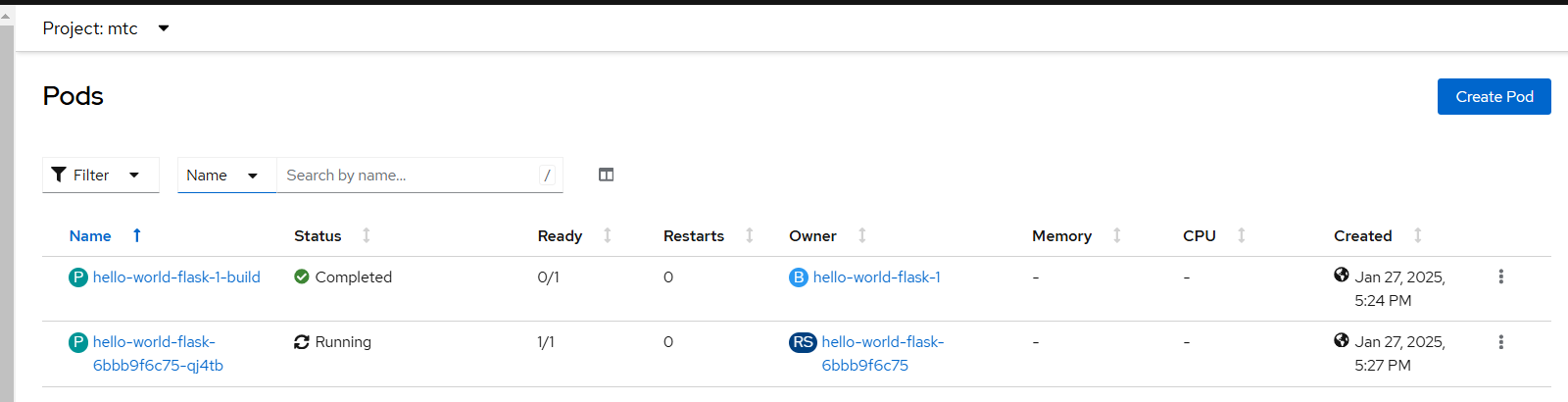
We can access the deployed apps directly after we expose a Route to our app.

Containerizing Python Flask App, and Deploy it into Openshift

Lets say for example i have a very simple python code, the goal is only to construct an html page and display it to user.

from flask import Flask, render_template

app = Flask(__name__)

@app.route("/")
def index():
    return render_template('index.html', message="Hello World..!!")

if __name__ == '__main__':
    app.run(host="0.0.0.0", port=5000, debug=True)

An HTML template file,

<!DOCTYPE html>
<html>
	<head>
		<title>Hello World Python</title>
	</head>
	<body>

		<h1>
			{{ message }}
		</h1>

	</body>
</html>

And requirements.txt

flask

Above Python code can be build into a container image by using a simple Dockerfile,

FROM registry.access.redhat.com/ubi8/python-39:latest

WORKDIR /deployment

COPY app.py /deployment
COPY templates/* /deployment/templates/
COPY requirements.txt /deployment

RUN pip3 install -r requirements.txt

EXPOSE 5000

CMD [ "python3", "-m" , "flask", "run", "--host=0.0.0.0"]

And make sure that the folder structure will be like below,

.
+--- app.py
+--- Dockerfile
+--- README.md
+--- requirements.txt
+--- templates
|   +--- index.html

Now the next thing to do is deploying this app into Openshift, we can start by running below command in the code’s folder.

$ oc new-build --strategy docker --binary --name=containerized-hello-world-python 

$ oc start-build containerized-hello-world-python  --from-dir=. --follow --wait

$ oc new-app containerized-hello-world-python  --name=containerized-hello-world-python 

$ oc create route edge --service=containerized-hello-world-python 

Code can be accessed in below git repository

https://github.com/edwin/containerized-hello-world-python

Have fun with Python.

Deploying a Python app to Openshift 4 using s2i

S2I or Source to Image, is a way to deploy application from its sourcecode directly to Openshift. In this article, we try to build a Python apps with Flask framework and deploy it to Openshift.

So lets start with requirements.txt for storing required libraries

flask

And a simple hello world app

from flask import Flask

app = Flask(__name__)

@app.route("/")
def index():
    return "<h1>Hello, World!</h1>"

app.run(host="0.0.0.0", port=8080)

Next is where the magic happens, it would build, containerized and push the whole apps to external registry by using below commands,

$ oc new-build . --name=hello-world-python --to-docker --to=docker.io/dockerusername/hello-world-python

$ oc start-build hello-world-python --from-dir=. --follow --wait

Once we push it to external registry, we can pull and run the apps in Openshift

$ oc new-app . --docker-image=dockerusername/hello-world-python --name=hello-world-python-app

And expose a secure URL for it,

$ oc create route edge --service=hello-world-python-app

Code for this can be accessed here,

https://github.com/edwin/hello-world-flask

[Python] Fixing Fatal Error when Installing Mysqlclient with Pip

On my current project, im using Python, Django and Pip. But there is some issue when installing libraries needed for running the app,

pip install -r requirements.txt

Below is the error generated when running it,

_mysql.c:29:10: fatal error: 'my_config.h' file not found
   #include "my_config.h"
            ^~~~~~~~~~~~~
   1 error generated.
   error: command 'clang' failed with exit status 1
----------------------------------------
 Rolling back uninstall of mysqlclient

Looks like error happen when trying to install below library,

mysqlclient==1.3.7

Below is Python and Pip version that im using,

 
$ python --version
Python 3.4.3
$ pip -V
pip 18.1 from /Users/m/.pyenv/versions/3.4.3/envs/logistic_backend/lib/python3.4/site-packages/pip (python 3.4)

The main culprit is corresponding library is not supported by Python 3.4.3, changing it into below lib fix the error

pymysql==0.9.2