edwin

Blacklist a Specific Application URL on Openshift using Route

Sometimes we want to hide a sensitive URLs such as our prometheus or even Spring Boot’s actuator from external world, but we still want those URL to be accesible within internal cluster. Basically there are multiple ways of doing that, such as blocking it from Firewall, rewrite from Reverse Proxy, or even doing blacklisting from application level.

One thing that i want to try is to do blacklisting from Openshift Route level, which is something doable by the DevOps team since it is still within platform level.

So for this example, i want to expose all my API to external world except for actuator endpoint which can only be consume within internal network. So lets start with a sample Kubernetes Service Yaml,

kind: Service
apiVersion: v1
metadata:
  name: catalogue-service
  namespace: edwin-ns
  labels:
    app: catalogue-service
    app.kubernetes.io/component: catalogue-service
    app.kubernetes.io/instance: catalogue-service
    app.kubernetes.io/name: catalogue-service
    app.kubernetes.io/part-of: sample-app
    app.openshift.io/runtime-version: latest
  annotations:
    openshift.io/generated-by: OpenShiftWebConsole
spec:
  ports:
    - name: 8080-tcp
      protocol: TCP
      port: 8080
      targetPort: 8080
  internalTrafficPolicy: Cluster
  type: ClusterIP
  ipFamilyPolicy: SingleStack
  sessionAffinity: None
  selector:
    app: catalogue-service
    deploymentconfig: catalogue-service

And i want to expose above Service into a specific URL by using Route,

kind: Route
apiVersion: route.openshift.io/v1
metadata:
  name: catalogue-service
  namespace: edwin-ns
  labels:
    app: catalogue-service
    app.kubernetes.io/component: catalogue-service
    app.kubernetes.io/instance: catalogue-service
    app.kubernetes.io/name: catalogue-service
    app.kubernetes.io/part-of: sample-app
    app.openshift.io/runtime-version: latest
  annotations:
    openshift.io/host.generated: 'true'
spec:
  host: catalogue-service-edwin-ns.apps.openshift.com
  to:
    kind: Service
    name: catalogue-service
    weight: 100
  port:
    targetPort: 8080-tcp
  tls:
    termination: edge
    insecureEdgeTerminationPolicy: Redirect
  wildcardPolicy: None

Above configuration means that everytime external users accessing catalogue-service-edwin-ns.apps.openshift.com, they are able to access catalogue-service application APIs thru its Kubernetes Service. If we want to block a specific URL, we need to create another Route yaml specifically for blocking it based on Path variable,

kind: Route
apiVersion: route.openshift.io/v1
metadata:
  name: catalogue-service-blocking-actuator
  namespace: edwin-ns
  labels:
    app: catalogue-service
    app.kubernetes.io/component: catalogue-service
    app.kubernetes.io/instance: catalogue-service
    app.kubernetes.io/name: catalogue-service
    app.kubernetes.io/part-of: sample-app
    app.openshift.io/runtime-version: latest
  annotations:
    haproxy.router.openshift.io/rewrite-target: /go-to-some-404-url
    openshift.io/host.generated: 'true'
spec:
  host: catalogue-service-edwin-ns.apps.openshift.com
  path: /actuator
  to:
    kind: Service
    name: catalogue-service
    weight: 100
  port:
    targetPort: 8080-tcp
  tls:
    termination: edge
    insecureEdgeTerminationPolicy: Redirect
  wildcardPolicy: None

Having those 2 YAML all together making sure that we are expose all APIs that are needed, excluding the actuator URL which we “rewrite” into some 404 url.

How to Generate User Statistics Queries using Keycloak

Sometimes we want to see how many users has registered to our Keycloak, how many login per-hours, how many failed logins, and other statistical data for multiple purposes.

We can a use sample queries below for generating those reports. But first we need to enable events for that corresponding realm,

Once we turn Keycloak events on, we can run below queries to populate the required results

## get total number of successful login
select count(1) from EVENT_ENTITY where TYPE='LOGIN';

## get total number of failed login
select count(1) from EVENT_ENTITY where TYPE='LOGIN_ERROR';

## get user's all activity
select USER_ENTITY.USERNAME, EVENT_ENTITY.* 
from USER_ENTITY, EVENT_ENTITY where EVENT_ENTITY.USER_ID = USER_ENTITY.ID
order by USER_ENTITY.USERNAME, EVENT_TIME;

Pretty simple right 🙂

Keycloak redirect_uri is Not HTTPS when Spring Boot is Behind Reverse Proxy

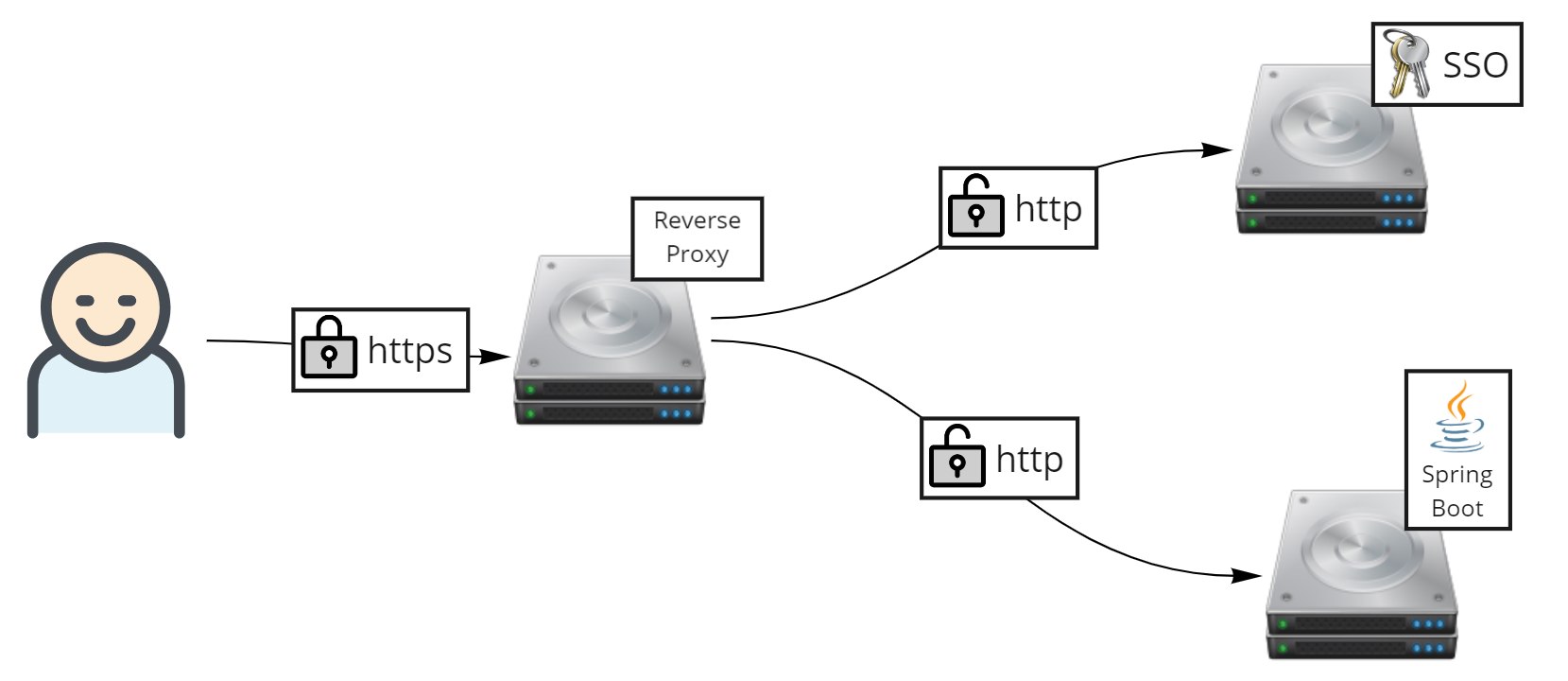
Recently i have a regular Keycloak deployment with the high level concept like below image,

But during implementation, i had this weird condition when Keycloak, behind a reverse proxy for SSL offloader, is redirecting to my Spring Boot application. But Keycloak is not detecting my Spring Boot application as https.

https://keycloak/auth/realms/realm/protocol/openid-connect/auth?
response_type=code&client_id=client-id&redirect_uri=http%3A%2F%2Fspring-boot-app%2Fsso&state=123&
login=true&scope=openid

As we can see, redirect_uri is having http as its protocol, instead of https. Despite my Spring Boot application is being deployed behind a reverse proxy with an SSL offloader.

The workaround is actually quite simple, first thing is that we need to forward request from users into downstream apps, which is Keycloak and Spring Boot. This is primarily being done on reverse proxy or Load Balancer such as F5 or Nginx

X-Forwarded-For: 10.20.81.131
X-Forwarded-Proto: https
X-Forwarded-Host: my.apps.com

But sometimes even after above headers being forwarded, Spring Boot still unaware that it is being accessed as HTTPS. Therefore we need to add one more configuration line in our Spring Boot’s application.properties configuration.

server.forward-headers-strategy=NATIVE

This should be sufficient enough.

How to Fix “java.lang.IllegalArgumentException: Invalid characters (CR/LF) in header message”

Recently i met a weird exception when using a Rest API endpoint provided by Red Hat Fuse (or Apache Camel) and deployed on top of Spring Boot,

javax.servlet.ServletException: java.lang.IllegalArgumentException: 
Invalid characters (CR/LF) in header message
	at org.apache.camel.http.common.CamelServlet.doService(CamelServlet.java:235) 
~[camel-http-common-2.21.0.fuse-770013-redhat-00001.jar!/:2.21.0.fuse-770013-redhat-00001]
	at org.apache.camel.http.common.CamelServlet.service(CamelServlet.java:80) 
~[camel-http-common-2.21.0.fuse-770013-redhat-00001.jar!/:2.21.0.fuse-770013-redhat-00001]
	at javax.servlet.http.HttpServlet.service(HttpServlet.java:791) 
~[jboss-servlet-api_4.0_spec-1.0.0.Final.jar!/:1.0.0.Final]
	at io.undertow.servlet.handlers.ServletHandler.handleRequest(ServletHandler.java:74) 
~[undertow-servlet-2.0.30.SP1-redhat-00001.jar!/:2.0.30.SP1-redhat-00001]
	at io.undertow.servlet.handlers.FilterHandler$FilterChainImpl.doFilter(FilterHandler.java:129) 
~[undertow-servlet-2.0.30.SP1-redhat-00001.jar!/:2.0.30.SP1-redhat-00001]

It happens everytime im using below CURL command,

curl -kv -L -X POST https://url/api/  -H 'Authorization: Basic Yxxxx'  -H 'Content-Type: application/json'  
--data-raw '{
        "id": "123",
        "birthDate": "19900429"
    }'

The funny thing is, i think culprit is because i have a newline within my json body request. After i change my command into below CURL, it seems that everything is working well now.

curl -kv -L -X POST https://url/api/  -H 'Authorization: Basic Yxxxx'  -H 'Content-Type: application/json'  
--data-raw '{"id": "123","birthDate": "19900429"}'

Weird eh

Error user_session_not_found when Using Keycloak’s UserInfo API

Had this error on Keycloak console,

09:49:35,417 WARN  [org.keycloak.events] (default task-145) type=USER_INFO_REQUEST_ERROR, 
realmId=internal, clientId=my-client-id, userId=null, ipAddress=10.20.24.35, 
error=user_session_not_found, auth_method=validate_access_token

Basically it happens when a specific user hitting a UserInfo API request bringing their active JWT token. JWT token is generated after a user successfully login to Keycloak, either via Login page or Rest API, and to be used in their internal application.

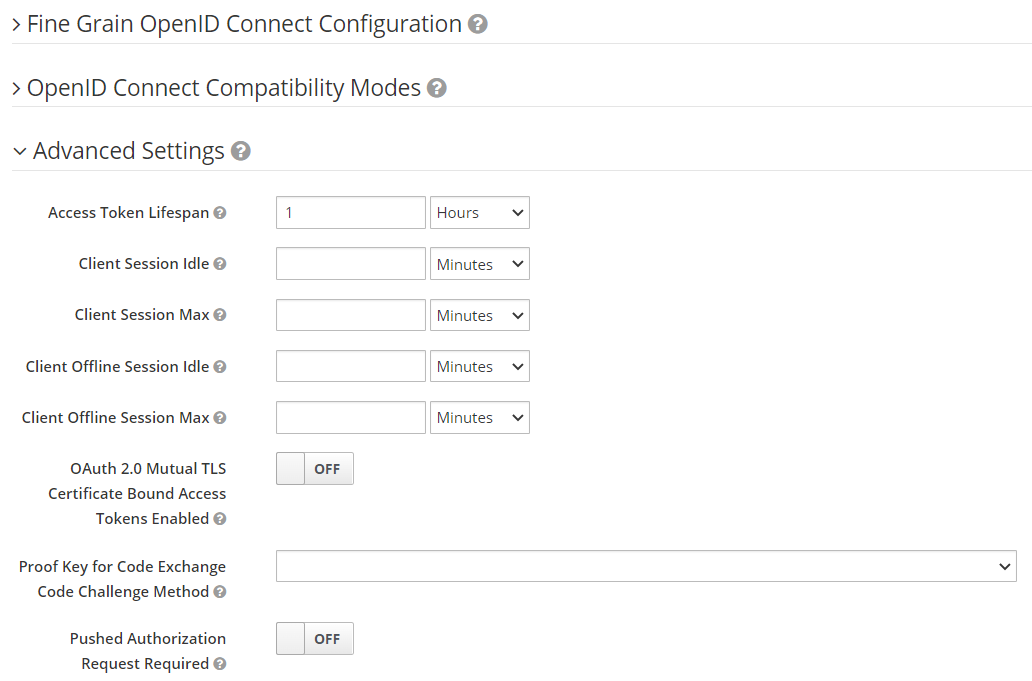
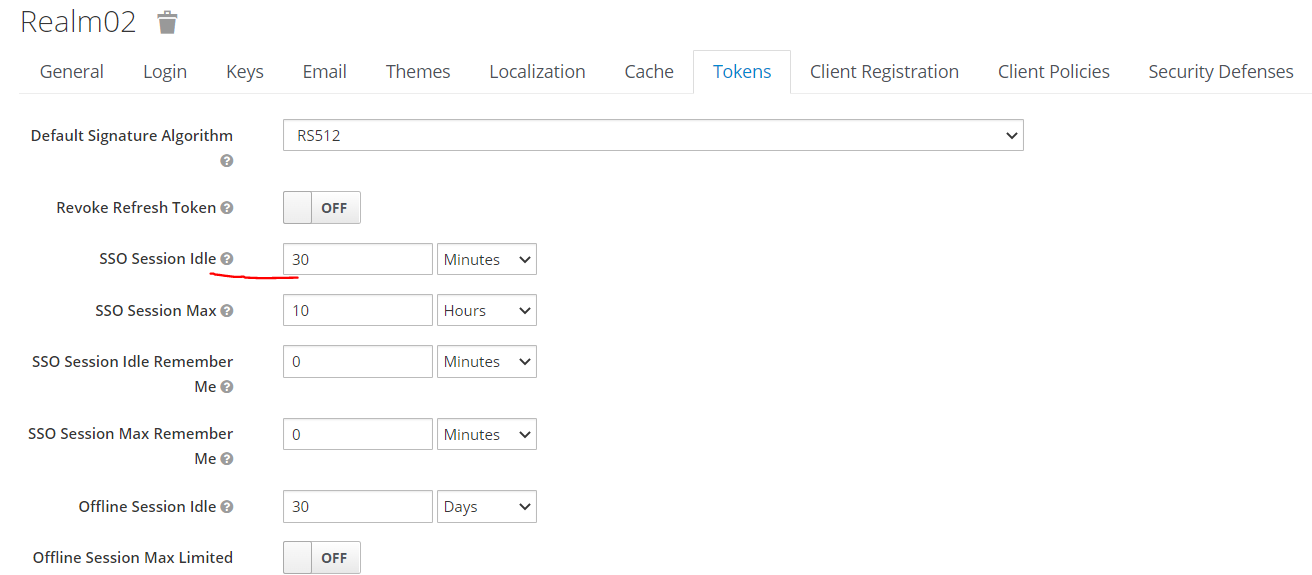
Also the error seems happening, generated JWT token seems to be invalid after 30minutes despite we update access token lifespan into 1 hour.

Finally i realized that this error keeps happening because i was updating the wrong configuration. It is supposed to be the “SSO Session Idle” configuration, in the “Tokens” tab in “Realm Settings” that need to be updated.

After change it into 1 Hour, i can see that my JWT token is successfully validated using UserInfo API for at most 1 hour after being created.