route

Create a Custom Route Certificate for Openshift 4

Sometimes we want to have a proper HTTPS certificate for our Openshift cluster, instead of a random Openshift generated certificate. We can do so by uploading our certificate into Openshift directly and completely replace default custom certificate.

But for this example, we are trying to generate a self-signed certificate with a custom attributes. We can start by generate a Root CA Key,

$ openssl genrsa -out rootCA.key 4096

After that we can create Root certificate based on previously generated rootCA.key

$ openssl req -x509 -new -nodes -key rootCA.key -sha256 -days 1024 -out rootCA.crt

Next is uploading our rootCA into Openshift 4

$ oc create configmap custom-ca --from-file=ca-bundle.crt=rootCA.crt -n openshift-config

And update cluster-wide proxy configuration to use our custom root certificate

$ oc patch proxy/cluster \
     --type=merge \
     --patch='{"spec":{"trustedCA":{"name":"custom-ca"}}}'

Next is to generate a certificate dedicated for our Openshift, we can start by generating a certificate key

$ openssl genrsa -out localhost.key 2048

and use the corresponding key to generate certificate signing,

$ openssl req -new -key localhost.key -out localhost.csr

last is to generate certificate using our CA Root key and CSR file,

$ openssl x509 -req -in localhost.csr -CA rootCA.crt -CAkey rootCA.key \
	-CAcreateserial -out localhost.crt -days 1000 -sha256

We can verify the content of our CRT by using below command,

$ openssl x509 -in localhost.crt -text -noout

Certificate:
    Data:
        Version: 1 (0x0)
        Serial Number:
            01:d3:65:36:30:4a:81:54:7d:ab:96:a5:a8:62:f2:d0:23:da:e7:6e
        Signature Algorithm: sha256WithRSAEncryption
        Issuer: C = ID, ST = Jakarta, L = Jakarta, O = RH, OU = GPS, CN = localhost, emailAddress = edwin@redhat.com
        Validity
            Not Before: Oct 16 06:50:00 2023 GMT
            Not After : Jul 12 06:50:00 2026 GMT
        Subject: C = ID, ST = JKT, L = JKT, O = RH, OU = GPS, CN = edwin.baculsoft.com, emailAddress = edwin@redhat.com
        Subject Public Key Info:
            Public Key Algorithm: rsaEncryption
                Public-Key: (2048 bit)
.....

once we generated our self-signed certificate, we can deploy them to Openshift by using below command,

$ oc create secret tls tls-secret --cert=localhost.crt \
	--key=localhost.key -n openshift-ingress

And patch our ingress operator to use our newly created secret,

$ oc patch ingresscontroller.operator default \
	--type=merge -p '{"spec":{"defaultCertificate": {"name": "tls-secret"}}}' \
	-n openshift-ingress-operator

We can validate whether our IngressController is reading our custom certificate by using below command,

$ oc get ingresscontroller default -oyaml

apiVersion: operator.openshift.io/v1
kind: IngressController
metadata:
  creationTimestamp: "2023-06-20T05:04:35Z"
  finalizers:
  - ingresscontroller.operator.openshift.io/finalizer-ingresscontroller
  generation: 2
  name: default
  namespace: openshift-ingress-operator
  resourceVersion: "1025274"
  uid: ab6a3f51-cc40-4d85-a988-568eb5358bc5
spec:
  clientTLS:
    clientCA:
      name: ""
    clientCertificatePolicy: ""
  defaultCertificate:
    name: tls-secret

And validate it by using CURL command,

$ curl -kv https://console-openshift-console.my-openshift.com/
*   Trying [::1]:443...
* Connected to console-openshift-console.my-openshift.com (::1) port 443 (#0)
* ALPN: offers h2,http/1.1
* (304) (OUT), TLS handshake, Client hello (1):
* (304) (IN), TLS handshake, Server hello (2):
* (304) (IN), TLS handshake, Unknown (8):
* (304) (IN), TLS handshake, Certificate (11):
* (304) (IN), TLS handshake, CERT verify (15):
* (304) (IN), TLS handshake, Finished (20):
* (304) (OUT), TLS handshake, Finished (20):
* SSL connection using TLSv1.3 / AEAD-AES128-GCM-SHA256
* ALPN: server did not agree on a protocol. Uses default.
* Server certificate:
*  subject: C=ID; ST=JKT; L=JKT; O=RH; OU=GPS; CN=edwin.baculsoft.com; emailAddress=edwin@redhat.com
*  start date: Oct 16 05:52:53 2023 GMT
*  expire date: Feb 27 05:52:53 2025 GMT
*  issuer: C=ID; ST=Jakarta; L=Jakarta; O=RH; OU=GPS; CN=localhost; emailAddress=edwin@redhat.com
*  SSL certificate verify result: unable to get local issuer certificate (20), continuing anyway.
* using HTTP/1.x
> GET / HTTP/1.1
> Host: console-openshift-console.my-openshift.com
> User-Agent: curl/8.1.2
> Accept: */*
>
< HTTP/1.1 200 OK
< referrer-policy: strict-origin-when-cross-origin
< set-cookie: csrf-token=xxxxx
< x-content-type-options: nosniff

Error 400 when Accessing Openshift 4 Route

Just had this intermittent error when accessing my application which is being deployed to Openshift 4,

<html><body><h1>400 Bad request</h1>
Your browser sent an invalid request.
</body></html>

At first, we tought that issue happens at application level. But after further debugging, it is shown that there is no logs captured at all from the application’s perspective. After further debugging, we realized that issue happens on Openshift’s Router level, where logs can be seen below.

2023-09-30T18:00:50.097282+00:00 infra-0 infra-0.ocp.local haproxy[46]: 127.0.0.1:41722 [30/Sep/2023:18:00:50.096] public openshift_default/<NOSRV> 0/-1/-1/-1/0 503 157 - - SC-- 1/1/0/0/0 0/0 "HEAD / HTTP/1.1"
2023-09-30T18:00:52.385991+00:00 infra-0 infra-0.ocp.local haproxy[46]: 10.20.24.80:36248 [30/Sep/2023:18:00:52.375] fe_no_sni~ fe_no_sni/<NOSRV> -1/-1/-1/-1/10 400 211 - - PR-- 2/1/0/0/0 0/0 "<BADREQ>"
2023-09-30T18:00:52.387088+00:00 infra-0 infra-0.ocp.local haproxy[46]: 10.20.24.80:36248 [30/Sep/2023:18:00:52.375] public_ssl be_no_sni/fe_no_sni 1/0/11 2440 SD 1/1/0/0/0 0/0
2023-09-30T18:00:53.915337+00:00 infra-0 infra-0.ocp.local haproxy[46]: 10.20.24.80:39454 [30/Sep/2023:18:00:53.914] public public/<NOSRV> -1/-1/-1/-1/0 400 211 - - PR-- 1/1/0/0/0 0/0 "<BADREQ>"
2023-09-30T18:00:56.155389+00:00 infra-0 infra-0.ocp.local haproxy[46]: 10.20.24.80:36306 [30/Sep/2023:18:00:56.144] public_ssl be_tcp:openshift-authentication:oauth-openshift/pod:oauth-openshift-69bc64d75b-r5z8t:oauth-openshift:https:10.130.1.123:6443 1/1/10 3687 -- 1/1/0/0/0 0/0
2023-09-30T18:00:57.368604+00:00 infra-0 infra-0.ocp.local haproxy[46]: 10.20.24.80:36322 [30/Sep/2023:18:00:57.366] fe_no_sni~ fe_no_sni/<NOSRV> -1/-1/-1/-1/2 400 211 - - PR-- 2/1/0/0/0 0/0 "<BADREQ>"
2023-09-30T18:00:57.369754+00:00 infra-0 infra-0.ocp.local haproxy[46]: 10.20.24.80:36322 [30/Sep/2023:18:00:57.365] public_ssl be_no_sni/fe_no_sni 1/0/3 404 SD 1/1/0/0/0 0/0
2023-09-30T18:00:58.847737+00:00 infra-0 infra-0.ocp.local haproxy[46]: 10.20.24.80:39522 [30/Sep/2023:18:00:58.847] public public/<NOSRV> -1/-1/-1/-1/0 400 211 - - PR-- 1/1/0/0/0 0/0 "<BADREQ>"

Where some requests were given error 400 BADREQ. And it seems that rootcause is haproxy blocking big http headers, we can see the sample below where i simulate a very big cookies when accessing my application thru Openshift Router.

$ curl -kv  https://my.apps.ocp.local --cookie "LELE=$(perl -e 'print "x"x25000')"
* Rebuilt URL to: https://my.apps.ocp.local/
*   Trying 10.20.20.135...
* TCP_NODELAY set
* Connected to my.apps.ocp.local (10.20.20.135) port 443 (#0)
* ALPN, offering h2
* ALPN, offering http/1.1
* successfully set certificate verify locations:
*   CAfile: /etc/pki/tls/certs/ca-bundle.crt
  CApath: none
* TLSv1.3 (OUT), TLS handshake, Client hello (1):
* TLSv1.3 (IN), TLS handshake, Server hello (2):
* TLSv1.3 (IN), TLS handshake, [no content] (0):
* TLSv1.3 (IN), TLS handshake, Encrypted Extensions (8):
* TLSv1.3 (IN), TLS handshake, [no content] (0):
* TLSv1.3 (IN), TLS handshake, Certificate (11):
* TLSv1.3 (IN), TLS handshake, [no content] (0):
* TLSv1.3 (IN), TLS handshake, CERT verify (15):
* TLSv1.3 (IN), TLS handshake, [no content] (0):
* TLSv1.3 (IN), TLS handshake, Finished (20):
* TLSv1.3 (OUT), TLS change cipher, Change cipher spec (1):
* TLSv1.3 (OUT), TLS handshake, [no content] (0):
* TLSv1.3 (OUT), TLS handshake, Finished (20):
* SSL connection using TLSv1.3 / TLS_AES_128_GCM_SHA256
* ALPN, server did not agree to a protocol
* Server certificate:
*  subject: C=ID; ST=Daerah Khusus Ibukota Jakarta; L=Jakarta Selatan; O=xxxx; CN=*.xxx
*  start date: Nov  8 00:00:00 2022 GMT
*  expire date: Dec  9 23:59:59 2023 GMT
*  issuer: C=US; O=DigiCert Inc; CN=DigiCert TLS RSA SHA256 2020 CA1
*  SSL certificate verify ok.
* TLSv1.3 (OUT), TLS app data, [no content] (0):
> GET / HTTP/1.1
> Host: my.apps.ocp.local
> User-Agent: curl/7.61.1
> Accept: */*
> Cookie: LELE=xxxxxx.....xxxxxxxxxxxxxxxxxxxxxxxxxxxxxxxxxxxxxxxxxxxxxxxxxxxx

TLSv1.3 (OUT), TLS app data, [no content] (0):
* TLSv1.3 (IN), TLS app data, [no content] (0):
< HTTP/1.1 400 Bad request
< content-length: 90
< cache-control: no-cache
< content-type: text/html
< connection: close
<
<html><body><h1>400 Bad request</h1>
Your browser sent an invalid request.
</body></html>
* Closing connection 0
* TLSv1.3 (OUT), TLS alert, [no content] (0):
* TLSv1.3 (OUT), TLS alert, close notify (256):

Workaround is pretty much simple, we can see it on below document

https://docs.openshift.com/container-platform/4.13/networking/ingress-operator.html#nw-ingress-controller-configuration-parameters_configuring-ingress

And that is to increase headerBufferBytes,

$ oc -n openshift-ingress-operator patch ingresscontroller/default \
	--type=merge -p '{"spec":{"tuningOptions": {"headerBufferBytes": 50000}}}'

How to Expose Openshift Route into a Secure Endpoint

We can do below command to expose a specific Openshift Service into a route or URL

$ oc expose svc <service-name>

but it would create a regular not-secure http endpoint, which sometimes not sufficient enough to fulfil our requirements. Therefore we need to find a way to create a secure route endpoint, and we can achieve that condition by using below command

$ oc create route edge --service <service-name>

It would create a route with an edge TLS termination.

Blacklist a Specific Application URL on Openshift using Route

Sometimes we want to hide a sensitive URLs such as our prometheus or even Spring Boot’s actuator from external world, but we still want those URL to be accesible within internal cluster. Basically there are multiple ways of doing that, such as blocking it from Firewall, rewrite from Reverse Proxy, or even doing blacklisting from application level.

One thing that i want to try is to do blacklisting from Openshift Route level, which is something doable by the DevOps team since it is still within platform level.

So for this example, i want to expose all my API to external world except for actuator endpoint which can only be consume within internal network. So lets start with a sample Kubernetes Service Yaml,

kind: Service
apiVersion: v1
metadata:
  name: catalogue-service
  namespace: edwin-ns
  labels:
    app: catalogue-service
    app.kubernetes.io/component: catalogue-service
    app.kubernetes.io/instance: catalogue-service
    app.kubernetes.io/name: catalogue-service
    app.kubernetes.io/part-of: sample-app
    app.openshift.io/runtime-version: latest
  annotations:
    openshift.io/generated-by: OpenShiftWebConsole
spec:
  ports:
    - name: 8080-tcp
      protocol: TCP
      port: 8080
      targetPort: 8080
  internalTrafficPolicy: Cluster
  type: ClusterIP
  ipFamilyPolicy: SingleStack
  sessionAffinity: None
  selector:
    app: catalogue-service
    deploymentconfig: catalogue-service

And i want to expose above Service into a specific URL by using Route,

kind: Route
apiVersion: route.openshift.io/v1
metadata:
  name: catalogue-service
  namespace: edwin-ns
  labels:
    app: catalogue-service
    app.kubernetes.io/component: catalogue-service
    app.kubernetes.io/instance: catalogue-service
    app.kubernetes.io/name: catalogue-service
    app.kubernetes.io/part-of: sample-app
    app.openshift.io/runtime-version: latest
  annotations:
    openshift.io/host.generated: 'true'
spec:
  host: catalogue-service-edwin-ns.apps.openshift.com
  to:
    kind: Service
    name: catalogue-service
    weight: 100
  port:
    targetPort: 8080-tcp
  tls:
    termination: edge
    insecureEdgeTerminationPolicy: Redirect
  wildcardPolicy: None

Above configuration means that everytime external users accessing catalogue-service-edwin-ns.apps.openshift.com, they are able to access catalogue-service application APIs thru its Kubernetes Service. If we want to block a specific URL, we need to create another Route yaml specifically for blocking it based on Path variable,

kind: Route
apiVersion: route.openshift.io/v1
metadata:
  name: catalogue-service-blocking-actuator
  namespace: edwin-ns
  labels:
    app: catalogue-service
    app.kubernetes.io/component: catalogue-service
    app.kubernetes.io/instance: catalogue-service
    app.kubernetes.io/name: catalogue-service
    app.kubernetes.io/part-of: sample-app
    app.openshift.io/runtime-version: latest
  annotations:
    haproxy.router.openshift.io/rewrite-target: /go-to-some-404-url
    openshift.io/host.generated: 'true'
spec:
  host: catalogue-service-edwin-ns.apps.openshift.com
  path: /actuator
  to:
    kind: Service
    name: catalogue-service
    weight: 100
  port:
    targetPort: 8080-tcp
  tls:
    termination: edge
    insecureEdgeTerminationPolicy: Redirect
  wildcardPolicy: None

Having those 2 YAML all together making sure that we are expose all APIs that are needed, excluding the actuator URL which we “rewrite” into some 404 url.

Error “verifying certificate: x509: certificate signed by unknown authority” When Creating HTTPS on Openshift

I had this error when creating a reeencrypt secure route on Openshift,

spec.tls.certificate: Invalid value: "redacted certificate data": error verifying certificate: x509: certificate signed by unknown authority
reason: ExtendedValidationFailed

this is the oc command that im using,

oc create route reeencrypt my-https --service my-gateway-https --key private.key --cert server.pem --cacert cacert.pem -n my-project

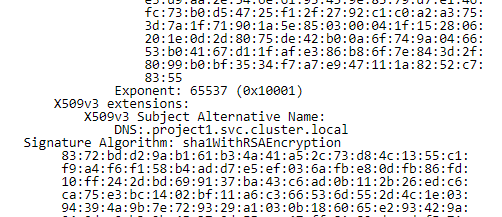
This error is due to im using an incorrect certificate for reencrypting. Using certificate decoder shows whats wrong with my certificate,

The correct certificate should show this,

Regenerating my certificate fix this issue.