edwin

How to Connect to Existing Database using Kogito BPMN and Quarkus

Kogito is a next generation business automation toolkit that originates from well known Open Source projects Drools (for business rules) and jBPM (for business processes). Kogito aims at providing another approach to business automation where the main message is to expose your business knowledge (processes, rules, decisions, predictions) in a domain specific way.

For this sample we are deploying Kogito on top of Quarkus, a lightweight Java framework, and use it to host a simple straightforward workflow for customer risk asessment and loan approval, automatically validating customers based on several variables such as Age, Salary, and whether that customer is part of Blacklisted customer or not.

First, lets start with a simple Maven pom file. This is needed to set the required libraries and frameworks for running the application.

<?xml version="1.0" encoding="UTF-8"?>
<project xmlns="http://maven.apache.org/POM/4.0.0"
         xmlns:xsi="http://www.w3.org/2001/XMLSchema-instance"
         xsi:schemaLocation="http://maven.apache.org/POM/4.0.0 http://maven.apache.org/xsd/maven-4.0.0.xsd">
    <modelVersion>4.0.0</modelVersion>

    <groupId>org.edw</groupId>
    <artifactId>quarkus-bpmn</artifactId>
    <version>1.0-SNAPSHOT</version>

    <properties>
        <surefire-plugin.version>3.0.0-M7</surefire-plugin.version>
        <maven.compiler.target>11</maven.compiler.target>
        <maven.compiler.source>11</maven.compiler.source>
        <quarkus.platform.artifact-id>quarkus-bom</quarkus.platform.artifact-id>
        <quarkus.platform.group-id>io.quarkus</quarkus.platform.group-id>
        <quarkus.platform.version>2.15.3.Final</quarkus.platform.version>
        <kogito.platform.group-id>org.kie.kogito</kogito.platform.group-id>
        <kogito.platform.artifact-id>kogito-quarkus-bom</kogito.platform.artifact-id>
        <kogito.platform.version>1.24.0.Final</kogito.platform.version>
        <project.build.sourceEncoding>UTF-8</project.build.sourceEncoding>
        <project.reporting.outputEncoding>UTF-8</project.reporting.outputEncoding>
    </properties>

    <dependencyManagement>
        <dependencies>
            <dependency>
                <groupId>org.antlr</groupId>
                <artifactId>antlr4-runtime</artifactId>
                <version>4.9.2</version>
            </dependency>
            <dependency>
                <groupId>${quarkus.platform.group-id}</groupId>
                <artifactId>${quarkus.platform.artifact-id}</artifactId>
                <version>${quarkus.platform.version}</version>
                <type>pom</type>
                <scope>import</scope>
            </dependency>
            <dependency>
                <groupId>${kogito.platform.group-id}</groupId>
                <artifactId>${kogito.platform.artifact-id}</artifactId>
                <version>${kogito.platform.version}</version>
                <type>pom</type>
                <scope>import</scope>
            </dependency>
        </dependencies>
    </dependencyManagement>

    <dependencies>
        <dependency>
            <groupId>io.quarkus</groupId>
            <artifactId>quarkus-resteasy-reactive-jackson</artifactId>
        </dependency>
        <dependency>
            <groupId>org.kie.kogito</groupId>
            <artifactId>kogito-quarkus</artifactId>
        </dependency>

        <!-- Hibernate ORM specific dependencies -->
        <dependency>
            <groupId>io.quarkus</groupId>
            <artifactId>quarkus-hibernate-orm-panache</artifactId>
        </dependency>
        <dependency>
            <groupId>io.quarkus</groupId>
            <artifactId>quarkus-hibernate-orm</artifactId>
        </dependency>
        <dependency>
            <groupId>io.quarkus</groupId>
            <artifactId>quarkus-hibernate-validator</artifactId>
        </dependency>

        <!-- JDBC driver dependencies -->
        <dependency>
            <groupId>io.quarkus</groupId>
            <artifactId>quarkus-jdbc-mysql</artifactId>
        </dependency>

        <!-- tests -->
        <dependency>
            <groupId>io.quarkus</groupId>
            <artifactId>quarkus-junit5</artifactId>
            <scope>test</scope>
        </dependency>
        <dependency>
            <groupId>io.rest-assured</groupId>
            <artifactId>rest-assured</artifactId>
            <scope>test</scope>
        </dependency>
        <dependency>
            <groupId>io.quarkus</groupId>
            <artifactId>quarkus-test-h2</artifactId>
            <scope>test</scope>
        </dependency>
        <dependency>
            <groupId>io.quarkus</groupId>
            <artifactId>quarkus-jdbc-h2</artifactId>
            <scope>test</scope>
        </dependency>
    </dependencies>
    <build>
        <plugins>
            <plugin>
                <groupId>${quarkus.platform.group-id}</groupId>
                <artifactId>quarkus-maven-plugin</artifactId>
                <version>${quarkus.platform.version}</version>
                <executions>
                    <execution>
                        <goals>
                            <goal>build</goal>
                        </goals>
                    </execution>
                </executions>
            </plugin>
            <plugin>
                <artifactId>maven-surefire-plugin</artifactId>
                <version>${surefire-plugin.version}</version>
                <configuration>
                    <systemPropertyVariables>
                        <java.util.logging.manager>org.jboss.logmanager.LogManager</java.util.logging.manager>
                        <maven.home>${maven.home}</maven.home>
                    </systemPropertyVariables>
                </configuration>
            </plugin>
        </plugins>
    </build>
    <profiles>
        <profile>
            <id>native</id>
            <activation>
                <property>
                    <name>native</name>
                </property>
            </activation>
            <properties>
                <quarkus.package.type>native</quarkus.package.type>
            </properties>
            <build>
                <plugins>
                    <plugin>
                        <artifactId>maven-failsafe-plugin</artifactId>
                        <version>${surefire-plugin.version}</version>
                        <executions>
                            <execution>
                                <goals>
                                    <goal>integration-test</goal>
                                    <goal>verify</goal>
                                </goals>
                                <configuration>
                                    <systemPropertyVariables>
                                        <native.image.path>${project.build.directory}/${project.build.finalName}-runner</native.image.path>
                                        <java.util.logging.manager>org.jboss.logmanager.LogManager</java.util.logging.manager>
                                        <maven.home>${maven.home}</maven.home>
                                    </systemPropertyVariables>
                                </configuration>
                            </execution>
                        </executions>
                    </plugin>
                </plugins>
            </build>
        </profile>
    </profiles>

</project>

Next is setting up our database connections on our application.properties, and Java services class for handling queries

# default
quarkus.http.port=8080

quarkus.log.level=DEBUG
quarkus.log.console.format=%d{HH:mm:ss} [%c{3.}] (%t) %s%e%n

quarkus.application.name=Quarkus and BPMN

# datasource
quarkus.datasource.db-kind = mysql
quarkus.datasource.username = admin
quarkus.datasource.password = password
quarkus.datasource.jdbc.url = jdbc:mysql://localhost:3306/db_test
package com.edw.entity;

import io.quarkus.hibernate.orm.panache.PanacheEntityBase;

import javax.persistence.Entity;
import javax.persistence.GeneratedValue;
import javax.persistence.GenerationType;
import javax.persistence.Id;

@Entity(name = "T_BLACKLIST")
public class Blacklist extends PanacheEntityBase {
    @Id
    @GeneratedValue(strategy = GenerationType.IDENTITY)
    private Long id;
    private String name;

	// put constructor, setter and getter after this
}
package com.edw.service;

import com.edw.entity.Blacklist;

import javax.enterprise.context.ApplicationScoped;
import javax.transaction.Transactional;

@ApplicationScoped
@Transactional
public class BlacklistService {
    public Boolean isBlacklist(String name) {
        if(name == null || name.trim().isEmpty())
            return true;
        return Blacklist.find("name", name).list().size() > 0;
    }
}

Next is creating a BPMN workflow, lets name this customer-risk.bpmn2. In here, we are creating a workflow to do a sequence validation.

What we need to modify is the first Script task, in there we need to call the Java method that we were creating before in Quarkus

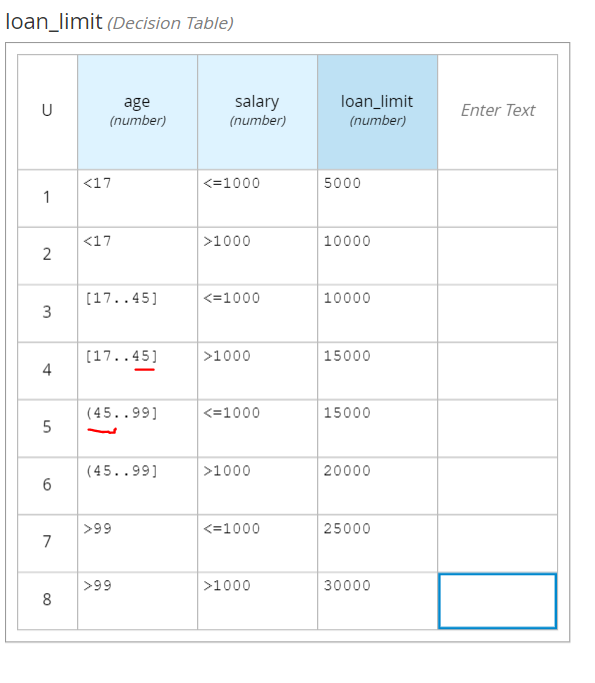
Next is creating a decision table for validating customer’s risk, we are using DMN for this.

which contains below Decision Table,

After we’ve done all above steps, we can start build and running our application

$ mvn clean package -s settings.xml

$ java -jar .\target\quarkus-app\quarkus-run.jar 

And can test our application by using a CURL call,

$ curl  -X POST http://localhost:8080/customer_risk  \
    -H 'content-type: application/json'  \
    -H 'accept: application/json'   \
    -d '{"name" : "Regular User", "salary":500, "age": 15}'

and it will give below result,

{
	"id":"c4fcc5eb-9aab-4c99-8620-5ff1c27be79e",
	"name":"Regular User", 
	"risk":"High",
	"salary":500,
	"age":15,
	"status":"Loan is Rejected because Customer is High Risk"
} 

Code can be accessed on below Github url,

https://github.com/edwin/quarkus-bpmn
Alert “Gap detected” when Using Kogito DMN

Got below alert when running DMN using Kogito

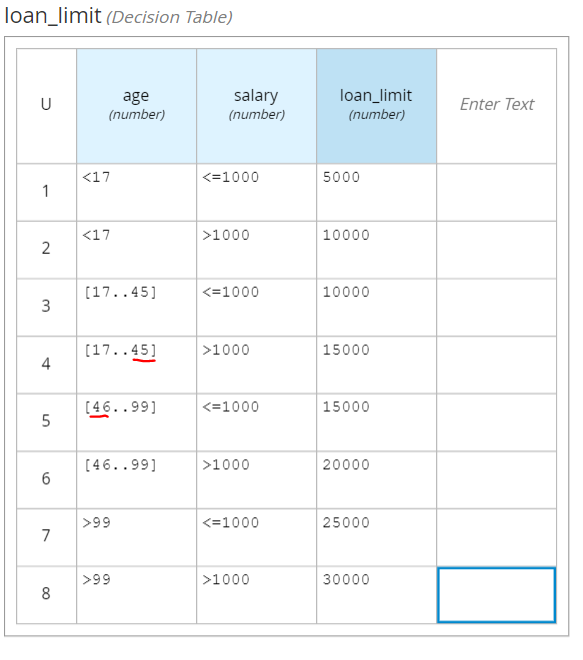
[org.kie.kog.cod.dec.DecisionValidation] (build-10)   Gap detected: [ ( 45 .. 46 ), - ]

While having Decision Table like below,

It happens because there are gap between 45 and 46 (as the error said), and the workaround is pretty much simple. Replacing square bracket (included) with round bracket (exclusion) should solve the problem.

Code can be accessed on below Github Repository

https://github.com/edwin/quarkus-and-dmn

Error PKIX path building failed When Connecting to Keycloak with a Self Signed Certificate

For this scenario im using Keycloak version 17, which are being installed by using below command.

docker pull quay.io/keycloak/keycloak:17.0.0

And being run by using below command,

docker run -p 8443:8443 -e KC_HOSTNAME=localhost:8443 \ 
	-e KC_HOSTNAME_URL=https://localhost:8443 -e KC_DB=mysql \ 
	-e KC_DB_USERNAME=keycloak -e KC_DB_PASSWORD=password \ 
	-e KC_DB_URL=jdbc:mysql://192.168.56.1:3306/keycloak_db \
	quay.io/keycloak/keycloak:17.0.0 start

As for the Spring Boot sourcecode, we are utilizing the same code that are being used in below article,

https://github.com/edwin/spring-boot-and-rhsso

So lets start by setting up our application.properties to pointing to Keycloak’s HTTPS port

keycloak.auth-server-url=https://localhost:8443/
keycloak.realm=external
keycloak.resource=client
keycloak.public-client=false
keycloak.bearer-only=false
keycloak.principal-attribute=preferred_username
keycloak.credentials.secret=xxxxxx

But when HTTPS is created by using a self signed certificate, it will display below error from the Java application console.

o.k.adapters.KeycloakDeployment - Failed to load URLs from https://localhost:8443/realms/external/.well-known/openid-configuration
javax.net.ssl.SSLHandshakeException: PKIX path building failed: sun.security.provider.certpath.SunCertPathBuilderException: unable to find valid certification path to requested target
	at java.base/sun.security.ssl.Alert.createSSLException(Alert.java:131)
	at java.base/sun.security.ssl.TransportContext.fatal(TransportContext.java:349)
	at java.base/sun.security.ssl.TransportContext.fatal(TransportContext.java:292)
	at java.base/sun.security.ssl.TransportContext.fatal(TransportContext.java:287)
Caused by: sun.security.validator.ValidatorException: PKIX path building failed: sun.security.provider.certpath.SunCertPathBuilderException: unable to find valid certification path to requested target
	at java.base/sun.security.validator.PKIXValidator.doBuild(PKIXValidator.java:439)
	at java.base/sun.security.validator.PKIXValidator.engineValidate(PKIXValidator.java:306)
	at java.base/sun.security.validator.Validator.validate(Validator.java:264)
	at java.base/sun.security.ssl.X509TrustManagerImpl.validate(X509TrustManagerImpl.java:313)
	at java.base/sun.security.ssl.X509TrustManagerImpl.checkTrusted(X509TrustManagerImpl.java:222)
	at java.base/sun.security.ssl.X509TrustManagerImpl.checkServerTrusted(X509TrustManagerImpl.java:129)
	at java.base/sun.security.ssl.CertificateMessage$T13CertificateConsumer.checkServerCerts(CertificateMessage.java:1340)
	... 86 common frames omitted
Caused by: sun.security.provider.certpath.SunCertPathBuilderException: unable to find valid certification path to requested target
	at java.base/sun.security.provider.certpath.SunCertPathBuilder.build(SunCertPathBuilder.java:141)
	at java.base/sun.security.provider.certpath.SunCertPathBuilder.engineBuild(SunCertPathBuilder.java:126)
	at java.base/java.security.cert.CertPathBuilder.build(CertPathBuilder.java:297)
	at java.base/sun.security.validator.PKIXValidator.doBuild(PKIXValidator.java:434)
	... 92 common frames omitted

Thats why we need to include Keycloak’s custom SSL certificate into our Spring Boot application so that Spring Boot able to recognize a self sign certificate.

We can start by using OpenSSL to capture Keycloak’s SSL Certificate

echo "" | openssl s_client -connect localhost:8443  -showcerts 2>/dev/null | openssl x509 -out certfile.cert

It will generate a certificate which is belongs to Keycloak, next step is to create a truststore to contain the corresponding certificate. Below command will create a keystore with the name of “customcacerts” and its password which is “changeit”

keytool -import -alias ca -file certfile.cert \
         -keystore customcacerts  -storepass changeit

And we can run our Spring Boot application with below command, using the created truststore and its password as parameter.

java -Djavax.net.ssl.trustStore=customcacerts \
         -Djavax.net.ssl.trustStorePassword=changeit -jar spring-boot.jar

[Spring Boot] Create application.properties Default Value from Environment Variables

Usually we have below code on application.properties

hello=${HELLO_ENV_VARIABLE}

It means that we are setting the value of variable “hello” from “HELLO_ENV_VARIABLE” which are being passed on thru environment variables. Which later on we can set on IntelliJ

Later on, we can call it from our Java Class,

@RestController
public class HelloWorldController {

    @Value("${hello}")
    private String hello;

    @GetMapping("/")
    public Map index() {
        return new HashMap() {{
            put("hello", hello);
        }};
    }
}

We can also create a default value, in case of “HELLO_ENV_VARIABLE” is not being set,

hello=${HELLO_ENV_VARIABLE:something not world}

But what most people forgot is that we can also create a default value from other environment variable

hello=${HELLO_ENV_VARIABLE:${HELLO_ENV_VARIABLE_BACKUP}}

And set it up on IntelliJ

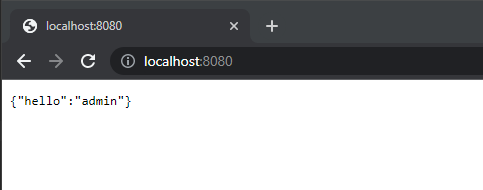
It will result in something like this,

{"hello":"this is a backup variable"}

Using Infinispan to Store Spring Boot’s HTTP Session

There are multiple ways of externalizing http session in Spring Boot, we can use a regular SQL database, or even a no-sql approach such as using Infinispan. For this sample, we are trying to integrate Spring Boot with Spring Security and externalizing its session to Infinispan.

So lets start with running an Infinispan instances,

$ docker pull infinispan/server:latest

$ docker run -p 11222:11222 -e USER=admin -e PASS=password infinispan/server

And create a new cache with the name of “app-session”, with a lifespan of one day, and and idle time of 5 minutes.

<?xml version="1.0"?>
<distributed-cache name="app-session" owners="1" mode="SYNC" statistics="true">
	<encoding>
		<key media-type="application/x-protostream"/>
		<value media-type="application/x-protostream"/>
	</encoding>
	<locking isolation="REPEATABLE_READ"/>
	<expiration lifespan="86400000" max-idle="300000"/>
</distributed-cache>

After that, we can focus on creating a new Java apps. We can start with a new pom.xml file,

<?xml version="1.0" encoding="UTF-8"?>
<project xmlns="http://maven.apache.org/POM/4.0.0"
         xmlns:xsi="http://www.w3.org/2001/XMLSchema-instance"
         xsi:schemaLocation="http://maven.apache.org/POM/4.0.0 http://maven.apache.org/xsd/maven-4.0.0.xsd">
    <modelVersion>4.0.0</modelVersion>

    <groupId>org.example</groupId>
    <artifactId>spring-infinispan-session</artifactId>
    <version>1.0-SNAPSHOT</version>

    <properties>
        <maven.compiler.source>11</maven.compiler.source>
        <maven.compiler.target>11</maven.compiler.target>
        <project.build.sourceEncoding>UTF-8</project.build.sourceEncoding>
        <infinispan.version>14.0.1.Final</infinispan.version>
        <spring-session.version>2.7.0</spring-session.version>
        <spring-boot.version>2.7.0</spring-boot.version>
    </properties>

    <dependencyManagement>
        <dependencies>
            <dependency>
                <groupId>org.infinispan</groupId>
                <artifactId>infinispan-bom</artifactId>
                <version>${infinispan.version}</version>
                <type>pom</type>
                <scope>import</scope>
            </dependency>
            <dependency>
                <groupId>org.springframework.boot</groupId>
                <artifactId>spring-boot-starter-parent</artifactId>
                <version>${spring-boot.version}</version>
                <type>pom</type>
                <scope>import</scope>
            </dependency>
        </dependencies>
    </dependencyManagement>

    <dependencies>
        <!-- spring boot -->
        <dependency>
            <groupId>org.springframework.boot</groupId>
            <artifactId>spring-boot-starter</artifactId>
        </dependency>
        <dependency>
            <groupId>org.springframework.boot</groupId>
            <artifactId>spring-boot-starter-web</artifactId>
        </dependency>

        <!-- spring security -->
        <dependency>
            <groupId>org.springframework.boot</groupId>
            <artifactId>spring-boot-starter-security</artifactId>
        </dependency>

        <!-- storing session in external storage -->
        <dependency>
            <groupId>org.springframework.session</groupId>
            <artifactId>spring-session-core</artifactId>
            <version>${spring-session.version}</version>
        </dependency>
        <dependency>
            <groupId>org.infinispan</groupId>
            <artifactId>infinispan-spring-boot-starter-remote</artifactId>
            <version>${infinispan.version}</version>
        </dependency>

    </dependencies>
</project>

And application.properties,

# spring boot
server.port=8080

# infinispan
infinispan.remote.server-list=127.0.0.1:11222
infinispan.remote.auth-username=admin
infinispan.remote.auth-password=password

# serialization
infinispan.remote.java-serial-whitelist=java.lang.*

And we can start with to code our Java files,

package com.edw;

import org.infinispan.spring.remote.session.configuration.EnableInfinispanRemoteHttpSession;
import org.springframework.boot.SpringApplication;
import org.springframework.boot.autoconfigure.SpringBootApplication;
import org.springframework.cache.annotation.EnableCaching;

@SpringBootApplication
@EnableCaching
@EnableInfinispanRemoteHttpSession(cacheName = "app-session")
public class Application {
    public static void main(String[] args) {
        SpringApplication.run(Application.class, args);
    }
}
package com.edw.controller;

import org.infinispan.spring.remote.provider.SpringRemoteCacheManager;
import org.springframework.beans.factory.annotation.Autowired;
import org.springframework.security.core.Authentication;
import org.springframework.security.core.context.SecurityContextHolder;
import org.springframework.web.bind.annotation.GetMapping;
import org.springframework.web.bind.annotation.RestController;

import java.util.HashMap;

@RestController
public class IndexController {

    @Autowired
    SpringRemoteCacheManager cacheManager;

    @GetMapping(path = "/")
    public HashMap index() {
        Authentication auth = SecurityContextHolder.getContext().getAuthentication();
        return new HashMap(){{
            put("hello", auth.getName());
        }};
    }
}
package com.edw.config;

import org.springframework.security.config.annotation.authentication.builders.AuthenticationManagerBuilder;
import org.springframework.security.config.annotation.method.configuration.EnableGlobalMethodSecurity;
import org.springframework.security.config.annotation.web.builders.HttpSecurity;
import org.springframework.security.config.annotation.web.configuration.WebSecurityConfigurerAdapter;
import org.springframework.security.web.util.matcher.AntPathRequestMatcher;

@EnableGlobalMethodSecurity(prePostEnabled = true)
public class SecurityConfiguration extends WebSecurityConfigurerAdapter {

    @Override
    protected void configure(AuthenticationManagerBuilder auth) throws Exception {
        auth
                .inMemoryAuthentication()
                .withUser("admin")
                .password("{noop}password")
                .roles("ADMIN")
            .and()
                .withUser("user")
                .password("{noop}password")
                .roles("USER");
    }

    @Override
    protected void configure(HttpSecurity http) throws Exception{
        super.configure(http);
        http
                .logout()
                .logoutRequestMatcher(new AntPathRequestMatcher("/logout"))
            .and()
                .csrf()
                .disable();
    }
}
package com.edw.config;

import org.infinispan.commons.marshall.ProtoStreamMarshaller;
import org.infinispan.spring.starter.remote.InfinispanRemoteCacheCustomizer;
import org.springframework.context.annotation.Bean;
import org.springframework.context.annotation.Configuration;
import org.springframework.core.Ordered;
import org.springframework.core.annotation.Order;

@Configuration
public class InfinispanConfiguration {

    @Bean
    @Order(Ordered.HIGHEST_PRECEDENCE)
    public InfinispanRemoteCacheCustomizer remoteCacheCustomizer() {
        return b -> {
            b.remoteCache("app-session").marshaller(ProtoStreamMarshaller.class);
        };
    }
}

If some NullPointerException happens, make sure that your cache is created first before we start our Java apps.

We can run the code and see our Spring Security default login page,

User admin as username, and password as its password to login, and we can see the login result,

And we can see the number of entries in increased on our app-session cache,

Code for this application can be found in below repository,

https://github.com/edwin/spring-boot-and-infinispan-http-session