How to Connect to Existing Database using Kogito BPMN and Quarkus
Kogito is a next generation business automation toolkit that originates from well known Open Source projects Drools (for business rules) and jBPM (for business processes). Kogito aims at providing another approach to business automation where the main message is to expose your business knowledge (processes, rules, decisions, predictions) in a domain specific way.
For this sample we are deploying Kogito on top of Quarkus, a lightweight Java framework, and use it to host a simple straightforward workflow for customer risk asessment and loan approval, automatically validating customers based on several variables such as Age, Salary, and whether that customer is part of Blacklisted customer or not.
First, lets start with a simple Maven pom file. This is needed to set the required libraries and frameworks for running the application.
<?xml version="1.0" encoding="UTF-8"?>
<project xmlns="http://maven.apache.org/POM/4.0.0"
         xmlns:xsi="http://www.w3.org/2001/XMLSchema-instance"
         xsi:schemaLocation="http://maven.apache.org/POM/4.0.0 http://maven.apache.org/xsd/maven-4.0.0.xsd">
    <modelVersion>4.0.0</modelVersion>

    <groupId>org.edw</groupId>
    <artifactId>quarkus-bpmn</artifactId>
    <version>1.0-SNAPSHOT</version>

    <properties>
        <surefire-plugin.version>3.0.0-M7</surefire-plugin.version>
        <maven.compiler.target>11</maven.compiler.target>
        <maven.compiler.source>11</maven.compiler.source>
        <quarkus.platform.artifact-id>quarkus-bom</quarkus.platform.artifact-id>
        <quarkus.platform.group-id>io.quarkus</quarkus.platform.group-id>
        <quarkus.platform.version>2.15.3.Final</quarkus.platform.version>
        <kogito.platform.group-id>org.kie.kogito</kogito.platform.group-id>
        <kogito.platform.artifact-id>kogito-quarkus-bom</kogito.platform.artifact-id>
        <kogito.platform.version>1.24.0.Final</kogito.platform.version>
        <project.build.sourceEncoding>UTF-8</project.build.sourceEncoding>
        <project.reporting.outputEncoding>UTF-8</project.reporting.outputEncoding>
    </properties>

    <dependencyManagement>
        <dependencies>
            <dependency>
                <groupId>org.antlr</groupId>
                <artifactId>antlr4-runtime</artifactId>
                <version>4.9.2</version>
            </dependency>
            <dependency>
                <groupId>${quarkus.platform.group-id}</groupId>
                <artifactId>${quarkus.platform.artifact-id}</artifactId>
                <version>${quarkus.platform.version}</version>
                <type>pom</type>
                <scope>import</scope>
            </dependency>
            <dependency>
                <groupId>${kogito.platform.group-id}</groupId>
                <artifactId>${kogito.platform.artifact-id}</artifactId>
                <version>${kogito.platform.version}</version>
                <type>pom</type>
                <scope>import</scope>
            </dependency>
        </dependencies>
    </dependencyManagement>

    <dependencies>
        <dependency>
            <groupId>io.quarkus</groupId>
            <artifactId>quarkus-resteasy-reactive-jackson</artifactId>
        </dependency>
        <dependency>
            <groupId>org.kie.kogito</groupId>
            <artifactId>kogito-quarkus</artifactId>
        </dependency>

        <!-- Hibernate ORM specific dependencies -->
        <dependency>
            <groupId>io.quarkus</groupId>
            <artifactId>quarkus-hibernate-orm-panache</artifactId>
        </dependency>
        <dependency>
            <groupId>io.quarkus</groupId>
            <artifactId>quarkus-hibernate-orm</artifactId>
        </dependency>
        <dependency>
            <groupId>io.quarkus</groupId>
            <artifactId>quarkus-hibernate-validator</artifactId>
        </dependency>

        <!-- JDBC driver dependencies -->
        <dependency>
            <groupId>io.quarkus</groupId>
            <artifactId>quarkus-jdbc-mysql</artifactId>
        </dependency>

        <!-- tests -->
        <dependency>
            <groupId>io.quarkus</groupId>
            <artifactId>quarkus-junit5</artifactId>
            <scope>test</scope>
        </dependency>
        <dependency>
            <groupId>io.rest-assured</groupId>
            <artifactId>rest-assured</artifactId>
            <scope>test</scope>
        </dependency>
        <dependency>
            <groupId>io.quarkus</groupId>
            <artifactId>quarkus-test-h2</artifactId>
            <scope>test</scope>
        </dependency>
        <dependency>
            <groupId>io.quarkus</groupId>
            <artifactId>quarkus-jdbc-h2</artifactId>
            <scope>test</scope>
        </dependency>
    </dependencies>
    <build>
        <plugins>
            <plugin>
                <groupId>${quarkus.platform.group-id}</groupId>
                <artifactId>quarkus-maven-plugin</artifactId>
                <version>${quarkus.platform.version}</version>
                <executions>
                    <execution>
                        <goals>
                            <goal>build</goal>
                        </goals>
                    </execution>
                </executions>
            </plugin>
            <plugin>
                <artifactId>maven-surefire-plugin</artifactId>
                <version>${surefire-plugin.version}</version>
                <configuration>
                    <systemPropertyVariables>
                        <java.util.logging.manager>org.jboss.logmanager.LogManager</java.util.logging.manager>
                        <maven.home>${maven.home}</maven.home>
                    </systemPropertyVariables>
                </configuration>
            </plugin>
        </plugins>
    </build>
    <profiles>
        <profile>
            <id>native</id>
            <activation>
                <property>
                    <name>native</name>
                </property>
            </activation>
            <properties>
                <quarkus.package.type>native</quarkus.package.type>
            </properties>
            <build>
                <plugins>
                    <plugin>
                        <artifactId>maven-failsafe-plugin</artifactId>
                        <version>${surefire-plugin.version}</version>
                        <executions>
                            <execution>
                                <goals>
                                    <goal>integration-test</goal>
                                    <goal>verify</goal>
                                </goals>
                                <configuration>
                                    <systemPropertyVariables>
                                        <native.image.path>${project.build.directory}/${project.build.finalName}-runner</native.image.path>
                                        <java.util.logging.manager>org.jboss.logmanager.LogManager</java.util.logging.manager>
                                        <maven.home>${maven.home}</maven.home>
                                    </systemPropertyVariables>
                                </configuration>
                            </execution>
                        </executions>
                    </plugin>
                </plugins>
            </build>
        </profile>
    </profiles>

</project>
Next is setting up our database connections on our application.properties, and Java services class for handling queries
# default
quarkus.http.port=8080

quarkus.log.level=DEBUG
quarkus.log.console.format=%d{HH:mm:ss} [%c{3.}] (%t) %s%e%n

quarkus.application.name=Quarkus and BPMN

# datasource
quarkus.datasource.db-kind = mysql
quarkus.datasource.username = admin
quarkus.datasource.password = password
quarkus.datasource.jdbc.url = jdbc:mysql://localhost:3306/db_test
package com.edw.entity;

import io.quarkus.hibernate.orm.panache.PanacheEntityBase;

import javax.persistence.Entity;
import javax.persistence.GeneratedValue;
import javax.persistence.GenerationType;
import javax.persistence.Id;

@Entity(name = "T_BLACKLIST")
public class Blacklist extends PanacheEntityBase {
    @Id
    @GeneratedValue(strategy = GenerationType.IDENTITY)
    private Long id;
    private String name;

	// put constructor, setter and getter after this
}
package com.edw.service;

import com.edw.entity.Blacklist;

import javax.enterprise.context.ApplicationScoped;
import javax.transaction.Transactional;

@ApplicationScoped
@Transactional
public class BlacklistService {
    public Boolean isBlacklist(String name) {
        if(name == null || name.trim().isEmpty())
            return true;
        return Blacklist.find("name", name).list().size() > 0;
    }
}
Next is creating a BPMN workflow, lets name this customer-risk.bpmn2. In here, we are creating a workflow to do a sequence validation.

What we need to modify is the first Script task, in there we need to call the Java method that we were creating before in Quarkus

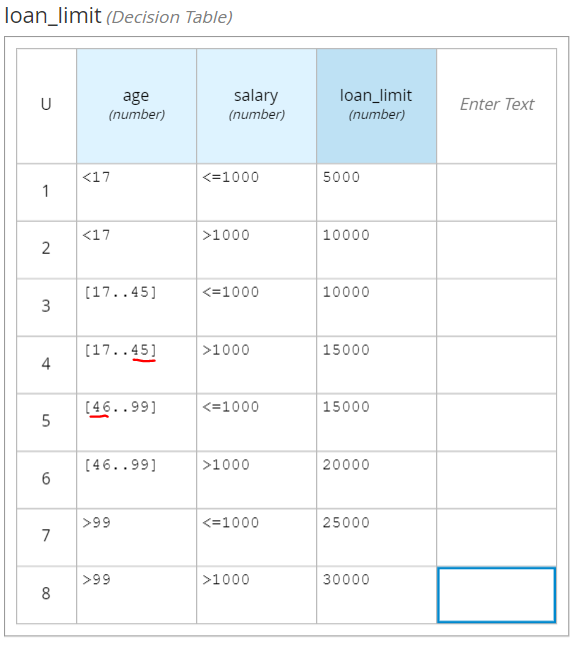
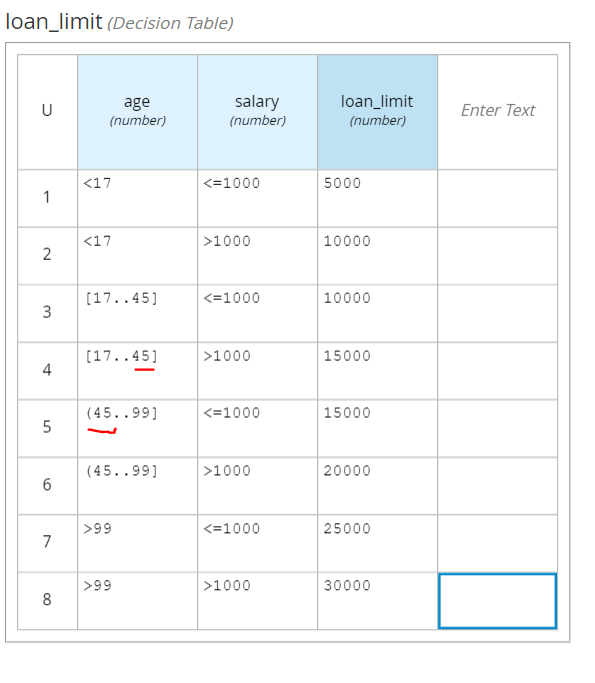
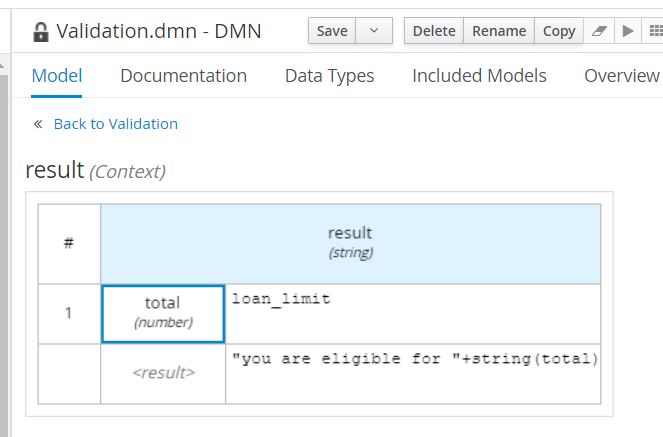
Next is creating a decision table for validating customer’s risk, we are using DMN for this.

which contains below Decision Table,

After we’ve done all above steps, we can start build and running our application
$ mvn clean package -s settings.xml

$ java -jar .\target\quarkus-app\quarkus-run.jar
And can test our application by using a CURL call,
$ curl  -X POST http://localhost:8080/customer_risk  \
    -H 'content-type: application/json'  \
    -H 'accept: application/json'   \
    -d '{"name" : "Regular User", "salary":500, "age": 15}'
and it will give below result,
{
	"id":"c4fcc5eb-9aab-4c99-8620-5ff1c27be79e",
	"name":"Regular User",
	"risk":"High",
	"salary":500,
	"age":15,
	"status":"Loan is Rejected because Customer is High Risk"
}
Code can be accessed on below Github url,
https://github.com/edwin/quarkus-bpmn