edwin

“No name matching” and “No subject alternative names present” when Connecting to a Secure Broker on Red Hat AMQ Broker

I had this error when using Artemis to connect to a secure broker on Openshift 4.10. AMQ Broker version is 7.10 and being installed by using Operator.

Caused by: java.security.cert.CertificateException: No name matching enterprise-rhamq-ss-0.enterprise-rhamq-hdls-svc.enterprise-rhamq.svc.cluster.local found
        at java.base/sun.security.util.HostnameChecker.matchDNS(HostnameChecker.java:234) [java.base:]
        at java.base/sun.security.util.HostnameChecker.match(HostnameChecker.java:103) [java.base:]
        at java.base/sun.security.ssl.X509TrustManagerImpl.checkIdentity(X509TrustManagerImpl.java:458) [java.base:]
        at java.base/sun.security.ssl.X509TrustManagerImpl.checkIdentity(X509TrustManagerImpl.java:418) [java.base:]
        at java.base/sun.security.ssl.X509TrustManagerImpl.checkTrusted(X509TrustManagerImpl.java:292) [java.base:]
        at java.base/sun.security.ssl.X509TrustManagerImpl.checkServerTrusted(X509TrustManagerImpl.java:144) [java.base:]
        at java.base/sun.security.ssl.CertificateMessage$T13CertificateConsumer.checkServerCerts(CertificateMessage.java:1335) [java.base:]
        ... 28 more

And when accessing with a direct IP, it would give below error

Caused by: java.security.cert.CertificateException: No subject alternative names present
        at java.base/sun.security.util.HostnameChecker.matchIP(HostnameChecker.java:142) [java.base:]
        at java.base/sun.security.util.HostnameChecker.match(HostnameChecker.java:101) [java.base:]
        at java.base/sun.security.ssl.X509TrustManagerImpl.checkIdentity(X509TrustManagerImpl.java:458) [java.base:]
        at java.base/sun.security.ssl.X509TrustManagerImpl.checkIdentity(X509TrustManagerImpl.java:432) [java.base:]
        at java.base/sun.security.ssl.X509TrustManagerImpl.checkTrusted(X509TrustManagerImpl.java:292) [java.base:]
        at java.base/sun.security.ssl.X509TrustManagerImpl.checkServerTrusted(X509TrustManagerImpl.java:144) [java.base:]
        at java.base/sun.security.ssl.CertificateMessage$T13CertificateConsumer.checkServerCerts(CertificateMessage.java:1335) [java.base:]
        ... 28 more

Apparently it is due to Java certificate validation. Workaround is quite easy, just adding below configuration on Artemis URL and it should works,

verifyHost=false

How to Create a Rule Engine with Drools and Quarkus

There are multiple ways of creating a rule engine, some prefer a DMN model and some like to use DRL (Drools) files. On this writing, we are trying to see how can we leverage DRL files to validate a user’s risk profile based on some variables, and run it on top of Quarkus.

So lets start with a Maven pom file,

<?xml version="1.0" encoding="UTF-8"?>
<project xmlns="http://maven.apache.org/POM/4.0.0"
         xmlns:xsi="http://www.w3.org/2001/XMLSchema-instance"
         xsi:schemaLocation="http://maven.apache.org/POM/4.0.0 http://maven.apache.org/xsd/maven-4.0.0.xsd">
    <modelVersion>4.0.0</modelVersion>

    <groupId>com.edw</groupId>
    <artifactId>quarkus-drl</artifactId>
    <version>1.0-SNAPSHOT</version>

    <properties>
        <surefire-plugin.version>3.0.0-M7</surefire-plugin.version>
        <maven.compiler.target>11</maven.compiler.target>
        <maven.compiler.source>11</maven.compiler.source>
        <quarkus.platform.artifact-id>quarkus-bom</quarkus.platform.artifact-id>
        <quarkus.platform.group-id>io.quarkus</quarkus.platform.group-id>
        <quarkus.platform.version>2.15.3.Final</quarkus.platform.version>
        <kogito.platform.group-id>org.kie.kogito</kogito.platform.group-id>
        <kogito.platform.artifact-id>kogito-quarkus-bom</kogito.platform.artifact-id>
        <kogito.platform.version>1.24.0.Final</kogito.platform.version>
        <project.build.sourceEncoding>UTF-8</project.build.sourceEncoding>
        <project.reporting.outputEncoding>UTF-8</project.reporting.outputEncoding>
    </properties>

    <dependencyManagement>
        <dependencies>
            <dependency>
                <groupId>org.antlr</groupId>
                <artifactId>antlr4-runtime</artifactId>
                <version>4.9.2</version>
            </dependency>
            <dependency>
                <groupId>${quarkus.platform.group-id}</groupId>
                <artifactId>${quarkus.platform.artifact-id}</artifactId>
                <version>${quarkus.platform.version}</version>
                <type>pom</type>
                <scope>import</scope>
            </dependency>
            <dependency>
                <groupId>${kogito.platform.group-id}</groupId>
                <artifactId>${kogito.platform.artifact-id}</artifactId>
                <version>${kogito.platform.version}</version>
                <type>pom</type>
                <scope>import</scope>
            </dependency>
        </dependencies>
    </dependencyManagement>

    <dependencies>
        <dependency>
            <groupId>io.quarkus</groupId>
            <artifactId>quarkus-resteasy-reactive-jackson</artifactId>
        </dependency>
        <dependency>
            <groupId>org.kie.kogito</groupId>
            <artifactId>kogito-quarkus-rules</artifactId>
        </dependency>

        <!-- tests -->
        <dependency>
            <groupId>io.quarkus</groupId>
            <artifactId>quarkus-junit5</artifactId>
            <scope>test</scope>
        </dependency>
        <dependency>
            <groupId>io.rest-assured</groupId>
            <artifactId>rest-assured</artifactId>
            <scope>test</scope>
        </dependency>
    </dependencies>
......
</project>

Next is creating a Java model, this is going to be the base model for variables that are going to contribute on our rule engine.

package com.edw.model;

public class Loan {

    private Integer age;
    private Double salary;

    private String risk;

    public Loan() {
    }

    public Loan(Integer age, Double salary, String risk) {
        this.age = age;
        this.salary = salary;
        this.risk = risk;
    }
	
	// other setter and getter

}

After that, we need to create a Rule Unit class. The purpose of it is to bind JSON request to a Java class, which can be modified by using our Rule Engine.

package com.edw.queries;

import com.edw.model.Loan;
import org.kie.kogito.rules.DataSource;
import org.kie.kogito.rules.DataStore;
import org.kie.kogito.rules.RuleUnitData;

public class LoanUnitData  implements RuleUnitData {
    private DataStore<Loan> loan;

    public LoanUnitData() {
        this(DataSource.createStore());
    }

    public LoanUnitData(DataStore<Loan> loan) {
        this.loan = loan;
    }

    public DataStore<Loan> getLoan() {
        return loan;
    }

    public void setLoan(DataStore<Loan> loan) {
        this.loan = loan;
    }
}

Next is to create our DRL file where we can write our whole Rule Engine there, and please make sure that it needs to be on the same package as our RuleUnit class.

package com.edw.queries;

unit LoanUnitData;

import com.edw.model.Loan;

rule HighRiskCustomerEverythingBelowMinimum when
   $L: /loan[age <= 20, salary <= 1000]
then
   modify($L) { setRisk("High") };
end

rule MediumRiskCustomerAgeBelowMinimum when
   $L: /loan[age <= 20, salary > 1000]
then
   modify($L) { setRisk("Medium") };
end

rule MediumRiskCustomerSalaryBelowMinimum when
   $L: /loan[age > 20, salary <= 1000]
then
   modify($L) { setRisk("Medium") };
end

rule LowRiskCustomerSalaryEverythingAboveMinimum when
   $L: /loan[age > 20, salary > 1000]
then
   modify($L) { setRisk("Low") };
end


query GetRisk
   $L: /loan
end

To validate whether our code works well or not, we can use below Unit Test

package com.edw;

import io.quarkus.test.junit.QuarkusTest;
import io.restassured.http.ContentType;
import org.junit.jupiter.api.Test;

import static io.restassured.RestAssured.given;
import static org.hamcrest.Matchers.hasItem;
import static org.hamcrest.Matchers.hasItems;

@QuarkusTest
public class LoanTest {

    @Test
    public void testHighRisk() {
        given()
                .body("{\"loan\" : [{\"age\":17, \"salary\":900}]}")
                .contentType(ContentType.JSON)
                .log().all()
                .when()
                .post("/get-risk")
                .then()
                .statusCode(200).log().all()
                .body("risk", hasItem("High"));
    }
}

Or we can simply using a CURL to validate this,

$ curl  -X POST http://localhost:8080/get-risk  \
    -H 'content-type: application/json'  \
    -H 'accept: application/json'   \
    -d '{"loan" : [{"age":17, "salary":900}, {"age":39,"salary":1900.0}]}'

[{"age":39,"salary":1900.0,"risk":"Low"},{"age":17,"salary":900.0,"risk":"High"}]    

Code for this article can be found on below Git repository,

https://github.com/edwin/quarkus-drl

Have fun with Drools 🙂

Fail Fast Architecture using Openshift Container Platform

This week ive met an application that are being deployed as Pod in OCP but having a very unique behaviour, it keeps giving below error every one and a while.

[5585.146s][warning][os,thread] Failed to start thread "Unknown thread" 
         - pthread_create failed (EAGAIN) for attributes: stacksize: 1024k, guardsize: 0k, detached.
[5585.147s][warning][os,thread] Failed to start the native thread for java.lang.Thread "HandshakeCompletedNotify-Thread"
[5586.153s][warning][os,thread] Failed to start thread "Unknown thread" 
         - pthread_create failed (EAGAIN) for attributes: stacksize: 1024k, guardsize: 0k, detached.
[5586.154s][warning][os,thread] Failed to start the native thread for java.lang.Thread "HandshakeCompletedNotify-Thread"
[5589.672s][warning][os,thread] Failed to start thread "Unknown thread" 
         - pthread_create failed (EAGAIN) for attributes: stacksize: 1024k, guardsize: 0k, detached.
[5589.673s][warning][os,thread] Failed to start the native thread for java.lang.Thread "pool-4944-thread-1"
06:57:23,949 
         ERROR [io.undertow.request] (default task-34) UT005023: Exception handling request to /actuator/health: java.lang.OutOfMemoryError: 
         unable to create native thread: possibly out of memory or process/resource limits reached	

It seems that once this error happens, Pod will never recover from this condition. So Openshift need to find a way to handle this situation.

One workaround which i found is by utilizing Kubernetes Liveness Probe, which will detect application’s healthness.

      livenessProbe:
        httpGet:
          path: /actuator/health
          port: 8080
          scheme: HTTP
        initialDelaySeconds: 60
        timeoutSeconds: 3
        periodSeconds: 4
        successThreshold: 1
        failureThreshold: 2

For this configuration I am setting a 4 seconds delay between request and will wait for 3 seconds for reply from the corresponding Pod. And if Pod are unable to response to Openshift’s request for two times, Openshift will force terminate the Pod assuming that the Pod is in an unhealthy state.

This strategy makes applications restart quite often in a day, but at least it will be healthy again after being restarted forcefully.

Direcly Deploy Jar File to Openshift

Openshift provides a convenient method for deploying binary Java applications. Other than deploying application’s source code, it can also deploy Jar file directly. For this example, im trying to deploy a Spring Boot and Red Hat Fuse middleware which is located on below repository.

https://github.com/edwin/hello-world-fuse-on-ocp

After we clone it, we can build the repo into Jar file.

$ mvn clean package

It will later on create a Jar file with the name of hello-world-fuse-on-ocp-1.0-SNAPSHOT.jar, which we can deploy to Openshift later on.

Along the way, we can create Openshift BuildConfig by using below command, it will create an Application template using Java8 on UBI8 base image.

$ oc new-build --name=hello-world-fuse-on-ocp \
		--binary=true \ 
		--image-stream=openshift/ubi8-openjdk-8:1.10  \ 
		--strategy=source

Next is we can deploy our Jar file using below command,

$ oc start-build hello-world-fuse-on-ocp \ 
		--from-file=hello-world-fuse-on-ocp-1.0-SNAPSHOT.jar \ 
		--follow

And publish it,

$ oc new-app hello-world-fuse-on-ocp

$ oc create route edge \
		--service=hello-world-fuse-on-ocp

Lets say we have some code changes and we want to build and redeploy the Application, we can just rerun the start-build command, and deploying the latest jar file into Openshift.

$ oc start-build hello-world-fuse-on-ocp \ 
		--from-file=hello-world-fuse-on-ocp-1.1-LATEST-JAR.jar \ 
		--follow

Deploying RHPAM KJar on Top of Spring Boot and Integrate It To Business Central

Red Hat Process Automation Manager, or RHPAM, is an open-source business process management (BPMN 2.0) and a low-code development platform. RHPAM has extensible business nodes or plugins and is a pioneer in Business rules engine development, which uses Drools by using drool language or drl language and middleware applications.

In this article here, we are trying to deploy a BPMN workflow project as a jar file, deploy it into Spring Boot, and connecting it to RHPAM Business Central for Monitoring.

So lets start by creating a basic workflow, for this example im using Visual Studio Code with BPMN Editor extension.

Full code for it can be cloned from below Github url,

https://github.com/edwin/rhpam-hello-world-example

Run below command to build our workflow into Jar file, and install it into our local Maven repository,

$ mvn clean install

Next is lets create our Spring Boot project, and we can start with a Maven pom.xml where we can import our BPMN Jar there

<?xml version="1.0" encoding="UTF-8"?>
<project xmlns="http://maven.apache.org/POM/4.0.0"
         xmlns:xsi="http://www.w3.org/2001/XMLSchema-instance"
         xsi:schemaLocation="http://maven.apache.org/POM/4.0.0 https://maven.apache.org/xsd/maven-4.0.0.xsd">
    <modelVersion>4.0.0</modelVersion>
    <parent>
        <groupId>org.springframework.boot</groupId>
        <artifactId>spring-boot-starter-parent</artifactId>
        <version>2.3.4.RELEASE</version>
        <relativePath /> <!-- lookup parent from repository -->
    </parent>

    <groupId>com.edw</groupId>
    <artifactId>spring-boot-and-rhpam</artifactId>
    <version>1.0.0</version>
    <name>spring-boot-and-rhpam</name>
    <description>Demo deploying BPMN on Spring Boot</description>

    <properties>
        <project.build.sourceEncoding>UTF-8</project.build.sourceEncoding>
        <project.reporting.outputEncoding>UTF-8</project.reporting.outputEncoding>
        <java.version>1.8</java.version>
        <narayana.version>5.6.4.Final</narayana.version>

        <kjar.version>1.6.0</kjar.version>
        <kie.version>7.53.0.Final</kie.version>
    </properties>

    <dependencies>

        <dependency>
            <groupId>org.springframework.boot</groupId>
            <artifactId>spring-boot-starter-web</artifactId>
        </dependency>

        <dependency>
            <groupId>org.kie</groupId>
            <artifactId>kie-server-spring-boot-starter-jbpm</artifactId>
            <version>${kie.version}</version>
        </dependency>
        <dependency>
            <groupId>org.kie.server</groupId>
            <artifactId>kie-server-controller-websocket-client</artifactId>
            <version>${kie.version}</version>
        </dependency>
        <dependency>
            <groupId>org.kie.server</groupId>
            <artifactId>kie-server-client</artifactId>
            <version>${kie.version}</version>
        </dependency>

        <!-- kjar here -->
        <dependency>
            <groupId>com.edw</groupId>
            <artifactId>Project01</artifactId>
            <version>${kjar.version}</version>
        </dependency>

        <dependency>
            <groupId>org.apache.tomcat</groupId>
            <artifactId>tomcat-jdbc</artifactId>
            <scope>runtime</scope>
        </dependency>

        <dependency>
            <groupId>org.springframework.boot</groupId>
            <artifactId>spring-boot-starter-security</artifactId>
        </dependency>

        <dependency>
            <groupId>mysql</groupId>
            <artifactId>mysql-connector-java</artifactId>
            <scope>runtime</scope>
        </dependency>

        <dependency>
            <groupId>org.springframework.boot</groupId>
            <artifactId>spring-boot-starter-test</artifactId>
            <scope>test</scope>
        </dependency>
        <dependency>
            <groupId>org.springframework.security</groupId>
            <artifactId>spring-security-test</artifactId>
            <scope>test</scope>
        </dependency>
    </dependencies>

    <build>
        <plugins>
            <plugin>
                <groupId>org.springframework.boot</groupId>
                <artifactId>spring-boot-maven-plugin</artifactId>
            </plugin>
        </plugins>
    </build>

</project>

And we can put all configurations on application.properties, including database and BusinessCentral connectivity

## spring boot endpoint
server.address=127.0.0.1
server.port=8080

cxf.path=/rest

# kie-server
kieserver.serverId=kie-server-project01
kieserver.serverName=kie-server-project01
kieserver.location=http://127.0.0.1:8080/rest/server

kieserver.username=kieserver
kieserver.password=password

# url for BusinessCentral
kieserver.controllers=ws://127.0.0.1:8090/business-central/websocket/controller

kieserver.drools.enabled=true
kieserver.dmn.enabled=true
kieserver.jbpm.enabled=true
kieserver.jbpmui.enabled=true
kieserver.casemgmt.enabled=true
kieserver.scenariosimulation.enabled=true

# Dedicated jBPM properties
jbpm.executor.enabled=false

# data source
spring.datasource.username=root
spring.datasource.password=password
spring.datasource.url=jdbc:mysql://localhost:3306/db_rhpam
spring.datasource.driver-class-name=com.mysql.cj.jdbc.Driver
spring.datasource.type=org.apache.tomcat.jdbc.pool.XADataSource

# hibernate configuration
spring.jpa.properties.hibernate.dialect=org.hibernate.dialect.MySQL8Dialect
spring.jpa.properties.hibernate.show_sql=false
spring.jpa.properties.hibernate.hbm2ddl.auto=update
spring.jpa.hibernate.naming.physical-strategy=org.hibernate.boot.model.naming.PhysicalNamingStrategyStandardImpl

# transaction manager configuration
spring.jta.narayana.transaction-manager-id=1

narayana.dbcp.enabled=true
narayana.dbcp.maxTotal=20

# kjar
kjar.name=project01
kjar.groupid=com.edw
kjar.artifactid=Project01
kjar.version=1.6.0

And 2 Java classes, one is for Main class and another one for Security and access right.

package com.edw;

import org.springframework.beans.factory.annotation.Value;
import org.springframework.boot.CommandLineRunner;
import org.springframework.boot.SpringApplication;
import org.springframework.boot.autoconfigure.SpringBootApplication;

import org.kie.server.api.marshalling.MarshallingFormat;
import org.kie.server.api.model.KieContainerResource;
import org.kie.server.api.model.KieContainerStatus;
import org.kie.server.api.model.ReleaseId;
import org.kie.server.api.model.ServiceResponse;
import org.kie.server.client.KieServicesClient;
import org.kie.server.client.KieServicesConfiguration;
import org.kie.server.client.KieServicesFactory;
import org.springframework.context.annotation.Bean;

@SpringBootApplication
public class Main {
    public static void main(String[] args) {
        SpringApplication.run(Main.class, args);
    }

    @Value("${kieserver.username}")
    private String user;

    @Value("${kieserver.password}")
    private String password;

    @Value("${kieserver.location}")
    private String url;

    @Value("${kjar.name}")
    private String kjarName;

    @Value("${kjar.groupid}")
    private String kjarGroupid;

    @Value("${kjar.artifactid}")
    private String kjarArtifactId;

    @Value("${kjar.version}")
    private String kjarVersion;

    @Bean
    CommandLineRunner deployAndValidate() {
        return new CommandLineRunner() {
            public void run(String... strings) throws Exception {
                KieServicesConfiguration config = KieServicesFactory.newRestConfiguration(url, user, password, 60000);
                config.setMarshallingFormat(MarshallingFormat.JSON);

                KieServicesClient client = KieServicesFactory.newKieServicesClient(config);
                KieContainerResource kContainer = new KieContainerResource();
                kContainer.setContainerId(kjarName);
                kContainer.setReleaseId(new ReleaseId(kjarGroupid, kjarArtifactId, kjarVersion));

                ServiceResponse<KieContainerResource> resp = client.createContainer(kjarName, kContainer);
                KieContainerStatus status = resp.getResult().getStatus();
                if (!KieContainerStatus.STARTED.equals(status)) {
                    throw new IllegalStateException();
                }
            }
        };
    }
}
package com.edw.config;

import org.springframework.beans.factory.annotation.Autowired;
import org.springframework.context.annotation.Bean;
import org.springframework.context.annotation.Configuration;
import org.springframework.http.HttpMethod;
import org.springframework.security.config.annotation.authentication.builders.AuthenticationManagerBuilder;
import org.springframework.security.config.annotation.web.builders.HttpSecurity;
import org.springframework.security.config.annotation.web.configuration.EnableWebSecurity;
import org.springframework.security.config.annotation.web.configuration.WebSecurityConfigurerAdapter;
import org.springframework.security.crypto.factory.PasswordEncoderFactories;
import org.springframework.security.crypto.password.PasswordEncoder;
import org.springframework.web.cors.CorsConfiguration;
import org.springframework.web.cors.CorsConfigurationSource;
import org.springframework.web.cors.UrlBasedCorsConfigurationSource;

import java.util.Arrays;

@Configuration("kieServerSecurity")
@EnableWebSecurity
public class KieSecurityConfig extends WebSecurityConfigurerAdapter {

    @Override
    protected void configure(HttpSecurity http) throws Exception {
        http
                .csrf().disable()
                .authorizeRequests()
                .antMatchers("/rest/server*").authenticated()
                .and()
                .httpBasic();
    }

    @Autowired
    public void configureGlobal(AuthenticationManagerBuilder auth) throws Exception {
        PasswordEncoder encoder = PasswordEncoderFactories.createDelegatingPasswordEncoder();

        auth.inMemoryAuthentication()
                .withUser("kieserver").password(encoder.encode("password")).roles("kie-server");

        auth.inMemoryAuthentication()
                .withUser("wbadmin").password(encoder.encode("wbadmin")).roles("kie-server");
    }

    @Bean
    public CorsConfigurationSource corsConfigurationSource() {
        UrlBasedCorsConfigurationSource source = new UrlBasedCorsConfigurationSource();
        CorsConfiguration corsConfiguration = new CorsConfiguration();
        corsConfiguration.setAllowedOrigins(Arrays.asList("*"));
        corsConfiguration.setAllowCredentials(true);
        corsConfiguration.setAllowedMethods(Arrays.asList(HttpMethod.GET.name(), HttpMethod.HEAD.name(),
                HttpMethod.POST.name(), HttpMethod.DELETE.name(), HttpMethod.PUT.name()));
        corsConfiguration.applyPermitDefaultValues();
        source.registerCorsConfiguration("/**", corsConfiguration);
        return source;
    }
}

To see whether our BPMN has been deployed or not, we can run below CURL command

$ curl -kv http://kieserver:password@localhost:8080/rest/server/containers

Next, is to start Business Central. It’s basically a JBoss application which runs on port 8090. We can start it by running below command,

$ ./standalone.sh

If our Spring Boot successfully connected to Business Central, we can see the result on Menu > Deploy > Execution Servers.

We can do some sample transactions by using below CURL command,

$ curl -kv http://kieserver:password@localhost:8080/rest/server/containers/project01/processes/Project01.Business01/instances -H 'Content-Type: application/json' --data-raw '{
    "application": {
        "com.edw.project01.User": {
            "age": 37,
            "name":"edwin"
        }
    }
}'

A succesful API call shall gives an Integer as a result, which we can see on Business Center’s UI. Go to Menu > Process Instances > Completed, and it shall display list of Process Instances with its detail.

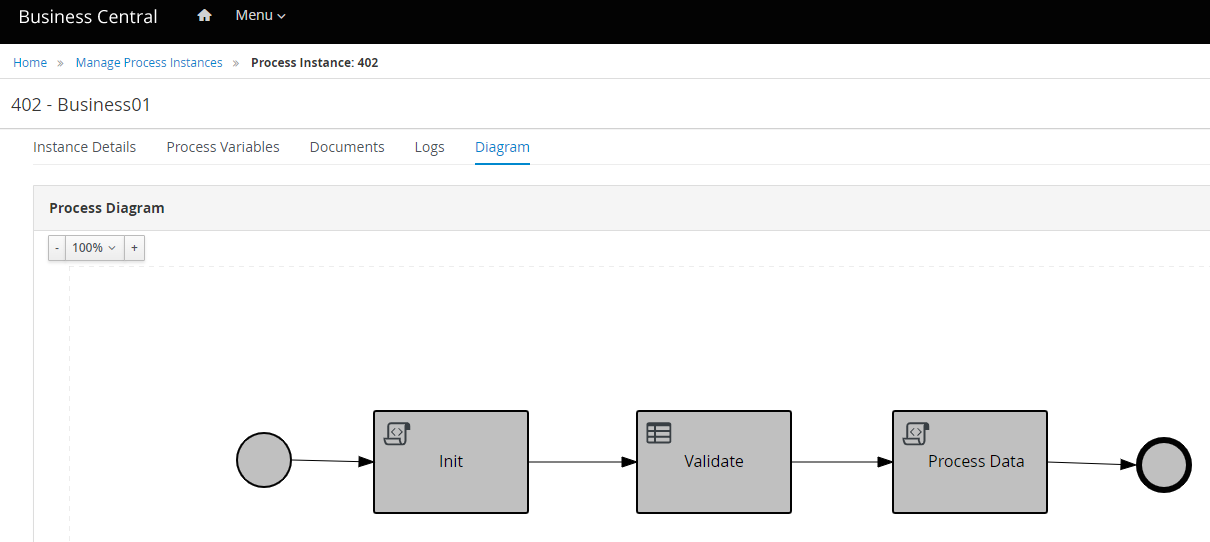
Code for this article can be access on below Github url,

https://github.com/edwin/spring-boot-and-rhpam