Java

java

Deploying RHPAM KJar on Top of Spring Boot and Integrate It To Business Central

Red Hat Process Automation Manager, or RHPAM, is an open-source business process management (BPMN 2.0) and a low-code development platform. RHPAM has extensible business nodes or plugins and is a pioneer in Business rules engine development, which uses Drools by using drool language or drl language and middleware applications.

In this article here, we are trying to deploy a BPMN workflow project as a jar file, deploy it into Spring Boot, and connecting it to RHPAM Business Central for Monitoring.

So lets start by creating a basic workflow, for this example im using Visual Studio Code with BPMN Editor extension.

Full code for it can be cloned from below Github url,

https://github.com/edwin/rhpam-hello-world-example

Run below command to build our workflow into Jar file, and install it into our local Maven repository,

$ mvn clean install

Next is lets create our Spring Boot project, and we can start with a Maven pom.xml where we can import our BPMN Jar there

<?xml version="1.0" encoding="UTF-8"?>
<project xmlns="http://maven.apache.org/POM/4.0.0"
         xmlns:xsi="http://www.w3.org/2001/XMLSchema-instance"
         xsi:schemaLocation="http://maven.apache.org/POM/4.0.0 https://maven.apache.org/xsd/maven-4.0.0.xsd">
    <modelVersion>4.0.0</modelVersion>
    <parent>
        <groupId>org.springframework.boot</groupId>
        <artifactId>spring-boot-starter-parent</artifactId>
        <version>2.3.4.RELEASE</version>
        <relativePath /> <!-- lookup parent from repository -->
    </parent>

    <groupId>com.edw</groupId>
    <artifactId>spring-boot-and-rhpam</artifactId>
    <version>1.0.0</version>
    <name>spring-boot-and-rhpam</name>
    <description>Demo deploying BPMN on Spring Boot</description>

    <properties>
        <project.build.sourceEncoding>UTF-8</project.build.sourceEncoding>
        <project.reporting.outputEncoding>UTF-8</project.reporting.outputEncoding>
        <java.version>1.8</java.version>
        <narayana.version>5.6.4.Final</narayana.version>

        <kjar.version>1.6.0</kjar.version>
        <kie.version>7.53.0.Final</kie.version>
    </properties>

    <dependencies>

        <dependency>
            <groupId>org.springframework.boot</groupId>
            <artifactId>spring-boot-starter-web</artifactId>
        </dependency>

        <dependency>
            <groupId>org.kie</groupId>
            <artifactId>kie-server-spring-boot-starter-jbpm</artifactId>
            <version>${kie.version}</version>
        </dependency>
        <dependency>
            <groupId>org.kie.server</groupId>
            <artifactId>kie-server-controller-websocket-client</artifactId>
            <version>${kie.version}</version>
        </dependency>
        <dependency>
            <groupId>org.kie.server</groupId>
            <artifactId>kie-server-client</artifactId>
            <version>${kie.version}</version>
        </dependency>

        <!-- kjar here -->
        <dependency>
            <groupId>com.edw</groupId>
            <artifactId>Project01</artifactId>
            <version>${kjar.version}</version>
        </dependency>

        <dependency>
            <groupId>org.apache.tomcat</groupId>
            <artifactId>tomcat-jdbc</artifactId>
            <scope>runtime</scope>
        </dependency>

        <dependency>
            <groupId>org.springframework.boot</groupId>
            <artifactId>spring-boot-starter-security</artifactId>
        </dependency>

        <dependency>
            <groupId>mysql</groupId>
            <artifactId>mysql-connector-java</artifactId>
            <scope>runtime</scope>
        </dependency>

        <dependency>
            <groupId>org.springframework.boot</groupId>
            <artifactId>spring-boot-starter-test</artifactId>
            <scope>test</scope>
        </dependency>
        <dependency>
            <groupId>org.springframework.security</groupId>
            <artifactId>spring-security-test</artifactId>
            <scope>test</scope>
        </dependency>
    </dependencies>

    <build>
        <plugins>
            <plugin>
                <groupId>org.springframework.boot</groupId>
                <artifactId>spring-boot-maven-plugin</artifactId>
            </plugin>
        </plugins>
    </build>

</project>

And we can put all configurations on application.properties, including database and BusinessCentral connectivity

## spring boot endpoint
server.address=127.0.0.1
server.port=8080

cxf.path=/rest

# kie-server
kieserver.serverId=kie-server-project01
kieserver.serverName=kie-server-project01
kieserver.location=http://127.0.0.1:8080/rest/server

kieserver.username=kieserver
kieserver.password=password

# url for BusinessCentral
kieserver.controllers=ws://127.0.0.1:8090/business-central/websocket/controller

kieserver.drools.enabled=true
kieserver.dmn.enabled=true
kieserver.jbpm.enabled=true
kieserver.jbpmui.enabled=true
kieserver.casemgmt.enabled=true
kieserver.scenariosimulation.enabled=true

# Dedicated jBPM properties
jbpm.executor.enabled=false

# data source
spring.datasource.username=root
spring.datasource.password=password
spring.datasource.url=jdbc:mysql://localhost:3306/db_rhpam
spring.datasource.driver-class-name=com.mysql.cj.jdbc.Driver
spring.datasource.type=org.apache.tomcat.jdbc.pool.XADataSource

# hibernate configuration
spring.jpa.properties.hibernate.dialect=org.hibernate.dialect.MySQL8Dialect
spring.jpa.properties.hibernate.show_sql=false
spring.jpa.properties.hibernate.hbm2ddl.auto=update
spring.jpa.hibernate.naming.physical-strategy=org.hibernate.boot.model.naming.PhysicalNamingStrategyStandardImpl

# transaction manager configuration
spring.jta.narayana.transaction-manager-id=1

narayana.dbcp.enabled=true
narayana.dbcp.maxTotal=20

# kjar
kjar.name=project01
kjar.groupid=com.edw
kjar.artifactid=Project01
kjar.version=1.6.0

And 2 Java classes, one is for Main class and another one for Security and access right.

package com.edw;

import org.springframework.beans.factory.annotation.Value;
import org.springframework.boot.CommandLineRunner;
import org.springframework.boot.SpringApplication;
import org.springframework.boot.autoconfigure.SpringBootApplication;

import org.kie.server.api.marshalling.MarshallingFormat;
import org.kie.server.api.model.KieContainerResource;
import org.kie.server.api.model.KieContainerStatus;
import org.kie.server.api.model.ReleaseId;
import org.kie.server.api.model.ServiceResponse;
import org.kie.server.client.KieServicesClient;
import org.kie.server.client.KieServicesConfiguration;
import org.kie.server.client.KieServicesFactory;
import org.springframework.context.annotation.Bean;

@SpringBootApplication
public class Main {
    public static void main(String[] args) {
        SpringApplication.run(Main.class, args);
    }

    @Value("${kieserver.username}")
    private String user;

    @Value("${kieserver.password}")
    private String password;

    @Value("${kieserver.location}")
    private String url;

    @Value("${kjar.name}")
    private String kjarName;

    @Value("${kjar.groupid}")
    private String kjarGroupid;

    @Value("${kjar.artifactid}")
    private String kjarArtifactId;

    @Value("${kjar.version}")
    private String kjarVersion;

    @Bean
    CommandLineRunner deployAndValidate() {
        return new CommandLineRunner() {
            public void run(String... strings) throws Exception {
                KieServicesConfiguration config = KieServicesFactory.newRestConfiguration(url, user, password, 60000);
                config.setMarshallingFormat(MarshallingFormat.JSON);

                KieServicesClient client = KieServicesFactory.newKieServicesClient(config);
                KieContainerResource kContainer = new KieContainerResource();
                kContainer.setContainerId(kjarName);
                kContainer.setReleaseId(new ReleaseId(kjarGroupid, kjarArtifactId, kjarVersion));

                ServiceResponse<KieContainerResource> resp = client.createContainer(kjarName, kContainer);
                KieContainerStatus status = resp.getResult().getStatus();
                if (!KieContainerStatus.STARTED.equals(status)) {
                    throw new IllegalStateException();
                }
            }
        };
    }
}
package com.edw.config;

import org.springframework.beans.factory.annotation.Autowired;
import org.springframework.context.annotation.Bean;
import org.springframework.context.annotation.Configuration;
import org.springframework.http.HttpMethod;
import org.springframework.security.config.annotation.authentication.builders.AuthenticationManagerBuilder;
import org.springframework.security.config.annotation.web.builders.HttpSecurity;
import org.springframework.security.config.annotation.web.configuration.EnableWebSecurity;
import org.springframework.security.config.annotation.web.configuration.WebSecurityConfigurerAdapter;
import org.springframework.security.crypto.factory.PasswordEncoderFactories;
import org.springframework.security.crypto.password.PasswordEncoder;
import org.springframework.web.cors.CorsConfiguration;
import org.springframework.web.cors.CorsConfigurationSource;
import org.springframework.web.cors.UrlBasedCorsConfigurationSource;

import java.util.Arrays;

@Configuration("kieServerSecurity")
@EnableWebSecurity
public class KieSecurityConfig extends WebSecurityConfigurerAdapter {

    @Override
    protected void configure(HttpSecurity http) throws Exception {
        http
                .csrf().disable()
                .authorizeRequests()
                .antMatchers("/rest/server*").authenticated()
                .and()
                .httpBasic();
    }

    @Autowired
    public void configureGlobal(AuthenticationManagerBuilder auth) throws Exception {
        PasswordEncoder encoder = PasswordEncoderFactories.createDelegatingPasswordEncoder();

        auth.inMemoryAuthentication()
                .withUser("kieserver").password(encoder.encode("password")).roles("kie-server");

        auth.inMemoryAuthentication()
                .withUser("wbadmin").password(encoder.encode("wbadmin")).roles("kie-server");
    }

    @Bean
    public CorsConfigurationSource corsConfigurationSource() {
        UrlBasedCorsConfigurationSource source = new UrlBasedCorsConfigurationSource();
        CorsConfiguration corsConfiguration = new CorsConfiguration();
        corsConfiguration.setAllowedOrigins(Arrays.asList("*"));
        corsConfiguration.setAllowCredentials(true);
        corsConfiguration.setAllowedMethods(Arrays.asList(HttpMethod.GET.name(), HttpMethod.HEAD.name(),
                HttpMethod.POST.name(), HttpMethod.DELETE.name(), HttpMethod.PUT.name()));
        corsConfiguration.applyPermitDefaultValues();
        source.registerCorsConfiguration("/**", corsConfiguration);
        return source;
    }
}

To see whether our BPMN has been deployed or not, we can run below CURL command

$ curl -kv http://kieserver:password@localhost:8080/rest/server/containers

Next, is to start Business Central. It’s basically a JBoss application which runs on port 8090. We can start it by running below command,

$ ./standalone.sh

If our Spring Boot successfully connected to Business Central, we can see the result on Menu > Deploy > Execution Servers.

We can do some sample transactions by using below CURL command,

$ curl -kv http://kieserver:password@localhost:8080/rest/server/containers/project01/processes/Project01.Business01/instances -H 'Content-Type: application/json' --data-raw '{
    "application": {
        "com.edw.project01.User": {
            "age": 37,
            "name":"edwin"
        }
    }
}'

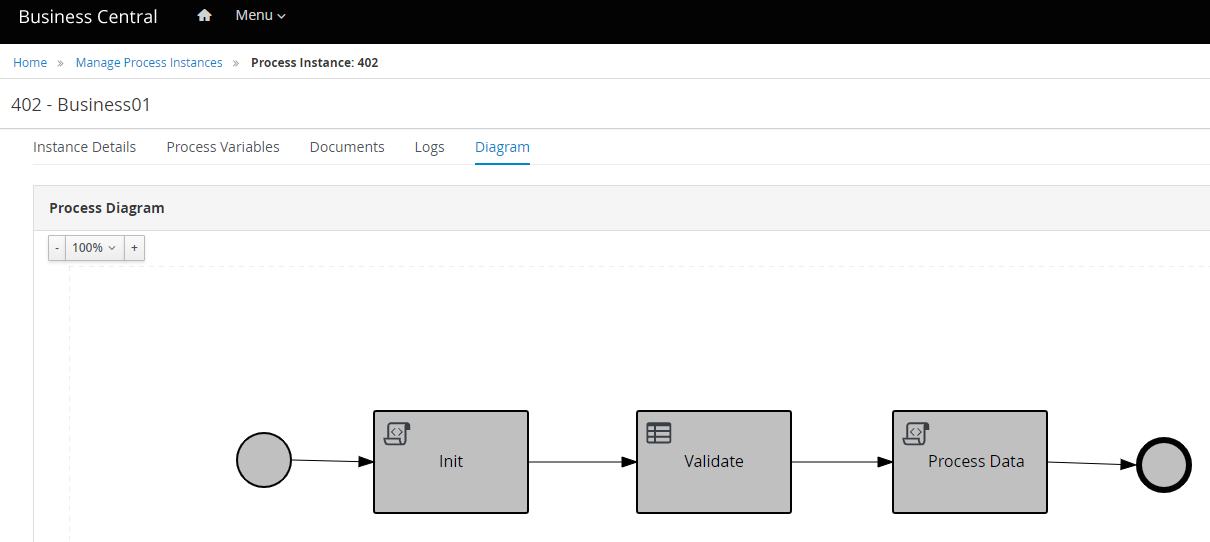
A succesful API call shall gives an Integer as a result, which we can see on Business Center’s UI. Go to Menu > Process Instances > Completed, and it shall display list of Process Instances with its detail.

Code for this article can be access on below Github url,

https://github.com/edwin/spring-boot-and-rhpam

How to Connect to Existing Database using Kogito BPMN and Quarkus

Kogito is a next generation business automation toolkit that originates from well known Open Source projects Drools (for business rules) and jBPM (for business processes). Kogito aims at providing another approach to business automation where the main message is to expose your business knowledge (processes, rules, decisions, predictions) in a domain specific way.

For this sample we are deploying Kogito on top of Quarkus, a lightweight Java framework, and use it to host a simple straightforward workflow for customer risk asessment and loan approval, automatically validating customers based on several variables such as Age, Salary, and whether that customer is part of Blacklisted customer or not.

First, lets start with a simple Maven pom file. This is needed to set the required libraries and frameworks for running the application.

<?xml version="1.0" encoding="UTF-8"?>
<project xmlns="http://maven.apache.org/POM/4.0.0"
         xmlns:xsi="http://www.w3.org/2001/XMLSchema-instance"
         xsi:schemaLocation="http://maven.apache.org/POM/4.0.0 http://maven.apache.org/xsd/maven-4.0.0.xsd">
    <modelVersion>4.0.0</modelVersion>

    <groupId>org.edw</groupId>
    <artifactId>quarkus-bpmn</artifactId>
    <version>1.0-SNAPSHOT</version>

    <properties>
        <surefire-plugin.version>3.0.0-M7</surefire-plugin.version>
        <maven.compiler.target>11</maven.compiler.target>
        <maven.compiler.source>11</maven.compiler.source>
        <quarkus.platform.artifact-id>quarkus-bom</quarkus.platform.artifact-id>
        <quarkus.platform.group-id>io.quarkus</quarkus.platform.group-id>
        <quarkus.platform.version>2.15.3.Final</quarkus.platform.version>
        <kogito.platform.group-id>org.kie.kogito</kogito.platform.group-id>
        <kogito.platform.artifact-id>kogito-quarkus-bom</kogito.platform.artifact-id>
        <kogito.platform.version>1.24.0.Final</kogito.platform.version>
        <project.build.sourceEncoding>UTF-8</project.build.sourceEncoding>
        <project.reporting.outputEncoding>UTF-8</project.reporting.outputEncoding>
    </properties>

    <dependencyManagement>
        <dependencies>
            <dependency>
                <groupId>org.antlr</groupId>
                <artifactId>antlr4-runtime</artifactId>
                <version>4.9.2</version>
            </dependency>
            <dependency>
                <groupId>${quarkus.platform.group-id}</groupId>
                <artifactId>${quarkus.platform.artifact-id}</artifactId>
                <version>${quarkus.platform.version}</version>
                <type>pom</type>
                <scope>import</scope>
            </dependency>
            <dependency>
                <groupId>${kogito.platform.group-id}</groupId>
                <artifactId>${kogito.platform.artifact-id}</artifactId>
                <version>${kogito.platform.version}</version>
                <type>pom</type>
                <scope>import</scope>
            </dependency>
        </dependencies>
    </dependencyManagement>

    <dependencies>
        <dependency>
            <groupId>io.quarkus</groupId>
            <artifactId>quarkus-resteasy-reactive-jackson</artifactId>
        </dependency>
        <dependency>
            <groupId>org.kie.kogito</groupId>
            <artifactId>kogito-quarkus</artifactId>
        </dependency>

        <!-- Hibernate ORM specific dependencies -->
        <dependency>
            <groupId>io.quarkus</groupId>
            <artifactId>quarkus-hibernate-orm-panache</artifactId>
        </dependency>
        <dependency>
            <groupId>io.quarkus</groupId>
            <artifactId>quarkus-hibernate-orm</artifactId>
        </dependency>
        <dependency>
            <groupId>io.quarkus</groupId>
            <artifactId>quarkus-hibernate-validator</artifactId>
        </dependency>

        <!-- JDBC driver dependencies -->
        <dependency>
            <groupId>io.quarkus</groupId>
            <artifactId>quarkus-jdbc-mysql</artifactId>
        </dependency>

        <!-- tests -->
        <dependency>
            <groupId>io.quarkus</groupId>
            <artifactId>quarkus-junit5</artifactId>
            <scope>test</scope>
        </dependency>
        <dependency>
            <groupId>io.rest-assured</groupId>
            <artifactId>rest-assured</artifactId>
            <scope>test</scope>
        </dependency>
        <dependency>
            <groupId>io.quarkus</groupId>
            <artifactId>quarkus-test-h2</artifactId>
            <scope>test</scope>
        </dependency>
        <dependency>
            <groupId>io.quarkus</groupId>
            <artifactId>quarkus-jdbc-h2</artifactId>
            <scope>test</scope>
        </dependency>
    </dependencies>
    <build>
        <plugins>
            <plugin>
                <groupId>${quarkus.platform.group-id}</groupId>
                <artifactId>quarkus-maven-plugin</artifactId>
                <version>${quarkus.platform.version}</version>
                <executions>
                    <execution>
                        <goals>
                            <goal>build</goal>
                        </goals>
                    </execution>
                </executions>
            </plugin>
            <plugin>
                <artifactId>maven-surefire-plugin</artifactId>
                <version>${surefire-plugin.version}</version>
                <configuration>
                    <systemPropertyVariables>
                        <java.util.logging.manager>org.jboss.logmanager.LogManager</java.util.logging.manager>
                        <maven.home>${maven.home}</maven.home>
                    </systemPropertyVariables>
                </configuration>
            </plugin>
        </plugins>
    </build>
    <profiles>
        <profile>
            <id>native</id>
            <activation>
                <property>
                    <name>native</name>
                </property>
            </activation>
            <properties>
                <quarkus.package.type>native</quarkus.package.type>
            </properties>
            <build>
                <plugins>
                    <plugin>
                        <artifactId>maven-failsafe-plugin</artifactId>
                        <version>${surefire-plugin.version}</version>
                        <executions>
                            <execution>
                                <goals>
                                    <goal>integration-test</goal>
                                    <goal>verify</goal>
                                </goals>
                                <configuration>
                                    <systemPropertyVariables>
                                        <native.image.path>${project.build.directory}/${project.build.finalName}-runner</native.image.path>
                                        <java.util.logging.manager>org.jboss.logmanager.LogManager</java.util.logging.manager>
                                        <maven.home>${maven.home}</maven.home>
                                    </systemPropertyVariables>
                                </configuration>
                            </execution>
                        </executions>
                    </plugin>
                </plugins>
            </build>
        </profile>
    </profiles>

</project>

Next is setting up our database connections on our application.properties, and Java services class for handling queries

# default
quarkus.http.port=8080

quarkus.log.level=DEBUG
quarkus.log.console.format=%d{HH:mm:ss} [%c{3.}] (%t) %s%e%n

quarkus.application.name=Quarkus and BPMN

# datasource
quarkus.datasource.db-kind = mysql
quarkus.datasource.username = admin
quarkus.datasource.password = password
quarkus.datasource.jdbc.url = jdbc:mysql://localhost:3306/db_test
package com.edw.entity;

import io.quarkus.hibernate.orm.panache.PanacheEntityBase;

import javax.persistence.Entity;
import javax.persistence.GeneratedValue;
import javax.persistence.GenerationType;
import javax.persistence.Id;

@Entity(name = "T_BLACKLIST")
public class Blacklist extends PanacheEntityBase {
    @Id
    @GeneratedValue(strategy = GenerationType.IDENTITY)
    private Long id;
    private String name;

	// put constructor, setter and getter after this
}
package com.edw.service;

import com.edw.entity.Blacklist;

import javax.enterprise.context.ApplicationScoped;
import javax.transaction.Transactional;

@ApplicationScoped
@Transactional
public class BlacklistService {
    public Boolean isBlacklist(String name) {
        if(name == null || name.trim().isEmpty())
            return true;
        return Blacklist.find("name", name).list().size() > 0;
    }
}

Next is creating a BPMN workflow, lets name this customer-risk.bpmn2. In here, we are creating a workflow to do a sequence validation.

What we need to modify is the first Script task, in there we need to call the Java method that we were creating before in Quarkus

Next is creating a decision table for validating customer’s risk, we are using DMN for this.

which contains below Decision Table,

After we’ve done all above steps, we can start build and running our application

$ mvn clean package -s settings.xml

$ java -jar .\target\quarkus-app\quarkus-run.jar 

And can test our application by using a CURL call,

$ curl  -X POST http://localhost:8080/customer_risk  \
    -H 'content-type: application/json'  \
    -H 'accept: application/json'   \
    -d '{"name" : "Regular User", "salary":500, "age": 15}'

and it will give below result,

{
	"id":"c4fcc5eb-9aab-4c99-8620-5ff1c27be79e",
	"name":"Regular User", 
	"risk":"High",
	"salary":500,
	"age":15,
	"status":"Loan is Rejected because Customer is High Risk"
} 

Code can be accessed on below Github url,

https://github.com/edwin/quarkus-bpmn

Alert “Gap detected” when Using Kogito DMN

Got below alert when running DMN using Kogito

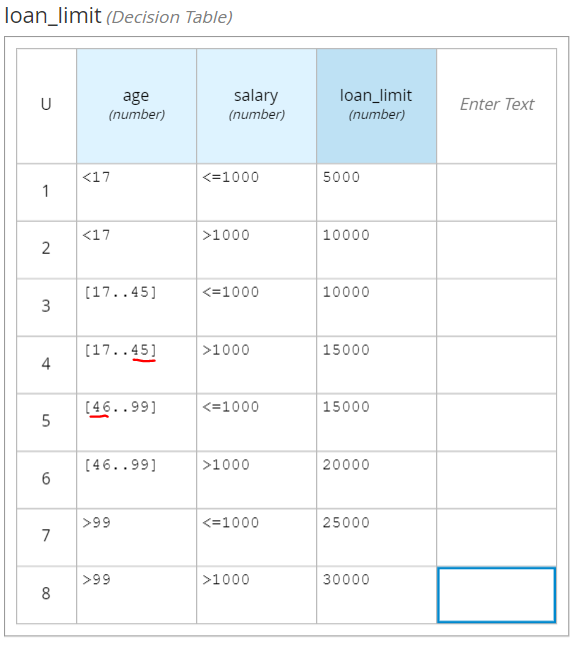
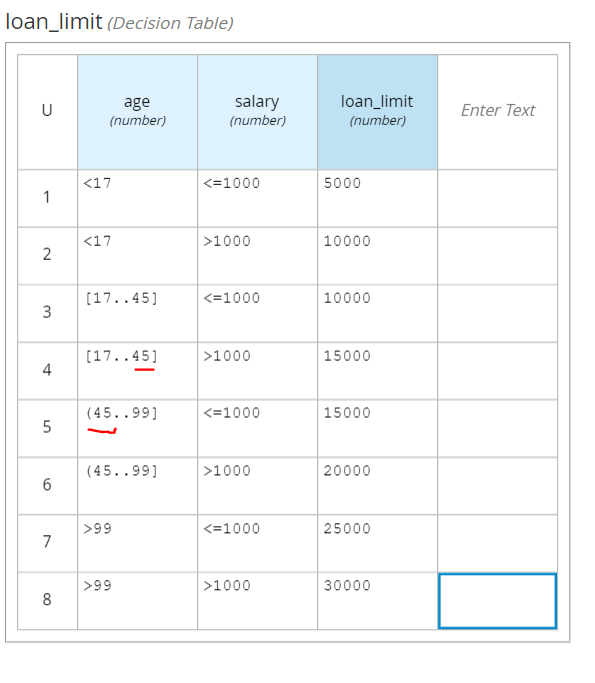
[org.kie.kog.cod.dec.DecisionValidation] (build-10)   Gap detected: [ ( 45 .. 46 ), - ]

While having Decision Table like below,

It happens because there are gap between 45 and 46 (as the error said), and the workaround is pretty much simple. Replacing square bracket (included) with round bracket (exclusion) should solve the problem.

Code can be accessed on below Github Repository

https://github.com/edwin/quarkus-and-dmn

Error PKIX path building failed When Connecting to Keycloak with a Self Signed Certificate

For this scenario im using Keycloak version 17, which are being installed by using below command.

docker pull quay.io/keycloak/keycloak:17.0.0

And being run by using below command,

docker run -p 8443:8443 -e KC_HOSTNAME=localhost:8443 \ 
	-e KC_HOSTNAME_URL=https://localhost:8443 -e KC_DB=mysql \ 
	-e KC_DB_USERNAME=keycloak -e KC_DB_PASSWORD=password \ 
	-e KC_DB_URL=jdbc:mysql://192.168.56.1:3306/keycloak_db \
	quay.io/keycloak/keycloak:17.0.0 start

As for the Spring Boot sourcecode, we are utilizing the same code that are being used in below article,

https://github.com/edwin/spring-boot-and-rhsso

So lets start by setting up our application.properties to pointing to Keycloak’s HTTPS port

keycloak.auth-server-url=https://localhost:8443/
keycloak.realm=external
keycloak.resource=client
keycloak.public-client=false
keycloak.bearer-only=false
keycloak.principal-attribute=preferred_username
keycloak.credentials.secret=xxxxxx

But when HTTPS is created by using a self signed certificate, it will display below error from the Java application console.

o.k.adapters.KeycloakDeployment - Failed to load URLs from https://localhost:8443/realms/external/.well-known/openid-configuration
javax.net.ssl.SSLHandshakeException: PKIX path building failed: sun.security.provider.certpath.SunCertPathBuilderException: unable to find valid certification path to requested target
	at java.base/sun.security.ssl.Alert.createSSLException(Alert.java:131)
	at java.base/sun.security.ssl.TransportContext.fatal(TransportContext.java:349)
	at java.base/sun.security.ssl.TransportContext.fatal(TransportContext.java:292)
	at java.base/sun.security.ssl.TransportContext.fatal(TransportContext.java:287)
Caused by: sun.security.validator.ValidatorException: PKIX path building failed: sun.security.provider.certpath.SunCertPathBuilderException: unable to find valid certification path to requested target
	at java.base/sun.security.validator.PKIXValidator.doBuild(PKIXValidator.java:439)
	at java.base/sun.security.validator.PKIXValidator.engineValidate(PKIXValidator.java:306)
	at java.base/sun.security.validator.Validator.validate(Validator.java:264)
	at java.base/sun.security.ssl.X509TrustManagerImpl.validate(X509TrustManagerImpl.java:313)
	at java.base/sun.security.ssl.X509TrustManagerImpl.checkTrusted(X509TrustManagerImpl.java:222)
	at java.base/sun.security.ssl.X509TrustManagerImpl.checkServerTrusted(X509TrustManagerImpl.java:129)
	at java.base/sun.security.ssl.CertificateMessage$T13CertificateConsumer.checkServerCerts(CertificateMessage.java:1340)
	... 86 common frames omitted
Caused by: sun.security.provider.certpath.SunCertPathBuilderException: unable to find valid certification path to requested target
	at java.base/sun.security.provider.certpath.SunCertPathBuilder.build(SunCertPathBuilder.java:141)
	at java.base/sun.security.provider.certpath.SunCertPathBuilder.engineBuild(SunCertPathBuilder.java:126)
	at java.base/java.security.cert.CertPathBuilder.build(CertPathBuilder.java:297)
	at java.base/sun.security.validator.PKIXValidator.doBuild(PKIXValidator.java:434)
	... 92 common frames omitted

Thats why we need to include Keycloak’s custom SSL certificate into our Spring Boot application so that Spring Boot able to recognize a self sign certificate.

We can start by using OpenSSL to capture Keycloak’s SSL Certificate

echo "" | openssl s_client -connect localhost:8443  -showcerts 2>/dev/null | openssl x509 -out certfile.cert

It will generate a certificate which is belongs to Keycloak, next step is to create a truststore to contain the corresponding certificate. Below command will create a keystore with the name of “customcacerts” and its password which is “changeit”

keytool -import -alias ca -file certfile.cert \
         -keystore customcacerts  -storepass changeit

And we can run our Spring Boot application with below command, using the created truststore and its password as parameter.

java -Djavax.net.ssl.trustStore=customcacerts \
         -Djavax.net.ssl.trustStorePassword=changeit -jar spring-boot.jar

How to Generate User Statistics Queries using Keycloak

Sometimes we want to see how many users has registered to our Keycloak, how many login per-hours, how many failed logins, and other statistical data for multiple purposes.

We can a use sample queries below for generating those reports. But first we need to enable events for that corresponding realm,

Once we turn Keycloak events on, we can run below queries to populate the required results

## get total number of successful login
select count(1) from EVENT_ENTITY where TYPE='LOGIN';

## get total number of failed login
select count(1) from EVENT_ENTITY where TYPE='LOGIN_ERROR';

## get user's all activity
select USER_ENTITY.USERNAME, EVENT_ENTITY.* 
from USER_ENTITY, EVENT_ENTITY where EVENT_ENTITY.USER_ID = USER_ENTITY.ID
order by USER_ENTITY.USERNAME, EVENT_TIME;

Pretty simple right 🙂