Keycloak redirect_uri is Not HTTPS when Spring Boot is Behind Reverse Proxy

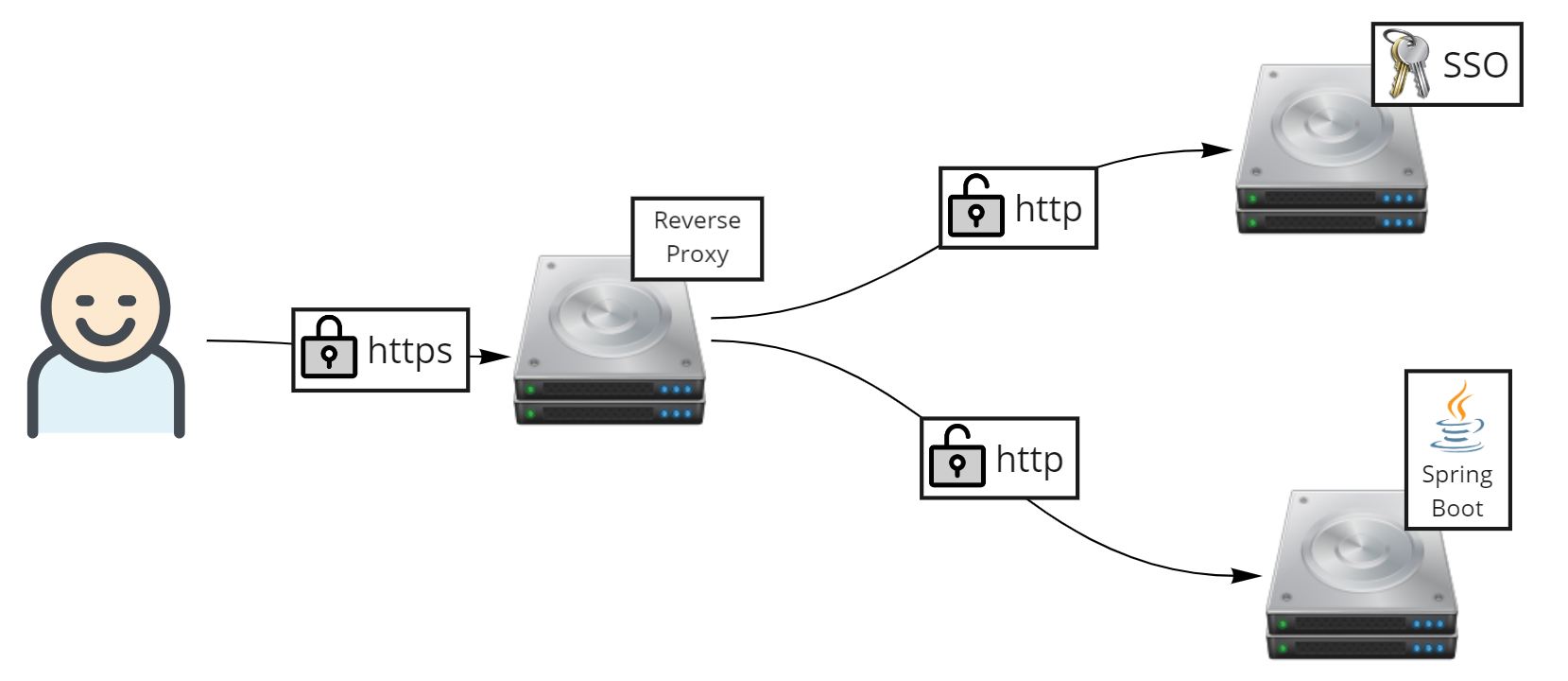
Recently i have a regular Keycloak deployment with the high level concept like below image,

But during implementation, i had this weird condition when Keycloak, behind a reverse proxy for SSL offloader, is redirecting to my Spring Boot application. But Keycloak is not detecting my Spring Boot application as https.

https://keycloak/auth/realms/realm/protocol/openid-connect/auth?
response_type=code&client_id=client-id&redirect_uri=http%3A%2F%2Fspring-boot-app%2Fsso&state=123&
login=true&scope=openid

As we can see, redirect_uri is having http as its protocol, instead of https. Despite my Spring Boot application is being deployed behind a reverse proxy with an SSL offloader.

The workaround is actually quite simple, first thing is that we need to forward request from users into downstream apps, which is Keycloak and Spring Boot. This is primarily being done on reverse proxy or Load Balancer such as F5 or Nginx

X-Forwarded-For: 10.20.81.131
X-Forwarded-Proto: https
X-Forwarded-Host: my.apps.com

But sometimes even after above headers being forwarded, Spring Boot still unaware that it is being accessed as HTTPS. Therefore we need to add one more configuration line in our Spring Boot’s application.properties configuration.

server.forward-headers-strategy=NATIVE

This should be sufficient enough.

How to Fix “java.lang.IllegalArgumentException: Invalid characters (CR/LF) in header message”

Recently i met a weird exception when using a Rest API endpoint provided by Red Hat Fuse (or Apache Camel) and deployed on top of Spring Boot,

javax.servlet.ServletException: java.lang.IllegalArgumentException: 
Invalid characters (CR/LF) in header message
	at org.apache.camel.http.common.CamelServlet.doService(CamelServlet.java:235) 
~[camel-http-common-2.21.0.fuse-770013-redhat-00001.jar!/:2.21.0.fuse-770013-redhat-00001]
	at org.apache.camel.http.common.CamelServlet.service(CamelServlet.java:80) 
~[camel-http-common-2.21.0.fuse-770013-redhat-00001.jar!/:2.21.0.fuse-770013-redhat-00001]
	at javax.servlet.http.HttpServlet.service(HttpServlet.java:791) 
~[jboss-servlet-api_4.0_spec-1.0.0.Final.jar!/:1.0.0.Final]
	at io.undertow.servlet.handlers.ServletHandler.handleRequest(ServletHandler.java:74) 
~[undertow-servlet-2.0.30.SP1-redhat-00001.jar!/:2.0.30.SP1-redhat-00001]
	at io.undertow.servlet.handlers.FilterHandler$FilterChainImpl.doFilter(FilterHandler.java:129) 
~[undertow-servlet-2.0.30.SP1-redhat-00001.jar!/:2.0.30.SP1-redhat-00001]

It happens everytime im using below CURL command,

curl -kv -L -X POST https://url/api/  -H 'Authorization: Basic Yxxxx'  -H 'Content-Type: application/json'  
--data-raw '{
        "id": "123",
        "birthDate": "19900429"
    }'

The funny thing is, i think culprit is because i have a newline within my json body request. After i change my command into below CURL, it seems that everything is working well now.

curl -kv -L -X POST https://url/api/  -H 'Authorization: Basic Yxxxx'  -H 'Content-Type: application/json'  
--data-raw '{"id": "123","birthDate": "19900429"}'

Weird eh

Error user_session_not_found when Using Keycloak’s UserInfo API

Had this error on Keycloak console,

09:49:35,417 WARN  [org.keycloak.events] (default task-145) type=USER_INFO_REQUEST_ERROR, 
realmId=internal, clientId=my-client-id, userId=null, ipAddress=10.20.24.35, 
error=user_session_not_found, auth_method=validate_access_token

Basically it happens when a specific user hitting a UserInfo API request bringing their active JWT token. JWT token is generated after a user successfully login to Keycloak, either via Login page or Rest API, and to be used in their internal application.

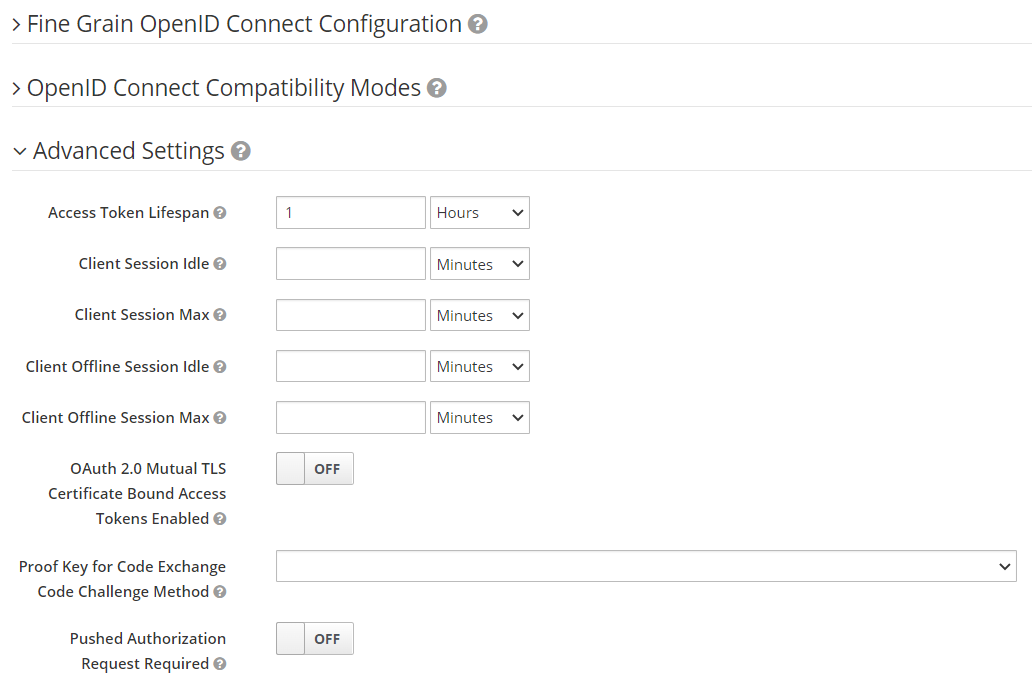
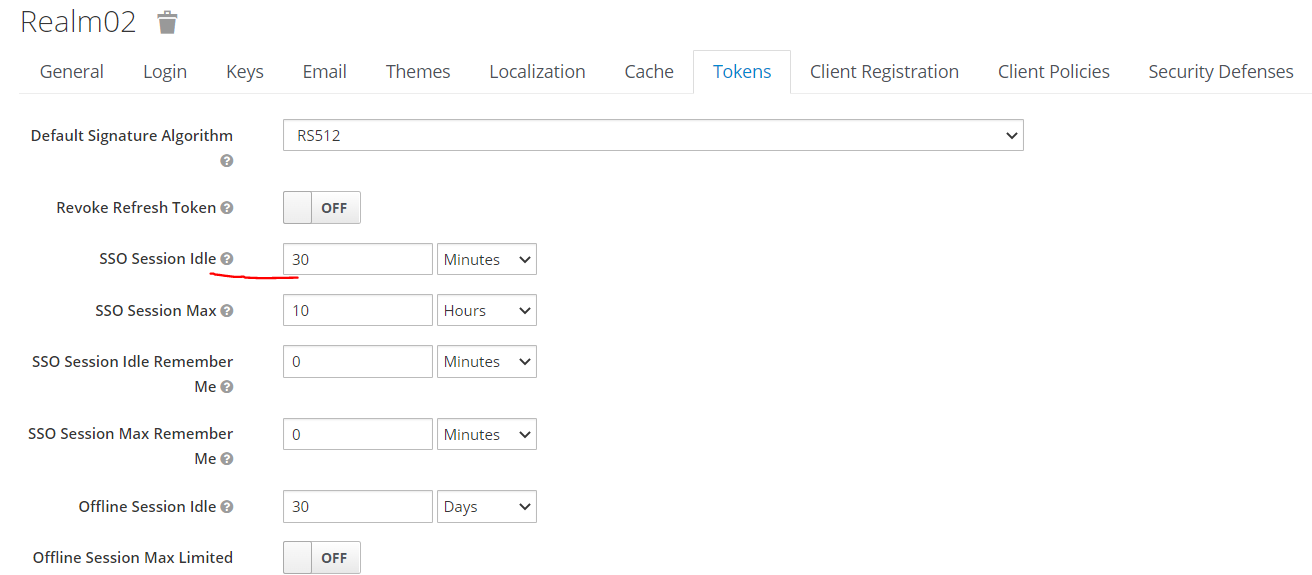
Also the error seems happening, generated JWT token seems to be invalid after 30minutes despite we update access token lifespan into 1 hour.

Finally i realized that this error keeps happening because i was updating the wrong configuration. It is supposed to be the “SSO Session Idle” configuration, in the “Tokens” tab in “Realm Settings” that need to be updated.

After change it into 1 Hour, i can see that my JWT token is successfully validated using UserInfo API for at most 1 hour after being created.

Dockerfile for Deploying Applications in JBoss EAP 7.4, and on top of Openshift 4

Openshift have a different permission right because by default, any containers deployed in Openshift will gets a random user ID. Therefore it needs a specific approach when creating a containerized apps, especially in regards to folder access rights. A simple chmod or chown commands wont be sufficient enough for this purpose.

Long story short, we can use below Dockerfile to be use to deploy an existing war file into JBoss EAP base image and push the result into Openshift 4.

FROM registry.redhat.io/jboss-eap-7/eap74-openjdk11-openshift-rhel8

ENV DISABLE_EMBEDDED_JMS_BROKER=true

COPY target/*.war $JBOSS_HOME/standalone/deployments/

USER root
RUN chgrp -R 0 $JBOSS_HOME/standalone/deployments/ && \
	chmod -R g=u $JBOSS_HOME/standalone/deployments/
USER 185

EXPOSE 8080

Run below command to build the image, can use either Podman or Docker command for it.

$ podman build -t custom-app-name .

Hello World App Using Spring Boot and Apache Camel

Based on wikipedia, Apache Camel is an open source framework for message-oriented middleware with a rule-based routing and mediation engine that provides a Java object-based implementation of the Enterprise Integration Patterns.

The good thing about Apache Camel is that it also has a great flexibility where we can deploy Apache Camel on top of Spring Boot, providing an agile microservice EIP and SOA approach.

So lets start by defining what kind of libraries needed for this project,

<?xml version="1.0" encoding="UTF-8"?>
<project xmlns="http://maven.apache.org/POM/4.0.0"
         xmlns:xsi="http://www.w3.org/2001/XMLSchema-instance"
         xsi:schemaLocation="http://maven.apache.org/POM/4.0.0 http://maven.apache.org/xsd/maven-4.0.0.xsd">
    <modelVersion>4.0.0</modelVersion>

    <groupId>com.edw</groupId>
    <artifactId>camel-hello-world</artifactId>
    <version>1.0-SNAPSHOT</version>

    <properties>
        <project.build.sourceEncoding>UTF-8</project.build.sourceEncoding>
        <camel.version>3.17.0</camel.version>
        <spring-boot.version>2.7.1</spring-boot.version>
        <start-class>com.edw.Applicationn</start-class>
    </properties>

    <dependencyManagement>
        <dependencies>
            <dependency>
                <groupId>org.springframework.boot</groupId>
                <artifactId>spring-boot-dependencies</artifactId>
                <version>${spring-boot.version}</version>
                <type>pom</type>
                <scope>import</scope>
            </dependency>
            <dependency>
                <groupId>org.apache.camel.springboot</groupId>
                <artifactId>camel-spring-boot-dependencies</artifactId>
                <version>${camel.version}</version>
                <type>pom</type>
                <scope>import</scope>
            </dependency>
        </dependencies>
    </dependencyManagement>

    <dependencies>
        <!--        spring boot     -->
        <dependency>
            <groupId>org.springframework.boot</groupId>
            <artifactId>spring-boot-starter</artifactId>
        </dependency>
        <dependency>
            <groupId>org.springframework.boot</groupId>
            <artifactId>spring-boot-starter-web</artifactId>
            <exclusions>
                <exclusion>
                    <groupId>org.springframework.boot</groupId>
                    <artifactId>spring-boot-starter-tomcat</artifactId>
                </exclusion>
            </exclusions>
        </dependency>
        <dependency>
            <groupId>org.springframework.boot</groupId>
            <artifactId>spring-boot-starter-undertow</artifactId>
        </dependency>
        <dependency>
            <groupId>org.springframework.boot</groupId>
            <artifactId>spring-boot-starter-actuator</artifactId>
        </dependency>
        <dependency>
            <groupId>org.springframework.boot</groupId>
            <artifactId>spring-boot-starter-test</artifactId>
            <scope>test</scope>
            <exclusions>
                <exclusion>
                    <groupId>junit</groupId>
                    <artifactId>junit</artifactId>
                </exclusion>
                <exclusion>
                    <groupId>org.junit.vintage</groupId>
                    <artifactId>junit-vintage-engine</artifactId>
                </exclusion>
            </exclusions>
        </dependency>

        <!--        camel   -->
        <dependency>
            <groupId>org.apache.camel.springboot</groupId>
            <artifactId>camel-spring-boot-starter</artifactId>
        </dependency>
        <dependency>
            <groupId>org.apache.camel</groupId>
            <artifactId>camel-test-spring-junit5</artifactId>
            <scope>test</scope>
        </dependency>

        <!--        unit test   -->
        <dependency>
            <groupId>org.junit.jupiter</groupId>
            <artifactId>junit-jupiter-api</artifactId>
            <scope>test</scope>
        </dependency>
        <dependency>
            <groupId>org.junit.jupiter</groupId>
            <artifactId>junit-jupiter-engine</artifactId>
            <scope>test</scope>
        </dependency>
        <dependency>
            <groupId>io.rest-assured</groupId>
            <artifactId>rest-assured</artifactId>
            <scope>test</scope>
        </dependency>
        <dependency>
            <groupId>io.rest-assured</groupId>
            <artifactId>json-path</artifactId>
            <scope>test</scope>
        </dependency>
    </dependencies>

    <build>
        <plugins>
            <plugin>
                <groupId>org.springframework.boot</groupId>
                <artifactId>spring-boot-maven-plugin</artifactId>
                <version>${spring-boot.version}</version>
                <configuration>
                    <mainClass>${start-class}</mainClass>
                </configuration>
                <executions>
                    <execution>
                        <goals>
                            <goal>repackage</goal>
                        </goals>
                    </execution>
                </executions>
            </plugin>
            <plugin>
                <artifactId>maven-compiler-plugin</artifactId>
                <configuration>
                    <source>11</source>
                    <target>11</target>
                </configuration>
            </plugin>

            <plugin>
                <groupId>org.apache.maven.plugins</groupId>
                <artifactId>maven-failsafe-plugin</artifactId>
                <version>3.0.0-M5</version>
                <executions>
                    <execution>
                        <goals>
                            <goal>integration-test</goal>
                            <goal>verify</goal>
                        </goals>
                    </execution>
                </executions>

                <configuration>
                    <classpathDependencyExcludes>
                        <classpathDependencyExcludes>${project.groupId}:${project.artifactId}
                        </classpathDependencyExcludes>
                    </classpathDependencyExcludes>
                    <additionalClasspathElements>
                        <additionalClasspathElement>${project.build.outputDirectory}</additionalClasspathElement>
                    </additionalClasspathElements>
                    <reportsDirectory>${project.build.directory}/surefire-reports</reportsDirectory>
                </configuration>
            </plugin>

        </plugins>
    </build>

</project>

Create a java main class,

package com.edw;

import org.springframework.boot.SpringApplication;
import org.springframework.boot.autoconfigure.SpringBootApplication;

@SpringBootApplication
public class Application {
    public static void main(String[] args) {
        SpringApplication.run(Application.class, args);
    }
}

A Spring controller, where we call Camel’s route

package com.edw.controller;

import org.apache.camel.ProducerTemplate;
import org.springframework.beans.factory.annotation.Autowired;
import org.springframework.web.bind.annotation.GetMapping;
import org.springframework.web.bind.annotation.RequestMapping;
import org.springframework.web.bind.annotation.RequestParam;
import org.springframework.web.bind.annotation.RestController;
import java.util.HashMap;

@RestController
@RequestMapping("/api")
public class ApiController {

    @Autowired
    private ProducerTemplate template;

    @GetMapping("/v1/hello")
    public HashMap getHello(@RequestParam("name") String name) {
        return (HashMap) template.requestBody("direct:getHelloWorld", name);
    }
}

And a Camel Route to do all the Enterprise Integration Pattern, where it do a json response

package com.edw.route;

import org.apache.camel.builder.RouteBuilder;
import org.springframework.stereotype.Component;
import java.util.HashMap;

@Component
public class ApiRoute extends RouteBuilder {

    @Override
    public void configure() {
        // say helloworld
        from("direct:getHelloWorld")
                .routeId("getHelloWorld")
                .tracing()
                .log("calling getHelloWorld")
                .process(exchange -> {
                    String name = (String) exchange.getIn().getBody();
                    exchange.getMessage().setBody(new HashMap<>(){{
                        put("hello", name);
                    }});
                })
                .end();
    }
}

Code for this post can be found on below github repo,

https://github.com/edwin/spring-boot-camel-hello-world

Have fun with Spring Boot and Camel 🙂