Programming

basic programming

Integrating Quarkus and OpenTelemetry with a PostgreSQL Database

In this tutorial, we will integrate the Quarkus framework with a PostgreSQL database and compile the application as a native image to observe Quarkus performance when running in native mode.

We will also examine the result of each request and including database queries, using Jaeger distributed tracing.

First, we’ll start with a Maven pom.xml,

<?xml version="1.0" encoding="UTF-8"?>
<project xmlns="http://maven.apache.org/POM/4.0.0"
         xmlns:xsi="http://www.w3.org/2001/XMLSchema-instance"
         xsi:schemaLocation="http://maven.apache.org/POM/4.0.0 http://maven.apache.org/xsd/maven-4.0.0.xsd">
    <modelVersion>4.0.0</modelVersion>

    <groupId>com.edw</groupId>
    <artifactId>quarkus-postgresql</artifactId>
    <version>1.0-SNAPSHOT</version>

    <properties>
        <compiler-plugin.version>3.14.0</compiler-plugin.version>
        <maven.compiler.release>21</maven.compiler.release>
        <project.build.sourceEncoding>UTF-8</project.build.sourceEncoding>
        <project.reporting.outputEncoding>UTF-8</project.reporting.outputEncoding>
        <quarkus.platform.artifact-id>quarkus-bom</quarkus.platform.artifact-id>
        <quarkus.platform.group-id>com.redhat.quarkus.platform</quarkus.platform.group-id>
        <quarkus.platform.version>3.27.1.redhat-00003</quarkus.platform.version>
        <skipITs>true</skipITs>
        <surefire-plugin.version>3.5.2</surefire-plugin.version>

        <maven.compiler.parameters>true</maven.compiler.parameters>
    </properties>

    <repositories>
        <repository>
            <releases>
                <enabled>true</enabled>
            </releases>
            <snapshots>
                <enabled>false</enabled>
            </snapshots>
            <id>redhat</id>
            <url>https://maven.repository.redhat.com/ga</url>
        </repository>
    </repositories>

    <pluginRepositories>
        <pluginRepository>
            <releases>
                <enabled>true</enabled>
            </releases>
            <snapshots>
                <enabled>false</enabled>
            </snapshots>
            <id>redhat</id>
            <url>https://maven.repository.redhat.com/ga</url>
        </pluginRepository>
    </pluginRepositories>

    <dependencyManagement>
        <dependencies>
            <dependency>
                <groupId>${quarkus.platform.group-id}</groupId>
                <artifactId>${quarkus.platform.artifact-id}</artifactId>
                <version>${quarkus.platform.version}</version>
                <type>pom</type>
                <scope>import</scope>
            </dependency>
        </dependencies>
    </dependencyManagement>
    <dependencies>
        <dependency>
            <groupId>io.quarkus</groupId>
            <artifactId>quarkus-hibernate-orm</artifactId>
        </dependency>
        <dependency>
            <groupId>io.quarkus</groupId>
            <artifactId>quarkus-resteasy</artifactId>
        </dependency>
        <dependency>
            <groupId>io.quarkus</groupId>
            <artifactId>quarkus-resteasy-jsonb</artifactId>
        </dependency>
        <dependency>
            <groupId>io.quarkus</groupId>
            <artifactId>quarkus-jdbc-postgresql</artifactId>
        </dependency>
        <dependency>
            <groupId>io.quarkus</groupId>
            <artifactId>quarkus-arc</artifactId>
        </dependency>

        <dependency>
            <groupId>io.quarkus</groupId>
            <artifactId>quarkus-opentelemetry</artifactId>
        </dependency>

        <dependency>
            <groupId>org.projectlombok</groupId>
            <artifactId>lombok</artifactId>
            <version>1.18.30</version>
            <scope>provided</scope>
        </dependency>

        <dependency>
            <groupId>io.quarkus</groupId>
            <artifactId>quarkus-junit5</artifactId>
            <scope>test</scope>
        </dependency>
        <dependency>
            <groupId>io.rest-assured</groupId>
            <artifactId>rest-assured</artifactId>
            <scope>test</scope>
        </dependency>
    </dependencies>
    <build>
        <plugins>
            <plugin>
                <groupId>${quarkus.platform.group-id}</groupId>
                <artifactId>quarkus-maven-plugin</artifactId>
                <version>${quarkus.platform.version}</version>
                <extensions>true</extensions>
                <executions>
                    <execution>
                        <goals>
                            <goal>build</goal>
                            <goal>generate-code</goal>
                            <goal>generate-code-tests</goal>
                        </goals>
                    </execution>
                </executions>
            </plugin>
            <plugin>
                <artifactId>maven-compiler-plugin</artifactId>
                <version>${compiler-plugin.version}</version>
                <configuration>
                    <parameters>${maven.compiler.parameters}</parameters>
                </configuration>
            </plugin>
            <plugin>
                <artifactId>maven-surefire-plugin</artifactId>
                <version>${surefire-plugin.version}</version>
                <configuration>
                    <systemPropertyVariables>
                        <java.util.logging.manager>org.jboss.logmanager.LogManager</java.util.logging.manager>
                        <maven.home>${maven.home}</maven.home>
                    </systemPropertyVariables>
                </configuration>
            </plugin>
        </plugins>
    </build>
    <profiles>
        <profile>
            <id>native</id>
            <activation>
                <property>
                    <name>native</name>
                </property>
            </activation>
            <build>
                <plugins>
                    <plugin>
                        <artifactId>maven-failsafe-plugin</artifactId>
                        <version>${surefire-plugin.version}</version>
                        <executions>
                            <execution>
                                <goals>
                                    <goal>integration-test</goal>
                                    <goal>verify</goal>
                                </goals>
                                <configuration>
                                    <systemPropertyVariables>
                                        <native.image.path>
                                            ${project.build.directory}/${project.build.finalName}-runner
                                        </native.image.path>
                                        <java.util.logging.manager>org.jboss.logmanager.LogManager
                                        </java.util.logging.manager>
                                        <maven.home>${maven.home}</maven.home>
                                    </systemPropertyVariables>
                                </configuration>
                            </execution>
                        </executions>
                    </plugin>
                </plugins>
            </build>
            <properties>
                <quarkus.package.type>native</quarkus.package.type>
            </properties>
        </profile>
    </profiles>
</project>

And with the following configuration,

quarkus.application.name=customers-svc
quarkus.http.port=${HTTP_PORT:8080}
quarkus.log.level=INFO
quarkus.log.category."com.edw".level=${LOG_LEVEL:DEBUG}

quarkus.log.console.format=%d{yyyy-MM-dd HH:mm:ss,SSS} %h %-5p [%c{3.}] [%X{traceId},%X{spanId}] (%t) %s%e%n

# opentelemetry
quarkus.otel.exporter.otlp.endpoint=${OTEL_URL:http\://192.168.8.140:4317}
quarkus.otel.sdk.disabled=false
quarkus.datasource.jdbc.telemetry=true

# database
quarkus.datasource.jdbc.url=${JDBC_URL:jdbc\:postgresql\://localhost\:5432/test_db}
quarkus.datasource.jdbc.driver=org.postgresql.Driver
quarkus.datasource.jdbc.max-size=20
quarkus.datasource.jdbc.min-size=2

quarkus.datasource.username=${JDBC_USERNAME:postgres}
quarkus.datasource.password=${JDBC_PASSWORD:postgres}

And the following Java files,

package com.edw.model;

import jakarta.persistence.*;
import lombok.AllArgsConstructor;
import lombok.Data;
import lombok.NoArgsConstructor;

import java.io.Serializable;

@Entity
@Table(name = "t_customer")

@Data
@AllArgsConstructor
@NoArgsConstructor
public class Customer implements Serializable {

    @Id
    @GeneratedValue(strategy= GenerationType.AUTO)
    @Column(name = "customer_id")
    private Long customerId;

    @Column(name = "customer_name")
    private String customerName;
}
package com.edw.service;

import com.edw.model.Customer;
import jakarta.enterprise.context.ApplicationScoped;
import jakarta.inject.Inject;
import jakarta.persistence.EntityManager;
import jakarta.transaction.Transactional;
import java.util.List;

@Transactional
@ApplicationScoped
public class CustomerService {

    @Inject
    EntityManager em;

    public List<Customer> findAll() {
        return em.createQuery("select c from Customer c order by customerId", Customer.class).getResultList();
    }
}
package com.edw.controller;

import com.edw.service.CustomerService;
import jakarta.inject.Inject;
import jakarta.ws.rs.GET;
import jakarta.ws.rs.Path;
import jakarta.ws.rs.Produces;
import jakarta.ws.rs.core.MediaType;
import jakarta.ws.rs.core.Response;
import org.slf4j.Logger;
import org.slf4j.LoggerFactory;

@Path("/api/v1/customers")
public class CustomerController {

    private Logger logger = LoggerFactory.getLogger(CustomerController.class);

    @Inject
    CustomerService customerService;

    @GET
    @Path("/")
    @Produces(MediaType.APPLICATION_JSON)
    public Response findAll() {
        logger.debug("on findAll() method");
        return Response
                .ok(customerService.findAll())
                .build();
    }
}

With the following Dockerfile,

FROM quay.io/quarkus/quarkus-distroless-image:2.0

ENV LANGUAGE='en_US:en'
ENV TZ='Asia/Jakarta'

COPY target/*-runner /application

EXPOSE 8080
USER nonroot

CMD ["./application", "-Dquarkus.http.host=0.0.0.0"]

Build the application as a native image,

$ mvn clean package -Dnative

......

Finished generating 'quarkus-postgresql-1.0-SNAPSHOT-runner' in 1m 24s.
[INFO] [io.quarkus.deployment.pkg.steps.NativeImageBuildRunner] podman run --env LANG=C --rm --user 115870:115870 --userns=keep-id -v /home/edwin/quarkus-postgresql/target/quarkus-postgresql-1.0-SNAPSHOT-native-image-source-jar:/project:z --entrypoint /bin/bash registry.access.redhat.com/quarkus/mandrel-for-jdk-21-rhel8:23.1 -c objcopy --strip-debug quarkus-postgresql-1.0-SNAPSHOT-runner
[INFO] [io.quarkus.deployment.QuarkusAugmentor] Quarkus augmentation completed in 97642ms
[INFO] ------------------------------------------------------------------------
[INFO] BUILD SUCCESS
[INFO] ------------------------------------------------------------------------
[INFO] Total time:  01:41 min
[INFO] Finished at: 2025-12-29T11:10:07+07:00
[INFO] ------------------------------------------------------------------------

And containerized it

$ podman build -t quarkus-postgresql:original -f Dockerfile.distroless .

For monitoring, we can use a containerized Jaeger instance to display the distributed tracing of our application,

$ podman run -d --name jaeger \
        -e COLLECTOR_OTLP_ENABLED=true \
        -p 16686:16686 \
        -p 4317:4317 \
        jaegertracing/all-in-one:latest

Run the image and make some API calls to the Quarkus application.
We will also be able to see the distributed tracing in the Jaeger UI, including database query spans.

Code for this post can be found on the below repository,

https://github.com/edwin/quarkus-postgresql

Creating a Custom Cache Listener on Infinispan

Infinispan offers powerful caching capabilities, but sometimes you need to trigger custom business logic when cache events occur, such as a data entry expiring. This post demonstrates how to create and deploy a custom Infinispan Cache Listener integrated via a Module Lifecycle component.

First, let’s configure a cache named user-cache with a short lifespan to easily demonstrate the expiration event.

For this example, the data will persist in the Infinispan memory for 5 seconds from the latest transaction involving that data, which is set by the maxIdle property (in milliseconds).

user-cache: 
  replicatedCache: 
    mode: "SYNC"
    statistics: "true"
    encoding: 
      mediaType: "text/plain"
    expiration: 
      lifespan: "-1"
      maxIdle: "5000"

We want to trigger an action every time an entry in the user-cache is created, modified, removed, or, most importantly for this case, expired. We achieve this with a custom class annotated with @Listener.

For this sample, the listener specifically checks if the event belongs to the user-cache before printing a message.

package com.edw;

import org.infinispan.notifications.Listener;
import org.infinispan.notifications.cachelistener.annotation.*;
import org.infinispan.notifications.cachelistener.event.*;

@Listener(clustered = true, observation = Listener.Observation.POST)
public class HelloWorldListener {

    @CacheEntryCreated
    public void entryCreated(CacheEntryCreatedEvent<Object, Object> event) {
        if("user-cache".equals(event.getCache().getName()))
            System.out.println("entryCreated for user-cache with key is " + event.getKey() + " and value is " + event.getValue());
    }

    @CacheEntryModified
    public void entryModified(CacheEntryModifiedEvent<String, String> event) {
        if("user-cache".equals(event.getCache().getName()))
            System.out.println("entryModified for user-cache with key is " + event.getKey() + " and new value is " + event.getNewValue());
    }

    @CacheEntryRemoved
    public void entryRemoved(CacheEntryRemovedEvent<String, String> event) {
        if("user-cache".equals(event.getCache().getName()))
            System.out.println("entryRemoved for user-cache with key is " + event.getKey() + " and value is " + event.getValue());
    }

    @CacheEntryExpired
    public void entryExpired(CacheEntryExpiredEvent<String, String> event) {
        if("user-cache".equals(event.getCache().getName()))
            System.out.println("entryExpired for user-cache with key is " + event.getKey() + " and value is " + event.getValue());
    }
}

To automatically register our listener when Infinispan starts, we’ll create a custom Infinispan Module that implements the ModuleLifecycle interface.

The cacheStarted method is the perfect place to check the cache name and register the listener once the user-cache has been initialized.

package com.edw;

import org.infinispan.Cache;
import org.infinispan.configuration.global.GlobalConfiguration;
import org.infinispan.factories.ComponentRegistry;
import org.infinispan.factories.GlobalComponentRegistry;
import org.infinispan.factories.annotations.InfinispanModule;
import org.infinispan.lifecycle.ModuleLifecycle;

@InfinispanModule(name = "custom-module", requiredModules = "core")
public class CustomModule implements ModuleLifecycle {
   @Override
   public void cacheManagerStarting(GlobalComponentRegistry gcr, GlobalConfiguration globalConfiguration) {
      CustomModuleConfiguration config = globalConfiguration.module(CustomModuleConfiguration.class);
      if (config != null) {
         System.out.println("Custom Module Message: " + config.message());
      }
   }

   @Override
   public void cacheStarted(ComponentRegistry cr, String cacheName) {
      System.out.println("Cache " + cacheName + " started!");
      if("user-cache".equals(cacheName))
         cr.getComponent(Cache.class).addListener(new HelloWorldListener());
   }
}

The remaining Java classes are necessary boilerplate codes for defining a custom configuration element that can be read by Infinispan’s parser.

package com.edw;

import java.util.HashMap;
import java.util.Map;

public enum Attribute {
   // must be first
   UNKNOWN(null),

   MESSAGE("message");
   private static final Map<String, Attribute> ATTRIBUTES;

   static {
      final Map<String, Attribute> map = new HashMap<>();
      for (Attribute attribute : values()) {
         final String name = attribute.name;
         if (name != null) {
            map.put(name, attribute);
         }
      }
      ATTRIBUTES = Map.copyOf(map);
   }

   private final String name;

   Attribute(final String name) {
      this.name = name;
   }

   public static Attribute forName(String localName) {
      final Attribute attribute = ATTRIBUTES.get(localName);
      return attribute == null ? UNKNOWN : attribute;
   }

   @Override
   public String toString() {
      return name;
   }
}
package com.edw;

import org.infinispan.commons.configuration.BuiltBy;
import org.infinispan.commons.configuration.attributes.AttributeDefinition;
import org.infinispan.commons.configuration.attributes.AttributeSet;
import org.infinispan.commons.configuration.attributes.ConfigurationElement;
import org.infinispan.configuration.serializing.SerializedWith;

@BuiltBy(CustomModuleConfigurationBuilder.class)
@SerializedWith(CustomModuleSerializer.class)
public class CustomModuleConfiguration extends ConfigurationElement<CustomModuleConfiguration> {

   static final AttributeDefinition<String> MESSAGE = AttributeDefinition.builder(Attribute.MESSAGE, "Module Loaded")
         .immutable().build();
   static AttributeSet attributeDefinitionSet() {
      return new AttributeSet(CustomModuleConfiguration.class, MESSAGE);
   }

   CustomModuleConfiguration(AttributeSet attributes) {
      super(Element.ROOT, attributes);
   }

   public String message() {
      return attributes.attribute(MESSAGE).get();
   }
}
package com.edw;

import org.infinispan.commons.configuration.Builder;
import org.infinispan.commons.configuration.Combine;
import org.infinispan.commons.configuration.attributes.AttributeSet;
import org.infinispan.configuration.global.GlobalConfigurationBuilder;

public class CustomModuleConfigurationBuilder implements Builder<CustomModuleConfiguration> {

   private final AttributeSet attributes = CustomModuleConfiguration.attributeDefinitionSet();

   private final GlobalConfigurationBuilder builder;

   public CustomModuleConfigurationBuilder(GlobalConfigurationBuilder builder) {
      this.builder = builder;
   }

   @Override
   public CustomModuleConfiguration create() {
      return new CustomModuleConfiguration(attributes.protect());
   }

   @Override
   public Builder<?> read(CustomModuleConfiguration template, Combine combine) {
      this.attributes.read(template.attributes(), combine);
      return this;
   }

   @Override
   public AttributeSet attributes() {
      return attributes;
   }

   public Builder<?> message(String message) {
      attributes.attribute(CustomModuleConfiguration.MESSAGE).set(message);
      return this;
   }
}
package com.edw;

import org.infinispan.commons.CacheConfigurationException;
import org.infinispan.commons.configuration.io.ConfigurationReader;
import org.infinispan.configuration.global.GlobalConfigurationBuilder;
import org.infinispan.configuration.parsing.ConfigurationBuilderHolder;
import org.infinispan.configuration.parsing.ConfigurationParser;
import org.infinispan.configuration.parsing.Namespace;
import org.infinispan.configuration.parsing.ParseUtils;
import org.infinispan.configuration.parsing.Parser;
import org.infinispan.configuration.parsing.ParserScope;
import org.kohsuke.MetaInfServices;

@MetaInfServices
@Namespace(root = "custom-module")
@Namespace(uri = Parser.NAMESPACE + "*", root = "custom-module")
public class CustomModuleParser implements ConfigurationParser {

   @Override
   public void readElement(ConfigurationReader reader, ConfigurationBuilderHolder holder) {
      if (!holder.inScope(ParserScope.CACHE_CONTAINER))
         throw new CacheConfigurationException(String.format("Unexpected scope. Expected CACHE_CONTAINER but was %s", holder.getScope()));


      Element element = Element.forName(reader.getLocalName());
      if (element != Element.ROOT)
         throw ParseUtils.unexpectedElement(reader);

      GlobalConfigurationBuilder globalBuilder = holder.getGlobalConfigurationBuilder();
      CustomModuleConfigurationBuilder builder = globalBuilder.addModule(CustomModuleConfigurationBuilder.class);

      for (int i = 0; i < reader.getAttributeCount(); i++) {
         ParseUtils.requireNoNamespaceAttribute(reader, i);
         String value = reader.getAttributeValue(i);
         Attribute attribute = Attribute.forName(reader.getAttributeName(i));
         switch (attribute) {
            case MESSAGE:
               builder.message(value);
               break;
            default:
               throw ParseUtils.unexpectedAttribute(reader, i);
         }
      }
      ParseUtils.requireNoContent(reader);
   }

   @Override
   public Namespace[] getNamespaces() {
      return ParseUtils.getNamespaceAnnotations(getClass());
   }
}
package com.edw;

import org.infinispan.commons.configuration.io.ConfigurationWriter;
import org.infinispan.configuration.serializing.ConfigurationSerializer;

public class CustomModuleSerializer implements ConfigurationSerializer<CustomModuleConfiguration> {
   @Override
   public void serialize(ConfigurationWriter writer, CustomModuleConfiguration configuration) {
      writer.writeStartElement(Element.ROOT);
      configuration.attributes().write(writer);
      writer.writeEndElement();
   }
}
package com.edw;

import java.util.HashMap;
import java.util.Map;

public enum Element {
   //must be first
   UNKNOWN(null),

   ROOT("custom-module"),
   ;

   private static final Map<String, Element> ELEMENTS;

   static {
      final Map<String, Element> map = new HashMap<>();
      for (Element element : values()) {
         final String name = element.name;
         if (name != null) {
            map.put(name, element);
         }
      }
      ELEMENTS = Map.copyOf(map);
   }

   private final String name;

   Element(final String name) {
      this.name = name;
   }

   public static Element forName(final String localName) {
      final Element element = ELEMENTS.get(localName);
      return element == null ? UNKNOWN : element;
   }

   @Override
   public String toString() {
      return name;
   }
}

We need to include the core Infinispan dependencies and the necessary artifacts for component annotation processing. The use of infinispan-bom ensures dependency versions are consistent.

<project xmlns="http://maven.apache.org/POM/4.0.0"
         xmlns:xsi="http://www.w3.org/2001/XMLSchema-instance"
         xsi:schemaLocation="http://maven.apache.org/POM/4.0.0
                             https://maven.apache.org/xsd/maven-4.0.0.xsd">
    <modelVersion>4.0.0</modelVersion>

    <groupId>com.edw</groupId>
    <artifactId>infinispan-cache-listener</artifactId>
    <version>1.0.0</version>
    <packaging>jar</packaging>

    <properties>
        <maven.compiler.source>21</maven.compiler.source>
        <maven.compiler.target>21</maven.compiler.target>
    </properties>

    <dependencyManagement>
        <dependencies>
            <dependency>
                <groupId>org.infinispan</groupId>
                <artifactId>infinispan-bom</artifactId>
                <version>16.0.1</version>
                <type>pom</type>
                <scope>import</scope>
            </dependency>
        </dependencies>
    </dependencyManagement>

    <dependencies>
        <dependency>
            <groupId>org.infinispan</groupId>
            <artifactId>infinispan-core</artifactId>
        </dependency>
        <dependency>
            <groupId>org.infinispan</groupId>
            <artifactId>infinispan-component-annotations</artifactId>
        </dependency>
        <dependency>
            <groupId>org.infinispan</groupId>
            <artifactId>infinispan-component-processor</artifactId>
        </dependency>
    </dependencies>

</project>

Execute the following commands to build the project and deploy the resulting JAR file into the Infinispan server’s library folder.

$ mvn clean package

$ cp infinispan-cache-listener-1.0.0.jar ${ISPN_HOME}/server/lib

Start Infinispan. You should see the custom module message and the confirmation that your specific cache started.

2025-11-23 14:33:09,598 INFO  [o.i.CLUSTER] ISPN000094: Received new cluster view for channel cluster: [DESKTOP-8NNFTMF-10079|0] (1) [DESKTOP-8NNFTMF-10079]
2025-11-23 14:33:09,660 INFO  [o.i.CLUSTER] ISPN000079: Channel `cluster` local address is `DESKTOP-8NNFTMF-10079`, physical addresses are `[192.168.8.120:7800]`
2025-11-23 14:33:09,660 INFO  [o.i.CONTAINER] ISPN000389: Loaded global state, version=15.0.7.Final timestamp=2025-11-23T07:32:46.562161300Z

// ... other caches ..

Cache user-cache started!

// ... server started logs ...

2025-11-23 14:33:10,639 INFO  [o.i.SERVER] ISPN080018: Started connector Resp (internal)
2025-11-23 14:33:10,639 INFO  [o.i.SERVER] ISPN080018: Started connector Memcached (internal)
Cache ___hotRodTopologyCache_hotrod-default started!
2025-11-23 14:33:10,647 INFO  [o.i.SERVER] ISPN080018: Started connector HotRod (internal)
2025-11-23 14:33:10,741 INFO  [o.i.SERVER] ISPN080018: Started connector REST (internal)
2025-11-23 14:33:10,741 INFO  [o.i.SERVER] ISPN005055: Using transport: NIO
2025-11-23 14:33:10,823 INFO  [o.i.SERVER] ISPN080004: Connector SinglePort (default) listening on 127.0.0.1:11222
2025-11-23 14:33:10,823 INFO  [o.i.SERVER] ISPN080034: Server 'DESKTOP-8NNFTMF-10079' listening on http://127.0.0.1:11222
2025-11-23 14:33:10,854 INFO  [o.i.SERVER] ISPN080001: Infinispan Server 15.0.7.Final started in 5283ms

Try adding new data on “user-cache”

We can see this logs related to cache addition and expiry on out ISPN logs

entryCreated for user-cache with key is user one and value is value one
entryExpired for user-cache with key is user one and value is value one

Code for this project can be found on the below repository,The complete source code for this project is available on the following repository,

https://github.com/edwin/infinispan-cache-listener

Monitoring Jboss EAP 8 DataSource and Application’s Query

JBoss EAP provide a convenient way of monitoring its Datasource where it can be monitored within a same JBoss EAP dashboard console. For this sample, i have a very simple Servlet class where it would do a Select query using JBoss EAP Datasource

package com.edw;

import jakarta.servlet.ServletException;
import jakarta.servlet.annotation.WebServlet;
import jakarta.servlet.http.HttpServlet;
import jakarta.servlet.http.HttpServletRequest;
import jakarta.servlet.http.HttpServletResponse;

import javax.naming.InitialContext;
import javax.sql.DataSource;
import java.io.IOException;
import java.sql.*;

@WebServlet(name = "HelloServlet", urlPatterns = "/")
public class HelloServlet extends HttpServlet {

    @Override
    protected void doGet(HttpServletRequest request, HttpServletResponse response)
            throws ServletException, IOException {
        DataSource ds = null;
        Connection connection = null;
        PreparedStatement statement = null;
        ResultSet rs = null;

        try {
            InitialContext ic = new InitialContext();
            ds = (DataSource) ic.lookup("java:/my-db");
            connection = ds.getConnection();

            statement = connection.prepareStatement("SELECT * FROM tb_testing ORDER BY id ASC");
            rs = statement.executeQuery();

            StringBuilder htmlTable = new StringBuilder("<table>");

            ResultSetMetaData metaData = rs.getMetaData();
            int columnCount = metaData.getColumnCount();

            // table header
            htmlTable.append("<thead><tr>");
            for (int i = 1; i <= columnCount; i++) {
                htmlTable.append("<th>").append(metaData.getColumnName(i)).append("</th>");
            }
            htmlTable.append("</tr></thead>");

            // table body
            htmlTable.append("<tbody>");
            while (rs.next()) {
                htmlTable.append("<tr>");
                for (int i = 1; i <= columnCount; i++) {
                    htmlTable.append("<td>").append(rs.getString(i)).append("</td>");
                }
                htmlTable.append("</tr>");
            }
            htmlTable.append("</tbody></table>");

            response.getWriter().write(htmlTable.toString());

        } catch (Exception e) {
            e.printStackTrace();
        } finally {
            // Make sure ResultSet, Statement and Connection are all closed at the end
            if (rs != null) {
                try {
                    rs.close();
                } catch (SQLException e) {
                    e.printStackTrace();
                }
            }
            if (statement != null) {
                try {
                    statement.close();
                } catch (SQLException e) {
                    e.printStackTrace();
                }
            }
            if (connection != null) {
                try {
                    connection.close();
                } catch (SQLException e) {
                    e.printStackTrace();
                }
            }
        }
    }
}

Which is connect to a mysql table,

create table test_db.tb_testing
(
    id       int auto_increment
        primary key,
    username varchar(60) null
);

and we have this datasource configuration on our JBoss EAP 8, where we are activating Statistics and SQL Statements spying feature

<datasource jndi-name="java:/my-db" pool-name="my-db" 
	spy="true" 
	statistics-enabled="true">
	<connection-url>jdbc:mysql://localhost:3306/test_db</connection-url>
	<driver-class>com.mysql.cj.jdbc.Driver</driver-class>
	<driver>mysql-connector-j-9.3.0.jar</driver>
	<security>
		<user-name>root</user-name>
		<password>password</password>
	</security>
	<validation>
		<valid-connection-checker class-name="org.jboss.jca.adapters.jdbc.extensions.mysql.MySQLValidConnectionChecker"/>
		<check-valid-connection-sql>SELECT 1</check-valid-connection-sql>
		<validate-on-match>true</validate-on-match>
		<background-validation>false</background-validation>
		<exception-sorter class-name="org.jboss.jca.adapters.jdbc.extensions.mysql.MySQLExceptionSorter"/>
	</validation>
	<statement>
		<track-statements>true</track-statements>
		<prepared-statement-cache-size>50</prepared-statement-cache-size>
	</statement>
</datasource>

And put this logging configuration to make sure that all the SQL statements are properly printed on log file,

<logger category="jboss.jdbc.spy">
	<level name="DEBUG"/>
	<handlers>
		<handler name="CONSOLE"/>
	</handlers>
</logger>

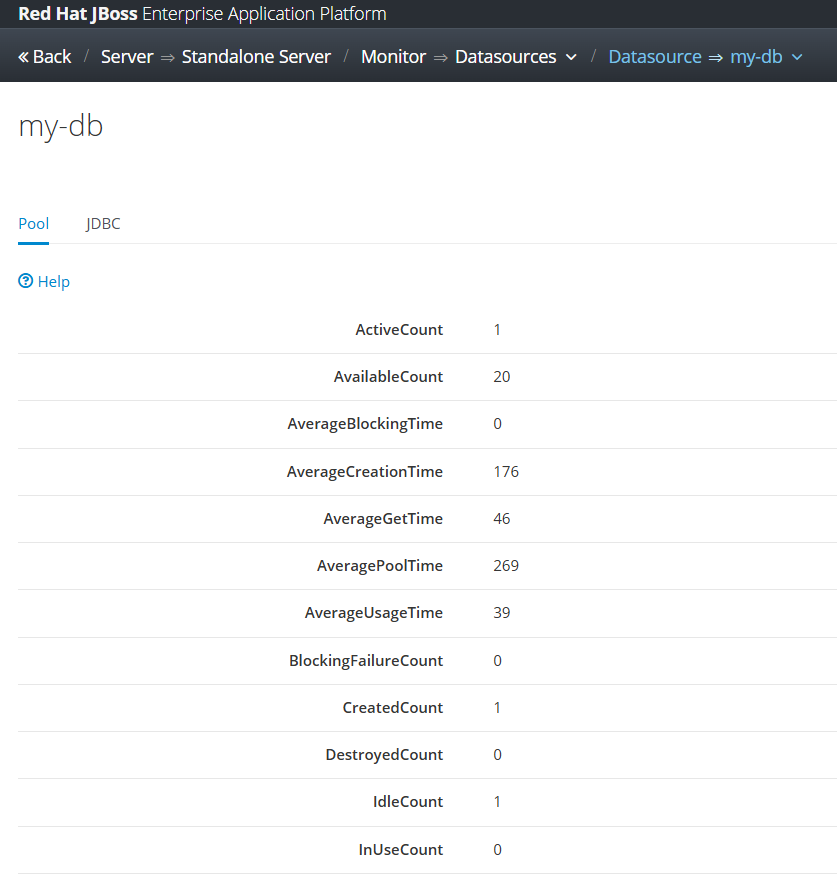
Deploy our custom application on JBoss EAP, do some transactions, and we can see that Datasource statistics on JBoss admin console,

and we can see our detail SQL statements on server.log file, for example is based on the below log we can see that our query took around 70ms to be executed


2025-10-23 13:21:27,852 DEBUG [jboss.jdbc.spy] (default task-1) java:/my-db [DataSource] getConnection()
2025-10-23 13:21:27,853 DEBUG [jboss.jdbc.spy] (default task-1) java:/my-db [Connection] prepareStatement(SELECT * FROM tb_testing ORDER BY id ASC)
2025-10-23 13:21:27,854 DEBUG [jboss.jdbc.spy] (default task-1) java:/my-db [PreparedStatement] executeQuery()
........ ........ ........ 
2025-10-23 13:21:27,929 DEBUG [jboss.jdbc.spy] (default task-1) java:/my-db [PreparedStatement] isClosed()
2025-10-23 13:21:27,929 DEBUG [jboss.jdbc.spy] (default task-1) java:/my-db [PreparedStatement] close()
2025-10-23 13:21:27,929 DEBUG [jboss.jdbc.spy] (default task-1) java:/my-db [Connection] isClosed()
2025-10-23 13:21:27,929 DEBUG [jboss.jdbc.spy] (default task-1) java:/my-db [Connection] close()

Code for this project can be accessed on the below repository,

https://github.com/edwin/hello-world-servlet-and-jboss-eap-connection-pool

Leveraging Nexus when Building a Golang Application

For this example, I’m creating a very simple Golang app

package main

import (
        "github.com/beego/beego/v2/server/web"
)

func main() {
        web.Router("/", &MainController{})
        web.Run()
}

type MainController struct {
        web.Controller
}

func (c *MainController) Get() {
        response := map[string]string{
                "message": "Hello World Beego",
                "status":  "success",
        }
        c.Data["json"] = response
        c.ServeJSON()
}

And here’s the required go.mod file:

module hello-beego

go 1.24.7

require github.com/beego/beego/v2 v2.3.8

Next, we’ll set up our Nexus to store the required Golang libraries. First, we start by creating a repository named go-proxy. The remote storage location for this repository will be proxy.golang.org.

We also need to point our Golang build proxy to the Nexus repository by exporting the GOPROXY variable.

$ export GOPROXY= http://localhost:8081/repository/go-proxy/

For more detailed logs, we can pull all our libraries using the following command:

$ GODEBUG=mod=1,gocacheverify=1 go mod tidy -v -x

This will show whether we’re able to pull libraries from the Nexus repository. We can also see the libraries that are being pulled in our Nexus repository.

By following above steps, we can successfully leverage Nexus to manage our Golang dependencies, ensuring a more efficient and controlled build environment.

Keycloak 26 Doesnt Show Custom User Attributes Tab

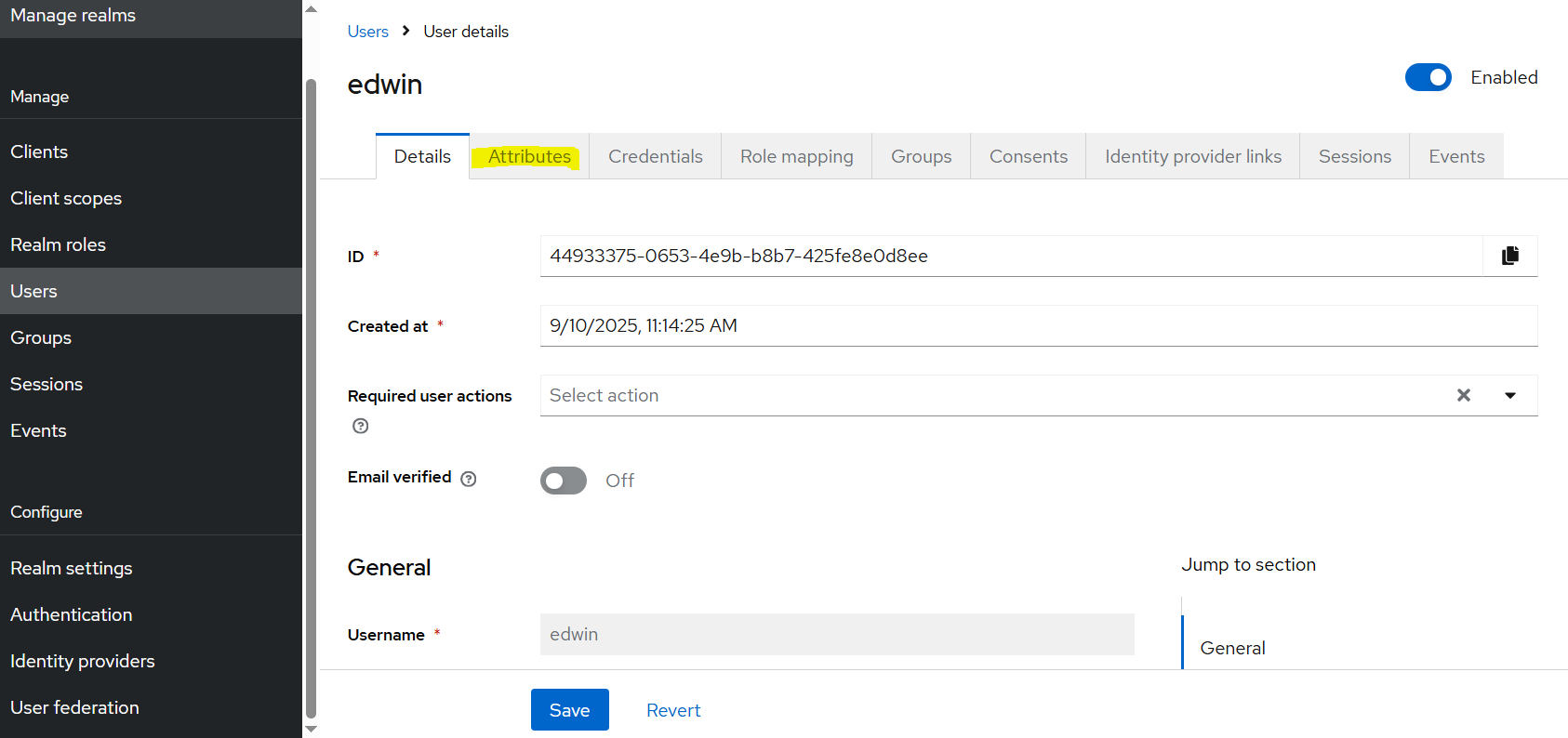
Had this problem and quite giving me a headache for a while, somehow the latest Keycloak version is not showing Attributes tab in Users menu which preventing me from creating a new custom user attribute.

Actually it is quite simple for enabling the custom attributes tab, we can go to Realm Settings menu and select the Unmanaged Attributes as Enabled.

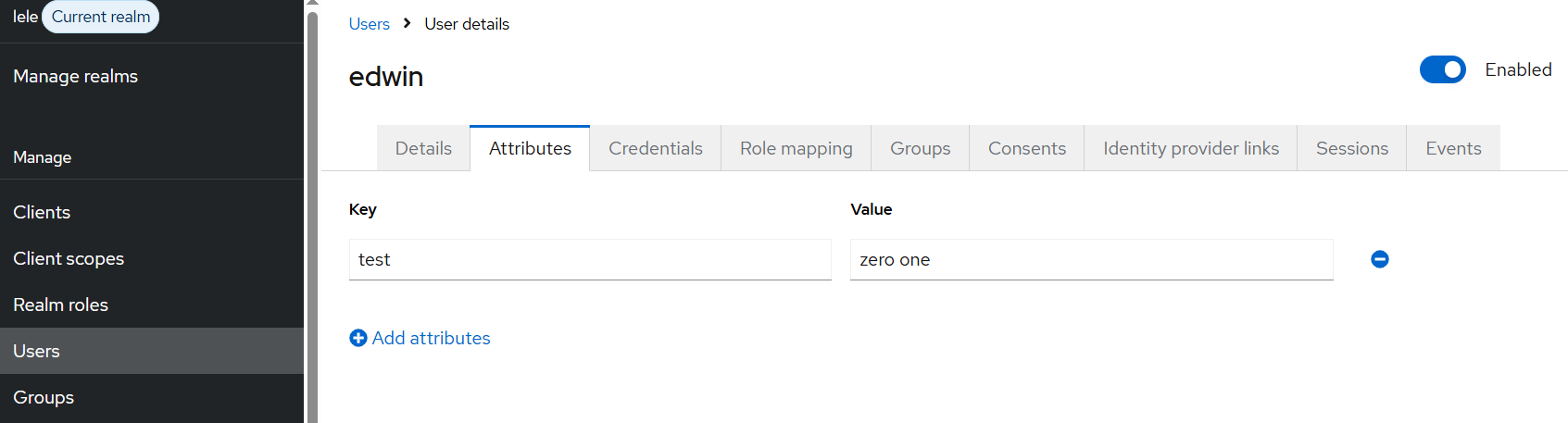
The result would be like this,