utility

A Simple JSon Requestor using Java

In my latest project, i found the needed to simulate a json request from my local computer. After do some research, i created a simple java class to simulate json request to my servlet. Im using GSon to format my java class to json string, and Apache HttpComponents.

Im trying to do json request to my servlet, to do an invoice payment. First, as always, is an Incoice javabean.

package com.edw.bean;

/**
 *  com.edw.bean.Invoice
 *
 *  @author edw
 *
 */
public class Invoice {
    private String username;
    private String po_number;
    private int bill;

    // other setter and getter
}

and this is my main java class, it will do a simple Request to my servlet

package com.edw.json;

import com.edw.bean.Invoice;
import com.google.gson.Gson;
import java.net.URL;
import org.apache.http.HttpEntity;
import org.apache.http.HttpResponse;
import org.apache.http.client.HttpClient;
import org.apache.http.entity.StringEntity;
import org.apache.http.client.methods.HttpPost;
import org.apache.http.impl.client.DefaultHttpClient;
import org.apache.http.util.EntityUtils;

/**
 *  com.edw.json.JSonRequestor
 *
 *  @author edw
 *
 */
public class JSonRequestor {

    public JSonRequestor() {
    }

    private void doRequest() {
        URL serverURL = null;
        try {
            
            Invoice invoice = new Invoice();
            invoice.setBill(2000);
            invoice.setPo_number("2000");
            invoice.setUsername("edw");
            
            Gson g = new Gson();
            String json = g.toJson(invoice);
            
            System.out.println(json);

            HttpClient httpclient = new DefaultHttpClient();
            
            HttpPost httppost = new HttpPost("http://localhost:18000/EPay/CreateInvoice");
            StringEntity stringEntity = new StringEntity(json);
            stringEntity.setContentType("application/json");
            httppost.setEntity(stringEntity);
            
            System.out.println("executing request " + httppost.getRequestLine());
            HttpResponse response = httpclient.execute(httppost);
            HttpEntity resEntity = response.getEntity();
            
            System.out.println("----------------------------------------");
            System.out.println(response.getStatusLine());
            if (resEntity != null) {
                System.out.println("Response content length: " + resEntity.getContentLength());
                System.out.println("Chunked?: " + resEntity.isChunked());
            }
            EntityUtils.consume(resEntity);
            
        } catch (Exception e) {
            e.printStackTrace();
        }
    }

    public static void main(String[] args) {
        JSonRequestor jSonRequestor = new JSonRequestor();
        jSonRequestor.doRequest();
    }
}

and this is how my request will looks like

this is libraries that i used

I hope it would help others,
have fun and dont forget to visit Indonesia 🙂

Create a Pascal Triangle using Java

On my last job interview, i was asked to create a very simple Pascal Triangle using java. What is a Pascal Triangle (indonesian people called it “Segitiga Pascal”) ?? According to Wikipedia, it is a triangular array of the binomial coefficients in a triangle. Okay this is how i do it.

package com.edw.test;

/**
 *  com.edw.test.PascalTriangle
 *
 *  @author edw
 */
public class PascalTriangle {

    public static void main(String[] args) {
        // initiate
        int numberOfRows = 8;
        int[][] pascal = new int[numberOfRows][numberOfRows];
         
        // fill my triangle
        for (int i = 0; i < numberOfRows; i++) {
            pascal[i][0] = 1;                        
            for (int j = 1; j <= i; j++) {
                pascal[i][j] = pascal[i - 1][j - 1] + pascal[i - 1][j];
            }
        }

        // print it
        for (int i = 0; i < numberOfRows; i++) {
            for (int j = 0; j <= i; j++) {
                System.out.print(pascal[i][j] + " ");
            }
            System.out.println();
        }
    }
}

this is the result on my Netbeans’ console

hope it can help others
cheers :-[

Get Absolute File Path Using ServletFilter

It’s all begin when i need to get a text file content from a servlet filter, after spent some amount of time googling i’ve found a good solution. This is how i do it.

package com.edw.filter;

import java.io.File;
import java.io.IOException;
import javax.servlet.Filter;
import javax.servlet.FilterChain;
import javax.servlet.FilterConfig;
import javax.servlet.ServletException;
import javax.servlet.ServletRequest;
import javax.servlet.ServletResponse;
import org.apache.log4j.Logger;

/**
 *
 * @author edw
 */
public class MyFilter implements Filter {

    private FilterConfig filterConfig = null;
    private Logger logger = Logger.getLogger(this.getClass());

    public MyFilter() {
        
    }    

    public void doFilter(ServletRequest request, ServletResponse response,
                         FilterChain chain)
	throws IOException, ServletException {
	
	try {
		String pathName = filterConfig.getServletContext().getRealPath("/");
		File file = new File(pathName);

		logger.debug(file.getAbsolutePath());

		chain.doFilter(request, response);
	}
	catch(Throwable t) {
	    logger.error(t,t);
	}
    }    

    public void destroy() { 
    }

    public void init(FilterConfig filterConfig) { 
		this.filterConfig = filterConfig;
    }    

}

Hope it can help others, thank you (*)

How to Create A Java Class Performance Test Using JMeters AbstractJavaSamplerClient

JMeter is a very powerfull tools to do performance testing. In this tutorial, im going to simulate a heavy load on a java object to test its strength and performance testing. My java class is very simple, only an ordinary java class to do inserts into mysql database using Hibernate framework.

first is a sample database and a table

CREATE DATABASE test;
USE test;
CREATE
    TABLE student
    (
        id INT NOT NULL AUTO_INCREMENT,
        studentname VARCHAR(60) NOT NULL,
        PRIMARY KEY (id)
    );

a java class and xml as representation for database’s table

package com.edw.bean;

public class Student implements java.io.Serializable {

    private Integer id;
    private String studentname;

    public Student() {
    }

    public Student(String studentname) {
       this.studentname = studentname;
    }
	
	// other setter and getter
<?xml version="1.0"?>
<!DOCTYPE hibernate-mapping PUBLIC "-//Hibernate/Hibernate Mapping DTD 3.0//EN"
"http://hibernate.sourceforge.net/hibernate-mapping-3.0.dtd">
<hibernate-mapping>
    <class name="com.edw.bean.Student" table="student" catalog="test">
        <id name="id" type="java.lang.Integer">
            <column name="id" />
            <generator class="identity" />
        </id>
        <property name="studentname" type="string">
            <column name="studentname" length="60" not-null="true" />
        </property>
    </class>
</hibernate-mapping>

this is my Hibernate main configuration xml

<?xml version="1.0" encoding="UTF-8"?>
<!DOCTYPE hibernate-configuration PUBLIC "-//Hibernate/Hibernate Configuration DTD 3.0//EN" "http://hibernate.sourceforge.net/hibernate-configuration-3.0.dtd">
<hibernate-configuration>
  <session-factory>
    <property name="hibernate.dialect">org.hibernate.dialect.MySQLDialect</property>
    <property name="hibernate.connection.driver_class">com.mysql.jdbc.Driver</property>
    <property name="hibernate.connection.url">jdbc:mysql://localhost:3306/test</property>
    <property name="hibernate.connection.username">root</property>
	<property name="hibernate.connection.password">xxxxxx</property>
    <property name="hibernate.connection.autocommit">true</property>
    <mapping resource="com/edw/bean/Student.hbm.xml"/>
  </session-factory>
</hibernate-configuration>

and my java class to load Hibernate’s configuration

package com.edw.hbm;

import org.hibernate.cfg.AnnotationConfiguration;
import org.hibernate.SessionFactory;

/**
 * @author edw
 */
public class HibernateUtil {
    private static final SessionFactory sessionFactory;

    static {
        try {
            sessionFactory = new AnnotationConfiguration().configure().buildSessionFactory();
        } catch (Throwable ex) {            
            System.err.println("Initial SessionFactory creation failed." + ex);
            throw new ExceptionInInitializerError(ex);
        }
    }

    public static SessionFactory getSessionFactory() {
        return sessionFactory;
    }
}

This is my tested java class, it has to extends AbstractJavaSamplerClient so the jmeter application can test it

package com.edw.test;

import com.edw.bean.Student;
import com.edw.hbm.HibernateUtil;
import java.util.Date;
import java.util.HashMap;
import java.util.Iterator;
import java.util.Map;
import org.apache.jmeter.config.Arguments;
import org.apache.jmeter.protocol.java.sampler.AbstractJavaSamplerClient;
import org.apache.jmeter.protocol.java.sampler.JavaSamplerContext;
import org.apache.jmeter.samplers.SampleResult;
import org.apache.jmeter.threads.JMeterContextService;
import org.apache.jmeter.threads.JMeterVariables;
import org.hibernate.Session;
import org.hibernate.SessionFactory;

/**
 *  com.edw.test.StudentStressTest
 *
 *  @author edw
 */
public class StudentStressTest extends AbstractJavaSamplerClient {

    private Map<String, String> mapParams = new HashMap<String, String>();
    private SessionFactory sessionFactory = HibernateUtil.getSessionFactory();

    public StudentStressTest() {
        super();
    }

    @Override
    public void setupTest(JavaSamplerContext context) {
        for (Iterator<String> it = context.getParameterNamesIterator(); it.hasNext();) {
            String paramName =  it.next();
            mapParams.put(paramName, context.getParameter(paramName));
        }
    }

    public SampleResult runTest(JavaSamplerContext context) {
        SampleResult result = new SampleResult();

        try {

            JMeterVariables vars = JMeterContextService.getContext().getVariables();
            vars.put("demo", "demoVariableContent");

            result.sampleStart();

            Student student = new Student();
            student.setStudentname(mapParams.get("name")+" "+new Date().getTime());
            Session session = sessionFactory.openSession();
            session.save(student);
            session.flush();
            session.close();

            result.sampleEnd();

            
            result.setSuccessful(true);
            result.setSampleLabel("SUCCESS: " + student.getStudentname());

        } catch (Throwable e) {
            result.sampleEnd();
            result.setSampleLabel("FAILED: '" + e.getMessage() + "' || " + e.toString());
            result.setSuccessful(false);

            e.printStackTrace();
            System.out.println("\n\n\n");
        }

        return result;
    }

    @Override
    public Arguments getDefaultParameters() {

        Arguments params = new Arguments();

        params.addArgument("name", "edw");

        return params;
    }
}

Next is build your project into jar and put it into jmeter’s path ( \lib\ext ), dont forget to copy your application library such as hibernate3.jar.
If you open your JMeter ui, you can see your java class on Add > Sampler > Java Request. You can see the results sumamry on tab summary report.

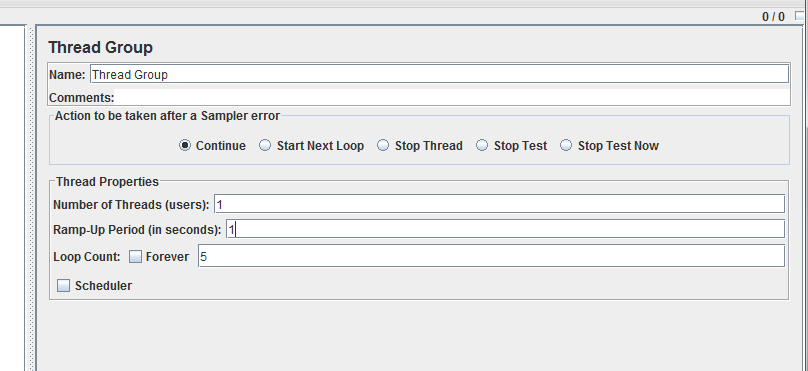
This is my Netbeans project structure, and my jmeter configuration.

Have fun working with JMeter 🙂

Creating A New WebSphere Instance

Im planning to create more than 1 WebSphere instance on my box, im using a CentOS for development, and IBM AIX for production. On this example i have an instance named “AppSrv01” and trying to create a new WebSphere instance “AppSrvTeller”. Btw, im using WAS 6.1 on my box.

Okay here we go,
first is executing manageprofiles.sh to create a new profiles, when im executing manageprofiles.sh -help -create, it will print

The following command line arguments are required for this mode.
Command-line arguments are case sensitive.
-create: Creates a new profile. Specify -help -create -templatePath <path> to get template-specific help information.
-templatePath: The fully qualified path name of the profile template that is located on the file system. The following example selects a template: -templatePath <app_server_home>/profileTemplates/<Template_name>
-profileName: The name of the profile.
-profilePath: The intended location of the profile in the file system.

The following command line arguments are optional, and have no default values.
Command-line arguments are case sensitive.
-isDefault: Make this profile the default target of commands that do not use their profile parameter.
-omitAction: Omit optional features.

you just provide the needed parameters, well in my case i’ll show you what i write on my console

[root@localhost bin]# uname -a
Linux localhost.localdomain 2.6.18-128.el5 #1 SMP Wed Jan 21 10:44:23 EST 2009 i686 i686 i386 GNU/Linux
[root@localhost bin]# pwd
/opt/IBM/WebSphere/AppServer/bin
[root@localhost bin]# sh manageprofiles.sh -create -profileName AppSrvTeller -templatePath /opt/IBM/WebSphere/AppServer/profileTemplates/default/ -profilePath /opt/IBM/WebSphere/AppServer/profiles/AppSrvTeller
INSTCONFSUCCESS: Success: Profile AppSrvTeller now exists. Please consult /opt/IBM/WebSphere/AppServer/profiles/AppSrvTeller/logs/AboutThisProfile.txt for more information about this profile.

Hope it can help others (H)