utility

How to Set Timezone on WebSphere Application Server

It’s actually quite easy, but a little tricky. This is how i do it,

1. Start the administrative console.
2. In the topology tree, expand Servers and click Application Servers.
3. Click the name of the application server for which you want to set the time zone.
4. On the application server page, click Process Definition.
Process Definition
5. On the Process Definition page, click Java Virtual Machine.
6. On the Java Virtual Machine page, click Custom Properties.
7. On the Custom Properties page, click New.
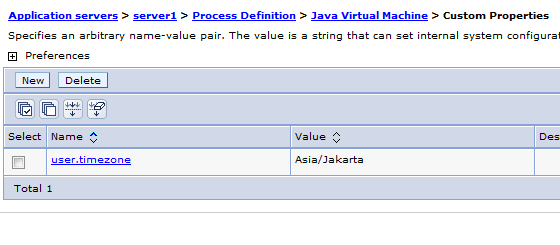
8. Specify user.timezone in the Name field and timezone in the Value field, where timezone is the supported value for your time zone.
9. Click Apply.
10. Save the configuration

In this example, i’m setting my timezone as Asia/Jakarta

user.timezone=Asia/Jakarta  

Timezone Success

Have fun with WebSphere (*)

A Simple Hibernate Caching Example using OSCache and EHCache

In this example im trying to create a simple application using Hibernate’s caching feature. What is cache anyway? A cache is designed to reduce traffic between your application and the database by conserving data already loaded from the database and put it whether in memory or in file. Database access is necessary only when retrieving data that is not currently available in the cache. So basically not all queries are taken from database, but from cache instead.

Hibernate use EHCache for default caching, but now im trying to demonstrate both OSCache and EHCache caching library. But you can only use one of it at one time. Both of them only differ in caching configuration, but the rest are still the same.

First is a simple sql file, a java bean and its hibernate xml configuration

CREATE
    TABLE matakuliah
    (
        kodematakuliah VARCHAR(10) NOT NULL,        
        namamatakuliah VARCHAR(20),
        PRIMARY KEY (kodematakuliah)
    )
    ENGINE=InnoDB DEFAULT CHARSET=latin1;
INSERT
INTO
    matakuliah
    (
        kodematakuliah,        
        namamatakuliah
    )
    VALUES
    (
        '123',        
        'ccc'
    );
package com.edw.bean;

public class Matakuliah  implements java.io.Serializable {

     public class Matakuliah  implements java.io.Serializable {

     private String kodematakuliah;
     private String namamatakuliah;

    public Matakuliah() {
    }

    public Matakuliah(String kodematakuliah) {
        this.kodematakuliah = kodematakuliah;
    }
    public Matakuliah(String kodematakuliah, String namamatakuliah) {
       this.kodematakuliah = kodematakuliah;      
       this.namamatakuliah = namamatakuliah;
    }
   
    // other setters and getters   
}
<?xml version="1.0" encoding="UTF-8"?>
<!DOCTYPE hibernate-mapping PUBLIC "-//Hibernate/Hibernate Mapping DTD 3.0//EN" "http://hibernate.sourceforge.net/hibernate-mapping-3.0.dtd">
<hibernate-mapping>
  <class catalog="kampus" name="com.edw.bean.Matakuliah" table="matakuliah">

    <!-- caching configuration -->
    <cache usage="read-write" />
    
    <id name="kodematakuliah" type="string">
      <column length="10" name="kodematakuliah"/>
      <generator class="assigned"/>
    </id>
      
    <property name="namamatakuliah" type="string">
      <column length="20" name="namamatakuliah"/>
    </property>       
  </class>
</hibernate-mapping>

please take a look at line 7, im using read-write because my data sometimes get updated. If you are planning to have static data that never changes, use read-only.

Next is registering EhCacheProvider on hibernate.cfg.xml file

<?xml version="1.0" encoding="UTF-8"?>
<!DOCTYPE hibernate-configuration PUBLIC "-//Hibernate/Hibernate Configuration DTD 3.0//EN" "http://hibernate.sourceforge.net/hibernate-configuration-3.0.dtd">
<hibernate-configuration>
  <session-factory>
    <property name="hibernate.dialect">org.hibernate.dialect.MySQLDialect</property>
    <property name="hibernate.connection.driver_class">com.mysql.jdbc.Driver</property>
    <property name="hibernate.connection.url">jdbc:mysql://localhost:3307/kampus</property>
    <property name="hibernate.connection.username">root</property>
    <property name="hibernate.connection.autocommit">true</property>
    <property name="hibernate.cache.use_second_level_cache">true</property>
    <property name="hibernate.cache.use_query_cache">true</property>
    <property name="hibernate.cache.provider_class">org.hibernate.cache.EhCacheProvider</property>
    <property name="hibernate.show_sql">true</property>
    <property name="hibernate.format_sql">true</property>
    <mapping resource="com/edw/bean/Matakuliah.hbm.xml"/>    
  </session-factory>
</hibernate-configuration>

create a java file to load your hibernate configuration file

package com.edw.util;

import org.hibernate.cfg.AnnotationConfiguration;
import org.hibernate.SessionFactory;

public class HiberUtil {
    private static final SessionFactory sessionFactory;

    static {
        try {
            sessionFactory = new AnnotationConfiguration().configure().buildSessionFactory();
        } catch (Throwable ex) {
            throw new ExceptionInInitializerError(ex);
        }
    }

    public static SessionFactory getSessionFactory() {
        return sessionFactory;
    }
}

and dont forget your ehcache.xml configuration

<?xml version="1.0" encoding="UTF-8"?>
<!--
    caching configuration
-->
<ehcache>
    <defaultCache
        maxElementsInMemory="10"
        eternal="false"
        timeToIdleSeconds="0"
        timeToLiveSeconds="0"
        overflowToDisk="false"/>
</ehcache>

and this is my java file to test hibernate’s caching ability

package com.edw.main.caching;

import com.edw.bean.Matakuliah;
import com.edw.util.HiberUtil;
import java.util.Date;
import org.hibernate.Session;

public class CachingMain {

    public CachingMain() {
    }   

    /**
     *  do some repeated queries for table Matakuliah
     *  query results are taken from cache memory instead of database     
     */
    private void withCache() {

        Session session = null;
        try {            
            for (int i = 0; i < 3; i++) {

                // open session
                session = HiberUtil.getSessionFactory().openSession();                

                // time needed
                long now = new Date().getTime();

                // select
                Matakuliah matakuliah = (Matakuliah)session.load(Matakuliah.class, "123");

                // print
                System.out.println("matakuliah "+matakuliah.getNamamatakuliah());
                System.out.println("Time : " + (new Date().getTime() - now) + " ms");

                // sleep for 3seconds
                Thread.sleep(3000);
            }
        } catch (Exception e) {
            e.printStackTrace();
        } finally {
            if (session != null) {
                session.close();
            }
        }
    }

    public static void main(String[] args) {
        CachingMain main = new CachingMain();
        main.withCache();
    }
}

you can see in your console, if you use log4j, this is what happen when Hibernate is querying from cache instead of database

DEBUG org.hibernate.impl.SessionImpl:220 - opened session at timestamp: 5364197853302784
DEBUG org.hibernate.jdbc.ConnectionManager:404 - aggressively releasing JDBC connection
DEBUG org.hibernate.impl.SessionImpl:832 - initializing proxy: [com.edw.bean.Matakuliah#123]
DEBUG org.hibernate.cache.EhCache:68 - key: com.edw.bean.Matakuliah#123
DEBUG org.hibernate.engine.StatefulPersistenceContext:790 - initializing non-lazy collections
matakuliah ccc
Time : 1 ms

Moving from EhCache to OsCache is very simple, all you have to do is replacing 1 line in your xml file, and adding an oscache.properties file.

<?xml version="1.0" encoding="UTF-8"?>
<!DOCTYPE hibernate-configuration PUBLIC "-//Hibernate/Hibernate Configuration DTD 3.0//EN" "http://hibernate.sourceforge.net/hibernate-configuration-3.0.dtd">
<hibernate-configuration>
  <session-factory>
    <property name="hibernate.dialect">org.hibernate.dialect.MySQLDialect</property>
    <property name="hibernate.connection.driver_class">com.mysql.jdbc.Driver</property>
    <property name="hibernate.connection.url">jdbc:mysql://localhost:3307/kampus</property>
    <property name="hibernate.connection.username">root</property>
    <property name="hibernate.connection.autocommit">false</property>
    <property name="hibernate.cache.use_second_level_cache">true</property>
    <property name="hibernate.cache.use_query_cache">true</property>
    <property name="hibernate.cache.provider_class">org.hibernate.cache.OSCacheProvider</property>
    <property name="hibernate.show_sql">true</property>
    <property name="hibernate.format_sql">true</property>
    <mapping resource="com/edw/bean/Matakuliah.hbm.xml"/>
  </session-factory>
</hibernate-configuration>

and this is my oscache.properties

cache.capacity=1000
cache.path=c:\\cache\\
cache.persistence.class=com.opensymphony.oscache.plugins.diskpersistence.HashDiskPersistenceListener

this is what happen on my Netbeans console when im using OsCache

DEBUG org.hibernate.impl.SessionImpl:220 - opened session at timestamp: 5364208706285568
DEBUG org.hibernate.jdbc.ConnectionManager:404 - aggressively releasing JDBC connection
DEBUG org.hibernate.impl.SessionImpl:832 - initializing proxy: [com.edw.bean.Matakuliah#123]
DEBUG com.opensymphony.oscache.base.algorithm.AbstractConcurrentReadCache:694 - get called (key=com.edw.bean.Matakuliah#123.com.edw.bean.Matakuliah)
DEBUG org.hibernate.engine.StatefulPersistenceContext:790 - initializing non-lazy collections
matakuliah ccc
Time : 1 ms

This is my project structure,

Hope it can help others. Have fun. (*)

How to Get Offline Message’s Timestamp on Openfire

I had a simple project using Openfire and Smack library, i found an obstacle when i had to display offline message’s timestamp. I usually use local timestamp for simple messages, but when dealing with offline messages i had to use server’s timestamp, that’s the tricky part.

It is actually very simple to solve it, only several lines of codes. But i’ve spend ridiculously amount of time searching the net for it. That’s why i try to posted it in my blog in case of others might need it.

This is an ordinary packet received,

<message id="Vw7cj-13" to="gajah@edw/Smack" from="kelinci@edw/Smack">
  <body>ordinary message</body>
</message>

while this is what received offline packet looks like

<message id="Vw7cj-12" to="gajah@edw/Smack" from="kelinci@edw/Smack">
  <body>example of offline message</body>
  <thread>U249D0</thread>
  <x xmlns="jabber:x:delay" stamp="20110625T06:53:52" from="edw"/>
</message>

As you can see, offline messages send its timestamp on line 4. Now the problem is how to get it.
But before testing, dont forget to store your message offline policy. And btw, my server name is “edw”.

This is how i solve it,

DelayInformation inf = null;
try {
	inf = (DelayInformation)packet.getExtension("x","jabber:x:delay");
} catch (Exception e) {
	log.error(e);
}
// get offline message timestamp
if(inf!=null){
	Date date = inf.getStamp();

And please dont forget to include smackx.jar.

Im using Openfire 3.6.4 and Smack. I am very recommend these libraries for creating a simple yet powerful instant messaging application based on Java. Have fun 🙂

Creating an MD5 String using Java

MD5 is a simple cryptographic hashing algorithm widely used for various application. In this tutorial im trying to generate MD5 value from a string and then compare it to mysql’s MD5 query result.

This is my java code to generate MD5, im using java’s MessageDigest.

package com.edw.util;

import java.security.MessageDigest;
import org.junit.Test;

/**
 *
 * @author edw
 */
public class MD5Test {

    public MD5Test() {
    }

    public String hexStringFromBytes(byte[] b) {
        char[] hexChars = {'0', '1', '2', '3', '4', '5', '6', '7', '8', '9', 'a', 'b', 'c', 'd', 'e', 'f'};
        String hex = "";
        int msb;
        int lsb = 0;
        int i;

        for (i = 0; i < b.length; i++) {
            msb = ((int) b[i] & 0x000000FF) / 16;
            lsb = ((int) b[i] & 0x000000FF) % 16;
            hex = hex + hexChars[msb] + hexChars[lsb];
        }
        return hex;
    }

    @Test
    public void testMD5() throws Exception {
        MessageDigest digest = java.security.MessageDigest.getInstance("MD5");
		
		// get md5 for word "PASSWORD"
        digest.update("PASSWORD".getBytes());
        byte[] passwordBytes = digest.digest();

		// result = 319f4d26e3c536b5dd871bb2c52e3178
        System.out.println(hexStringFromBytes(passwordBytes));		
    }
}

compared to mysql’s md5 function

you can see that MD5 strings generated by java and mysql are both the same.
(H)

Beginning Apache Velocity : Creating A Simple Web Application

Today im going to try create a simple web application using Apache Velocity. From what is written on its wiki, Apache Velocty is a simple yet powerful Java-based template engine that renders data from plain Java objects to text, xml, email, SQL, Post Script, HTML etc. The template syntax and rendering engine are both easy to understand and quick to learn and implement.
In this example i’m using Velocity 1.7 and Velocity Tools View 2.0, Netbeans 6.9 and Apache Tomcat 6. Im using a simple Servlet acting as Controller, Velocity file with extension .vm as View and a simple ArrayList to mimic ResultSets as the Model.

Lets start with a simple Velocity file

<html>
<head> <title>Hello Velocity</title> </head>
<body>
<h1>Hello World..!!</h1>
<br />
## this is a comment, set variable name with "Edw" value
#set( $name = "Edw" )

<h2> $name is using velocity</h2>

## if-else statement
#if($name.equals("NotEdw"))
    <br />
    not an Edw
#else
    <br />
    Only the Paranoid Survive
#end

<br />
<br />

<table>
<tr>
    <td>Name</td>
    <td>Address</td>
<tr>
## for each statement to iterate over a collection
#foreach($user in $users)
<tr>
    <td>$user.name</td>
    <td>$user.address</td>
<tr>
#end
</table>

## simple velocity method
Today is :  $date.medium
</body>
</html>

i named it index.vm and put it under the Web Pages folder.

Next is creating an xml file, toolbox.xml for registering classes that is needed by Velocity. In this example im only registering a simple DateTool class.

<toolbox>
    <tool>
        <key>date</key>
        <scope>application</scope>
        <class>org.apache.velocity.tools.generic.DateTool</class>
    </tool>
</toolbox>

Next is a simple javabean

package com.edw.bean;

public class User {

    private String name;
    private String address;

    public User() {
    }

    public User(String name, String address) {
        this.name = name;
        this.address = address;
    }

	// other setter - getter
}

And a simple Servlet, im using it simply just for Controller function, it forward my requests-responses to index.vm

package com.edw.servlet;

import com.edw.bean.User;
import java.io.IOException;
import java.util.ArrayList;
import java.util.List;
import javax.servlet.RequestDispatcher;
import javax.servlet.ServletException;
import javax.servlet.http.HttpServlet;
import javax.servlet.http.HttpServletRequest;
import javax.servlet.http.HttpServletResponse;
import org.apache.log4j.Logger;

public class VelocityServlet extends HttpServlet {

    private Logger logger = Logger.getLogger(getClass());

    @Override
    protected void doGet(HttpServletRequest request, HttpServletResponse response)
    throws ServletException, IOException {        
        try {
            // simulate a database query
            List<User> users = new ArrayList<User>();
            for (int i = 0; i < 5; i++) {
                User user = new User("name "+i, "Address "+i);
                users.add(user);
            }
            // set values
            request.setAttribute("users", users);

            // get UI
            RequestDispatcher requestDispatcher =  request.getRequestDispatcher("index.vm");
            requestDispatcher.forward(request, response);
        } catch(Exception ex){
            logger.error(ex);
        }
    } 
}
&#91;/code&#93;

And the most important part is web.xml
&#91;code language="xml" highlight="10,20,25"&#93;
<?xml version="1.0" encoding="UTF-8"?>
<web-app version="2.5" xmlns="http://java.sun.com/xml/ns/javaee" xmlns:xsi="http://www.w3.org/2001/XMLSchema-instance" xsi:schemaLocation="http://java.sun.com/xml/ns/javaee http://java.sun.com/xml/ns/javaee/web-app_2_5.xsd">
    <!--    register servlet    -->
    <servlet>
        <servlet-name>ServletVelocity</servlet-name>
        <servlet-class>com.edw.servlet.VelocityServlet</servlet-class>
    </servlet>
    <servlet-mapping>
        <servlet-name>ServletVelocity</servlet-name>
        <url-pattern>/velocity.service</url-pattern>
    </servlet-mapping>
    
    <!--    mapping all .vm files to velocity servlets  -->
    <servlet>
        <servlet-name>velocity</servlet-name>
        <servlet-class>org.apache.velocity.tools.view.servlet.VelocityViewServlet</servlet-class>
        <!--    load my toolbox -->
        <init-param>
             <param-name>org.apache.velocity.toolbox</param-name>
             <param-value>/WEB-INF/toolbox.xml</param-value>
        </init-param>
    </servlet>
    <servlet-mapping>
        <servlet-name>velocity</servlet-name>
        <url-pattern>*.vm</url-pattern>
    </servlet-mapping>
    
    <!--    session timeout -->
    <session-config>
        <session-timeout>
            30
        </session-timeout>
    </session-config>
    
    <!--    welcome file    -->
    <welcome-file-list>
        <welcome-file>velocity.service</welcome-file>
    </welcome-file-list>


</web-app>

This is my Netbeans project structure

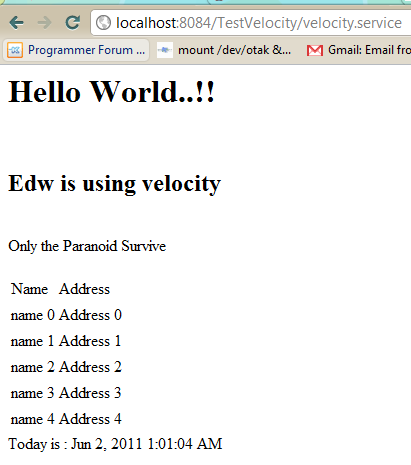
And this is what my browser displayed

In case of anybody asked about my log4j.properties, here is my configuration

# Global logging configuration
log4j.rootLogger=DEBUG,stdout

# Console output...
log4j.appender.stdout=org.apache.log4j.ConsoleAppender
log4j.appender.stdout.layout=org.apache.log4j.PatternLayout
log4j.appender.stdout.layout.ConversionPattern=%d{yyyy-MM-dd HH:mm:ss.SSS} %-5p %c:%L - %m%n

Well it’s not too difficult isn’t it? (H)