utility

A Simple HTTPS Configuration Example on Apache Tomcat 6

This idea comes suddenly on my head while i was reading a question on Kaskus’ programmer forum about how to setup a https connection on Apache Tomcat, thats why today im trying to write a simple how-to example on creating a simple HTTPS connection using Apache Tomcat 6. Who knows perhaps someone would find it useful.

Let’s start with creating a simple certificate file using keytool.exe

C:\Program Files\Java\jdk1.6.0_19\bin>keytool.exe -genkey -alias tomcat -keyalg RSA -keystore edw.jks

after you insert your keystore password (i entered “secret” as my password) and several simple questions such as “What is your first and last name?”, it would create a file.

What you need to do next is to link your certificate to Tomcat’s server.xml configuration. This is what i add to my server.xml configuration.

<Connector port="8443" protocol="HTTP/1.1" SSLEnabled="true"
               maxThreads="150" scheme="https" secure="true"
               clientAuth="false" sslProtocol="TLS" keystoreFile="D:\edw.jks" 
               keystorePass="secret" />
<!-- keystorePass use the same password -->

And i also add this to my web.xml file, located under my tomcat’s conf folder

	<security-constraint>
		<web-resource-collection>
			<web-resource-name>Automatic SLL Forwarding</web-resource-name>
			<url-pattern>/*</url-pattern>
		</web-resource-collection>
		<user-data-constraint>
			<transport-guarantee>CONFIDENTIAL</transport-guarantee>
		</user-data-constraint>
	</security-constraint>

This is what my page will look like,

Hope it would help others, cheers (B)

Creating a Simple Yahoo Messenger Auto Response with Java and OpenYMSG Library

Hi, several days ago someone asked me to help him on his assignment related to Yahoo Messenger Application with Java. That’s why today im trying to help him by creating a simple example on auto response and message sending using one of the best open source Yahoo Messenger API implementation, OpenYMSG.

It’s actually quite easy, only several lines of codes. This is how i do it

package com.edw.yahoo;

import java.util.Scanner;
import org.apache.log4j.Logger;
import org.openymsg.network.FireEvent;
import org.openymsg.network.ServiceType;
import org.openymsg.network.Session;
import org.openymsg.network.event.SessionEvent;
import org.openymsg.network.event.SessionListener;

/**
 *  com.edw.yahoo.YahooLogin
 *
 *  @author edw
 */
public class YahooLogin implements SessionListener {

    private Logger logger = Logger.getLogger(YahooLogin.class);
    private Session session = new Session();

    public static void main(String[] args) {
        YahooLogin yahooLogin = new YahooLogin();
        yahooLogin.doLogin();
    }

    public YahooLogin() {
    }

    private void doLogin() {
        try {
            // insert your yahoo id
            // as for this example, im using my yahoo ID "dombaganas"
            session.login("dombaganas", "MyYahooPassword", true);
            session.addSessionListener(this);
            Scanner scanner = new Scanner(System.in);

            while (true) {
                System.out.println("please insert your message : ");
                String message = scanner.nextLine();

                // logout if message equals to "bye"
                if (message.equalsIgnoreCase("bye")) {
                    break;
                }
                // send message to targeted yahoo id
                session.sendMessage("TargetYahooID", message);
            }

            // logout from YM
            session.logout();
        } catch (Exception e) {
            logger.error(e, e);

        }
    }

    /*
     *  this is my listener method
     *  it listen for YM message request
     */
    @Override
    public void dispatch(FireEvent fe) {
        ServiceType type = fe.getType();
        SessionEvent sessionEvent = fe.getEvent();

        if (type == ServiceType.MESSAGE) {
            try {
                // log request message
                logger.debug("message from " + sessionEvent.getFrom() + " \nmessage " + sessionEvent.getMessage());

                // give an automatic response
                session.sendMessage(sessionEvent.getFrom(), "hi, you are sending " + sessionEvent.getMessage());
            } catch (Exception e) {
                logger.error(e, e);
            }
        }
    }
}

These are some screenshots related to this application.

To my friend, i hope this tutorial can help you getting started with your assignment. As the wise man once said “Answering one good question is like feeding a hungry person one meal, but teaching them research skills by example is showing them how to grow food for a lifetime.”

YNWA
(I)

ps. if somehow you found a NoClassDefFoundError, such as :
Exception in thread โ€œmainโ€ java.lang.NoClassDefFoundError: org/apache/commons/logging/LogFactory
you need to include apache common logging lib into your project classpath.

How to Send Emails With Java Using Gmail Accounts

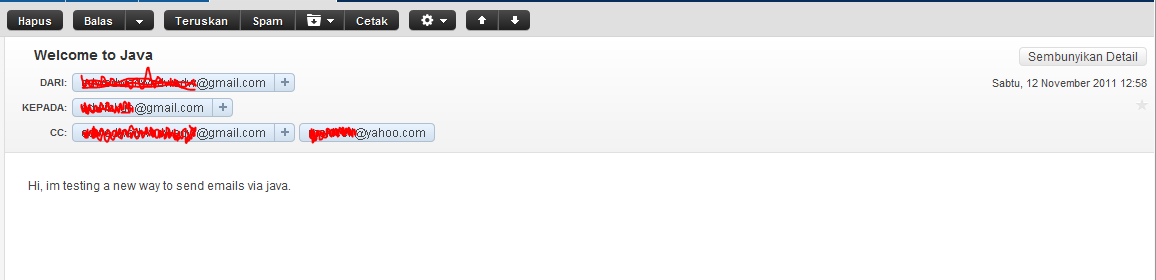
It’s actually quite simple on how to send emails using java, only need several lines of codes. This is how i do it


import java.util.Properties;
import javax.mail.Message;
import javax.mail.Session;
import javax.mail.Transport;
import javax.mail.internet.InternetAddress;
import javax.mail.internet.MimeMessage;
import org.apache.log4j.Logger;

public class MailTestSend {

    private static Logger logger = Logger.getLogger(MailTestSend.class);

    public static void main(String[] args) {
        try {

            // setup the mail server properties
            Properties props = new Properties();
            props.put("mail.smtp.auth", "true");
            props.put("mail.smtp.starttls.enable", "true");

            // set up the message
            Session session = Session.getInstance(props);

            Message message = new MimeMessage(session);

            // add a TO address
            message.setRecipients(Message.RecipientType.TO, InternetAddress.parse("xxxxx@gmail.com"));

            // add a multiple CC addresses
            message.setRecipients(Message.RecipientType.CC, InternetAddress.parse("yyyyy@gmail.com,zzzzzz@yahoo.com"));
            
            message.setSubject("Welcome to Java");
            message.setContent("Hi, im testing a new way to send emails via java.", "text/plain");

            Transport transport = session.getTransport("smtp");
            transport.connect("smtp.gmail.com", 587, "yourgmailusername", "yourgmailpassword");
            transport.sendMessage(message, message.getAllRecipients());
            logger.error("successfully send email");
        } catch (Exception e) {            
            logger.error(e, e);
        }
    }
}

Please dont forget to include mail.jar into your project. This is the screenshot of my netbeans libraries and my email inbox.

:-[

Error “Communications link failure” When Connecting Glassfish v3 to MySQL

Today i spent a ridiculously amount of time finding out why suddenly my application cannot connect to database. Im using Glassfish 3 connected to MySQL via connection pool on an Ubuntu server with an IP public. What makes it difficult is that it can connect smoothly before but suddenly an error happened.

This is the detail exception from my Glassfish’s log.

[#|2011-11-07T15:26:24.411+0700|WARNING|glassfish3.0.1|javax.enterprise.resource.resourceadapter.com.sun. enterprise.connectors.service|_ThreadID=30;_ThreadName=http-thread-pool-4848-(5);|RAR8054: Exception while creating an unpooled [test] 
connection for pool [ dbepay ], Connection could not be allocated because: Communications link failure

Last packet sent to the server was 0 ms ago.|#]

[#|2011-11-07T15:26:30.982+0700|WARNING|glassfish3.0.1|javax.enterprise.resource.resourceadapter.com. sun.enterprise.resource.pool|_ThreadID=31;_ThreadName=http-thread-pool-4848-(2);|RAR8023: 
Flush Connection Pool did not happen as pool - dbepay is not initialized|#]

After some browsing i found out that it’s due to mysql’s binding issue. Exception happened because MySQL server and Glassfish are installed on the same host, and in MySQL configuration on my.cnf have binded to a public ip address instead of localhost.
This is my ifconfig looks like

root@portal:~/edw/glassfishv3/glassfish/modules# ifconfig
eth0      Link encap:Ethernet  HWaddr 00:50:56:01:00:0e  
          inet addr:xxx.xx.xxx.xx  Bcast:xxx.xx.xxx.xx  Mask:255.255.255.128
          inet6 addr: xxxxx :e/64 Scope:Link
          UP BROADCAST RUNNING MULTICAST  MTU:1500  Metric:1
          RX packets:2082924 errors:0 dropped:0 overruns:0 frame:0
          TX packets:1065587 errors:0 dropped:0 overruns:0 carrier:0
          collisions:0 txqueuelen:1000 
          RX bytes:668840899 (668.8 MB)  TX bytes:222095600 (222.0 MB)

lo        Link encap:Local Loopback  
          inet addr:127.0.0.1  Mask:255.0.0.0
          inet6 addr: ::1/128 Scope:Host
          UP LOOPBACK RUNNING  MTU:16436  Metric:1
          RX packets:4888314 errors:0 dropped:0 overruns:0 frame:0
          TX packets:4888314 errors:0 dropped:0 overruns:0 carrier:0
          collisions:0 txqueuelen:0 
          RX bytes:406280073 (406.2 MB)  TX bytes:406280073 (406.2 MB)

All i do is edit MySQL’s my.cnf, adding a new bind address to 127.0.0.1 and remarking previous binding.

[mysqld]
#
# * Basic Settings
#

#
# * IMPORTANT
#   If you make changes to these settings and your system uses apparmor, you may
#   also need to also adjust /etc/apparmor.d/usr.sbin.mysqld.
#

user		= mysql
socket		= /var/run/mysqld/mysqld.sock
port		= 3306
basedir		= /usr
datadir		= /var/lib/mysql
tmpdir		= /tmp
skip-external-locking
#
# Instead of skip-networking the default is now to listen only on
# localhost which is more compatible and is not less secure.
#this is my previous value, binded to a public ip address
#bind-address		= xxx.xxx.xxx.xxx 

#this is my new value
bind-address		= 127.0.0.1

restart both of mysql and glassfish and suddenly, my application run smoothly again.
Thanks uncle Google, you’ve helped me alot.

LDAP Programming with Java

Today im trying to share on how to do a simple LDAP queries such as select, insert, edit and delete using java. Im using Apache Directory Server as LDAP server and JXplorer as LDAP explorer.

Enough chit-chat, here is my code.
First is a simple java bean,

package com.edw.bean;

/**
 *  com.edw.bean.Person
 *
 *  @author edw
 */
public class Person {
    
    private String name;
    private String address;    
    private String password;

	// other setter and getter
}

and here is my LDAP class controller

package com.edw.ldap.main;

import com.edw.bean.Person;
import java.security.MessageDigest;
import java.util.Hashtable;
import javax.naming.Context;
import javax.naming.NamingEnumeration;
import javax.naming.directory.Attribute;
import javax.naming.directory.Attributes;
import javax.naming.directory.BasicAttribute;
import javax.naming.directory.BasicAttributes;
import javax.naming.directory.DirContext;
import javax.naming.directory.InitialDirContext;
import javax.naming.directory.ModificationItem;
import javax.naming.directory.SearchControls;
import javax.naming.directory.SearchResult;
import org.apache.log4j.Logger;
import sun.misc.BASE64Encoder;

/**
 *  com.edw.ldap.main.LDAPMain
 *
 *  @author edw
 */
public class LDAPMain {

    private Logger logger = Logger.getLogger(LDAPMain.class);
    private Hashtable<String, String> env = new Hashtable<String, String>();

    public LDAPMain() {
        try {
            env.put(Context.INITIAL_CONTEXT_FACTORY, "com.sun.jndi.ldap.LdapCtxFactory");
            env.put(Context.PROVIDER_URL, "ldap://localhost:10389");
            env.put(Context.SECURITY_PRINCIPAL, "uid=admin,ou=system");
            env.put(Context.SECURITY_CREDENTIALS, "xxx");
        } catch (Exception e) {
            logger.error(e, e);
        }

    }

    private boolean insert(Person person) {
        try {

            DirContext dctx = new InitialDirContext(env);
            Attributes matchAttrs = new BasicAttributes(true);
            matchAttrs.put(new BasicAttribute("uid", person.getName()));
            matchAttrs.put(new BasicAttribute("cn", person.getName()));
            matchAttrs.put(new BasicAttribute("street", person.getAddress()));
            matchAttrs.put(new BasicAttribute("sn", person.getName()));
            matchAttrs.put(new BasicAttribute("userpassword", encryptLdapPassword("SHA", person.getPassword())));
            matchAttrs.put(new BasicAttribute("objectclass", "top"));
            matchAttrs.put(new BasicAttribute("objectclass", "person"));
            matchAttrs.put(new BasicAttribute("objectclass", "organizationalPerson"));
            matchAttrs.put(new BasicAttribute("objectclass", "inetorgperson"));
            String name = "uid=" + person.getName() + ",ou=users,ou=system";
            InitialDirContext iniDirContext = (InitialDirContext) dctx;
            iniDirContext.bind(name, dctx, matchAttrs);

            logger.debug("success inserting "+person.getName());
            return true;
        } catch (Exception e) {
            logger.error(e, e);
            return false;
        }
    }

    private boolean edit(Person person) {
        try {

            DirContext ctx = new InitialDirContext(env);
            ModificationItem[] mods = new ModificationItem[2];
            Attribute mod0 = new BasicAttribute("street", person.getAddress());
            Attribute mod1 = new BasicAttribute("userpassword", encryptLdapPassword("SHA", person.getPassword()));
            mods[0] = new ModificationItem(DirContext.REPLACE_ATTRIBUTE, mod0);
            mods[1] = new ModificationItem(DirContext.REPLACE_ATTRIBUTE, mod1);

            ctx.modifyAttributes("uid=" + person.getName() + ",ou=users,ou=system", mods);

            logger.debug("success editing "+person.getName());
            return true;
        } catch (Exception e) {
            logger.error(e, e);
            return false;
        }
    }

    private boolean delete(Person person) {
        try {

            DirContext ctx = new InitialDirContext(env);
            ctx.destroySubcontext("uid=" + person.getName() + ",ou=users,ou=system");

            logger.debug("success deleting "+person.getName());
            return true;
        } catch (Exception e) {
            logger.error(e, e);
            return false;
        }
    }
    
    private boolean search(Person person) {
        try {

            DirContext ctx = new InitialDirContext(env);
            String base = "ou=users,ou=system";

            SearchControls sc = new SearchControls();
            sc.setSearchScope(SearchControls.SUBTREE_SCOPE);

            String filter = "(&(objectclass=person)(uid="+person.getName()+"))";

            NamingEnumeration results = ctx.search(base, filter, sc);


            while (results.hasMore()) {
                SearchResult sr = (SearchResult) results.next();
                Attributes attrs = sr.getAttributes();

                Attribute attr = attrs.get("uid");
                if(attr != null)
                    logger.debug("record found "+attr.get());
            }
            ctx.close();
                        
            return true;
        } catch (Exception e) {
            logger.error(e, e);
            return false;
        }
    }

    private String encryptLdapPassword(String algorithm, String _password) {
        String sEncrypted = _password;
        if ((_password != null) && (_password.length() > 0)) {
            boolean bMD5 = algorithm.equalsIgnoreCase("MD5");
            boolean bSHA = algorithm.equalsIgnoreCase("SHA")
                    || algorithm.equalsIgnoreCase("SHA1")
                    || algorithm.equalsIgnoreCase("SHA-1");
            if (bSHA || bMD5) {
                String sAlgorithm = "MD5";
                if (bSHA) {
                    sAlgorithm = "SHA";
                }
                try {
                    MessageDigest md = MessageDigest.getInstance(sAlgorithm);
                    md.update(_password.getBytes("UTF-8"));
                    sEncrypted = "{" + sAlgorithm + "}" + (new BASE64Encoder()).encode(md.digest());
                } catch (Exception e) {
                    sEncrypted = null;
                    logger.error(e, e);
                }
            }
        }
        return sEncrypted;
    }

    public static void main(String[] args) {
        LDAPMain main = new LDAPMain();

        Person person = new Person();
        person.setAddress("kebayoran");
        person.setName("kamplenk");
        person.setPassword("pepe");

        // insert
        main.insert(person);
        
        // edit
        main.edit(person);
        
        // select
        main.search(person);
        
        // delete
        main.delete(person);
    }
}

Here is screenshot of my LDAP explorer, after i’ve insert my latest ldap record.

hope it can help others, have fun with LDAP ๐Ÿ˜‰