Programming

ServletContext.getRealPath Always Return Null on Apache Tomcat 8

I met a very strange error, that somehow works on Tomcat 7, but not working on Tomcat 8. I’m using ServletContext’s class getRealPath method, for getting my application’s absolute file path. Here is my code,

@PostConstruct
    private void init() {
        try {
            // get report location
            String reportLocation = servletContext.getRealPath("WEB-INF");           
        } catch (Exception e) {
            logger.error(e.getMessage(), e);
        }
    }

On this code, i’m trying to get my report’s location and then processing it, by using servletContext.getRealPath. Which works well on my Apache Tomcat 7, but not well enough on Apache Tomcat 8. Somehow it always show null instead of the absolute path of my “WEB-INF” folder.

The workaround is actually quite simple, adding slash in front of “WEB-INF” make the problem disappear.

@PostConstruct
    private void init() {
        try {
            // get report location
            String reportLocation = servletContext.getRealPath("/WEB-INF");           
        } catch (Exception e) {
            logger.error(e.getMessage(), e);
        }
    }

How to Create A HTTP Request with Proxy Using Apache HTTP Client

In this tutorial, im trying to simuate a http GET request using apache http client, the version im using is 4.5.1

<!-- http client -->
<dependency>
	<groupId>org.apache.httpcomponents</groupId>
	<artifactId>httpclient</artifactId>
	<version>4.5.1</version>
</dependency>
<dependency>
	<groupId>org.apache.httpcomponents</groupId>
	<artifactId>httpmime</artifactId>
	<version>4.5.1</version>
</dependency>

Usually, my application connects well without proxy. But on production environment, I need to put a proxy configuration. So this is my method for making a proxy request connection.

public String process(String lat, String lon) {
	try {
		HttpClient httpclient = HttpClientBuilder.create().build();
		HttpGet httpGet = new HttpGet("<INPUT YOUR URL HERE>");
		
		HttpHost proxy = new HttpHost("127.0.0.1", 3128, "http");
		RequestConfig config = RequestConfig.custom()
				.setProxy(proxy)
				.build();
		httpGet.setConfig(config);
		
		HttpResponse response = httpclient.execute(httpGet);
		HttpEntity resEntity = response.getEntity();

		String responseText = EntityUtils.toString(resEntity);		
		return responseText;
	} catch (IOException e) {
		logger.error(e, e);
	} catch (Exception e) {
		logger.error(e, e);
	}
	return null;
}

[Java] SMS Gateway dengan Modem Zoglab Q2687RD

Baru-baru ini gw dapet kerjaan untuk membuat suatu sistem notifikasi yang terhubung dengan modem SMS, kebetulan modem yang dipakai adalah modem dengan merk Zoglab seri Q2687RD. Awalnya gw pikir menggunakan metode konvensional, menggunaan 7bit sms gateway ala-ala skripsi jaman gw masih kuliah, dan ternyata rada berbeda format AT Command-nya.

Oh ya, sebelumnya ini adalah wujud modemnya. Sekilas agak aneh, karena ada colokan power dibelakangnya tapi waktu membeli engga dapet kabel powernya. Ternyata powernya bisa lewat kabel USB.
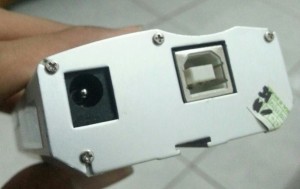
modem zoglab

Oke, berikut adalah class java yang gw gunakan untuk testing sending SMS, kebetulan gw menggunakan library RXTXcomm.jar.

package com.edw.commportchecker;

import gnu.io.CommPortIdentifier;
import gnu.io.SerialPort;
import java.io.OutputStream;
import java.util.Enumeration;

public class Main {

    private OutputStream outputStream;
    private SerialPort serialPort;

    private void doSomething()
            throws Exception {
        Enumeration portList = CommPortIdentifier.getPortIdentifiers();
        System.out.println(portList.hasMoreElements());
        while (portList.hasMoreElements()) {
            CommPortIdentifier portId = (CommPortIdentifier) portList.nextElement();
            if (portId.getPortType() == 1) {
                System.out.println("connecting to " + portId.getName());
            }
            // kebetulan modem kedetect sebagai COM3
            if (portId.getName().equalsIgnoreCase("COM3")) {
                this.serialPort = ((SerialPort) portId.open("SMSGateway", 2000));
            }
        }


        this.serialPort.setSerialPortParams(9600, 8, 1, 0);
        this.serialPort.setFlowControlMode(0);

        this.outputStream = this.serialPort.getOutputStream();

        System.out.println("sending");

        // gunakan prefix +62, contoh : +62856727xxxx 
        // agak aneh nih, sebelumnya tanpa prefix "+" jalan, tapi ditengah jalan tiba2 jadi ga jalan T_T
        String nomerHp = ""; 
        
        // content sms yang akan dikirim
        String contentSMS = "ini isi sms-nya";
        
        sendToStream("AT\r");
        sendToStream("AT+CMGF=1\r");
        sendToStream("AT+CMGS=\""+nomerHp+"\"\r\n");
        sendToStream(contentSMS);
        sendToStream("\032");

        System.out.println("finish");

        System.exit(1);
    }

    private void sendToStream(String content) throws Exception {
        System.out.println(">" + content);

        this.outputStream.write(content.getBytes());
        this.outputStream.flush();

        Object o = new Object();
        synchronized ( o ) {
            o.wait(1500L);
        }
    }

    public static void main(String[] args) {
        Main main = new Main();
        try {
            main.doSomething();
        } catch (Exception e) {
            e.printStackTrace();
        }
    }
}

[Java] How to Create a HTTP Get Request

Basically i use this class to mimic a json request to a different domain, to prevent CORS error. So this is my code, oh and i use Spring Framework, which explain the Service annotation .

import java.io.BufferedReader;
import java.io.InputStreamReader;
import java.net.HttpURLConnection;
import java.net.URL;
import org.springframework.stereotype.Service;

@Service
public class JsonService {

    public String get() {
        try {
            return getHTML("myurl");
        } catch (Exception e) {
            return "";
        }
    }
    
   private String getHTML(String urlToRead) throws Exception {
      StringBuilder result = new StringBuilder();
      URL url = new URL(urlToRead);
      HttpURLConnection conn = (HttpURLConnection) url.openConnection();
      conn.setRequestMethod("GET");
      BufferedReader rd = new BufferedReader(new InputStreamReader(conn.getInputStream()));
      String line;
      while ((line = rd.readLine()) != null) {
         result.append(line);
      }
      rd.close();
      return result.toString();
   }
}

Hope it can help others, cheers (B)

Error No Buffer Space Available when Using Java, MyBatis and MySql

I’ve met a very weird error, that are not supposed to happen, when using MyBatis and MySql. Somehow my Windows OS is running out of ports, this is the complete stacktrace.

Caused by: java.net.SocketException: No buffer space available (maximum connections reached?): connect
    at java.net.PlainSocketImpl.socketConnect(Native Method)
    at java.net.PlainSocketImpl.doConnect(Unknown Source)
    at java.net.PlainSocketImpl.connectToAddress(Unknown Source)
    at java.net.PlainSocketImpl.connect(Unknown Source)
    at java.net.SocksSocketImpl.connect(Unknown Source)
    at java.net.Socket.connect(Unknown Source)
    at java.net.Socket.connect(Unknown Source)
    at java.net.Socket.<init>(Unknown Source)
    at java.net.Socket.<init>(Unknown Source)
    at com.mysql.jdbc.StandardSocketFactory.connect(StandardSocketFactory.java:257)
    at com.mysql.jdbc.MysqlIO.<init>(MysqlIO.java:294)]

I found out it happened because im using traditional unpooled connection, changing it into pooled connection in MyBatis solved it.

<?xml version="1.0" encoding="UTF-8" ?>
<!DOCTYPE configuration
PUBLIC "-//mybatis.org//DTD Config 3.0//EN"
"http://mybatis.org/dtd/mybatis-3-config.dtd">
<configuration>
    <environments default="development">
        <environment id="development">
            <transactionManager type="JDBC"/>
            <dataSource type="POOLED">
                <property name="driver" value="com.mysql.jdbc.Driver"/>
                <property name="url" value="jdbc:mysql://localhost/xxxx"/>
                <property name="username" value="xxxx"/>
                <property name="password" value=""/>
                <property name="poolMaximumActiveConnections" value="20"/>
            </dataSource>
        </environment>
    </environments>
    <mappers>

    </mappers>
</configuration>