Programming

[Weird Issue] Slow Database Query Which only Happen in Windows Server 2008 64Bit

Several days ago, i was asked by my friend to fix one of his weird issue. A same java webapp deployed on two different Operating System, Windows Server 2003 32bit and Windows Server 2008 64bit, gives two different performance. The webapp runs well on Windows Server 2003, while at the same time have a very poor performance on Windows Server 2008. Same identical infrastructure, the only differences is the Windows Server version.

Later i will show you how to fix this issue, but first let me show what the infrastructure looks like. Basically, it’s a three tier infrastructure, a load balancer, multiple webserver and database server. At first, i thought that the bottleneck is on network infrastructure, but the network guy says that there is nothing wrong on network’s monitoring.

After several days monitoring, i found out that the main culprit is Windows Server 2008. Somehow there are some issues on network outbound causing a very slow database queries.

So this is to fix it, first via netsh interface

netsh interface tcp set global rss=disabled
netsh interface tcp set global autotuning=disabled
netsh interface tcp set global chimney=disabled

netsh1

netsh2

Next is disabling QoS Packet Scheduler,
qos

And last is adding a TcpNoDelay variable in windows server’s regedit, which located at HKEY_LOCAL_MACHINE\SYSTEM\CurrentControlSet\services\Tcpip\Parameters
tcpnodelay

After i run those command and restart my machine, my application on Windows Server 2008 run smoothly.

[Java] Creating a Microsoft Word Report Easily using Servlet and A Plain HTML Template

Yesterday one of my friend, Edward Barchia, asked me a very simple question, “how can i creating an MSWord Report without using Jasper Report”. Because somehow, jasper report creates a very weird output when exported into Word file (.doc).

One fastest solution is using a html file, and renamed into .doc. Not an elegant solution, but perhaps (at that moment) is the best solution we had.

Okay, so basically what i need is only 2 files, 1 html template and a java servlet files. This is my HTML template, i put it on drie E and name it hello.html

<html>
	<head></head>
	<body>
		Test, hello ${name}
	</body>
</html>

And this is my servlet file,

package com.edw.testdownloaddoc.servlet;

import java.io.BufferedReader;
import java.io.FileInputStream;
import java.io.FileReader;
import java.io.IOException;
import java.io.OutputStream;
import javax.servlet.ServletException;
import javax.servlet.annotation.WebServlet;
import javax.servlet.http.HttpServlet;
import javax.servlet.http.HttpServletRequest;
import javax.servlet.http.HttpServletResponse;
import org.apache.commons.io.IOUtils;

@WebServlet(name = "downloadServlet", urlPatterns = {"/downloadServlet"})
public class DownloadServlet extends HttpServlet {

    protected void processRequest(HttpServletRequest request, HttpServletResponse response)
            throws ServletException, IOException {
        BufferedReader downloadFile = new BufferedReader(new FileReader("e:\\hello.html"));
        FileInputStream inputStream = null;
        OutputStream outStream = null;
        try {
            String s;
            StringBuilder sb = new StringBuilder();
            while ((s=downloadFile.readLine()) != null) {
                if(s.contains("${name}"))
                    s = s.replace("${name}", "Edwin");
                sb.append(s);
            }
 
            response.setContentLength((int) sb.toString().length());
            response.setContentType("application/msword");           
 
            // response header
            String nameFile = "hello.doc";
            String headerKey = "Content-Disposition";
            String headerValue = String.format("attachment; filename=\"%s\"",nameFile);
            response.setHeader(headerKey, headerValue);
 
            // Write response
            outStream = response.getOutputStream();
            IOUtils.write(sb.toString(), outStream);
        } catch (Exception e) {
            e.printStackTrace();
        } finally{
            IOUtils.closeQuietly(downloadFile);
            IOUtils.closeQuietly(inputStream);
            IOUtils.closeQuietly(outStream);
        }
    }

    @Override
    protected void doGet(HttpServletRequest request, HttpServletResponse response)
            throws ServletException, IOException {
        processRequest(request, response);
    }
}

Oh, and before i forgot, this is my pom.xml dependencies

<dependencies>
	<dependency>
		<groupId>commons-io</groupId>
		<artifactId>commons-io</artifactId>
		<version>2.2</version>
	</dependency>
	<dependency>
		<groupId>javax</groupId>
		<artifactId>javaee-web-api</artifactId>
		<version>7.0</version>
		<scope>provided</scope>
	</dependency>
</dependencies>

This is the final output looks like,
helloworld

How to Perform “Autopsy” on OutOfMemoryError Application

Just several days ago, my application was down because of OutOfMemoryError, and I haven’t got a clue what the root cause is. That’s why I’m looking for a way on how to find the culprit when my application is down again. So im using this jvm parameter to dump all the object on memory when OutOfMemoryError happen.

-XX:+HeapDumpOnOutOfMemoryError -XX:HeapDumpPath=E:\ -Xmx10m -Xms10m

For example, im using this java class to simulate OutOfMemoryError,

package mybatistesting;

import java.util.ArrayList;
import java.util.List;

public class MyBatisTesting {
    
    public static void main(String[] args) throws Exception {
        List list = new ArrayList();
        for (int i = 0; i < 10000000000l; i++) {
            list.add(i+""+i+""+i);
            if(i%1000==0)
                System.out.println("adding -- "+i);
        }
    }
}

As you can see on your console log,

java.lang.OutOfMemoryError: GC overhead limit exceeded
Dumping heap to E:\java_pid5812.hprof ...
Heap dump file created [15155736 bytes in 0.237 secs]

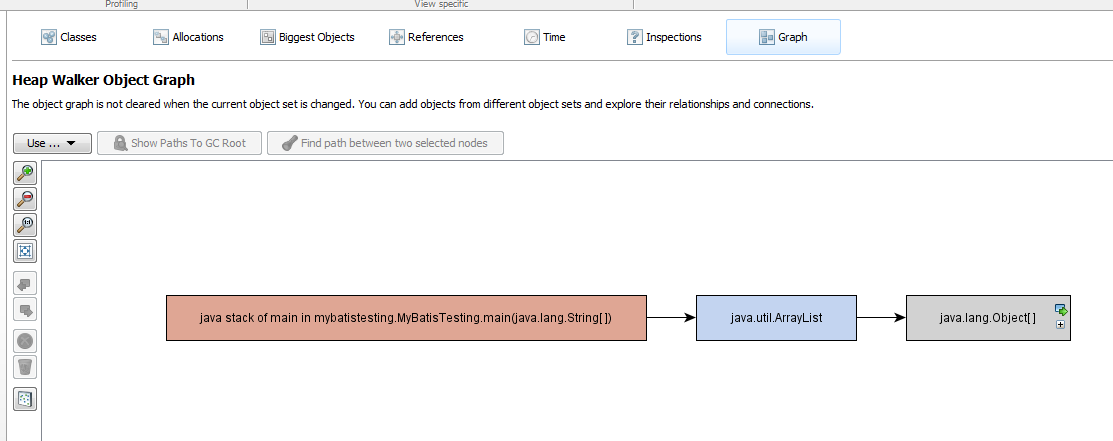
You can open java_pid5812.hprof using your preferable application, for example using Eclipse MAT or JProfiler.

eclipse mat

jprofiler 1

jprofiler 2

Have fun 😉

Weird MyBatis Error, “Error setting null for parameter [number] with JdbcType OTHER”

I had a very weird error today, when connecting MyBatis to Oracle Database, the complete error is like this,

Error setting null for parameter #2 with JdbcType OTHER . 
Try setting a different JdbcType for this parameter or a different jdbcTypeForNull configuration property. 
Cause: java.sql.SQLException: Invalid column type: 1111

After researching for a while, i found out that it happen because i miss to fill a parameter on mybatis xml query file. This is my xml file,

<?xml version="1.0" encoding="UTF-8" ?>
<!DOCTYPE mapper PUBLIC "-//mybatis.org//DTD Mapper 3.0//EN" "http://mybatis.org/dtd/mybatis-3-mapper.dtd" >
<mapper namespace="mybatistesting.MyMapper" >    
    <select resultType="java.util.Map" id="select" parameterType="java.util.Map">
        SELECT
            *
        FROM
            RISALAH
        WHERE UUID = #{UUID} AND CONTENT = #{CONTENT}
    </select>
</mapper>

And this is my main java file,

package mybatistesting;

import java.util.HashMap;
import java.util.Map;
import mybatistesting.config.MyBatisSqlSessionFactory;
import org.apache.ibatis.session.SqlSession;

public class MyBatisTesting {

    public static void main(String[] args) throws Exception {
        SqlSession sqlSession = MyBatisSqlSessionFactory.getSqlSessionFactory().openSession(true);
        MyMapper mapper = sqlSession.getMapper(MyMapper.class);
        Map map1 = new HashMap();
        map1.put("UUID", "1");
        for (Map map : mapper.select(map1)) {
            System.out.println("map "+map);
        }
    }
}

As you can see, i only set UUID as query parameter on my java file, despite that i need at least 2 parameter on my xml file. Here is how to fix it,

package mybatistesting;

import java.util.HashMap;
import java.util.Map;
import mybatistesting.config.MyBatisSqlSessionFactory;
import org.apache.ibatis.session.SqlSession;

public class MyBatisTesting {

    public static void main(String[] args) throws Exception {
        SqlSession sqlSession = MyBatisSqlSessionFactory.getSqlSessionFactory().openSession(true);
        MyMapper mapper = sqlSession.getMapper(MyMapper.class);
        Map map1 = new HashMap();
        map1.put("UUID", "1");
        map1.put("CONTENT", "1");
        for (Map map : mapper.select(map1)) {
            System.out.println("map "+map);
        }
    }
}

Hope it helps others, cheers 😉

How to Simulate and Finding Connection Leak in Oracle

It’s been a while since the last time i’ve write tutorials in my blog, but i found a very interesting case that perhaps helped a lot of people. Today im trying to create a simple test case to simulate a connection leak and how to search for it.

First is creating a simple unclosed connection query using java,

package com.edw;

import java.sql.Connection;
import java.sql.DriverManager;
import java.sql.ResultSet;
import java.sql.Statement;

public class Main {

    public static void main(String[] args) throws Exception {
        System.out.println("starting --------");
        
        Class.forName("oracle.jdbc.driver.OracleDriver");
        Connection connection = DriverManager.getConnection("jdbc:oracle:thin:@localhost:1521:xe", "USERNAME", "password");
        Statement statement = connection.createStatement();
        ResultSet resultSet = statement.executeQuery("SELECT * FROM INVALID"); // example table name is INVALID
        
        while(resultSet.next()) {
            System.out.println(resultSet.getString(1));
            System.out.println(resultSet.getString(2));
            System.out.println(resultSet.getString(3));
            System.out.println("=============");
        }
        
        System.out.println("ending --------");
        
        while(true) {
            Thread.sleep(10000);
            System.out.println("testing --------");
        }
    
    }
}

It will create an unclosed query that will hanging on my oracle connection.
And next, is my oracle query to find the hanging queries,

select LAST_CALL_ET, SQL_TEXT, username, machine, to_char(logon_time, 'ddMon hh24:mi') as login, 
    SQL_HASH_VALUE, PREV_HASH_VALUE, status
from v$session, v$sql 
where username='USERNAME' and HASH_VALUE =  PREV_HASH_VALUE
order by last_call_et desc;

it will show result like this,

LAST_CALL_ET SQL_TEXT                USERNAME     MACHINE        LOGIN                SQL_HASH_VALUE PREV_HASH_VALUE STATUS 
------------ ---------------------- ------------- -------------- -------------------- -------------- --------------- --------
          91 SELECT * FROM INVALID   USERNAME     edw      	     03Mar 11:53                       0       621168917 INACTIVE 

As you can see the result on the first column, “SELECT * FROM INVALID” query has run for more than 90 seconds.
So i can easily find the java class culprit who run that query.

FYI, this is my Oracle version,

select * from v$version;

BANNER                                                                         
--------------------------------------------------------------------------------
Oracle Database 11g Express Edition Release 11.2.0.2.0 - Production              
PL/SQL Release 11.2.0.2.0 - Production                                           
CORE	11.2.0.2.0	Production                                                         
TNS for 32-bit Windows: Version 11.2.0.2.0 - Production                          
NLSRTL Version 11.2.0.2.0 - Production   

I Hope this tutorial can help others, have fun 🙂