ocp

Direcly Deploy Jar File to Openshift

Openshift provides a convenient method for deploying binary Java applications. Other than deploying application’s source code, it can also deploy Jar file directly. For this example, im trying to deploy a Spring Boot and Red Hat Fuse middleware which is located on below repository.

https://github.com/edwin/hello-world-fuse-on-ocp

After we clone it, we can build the repo into Jar file.

$ mvn clean package

It will later on create a Jar file with the name of hello-world-fuse-on-ocp-1.0-SNAPSHOT.jar, which we can deploy to Openshift later on.

Along the way, we can create Openshift BuildConfig by using below command, it will create an Application template using Java8 on UBI8 base image.

$ oc new-build --name=hello-world-fuse-on-ocp \
		--binary=true \ 
		--image-stream=openshift/ubi8-openjdk-8:1.10  \ 
		--strategy=source

Next is we can deploy our Jar file using below command,

$ oc start-build hello-world-fuse-on-ocp \ 
		--from-file=hello-world-fuse-on-ocp-1.0-SNAPSHOT.jar \ 
		--follow

And publish it,

$ oc new-app hello-world-fuse-on-ocp

$ oc create route edge \
		--service=hello-world-fuse-on-ocp

Lets say we have some code changes and we want to build and redeploy the Application, we can just rerun the start-build command, and deploying the latest jar file into Openshift.

$ oc start-build hello-world-fuse-on-ocp \ 
		--from-file=hello-world-fuse-on-ocp-1.1-LATEST-JAR.jar \ 
		--follow

Blacklist a Specific Application URL on Openshift using Route

Sometimes we want to hide a sensitive URLs such as our prometheus or even Spring Boot’s actuator from external world, but we still want those URL to be accesible within internal cluster. Basically there are multiple ways of doing that, such as blocking it from Firewall, rewrite from Reverse Proxy, or even doing blacklisting from application level.

One thing that i want to try is to do blacklisting from Openshift Route level, which is something doable by the DevOps team since it is still within platform level.

So for this example, i want to expose all my API to external world except for actuator endpoint which can only be consume within internal network. So lets start with a sample Kubernetes Service Yaml,

kind: Service
apiVersion: v1
metadata:
  name: catalogue-service
  namespace: edwin-ns
  labels:
    app: catalogue-service
    app.kubernetes.io/component: catalogue-service
    app.kubernetes.io/instance: catalogue-service
    app.kubernetes.io/name: catalogue-service
    app.kubernetes.io/part-of: sample-app
    app.openshift.io/runtime-version: latest
  annotations:
    openshift.io/generated-by: OpenShiftWebConsole
spec:
  ports:
    - name: 8080-tcp
      protocol: TCP
      port: 8080
      targetPort: 8080
  internalTrafficPolicy: Cluster
  type: ClusterIP
  ipFamilyPolicy: SingleStack
  sessionAffinity: None
  selector:
    app: catalogue-service
    deploymentconfig: catalogue-service

And i want to expose above Service into a specific URL by using Route,

kind: Route
apiVersion: route.openshift.io/v1
metadata:
  name: catalogue-service
  namespace: edwin-ns
  labels:
    app: catalogue-service
    app.kubernetes.io/component: catalogue-service
    app.kubernetes.io/instance: catalogue-service
    app.kubernetes.io/name: catalogue-service
    app.kubernetes.io/part-of: sample-app
    app.openshift.io/runtime-version: latest
  annotations:
    openshift.io/host.generated: 'true'
spec:
  host: catalogue-service-edwin-ns.apps.openshift.com
  to:
    kind: Service
    name: catalogue-service
    weight: 100
  port:
    targetPort: 8080-tcp
  tls:
    termination: edge
    insecureEdgeTerminationPolicy: Redirect
  wildcardPolicy: None

Above configuration means that everytime external users accessing catalogue-service-edwin-ns.apps.openshift.com, they are able to access catalogue-service application APIs thru its Kubernetes Service. If we want to block a specific URL, we need to create another Route yaml specifically for blocking it based on Path variable,

kind: Route
apiVersion: route.openshift.io/v1
metadata:
  name: catalogue-service-blocking-actuator
  namespace: edwin-ns
  labels:
    app: catalogue-service
    app.kubernetes.io/component: catalogue-service
    app.kubernetes.io/instance: catalogue-service
    app.kubernetes.io/name: catalogue-service
    app.kubernetes.io/part-of: sample-app
    app.openshift.io/runtime-version: latest
  annotations:
    haproxy.router.openshift.io/rewrite-target: /go-to-some-404-url
    openshift.io/host.generated: 'true'
spec:
  host: catalogue-service-edwin-ns.apps.openshift.com
  path: /actuator
  to:
    kind: Service
    name: catalogue-service
    weight: 100
  port:
    targetPort: 8080-tcp
  tls:
    termination: edge
    insecureEdgeTerminationPolicy: Redirect
  wildcardPolicy: None

Having those 2 YAML all together making sure that we are expose all APIs that are needed, excluding the actuator URL which we “rewrite” into some 404 url.

Canary Deployment with Openshift 4 Route

Doing a Canary deployment using Openshift is pretty much straight forward, where we can leverage Openshift’s Route feature to do routing to multiple different application versions.

Before we go far, we need to understand the difference between a Blue Green deployment, and Canary deployment. Basically in Blue Green deployment, we are having the same application but with 2 different version (blue and green version) and we can route all the request to either blue, or green version. So at Blue Green deployment, all the requests would go either to blue, or to green version.

But on Canary, it’s like Blue Green deployment but we can change the traffic percentage partially. For example 90percent of the traffic would go to blue version while 10percent go to green one.

For this demo, lets create two different apps. Both apps are using PHP, with a different content for simulating blue-green deployment.

First create our first PHP app,

$ mkdir php-hello-world-1

and create index.php file inside it

<?php
echo "<h2>We are at version one</h2>";
echo "Hello world!<br>";

Build it and deploy into Openshift

$ oc new-build --name=php-app-01 --image-stream=php:7.4-ubi8 --binary=true
$ oc start-build php-app-01  --from-dir=.
$ oc new-app php-app-01 --name=php-app-01

Next is creating our second PHP app,

$ mkdir php-hello-world-2

With index.php inside it,

<?php
echo "<h2>We are at version TWO</h2>";
echo "Hello world!<br>";

Build and deploy our second PHP app into Openshift

$ oc new-build --name=php-app-02 --image-stream=php:7.4-ubi8 --binary=true
$ oc start-build php-app-02  --from-dir=.
$ oc new-app php-app-02 --name=php-app-02

We can see the result on our Openshift dashboard
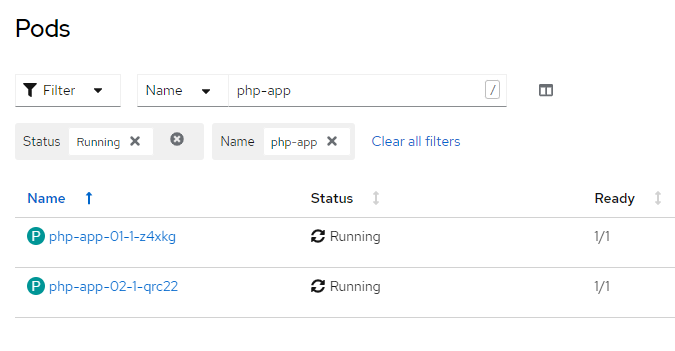
Now lets create a route,

$ oc create route edge --service php-app-01 php-app

And split the route traffic, 80 percent goes to app version 1, and 20 percent goes to app version 2.

$ oc set route-backends php-app php-app-01=80 php-app-02=20

And check the result on Openshift dashboard,
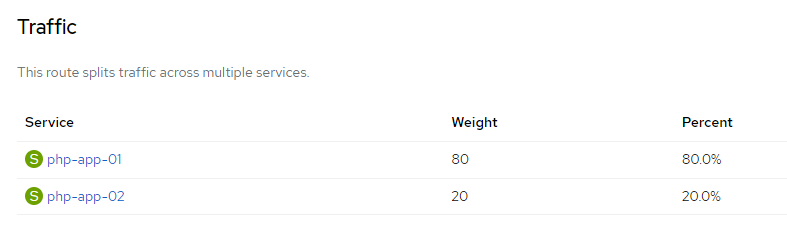
Now, lets do curl testing to see whether request to that corresponding route are being distibuted into 2 different application version,

$ for i in `seq 1 20`; do curl -k https://php-app-route-url ;echo ; done
<h2>We are at version one</h2>Hello world!<br>
<h2>We are at version TWO</h2>Hello world!<br>
<h2>We are at version one</h2>Hello world!<br>
<h2>We are at version TWO</h2>Hello world!<br>
<h2>We are at version one</h2>Hello world!<br>
<h2>We are at version TWO</h2>Hello world!<br>
<h2>We are at version one</h2>Hello world!<br>
<h2>We are at version TWO</h2>Hello world!<br>

And we can see that 4 out of 20 request are being served from the second PHP application. For more testing, lets change the distribution weight

oc set route-backends php-app php-app-01=50 php-app-02=50

And do more testing,

$ for i in `seq 1 20`; do curl -k https://php-app-route-url ;echo ; done
<h2>We are at version one</h2>Hello world!<br>
<h2>We are at version TWO</h2>Hello world!<br>
<h2>We are at version one</h2>Hello world!<br>
<h2>We are at version TWO</h2>Hello world!<br>
<h2>We are at version one</h2>Hello world!<br>
<h2>We are at version TWO</h2>Hello world!<br>
<h2>We are at version one</h2>Hello world!<br>
<h2>We are at version TWO</h2>Hello world!<br>
<h2>We are at version one</h2>Hello world!<br>
<h2>We are at version TWO</h2>Hello world!<br>
<h2>We are at version one</h2>Hello world!<br>
<h2>We are at version TWO</h2>Hello world!<br>
<h2>We are at version one</h2>Hello world!<br>
<h2>We are at version TWO</h2>Hello world!<br>
<h2>We are at version one</h2>Hello world!<br>
<h2>We are at version TWO</h2>Hello world!<br>
<h2>We are at version one</h2>Hello world!<br>
<h2>We are at version TWO</h2>Hello world!<br>
<h2>We are at version one</h2>Hello world!<br>
<h2>We are at version TWO</h2>Hello world!<br>

And there we can see that requests are being split, half goes to version 1 and the rest goes to version 2.

Deploying a Dockerfile and Jar file into OpenShift 4

Lets say i have a spring boot Jar file, and i want to run it in directly. We can run it by using below command.

$ java -jar existing-app.jar

But somewhere in the future i want to containerized them so that we can run it anywhere have to worry about infrastructure dependencies. For that purpose I need to have a Dockerfile, copy, and run my jar file inside it.

FROM openjdk:11.0.7-jre-slim-buster

LABEL base-image="openjdk:11.0.7-jre-slim-buster" \
      java-version="11.0.7" \
      purpose="Hello World with Java and Dockerfile"

MAINTAINER Muhammad Edwin < edwin at redhat dot com >

# set working directory at /deployments
WORKDIR /deployments

# copy my jar file
COPY existing-app.jar app.jar

# gives uid
USER 185

EXPOSE 8080

# run it
CMD ["java", "-jar","app.jar"]

I can build the container by running below command,

$ docker build -t hello-world-snowdrop .

And run it.

$ docker run -p 8080:8080 hello-world-snowdrop

In order to have above commands runs well, we need to have below structure in our folder.

$ tree
.
+--- Dockerfile
+--- existing-app.jar

The same concept we can use when we want to deploy our app into Openshift. The only difference is the docker build process is being done in Openshift.

$ oc new-build --strategy docker --binary \ 
		--docker-image openjdk:11.0.7-jre-slim-buster \
		--name hello-world-snowdrop
		
$ oc start-build hello-world-snowdrop \ 
		--from-dir . --follow

And below are the commands we can use for deploy, run and expose our app into Openshift.

$ oc new-app hello-world-snowdrop

$ oc create route edge --service hello-world-snowdrop

Dont forget to run above command within the same folder with our Dockerfile and jar files.
Hope it helps, and dont forget to have fun with Openshift 4.

Deploying a Python app to Openshift 4 using s2i

S2I or Source to Image, is a way to deploy application from its sourcecode directly to Openshift. In this article, we try to build a Python apps with Flask framework and deploy it to Openshift.

So lets start with requirements.txt for storing required libraries

flask

And a simple hello world app

from flask import Flask

app = Flask(__name__)

@app.route("/")
def index():
    return "<h1>Hello, World!</h1>"

app.run(host="0.0.0.0", port=8080)

Next is where the magic happens, it would build, containerized and push the whole apps to external registry by using below commands,

$ oc new-build . --name=hello-world-python --to-docker --to=docker.io/dockerusername/hello-world-python

$ oc start-build hello-world-python --from-dir=. --follow --wait

Once we push it to external registry, we can pull and run the apps in Openshift

$ oc new-app . --docker-image=dockerusername/hello-world-python --name=hello-world-python-app

And expose a secure URL for it,

$ oc create route edge --service=hello-world-python-app

Code for this can be accessed here,

https://github.com/edwin/hello-world-flask