Java

java

[Java] How to Create a HTTP Get Request

Basically i use this class to mimic a json request to a different domain, to prevent CORS error. So this is my code, oh and i use Spring Framework, which explain the Service annotation .

import java.io.BufferedReader;
import java.io.InputStreamReader;
import java.net.HttpURLConnection;
import java.net.URL;
import org.springframework.stereotype.Service;

@Service
public class JsonService {

    public String get() {
        try {
            return getHTML("myurl");
        } catch (Exception e) {
            return "";
        }
    }
    
   private String getHTML(String urlToRead) throws Exception {
      StringBuilder result = new StringBuilder();
      URL url = new URL(urlToRead);
      HttpURLConnection conn = (HttpURLConnection) url.openConnection();
      conn.setRequestMethod("GET");
      BufferedReader rd = new BufferedReader(new InputStreamReader(conn.getInputStream()));
      String line;
      while ((line = rd.readLine()) != null) {
         result.append(line);
      }
      rd.close();
      return result.toString();
   }
}

Hope it can help others, cheers (B)

Error No Buffer Space Available when Using Java, MyBatis and MySql

I’ve met a very weird error, that are not supposed to happen, when using MyBatis and MySql. Somehow my Windows OS is running out of ports, this is the complete stacktrace.

Caused by: java.net.SocketException: No buffer space available (maximum connections reached?): connect
    at java.net.PlainSocketImpl.socketConnect(Native Method)
    at java.net.PlainSocketImpl.doConnect(Unknown Source)
    at java.net.PlainSocketImpl.connectToAddress(Unknown Source)
    at java.net.PlainSocketImpl.connect(Unknown Source)
    at java.net.SocksSocketImpl.connect(Unknown Source)
    at java.net.Socket.connect(Unknown Source)
    at java.net.Socket.connect(Unknown Source)
    at java.net.Socket.<init>(Unknown Source)
    at java.net.Socket.<init>(Unknown Source)
    at com.mysql.jdbc.StandardSocketFactory.connect(StandardSocketFactory.java:257)
    at com.mysql.jdbc.MysqlIO.<init>(MysqlIO.java:294)]

I found out it happened because im using traditional unpooled connection, changing it into pooled connection in MyBatis solved it.

<?xml version="1.0" encoding="UTF-8" ?>
<!DOCTYPE configuration
PUBLIC "-//mybatis.org//DTD Config 3.0//EN"
"http://mybatis.org/dtd/mybatis-3-config.dtd">
<configuration>
    <environments default="development">
        <environment id="development">
            <transactionManager type="JDBC"/>
            <dataSource type="POOLED">
                <property name="driver" value="com.mysql.jdbc.Driver"/>
                <property name="url" value="jdbc:mysql://localhost/xxxx"/>
                <property name="username" value="xxxx"/>
                <property name="password" value=""/>
                <property name="poolMaximumActiveConnections" value="20"/>
            </dataSource>
        </environment>
    </environments>
    <mappers>

    </mappers>
</configuration>

[Weird Issue] Slow Database Query Which only Happen in Windows Server 2008 64Bit

Several days ago, i was asked by my friend to fix one of his weird issue. A same java webapp deployed on two different Operating System, Windows Server 2003 32bit and Windows Server 2008 64bit, gives two different performance. The webapp runs well on Windows Server 2003, while at the same time have a very poor performance on Windows Server 2008. Same identical infrastructure, the only differences is the Windows Server version.

Later i will show you how to fix this issue, but first let me show what the infrastructure looks like. Basically, it’s a three tier infrastructure, a load balancer, multiple webserver and database server. At first, i thought that the bottleneck is on network infrastructure, but the network guy says that there is nothing wrong on network’s monitoring.

After several days monitoring, i found out that the main culprit is Windows Server 2008. Somehow there are some issues on network outbound causing a very slow database queries.

So this is to fix it, first via netsh interface

netsh interface tcp set global rss=disabled
netsh interface tcp set global autotuning=disabled
netsh interface tcp set global chimney=disabled

netsh1

netsh2

Next is disabling QoS Packet Scheduler,
qos

And last is adding a TcpNoDelay variable in windows server’s regedit, which located at HKEY_LOCAL_MACHINE\SYSTEM\CurrentControlSet\services\Tcpip\Parameters
tcpnodelay

After i run those command and restart my machine, my application on Windows Server 2008 run smoothly.

[Java] Creating a Microsoft Word Report Easily using Servlet and A Plain HTML Template

Yesterday one of my friend, Edward Barchia, asked me a very simple question, “how can i creating an MSWord Report without using Jasper Report”. Because somehow, jasper report creates a very weird output when exported into Word file (.doc).

One fastest solution is using a html file, and renamed into .doc. Not an elegant solution, but perhaps (at that moment) is the best solution we had.

Okay, so basically what i need is only 2 files, 1 html template and a java servlet files. This is my HTML template, i put it on drie E and name it hello.html

<html>
	<head></head>
	<body>
		Test, hello ${name}
	</body>
</html>

And this is my servlet file,

package com.edw.testdownloaddoc.servlet;

import java.io.BufferedReader;
import java.io.FileInputStream;
import java.io.FileReader;
import java.io.IOException;
import java.io.OutputStream;
import javax.servlet.ServletException;
import javax.servlet.annotation.WebServlet;
import javax.servlet.http.HttpServlet;
import javax.servlet.http.HttpServletRequest;
import javax.servlet.http.HttpServletResponse;
import org.apache.commons.io.IOUtils;

@WebServlet(name = "downloadServlet", urlPatterns = {"/downloadServlet"})
public class DownloadServlet extends HttpServlet {

    protected void processRequest(HttpServletRequest request, HttpServletResponse response)
            throws ServletException, IOException {
        BufferedReader downloadFile = new BufferedReader(new FileReader("e:\\hello.html"));
        FileInputStream inputStream = null;
        OutputStream outStream = null;
        try {
            String s;
            StringBuilder sb = new StringBuilder();
            while ((s=downloadFile.readLine()) != null) {
                if(s.contains("${name}"))
                    s = s.replace("${name}", "Edwin");
                sb.append(s);
            }
 
            response.setContentLength((int) sb.toString().length());
            response.setContentType("application/msword");           
 
            // response header
            String nameFile = "hello.doc";
            String headerKey = "Content-Disposition";
            String headerValue = String.format("attachment; filename=\"%s\"",nameFile);
            response.setHeader(headerKey, headerValue);
 
            // Write response
            outStream = response.getOutputStream();
            IOUtils.write(sb.toString(), outStream);
        } catch (Exception e) {
            e.printStackTrace();
        } finally{
            IOUtils.closeQuietly(downloadFile);
            IOUtils.closeQuietly(inputStream);
            IOUtils.closeQuietly(outStream);
        }
    }

    @Override
    protected void doGet(HttpServletRequest request, HttpServletResponse response)
            throws ServletException, IOException {
        processRequest(request, response);
    }
}

Oh, and before i forgot, this is my pom.xml dependencies

<dependencies>
	<dependency>
		<groupId>commons-io</groupId>
		<artifactId>commons-io</artifactId>
		<version>2.2</version>
	</dependency>
	<dependency>
		<groupId>javax</groupId>
		<artifactId>javaee-web-api</artifactId>
		<version>7.0</version>
		<scope>provided</scope>
	</dependency>
</dependencies>

This is the final output looks like,
helloworld

How to Perform “Autopsy” on OutOfMemoryError Application

Just several days ago, my application was down because of OutOfMemoryError, and I haven’t got a clue what the root cause is. That’s why I’m looking for a way on how to find the culprit when my application is down again. So im using this jvm parameter to dump all the object on memory when OutOfMemoryError happen.

-XX:+HeapDumpOnOutOfMemoryError -XX:HeapDumpPath=E:\ -Xmx10m -Xms10m

For example, im using this java class to simulate OutOfMemoryError,

package mybatistesting;

import java.util.ArrayList;
import java.util.List;

public class MyBatisTesting {
    
    public static void main(String[] args) throws Exception {
        List list = new ArrayList();
        for (int i = 0; i < 10000000000l; i++) {
            list.add(i+""+i+""+i);
            if(i%1000==0)
                System.out.println("adding -- "+i);
        }
    }
}

As you can see on your console log,

java.lang.OutOfMemoryError: GC overhead limit exceeded
Dumping heap to E:\java_pid5812.hprof ...
Heap dump file created [15155736 bytes in 0.237 secs]

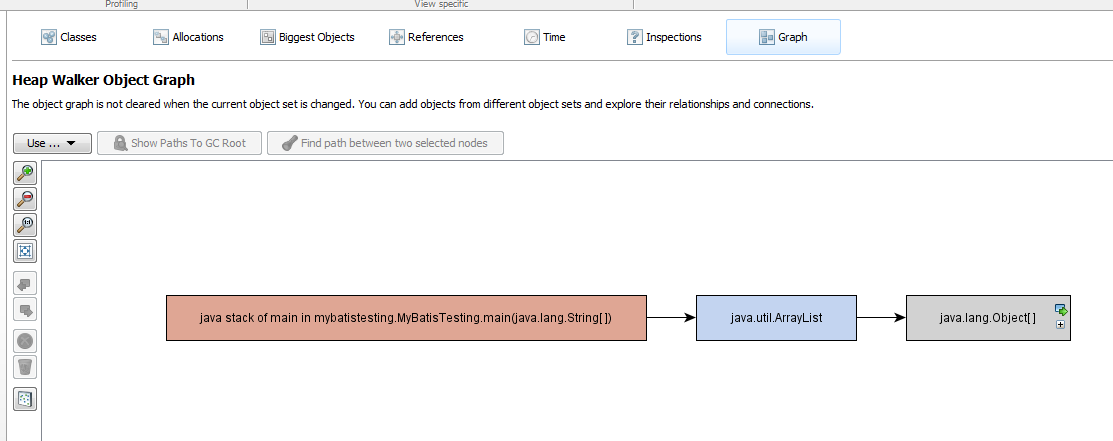
You can open java_pid5812.hprof using your preferable application, for example using Eclipse MAT or JProfiler.

eclipse mat

jprofiler 1

jprofiler 2

Have fun 😉