Java

java

Weird MyBatis Error, “Error setting null for parameter [number] with JdbcType OTHER”

I had a very weird error today, when connecting MyBatis to Oracle Database, the complete error is like this,

Error setting null for parameter #2 with JdbcType OTHER . 
Try setting a different JdbcType for this parameter or a different jdbcTypeForNull configuration property. 
Cause: java.sql.SQLException: Invalid column type: 1111

After researching for a while, i found out that it happen because i miss to fill a parameter on mybatis xml query file. This is my xml file,

<?xml version="1.0" encoding="UTF-8" ?>
<!DOCTYPE mapper PUBLIC "-//mybatis.org//DTD Mapper 3.0//EN" "http://mybatis.org/dtd/mybatis-3-mapper.dtd" >
<mapper namespace="mybatistesting.MyMapper" >    
    <select resultType="java.util.Map" id="select" parameterType="java.util.Map">
        SELECT
            *
        FROM
            RISALAH
        WHERE UUID = #{UUID} AND CONTENT = #{CONTENT}
    </select>
</mapper>

And this is my main java file,

package mybatistesting;

import java.util.HashMap;
import java.util.Map;
import mybatistesting.config.MyBatisSqlSessionFactory;
import org.apache.ibatis.session.SqlSession;

public class MyBatisTesting {

    public static void main(String[] args) throws Exception {
        SqlSession sqlSession = MyBatisSqlSessionFactory.getSqlSessionFactory().openSession(true);
        MyMapper mapper = sqlSession.getMapper(MyMapper.class);
        Map map1 = new HashMap();
        map1.put("UUID", "1");
        for (Map map : mapper.select(map1)) {
            System.out.println("map "+map);
        }
    }
}

As you can see, i only set UUID as query parameter on my java file, despite that i need at least 2 parameter on my xml file. Here is how to fix it,

package mybatistesting;

import java.util.HashMap;
import java.util.Map;
import mybatistesting.config.MyBatisSqlSessionFactory;
import org.apache.ibatis.session.SqlSession;

public class MyBatisTesting {

    public static void main(String[] args) throws Exception {
        SqlSession sqlSession = MyBatisSqlSessionFactory.getSqlSessionFactory().openSession(true);
        MyMapper mapper = sqlSession.getMapper(MyMapper.class);
        Map map1 = new HashMap();
        map1.put("UUID", "1");
        map1.put("CONTENT", "1");
        for (Map map : mapper.select(map1)) {
            System.out.println("map "+map);
        }
    }
}

Hope it helps others, cheers 😉

A Simple MyBatis Caching using Redis

Mybatis recently introduce a new caching mechanism using Redis (http://mybatis.github.io/redis-cache/index.html), and in this tutorial i’m trying to create a simple demonstration for it. MyBatis’ Redis caching is a little bit different with other MyBatis’ caching provider, such as EhCache or OsCache because you need to install Redis server before using it.

Because Redis project does not officially support Windows and i need Redis to run as a windows service so im downloading redis-service.exe from this url (https://github.com/rgl/redis/downloads), install and run it. You can see Redis is running on port 6379.

Because MyBatis Redis Cache hasnt available on Maven repository, so next step is download MyBatis Redis Cache project from github (https://github.com/mybatis/redis-cache), build it into jar and install it manually into our pom.xml file from local folder.

Okay, so here is my pom.xml file, you can see im manually installing mybatis-redis from local repository,

<?xml version="1.0" encoding="UTF-8"?>
<project xmlns="http://maven.apache.org/POM/4.0.0" xmlns:xsi="http://www.w3.org/2001/XMLSchema-instance" xsi:schemaLocation="http://maven.apache.org/POM/4.0.0 http://maven.apache.org/xsd/maven-4.0.0.xsd">
    <modelVersion>4.0.0</modelVersion>
    <groupId>com.edw</groupId>
    <artifactId>MybatisRedisExample</artifactId>
    <version>0.0.1-SNAPSHOT</version>
    <packaging>jar</packaging>
    
    <repositories>
        <repository>
            <id>local</id>
            <url>file://${basedir}/lib</url>
        </repository>
    </repositories>
    
    <properties>
        <project.build.sourceEncoding>UTF-8</project.build.sourceEncoding>
        <maven.compiler.source>1.7</maven.compiler.source>
        <maven.compiler.target>1.7</maven.compiler.target>
    </properties>
    <dependencies>
        <dependency>
            <groupId>log4j</groupId>
            <artifactId>log4j</artifactId>
            <version>1.2.17</version>
        </dependency>
        <dependency>
            <groupId>mysql</groupId>
            <artifactId>mysql-connector-java</artifactId>
            <version>5.1.6</version>
        </dependency>
        <dependency>
            <groupId>org.mybatis</groupId>
            <artifactId>mybatis</artifactId>
            <version>3.2.2</version>
        </dependency>
        
        <dependency>
            <groupId>org.mybatis.caches</groupId>
            <artifactId>mybatis-redis</artifactId>
            <version>1.0.0-SNAPSHOT</version>
        </dependency>
        <dependency>
            <groupId>org.apache.commons</groupId>
            <artifactId>commons-pool2</artifactId>
            <version>2.3</version>
        </dependency>
        
        <dependency>
            <groupId>redis.clients</groupId>
            <artifactId>jedis</artifactId>
            <version>2.6.2</version>
        </dependency>
    </dependencies>
</project>

Now create a database and a simple table for example,

CREATE DATABASE `test`;
DROP TABLE IF EXISTS `testing`;
CREATE TABLE `testing` (
  `id` int(11) NOT NULL AUTO_INCREMENT,
  `name` varchar(20) NOT NULL,
  `address` varchar(50) NOT NULL,
  PRIMARY KEY (`id`)
) ENGINE=InnoDB AUTO_INCREMENT=4 DEFAULT CHARSET=latin1;


INSERT INTO `testing` VALUES ('1', 'edw', '123');
INSERT INTO `testing` VALUES ('2', 'pepe', 'epep');
INSERT INTO `testing` VALUES ('3', 'dodol', 'dodll');

And a java bean for our table representation

package com.edw.mybatisredisexample.bean;

public class Testing {

    private String name;
    private String address;

    public String getName() {
        return name;
    }

    public void setName(String name) {
        this.name = name;
    }

    public String getAddress() {
        return address;
    }

    public void setAddress(String address) {
        this.address = address;
    }

    public Testing() {
    }
}

And an xml file and a java file, named TestingMapper to handle all the queries,

package com.edw.mybatisredisexample.mapper;

import com.edw.mybatisredisexample.bean.Testing;
import java.util.List;
import java.util.Map;

public interface TestingMapper {
    void insert(Testing testing);
    List<Map> select();
}
<?xml version="1.0" encoding="UTF-8" ?>
<!DOCTYPE mapper PUBLIC "-//mybatis.org//DTD Mapper 3.0//EN" "http://mybatis.org/dtd/mybatis-3-mapper.dtd" >
<mapper namespace="com.edw.mybatisredisexample.mapper.TestingMapper" >
    
    <cache type="org.mybatis.caches.redis.RedisCache" />
    
    <select id="insert" parameterType="com.edw.mybatisredisexample.bean.Testing" >
        insert into testing (name, address)
        values ( #{name,jdbcType=VARCHAR}, #{address,jdbcType=VARCHAR} )
    </select>
    
    <select resultType="java.util.Map" id="select" >
        SELECT
            *
        FROM
            testing
    </select>
</mapper>

Dont forget to register our xml file on MyBatis’ Configuration.xml

<?xml version="1.0" encoding="UTF-8" ?>
<!DOCTYPE configuration
PUBLIC "-//mybatis.org//DTD Config 3.0//EN"
"http://mybatis.org/dtd/mybatis-3-config.dtd">
<configuration>
    <environments default="development">
        <environment id="development">
            <transactionManager type="JDBC"/>
            <dataSource type="UNPOOLED">
                <property name="driver" value="com.mysql.jdbc.Driver"/>
                <property name="url" value="jdbc:mysql://localhost/test"/>
                <property name="username" value="root"/>
                <property name="password" value="password"/>
            </dataSource>
        </environment>
    </environments>
    <mappers>
        <mapper resource="TestingMapper.xml" />
    </mappers>
</configuration>

And a java class to load our MyBatis xml configuration

package com.edw.mybatisredisexample.config;

import java.io.IOException;
import java.io.Reader;
import org.apache.ibatis.io.Resources;
import org.apache.ibatis.session.SqlSessionFactory;
import org.apache.ibatis.session.SqlSessionFactoryBuilder;

public class MyBatisSqlSessionFactory {

    private static final SqlSessionFactory FACTORY;

    static {
        try {
            Reader reader = Resources.getResourceAsReader("Configuration.xml");
            FACTORY = new SqlSessionFactoryBuilder().build(reader);
        } catch (IOException e) {
            throw new RuntimeException("Fatal Error. Cause: " + e, e);
        }
    }

    public static SqlSessionFactory getSqlSessionFactory() {
        return FACTORY;
    }
}

Next is creating our Redis connection configuration, redis.properties

redis.host=localhost
redis.port=6379
redis.timeout=5000
redis.password=
redis.namespace=edw
redis.database=0

After everything is ready, next is create a Main file

package com.edw.mybatisredisexample;

import com.edw.mybatisredisexample.config.MyBatisSqlSessionFactory;
import com.edw.mybatisredisexample.mapper.TestingMapper;
import java.util.List;
import java.util.Map;
import org.apache.ibatis.session.SqlSession;
import org.apache.log4j.Logger;

public class Main {

    private Logger logger = Logger.getLogger(this.getClass());

    public static void main(String[] args) throws Exception {
        new Main().testQuery();
    }

    private void testQuery() throws Exception {
        logger.debug("start ----");

        for (int i = 0; i < 10; i++) {
            SqlSession sqlSession = null;
            try {
                sqlSession = MyBatisSqlSessionFactory.getSqlSessionFactory().openSession(true);
                TestingMapper testingMapper = sqlSession.getMapper(TestingMapper.class);
                List<Map> maps = testingMapper.select();

                for (Map map : maps) {
                    logger.debug(map);
                }
            } catch (Exception e) {
                logger.error(e.getMessage(), e);
            } finally {
                if (sqlSession != null) {
                    sqlSession.close();
                }
            }
            
            Thread.sleep(5000);
        }

        logger.debug("end ----");
    }
}

Using monitor command, this is what you will see on your Redis console,
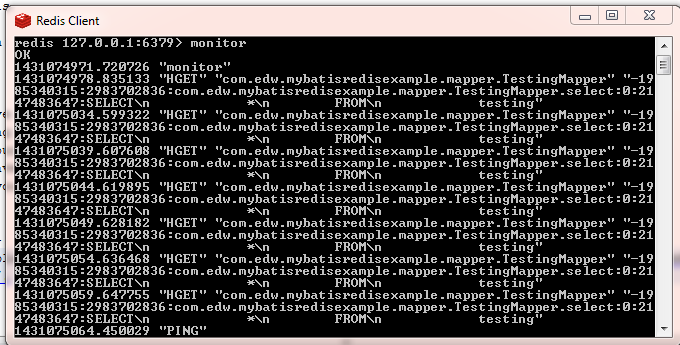
redis console

And on my netbeans console,mybatis redis result log 2

It will keep showing the same value despite i’ve delete and update some values on database directly,
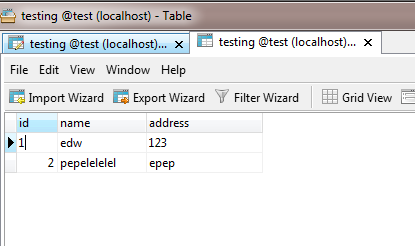
mysql data redis

You can see my complete sourcecode on my github page (https://github.com/edwinkun/MybatisRedisExample).
Weird HTTP Error, HTTP Request Parameter Not Detected When Using JavaScript canvas.toDataURL and Base64 Ajax Post

I have a simple Java web application that use Ajax image upload using canvas.toDataURL and base64 encoder. Usually it run well, but I have a very weird error that happen intermittently. Somehow my application cannot detect any http request parameters that send by my Ajax requests. After I spend a while researching, it seems that this error only happen when uploading multiple big images.

At first I thought that it was my Java or JavaScript issue, but then I realized that this is an issue on my Application Server, which is Apache Tomcat. Its default value for maximum POST size is 2MB (2097152), and after I resize it, the error went away.

I add “maxPostSize” property on server.xml, to increase maximum POST size that Apache Tomcat can handle. In this example, i increase it into 20MB.

    <Connector connectionTimeout="20000" 
        port="8080" protocol="HTTP/1.1" 
        redirectPort="8443" maxPostSize="20971520"/>

😉

Generating an SVN Log File in a HTML Format

Basically, we can see our SVN history from IDE, but today i have a very weird request from one of my user, they want to see our svn logs progress but in HTML format. After sometimes googling, i found a workaround using XSLT to change svn log XML output file into HTML file.

This is how i do it, i run this command from command prompt, dont forget to register svn.exe on your environment.

svn log -v --limit 100 --xml > outfile.xml

it will create an xml file (outfile.xml) which consist of last 100 svn commit logs.

Next is creating an xsl file, style.xsl, which will become our html template file.

<?xml version="1.0" encoding="ISO-8859-1"?>  
<xsl:stylesheet version="2.0"  
xmlns:xsl="http://www.w3.org/1999/XSL/Transform">  
<xsl:template match="/">  
<html>  
<body>  
<h2>Versioning Log</h2>  
<table border="1" style="table-layout:fixed;width: 100%;">
	<tr>
		<td width="5%">Rev No.</td>
		<td width="10%">
				Date				
		</td>
		<td width="5%">
					Author
				
		</td>
		<td width="">
					Message
				
		</td>
	</tr>
	<xsl:for-each select="log/logentry">  
		<tr>			
			<td>				
				<pre><xsl:value-of select="@revision"/> </pre>
			</td>			
			<td>
				<pre><xsl:value-of select="substring(date, 0, 11)" /></pre>
			</td>		
			<td>
				<pre>
					<xsl:value-of select="author"/> 
				</pre>
			</td>		
			<td>			
				<pre>
					<xsl:value-of select="msg"/>
				</pre>
			</td>
		</tr>
	</xsl:for-each>  
</table>  
</body>  
</html>  
</xsl:template>  
</xsl:stylesheet>  

Next step is converting outfile.xml into html file, im using saxon library for handling this. I run this command from command prompt, it will create a html file.

java -jar saxon9he.jar -o:version.html outfile.xml style.xsl

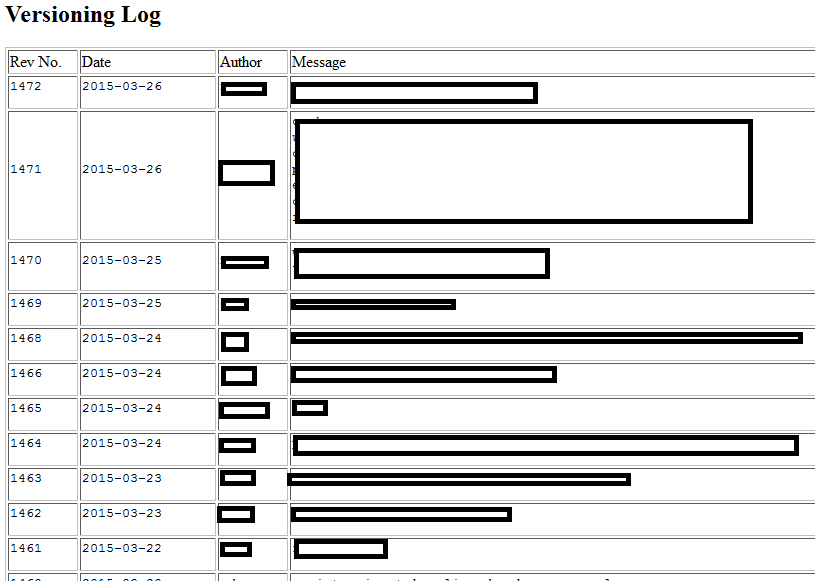
The final result is version.html, which looks like this,
svn versioning html

With a little effort, it’s not so hard to automate this task via maven task. 😉

How to Simulate and Finding Connection Leak in Oracle

It’s been a while since the last time i’ve write tutorials in my blog, but i found a very interesting case that perhaps helped a lot of people. Today im trying to create a simple test case to simulate a connection leak and how to search for it.

First is creating a simple unclosed connection query using java,

package com.edw;

import java.sql.Connection;
import java.sql.DriverManager;
import java.sql.ResultSet;
import java.sql.Statement;

public class Main {

    public static void main(String[] args) throws Exception {
        System.out.println("starting --------");
        
        Class.forName("oracle.jdbc.driver.OracleDriver");
        Connection connection = DriverManager.getConnection("jdbc:oracle:thin:@localhost:1521:xe", "USERNAME", "password");
        Statement statement = connection.createStatement();
        ResultSet resultSet = statement.executeQuery("SELECT * FROM INVALID"); // example table name is INVALID
        
        while(resultSet.next()) {
            System.out.println(resultSet.getString(1));
            System.out.println(resultSet.getString(2));
            System.out.println(resultSet.getString(3));
            System.out.println("=============");
        }
        
        System.out.println("ending --------");
        
        while(true) {
            Thread.sleep(10000);
            System.out.println("testing --------");
        }
    
    }
}

It will create an unclosed query that will hanging on my oracle connection.
And next, is my oracle query to find the hanging queries,

select LAST_CALL_ET, SQL_TEXT, username, machine, to_char(logon_time, 'ddMon hh24:mi') as login, 
    SQL_HASH_VALUE, PREV_HASH_VALUE, status
from v$session, v$sql 
where username='USERNAME' and HASH_VALUE =  PREV_HASH_VALUE
order by last_call_et desc;

it will show result like this,

LAST_CALL_ET SQL_TEXT                USERNAME     MACHINE        LOGIN                SQL_HASH_VALUE PREV_HASH_VALUE STATUS 
------------ ---------------------- ------------- -------------- -------------------- -------------- --------------- --------
          91 SELECT * FROM INVALID   USERNAME     edw      	     03Mar 11:53                       0       621168917 INACTIVE 

As you can see the result on the first column, “SELECT * FROM INVALID” query has run for more than 90 seconds.
So i can easily find the java class culprit who run that query.

FYI, this is my Oracle version,

select * from v$version;

BANNER                                                                         
--------------------------------------------------------------------------------
Oracle Database 11g Express Edition Release 11.2.0.2.0 - Production              
PL/SQL Release 11.2.0.2.0 - Production                                           
CORE	11.2.0.2.0	Production                                                         
TNS for 32-bit Windows: Version 11.2.0.2.0 - Production                          
NLSRTL Version 11.2.0.2.0 - Production   

I Hope this tutorial can help others, have fun 🙂