Multi-Tenancy System with JBoss EAP 8 Connection Pooling

Basically a multi-tenancy system is a condition where one single instance of a software is able to handle multple distinct customers with each having their own database. The concept is perhaps can be seen in below image,

We can start by uploading database driver that is required to connect to the existing database, for this sample we are using MySql Database
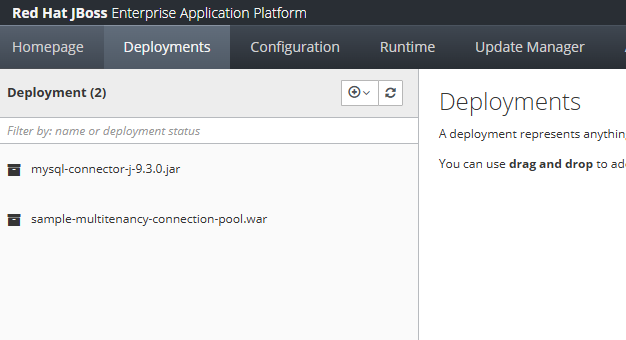
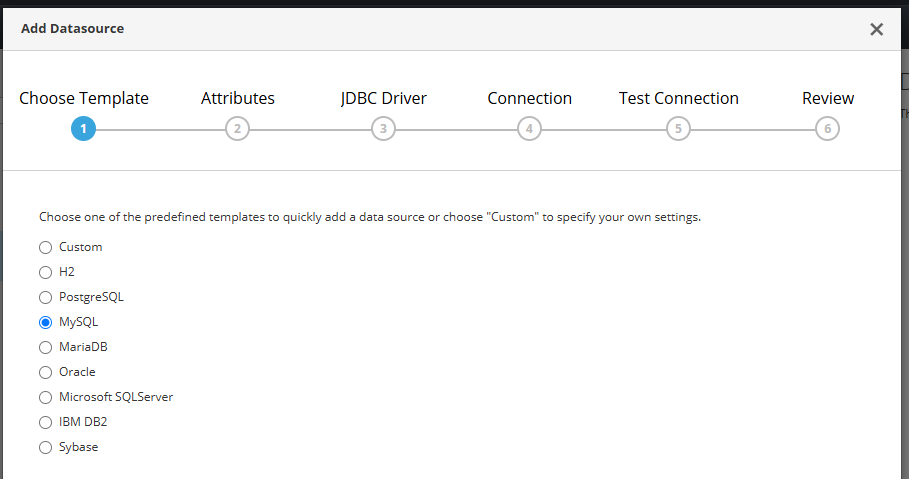
creating a Database connection on JBoss EAP Datasource,

choose MySql,
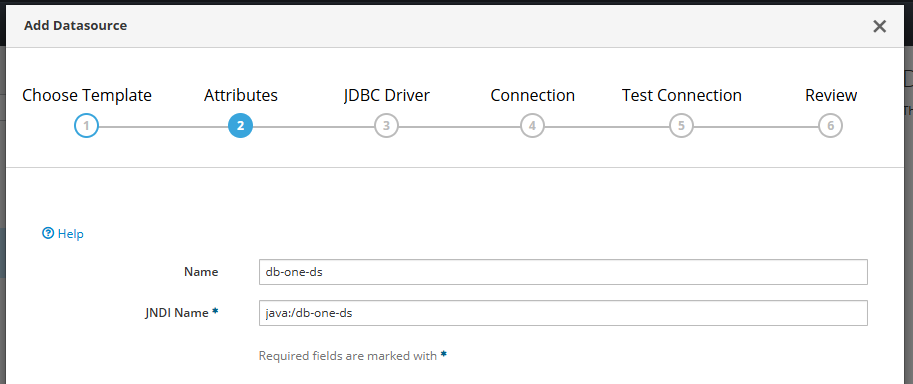
create JNDI name
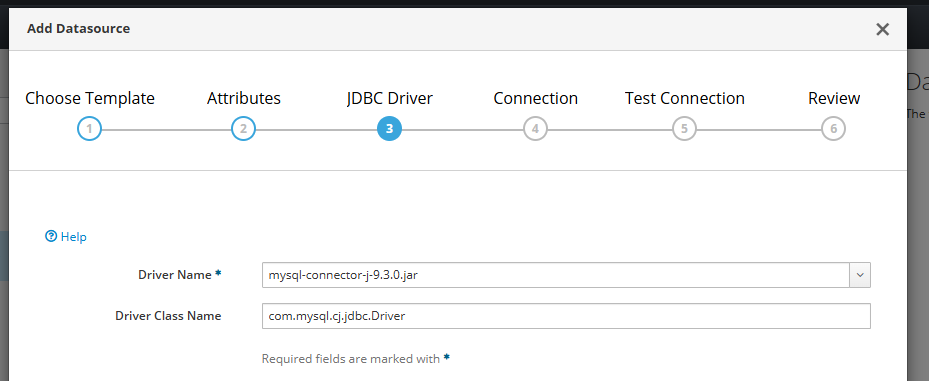
and select driver,
put database credentials there,
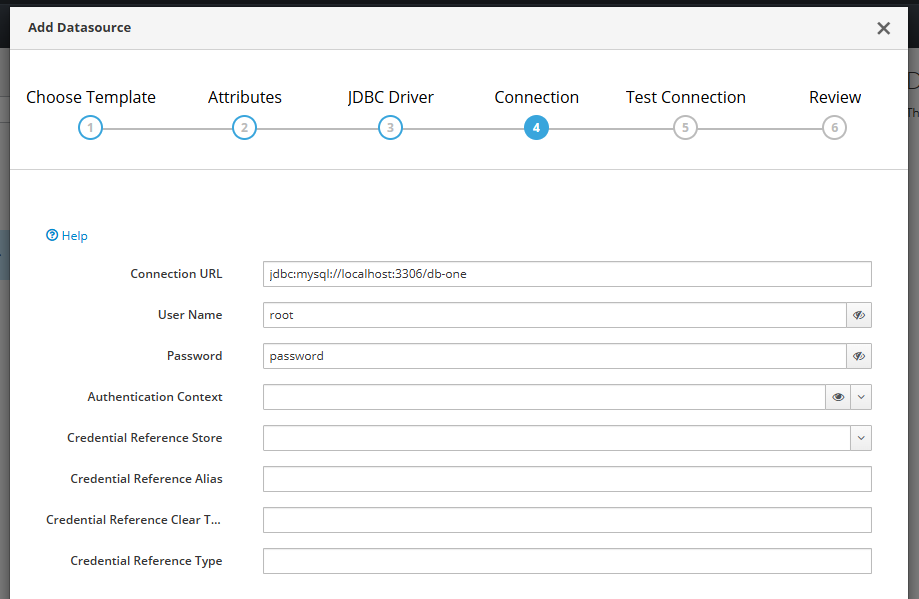
test the connection,
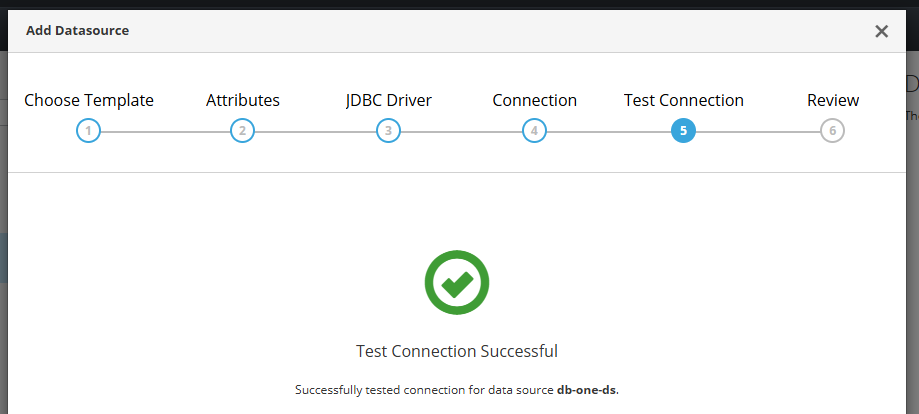
and save it.
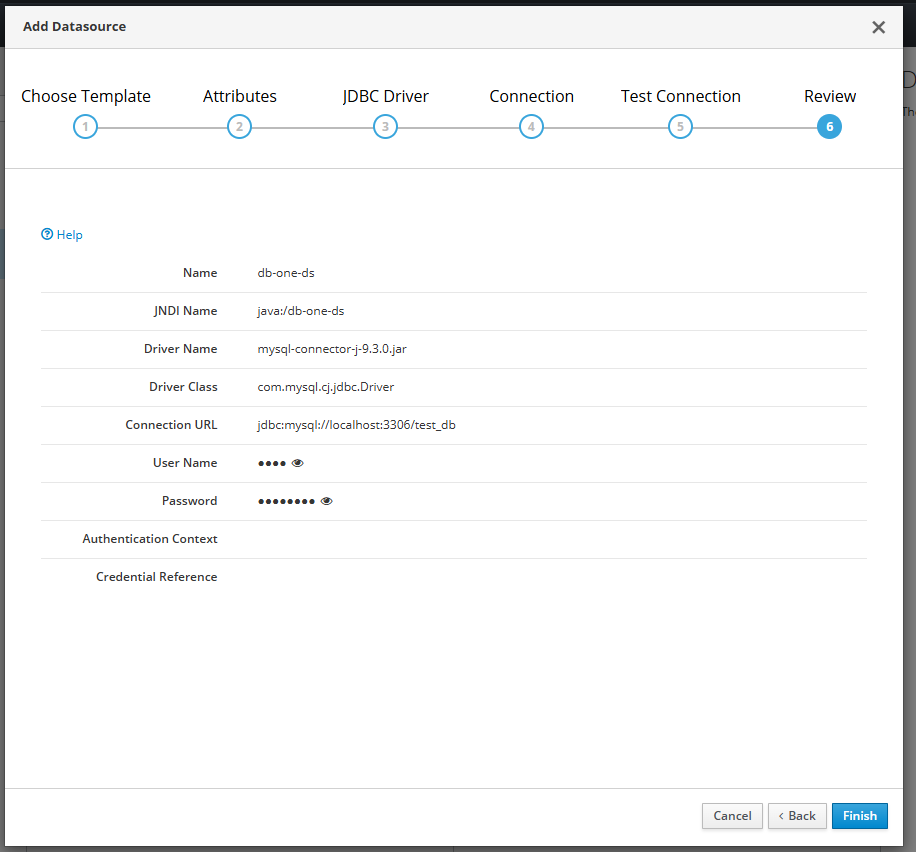
If we have lots of different database connection, we can define it on our JBoss EAP standalone.xml manually instead of putting them one by one from JBoss EAP console,

<datasource jndi-name="java:/db-one-ds" pool-name="db-one-ds">
    <connection-url>jdbc:mysql://localhost:3306/db-one</connection-url>
    <driver-class>com.mysql.cj.jdbc.Driver</driver-class>
    <driver>mysql-connector-j-9.3.0.jar</driver>
    <security>
        <user-name>aaaa</user-name>
        <password>bbbb</password>
    </security>
</datasource>

<datasource jndi-name="java:/db-two-ds" pool-name="db-two-ds">
    <connection-url>jdbc:mysql://localhost:3306/db-two</connection-url>
    <driver-class>com.mysql.cj.jdbc.Driver</driver-class>
    <driver>mysql-connector-j-9.3.0.jar</driver>
    <security>
        <user-name>aaaa</user-name>
        <password>bbbb</password>
    </security>
</datasource>

Next is to create a database connection in our Java file

package com.edw.helper;

import javax.naming.Context;
import javax.naming.InitialContext;
import javax.sql.DataSource;
import java.sql.Connection;
import java.sql.SQLException;

public class DatabaseHelper {

    private DataSource ds = null;

    public DatabaseHelper() {
    }

    public DatabaseHelper(String customerId) {
        try {
            Context initCxt = new InitialContext();
            ds = (DataSource) initCxt.lookup(String.format("java:/%s-ds", customerId));
        } catch (Exception e) {
            e.printStackTrace();
        }
    }

    public Connection getConnection() throws SQLException {
        return ds.getConnection();
    }
}

and create a service class.

package com.edw.service;

import com.edw.helper.DatabaseHelper;

import java.util.ArrayList;
import java.util.HashMap;
import java.util.List;
import java.util.Map;

import java.sql.Connection;
import java.sql.PreparedStatement;
import java.sql.ResultSet;

public class UserService {

    private DatabaseHelper databaseHelper;

    public UserService() {
    }

    public List<Map> select(String customerId, Integer start, Integer limit) {

        List<Map> list = new ArrayList<>();

        databaseHelper = new DatabaseHelper(customerId);
        String sql = "select * from tb_testing order by id limit ?, ?";

        try (Connection conn = databaseHelper.getConnection();
             PreparedStatement preparedStmt = conn.prepareStatement(sql)) {

            preparedStmt.setInt(1, start);
            preparedStmt.setInt(2, limit);

            try (ResultSet resultSet = preparedStmt.executeQuery()) {
                while (resultSet.next()) {
                    Integer id = resultSet.getInt(1);
                    String username = resultSet.getString(2);

                    list.add(new HashMap() {{
                        put("id", id);
                        put("username", username);
                    }});
                }
            }
        } catch (Exception e) {
            e.printStackTrace();
        }

        return list;
    }

}

and our controller file,

package com.edw.controller;

import com.edw.service.UserService;

import com.google.gson.Gson;
import jakarta.servlet.ServletException;
import jakarta.servlet.annotation.WebServlet;
import jakarta.servlet.http.HttpServlet;
import jakarta.servlet.http.HttpServletRequest;
import jakarta.servlet.http.HttpServletResponse;
import java.io.IOException;
import java.io.PrintWriter;
import java.util.List;
import java.util.Map;

@WebServlet(name = "IndexController", urlPatterns = "/index")
public class IndexController extends HttpServlet {

    private static final long serialVersionUID = 1L;

    private UserService userService = new UserService();

    @Override
    protected void doGet(HttpServletRequest request,
                         HttpServletResponse response)
            throws ServletException, IOException {

        String customerId = request.getParameter("customerId");
        List<Map> result = userService.select(customerId, 0, 10);

        response.setContentType("application/json");

        PrintWriter out = response.getWriter();
        out.println(new Gson().toJson(result));
    }
}

with pom.xml

<?xml version="1.0" encoding="UTF-8"?>
<project xmlns="http://maven.apache.org/POM/4.0.0"
         xmlns:xsi="http://www.w3.org/2001/XMLSchema-instance"
         xsi:schemaLocation="http://maven.apache.org/POM/4.0.0 http://maven.apache.org/xsd/maven-4.0.0.xsd">
    <modelVersion>4.0.0</modelVersion>

    <groupId>com.edw</groupId>
    <artifactId>multitenancy-connection-pool-with-jboss-8</artifactId>
    <version>1.0-SNAPSHOT</version>
    <packaging>war</packaging>

    <properties>
        <maven.compiler.source>21</maven.compiler.source>
        <maven.compiler.target>21</maven.compiler.target>
        <project.build.sourceEncoding>UTF-8</project.build.sourceEncoding>
    </properties>

    <dependencies>
        <dependency>
            <groupId>jakarta.platform</groupId>
            <artifactId>jakarta.jakartaee-web-api</artifactId>
            <version>10.0.0</version>
            <scope>provided</scope>
        </dependency>
        <dependency>
            <groupId>com.google.code.gson</groupId>
            <artifactId>gson</artifactId>
            <version>2.13.1</version>
        </dependency>
    </dependencies>

    <build>
        <plugins>
            <plugin>
                <groupId>org.apache.maven.plugins</groupId>
                <artifactId>maven-compiler-plugin</artifactId>
                <version>3.13.0</version>
            </plugin>
            <plugin>
                <groupId>org.apache.maven.plugins</groupId>
                <artifactId>maven-war-plugin</artifactId>
                <version>3.4.0</version>
                <configuration>
                    <warName>${project.name}</warName>
                    <failOnMissingWebXml>false</failOnMissingWebXml>
                </configuration>
            </plugin>
        </plugins>
    </build>
</project>

and finally we can test our application connectivity by using below command,

$ curl -kv http://127.0.0.1:8080/index?customerId=db-one
*   Trying 127.0.0.1:8080...
* Connected to 127.0.0.1 (127.0.0.1) port 8080
> GET /index?customerId=db-one HTTP/1.1
> Host: 127.0.0.1:8080
> User-Agent: curl/8.4.0
> Accept: */*
>
< HTTP/1.1 200 OK
< Connection: keep-alive
< Content-Type: application/json;charset=ISO-8859-1
< Content-Length: 594
< Date: Sun, 25 May 2025 15:31:57 GMT
<
[{"id":1,"username":"username 001"}]
* Connection #0 to host 127.0.0.1 left intact

Sample for the code can be found on below Github link,

https://github.com/edwin/multitenancy-connection-pool-with-jboss-8

Generate an HTML Trivy Report Ordered by Severity

Trivy is an Open Source tools for scanning software artifacts, and image vulnerabilities, which is maintained by Aqua Security. We can also generate Trivy reports and displaying the list of vulnerabilities as an HTML report. We can also create our own custom HTML template that would suitable for our needs.

Below is a sample HTML report that we use for sorting vulnerabilities based on its severity level,

<!DOCTYPE html>
<html>
  <head>
    <meta http-equiv="Content-Type" content="text/html; charset=utf-8">
{{- if . }}
    <style>
      * {
        font-family: Arial, Helvetica, sans-serif;
      }
      h1 {
        text-align: center;
      }
      .group-header th {
        font-size: 200%;
      }
      .sub-header th {
        font-size: 150%;
      }
      table, th, td {
        border: 1px solid black;
        border-collapse: collapse;
        white-space: nowrap;
        padding: .3em;
      }
      table {
        margin: 0 auto;
      }
      .severity {
        text-align: center;
        font-weight: bold;
        color: #fafafa;
      }
      .severity-LOW .severity { background-color: #5fbb31; }
      .severity-MEDIUM .severity { background-color: #e9c600; }
      .severity-HIGH .severity { background-color: #ff8800; }
      .severity-CRITICAL .severity { background-color: #e40000; }
      .severity-UNKNOWN .severity { background-color: #747474; }
      .severity-LOW { background-color: #5fbb3160; }
      .severity-MEDIUM { background-color: #e9c60060; }
      .severity-HIGH { background-color: #ff880060; }
      .severity-CRITICAL { background-color: #e4000060; }
      .severity-UNKNOWN { background-color: #74747460; }
      table tr td:first-of-type {
        font-weight: bold;
      }
      .links a,
      .links[data-more-links=on] a {
        display: block;
      }
      .links[data-more-links=off] a:nth-of-type(1n+5) {
        display: none;
      }
      a.toggle-more-links { cursor: pointer; }
    </style>
    <title>{{- escapeXML ( index . 0 ).Target }} - Trivy Report - {{ now }} </title>
    <script>
      window.onload = function() {
        document.querySelectorAll('td.links').forEach(function(linkCell) {
          var links = [].concat.apply([], linkCell.querySelectorAll('a'));
          [].sort.apply(links, function(a, b) {
            return a.href > b.href ? 1 : -1;
          });
          links.forEach(function(link, idx) {
            if (links.length > 3 && 3 === idx) {
              var toggleLink = document.createElement('a');
              toggleLink.innerText = "Toggle more links";
              toggleLink.href = "#toggleMore";
              toggleLink.setAttribute("class", "toggle-more-links");
              linkCell.appendChild(toggleLink);
            }
            linkCell.appendChild(link);
          });
        });
        document.querySelectorAll('a.toggle-more-links').forEach(function(toggleLink) {
          toggleLink.onclick = function() {
            var expanded = toggleLink.parentElement.getAttribute("data-more-links");
            toggleLink.parentElement.setAttribute("data-more-links", "on" === expanded ? "off" : "on");
            return false;
          };
        });
      };
	  
	  window.addEventListener('DOMContentLoaded', () => {	  
			const severityOrder = {
			  "CRITICAL": 1,
			  "HIGH": 2,
			  "MEDIUM": 3,
			  "LOW": 4
			};

			const table = document.getElementById("myTable");
			const tbody = table.tBodies[0];
			const rows = Array.from(tbody.rows);
			
			const columnIndex = 2; 
			
			rows.sort((a, b) => {
				  const cellA = a.cells[columnIndex];
				  const cellB = b.cells[columnIndex];

				  if (!cellA || !cellB) {					
					return 0; // Skip sort if data is malformed
				  }
				  
				  if (cellA.textContent.trim().toUpperCase()=='SEVERITY' || cellB.textContent.trim().toUpperCase()=='SEVERITY') {		
					return 0; // Skip sort if data is malformed
				  }

				  const sevA = cellA.textContent.trim().toUpperCase();
				  const sevB = cellB.textContent.trim().toUpperCase();

				  const orderA = severityOrder[sevA] ?? 999;
				  const orderB = severityOrder[sevB] ?? 999;

				  return orderA - orderB;
			});

			rows.forEach(row => tbody.appendChild(row));
	  });
	
    </script>
  </head>
  <body>
    <h1>{{- escapeXML ( index . 0 ).Target }} - Trivy Report - {{ now }}</h1>
    <table id="myTable">
    {{- range . }}
      <tr class="group-header"><th colspan="6">{{ .Type | toString | escapeXML }}</th></tr>
      {{- if (eq (len .Vulnerabilities) 0) }}
      <tr><th colspan="6">No Vulnerabilities found</th></tr>
      {{- else }}
      <tr class="sub-header">
        <th>Package</th>
        <th>Vulnerability ID</th>
        <th>Severity</th>
        <th>Installed Version</th>
        <th>Fixed Version</th>
        <th>Links</th>
      </tr>
        {{- range .Vulnerabilities }}
      <tr class="severity-{{ escapeXML .Vulnerability.Severity }}">
        <td class="pkg-name">{{ escapeXML .PkgName }}</td>
        <td>{{ escapeXML .VulnerabilityID }}</td>
        <td class="severity">{{ escapeXML .Vulnerability.Severity }}</td>
        <td class="pkg-version">{{ escapeXML .InstalledVersion }}</td>
        <td>{{ escapeXML .FixedVersion }}</td>
        <td class="links" data-more-links="off">
          {{- range .Vulnerability.References }}
          <a href={{ escapeXML . | printf "%q" }}>{{ escapeXML . }}</a>
          {{- end }}
        </td>
      </tr>
        {{- end }}
      {{- end }}
      {{- if (eq (len .Misconfigurations ) 0) }}
      <tr><th colspan="6">No Misconfigurations found</th></tr>
      {{- else }}
      <tr class="sub-header">
        <th>Type</th>
        <th>Misconf ID</th>
        <th>Check</th>
        <th>Severity</th>
        <th>Message</th>
      </tr>
        {{- range .Misconfigurations }}
      <tr class="severity-{{ escapeXML .Severity }}">
        <td class="misconf-type">{{ escapeXML .Type }}</td>
        <td>{{ escapeXML .ID }}</td>
        <td class="misconf-check">{{ escapeXML .Title }}</td>
        <td class="severity">{{ escapeXML .Severity }}</td>
        <td class="link" data-more-links="off"  style="white-space:normal;">
          {{ escapeXML .Message }}
          <br>
            <a href={{ escapeXML .PrimaryURL | printf "%q" }}>{{ escapeXML .PrimaryURL }}</a>
          </br>
        </td>
      </tr>
        {{- end }}
      {{- end }}
    {{- end }}
    </table>
{{- else }}
  </head>
  <body>
    <h1>Trivy Returned Empty Report</h1>
{{- end }}
  </body>
</html>

Save it as “html.tpl”, and run the below command

$ trivy image --scanners vuln  my-image:latest --format template \
       --template "@/tmp/html.tpl" -o /tmp/my-image-vulnerabilities.html

It shall generate a report like below,

Java 21 and Maven Error PKIX when Connecting to Self Signed Nexus Registry

Had this error while doing a maven build

PKIX path building failed: sun.security.provider.certpath.SunCertPathBuilderException: unable to find valid certification path to requested target

With a complete error log,

$ mvn clean package -s settings.xml

.......

[ERROR] [ERROR] Some problems were encountered while processing the POMs:
[ERROR] Unresolveable build extension: Plugin com.redhat.quarkus.platform:quarkus-maven-plugin:3.15.3.SP1-redhat-00002 or one of its dependencies could not be resolved: Failed to collect dependencies at com.redhat.quarkus.platform:quarkus-maven-plugin:jar:3.15.3.SP1-redhat-00002 -> io.quarkus:quarkus-bootstrap-maven-resolver:jar:3.15.3.redhat-00004 -> io.smallrye.beanbag:smallrye-beanbag-maven:jar:1.5.2.redhat-00001 -> io.smallrye.beanbag:smallrye-beanbag-sisu:jar:1.5.2.redhat-00001 -> javax.inject:javax.inject:jar:1.0.0.redhat-00014 @
[ERROR] Non-resolvable import POM: The following artifacts could not be resolved: com.redhat.quarkus.platform:quarkus-camel-bom:pom:3.15.3.SP1-redhat-00002 (present, but unavailable): Could not transfer artifact com.redhat.quarkus.platform:quarkus-camel-bom:pom:3.15.3.SP1-redhat-00002 from/to mvn-repository (https://nexus/maven-group/): PKIX path building failed: sun.security.provider.certpath.SunCertPathBuilderException: unable to find valid certification path to requested target @ line 32, column 25

But somehow the previous solution on my previous post is not working. Maybe because of a different Java version or Maven version. So I need to find another solution, and this is what was working on my end.

First we need to take the self-signed certificate that belongs to the remote Nexus instance

$ echo "" | openssl s_client -connect nexus:8443  -showcerts 2>/dev/null | openssl x509 -out nexus.crt

Import it into our key

$ keytool -import -alias mycert -keystore /tmp/customcacerts -file nexus.crt -storepass changeit -noprompt

And use it on our Maven build

$ ./mvnw -Djavax.net.ssl.trustStore=/tmp/customcacerts \
        -Djavax.net.ssl.trustStorePassword=changeit clean install \ 
		-s settings.xml 

Everything is working well after that.

Maven Error PKIX When Connecting to Self Signed Nexus Repository

Had this error while doing a maven build

PKIX path building failed: sun.security.provider.certpath.SunCertPathBuilderException: unable to find valid certification path to requested target

With a complete error log,

$ mvn clean package -s settings.xml

.......

[ERROR] [ERROR] Some problems were encountered while processing the POMs:
[ERROR] Unresolveable build extension: Plugin com.redhat.quarkus.platform:quarkus-maven-plugin:3.15.3.SP1-redhat-00002 or one of its dependencies could not be resolved: Failed to collect dependencies at com.redhat.quarkus.platform:quarkus-maven-plugin:jar:3.15.3.SP1-redhat-00002 -> io.quarkus:quarkus-bootstrap-maven-resolver:jar:3.15.3.redhat-00004 -> io.smallrye.beanbag:smallrye-beanbag-maven:jar:1.5.2.redhat-00001 -> io.smallrye.beanbag:smallrye-beanbag-sisu:jar:1.5.2.redhat-00001 -> javax.inject:javax.inject:jar:1.0.0.redhat-00014 @
[ERROR] Non-resolvable import POM: The following artifacts could not be resolved: com.redhat.quarkus.platform:quarkus-camel-bom:pom:3.15.3.SP1-redhat-00002 (present, but unavailable): Could not transfer artifact com.redhat.quarkus.platform:quarkus-camel-bom:pom:3.15.3.SP1-redhat-00002 from/to mvn-repository (https://nexus/maven-group/): PKIX path building failed: sun.security.provider.certpath.SunCertPathBuilderException: unable to find valid certification path to requested target @ line 32, column 25
[ERROR] 'dependencies.dependency.version' for org.apache.camel.quarkus:camel-quarkus-direct:jar is missing. @ line 45, column 21
[ERROR] 'dependencies.dependency.version' for org.apache.camel.quarkus:camel-quarkus-jackson:jar is missing. @ line 49, column 21
[ERROR] 'dependencies.dependency.version' for org.apache.camel.quarkus:camel-quarkus-rest-openapi:jar is missing. @ line 53, column 21
[ERROR] 'dependencies.dependency.version' for org.apache.camel.quarkus:camel-quarkus-rest:jar is missing. @ line 57, column 21
 @
[ERROR] The build could not read 1 project -> [Help 1]

Workaround is quite simple,

$ mvn -Dmaven.wagon.http.ssl.insecure=true clean package -s settings.xml

Script to Generate Series of Thread Dump

There are times when we want to see which threads are blocking our requests, and generating a thread dump is one way to find it out. The thing is sometimes we need to create a series of thread dumps, that’s why i have this script to do it for me. Create a file with the name of “jstack.sh”, with below script as its content

# number of cycles.
LOOP=3
# seconds between cycles.
INTERVAL=10

for ((i=1; i <= $LOOP; i++))
do
   _now=$(date)
   echo "\n \n ${_now}" >> cpu.out
   top -l 1 -o cpu -pid $1 >> cpu.out
   echo "\n \n ${_now}" >> tdump.out
   jstack -l $1 >> tdump.out
   echo "thread dump #" $i
   if [ $i -lt $LOOP ]; then
      echo "Sleeping..."
      sleep $INTERVAL
   fi
done

Repository for above script can be found below,

https://github.com/edwin/java-thread-dump