Java

java programming

Simple Messaging Example using Hessian

According to Wikipedia, Hessian is a binary web service protocol that makes web services usable without requiring a large framework, and without learning a new set of protocols. Because it is a binary protocol, it is well-suited to sending binary data without any need to extend the protocol with attachments.

From what i’ve tested, perhaps it is somekind of light version of remote EJB3 because i dont have to include so many libraries like EJB3. Altough EJB3 and Hessian are not apple-to-apple comparable, because both arent using the same messaging protocol. EJB3 use RMI-IIOP while Hessian use WebService.

So let’s start with the code. First, for the server part (im using tomcat), create a web project on Netbeans 6.9 and creating a simple interface class,

package com.edw.service;

public interface HelloService {
    String sayHelloTo(String target);
}

after that, i create a simple servlet which implements HelloService interface,

package com.edw.servlet;

import com.caucho.hessian.server.HessianServlet;
import com.edw.service.HelloService;

public class HelloServlet extends HessianServlet implements HelloService {

    public String sayHelloTo(String target) {
        return "hello "+target+", have a nice day";
    }
    
}

dont forget to register your servlet to web.xml

<?xml version="1.0" encoding="UTF-8"?>
<web-app version="2.5" xmlns="http://java.sun.com/xml/ns/javaee" xmlns:xsi="http://www.w3.org/2001/XMLSchema-instance" xsi:schemaLocation="http://java.sun.com/xml/ns/javaee http://java.sun.com/xml/ns/javaee/web-app_2_5.xsd">
    <servlet>
        <servlet-name>HelloServlet</servlet-name>
        <servlet-class>com.edw.servlet.HelloServlet</servlet-class>
    </servlet>
    <servlet-mapping>
        <servlet-name>HelloServlet</servlet-name>
        <url-pattern>/HelloServlet</url-pattern>
    </servlet-mapping>
    <session-config>
        <session-timeout>
            30
        </session-timeout>
    </session-config>
    <welcome-file-list>
        <welcome-file>index.jsp</welcome-file>
    </welcome-file-list>
</web-app>

next, is creating the client application. I start with a simple java netbeans project, a main class and an interface, i copied the exact copy of HelloService and then put it on my client project,

package com.edw.service;

public interface HelloService {
    String sayHelloTo(String target);
}

and my main class

package com.edw.main;

import com.caucho.hessian.client.HessianProxyFactory;
import com.edw.service.HelloService;

public class Main {

    String url = "http://localhost:809/HessianServer/HelloServlet";
    HessianProxyFactory factory = new HessianProxyFactory();

    public Main() {
    }

    private void doTest() {
        try {
            HelloService hello = (HelloService) factory.create(HelloService.class, url);
            System.out.println(hello.sayHelloTo("si pepe"));
        } catch (Exception e) {
            e.printStackTrace();
        }
    }

    public static void main(String[] args) {
        Main main = new Main();
        main.doTest();
    }
}

here is the screenshot of my project

This is what the messaging looks like

another good competitor for Spring Http Invoker.
Have fun 😉

Creating an MD5 String using Java

MD5 is a simple cryptographic hashing algorithm widely used for various application. In this tutorial im trying to generate MD5 value from a string and then compare it to mysql’s MD5 query result.

This is my java code to generate MD5, im using java’s MessageDigest.

package com.edw.util;

import java.security.MessageDigest;
import org.junit.Test;

/**
 *
 * @author edw
 */
public class MD5Test {

    public MD5Test() {
    }

    public String hexStringFromBytes(byte[] b) {
        char[] hexChars = {'0', '1', '2', '3', '4', '5', '6', '7', '8', '9', 'a', 'b', 'c', 'd', 'e', 'f'};
        String hex = "";
        int msb;
        int lsb = 0;
        int i;

        for (i = 0; i < b.length; i++) {
            msb = ((int) b[i] & 0x000000FF) / 16;
            lsb = ((int) b[i] & 0x000000FF) % 16;
            hex = hex + hexChars[msb] + hexChars[lsb];
        }
        return hex;
    }

    @Test
    public void testMD5() throws Exception {
        MessageDigest digest = java.security.MessageDigest.getInstance("MD5");
		
		// get md5 for word "PASSWORD"
        digest.update("PASSWORD".getBytes());
        byte[] passwordBytes = digest.digest();

		// result = 319f4d26e3c536b5dd871bb2c52e3178
        System.out.println(hexStringFromBytes(passwordBytes));		
    }
}

compared to mysql’s md5 function

you can see that MD5 strings generated by java and mysql are both the same.
(H)

Beginning Apache Velocity : Creating A Simple Web Application

Today im going to try create a simple web application using Apache Velocity. From what is written on its wiki, Apache Velocty is a simple yet powerful Java-based template engine that renders data from plain Java objects to text, xml, email, SQL, Post Script, HTML etc. The template syntax and rendering engine are both easy to understand and quick to learn and implement.
In this example i’m using Velocity 1.7 and Velocity Tools View 2.0, Netbeans 6.9 and Apache Tomcat 6. Im using a simple Servlet acting as Controller, Velocity file with extension .vm as View and a simple ArrayList to mimic ResultSets as the Model.

Lets start with a simple Velocity file

<html>
<head> <title>Hello Velocity</title> </head>
<body>
<h1>Hello World..!!</h1>
<br />
## this is a comment, set variable name with "Edw" value
#set( $name = "Edw" )

<h2> $name is using velocity</h2>

## if-else statement
#if($name.equals("NotEdw"))
    <br />
    not an Edw
#else
    <br />
    Only the Paranoid Survive
#end

<br />
<br />

<table>
<tr>
    <td>Name</td>
    <td>Address</td>
<tr>
## for each statement to iterate over a collection
#foreach($user in $users)
<tr>
    <td>$user.name</td>
    <td>$user.address</td>
<tr>
#end
</table>

## simple velocity method
Today is :  $date.medium
</body>
</html>

i named it index.vm and put it under the Web Pages folder.

Next is creating an xml file, toolbox.xml for registering classes that is needed by Velocity. In this example im only registering a simple DateTool class.

<toolbox>
    <tool>
        <key>date</key>
        <scope>application</scope>
        <class>org.apache.velocity.tools.generic.DateTool</class>
    </tool>
</toolbox>

Next is a simple javabean

package com.edw.bean;

public class User {

    private String name;
    private String address;

    public User() {
    }

    public User(String name, String address) {
        this.name = name;
        this.address = address;
    }

	// other setter - getter
}

And a simple Servlet, im using it simply just for Controller function, it forward my requests-responses to index.vm

package com.edw.servlet;

import com.edw.bean.User;
import java.io.IOException;
import java.util.ArrayList;
import java.util.List;
import javax.servlet.RequestDispatcher;
import javax.servlet.ServletException;
import javax.servlet.http.HttpServlet;
import javax.servlet.http.HttpServletRequest;
import javax.servlet.http.HttpServletResponse;
import org.apache.log4j.Logger;

public class VelocityServlet extends HttpServlet {

    private Logger logger = Logger.getLogger(getClass());

    @Override
    protected void doGet(HttpServletRequest request, HttpServletResponse response)
    throws ServletException, IOException {        
        try {
            // simulate a database query
            List<User> users = new ArrayList<User>();
            for (int i = 0; i < 5; i++) {
                User user = new User("name "+i, "Address "+i);
                users.add(user);
            }
            // set values
            request.setAttribute("users", users);

            // get UI
            RequestDispatcher requestDispatcher =  request.getRequestDispatcher("index.vm");
            requestDispatcher.forward(request, response);
        } catch(Exception ex){
            logger.error(ex);
        }
    } 
}
&#91;/code&#93;

And the most important part is web.xml
&#91;code language="xml" highlight="10,20,25"&#93;
<?xml version="1.0" encoding="UTF-8"?>
<web-app version="2.5" xmlns="http://java.sun.com/xml/ns/javaee" xmlns:xsi="http://www.w3.org/2001/XMLSchema-instance" xsi:schemaLocation="http://java.sun.com/xml/ns/javaee http://java.sun.com/xml/ns/javaee/web-app_2_5.xsd">
    <!--    register servlet    -->
    <servlet>
        <servlet-name>ServletVelocity</servlet-name>
        <servlet-class>com.edw.servlet.VelocityServlet</servlet-class>
    </servlet>
    <servlet-mapping>
        <servlet-name>ServletVelocity</servlet-name>
        <url-pattern>/velocity.service</url-pattern>
    </servlet-mapping>
    
    <!--    mapping all .vm files to velocity servlets  -->
    <servlet>
        <servlet-name>velocity</servlet-name>
        <servlet-class>org.apache.velocity.tools.view.servlet.VelocityViewServlet</servlet-class>
        <!--    load my toolbox -->
        <init-param>
             <param-name>org.apache.velocity.toolbox</param-name>
             <param-value>/WEB-INF/toolbox.xml</param-value>
        </init-param>
    </servlet>
    <servlet-mapping>
        <servlet-name>velocity</servlet-name>
        <url-pattern>*.vm</url-pattern>
    </servlet-mapping>
    
    <!--    session timeout -->
    <session-config>
        <session-timeout>
            30
        </session-timeout>
    </session-config>
    
    <!--    welcome file    -->
    <welcome-file-list>
        <welcome-file>velocity.service</welcome-file>
    </welcome-file-list>


</web-app>

This is my Netbeans project structure

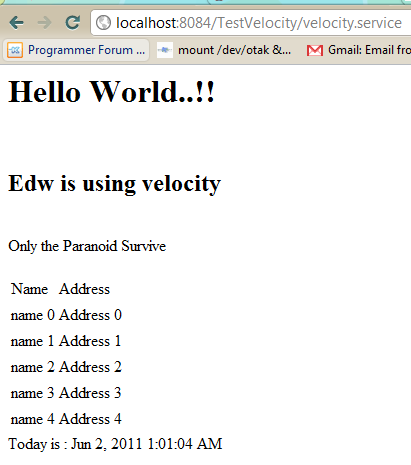
And this is what my browser displayed

In case of anybody asked about my log4j.properties, here is my configuration

# Global logging configuration
log4j.rootLogger=DEBUG,stdout

# Console output...
log4j.appender.stdout=org.apache.log4j.ConsoleAppender
log4j.appender.stdout.layout=org.apache.log4j.PatternLayout
log4j.appender.stdout.layout.ConversionPattern=%d{yyyy-MM-dd HH:mm:ss.SSS} %-5p %c:%L - %m%n

Well it’s not too difficult isn’t it? (H)

How to Fix Netbeans’ GroupLayout Incompatibility with Java 5.0 (and Less)

Netbeans has a very powerful feature for its Swing designer, but too bad the default swing designer generates soucecode using javax.swing.GroupLayout and it’s only available at Java 6. I found this problem early this morning, somehow i design the Swing UI using Netbeans but i have to deploy my application in a Java 5 environment. Btw, im using Netbeans 6.9.

Below is the screenshot for Netbeans’ free design layout.

And this is the generated sourcecode, it works well with java 6.0

But when im using Java 5, it generates lots of errors

So, the workarouds are whether i change all the UI layout designs from GroupLayout to NullLayout, or find a way so GroupLayout is compatible with Java 5.

Because the second workaround is much promising, so i googled a while and found out that it’s actually not to difficult to make GroupLayout is compatible with Java 5. This is how i do it.

Right click, and choose Properties

And choose Swing Layout Extension Library.

Suddenly all the javax.swing.GroupLayout changed into org.jdesktop.layout.GroupLayout. And dont forget to include swing-layout*.jar, because org.jdesktop.layout.GroupLayout located in it.

See, it’s not that hard right? (H)

Beginning MyBatis : DataSource, JNDI and Apache DBCP

In this tutorial, im trying to connect a servlet to mysql database using Apache DBCP. Im using mybatis and accessing Apache DBCP’s datasource via JNDI. Btw, im using Netbeans 6.9 and Apache Tomcat 6.

First as always, a table named “contoh” on a database “test”

CREATE
    TABLE contoh
    (
        nama VARCHAR(30) NOT NULL,
        alamat VARCHAR(100),
        PRIMARY KEY (nama)
    )

insert into contoh (nama, alamat) values ('edwin', 'singapore');
insert into contoh (nama, alamat) values ('kamplenk', 'ciledug');
insert into contoh (nama, alamat) values ('nugie', 'pamulang');
insert into contoh (nama, alamat) values ('samsu', 'dago');
insert into contoh (nama, alamat) values ('tebek', 'karawaci');	

and a simple java bean

package com.edw.mybatis.bean;

import java.io.Serializable;

public class Contoh implements Serializable {
    private String nama;
    private String alamat;

	// other setter and getter
	
    @Override
    public String toString(){
        return nama+" : "+alamat;
    }
}

next is creating a simple xml query, ContohMapper.xml.

<?xml version="1.0" encoding="UTF-8" ?>
<!DOCTYPE mapper PUBLIC "-//mybatis.org//DTD Mapper 3.0//EN" "http://mybatis.org/dtd/mybatis-3-mapper.dtd" >
<mapper namespace="com.edw.mybatis.mapper.ContohMapper" >

    <resultMap id="ContohMap" type="com.edw.mybatis.bean.Contoh" >
        <id column="nama" property="nama" jdbcType="VARCHAR" />
        <result column="alamat" property="alamat" jdbcType="VARCHAR" />
    </resultMap>
    

    <select id="selectAll" resultMap="ContohMap">
        SELECT * FROM contoh
    </select>

</mapper>

and an interface class to map my queries

package com.edw.mybatis.mapper;

import com.edw.mybatis.bean.Contoh;
import java.util.List;

public interface ContohMapper {    
    List<Contoh> selectAll();
}

Dont forget to create a connection pooling configuration on context.xml, which located under META-INF folder.

<?xml version="1.0" encoding="UTF-8"?>
<Context antiJARLocking="true" path="/MyBatisDBCP">
    
    <Resource name="jdbc/test" auth="Container"
            type="javax.sql.DataSource"
            driverClassName="com.mysql.jdbc.Driver"
            url="jdbc:mysql://localhost:3306/test"
            username="root"
            password="xxxx"
            maxActive="100" maxIdle="30" maxWait="10000"
            removeAbandoned="true"
            removeAbandonedTimeout="60"
            logAbandoned="true"
            />
            
</Context>

an xml configuration, Configuration.xml. This is where i put my connection properties.

<?xml version="1.0" encoding="UTF-8" ?>
<!DOCTYPE configuration
PUBLIC "-//mybatis.org//DTD Config 3.0//EN"
"http://mybatis.org/dtd/mybatis-3-config.dtd">
<configuration>
    <environments default="development">
        <environment id="development">
            <transactionManager type="JDBC"/>
            <dataSource type="JNDI">
                <property name="data_source" value="java:/comp/env/jdbc/test"/>
            </dataSource>
        </environment>
    </environments>
    <mappers>
        <mapper resource="com/edw/mybatis/xml/ContohMapper.xml" />
    </mappers>
</configuration>

and a singleton class to load my configuration class,

package com.edw.mybatis.config;

import java.io.Reader;
import org.apache.ibatis.io.Resources;
import org.apache.ibatis.session.SqlSessionFactory;
import org.apache.ibatis.session.SqlSessionFactoryBuilder;


/**
 *
 * @author edw
 */
public class MyBatisSqlSessionFactory {

    protected static final SqlSessionFactory FACTORY;

    static {
        try {
            Reader reader = Resources.getResourceAsReader("com/edw/mybatis/xml/Configuration.xml");
            FACTORY = new SqlSessionFactoryBuilder().build(reader);
        } catch (Exception e){
            throw new RuntimeException("Fatal Error.  Cause: " + e, e);
        }
    }

    public static SqlSessionFactory getSqlSessionFactory() {
        return FACTORY;
    }
}

and a simple servlet to call mybatis query

package com.edw.servlet;

import com.edw.mybatis.bean.Contoh;
import com.edw.mybatis.config.MyBatisSqlSessionFactory;
import com.edw.mybatis.mapper.ContohMapper;
import java.io.IOException;
import java.io.PrintWriter;
import java.util.List;
import javax.servlet.ServletException;
import javax.servlet.http.HttpServlet;
import javax.servlet.http.HttpServletRequest;
import javax.servlet.http.HttpServletResponse;
import org.apache.ibatis.session.SqlSession;
import org.apache.log4j.Logger;

/**
 *
 * @author edw
 */
public class MainServlet extends HttpServlet {

    private Logger logger = Logger.getLogger(MainServlet.class);

    protected void processRequest(HttpServletRequest request, HttpServletResponse response)
    throws ServletException, IOException {
        response.setContentType("text/html;charset=UTF-8");
        PrintWriter out = response.getWriter();
        try {

            SqlSession session = MyBatisSqlSessionFactory.getSqlSessionFactory().openSession();

            ContohMapper contohMapper = session.getMapper(ContohMapper.class);
            List<Contoh> contohs = contohMapper.selectAll();

            out.println("<html>");
            out.println("<head>");
            out.println("<title>DBCP Example MainServlet</title>");
            out.println("</head>");
            out.println("<body>");
            
            for (Contoh contoh : contohs) {
                out.println(contoh.getNama()+" "+contoh.getAlamat()+"<br />");
                logger.debug(contoh.getNama()+" "+contoh.getAlamat());
            }

            out.println("</body>");
            out.println("</html>");

        }catch(Exception ex){
            logger.error(ex.getMessage(), ex);
            out.println(ex.getMessage());
        } finally {
            out.close();
        }
    } 

    @Override
    protected void doGet(HttpServletRequest request, HttpServletResponse response)
    throws ServletException, IOException {
        processRequest(request, response);
    } 

    @Override
    protected void doPost(HttpServletRequest request, HttpServletResponse response)
    throws ServletException, IOException {
        processRequest(request, response);
    }
}

and dont forget to register your jndi and servlet to web.xml

<?xml version="1.0" encoding="UTF-8"?>
<web-app version="2.5" xmlns="http://java.sun.com/xml/ns/javaee" xmlns:xsi="http://www.w3.org/2001/XMLSchema-instance" xsi:schemaLocation="http://java.sun.com/xml/ns/javaee http://java.sun.com/xml/ns/javaee/web-app_2_5.xsd">

    <!-- Session -->
    <session-config>
        <session-timeout>
            30
        </session-timeout>
    </session-config>

    <!-- Welcome file -->
    <welcome-file-list>
        <welcome-file>mainServlet</welcome-file>
    </welcome-file-list>

    <!--  Servlet -->
    <servlet>
        <servlet-name>mainServlet</servlet-name>
        <servlet-class>com.edw.servlet.MainServlet</servlet-class>
    </servlet>
    <servlet-mapping>
        <servlet-name>mainServlet</servlet-name>
        <url-pattern>/mainServlet</url-pattern>
    </servlet-mapping>

    <!-- JNDI -->
    <resource-ref>
        <description>DB Connection</description>
        <res-ref-name>jdbc/test</res-ref-name>
        <res-type>javax.sql.DataSource</res-type>
        <res-auth>Container</res-auth>
    </resource-ref>
    
</web-app>

And also, dont forget to put your mysql-connector.jar to tomcat lib. And if you see this error, Cannot create JDBC driver of class '' for connect URL 'null', it means there’s something wrong with your JNDI configuration on context.xml.

This is my netbeans project screenshot

and this is what the result will look like

Have fun, cheers. (B)