web

Calling Java Serialized Object from JSP

This article is an answer for my simple assignment i created several weeks ago for my friend, Zainul Iman. Its about creating a simple web application that can persist and retrieve values by putting it values on a java object and serialized it on a plain text file.

Okay, so basically i only create 4 files. Only 1 java files, 2 jsp and 1 servlet. And only adding several lines on web.xml file.
First is a simple java bean to store my inserted value,

package com.edw.bean;

import java.io.Serializable;

public class Student implements Serializable{    
    private String name;
    public String getName() {
        return name;
    }
    public void setName(String name) {
        this.name = name;
    }    
}

And a simple jsp file to serve as view layer, in here user can insert value which will be persist on java bean.

<%@page contentType="text/html" pageEncoding="UTF-8"%>
<!DOCTYPE html>
<html>
    <head>
        <meta http-equiv="Content-Type" content="text/html; charset=UTF-8">
        <title>Insert Value</title>
    </head>
    <body>
        <form method="post" action="StudentServlet">
        <table>
            <tr>
                <td>Insert Name : </td>
                <td><input type="text" name="name" /> </td>
            </tr>
            <tr>
                <td colspan="2"><input type="submit" /></td>                
            </tr>
        </table>
        </form>
    </body>
</html>

This is my servlet class, in this class i handle the serialization of the inserted value into java object

package com.edw.servlet;

import com.edw.bean.Student;
import java.io.File;
import java.io.FileOutputStream;
import java.io.IOException;
import java.io.ObjectOutputStream;
import java.io.PrintWriter;
import javax.servlet.ServletException;
import javax.servlet.http.HttpServlet;
import javax.servlet.http.HttpServletRequest;
import javax.servlet.http.HttpServletResponse;

public class StudentServlet extends HttpServlet {

    @Override
    protected void doGet(HttpServletRequest request, HttpServletResponse response)
            throws ServletException, IOException {
    }

    @Override
    protected void doPost(HttpServletRequest request, HttpServletResponse response)
            throws ServletException, IOException {
        String name = request.getParameter("name");
        Student student = new Student();
        student.setName(name);
		
        FileOutputStream fileOutputStream2 = new FileOutputStream(new File("D:\\test12.txt"), false);
        ObjectOutputStream objectOutputStream = new ObjectOutputStream(fileOutputStream2);
        objectOutputStream.writeObject(student);
        response.getWriter().println("Success....!!");
        response.getWriter().println("list of student ---> <a href=\"\">daftar.jsp</a>");
    }
}

And the serialized object will be read from “daftar.jsp” file,

<%@page import="com.edw.bean.Student"%>
<%@page import="java.io.ObjectInputStream"%>
<%@page import="java.io.File"%>
<%@page import="java.io.FileInputStream"%>
<%@page contentType="text/html" pageEncoding="UTF-8"%>
<!DOCTYPE html>
<html>
    <head>
        <meta http-equiv="Content-Type" content="text/html; charset=UTF-8">
        <title>Daftar Nama</title>
    </head>
    <body>
        <h1>Registered Name is : </h1>
        <%
            try{
                FileInputStream fileInputStream = new FileInputStream(new File("D:\\test12.txt"));
                ObjectInputStream objectInputStream = new ObjectInputStream(fileInputStream);
                Student student = (Student)objectInputStream.readObject();
                out.print("<h1>"+student.getName()+"</h1>");
            }catch(Exception ex){                
                out.print(ex);
            }            
        %>
    </body>
</html>

Dont forget to register you servlet to web.xml

<?xml version="1.0" encoding="UTF-8"?>
<web-app version="2.5" xmlns="http://java.sun.com/xml/ns/javaee" xmlns:xsi="http://www.w3.org/2001/XMLSchema-instance" xsi:schemaLocation="http://java.sun.com/xml/ns/javaee http://java.sun.com/xml/ns/javaee/web-app_2_5.xsd">
    <servlet>
        <servlet-name>StudentServlet</servlet-name>
        <servlet-class>com.edw.servlet.StudentServlet</servlet-class>
    </servlet>
    <servlet-mapping>
        <servlet-name>StudentServlet</servlet-name>
        <url-pattern>/StudentServlet</url-pattern>
    </servlet-mapping>
    <session-config>
        <session-timeout>
            30
        </session-timeout>
    </session-config>
    <welcome-file-list>
        <welcome-file>index.jsp</welcome-file>
    </welcome-file-list>
</web-app>

Well it’s not too hard isnt it 😉

Beginning REST Using JBoss RESTEasy

On today’s demo im trying to use RESTEasy to handle multiple REST requests. According to Wikipedia, REST (Representational state transfer) is a style of software architecture for distributed hypermedia systems such as the World Wide Web. While RESTEasy is a JBoss project that provides various frameworks to help you build RESTful Web Services and RESTful Java applications. It is a fully certified and portable implementation of the JAX-RS specification. JAX-RS is a new JCP specification that provides a Java API for RESTful Web Services over the HTTP protocol.

On this project, im trying to create 2 different services. 1 service to get all objects, while another one for fetching a single objects. I create 2 different responses type for each service, JSON and XML. Okay, so lets try with 2 simple javabeans.

package com.edw.bean;

import java.util.List;
import javax.xml.bind.annotation.XmlAccessType;
import javax.xml.bind.annotation.XmlAccessorType;
import javax.xml.bind.annotation.XmlElement;
import javax.xml.bind.annotation.XmlElementWrapper;
import javax.xml.bind.annotation.XmlRootElement;

@XmlRootElement
@XmlAccessorType(XmlAccessType.FIELD)
public class Student {

    private String name;
    private String address;
    private int age;

    @XmlElement(name="book")
    @XmlElementWrapper(name = "books")
    private List<Book> books;

    public Student() {
    }

    public Student(String name, String address, int age, List<Book> books) {
        this.name = name;
        this.address = address;
        this.age = age;
        this.books = books;
    }

	// other setter getter

    @Override
    public String toString() {
        return "Student{" + "name=" + name + ", address=" + address + ", age=" + age + ", books=" + books + '}';
    }
}
package com.edw.bean;

import javax.xml.bind.annotation.XmlAccessType;
import javax.xml.bind.annotation.XmlAccessorType;
import javax.xml.bind.annotation.XmlRootElement;

@XmlRootElement
@XmlAccessorType(XmlAccessType.FIELD)
public class Book {

    private String title;
    private double price;

    public Book() {
    }

    public Book(String title, double price) {
        this.title = title;
        this.price = price;
    }

	// other setter getter

    @Override
    public String toString() {
        return "Book{" + "title=" + title + ", price=" + price + '}';
    }
}

Now, you need to create a java class to handle all REST services,

package com.edw.rest;

import com.edw.bean.Book;
import com.edw.bean.Student;
import java.util.ArrayList;
import java.util.List;
import javax.ws.rs.GET;
import javax.ws.rs.Path;
import javax.ws.rs.PathParam;
import javax.ws.rs.Produces;
import javax.ws.rs.core.MediaType;

@Path("/service/student")
public class StudentRest {

    @GET
    @Path("/json")
    @Produces(MediaType.APPLICATION_JSON)
    // path would be http://localhost:8080/YourProject/service/student/json
    public List<Student> getStudentsJSON() {
        return getStudents();
    }

    @GET
    @Path("/xml")
    @Produces(MediaType.APPLICATION_XML)
    // path would be http://localhost:8080/YourProject/service/student/xml
    public List<Student> getStudentsXML() {
        return getStudents();
    }

    @GET
    @Path("/json/{name}")
    @Produces(MediaType.APPLICATION_JSON)
    // path would be http://localhost:8080/YourProject/service/student/json/insertyournamehere
    public Student getStudentJSON(@PathParam("name") String name) {
        return new Student(name, name + " Address", 10, getBooks());
    }

    @GET
    @Path("/xml/{name}")
    @Produces(MediaType.APPLICATION_XML)
    // path would be http://localhost:8080/YourProject/service/student/xml/insertyournamehere
    public Student getStudentXML(@PathParam("name") String name) {
        return new Student(name, name + " Address", 10, getBooks());
    }

    private List<Book> getBooks() {
        List<Book> books = new ArrayList<Book>();
        books.add(new Book("Harry Potter", 100d));
        books.add(new Book("Lord of the Ring", 120d));
        books.add(new Book("Chicken Soup", 20d));
        books.add(new Book("Doraemon", 190d));
        books.add(new Book("Laskar Pelangi", 200d));
        return books;
    }

    private List<Student> getStudents() {
        List<Student> students = new ArrayList<Student>();
        students.add(new Student("Edwin", "Jakarta", 25, getBooks()));
        students.add(new Student("Kamplenk", "Ciledug", 29, getBooks()));
        students.add(new Student("Tebek", "Pamulang", 38, getBooks()));
        students.add(new Student("Syamsu", "Bandung", 60, getBooks()));
        return students;
    }
}

And dont forget to register your service class

package com.edw.config;

import com.edw.rest.StudentRest;
import java.util.Set;
import java.util.HashSet;
import javax.ws.rs.core.Application;

public class ApplicationConfig extends Application {

    private Set<Object> singletons = new HashSet<Object>();
    private Set<Class<?>> empty = new HashSet<Class<?>>();

    public ApplicationConfig() {
        singletons.add(new StudentRest());
    }

    @Override
    public Set<Class<?>> getClasses() {
        return empty;
    }

    @Override
    public Set<Object> getSingletons() {
        return singletons;
    }
}

And last, register all in your web.xml file

<?xml version="1.0" encoding="UTF-8"?>
<web-app version="2.5" xmlns="http://java.sun.com/xml/ns/javaee" xmlns:xsi="http://www.w3.org/2001/XMLSchema-instance" xsi:schemaLocation="http://java.sun.com/xml/ns/javaee http://java.sun.com/xml/ns/javaee/web-app_2_5.xsd">
    <servlet>
        <servlet-name>Resteasy</servlet-name>
        <servlet-class>
            org.jboss.resteasy.plugins.server.servlet.HttpServletDispatcher
        </servlet-class>
        <init-param>
            <param-name>javax.ws.rs.Application</param-name>
            <param-value>com.edw.config.ApplicationConfig</param-value>
        </init-param>
    </servlet>

    <servlet-mapping>
        <servlet-name>Resteasy</servlet-name>
        <url-pattern>/service/*</url-pattern>
    </servlet-mapping>

    <welcome-file-list>
        <welcome-file>index.jsp</welcome-file>
    </welcome-file-list>
</web-app>

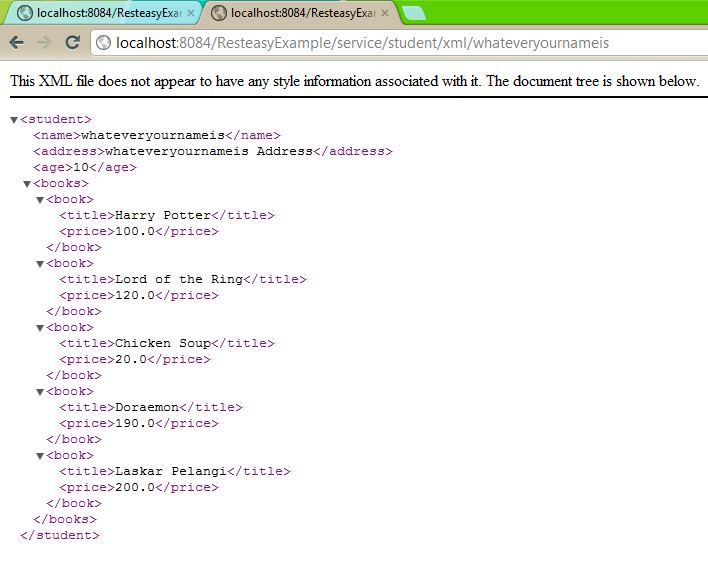
Here are some screenshots,

Have fun with RESTEasy 😉

Error “java.lang.ClassNotFoundException: com.ibm.icu.text.SimpleDateFormat” When Deploying GWT Application

Today i’ve met a very weird error when trying to deploy my GWT application to my tomcat 7,

SEVERE: Exception while dispatching incoming RPC call
com.google.gwt.user.server.rpc.UnexpectedException: Service method 'public abstract java.util.List id.net.baculsoft.app.client.service. LoginService.getUtilDao(java.lang.String,java.util.Map)' 
threw an unexpected exception: java.lang.NoClassDefFoundError: com/ibm/icu/text/SimpleDateFormat
	at com.google.gwt.user.server.rpc.RPC. encodeResponseForFailure(RPC.java:385)
	at com.google.gwt.user.server.rpc.RPC. invokeAndEncodeResponse(RPC.java:588)
	at com.google.gwt.user.server.rpc.RPC. invokeAndEncodeResponse(RPC.java:551)
	at org.gwtrpcspring.RemoteServiceDispatcher. invokeAndEncodeResponse(RemoteServiceDispatcher.java:57)
	at org.gwtrpcspring.RemoteServiceDispatcher. processCall(RemoteServiceDispatcher.java:38)
	at com.google.gwt.user.server.rpc. RemoteServiceServlet.processPost(RemoteServiceServlet.java:248)
	at com.google.gwt.user.server.rpc. AbstractRemoteServiceServlet.doPost(AbstractRemoteServiceServlet.java:62)

which somehow, never happen on my development mode. After searching and trying various workarounds for several hours, i finally make it work by adding icu4j.jar. Well despite icu4j.jar’s size is more than 3mb, at least i’ve make my application running well. Thank God 😉

Creating a Pretty URL With Struts Framework and URLRewrite

On this tutorial im trying to create a pretty URL using one of java’s most famous framework, Struts Framework. I want to change a usual struts URL from news.do?id=newsID into a pretty URL such as news/newsID/newsTitle. The main benefits are your links get easily indexed by search engines and make them easy-to-read and easy-to-remember.

Im using urlrewrite library for url rewriting. As for this example, im using old version of struts 1.3.8 and iBatis ORM version 2.3.4.

First as always, a simple MySQL table

CREATE TABLE news
    (
        id bigint NOT NULL AUTO_INCREMENT,
        title VARCHAR(100) NOT NULL,
        content text NOT NULL,
        createddate DATETIME NOT NULL,
        PRIMARY KEY (id)
    )
	
insert into news 
        (id, title, content, createddate) 
        values (1, 'A Tale of Two More Earths?', 'Example of Content', '2011-12-26 19:00:00');
insert into news 
        (id, title, content, createddate) 
        values (2, 'India: Boat Capsizes; 11 Missing', 'Example of Content number 2', '2011-12-27 19:00:00');

and a javabean and xml for database mapping. And please be aware, im injecting Slugify class to getUrl method so i could get a clean url property inside this bean.

package com.edw.bean;

import com.edw.util.Slugify;
import java.util.Date;

public class News {

    private Long id;
    private String title;
    private Date createddate;
    private String content;
    
    // added for pretty URL
    private String url;

    // other getter and setter

    // do title formatting for a clean url
    public String getUrl() {
        return Slugify.slugify(getTitle());
    }

    public void setUrl(String url) {
        this.url = url;
    }
}

And this is my xml queries

<?xml version="1.0" encoding="UTF-8" ?>
<!DOCTYPE sqlMap PUBLIC "-//ibatis.apache.org//DTD SQL Map 2.0//EN" "http://ibatis.apache.org/dtd/sql-map-2.dtd" >
<sqlMap namespace="news" >
    
  <resultMap id="newsBean" class="com.edw.bean.News" >    
    <result column="id" property="id" jdbcType="BIGINT" />
    <result column="title" property="title" jdbcType="VARCHAR" />
    <result column="content" property="content" jdbcType="LONGVARCHAR" />
    <result column="createddate" property="createddate" jdbcType="TIMESTAMP" />
  </resultMap>  
  
  <select id="select" resultMap="newsBean" >    
    select id, title, createddate, content
    from news    
  </select> 
  
  <select id="selectWithId" resultMap="newsBean" parameterClass="java.lang.Integer" >    
    select id, title, createddate, content
    from news    
    where id = #id#
  </select> 
  
</sqlMap>

This is my utility java class, its main purpose is to encode and clean news titles so they can fit into URLs.

package com.edw.util;

import java.net.URLEncoder;
import java.text.Normalizer;
import org.apache.log4j.Logger;

public class Slugify {

    private static final Logger logger = Logger.getLogger(Slugify.class);
    
    /**
     * 
     * modified version of Jozef Ševcík's slugify
     * 
     * @link http://maddemcode.com/java/seo-friendly-urls-using-slugify-in-java/
     * @param input
     * @return formatted URL
     */
    public static String slugify(String input) {
        if (input == null || input.length() == 0) {
            return "";
        }
        
        try {
            String toReturn = normalize(input);            
            toReturn = toReturn.replaceAll("[^\\w\\s\\-]", "");
            toReturn = toReturn.replace(" ", "-");
            toReturn = toReturn.toLowerCase();
            toReturn = URLEncoder.encode(toReturn, "UTF-8");
            return toReturn;
        } catch (Exception e) {
            logger.error(e, e);
        }
        return "";

    }

    private static String normalize(String input) {
        if (input == null || input.length() == 0) {
            return "";
        }
        return Normalizer.normalize(input, Normalizer.Form.NFD).replaceAll("[^\\p{ASCII}]", "");
    }
}

And an xml file to load all my xml queries

<?xml version="1.0" encoding="UTF-8"?>
<!DOCTYPE sqlMapConfig
PUBLIC "-//ibatis.apache.org//DTD SQL Map Config 2.0//EN"
"http://ibatis.apache.org/dtd/sql-map-config-2.dtd">

<sqlMapConfig>
    <settings
        useStatementNamespaces="true"
        lazyLoadingEnabled="true"
        enhancementEnabled="true"
        maxSessions="20"
        />

    <transactionManager type="JDBC" commitRequired="false">
        <dataSource type="SIMPLE">

            <property name="SetAutoCommitAllowed" value="false"/>
            <property name="DefaultAutoCommit" value="false"/>
            
            <property name="JDBC.Driver" value="com.mysql.jdbc.Driver"/>
            <!-- my database name = pepe -->
            <property name="JDBC.ConnectionURL" value="jdbc:mysql://localhost/pepe"/>
            <property name="JDBC.Username" value="root"/>
            <property name="JDBC.Password" value="xxx"/>
   
        </dataSource>
    </transactionManager>

    <sqlMap resource="com/edw/sqlmap/news.xml"/>
    
</sqlMapConfig>

A java class to load my xml configuration

package com.edw.sqlmap.config;

import com.ibatis.common.resources.Resources;
import com.ibatis.sqlmap.client.SqlMapClient;
import com.ibatis.sqlmap.client.SqlMapClientBuilder;
import java.io.Reader;


public class SqlMapConfig {

    protected static final SqlMapClient sqlMap;

    static {
        try {
            Reader reader = Resources.getResourceAsReader("com/edw/sqlmap/sqlmapconfig.xml");
            sqlMap = SqlMapClientBuilder.buildSqlMapClient(reader);       
        } catch (Exception e){
            throw new RuntimeException("Fatal Error.  Cause: " + e, e);
        }
    }

    public static SqlMapClient getSqlMap() {
        return sqlMap;
    }
}

Next is im creating a Struts Action class

package com.edw.action;

import com.edw.bean.News;
import com.edw.sqlmap.config.SqlMapConfig;
import java.util.List;
import javax.servlet.http.HttpServletRequest;
import javax.servlet.http.HttpServletResponse;
import org.apache.struts.action.ActionForm;
import org.apache.struts.action.ActionForward;
import org.apache.struts.action.ActionMapping;

public class NewsAction extends org.apache.struts.action.Action {

    private static final String SUCCESS = "success";
    
    @Override
    public ActionForward execute(ActionMapping mapping, ActionForm form,
            HttpServletRequest request, HttpServletResponse response)
            throws Exception {
        
        List<News> newses = null;
        if(request.getParameter("id") != null)
            newses = SqlMapConfig.getSqlMap().queryForList("news.selectWithId", Integer.parseInt(request.getParameter("id")));       
        else
            newses = SqlMapConfig.getSqlMap().queryForList("news.select");       
        request.setAttribute("newses", newses);
        
        return mapping.findForward(SUCCESS);
    }        
}

dont forget to register NewsAction to strutsconfig.xml

<?xml version="1.0" encoding="UTF-8" ?>

<!DOCTYPE struts-config PUBLIC
          "-//Apache Software Foundation//DTD Struts Configuration 1.3//EN"
          "http://jakarta.apache.org/struts/dtds/struts-config_1_3.dtd">

<struts-config>
    <form-beans></form-beans>
    
    <global-exceptions></global-exceptions>

    <global-forwards>
        <forward name="welcome"  path="/Welcome.do"/>
    </global-forwards>

    <action-mappings>
        <action path="/news" type="com.edw.action.NewsAction">
            <forward name="success" path="/WEB-INF/pages/news.jsp" />
        </action>
        <action path="/Welcome" forward="/welcomeStruts.jsp"/>
    </action-mappings>        

    <message-resources parameter="com/edw/res/ApplicationResource"/>    
    
</struts-config>

Next is my presentation layer. Im using a plain JSP and Struts tags, and put my JSP file under WEB-INF folder, so it cant be accessed directly.

<%@page contentType="text/html" pageEncoding="UTF-8"%>
<!DOCTYPE html>

<%@taglib uri="http://struts.apache.org/tags-bean" prefix="bean"%>
<%@taglib uri="http://struts.apache.org/tags-logic" prefix="logic"%>

<html>
    <head>
        <meta http-equiv="Content-Type" content="text/html; charset=UTF-8">
        <title>News Page</title>
    </head>
    <body>
        <h1>News</h1>

        <logic:iterate name="newses" id="news">            
            <bean:write name="news" property="id"/> , 
            <bean:write name="news" property="title"/>, 
            <bean:write name="news" property="createddate"/>, 
            <bean:write name="news" property="content"/>            
            <br />
            <a href="${pageContext.request.contextPath}/news/<bean:write name="news" property="id"/>/<bean:write name="news" property="url"/>">link</a>
            <br />
            <br />
            <br />
            
        </logic:iterate>

    </body>
</html>

Next is where the magic of urlrewrite starts, first i register urlrewrite filter to my web.xml

<?xml version="1.0" encoding="UTF-8"?>
<web-app version="2.5" xmlns="http://java.sun.com/xml/ns/javaee" xmlns:xsi="http://www.w3.org/2001/XMLSchema-instance" xsi:schemaLocation="http://java.sun.com/xml/ns/javaee http://java.sun.com/xml/ns/javaee/web-app_2_5.xsd">
    
    <filter>
        <filter-name>UrlRewriteFilter</filter-name>
        <filter-class>org.tuckey.web.filters.urlrewrite.UrlRewriteFilter</filter-class>   
    </filter>
    <filter-mapping>
        <filter-name>UrlRewriteFilter</filter-name>
        <url-pattern>/*</url-pattern>
    </filter-mapping>
        
    
    <servlet>
        <servlet-name>action</servlet-name>
        <servlet-class>org.apache.struts.action.ActionServlet</servlet-class>
        <init-param>
            <param-name>config</param-name>
            <param-value>/WEB-INF/struts-config.xml</param-value>
        </init-param>
        <init-param>
            <param-name>debug</param-name>
            <param-value>2</param-value>
        </init-param>
        <init-param>
            <param-name>detail</param-name>
            <param-value>2</param-value>
        </init-param>
        <load-on-startup>2</load-on-startup>
    </servlet>
    
    <servlet-mapping>
        <servlet-name>action</servlet-name>
        <url-pattern>*.do</url-pattern>
    </servlet-mapping>
    
    <session-config>
        <session-timeout>
            30
        </session-timeout>
    </session-config>
    
    <welcome-file-list>
        <welcome-file>index.jsp</welcome-file>
    </welcome-file-list>
    
</web-app>

and create a urlrewrite xml under WEB-INF

<?xml version="1.0" encoding="utf-8"?>
<!DOCTYPE urlrewrite PUBLIC "-//tuckey.org//DTD UrlRewrite 3.2//EN"
        "http://tuckey.org/res/dtds/urlrewrite3.2.dtd">

<urlrewrite>       
    
    <rule>
        <note>for news with parameters</note>
        <from>^/news/([0-9]+)/(.*)</from>
        <to>/news.do?id=$1</to>
    </rule> 
    
    <rule>
        <note>display all news</note>
        <from>^/news$</from>
        <to>/news.do</to>
    </rule> 

</urlrewrite>

The final result is my url path will be changed from

http://localhost:8084/StrutsPrettyURL/news.do
and
http://localhost:8084/StrutsPrettyURL/news.do?id=1

to

http://localhost:8084/StrutsPrettyURL/news
and
http://localhost:8084/StrutsPrettyURL/news/1/a-tale-of-two-more-earths

This are my netbeans project structure and libraries.

Have Fun (&)

Get Absolute File Path Using ServletFilter

It’s all begin when i need to get a text file content from a servlet filter, after spent some amount of time googling i’ve found a good solution. This is how i do it.

package com.edw.filter;

import java.io.File;
import java.io.IOException;
import javax.servlet.Filter;
import javax.servlet.FilterChain;
import javax.servlet.FilterConfig;
import javax.servlet.ServletException;
import javax.servlet.ServletRequest;
import javax.servlet.ServletResponse;
import org.apache.log4j.Logger;

/**
 *
 * @author edw
 */
public class MyFilter implements Filter {

    private FilterConfig filterConfig = null;
    private Logger logger = Logger.getLogger(this.getClass());

    public MyFilter() {
        
    }    

    public void doFilter(ServletRequest request, ServletResponse response,
                         FilterChain chain)
	throws IOException, ServletException {
	
	try {
		String pathName = filterConfig.getServletContext().getRealPath("/");
		File file = new File(pathName);

		logger.debug(file.getAbsolutePath());

		chain.doFilter(request, response);
	}
	catch(Throwable t) {
	    logger.error(t,t);
	}
    }    

    public void destroy() { 
    }

    public void init(FilterConfig filterConfig) { 
		this.filterConfig = filterConfig;
    }    

}

Hope it can help others, thank you (*)