utility

[Weird Javascript Error] Leading Zero on Integer Variable Become Octal on Old Browser

Ive met a very weird error, that somehow never occurs to me on my browser. I found this error only happen on old mozilla browsers, and only happen on javascript’s parseInt method. Here is a simple example,

alert(parseInt("09")-1);

When im running it on my browser (Mozilla version 34), this is what happen,
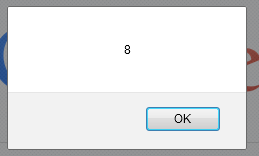
mozillanew

But when running on old browsers (Mozilla version 3.6), this is what happen,
mozillaold

I finally found out that that on old browsers, leading zeros are treated as octal values instead of plain integers. So this is my workaround,

alert(parseInt("09".replace(/^[0]+/g,""))-1);

I removed the leading zero before parsing it into int.

Hope it can help others 🙂

Accessing JBoss Administration Console (Port 9990) From Network

Today, i have a very weird condition, im installing Jboss EAP 6.1 but i cannot access its administration console from outside ip. Somehow, everytime i run netstat -aon command, i can see that port 9990 binded only with 127.0.0.1.

The workaround is actually very simple, i only add -bmanagement on JBoss start command,

./standalone.sh -bmanagement=0.0.0.0

And now port 9990 is accessible by other network.

Regular Expression to Check Indonesian MobilePhone Provider

These are simple regex to check Indonesia’s Mobile phone provider based on its number,

telkomsel.regex = ^(\\+62|\\+0|0|62)8(1[123]|52|53|21|22|23)[0-9]{5,9}$

simpati.regex = ^(\\+62|\\+0|0|62)8(1[123]|2[12])[0-9]{5,9}$

as.regex = ^(\\+62|\\+0|0|62)8(52|53|23)[0-9]{5,9}$

indosat.regex= ^(\\+62815|0815|62815|\\+0815|\\+62816|0816|62816|\\+0816|\\+62858|0858|62858|\\+0814|\\+62814|0814|62814|\\+0814)[0-9]{5,9}$

im3.regex = ^(\\+62855|0855|62855|\\+0855|\\+62856|0856|62856|\\+0856|\\+62857|0857|62857|\\+0857)[0-9]{5,9}$

xl.regex = ^(\\+62817|0817|62817|\\+0817|\\+62818|0818|62818|\\+0818|\\+62819|0819|62819|\\+0819|\\+62859|0859|62859|\\+0859|\\+0878|\\+62878|0878|62878|\\+0877|\\+62877|0877|62877)[0-9]{5,9}$

Hope it can help others, 😉

A Simple Indonesian Geographic Coordinate Conversion Between Degrees to Degree-Minute-Second (DMS)

Recently i have a simple GIS project which force me to display an Indonesian DMS coordinate format, instead of the usual decimal format. This is a simple utility class i used to do convertion.

import java.text.DecimalFormat;

public class DegreeConverterTest {

    public static final String LONGITUDE = "longitude";
    public static final String LATITUDE = "latitude";

    public DegreeConverterTest(String testName) {
    }

    public static void main(String a[]) {
        System.out.println(degree2DMS(-8.857, LATITUDE));
        System.out.println(degree2DMS(10.645, LATITUDE));
        System.out.println(degree2DMS(135.696, LONGITUDE));
    }

    public static String degree2DMS(double coordinate, String mode) {
        String dms = "";

        char degree = '\u00B0';
        int degLong, minLongA;
        double minLong, secLong;
        DecimalFormat df = new DecimalFormat("#,###,####0.0000");

        if (LONGITUDE.equals(mode)) {
            // minus is BB (Bujur Barat or west longitude)
            // plus is BT (Bujur Timur of east longitude)
            degLong = (int) coordinate;
            minLong = (coordinate % 1) * 60;
            minLongA = (int) minLong;
            secLong = (minLong % 1) * 60;
            String secLongAs = String.valueOf(df.format(secLong));
            dms = degLong + degree + " " + minLongA + "' " + secLongAs + "\" BT";
        } else if (LATITUDE.equals(mode)) {
            // minus is LS (Lintang Selatan or south latitude)
            // plus is LU (Lintang Utara or north latitude)
            boolean isMinus = true;
            String minusDegree = "LS";
            degLong = (int) coordinate;
            String degLongS = String.valueOf(degLong);
            if (degLongS.contains("-")) {
                degLongS = degLongS.replace("-", "");
            } else {
                isMinus = false;
                minusDegree = "LU";
            }

            minLong = (coordinate % 1) * 60;
            minLongA = (int) minLong;
            String minLongAs = String.valueOf(minLongA);
            if (isMinus) {
                minLongAs = minLongAs.replace("-", "");
            }

            secLong = (minLong % 1) * 60;
            String secLongAs = String.valueOf(df.format(secLong));
            if (isMinus) {
                secLongAs = secLongAs.replace("-", "");
            }

            dms = degLongS + degree + " " + minLongAs + "' " + secLongAs + "\" " + minusDegree;
        }
        return dms;
    }
}

And this is the output i got on my netbeans’ console

8° 51' 25.2000" LS
10° 38' 42.0000" LU
311 41' 45.6000" BT

How To Simulate An Image Attachment HTTP Multipart POST

Below is the code i use for simulating an image attachment using apache http client.

package com.edw.postsimulator;

import java.io.File;
import java.nio.charset.Charset;
import org.apache.http.HttpEntity;
import org.apache.http.HttpResponse;
import org.apache.http.client.HttpClient;
import org.apache.http.client.methods.HttpPost;
import org.apache.http.entity.mime.HttpMultipartMode;
import org.apache.http.entity.mime.MultipartEntity;
import org.apache.http.entity.mime.content.FileBody;
import org.apache.http.entity.mime.content.StringBody;
import org.apache.http.impl.client.DefaultHttpClient;
import org.apache.http.protocol.BasicHttpContext;
import org.apache.http.protocol.HttpContext;
import org.apache.http.util.EntityUtils;

public class PostTest {

    private static String url = "http://localhost:8083/RealsAppApi/images/add";

    public static void main(String[] args) throws Exception {
        HttpClient httpclient = new DefaultHttpClient();
        HttpPost httpPost = new HttpPost(url);
        HttpContext localContext = new BasicHttpContext();
        
        Charset chars = Charset.forName("UTF-8");
        
        // http content
        MultipartEntity entity = new MultipartEntity(HttpMultipartMode.BROWSER_COMPATIBLE);
        entity.addPart("username", new StringBody("edwin", chars));
        entity.addPart("password", new StringBody("edwinpassword", chars));        
        
        // attach image
        File fileToUpload = new File("F:\\no.jpg");
        FileBody fileBody = new FileBody(fileToUpload, "application/octet-stream");
        entity.addPart("image", fileBody);
        httpPost.setEntity(entity);

        // fire and log the responses
        HttpResponse response = httpclient.execute(httpPost, localContext); 
        HttpEntity resEntity = response.getEntity();
        System.out.println(EntityUtils.toString(resEntity));
    }
}

These are the libraries i used for this project,
post simulator

Hope it would help others, have fun (Y)