Programming

How to Handle JSon POST Request Using PHP

On my last project, i need to create a php service using JSon to handle service requests from multiple clients. My PHP file would consume JSon string for its requests and produce JSon string as its responses.
Im not too familiar with PHP, but after sometime googling i’ve found a workaround. This is how i do it.

<?php
// JSon request format is : 
// {"userName":"654321@zzzz.com","password":"12345","emailProvider":"zzzz"}

// read JSon input
$data_back = json_decode(file_get_contents('php://input'));

// set json string to php variables
$userName = $data_back->{"userName"};
$password = $data_back->{"password"};
$emailProvider = $data_back->{"emailProvider"};

// create json response
$responses = array();
for ($i = 0; $i < 10; $i++) {
    $responses[] = array("name" => $i, "email" => $userName . " " . $password . " " . $emailProvider);
}

// JSon response format is : 
// [{"name":"eeee","email":"eee@zzzzz.com"},
// {"name":"aaaa","email":"aaaaa@zzzzz.com"},{"name":"cccc","email":"bbb@zzzzz.com"}]

// set header as json
header("Content-type: application/json");

// send response
echo json_encode($responses);
?>

This is the http header and body of request and response.

Hope it help others, have fun with JSon. πŸ˜‰

How to Create a Simple Servlet to Handle JSon Requests

On this example, im trying to create a simple servlet to handle JSon request. Im using this servlet to handle JSon request from my front end such as web or even desktop application. Thanks to GSon library, it really helped on simplifying javabean convert to json strings and the other way around.

First as usual, a simple java bean to handle request and response format

package com.edw.bean;

public class Student {
 
    private String name;
    private int age;
    private byte gender;

	// other setter and getter
}
package com.edw.bean;

public class Status {
    private boolean success;
    private String description;
	
	// other setter and getter
}

And this is my servlet,

package com.edw.servlet;

import com.edw.bean.Status;
import com.edw.bean.Student;
import com.google.gson.Gson;
import java.io.IOException;
import javax.servlet.ServletException;
import javax.servlet.http.HttpServlet;
import javax.servlet.http.HttpServletRequest;
import javax.servlet.http.HttpServletResponse;

public class JsonParserServlet extends HttpServlet {

    protected void processRequest(HttpServletRequest request, HttpServletResponse response)
            throws ServletException, IOException {
        response.setContentType("application/json");        
        Gson gson = new Gson();

        try {
            StringBuilder sb = new StringBuilder();
            String s;
            while ((s = request.getReader().readLine()) != null) {
                sb.append(s);
            }

            Student student = (Student) gson.fromJson(sb.toString(), Student.class);

            Status status = new Status();
            if (student.getName().equalsIgnoreCase("edw")) {
                status.setSuccess(true);
                status.setDescription("success");
            } else {
                status.setSuccess(false);
                status.setDescription("not edw");
            }
            response.getOutputStream().print(gson.toJson(status));
            response.getOutputStream().flush();
        } catch (Exception ex) {
            ex.printStackTrace();
            Status status = new Status();
            status.setSuccess(false);
            status.setDescription(ex.getMessage());
            response.getOutputStream().print(gson.toJson(status));
            response.getOutputStream().flush();
        } 
    }

    @Override
    protected void doPost(HttpServletRequest request, HttpServletResponse response)
            throws ServletException, IOException {
        processRequest(request, response);
    }
}

This is a screenshot on how my message actually look like

Have Fun (H)

Creating a Simple Yahoo Messenger Auto Response with Java and OpenYMSG Library

Hi, several days ago someone asked me to help him on his assignment related to Yahoo Messenger Application with Java. That’s why today im trying to help him by creating a simple example on auto response and message sending using one of the best open source Yahoo Messenger API implementation, OpenYMSG.

It’s actually quite easy, only several lines of codes. This is how i do it

package com.edw.yahoo;

import java.util.Scanner;
import org.apache.log4j.Logger;
import org.openymsg.network.FireEvent;
import org.openymsg.network.ServiceType;
import org.openymsg.network.Session;
import org.openymsg.network.event.SessionEvent;
import org.openymsg.network.event.SessionListener;

/**
 *  com.edw.yahoo.YahooLogin
 *
 *  @author edw
 */
public class YahooLogin implements SessionListener {

    private Logger logger = Logger.getLogger(YahooLogin.class);
    private Session session = new Session();

    public static void main(String[] args) {
        YahooLogin yahooLogin = new YahooLogin();
        yahooLogin.doLogin();
    }

    public YahooLogin() {
    }

    private void doLogin() {
        try {
            // insert your yahoo id
            // as for this example, im using my yahoo ID "dombaganas"
            session.login("dombaganas", "MyYahooPassword", true);
            session.addSessionListener(this);
            Scanner scanner = new Scanner(System.in);

            while (true) {
                System.out.println("please insert your message : ");
                String message = scanner.nextLine();

                // logout if message equals to "bye"
                if (message.equalsIgnoreCase("bye")) {
                    break;
                }
                // send message to targeted yahoo id
                session.sendMessage("TargetYahooID", message);
            }

            // logout from YM
            session.logout();
        } catch (Exception e) {
            logger.error(e, e);

        }
    }

    /*
     *  this is my listener method
     *  it listen for YM message request
     */
    @Override
    public void dispatch(FireEvent fe) {
        ServiceType type = fe.getType();
        SessionEvent sessionEvent = fe.getEvent();

        if (type == ServiceType.MESSAGE) {
            try {
                // log request message
                logger.debug("message from " + sessionEvent.getFrom() + " \nmessage " + sessionEvent.getMessage());

                // give an automatic response
                session.sendMessage(sessionEvent.getFrom(), "hi, you are sending " + sessionEvent.getMessage());
            } catch (Exception e) {
                logger.error(e, e);
            }
        }
    }
}

These are some screenshots related to this application.

To my friend, i hope this tutorial can help you getting started with your assignment. As the wise man once said “Answering one good question is like feeding a hungry person one meal, but teaching them research skills by example is showing them how to grow food for a lifetime.”

YNWA
(I)

ps. if somehow you found a NoClassDefFoundError, such as :
Exception in thread β€œmain” java.lang.NoClassDefFoundError: org/apache/commons/logging/LogFactory
you need to include apache common logging lib into your project classpath.

How to Send Emails With Java Using Gmail Accounts

It’s actually quite simple on how to send emails using java, only need several lines of codes. This is how i do it


import java.util.Properties;
import javax.mail.Message;
import javax.mail.Session;
import javax.mail.Transport;
import javax.mail.internet.InternetAddress;
import javax.mail.internet.MimeMessage;
import org.apache.log4j.Logger;

public class MailTestSend {

    private static Logger logger = Logger.getLogger(MailTestSend.class);

    public static void main(String[] args) {
        try {

            // setup the mail server properties
            Properties props = new Properties();
            props.put("mail.smtp.auth", "true");
            props.put("mail.smtp.starttls.enable", "true");

            // set up the message
            Session session = Session.getInstance(props);

            Message message = new MimeMessage(session);

            // add a TO address
            message.setRecipients(Message.RecipientType.TO, InternetAddress.parse("xxxxx@gmail.com"));

            // add a multiple CC addresses
            message.setRecipients(Message.RecipientType.CC, InternetAddress.parse("yyyyy@gmail.com,zzzzzz@yahoo.com"));
            
            message.setSubject("Welcome to Java");
            message.setContent("Hi, im testing a new way to send emails via java.", "text/plain");

            Transport transport = session.getTransport("smtp");
            transport.connect("smtp.gmail.com", 587, "yourgmailusername", "yourgmailpassword");
            transport.sendMessage(message, message.getAllRecipients());
            logger.error("successfully send email");
        } catch (Exception e) {            
            logger.error(e, e);
        }
    }
}

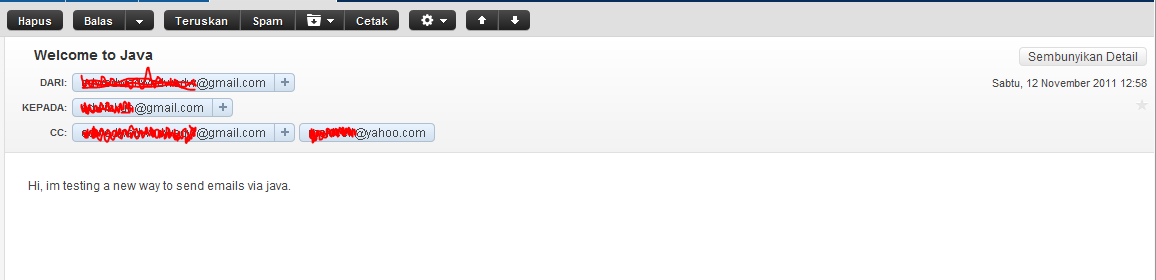
Please dont forget to include mail.jar into your project. This is the screenshot of my netbeans libraries and my email inbox.

:-[

LDAP Programming with Java

Today im trying to share on how to do a simple LDAP queries such as select, insert, edit and delete using java. Im using Apache Directory Server as LDAP server and JXplorer as LDAP explorer.

Enough chit-chat, here is my code.
First is a simple java bean,

package com.edw.bean;

/**
 *  com.edw.bean.Person
 *
 *  @author edw
 */
public class Person {
    
    private String name;
    private String address;    
    private String password;

	// other setter and getter
}

and here is my LDAP class controller

package com.edw.ldap.main;

import com.edw.bean.Person;
import java.security.MessageDigest;
import java.util.Hashtable;
import javax.naming.Context;
import javax.naming.NamingEnumeration;
import javax.naming.directory.Attribute;
import javax.naming.directory.Attributes;
import javax.naming.directory.BasicAttribute;
import javax.naming.directory.BasicAttributes;
import javax.naming.directory.DirContext;
import javax.naming.directory.InitialDirContext;
import javax.naming.directory.ModificationItem;
import javax.naming.directory.SearchControls;
import javax.naming.directory.SearchResult;
import org.apache.log4j.Logger;
import sun.misc.BASE64Encoder;

/**
 *  com.edw.ldap.main.LDAPMain
 *
 *  @author edw
 */
public class LDAPMain {

    private Logger logger = Logger.getLogger(LDAPMain.class);
    private Hashtable<String, String> env = new Hashtable<String, String>();

    public LDAPMain() {
        try {
            env.put(Context.INITIAL_CONTEXT_FACTORY, "com.sun.jndi.ldap.LdapCtxFactory");
            env.put(Context.PROVIDER_URL, "ldap://localhost:10389");
            env.put(Context.SECURITY_PRINCIPAL, "uid=admin,ou=system");
            env.put(Context.SECURITY_CREDENTIALS, "xxx");
        } catch (Exception e) {
            logger.error(e, e);
        }

    }

    private boolean insert(Person person) {
        try {

            DirContext dctx = new InitialDirContext(env);
            Attributes matchAttrs = new BasicAttributes(true);
            matchAttrs.put(new BasicAttribute("uid", person.getName()));
            matchAttrs.put(new BasicAttribute("cn", person.getName()));
            matchAttrs.put(new BasicAttribute("street", person.getAddress()));
            matchAttrs.put(new BasicAttribute("sn", person.getName()));
            matchAttrs.put(new BasicAttribute("userpassword", encryptLdapPassword("SHA", person.getPassword())));
            matchAttrs.put(new BasicAttribute("objectclass", "top"));
            matchAttrs.put(new BasicAttribute("objectclass", "person"));
            matchAttrs.put(new BasicAttribute("objectclass", "organizationalPerson"));
            matchAttrs.put(new BasicAttribute("objectclass", "inetorgperson"));
            String name = "uid=" + person.getName() + ",ou=users,ou=system";
            InitialDirContext iniDirContext = (InitialDirContext) dctx;
            iniDirContext.bind(name, dctx, matchAttrs);

            logger.debug("success inserting "+person.getName());
            return true;
        } catch (Exception e) {
            logger.error(e, e);
            return false;
        }
    }

    private boolean edit(Person person) {
        try {

            DirContext ctx = new InitialDirContext(env);
            ModificationItem[] mods = new ModificationItem[2];
            Attribute mod0 = new BasicAttribute("street", person.getAddress());
            Attribute mod1 = new BasicAttribute("userpassword", encryptLdapPassword("SHA", person.getPassword()));
            mods[0] = new ModificationItem(DirContext.REPLACE_ATTRIBUTE, mod0);
            mods[1] = new ModificationItem(DirContext.REPLACE_ATTRIBUTE, mod1);

            ctx.modifyAttributes("uid=" + person.getName() + ",ou=users,ou=system", mods);

            logger.debug("success editing "+person.getName());
            return true;
        } catch (Exception e) {
            logger.error(e, e);
            return false;
        }
    }

    private boolean delete(Person person) {
        try {

            DirContext ctx = new InitialDirContext(env);
            ctx.destroySubcontext("uid=" + person.getName() + ",ou=users,ou=system");

            logger.debug("success deleting "+person.getName());
            return true;
        } catch (Exception e) {
            logger.error(e, e);
            return false;
        }
    }
    
    private boolean search(Person person) {
        try {

            DirContext ctx = new InitialDirContext(env);
            String base = "ou=users,ou=system";

            SearchControls sc = new SearchControls();
            sc.setSearchScope(SearchControls.SUBTREE_SCOPE);

            String filter = "(&(objectclass=person)(uid="+person.getName()+"))";

            NamingEnumeration results = ctx.search(base, filter, sc);


            while (results.hasMore()) {
                SearchResult sr = (SearchResult) results.next();
                Attributes attrs = sr.getAttributes();

                Attribute attr = attrs.get("uid");
                if(attr != null)
                    logger.debug("record found "+attr.get());
            }
            ctx.close();
                        
            return true;
        } catch (Exception e) {
            logger.error(e, e);
            return false;
        }
    }

    private String encryptLdapPassword(String algorithm, String _password) {
        String sEncrypted = _password;
        if ((_password != null) && (_password.length() > 0)) {
            boolean bMD5 = algorithm.equalsIgnoreCase("MD5");
            boolean bSHA = algorithm.equalsIgnoreCase("SHA")
                    || algorithm.equalsIgnoreCase("SHA1")
                    || algorithm.equalsIgnoreCase("SHA-1");
            if (bSHA || bMD5) {
                String sAlgorithm = "MD5";
                if (bSHA) {
                    sAlgorithm = "SHA";
                }
                try {
                    MessageDigest md = MessageDigest.getInstance(sAlgorithm);
                    md.update(_password.getBytes("UTF-8"));
                    sEncrypted = "{" + sAlgorithm + "}" + (new BASE64Encoder()).encode(md.digest());
                } catch (Exception e) {
                    sEncrypted = null;
                    logger.error(e, e);
                }
            }
        }
        return sEncrypted;
    }

    public static void main(String[] args) {
        LDAPMain main = new LDAPMain();

        Person person = new Person();
        person.setAddress("kebayoran");
        person.setName("kamplenk");
        person.setPassword("pepe");

        // insert
        main.insert(person);
        
        // edit
        main.edit(person);
        
        // select
        main.search(person);
        
        // delete
        main.delete(person);
    }
}

Here is screenshot of my LDAP explorer, after i’ve insert my latest ldap record.

hope it can help others, have fun with LDAP πŸ˜‰