Programming

Calling Java Serialized Object from JSP

This article is an answer for my simple assignment i created several weeks ago for my friend, Zainul Iman. Its about creating a simple web application that can persist and retrieve values by putting it values on a java object and serialized it on a plain text file.

Okay, so basically i only create 4 files. Only 1 java files, 2 jsp and 1 servlet. And only adding several lines on web.xml file.
First is a simple java bean to store my inserted value,

package com.edw.bean;

import java.io.Serializable;

public class Student implements Serializable{    
    private String name;
    public String getName() {
        return name;
    }
    public void setName(String name) {
        this.name = name;
    }    
}

And a simple jsp file to serve as view layer, in here user can insert value which will be persist on java bean.

<%@page contentType="text/html" pageEncoding="UTF-8"%>
<!DOCTYPE html>
<html>
    <head>
        <meta http-equiv="Content-Type" content="text/html; charset=UTF-8">
        <title>Insert Value</title>
    </head>
    <body>
        <form method="post" action="StudentServlet">
        <table>
            <tr>
                <td>Insert Name : </td>
                <td><input type="text" name="name" /> </td>
            </tr>
            <tr>
                <td colspan="2"><input type="submit" /></td>                
            </tr>
        </table>
        </form>
    </body>
</html>

This is my servlet class, in this class i handle the serialization of the inserted value into java object

package com.edw.servlet;

import com.edw.bean.Student;
import java.io.File;
import java.io.FileOutputStream;
import java.io.IOException;
import java.io.ObjectOutputStream;
import java.io.PrintWriter;
import javax.servlet.ServletException;
import javax.servlet.http.HttpServlet;
import javax.servlet.http.HttpServletRequest;
import javax.servlet.http.HttpServletResponse;

public class StudentServlet extends HttpServlet {

    @Override
    protected void doGet(HttpServletRequest request, HttpServletResponse response)
            throws ServletException, IOException {
    }

    @Override
    protected void doPost(HttpServletRequest request, HttpServletResponse response)
            throws ServletException, IOException {
        String name = request.getParameter("name");
        Student student = new Student();
        student.setName(name);
		
        FileOutputStream fileOutputStream2 = new FileOutputStream(new File("D:\\test12.txt"), false);
        ObjectOutputStream objectOutputStream = new ObjectOutputStream(fileOutputStream2);
        objectOutputStream.writeObject(student);
        response.getWriter().println("Success....!!");
        response.getWriter().println("list of student ---> <a href=\"\">daftar.jsp</a>");
    }
}

And the serialized object will be read from “daftar.jsp” file,

<%@page import="com.edw.bean.Student"%>
<%@page import="java.io.ObjectInputStream"%>
<%@page import="java.io.File"%>
<%@page import="java.io.FileInputStream"%>
<%@page contentType="text/html" pageEncoding="UTF-8"%>
<!DOCTYPE html>
<html>
    <head>
        <meta http-equiv="Content-Type" content="text/html; charset=UTF-8">
        <title>Daftar Nama</title>
    </head>
    <body>
        <h1>Registered Name is : </h1>
        <%
            try{
                FileInputStream fileInputStream = new FileInputStream(new File("D:\\test12.txt"));
                ObjectInputStream objectInputStream = new ObjectInputStream(fileInputStream);
                Student student = (Student)objectInputStream.readObject();
                out.print("<h1>"+student.getName()+"</h1>");
            }catch(Exception ex){                
                out.print(ex);
            }            
        %>
    </body>
</html>

Dont forget to register you servlet to web.xml

<?xml version="1.0" encoding="UTF-8"?>
<web-app version="2.5" xmlns="http://java.sun.com/xml/ns/javaee" xmlns:xsi="http://www.w3.org/2001/XMLSchema-instance" xsi:schemaLocation="http://java.sun.com/xml/ns/javaee http://java.sun.com/xml/ns/javaee/web-app_2_5.xsd">
    <servlet>
        <servlet-name>StudentServlet</servlet-name>
        <servlet-class>com.edw.servlet.StudentServlet</servlet-class>
    </servlet>
    <servlet-mapping>
        <servlet-name>StudentServlet</servlet-name>
        <url-pattern>/StudentServlet</url-pattern>
    </servlet-mapping>
    <session-config>
        <session-timeout>
            30
        </session-timeout>
    </session-config>
    <welcome-file-list>
        <welcome-file>index.jsp</welcome-file>
    </welcome-file-list>
</web-app>

Well it’s not too hard isnt it 😉

MyBatis Caching Using OSCache

In this example im trying to create a simple application using MyBatis cache ability. What is cache anyway? A cache is designed to reduce traffic between your application and the database by conserving data already loaded from the database and put it whether in memory or in file. Database access is necessary only when retrieving data that is not currently available in the cache. So basically not all queries are taken from database, but from cache instead.

As you can see here, MyBatis has lots of caching products. But on this example im using OSCache.
First, as always, a simple mysql table

CREATE TABLE contoh
    (
        nama VARCHAR(10) NOT NULL,
        alamat VARCHAR(200),
        PRIMARY KEY (nama)
    )
	
insert into contoh (nama, alamat) values ('edw', 'Jakarta');
insert into contoh (nama, alamat) values ('danu', 'Ciledug');
insert into contoh (nama, alamat) values ('kamplenk', 'Tangerang');
insert into contoh (nama, alamat) values ('tebek', 'BSD');
insert into contoh (nama, alamat) values ('nugie', 'Pamulang');
insert into contoh (nama, alamat) values ('samsu', 'Bandung');

And a simple java bean to represent my table,

package com.edw.bean;

import java.io.Serializable;

public class Contoh implements Serializable {
    private String nama;
    private String alamat;

	// setter and getter

    @Override
    public String toString(){
        return nama+" : "+alamat;
    }
}

And a simple java interface to create query method

package com.edw.mapper;

import com.edw.bean.Contoh;
import java.util.List;

public interface ContohMapper {    
    List<Contoh> selectAll();
}

My xml query, please take a look at line 5.

<?xml version="1.0" encoding="UTF-8" ?>
<!DOCTYPE mapper PUBLIC "-//mybatis.org//DTD Mapper 3.0//EN" "http://mybatis.org/dtd/mybatis-3-mapper.dtd" >
<mapper namespace="com.edw.mapper.ContohMapper" >
    
	<cache type="org.mybatis.caches.oscache.OSCache"/>

    <resultMap id="ContohMap" type="com.edw.bean.Contoh" >
        <id column="nama" property="nama" jdbcType="VARCHAR" />
        <result column="alamat" property="alamat" jdbcType="VARCHAR" />
    </resultMap>
    
    <select id="selectAll" resultMap="ContohMap">
        SELECT * FROM contoh
    </select>
</mapper>

And my xml configuration to load all my xml queries,

<?xml version="1.0" encoding="UTF-8" ?>
<!DOCTYPE configuration
PUBLIC "-//mybatis.org//DTD Config 3.0//EN"
"http://mybatis.org/dtd/mybatis-3-config.dtd">
<configuration>
   <environments default="development">
        <environment id="development">
            <transactionManager type="JDBC"/>
            <dataSource type="UNPOOLED">
                <property name="driver" value="com.mysql.jdbc.Driver"/>
                <property name="url" value="jdbc:mysql://localhost/test"/>
                <property name="username" value="root"/>
                <property name="password" value=""/>
            </dataSource>
        </environment>
    </environments>
    <mappers>
        <mapper resource="com/edw/xml/ContohMapper.xml" />
    </mappers>
</configuration>

A java class to load all my xml configurations,

package com.edw.config;

import java.io.Reader;
import org.apache.ibatis.io.Resources;
import org.apache.ibatis.session.SqlSessionFactory;
import org.apache.ibatis.session.SqlSessionFactoryBuilder;

public class MyBatisSqlSessionFactory {

    protected static final SqlSessionFactory FACTORY;

    static {
        try {
            Reader reader = Resources.getResourceAsReader("com/edw/xml/Configuration.xml");
            FACTORY = new SqlSessionFactoryBuilder().build(reader);
        } catch (Exception e){
            throw new RuntimeException("Fatal Error.  Cause: " + e, e);
        }
    }

    public static SqlSessionFactory getSqlSessionFactory() {
        return FACTORY;
    }
}

Now i create my main java class.

package com.edw.main;

import com.edw.bean.Contoh;
import com.edw.config.MyBatisSqlSessionFactory;
import com.edw.mapper.ContohMapper;
import java.util.List;
import org.apache.ibatis.session.SqlSession;
import org.apache.log4j.Logger;

public class Main {
    
    private Logger logger = Logger.getLogger(this.getClass());
    
    public Main(){       
    }
    
    private void execute(){
        // test caching by doing select queries for 10 times
        for (int i = 0; i < 10; i++) {
            SqlSession session = MyBatisSqlSessionFactory.getSqlSessionFactory().openSession();
            ContohMapper mapper = session.getMapper(ContohMapper.class);
            List<Contoh> contohs = mapper.selectAll();
            for (Contoh contoh : contohs) {
                logger.debug(contoh);
            }
            session.close();
            
            try {
                logger.debug("sleeping for 3 seconds");
                Thread.sleep(3000);
            } catch (Exception e) {
            }
        }        
    }

    public static void main(String[] args) {
        Main main = new Main();
        main.execute();
    }
}

Last, is create 2 properties file. One is for log4j configuration, and another one for oscache configuration.
This is my log4j.properties

# Global logging configuration
log4j.rootLogger=DEBUG,stdout

# Console output...
log4j.appender.stdout=org.apache.log4j.ConsoleAppender
log4j.appender.stdout.layout=org.apache.log4j.PatternLayout
log4j.appender.stdout.layout.ConversionPattern=%d [%c{1}] %-5p %c:%L - %m%n

And this is my oscache.properties

cache.capacity=1000
cache.memory=true
cache.algorithm=com.opensymphony.oscache.base.algorithm.LRUCache

If you run the application, you’ll notice that for the second queries it will take from cache instead of database. This is what written on my log console.

2012-05-20 02:06:11,687 [Connection] DEBUG java.sql.Connection:27 - ooo Connection Opened
2012-05-20 02:06:11,688 [AbstractConcurrentReadCache] DEBUG com.opensymphony.oscache.base.algorithm.AbstractConcurrentReadCache:694 - get called (key=1247278887:1786588787:com.edw.mapper.ContohMapper.selectAll:0:2147483647:SELECT * FROM contoh)
2012-05-20 02:06:11,688 [LoggingCache] DEBUG org.apache.ibatis.cache.decorators.LoggingCache:27 - Cache Hit Ratio [com.edw.mapper.ContohMapper]: 0.6666666666666666
2012-05-20 02:06:11,689 [Main] DEBUG com.edw.main.Main:31 - edw : Jakarta
2012-05-20 02:06:11,689 [Main] DEBUG com.edw.main.Main:31 - danu : Ciledug
2012-05-20 02:06:11,692 [Main] DEBUG com.edw.main.Main:31 - kamplenk : Tangerang
2012-05-20 02:06:11,692 [Main] DEBUG com.edw.main.Main:31 - tebek : BSD
2012-05-20 02:06:11,692 [Main] DEBUG com.edw.main.Main:31 - nugie : Pamulang
2012-05-20 02:06:11,693 [Main] DEBUG com.edw.main.Main:31 - samsu : Bandung
2012-05-20 02:06:11,693 [Connection] DEBUG java.sql.Connection:27 - xxx Connection Closed
2012-05-20 02:06:11,693 [Main] DEBUG com.edw.main.Main:36 - sleeping for 3 seconds
BUILD STOPPED (total time: 8 seconds)

This is my project structure on Netbeans7
mybatis oscache project structure

Executing EJB3 Using Glassfish 3 AppClient

On my last EJB3 tutorial, im still using the old fashioned way of EJB3. Still importing lots of jars, which is very dangerous due to the fact that sometimes i forgot which jar i need to include.

That’s why now im trying to use one of Glassfish’s feature application, appclient. It can bundle all the libraries and dependencies your EJB client needed, so it save your time from including various Glassfish’s jars to your project.

Lets start with a very simple ejb interface class,

package com.edw.facade;

public interface ConnectionFacadeRemote {
    String sayHello(String string);
    int sayAge(int age);
}

And a simple main class,

package com.edw.main;

import com.edw.facade.ConnectionFacadeRemote;
import java.util.Properties;
import javax.naming.Context;
import javax.naming.InitialContext;
import org.apache.log4j.Logger;

public class Main {

    private Logger logger = Logger.getLogger(Main.class);
    
    private void connect() {
        try{
            Properties props = new Properties();
            props.put(Context.INITIAL_CONTEXT_FACTORY, "com.sun.enterprise.naming.SerialInitContextFactory");
            props.setProperty("org.omg.CORBA.ORBInitialHost", "localhost");
            props.setProperty("org.omg.CORBA.ORBInitialPort", "3700");
            
            InitialContext ctx = new InitialContext();
            ConnectionFacadeRemote connectionFacadeRemote = (ConnectionFacadeRemote) ctx.lookup("com.edw.facade.ConnectionFacadeRemote");
            logger.debug(connectionFacadeRemote.sayHello("edwin ")); 
            logger.debug("my age is " + connectionFacadeRemote.sayAge(12) + " years");
        }catch(Exception ex){
            logger.error(ex,ex);
        }
    }

    public static void main(String[] args) {
        Main tejbc = new Main();
        tejbc.connect();
    }
}

After you create all classes needed, you have to build your application into .jar.
Next is to pull all the jar needed for this EJB client application to run smoothly. First go to your Server glassfish’s bin folder located in your Server glassfish installation folder, in my PC it would be (C:\Program Files\glassfish-3.0.1\glassfish\bin). And execute the package-appclient command.

C:\Program Files\glassfish-3.0.1\glassfish\bin>package-appclient
Creating C:\Program Files\glassfish-3.0.1\glassfish\lib\appclient.jar

It would create a jar file, appclient.jar, which located in your glassfish lib installation folder.

Next is copy your appclient.jar into your client computers. Extract it, and execute appclient command. The appclient format would be, appclient -jar .

C:\Users\edw\Documents\appclient\appclient\glassfish\bin>appclient -jar "C:\Users\edw\Documents\NetBeansProjects\TestEJBClient\dist\TestEJBClient.jar"
Apr 19, 2012 6:28:03 PM com.sun.enterprise.transaction.JavaEETransactionManagerSimplified initDelegates
INFO: Using com.sun.enterprise.transaction.jts.JavaEETransactionManagerJTSDelegate as the delegate
2012-04-19 18:28:10,067 [Main] DEBUG com.edw.main.Main:22 - hello edwin
2012-04-19 18:28:10,072 [Main] DEBUG com.edw.main.Main:23 - my age is 24 years

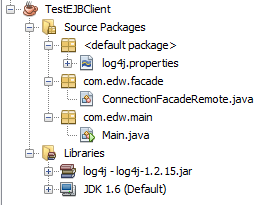
You can see the server side’s source code here. And here is my netbeans project structure

Not too hard right 😉

Beginning REST Using JBoss RESTEasy

On today’s demo im trying to use RESTEasy to handle multiple REST requests. According to Wikipedia, REST (Representational state transfer) is a style of software architecture for distributed hypermedia systems such as the World Wide Web. While RESTEasy is a JBoss project that provides various frameworks to help you build RESTful Web Services and RESTful Java applications. It is a fully certified and portable implementation of the JAX-RS specification. JAX-RS is a new JCP specification that provides a Java API for RESTful Web Services over the HTTP protocol.

On this project, im trying to create 2 different services. 1 service to get all objects, while another one for fetching a single objects. I create 2 different responses type for each service, JSON and XML. Okay, so lets try with 2 simple javabeans.

package com.edw.bean;

import java.util.List;
import javax.xml.bind.annotation.XmlAccessType;
import javax.xml.bind.annotation.XmlAccessorType;
import javax.xml.bind.annotation.XmlElement;
import javax.xml.bind.annotation.XmlElementWrapper;
import javax.xml.bind.annotation.XmlRootElement;

@XmlRootElement
@XmlAccessorType(XmlAccessType.FIELD)
public class Student {

    private String name;
    private String address;
    private int age;

    @XmlElement(name="book")
    @XmlElementWrapper(name = "books")
    private List<Book> books;

    public Student() {
    }

    public Student(String name, String address, int age, List<Book> books) {
        this.name = name;
        this.address = address;
        this.age = age;
        this.books = books;
    }

	// other setter getter

    @Override
    public String toString() {
        return "Student{" + "name=" + name + ", address=" + address + ", age=" + age + ", books=" + books + '}';
    }
}
package com.edw.bean;

import javax.xml.bind.annotation.XmlAccessType;
import javax.xml.bind.annotation.XmlAccessorType;
import javax.xml.bind.annotation.XmlRootElement;

@XmlRootElement
@XmlAccessorType(XmlAccessType.FIELD)
public class Book {

    private String title;
    private double price;

    public Book() {
    }

    public Book(String title, double price) {
        this.title = title;
        this.price = price;
    }

	// other setter getter

    @Override
    public String toString() {
        return "Book{" + "title=" + title + ", price=" + price + '}';
    }
}

Now, you need to create a java class to handle all REST services,

package com.edw.rest;

import com.edw.bean.Book;
import com.edw.bean.Student;
import java.util.ArrayList;
import java.util.List;
import javax.ws.rs.GET;
import javax.ws.rs.Path;
import javax.ws.rs.PathParam;
import javax.ws.rs.Produces;
import javax.ws.rs.core.MediaType;

@Path("/service/student")
public class StudentRest {

    @GET
    @Path("/json")
    @Produces(MediaType.APPLICATION_JSON)
    // path would be http://localhost:8080/YourProject/service/student/json
    public List<Student> getStudentsJSON() {
        return getStudents();
    }

    @GET
    @Path("/xml")
    @Produces(MediaType.APPLICATION_XML)
    // path would be http://localhost:8080/YourProject/service/student/xml
    public List<Student> getStudentsXML() {
        return getStudents();
    }

    @GET
    @Path("/json/{name}")
    @Produces(MediaType.APPLICATION_JSON)
    // path would be http://localhost:8080/YourProject/service/student/json/insertyournamehere
    public Student getStudentJSON(@PathParam("name") String name) {
        return new Student(name, name + " Address", 10, getBooks());
    }

    @GET
    @Path("/xml/{name}")
    @Produces(MediaType.APPLICATION_XML)
    // path would be http://localhost:8080/YourProject/service/student/xml/insertyournamehere
    public Student getStudentXML(@PathParam("name") String name) {
        return new Student(name, name + " Address", 10, getBooks());
    }

    private List<Book> getBooks() {
        List<Book> books = new ArrayList<Book>();
        books.add(new Book("Harry Potter", 100d));
        books.add(new Book("Lord of the Ring", 120d));
        books.add(new Book("Chicken Soup", 20d));
        books.add(new Book("Doraemon", 190d));
        books.add(new Book("Laskar Pelangi", 200d));
        return books;
    }

    private List<Student> getStudents() {
        List<Student> students = new ArrayList<Student>();
        students.add(new Student("Edwin", "Jakarta", 25, getBooks()));
        students.add(new Student("Kamplenk", "Ciledug", 29, getBooks()));
        students.add(new Student("Tebek", "Pamulang", 38, getBooks()));
        students.add(new Student("Syamsu", "Bandung", 60, getBooks()));
        return students;
    }
}

And dont forget to register your service class

package com.edw.config;

import com.edw.rest.StudentRest;
import java.util.Set;
import java.util.HashSet;
import javax.ws.rs.core.Application;

public class ApplicationConfig extends Application {

    private Set<Object> singletons = new HashSet<Object>();
    private Set<Class<?>> empty = new HashSet<Class<?>>();

    public ApplicationConfig() {
        singletons.add(new StudentRest());
    }

    @Override
    public Set<Class<?>> getClasses() {
        return empty;
    }

    @Override
    public Set<Object> getSingletons() {
        return singletons;
    }
}

And last, register all in your web.xml file

<?xml version="1.0" encoding="UTF-8"?>
<web-app version="2.5" xmlns="http://java.sun.com/xml/ns/javaee" xmlns:xsi="http://www.w3.org/2001/XMLSchema-instance" xsi:schemaLocation="http://java.sun.com/xml/ns/javaee http://java.sun.com/xml/ns/javaee/web-app_2_5.xsd">
    <servlet>
        <servlet-name>Resteasy</servlet-name>
        <servlet-class>
            org.jboss.resteasy.plugins.server.servlet.HttpServletDispatcher
        </servlet-class>
        <init-param>
            <param-name>javax.ws.rs.Application</param-name>
            <param-value>com.edw.config.ApplicationConfig</param-value>
        </init-param>
    </servlet>

    <servlet-mapping>
        <servlet-name>Resteasy</servlet-name>
        <url-pattern>/service/*</url-pattern>
    </servlet-mapping>

    <welcome-file-list>
        <welcome-file>index.jsp</welcome-file>
    </welcome-file-list>
</web-app>

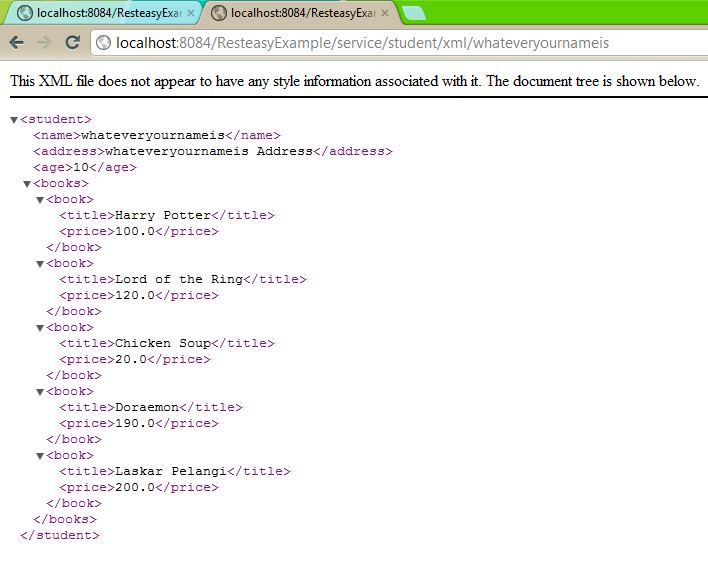
Here are some screenshots,

Have fun with RESTEasy 😉

A Simple Java Desktop JasperReport Example

Hi, im currently testing the latest version of iReport, iReport 4.5.1. For the test, im trying to create a very simple reporting, consist of 2 column and without database connection. Im using a simple Array of Maps to fill my jasper report’s data using the JRMapCollectionDataSource class.

Here is my report example,

<?xml version="1.0" encoding="UTF-8"?>
<jasperReport xmlns="http://jasperreports.sourceforge.net/jasperreports" xmlns:xsi="http://www.w3.org/2001/XMLSchema-instance" xsi:schemaLocation="http://jasperreports.sourceforge.net/jasperreports http://jasperreports.sourceforge.net/xsd/jasperreport.xsd" name="report" pageWidth="595" pageHeight="842" columnWidth="555" leftMargin="20" rightMargin="20" topMargin="20" bottomMargin="20">
	<property name="ireport.zoom" value="1.0"/>
	<property name="ireport.x" value="0"/>
	<property name="ireport.y" value="0"/>
	<field name="name" class="java.lang.String"/>
	<field name="address" class="java.lang.String"/>
	<background>
		<band splitType="Stretch"/>
	</background>
	<title>
		<band height="31" splitType="Stretch">
			<staticText>
				<reportElement x="235" y="0" width="100" height="31"/>
				<textElement>
					<font size="24"/>
				</textElement>
				<text><![CDATA[Judul Saya]]></text>
			</staticText>
		</band>
	</title>
	<pageHeader>
		<band height="35" splitType="Stretch"/>
	</pageHeader>
	<columnHeader>
		<band height="22" splitType="Stretch">
			<staticText>
				<reportElement x="0" y="2" width="100" height="20"/>
				<textElement/>
				<text><![CDATA[name]]></text>
			</staticText>
			<staticText>
				<reportElement x="200" y="2" width="100" height="20"/>
				<textElement/>
				<text><![CDATA[address]]></text>
			</staticText>
		</band>
	</columnHeader>
	<detail>
		<band height="20" splitType="Stretch">
			<textField>
				<reportElement x="0" y="0" width="200" height="20"/>
				<textElement/>
				<textFieldExpression><![CDATA[$F{name}]]></textFieldExpression>
			</textField>
			<textField>
				<reportElement x="200" y="0" width="221" height="20"/>
				<textElement/>
				<textFieldExpression><![CDATA[$F{address}]]></textFieldExpression>
			</textField>
		</band>
	</detail>
	<columnFooter>
		<band height="13" splitType="Stretch"/>
	</columnFooter>
	<pageFooter>
		<band height="14" splitType="Stretch"/>
	</pageFooter>
	<summary>
		<band height="8" splitType="Stretch"/>
	</summary>
</jasperReport>

Dont forget to compile it, and this is my java code to call my report. It call for .jasper file instead of .jrxml files.

package com.edw.main;

import java.io.BufferedInputStream;
import java.io.FileInputStream;
import java.util.ArrayList;

import java.util.HashMap;
import java.util.List;
import java.util.Map;
import java.util.UUID;

import net.sf.jasperreports.engine.JasperFillManager;
import net.sf.jasperreports.engine.JasperPrint;
import net.sf.jasperreports.engine.JasperReport;
import net.sf.jasperreports.engine.data.JRMapCollectionDataSource;
import net.sf.jasperreports.engine.util.JRLoader;
import net.sf.jasperreports.view.JasperViewer;
import org.apache.log4j.Logger;

public class Main {

    private Logger logger = Logger.getLogger(Main.class);

    public Main() {
    }

    private void start() {
        try {                                            
            // load report location
            FileInputStream fis = new FileInputStream("report.jasper");
            BufferedInputStream bufferedInputStream = new BufferedInputStream(fis);

            // fill report
            List<Map<String,?>> maps = new ArrayList<Map<String, ?>> (); 
            for (int i = 0; i < 10; i++) {
                Map<String,Object> map = new HashMap<String, Object>();
                map.put("name", getRandomString());
                map.put("address", getRandomString());
                maps.add(map);
            }            
            JRMapCollectionDataSource dataSource = new JRMapCollectionDataSource(maps);
            
            // compile report
            JasperReport jasperReport = (JasperReport) JRLoader.loadObject(bufferedInputStream);
            JasperPrint jasperPrint = JasperFillManager.fillReport(jasperReport, new HashMap(), dataSource);

            // view report to UI
            JasperViewer.viewReport(jasperPrint, false);

        } catch (Exception e) {
            logger.error(e, e);
        }
    }
    
    private String getRandomString(){
        return UUID.randomUUID().toString();
    }

    public static void main(String[] args) {
        Main main = new Main();
        main.start();
    }
}

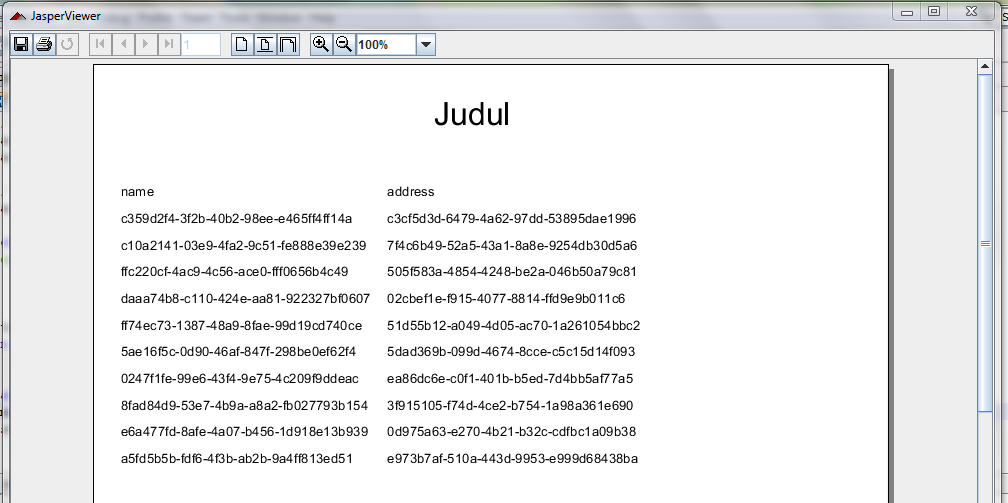
And some screenshots from my project,

Have fun with Jasper Report 😉