Java

java

Deploy a New Application and Building It Using Openshift S2I Feature and a Custom Base Image

Lots of ways to deploy apps to Openshift, one of it is by using oc new-app command. We are trying now to create a new app using corresponding command, but specifying a custom base image for it. For this example, im using a OpenJDK 11 and RHEL 7 base image.

The command is quite easy, run it on your code folder

D:\source> oc new-app registry.access.redhat.com/openjdk/openjdk-11-rhel7~. --name=spring-boot-2

D:\source> oc start-build spring-boot-2 --from-dir=.

It will create a BuildConfig with the name of spring-boot-2,

D:\source> oc get bc spring-boot-2
NAME            TYPE      FROM      LATEST
spring-boot-2   Source    Binary    3

We can see the detail of our BuildConfig by running this command,

D:\source> oc describe bc spring-boot-2

....
Strategy:       Source
From Image:     ImageStreamTag openjdk-11-rhel7:latest
Output to:      ImageStreamTag spring-boot-2:latest
Binary:         provided on build
....

And if we have some code change and want to redeploy, we can run this command

D:\source> oc start-build spring-boot-2 --from-dir=.

It will rebuild the whole image, and using new code which are uploaded from existing source directory.

Create Async HTTP Process with Red Hat Fuse on Top of Openshift 3.11

Got a unique requirement yesterday where one process on Red Hat Fuse consuming a very long time, therefore creating lots of timeout error from frontend. It happen because some process on Fuse performing a very complicated task and we cannot modified existing api flow due to business requirements.

For this example, i want to simulate the same slowness on my Fuse + Spring Boot app,

package com.redhat.edw;

import org.springframework.boot.SpringApplication;
import org.springframework.boot.autoconfigure.SpringBootApplication;

@SpringBootApplication
public class Application {
    public static void main(String[] args) {
        SpringApplication.run(Application.class, args);
    }
}

A simple camel route,

package com.redhat.edw;

import org.apache.camel.builder.RouteBuilder;
import org.apache.camel.model.rest.RestBindingMode;
import org.springframework.beans.factory.annotation.Value;
import org.springframework.stereotype.Component;

@Component
public class Routes extends RouteBuilder {
    @Override
    public void configure() throws Exception {
        restConfiguration("servlet")
                .bindingMode(RestBindingMode.json)
        ;

        rest()
                .get("hello")
                .route()
                .setBody(method("helloRouteHandler", "setHelloWithName"))
                .endRest()
        ;
    }
}

A placeholder bean,

package com.redhat.edw;

import lombok.*;

@Data
@ToString
@AllArgsConstructor
@NoArgsConstructor
@Builder
public class HelloResponse {
    private String content;
}

And a Handler class,

package com.redhat.edw;

import lombok.extern.slf4j.Slf4j;
import org.springframework.beans.factory.annotation.Value;
import org.springframework.stereotype.Component;

@Slf4j
@Component("helloRouteHandler")
public class HelloRouteHandler {

    @Value("${name}")
    private String name;

    public HelloResponse setHelloWithName() throws Exception {

        /*
         * simulate a very long process (10second)
         */
        Thread.sleep(10000);

        /*
         * this process will still getting called after 10 second regardless of sync or async
         */
        log.info("calling hello for "+name);

        return HelloResponse.builder().content(name).build();
    }
}

And two simple properties file,

# The Camel context name
camel.springboot.name=FuseHelloWorld

# enable all management endpoints
endpoints.enabled=true
management.security.enabled=false

camel.component.servlet.mapping.contextPath=/api/*

name=Edwin
# OpenShift ConfigMap name
spring.application.name=fuse-hello-world

spring.cloud.kubernetes.reload.enabled=true
spring.cloud.kubernetes.reload.strategy=restart_context
spring.cloud.kubernetes.reload.monitoring-config-maps=true
spring.cloud.kubernetes.reload.monitoring-secrets=true
spring.cloud.kubernetes.reload.mode=polling

Run the project and try calling /api/hello api and see how much time is needed to give response time.

As you can see, 10seconds is not an acceptable response for a regular web user and wee need to improve it. The workaround is quite simple, Spring have an @Async method which we will utilize on Handler class,

package com.redhat.edw;

import lombok.extern.slf4j.Slf4j;
import org.springframework.beans.factory.annotation.Value;
import org.springframework.scheduling.annotation.Async;
import org.springframework.stereotype.Component;

@Slf4j
@Component("helloRouteHandler")
public class HelloRouteHandler {

    @Value("${name}")
    private String name;

    @Async
    public HelloResponse setHelloWithName() throws Exception {

        /*
         * simulate a very long process (10second)
         */
        Thread.sleep(10000);

        /*
         * this process will still getting called after 10 second regardless of sync or async
         */
        log.info("calling hello for "+name);

        return HelloResponse.builder().content(name).build();
    }
}

Which will give a faster response,

And we can deploy our code to Openshift by using this command,

mvn fabric8:deploy -Pfabric8

A successful deployment will looks like this,

And finally, the complete code can be downloaded from this url,

https://github.com/edwin/fuse-with-async-http

Creating a Jenkins Slave Image with Maven 3.6, Java 11 and Skopeo

Openshift have a default maven Jenkins slave image, but too bad it is build on top of Java 8. And on this project which im currently working on, i need a custom Jenkins slave but with Java 11 and the ability to move images between Image Registry. Therefore i create a custom Dockerfile which contains Skopeo, Maven 3.6.3 and Java 11. Below is the detail Dockerfile which i created,

FROM openshift/jenkins-slave-base-centos7:v3.11

MAINTAINER Muhammad Edwin < edwin at redhat dot com >


ENV MAVEN_VERSION=3.6.3 \
    PATH=$PATH:/opt/maven/bin

# install skopeo
RUN yum install skopeo -y && yum clean all

# install java
RUN curl -L --output /tmp/jdk.tar.gz https://download.java.net/java/GA/jdk11/9/GPL/openjdk-11.0.2_linux-x64_bin.tar.gz && \
	tar zxf /tmp/jdk.tar.gz -C /usr/lib/jvm && \
	rm /tmp/jdk.tar.gz && \
	update-alternatives --install /usr/bin/java java /usr/lib/jvm/jdk-11.0.2/bin/java 20000 --family java-1.11-openjdk.x86_64 && \
	update-alternatives --set java /usr/lib/jvm/jdk-11.0.2/bin/java
	
# Install Maven
RUN curl -L --output /tmp/apache-maven-bin.zip  https://www-eu.apache.org/dist/maven/maven-3/${MAVEN_VERSION}/binaries/apache-maven-${MAVEN_VERSION}-bin.zip && \
    unzip -q /tmp/apache-maven-bin.zip -d /opt && \
    ln -s /opt/apache-maven-${MAVEN_VERSION} /opt/maven && \
    rm /tmp/apache-maven-bin.zip && \
    mkdir -p $HOME/.m2

RUN chown -R 1001:0 $HOME && chmod -R g+rw $HOME

COPY run-jnlp-client /usr/local/bin/

USER 1001

Build by using this command,

docker build -t jenkins-slave-skopeo-jdk11-new -f skopeo-jdk11.dockerfile .

Pull the image to Openshift,

oc import-image docker.io/edwinkun/jenkins-slave-skopeo-jdk11-new --confirm

Register on Jenkins as a

And try on

node('maven') {
	stage('Clone') {
		sh "git config --global http.sslVerify false"
		sh "git clone https://github.com/edwin/hello-world.git"
	}
	stage('Build') {
		sh "mvn -v"
		sh "mvn clean package -f hello-world/pom.xml"
	}
}

This is the result,

Detail code can be seen on my github page, https://github.com/edwin/jenkins-slave-maven-jdk11-skopeo

Starting JBoss EAP or Wildfly with a Specific XML Configuration

We can run EAP or Wildfly with a specific XML configuration, not just the default one. For example we have a new configuration with the name of standalone-full-ha_1.xml, and want to run EAP based on it. First we need to put corresponding XML on below directory,

%WILDFLY_DIRECTORY%\standalone\configuration

And run using below command,

standalone.bat -c standalone-full-ha_1.xml

(Y)

Does JBoss EAP’s “org.jboss.jca.adapters.jdbc.extensions.oracle.OracleValidConnectionChecker” doing a “Select 1 from Dual”?

TL;DR
No it is NOT.

Longer Version :
JBoss EAP and Wildfly have its own internal query validator to check whether connection is active or not before doing connection to Oracle database, it resides on below class.

org.jboss.jca.adapters.jdbc.extensions.oracle.OracleValidConnectionChecker

Why i’m interested in OracleValidConnectionChecker class? Because several days ago, i got a critical question from Habiburrokhman Sjarbini, my fellow RedHat Platform Consultant regarding this. Whether OracleValidConnectionChecker which is embedded in JBoss EAP will do a “select 1 from dual” query?

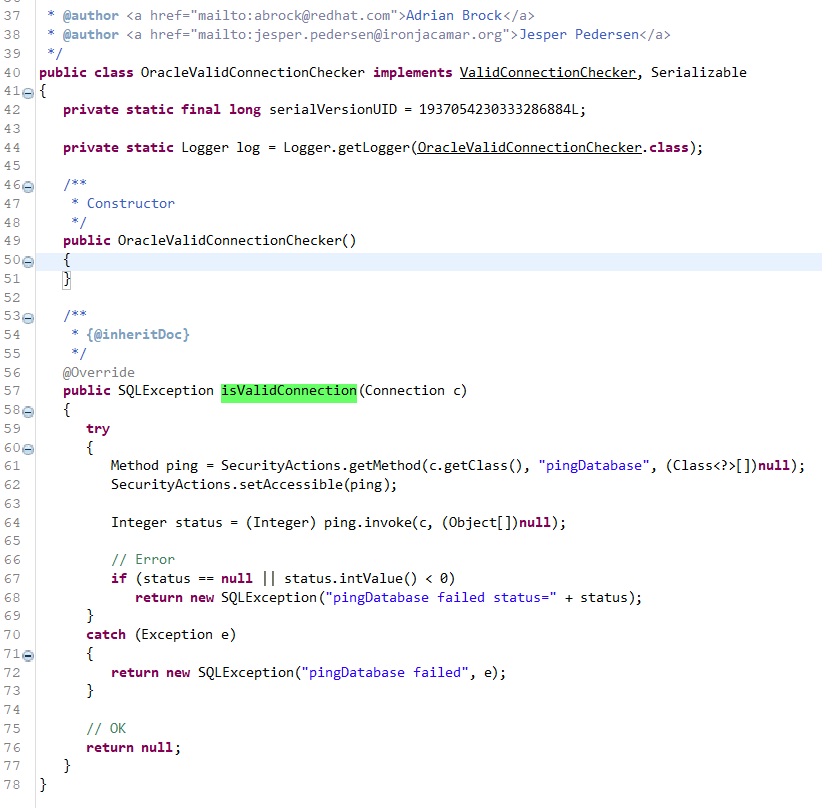
I have to decompile a lot of classes to see what is running under the hood,

Here is the screenshot of what OracleValidConnectionChecker looks like,

On Oracle database, it will call “oracle.jdbc.driver.OracleConnection” and invoke method “pingDatabase”. Lets check what is the content of “pingDatabase” method,

OracleConnection will call its super class, OracleConnectionWrapper, and invoke pingDatabase method. It goes here and there, until finally it reach oracle.jdbc.driver.PhysicalConnection class on method doPingDatabase.

And as you can see, it runs a “SELECT ‘x’ FROM DUAL” query, instead on “select 1 from dual”. 🙂

Jar versions :

ojdbc8.jar
ironjacamar-jdbc-1.4.11.Final.jar