According to wikipedia, database transaction should provide an “all-or-nothing” proposition, stating that each work-unit performed in a database must either complete in its entirety or have no effect whatsoever. Further, the system must isolate each transaction from other transactions, results must conform to existing constraints in the database, and transactions that complete successfully must get written to durable storage.
So on this example, im trying to create a simple MyBatis database transaction, managed by Spring Framework. Okay, so this is my pom file, as you can see, im using Spring version 4.1.2.
<project xmlns="http://maven.apache.org/POM/4.0.0" xmlns:xsi="http://www.w3.org/2001/XMLSchema-instance"
  xsi:schemaLocation="http://maven.apache.org/POM/4.0.0 http://maven.apache.org/xsd/maven-4.0.0.xsd">
  <modelVersion>4.0.0</modelVersion>

  <groupId>com.edw.springmybatis</groupId>
  <artifactId>SpringMyBatisIntegration</artifactId>
  <packaging>war</packaging>
  <version>1.0</version>

  <name>SpringMyBatisIntegration</name>
  <url>http://maven.apache.org</url>

  <dependencies>
        <dependency>
            <groupId>javax</groupId>
            <artifactId>javaee-web-api</artifactId>
            <version>6.0</version>
            <scope>provided</scope>
        </dependency>
        <!-- Spring 4 dependencies -->
        <dependency>
            <groupId>org.springframework</groupId>
            <artifactId>spring-core</artifactId>
            <version>4.1.2.RELEASE</version>
        </dependency>
        <dependency>
            <groupId>org.springframework</groupId>
            <artifactId>spring-web</artifactId>
            <version>4.1.2.RELEASE</version>
        </dependency>
        <dependency>
            <groupId>org.springframework</groupId>
            <artifactId>spring-webmvc</artifactId>
            <version>4.1.2.RELEASE</version>
        </dependency>
        <dependency>
            <groupId>org.springframework</groupId>
            <artifactId>spring-tx</artifactId>
            <version>4.1.2.RELEASE</version>
        </dependency>
        <dependency>
            <groupId>org.springframework</groupId>
            <artifactId>spring-orm</artifactId>
            <version>4.1.2.RELEASE</version>
        </dependency>
        <dependency>
            <groupId>cglib</groupId>
            <artifactId>cglib</artifactId>
            <version>2.2</version>
        </dependency>

        <dependency>
            <groupId>log4j</groupId>
            <artifactId>log4j</artifactId>
            <version>1.2.17</version>
        </dependency>
        <dependency>
            <groupId>mysql</groupId>
            <artifactId>mysql-connector-java</artifactId>
            <version>5.1.6</version>
        </dependency>
        <dependency>
            <groupId>org.mybatis</groupId>
            <artifactId>mybatis</artifactId>
            <version>3.2.2</version>
        </dependency>
        <dependency>
            <groupId>org.mybatis</groupId>
            <artifactId>mybatis-spring</artifactId>
            <version>1.1.0</version>
        </dependency>

        <dependency>
            <groupId>commons-dbcp</groupId>
            <artifactId>commons-dbcp</artifactId>
            <version>1.2.2</version>
        </dependency>

        <!-- json request -->
        <dependency>
            <groupId>org.codehaus.jackson</groupId>
            <artifactId>jackson-mapper-asl</artifactId>
            <version>1.9.11</version>
        </dependency>

    </dependencies>

  <build>
    <plugins>
      <plugin>
        <groupId>org.apache.maven.plugins</groupId>
        <artifactId>maven-compiler-plugin</artifactId>
        <version>2.0.2</version>
        <configuration>
          <source>1.5</source>
          <target>1.5</target>
        </configuration>
      </plugin>
    </plugins>
  </build>
</project>
This is my database structure,
CREATE TABLE `testing` (
  `Id` int(11) NOT NULL AUTO_INCREMENT,
  `name` varchar(30) NOT NULL DEFAULT '',
  `address` varchar(255) NOT NULL DEFAULT '',
  PRIMARY KEY (`Id`),
  UNIQUE KEY `ix` (`name`)
)
Im mapping my “testing” table into an xml and java file,
<?xml version="1.0" encoding="UTF-8" ?>
<!DOCTYPE mapper PUBLIC "-//mybatis.org//DTD Mapper 3.0//EN" "http://mybatis.org/dtd/mybatis-3-mapper.dtd" >
<mapper namespace="com.edw.springmybatis.mapper.TestingMapper" >

    <select id="insert" parameterType="com.edw.springmybatis.bean.Testing" >
        insert into testing (name, address)
        values ( #{name,jdbcType=VARCHAR}, #{address,jdbcType=VARCHAR} )
    </select>

</mapper>
package com.edw.springmybatis.bean;

import java.io.Serializable;

public class Testing implements Serializable  {

    private Integer id;
    private String name;
    private String address;

	public Integer getId() {
        return id;
    }

    public void setId(Integer id) {
        this.id = id;
    }

    // other setter and getter

    public Testing() {
    }

    public Testing(String name, String address) {
        this.name = name;
        this.address = address;
    }
}
This is my configuration.xml file for handling all mybatis’ configuration file,
<?xml version="1.0" encoding="UTF-8"?>
<!DOCTYPE configuration
PUBLIC "-//mybatis.org//DTD Config 3.0//EN"
"http://mybatis.org/dtd/mybatis-3-config.dtd">

<configuration>
  <mappers>
  	<mapper resource="TestingMapper.xml"/>
  </mappers>
</configuration>
And my spring xml files, applicationContext.xml and dispatcher-servlet.xml
<?xml version="1.0" encoding="UTF-8"?>
<beans xmlns="http://www.springframework.org/schema/beans"
       xmlns:xsi="http://www.w3.org/2001/XMLSchema-instance" xmlns:p="http://www.springframework.org/schema/p"
       xmlns:context="http://www.springframework.org/schema/context"
       xmlns:tx="http://www.springframework.org/schema/tx"
       xsi:schemaLocation="http://www.springframework.org/schema/beans http://www.springframework.org/schema/beans/spring-beans-3.0.xsd
        http://www.springframework.org/schema/aop http://www.springframework.org/schema/aop/spring-aop-3.0.xsd
        http://www.springframework.org/schema/context http://www.springframework.org/schema/context/spring-context-3.0.xsd
        http://www.springframework.org/schema/jee http://www.springframework.org/schema/jee/spring-jee-3.0.xsd
        http://www.springframework.org/schema/tx http://www.springframework.org/schema/tx/spring-tx-3.0.xsd">

    <context:annotation-config/>

    <tx:annotation-driven transaction-manager="transactionManager"/>

    <context:component-scan base-package="com.edw.springmybatis.service"/>

    <!-- middleware datasource  -->
    <bean id="dataSource" class="org.apache.commons.dbcp.BasicDataSource" destroy-method="close"
          p:driverClassName="com.mysql.jdbc.Driver" p:url="jdbc:mysql://localhost/test"
          p:username="root" p:password=""
          p:initialSize="2"
          p:maxActive="30"
          p:maxIdle="10"
          p:minIdle="3"
          p:maxWait="30000"
          p:removeAbandoned="true"
          p:removeAbandonedTimeout="30"
          p:validationQuery="SELECT 1" />

    <bean id="sqlSessionFactory" class="org.mybatis.spring.SqlSessionFactoryBean">
        <property name="dataSource" ref="dataSource" />
        <property name="configLocation" value="/WEB-INF/configuration.xml" />
    </bean>

    <bean class="org.mybatis.spring.mapper.MapperScannerConfigurer">
        <property name="basePackage" value="com.edw.springmybatis.mapper" />
    </bean>

    <bean id="transactionManager"
          class="org.springframework.jdbc.datasource.DataSourceTransactionManager">
        <property name="dataSource" ref="dataSource" />
    </bean>
</beans>
<?xml version="1.0" encoding="UTF-8"?>
<beans xmlns="http://www.springframework.org/schema/beans"
       xmlns:xsi="http://www.w3.org/2001/XMLSchema-instance"
       xmlns:p="http://www.springframework.org/schema/p"
       xmlns:context="http://www.springframework.org/schema/context"
       xmlns:mvc="http://www.springframework.org/schema/mvc"
       xsi:schemaLocation="http://www.springframework.org/schema/beans http://www.springframework.org/schema/beans/spring-beans-3.0.xsd
        http://www.springframework.org/schema/mvc http://www.springframework.org/schema/mvc/spring-mvc-3.0.xsd
        http://www.springframework.org/schema/context http://www.springframework.org/schema/context/spring-context-3.0.xsd">


    <context:component-scan base-package="com.edw.springmybatis.controller" />

    <mvc:annotation-driven />
    <mvc:default-servlet-handler />
</beans>
And finally, my web.xml file to hold all my spring xml files,
<?xml version="1.0" encoding="UTF-8"?>
<web-app version="3.0" xmlns="http://java.sun.com/xml/ns/javaee" xmlns:xsi="http://www.w3.org/2001/XMLSchema-instance" xsi:schemaLocation="http://java.sun.com/xml/ns/javaee http://java.sun.com/xml/ns/javaee/web-app_3_0.xsd">
    <context-param>
        <param-name>contextConfigLocation</param-name>
        <param-value>/WEB-INF/applicationContext.xml</param-value>
    </context-param>
    <listener>
        <listener-class>org.springframework.web.context.ContextLoaderListener</listener-class>
    </listener>
    <servlet>
        <servlet-name>dispatcher</servlet-name>
        <servlet-class>org.springframework.web.servlet.DispatcherServlet</servlet-class>
        <load-on-startup>2</load-on-startup>
    </servlet>
    <servlet-mapping>
        <servlet-name>dispatcher</servlet-name>
        <url-pattern>/</url-pattern>
    </servlet-mapping>
    <session-config>
        <session-timeout>
            30
        </session-timeout>
    </session-config>
</web-app>
My log4j file,
# Global logging configuration
log4j.rootLogger=WARN,stdout
log4j.logger.com.edw=DEBUG

log4j.rootLogger=WARN,stdout

# Console output...
log4j.appender.stdout=org.apache.log4j.ConsoleAppender
log4j.appender.stdout.layout=org.apache.log4j.PatternLayout
log4j.appender.stdout.layout.ConversionPattern=%d [%c{1}] %-5p %c:%L - %m%n
Okay, now is for my java class. First is MyBatis mapper file,
package com.edw.springmybatis.mapper;

import com.edw.springmybatis.bean.Testing;

public interface TestingMapper {
    public void insert(Testing testing);
}
Next is my Service class,
package com.edw.springmybatis.service;

import com.edw.springmybatis.bean.Testing;
import com.edw.springmybatis.mapper.TestingMapper;
import java.util.Random;
import org.springframework.beans.factory.annotation.Autowired;
import org.springframework.stereotype.Service;
import org.springframework.transaction.annotation.Propagation;
import org.springframework.transaction.annotation.Transactional;

@Service
@Transactional(propagation = Propagation.REQUIRED, rollbackFor = Exception.class)
public class TestingService {

    @Autowired
    private TestingMapper testingMapper;

    public void insert() throws Exception {
        testingMapper.insert(new Testing("" + new Random().nextInt(), "" + new Random().nextInt()));
        testingMapper.insert(new Testing()); // this will throw an exception
    }
}
And finally, my controller file
package com.edw.springmybatis.controller;

import com.edw.springmybatis.service.TestingService;
import org.apache.log4j.Logger;
import org.springframework.beans.factory.annotation.Autowired;
import org.springframework.stereotype.Controller;
import org.springframework.web.bind.annotation.RequestMapping;
import org.springframework.web.bind.annotation.RequestMethod;
import org.springframework.web.bind.annotation.ResponseBody;

@Controller
public class IndexController {

    @Autowired
    private TestingService testingService;

    private final Logger logger = Logger.getLogger(this.getClass());

    @RequestMapping(value = "/", method = RequestMethod.GET)
    public @ResponseBody Integer index() {
        try {
            testingService.insert();
			return 1;
        } catch (Exception e) {
            logger.error(e);
        }
        return 0;
    }
}
This is what happen when im accessing my application directly,

And this what is written on my netbeans console,

As you can see, my previous insert is rolledback so there is no new record on my “testing” table.

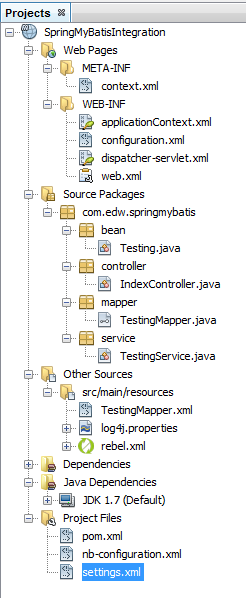
And this is my netbeans project structure,
You can find the sourcecode needed on my Github page.