How to Convert Java List or ArrayList into ResultSet

At this project i found an obstacle, which i need to convert a reporting module from fetching data from database into fetching data from Webservices. At first I think it was easy, I just fetch strings from Webservice, and put it in a bean or in a map and put it all in an ArrayList, just like JasperReport. But I forgot, this isn’t JasperReport I’m using, I’m using bloody hell CrystalReport. And my Crystal-Report-calling method only accepting ResultSet for parameter, so somehow I need to convert strings from webservice into ResultSet.

My idea is adding strings from webservices into an ArrayList<Object> and adding this ArrayList into ArrayList<ArrayList<Object>> and converting it into rows of ResultSet. And im using MockRunner library to help me. This is how I do it :

I create a class to convert a list into result set

package com.edw.rs;

import com.mockrunner.mock.jdbc.MockResultSet;
import java.sql.ResultSet;
import java.util.List;

/**
 *
 * @author edw
 */
public class MyResultSet {

    public ResultSet getResultSet(List<String> headers, List<List<Object>> data) throws Exception {

        // validation
        if (headers == null || data == null) {
            throw new Exception("null parameters");
        }

        if (headers.size() != data.size()) {
            throw new Exception("parameters size are not equals");
        }

        // create a mock result set
        MockResultSet mockResultSet = new MockResultSet("myResultSet");

        // add header
        for (String string : headers) {          
            mockResultSet.addColumn(string);
        }

        // add data
        for (List<Object> list : data) {
            mockResultSet.addRow(list);
        }

        return mockResultSet;
    }
}

and i tested it with my junit class

package com.edw.rs.test;

import com.edw.rs.MyResultSet;
import java.sql.ResultSet;
import java.util.ArrayList;
import java.util.List;
import org.apache.log4j.Logger;
import org.junit.Test;

/**
 *
 * @author edw
 */
public class MyResultSetTest {

    private Logger logger = Logger.getLogger(MyResultSetTest.class);

    public MyResultSetTest() {
    }

    @Test
    public void testMyResultSet() throws Exception {
        MyResultSet myResultSet = new MyResultSet();
        List<String> headers = new ArrayList<String>();
        headers.add("id");
        headers.add("name");
        headers.add("salary");
        headers.add("age");

        List<List<Object>> data = new ArrayList<List<Object>>();
        for (int i = 0; i < 4; i++) {
            List<Object> objects = new ArrayList<Object>();
            objects.add(new Integer(i));
            objects.add("name " + i);
            objects.add(new Double(i));
            objects.add(new Integer(20 + i));
            data.add(objects);
        }

        ResultSet rs = myResultSet.getResultSet(headers, data);
        while (rs.next()) {
            logger.debug(rs.getString("id"));
            logger.debug(rs.getString(2));
            logger.debug(rs.getDouble("salary"));
            logger.debug(rs.getInt(4));
            logger.debug("------------------------");
        }

    }
}

this is the result on my IDE console

2010-08-18 18:13:09,112 [MyResultSetTest] DEBUG com.edw.rs.test.MyResultSetTest:42 - 0
2010-08-18 18:13:09,131 [MyResultSetTest] DEBUG com.edw.rs.test.MyResultSetTest:43 - name 0
2010-08-18 18:13:09,132 [MyResultSetTest] DEBUG com.edw.rs.test.MyResultSetTest:44 - 0.0
2010-08-18 18:13:09,132 [MyResultSetTest] DEBUG com.edw.rs.test.MyResultSetTest:45 - 20
2010-08-18 18:13:09,133 [MyResultSetTest] DEBUG com.edw.rs.test.MyResultSetTest:46 - ------------------------
2010-08-18 18:13:09,133 [MyResultSetTest] DEBUG com.edw.rs.test.MyResultSetTest:42 - 1
2010-08-18 18:13:09,189 [MyResultSetTest] DEBUG com.edw.rs.test.MyResultSetTest:43 - name 1
2010-08-18 18:13:09,189 [MyResultSetTest] DEBUG com.edw.rs.test.MyResultSetTest:44 - 1.0
2010-08-18 18:13:09,189 [MyResultSetTest] DEBUG com.edw.rs.test.MyResultSetTest:45 - 21
2010-08-18 18:13:09,190 [MyResultSetTest] DEBUG com.edw.rs.test.MyResultSetTest:46 - ------------------------
2010-08-18 18:13:09,190 [MyResultSetTest] DEBUG com.edw.rs.test.MyResultSetTest:42 - 2
2010-08-18 18:13:09,191 [MyResultSetTest] DEBUG com.edw.rs.test.MyResultSetTest:43 - name 2
2010-08-18 18:13:09,218 [MyResultSetTest] DEBUG com.edw.rs.test.MyResultSetTest:44 - 2.0
2010-08-18 18:13:09,219 [MyResultSetTest] DEBUG com.edw.rs.test.MyResultSetTest:45 - 22
2010-08-18 18:13:09,219 [MyResultSetTest] DEBUG com.edw.rs.test.MyResultSetTest:46 - ------------------------
2010-08-18 18:13:09,219 [MyResultSetTest] DEBUG com.edw.rs.test.MyResultSetTest:42 - 3
2010-08-18 18:13:09,220 [MyResultSetTest] DEBUG com.edw.rs.test.MyResultSetTest:43 - name 3
2010-08-18 18:13:09,225 [MyResultSetTest] DEBUG com.edw.rs.test.MyResultSetTest:44 - 3.0
2010-08-18 18:13:09,226 [MyResultSetTest] DEBUG com.edw.rs.test.MyResultSetTest:45 - 23
2010-08-18 18:13:09,226 [MyResultSetTest] DEBUG com.edw.rs.test.MyResultSetTest:46 - ------------------------

this is my project structure, FYI im using Netbeans 6.9.
Netbeans 6.9 Project Structure

all i can say is, Thank You mockrunner, you saved my life.
DotA’s Castle Fight Game Mode

from what i’ve read here, Castle Fight’s gamemode need to be entered by player 1 in the first 20 seconds of gametime before round 1 starts.
It has lots of gamemodes, while my favorite is

-rr2 -ntb -nt -nafk -balance -slb -ur -fow -ca -ban -skip

-rr2 = Random races with new races each round with 2 win limit
-ntb = You can’t build Treasure Boxes when this modification has been chosen.
-nt = You don’t have to pay taxes on your income when No Taxes is chosen.
-nafk = Players can’t use the “-afk” command and the AI will also not take control over an afk player after some time.
-balance = Activates auto team balance.
-slb = Units can only move / fly over one lane. -sl picks a random lane while -slt picks the top lane and -slb the bottom lane
-ur = A race can be chosen only once per round (even across the teams).
-fow = There will be Fog of War at the beginning of each round for X seconds. If you just write -fow without a number, you will have indefinite fog of war.
-ca = You are able to block units by building buildings around them in this gamemode. You can use this to build farms like in earlier versions
-ban = Before races get picked/randomed the leader of each team bans X races which cannot be picked/randomed then
-skip = Write this during the first 20 seconds to start round1 immediately (if you have already chosen gamemodes and can’t wait )

Have Fun playing it. 😉

Membuat Aplikasi Reporting sederhana dengan JasperReport dan Java Swing

Beberapa hari terakhir ini, gw ditanyain terus tentang caranya connect java swing ke jasper report. Dan konyolnya, gw juga udah lupa caranya. Maklum, kebanyakan copy-paste jadi begini niy. Ya udh supaya inget dan gag lupa-lupa lagi, gw paste disini aja sourcenya.

Gw coba bikin report gembel sederhana dulu, yg ambil data nama dan alamat dari table “contoh” yang ada di database “test”. Pertama-tama kita bikin dulu table nya didatabase,

CREATE TABLE `contoh` (
  `nama` varchar(30) NOT NULL DEFAULT '',
  `alamat` varchar(100) DEFAULT NULL,
  PRIMARY KEY (`nama`)
)

Abis itu kita bikin file jrxml-nya, nanti file jrxml ini akan dicompile on-the-fly oleh compiler jadi .jasper.

<?xml version="1.0" encoding="UTF-8"?>
<jasperReport xmlns="http://jasperreports.sourceforge.net/jasperreports" xmlns:xsi="http://www.w3.org/2001/XMLSchema-instance" xsi:schemaLocation="http://jasperreports.sourceforge.net/jasperreports http://jasperreports.sourceforge.net/xsd/jasperreport.xsd" name="Iseng" language="groovy" pageWidth="595" pageHeight="842" columnWidth="555" leftMargin="20" rightMargin="20" topMargin="20" bottomMargin="20">
	<parameter name="nama1" class="java.lang.String"/>
	<queryString>
		<![CDATA[SELECT
     contoh.`nama` AS contoh_nama,
     contoh.`alamat` AS contoh_alamat
FROM
     `contoh` contoh
where contoh.`nama` like $P{nama1}]]>
	</queryString>
	<field name="contoh_nama" class="java.lang.String">
		<fieldDescription><![CDATA[]]></fieldDescription>
	</field>
	<field name="contoh_alamat" class="java.lang.String">
		<fieldDescription><![CDATA[]]></fieldDescription>
	</field>
	<background>
		<band splitType="Stretch"/>
	</background>
	<title>
		<band height="56" splitType="Stretch">
			<staticText>
				<reportElement x="0" y="0" width="555" height="46"/>
				<textElement textAlignment="Center" verticalAlignment="Middle">
					<font size="24"/>
				</textElement>
				<text><![CDATA[Testing Report]]></text>
			</staticText>
		</band>
	</title>
	<pageHeader>
		<band height="13" splitType="Stretch"/>
	</pageHeader>
	<columnHeader>
		<band height="34" splitType="Stretch">
			<staticText>
				<reportElement x="0" y="11" width="100" height="20"/>
				<textElement textAlignment="Center" verticalAlignment="Middle"/>
				<text><![CDATA[Nama]]></text>
			</staticText>
			<staticText>
				<reportElement x="132" y="11" width="100" height="20"/>
				<textElement textAlignment="Center" verticalAlignment="Middle"/>
				<text><![CDATA[Alamat]]></text>
			</staticText>
		</band>
	</columnHeader>
	<detail>
		<band height="27" splitType="Stretch">
			<textField>
				<reportElement x="0" y="0" width="100" height="20"/>
				<textElement textAlignment="Center" verticalAlignment="Middle"/>
				<textFieldExpression class="java.lang.String"><![CDATA[$F{contoh_nama}]]></textFieldExpression>
			</textField>
			<textField>
				<reportElement x="132" y="0" width="100" height="20"/>
				<textElement textAlignment="Center" verticalAlignment="Middle"/>
				<textFieldExpression class="java.lang.String"><![CDATA[$F{contoh_alamat}]]></textFieldExpression>
			</textField>
		</band>
	</detail>
	<columnFooter>
		<band height="45" splitType="Stretch"/>
	</columnFooter>
	<pageFooter>
		<band height="54" splitType="Stretch"/>
	</pageFooter>
	<summary>
		<band height="42" splitType="Stretch"/>
	</summary>
</jasperReport>

Di situ gw bikin satu report yang akan mencari data di table contoh berdasarkan query nama. Perhatikan line 10, itu adalah variabel yang akan gw gunakan untuk menjadi variabel query report.

Setelah jadi reportnya, sekarang gw lanjut bikin tampilannya. Gw pakek java Swing buat bikin UI. Jadi harap maklum klo rada kacrut sederhana.

package com.edw.frame;

import java.awt.Container;
import java.awt.FlowLayout;
import java.awt.event.ActionEvent;
import java.awt.event.ActionListener;
import java.io.BufferedInputStream;
import java.io.FileInputStream;
import java.sql.Connection;
import java.sql.DriverManager;
import java.util.HashMap;
import java.util.Map;

import javax.swing.JButton;
import javax.swing.JFrame;
import javax.swing.JLabel;
import javax.swing.JTextField;
import net.sf.jasperreports.engine.JasperCompileManager;
import net.sf.jasperreports.engine.JasperFillManager;
import net.sf.jasperreports.engine.JasperPrint;
import net.sf.jasperreports.engine.JasperReport;
import net.sf.jasperreports.view.JasperViewer;

import org.apache.log4j.Logger;

/**
 *
 * @author edw
 */
public class FrameMain extends JFrame implements ActionListener {

    private Logger logger = Logger.getLogger(FrameMain.class);
    private JTextField txtNama = new JTextField(20);
    private JButton cmdPrint = new JButton("cetak");

    public FrameMain() {
        init();
    }

    private void init() {
        Container conn = getContentPane();
        conn.setLayout(new FlowLayout());
        conn.add(new JLabel("Iseng"));
        conn.add(txtNama);
        conn.add(cmdPrint);
        setLocationRelativeTo(null);
        setDefaultCloseOperation(JFrame.EXIT_ON_CLOSE);
        cmdPrint.addActionListener(this);
        pack();
    }

    public void actionPerformed(ActionEvent e) {
        if (e.getSource() == cmdPrint) {
            try {
                // parameter
                String parameterNama = txtNama.getText();

                //load report location
                FileInputStream fis = new FileInputStream("src\\com\\edw\\rpt\\Iseng.jrxml");
                BufferedInputStream bufferedInputStream = new BufferedInputStream(fis);

                //set parameters
                Map<String, String> map = new HashMap<String, String>();
                map.put("nama1", parameterNama);

                Class.forName("com.mysql.jdbc.Driver");
                Connection connection = DriverManager.getConnection("jdbc:mysql://localhost/test", "root", "xxxx");


                //compile report
                JasperReport jasperReport = (JasperReport) JasperCompileManager.compileReport(bufferedInputStream);
                JasperPrint jasperPrint = JasperFillManager.fillReport(jasperReport, map, connection);

                //close connection
                connection.close();

                //view report to UI
                JasperViewer.viewReport(jasperPrint, false);

            } catch (Exception ex) {
                logger.error(ex.getMessage(), ex);
            }

        }
    }

    public static void main(String[] args) {
        new FrameMain().setVisible(true);
    }
}

Coba cek di line 64, itu adalah parameter yang akan dikirim ke report, pastikan nama variabelnya sama dengan nama variabel yang ada di jasper report ( file jrxml ). Sedangkan line 67 adalah Koneksi database gw, silahkan di modifikasi sesuai keinginan.

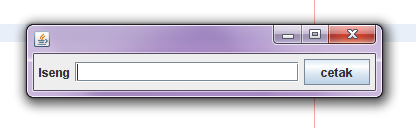
Nanti klo udh dijalanin, jadinya kayak gini
Form UI

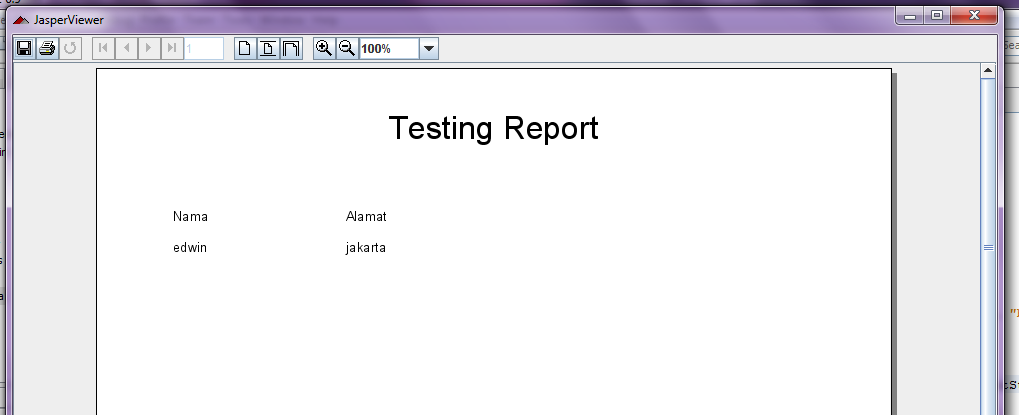
terus klo misalkan text field nya diisi dengan “edwin” dan kemudian menekan tombol “cetak”, maka akan muncul form report dengan data “edwin” yang kita cari.
report jasper

berikut adalah struktur project gw serta library (jar) apa aja yg gw pake.
jasper report jar project structure
harap diingat, lokasi jar yg gw pake ada di dalam folder instalasi Jasper Report, silahkan di search aja.

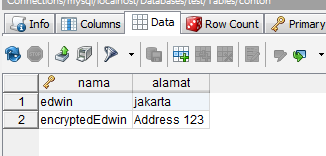
nah ini adalah isi database gw, coba di cek output dari jasper dan isi databasenya, sinkron apa engga.
isi db

Sekian dan terima kasih.

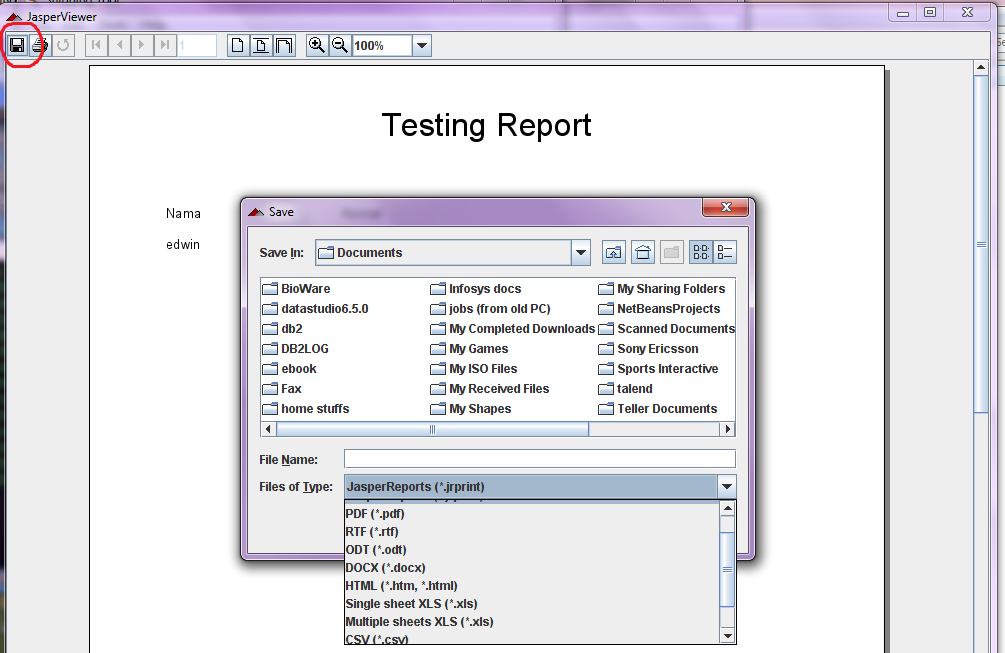
nb. Oh iya, hasil preview dari jasper report juga bisa di save as ke berbagai macam format, tinggal di save aja.
export jasper into another format