Java

java programming

Changing JAX-WS Webservice Client’s Target Endpoint Url

Let say you have a wsdl that you get from an url, but you want to fire the webservice generated from it to a different url, see my code below for example,

<service name="TestingService">
	<port name="TestingServicePort" binding="tns:TestingServicePortBinding">
		<soap:address location="http://localhost:8084/WSDLTest/TestingService" />
	</port>
</service>

as you can see, my wsdl is pointing at “http://localhost:8084/WSDLTest/TestingService”. But what if i want to fire my webservice client into another url, without changing the original wsdl. For example, my new url would be http://192.168.0.101/WSDLTest/TestingService.

Well, it’s actualy quite easy. All you need to do is only casting the service interface into interface BindingProvider, and add a new url property. This is what my code would look like,


             TestingService_Service tss = new TestingService_Service();
             TestingService testingService = tss.getTestingServicePort();
             ((BindingProvider) testingService).getRequestContext()
                .put(BindingProvider.ENDPOINT_ADDRESS_PROPERTY, "http://192.168.0.101/WSDLTest/TestingService");

If you fire your service again, it will point to a new url (http://192.168.0.101/WSDLTest/TestingService) instead of the old one (http://localhost:8084/WSDLTest/TestingService).

How to Create A Simple Captcha Using Java Servlet

On this article im going to create a simple image captcha that will show a 5-random alphanumeric letters, im using SimpleCaptha library to help me creating images and validating user’s input.

First is a simple java servlet, it will build random images and store its value on httpsession.

package com.edw.captcha;

import java.awt.Color;
import java.awt.Font;
import java.io.IOException;
import java.util.ArrayList;
import java.util.List;
import javax.servlet.ServletException;
import javax.servlet.http.HttpServlet;
import javax.servlet.http.HttpServletRequest;
import javax.servlet.http.HttpServletResponse;
import nl.captcha.Captcha;
import nl.captcha.backgrounds.GradiatedBackgroundProducer;
import nl.captcha.servlet.CaptchaServletUtil;
import nl.captcha.text.renderer.DefaultWordRenderer;

public class EdwCaptcha extends HttpServlet {

    @Override
    protected void doGet(HttpServletRequest request, HttpServletResponse response)
            throws ServletException, IOException {
        List<Color> colors = new ArrayList<Color> ();
        colors.add(Color.black);
        colors.add(Color.red);
        
        List<Font> fonts = new ArrayList<Font>();
        fonts.add(new Font("Arial", Font.ITALIC, 40));
        
        Captcha captcha = new Captcha.Builder(120, 50)
                .addText(new DefaultWordRenderer(colors, fonts))
                .addBackground(new GradiatedBackgroundProducer(Color.white, Color.white))
                .gimp()
                .addBorder()
                .build();

        // display the image produced
        CaptchaServletUtil.writeImage(response, captcha.getImage());

        // save the captcha value on session
        request.getSession().setAttribute("simpleCaptcha", captcha); 
    }
}

And now im registering my servlet on my web.xml,

<?xml version="1.0" encoding="UTF-8"?>
<web-app version="3.0" xmlns="http://java.sun.com/xml/ns/javaee" xmlns:xsi="http://www.w3.org/2001/XMLSchema-instance" xsi:schemaLocation="http://java.sun.com/xml/ns/javaee http://java.sun.com/xml/ns/javaee/web-app_3_0.xsd">
    <session-config>
        <session-timeout>
            30
        </session-timeout>
    </session-config>
    
    <servlet>
        <servlet-name>Captcha</servlet-name>
        <servlet-class>com.edw.captcha.EdwCaptcha</servlet-class>
    </servlet>
    <servlet-mapping>
        <servlet-name>Captcha</servlet-name>
        <url-pattern>/Captcha.jpg</url-pattern>
    </servlet-mapping>    
</web-app>

Here is the result image generated from my servlet,

You can validate the submitted captcha values by comparing it with the values that you store in httpsession.

Create an Expirable Token Using Java

On this article, im trying to create a simple java app that will hold a value that have an expiration time. I usually use this for handling request session or to hold a value that have a time limitation. Btw, i’m using EhCache for handling expiration time.

First is a simple pom.xml,

<project xmlns="http://maven.apache.org/POM/4.0.0" xmlns:xsi="http://www.w3.org/2001/XMLSchema-instance"
         xsi:schemaLocation="http://maven.apache.org/POM/4.0.0 http://maven.apache.org/xsd/maven-4.0.0.xsd">
    <modelVersion>4.0.0</modelVersion>

    <groupId>com.edw</groupId>
    <artifactId>ExpirableToken</artifactId>
    <version>1.0-SNAPSHOT</version>
    <packaging>jar</packaging>

    <name>ExpirableToken</name>
    <url>http://maven.apache.org</url>

    <properties>
        <project.build.sourceEncoding>UTF-8</project.build.sourceEncoding>
    </properties>

    <dependencies>
        <dependency>
            <groupId>net.sf.ehcache</groupId>
            <artifactId>ehcache</artifactId>
            <version>2.7.4</version>
        </dependency>           
    </dependencies>
</project>

And a simple xml file to hold ehcache configurations,

<ehcache updateCheck="false" monitoring="off" dynamicConfig="false">
    
    <diskStore path="java.io.tmpdir" />
    
    <defaultCache maxEntriesLocalHeap="0" eternal="false"
                  timeToIdleSeconds="1200" timeToLiveSeconds="1200">
    </defaultCache>
    
    <!-- a 3 seconds -->
    <cache name="token" maxElementsInMemory="1000" eternal="false"
           overflowToDisk="true" diskPersistent="false" timeToIdleSeconds="3" 
           timeToLiveSeconds="3" memoryStoreEvictionPolicy="LFU" statistics="false" transactionalMode="off">       
    </cache>                
    
    <!-- a 10 seconds -->
    <cache name="action" maxElementsInMemory="1000" eternal="false"
           overflowToDisk="true" diskPersistent="false" timeToIdleSeconds="10" 
           timeToLiveSeconds="10" memoryStoreEvictionPolicy="LFU" statistics="false" transactionalMode="off">       
    </cache>        
    
</ehcache>

And this is my java class that i use for testing,

package com.edw.expirabletoken;

import java.util.Date;
import net.sf.ehcache.Cache;
import net.sf.ehcache.CacheManager;
import net.sf.ehcache.Element;

public class App {

    private CacheManager cacheManager= CacheManager.create();
    private Cache tokenCache = cacheManager.getCache("token"); // a 3 seconds cache
    private Cache actionCache = cacheManager.getCache("action"); // a 10 seconds cache

    public App() {
    }

    private void action() throws Exception {
        // add into a 3 seconds cache
        Element regElement = new Element("name", "edwin 3 seconds");
        tokenCache.put(regElement);
        
        // add into a 10 seconds cache
        Element regElement2 = new Element("name", "edwin 10 seconds");
        actionCache.put(regElement2);
        
         // 2 seconds sleep
         Thread.sleep(2000);
         getCacheContent();
         
         // 5 seconds sleep
         Thread.sleep(5000);
         getCacheContent();
         
         // 10 seconds sleep
         Thread.sleep(10000);
         getCacheContent();
    }
    
    private void getCacheContent() {
        Element element3 = tokenCache.get("name"); // get value from a 3 seconds cache
        if (element3 != null) {
            String value = (String) element3.getObjectValue();
            System.out.println(new Date()+" -- "+value);    
        } else {
            System.out.println(new Date()+" -- Empty Cache");
        }
        
         Element element10 = actionCache.get("name"); // get value from a 10 seconds cache
         if (element10 != null) {
            String value = (String) element10.getObjectValue();
            System.out.println(new Date()+" -- "+value);    
        } else {
            System.out.println(new Date()+" -- Empty Cache");
        }
    }
    
    public static void main(String[] args) throws Exception {
        App app = new App();
        app.action();
    }
}

This is what the result on my Netbeans’ console,
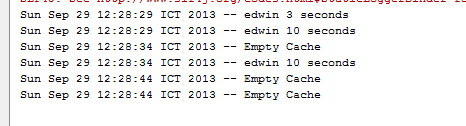
This is my Netbeans’ project structure,

Well i hope this helped others, have fun using ehcache.

[Java] How to Convert XMLGregorianCalendar to java.util.Date and The Other Way Around

This is a simple code snippet on how to convert XMLGregorianCalendar into java.util.Date and java.util.Date into javax.xml.datatype.XMLGregorianCalendar. Usually i found XMLGregorianCalendar everytime im trying to convert java bean into webservice using wsdl2java.

But there are some time when i need to convert those XMLGregorianCalendar objects and change them into java.util.Date so i could do a much more various process on them. So this is how i convert XMLGregorianCalendar into java.util.Date,

            
            XMLGregorianCalendar calendar = responseMessage.getDate();
            java.util.Date date = calendar.toGregorianCalendar().getTime();

and this is how i convert java.util.Date into XMLGregorianCalendar

            GregorianCalendar gregorianCalendar = new GregorianCalendar();
            gregorianCalendar.setTime(new Date());
            responseMessage.setDate(new XMLGregorianCalendarImpl(gregorianCalendar));

For example, im using XMLGregorianCalendar value “2012-10-15T00:00:00”. Hope it would help others (H)

How To Change Apache Tomcat’s Server Name

On this tutorial, i’ll show you how to change Apache Tomcat’s server name. This is the screenshot from a regular Apache Tomcat,

And with a simple configuration on server.xml,

 <Connector port="8080" protocol="HTTP/1.1"
         connectionTimeout="20000"
	 server="Why So Serious"
         redirectPort="8443" />

It will change my Tomcat’s server name into,

Not hard actually 😉