edwin

Creating a Simple Reporting Application using JasperReport and iBatis Framework

In this article i’m trying to create a very simple reporting application. In my several past projects, i used to do reporting with java swing and jasper report, and im connecting both of them using a simple JDBC and java.sql.Connection. But in recent project, i had to used iBatis Framework for replacing JDBC. So i had to spend several hours finding a workaround on how connecting Jasper with iBatis, but thanks to uncle Google i finally found a very simple but elegant workaround.
Enough with the chit-chat, i’ll show you the code. First, as always, a simple database named “test” and a simple table named “contoh”.

CREATE DATABASE 'test'
USE 'test'

CREATE TABLE `contoh` (
  `nama` varchar(30) NOT NULL DEFAULT '',
  `alamat` varchar(100) DEFAULT NULL,
  PRIMARY KEY (`nama`)
)

next step is creating a java bean for database mapping

package com.edw.bean;

public class Contoh {

    private String nama;
    private String alamat;

    public String getAlamat() {
        return alamat;
    }

    public void setAlamat(String alamat) {
        this.alamat = alamat;
    }

    public String getNama() {
        return nama;
    }

    public void setNama(String nama) {
        this.nama = nama;
    }
    
}

and an xml mapping for database queries, i named it contoh.xml

<?xml version="1.0" encoding="UTF-8" ?>
<!DOCTYPE sqlMap PUBLIC "-//ibatis.apache.org//DTD SQL Map 2.0//EN" 
"http://ibatis.apache.org/dtd/sql-map-2.dtd" >
<sqlMap namespace="contoh" >

  <resultMap id="result" class="com.edw.bean.Contoh">
        <result property="nama" column="NAMA" columnIndex="1"/>
        <result property="alamat" column="ALAMAT" columnIndex="2"/>
    </resultMap>

    <insert id="insertContoh" parameterClass="com.edw.bean.Contoh" >
    insert into contoh (nama, alamat)
    values (#nama:VARCHAR#, #alamat:VARCHAR#)
    </insert>

    <select id="selectAllContoh" resultMap="result">
    select nama, alamat
    from contoh
    </select>

</sqlMap>

and ibatis’ main xml configuration, sqlmapconfig.xml

<?xml version="1.0" encoding="UTF-8"?>
<!DOCTYPE sqlMapConfig
PUBLIC "-//ibatis.apache.org//DTD SQL Map Config 2.0//EN"
"http://ibatis.apache.org/dtd/sql-map-config-2.dtd">

<sqlMapConfig>
    <settings
        useStatementNamespaces="true"
        lazyLoadingEnabled="true"
        enhancementEnabled="true"
        maxSessions="20"
        />

    <transactionManager type="JDBC" commitRequired="false">
        <dataSource type="SIMPLE">

            <property name="SetAutoCommitAllowed" value="false"/>
            <property name="DefaultAutoCommit" value="false"/>
            
            <property name="JDBC.Driver" value="com.mysql.jdbc.Driver"/>
            <property name="JDBC.ConnectionURL" value="jdbc:mysql://localhost/test"/>
            <property name="JDBC.Username" value="root"/>
            <property name="JDBC.Password" value="password"/>
   
        </dataSource>
    </transactionManager>

    <sqlMap resource="com/edw/sqlmap/contoh.xml"/>
</sqlMapConfig>

next step is creating a simple java class to load all iBatis’ configuration file.

package com.edw.config;

import com.ibatis.common.resources.Resources;
import com.ibatis.sqlmap.client.SqlMapClient;
import com.ibatis.sqlmap.client.SqlMapClientBuilder;
import java.io.IOException;
import java.io.Reader;


/**
 *
 * @author edw
 */
public class SqlMapConfig {

    protected static final SqlMapClient sqlMap;

    static {
        try {
            Reader reader = Resources.getResourceAsReader("com/edw/sqlmap/sqlmapconfig.xml");
            sqlMap = SqlMapClientBuilder.buildSqlMapClient(reader);
        } catch (IOException e) {
            throw new RuntimeException("Fatal Error, ga dapet sqlmapconfignya.  Cause: " + e, e);
        } catch (Exception e){
            throw new RuntimeException("Fatal Error.  Cause: " + e, e);
        }
    }

    public static SqlMapClient getSqlMap() {
        return sqlMap;
    }
}

I create a very simple reporting using JasperReport, i named it Iseng.jrxml and compile it into Iseng.jasper

<?xml version="1.0" encoding="UTF-8"?>
<jasperReport xmlns="http://jasperreports.sourceforge.net/jasperreports" xmlns:xsi="http://www.w3.org/2001/XMLSchema-instance" xsi:schemaLocation="http://jasperreports.sourceforge.net/jasperreports http://jasperreports.sourceforge.net/xsd/jasperreport.xsd" name="Iseng" pageWidth="595" pageHeight="842" columnWidth="555" leftMargin="20" rightMargin="20" topMargin="20" bottomMargin="20">
	<property name="ireport.zoom" value="1.0"/>
	<property name="ireport.x" value="0"/>
	<property name="ireport.y" value="0"/>
	<parameter name="nama1" class="java.lang.String"/>
	<queryString>
		<![CDATA[]]>
	</queryString>
	<field name="nama" class="java.lang.String"/>
	<field name="alamat" class="java.lang.String"/>
	<background>
		<band splitType="Stretch"/>
	</background>
	<title>
		<band height="56" splitType="Stretch">
			<staticText>
				<reportElement x="0" y="0" width="555" height="46"/>
				<textElement textAlignment="Center" verticalAlignment="Middle">
					<font size="24"/>
				</textElement>
				<text><![CDATA[Testing Report]]></text>
			</staticText>
		</band>
	</title>
	<pageHeader>
		<band height="13" splitType="Stretch"/>
	</pageHeader>
	<columnHeader>
		<band height="34" splitType="Stretch">
			<staticText>
				<reportElement x="0" y="11" width="100" height="20"/>
				<textElement textAlignment="Center" verticalAlignment="Middle"/>
				<text><![CDATA[Nama]]></text>
			</staticText>
			<staticText>
				<reportElement x="225" y="11" width="100" height="20"/>
				<textElement textAlignment="Center" verticalAlignment="Middle"/>
				<text><![CDATA[Alamat]]></text>
			</staticText>
		</band>
	</columnHeader>
	<detail>
		<band height="27" splitType="Stretch">
			<textField>
				<reportElement x="32" y="0" width="100" height="20"/>
				<textElement/>
				<textFieldExpression class="java.lang.String"><![CDATA[$F{nama}]]></textFieldExpression>
			</textField>
			<textField>
				<reportElement x="225" y="0" width="100" height="20"/>
				<textElement/>
				<textFieldExpression class="java.lang.String"><![CDATA[$F{alamat}]]></textFieldExpression>
			</textField>
		</band>
	</detail>
	<columnFooter>
		<band height="45" splitType="Stretch"/>
	</columnFooter>
	<pageFooter>
		<band height="54" splitType="Stretch"/>
	</pageFooter>
	<summary>
		<band height="42" splitType="Stretch"/>
	</summary>
</jasperReport>

And this is my main Swing class. iBatis generate a List of Beans class for its result set, and im using Jasper’s JRBeanCollectionDataSource class to map iBatis’ resultSet.

package com.edw.ui;

import com.edw.bean.Contoh;
import com.edw.config.SqlMapConfig;
import com.ibatis.sqlmap.client.SqlMapClient;
import java.awt.Container;
import java.awt.FlowLayout;
import java.awt.event.ActionEvent;
import java.awt.event.ActionListener;
import java.io.BufferedInputStream;
import java.io.FileInputStream;

import java.util.HashMap;
import java.util.List;

import javax.swing.JButton;
import javax.swing.JFrame;

import net.sf.jasperreports.engine.JasperFillManager;
import net.sf.jasperreports.engine.JasperPrint;
import net.sf.jasperreports.engine.JasperReport;
import net.sf.jasperreports.engine.data.JRBeanCollectionDataSource;
import net.sf.jasperreports.engine.util.JRLoader;
import net.sf.jasperreports.view.JasperViewer;
import org.apache.log4j.Logger;

/**
 *
 * @author edw
 */
public class Main extends JFrame implements ActionListener {

    private Logger logger = Logger.getLogger(this.getClass());
    private JButton cmdPrint = new JButton("cetak");
    private SqlMapClient sqlMapClient = SqlMapConfig.getSqlMap();

    public Main() {
        Container conn = getContentPane();
        conn.setLayout(new FlowLayout());
        conn.add(cmdPrint);
        setLocationRelativeTo(null);
        setDefaultCloseOperation(JFrame.EXIT_ON_CLOSE);
        cmdPrint.addActionListener(this);
        pack();
    }

     public void actionPerformed(ActionEvent e) {
        if (e.getSource() == cmdPrint) {
            try {
                //load report location
                FileInputStream fis = new FileInputStream("Iseng.jasper");
                BufferedInputStream bufferedInputStream = new BufferedInputStream(fis);

                // do query and get list of Contoh
                List<Contoh> contohs = sqlMapClient.queryForList("contoh.selectAllContoh");

                //fill it in JRBeanCollectionDS
                JRBeanCollectionDataSource jrbcds = new JRBeanCollectionDataSource(contohs);

                //compile report
                JasperReport jasperReport = (JasperReport) JRLoader.loadObject(bufferedInputStream);
                JasperPrint jasperPrint = JasperFillManager.fillReport(jasperReport, new HashMap(), jrbcds);

                //view report to UI
                JasperViewer.viewReport(jasperPrint, false);

            } catch (Exception ex) {
                logger.error(ex.getMessage(), ex);
            }

        }
    }

    public static void main(String[] args) {
        Main main = new Main();
        main.setVisible(true);
    }
}

and my log4j configuration, i named it log4j.properties

# Global logging configuration
log4j.rootLogger=DEBUG,stdout

# Console output...
log4j.appender.stdout=org.apache.log4j.ConsoleAppender
log4j.appender.stdout.layout=org.apache.log4j.PatternLayout
log4j.appender.stdout.layout.ConversionPattern=%d [%c{1}] %-5p %c:%L - %m%n

this is my NetBeans’ project structure,
Netbeans 6.9 project structure

dont forget to put your .jasper file in the same folder as your build.xml file,
Netbeans 6.9 file structure

this is what happen when i run my application, on the background you can see iBatis’ resultSet.
iBatis UI and its ResultSet

and this is what happen when i push my report button
JasperViewer showing iBatis' resultSet

I hope my article can be useful for others, thank you and have fun using iBatis.
(H)

Selamat Idul Fitri 1431H 2010AD


Maafkan Lahir dan Batin

L-ive is go on,
E-verything reborn again,
B-ut
A-ll of d sin &
R-egret still inside in me,
A-nd I wanna say
N-othing but taqobbalallahu minna waminkum..

Minal Aidin Walfaidzin
Mohon Maaf Lahir dan Batin.
(B)

Iseng2 browsing, eh nemu gambar Love Hina lagi suasana Lebaran, langsung gw tarik terus edit2 dikid. Thanks for the original posters, two thumbs up for u guys.
Love Hina characters and All materials copyrighted per their respective copyright holders.

A Simple Java Client Server Application using EJB3 and Glassfish3

Well, in this tutorial i want to show you how to create a simple client server application using java. Actually java has dozens of different network protocols, from a simple socket, hessian, burlap, SpringHttpInvoker, SOAP, XML and so on. But in this example, i will try to create a very simple client server application with EJB 3, using Glassfish 3 as JavaEE Container. As usual, i use Netbeans 6.9 with its default Glassfish3 installation.

First, i create a new JavaEE, EJB Module project, named CompressedEJBServer, and create a simple Stateless Session Bean in it

package com.edw.facade;

import javax.ejb.Remote;

/**
 *
 * @author edw
 */
@Remote
public interface ConnectionFacadeRemote {
    String sayHello(String string);
    int sayAge(int age);  
}

and its implementation

package com.edw.facade;

import javax.ejb.Stateless;

/**
 *
 * @author edw
 */
@Stateless
public class ConnectionFacade implements ConnectionFacadeRemote {

    public String sayHello(String string) {
        System.out.println("im at " + this.getClass().getName() + " method sayHello()");
        return "hello " + string;
    }

    public int sayAge(int age) {
        System.out.println("im at " + this.getClass().getName() + " method sayAge()");
        return age * 2;
    }
}

and that’s my EJB3 Server side files. Simple isn’t it?

Next step is creating a Standard Java Application project, for my EJB3 client application. It consist only 1 java file, for testing connection to the server.

package com.edw.main;

import com.edw.facade.ConnectionFacadeRemote;
import java.util.Properties;

import javax.naming.Context;
import javax.naming.InitialContext;
import org.apache.log4j.Logger;

/**
 *
 * @author edw
 */
public class Main {

    private Logger logger = Logger.getLogger(Main.class);

    private void connect() {
        try {
            Properties props = new Properties();
            props.put(Context.INITIAL_CONTEXT_FACTORY, "com.sun.enterprise.naming.SerialInitContextFactory");
            props.setProperty("org.omg.CORBA.ORBInitialHost", "localhost");
            
            // glassfish default port value will be 3700, 
            // but im using tcpviewer to redirect my 50005 port to 3700
            props.setProperty("org.omg.CORBA.ORBInitialPort", "50005");

            InitialContext ctx = new InitialContext(props);
            ConnectionFacadeRemote connectionFacadeRemote = (ConnectionFacadeRemote) ctx.lookup("com.edw.facade.ConnectionFacadeRemote");
            logger.debug(connectionFacadeRemote.sayHello("edwin "));
            logger.debug("my age is " + connectionFacadeRemote.sayAge(12) + " years");
        } catch (Exception ex) {
            logger.error(ex.getMessage(), ex);
        }
    }

    public static void main(String[] args) {
        Main x = new Main();
        x.connect();
    }
}

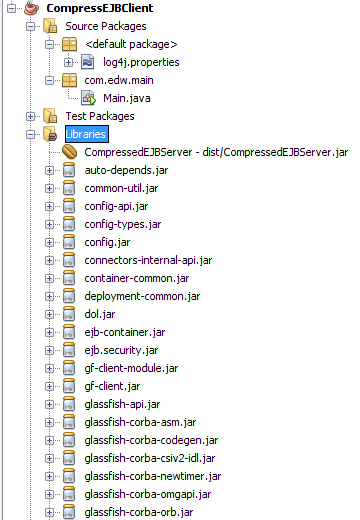
include these jars to your client side’s application,

auto-depends.jar
common-util.jar
config.jar
config-api.jar
config-types.jar
connectors-internal-api.jar
container-common.jar
deployment-common.jar
dol.jar
ejb.security.jar
ejb-container.jar
glassfish-api.jar
glassfish-corba-asm.jar
glassfish-corba-codegen.jar
glassfish-corba-csiv2-idl.jar
glassfish-corba-newtimer.jar
glassfish-corba-omgapi.jar
glassfish-corba-orb.jar
glassfish-corba-orbgeneric.jar
glassfish-naming.jar
gmbal.jar
hk2-core.jar
internal-api.jar
javax.ejb.jar
javax.jms.jar
javax.resource.jar
javax.servlet.jar
javax.transaction.jar
jta.jar
kernel.jar
management-api.jar
orb-connector.jar
orb-iiop.jar
security.jar
tiger-types-osgi.jar
transaction-internal-api.jar 

and dont forget to add CompressedEJBServer project into CompressEJBClient’s project

this is what happen if i run my client side’s application

[Main] DEBUG com.edw.main.Main:30 - hello edwin 
[Main] DEBUG com.edw.main.Main:31 - my age is 24 years

this is my Server side’s project structures

and this is my Client side’s project structures
My Client Side's Project Structure

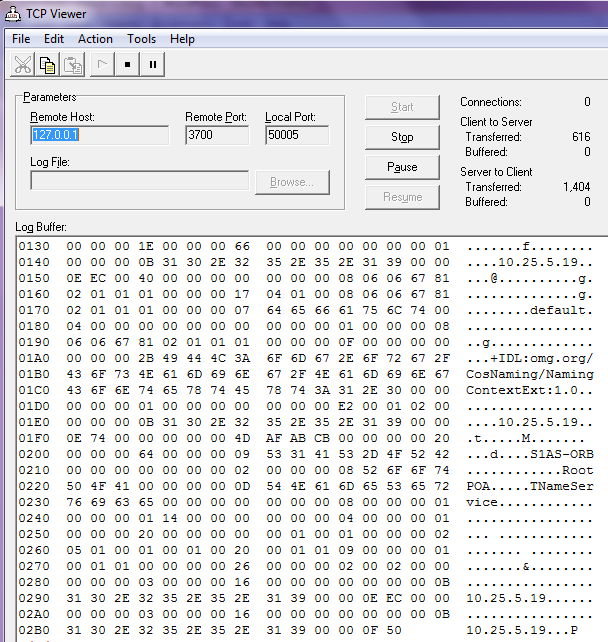
and this is my TCP Viewer logs, i try to redirect my localhost’s port 50005 into my localhost’s port 3700 (Glassfish’s port), so i can see what is passing through my 50005 port via TCP Viewer’s console.

Hope this can help, have fun and good luck. May the Source be with You.
(*)

Creating an Autocomplete Text Field in Java using SwingX

Again, my friend Iswi asked me a simple question, but a little bit hard to do. She asked me, how can she create an autocomplete jtextfield in java, maybe something like NetBean’s autocompletion feature. It took me a while to try several workarounds, before i found a very neat library, swingx. Let just say that this SwingX library helped me alot, and it have lots of other cool swing components. Really worth a try.

In this example, i try to create a simple application consist of 2 autocompletion components, 1 unrestricted jcombobox and 1 restricted jtextfield. Both components will connect to one table using Hibernate. Let’s give it a try.

First, a simple 2 column table.

CREATE DATABASE 'test'
USE 'test'

CREATE TABLE 'contoh' (
  'nama' varchar(30) NOT NULL,
  'alamat' varchar(100) DEFAULT NULL,
  PRIMARY KEY ('nama')
) 

next step is creating a java bean and its hbm.xml for database mapping

package com.edw.bean;

/**
 * Contoh generated by hbm2java
 */
public class Contoh implements java.io.Serializable {

    private String nama;
    private String alamat;

    public Contoh() {
    }

    public Contoh(String nama) {
        this.nama = nama;
    }

    public Contoh(String nama, String alamat) {
        this.nama = nama;
        this.alamat = alamat;
    }

    public String getNama() {
        return this.nama;
    }

    public void setNama(String nama) {
        this.nama = nama;
    }

    public String getAlamat() {
        return this.alamat;
    }

    public void setAlamat(String alamat) {
        this.alamat = alamat;
    }
}

FYI, im using NetBeans’ Hibernate POJO and XML generator.

<?xml version="1.0" encoding="UTF-8"?>
<!DOCTYPE hibernate-mapping PUBLIC "-//Hibernate/Hibernate Mapping DTD 3.0//EN" "http://hibernate.sourceforge.net/hibernate-mapping-3.0.dtd">
<!-- Generated Sep 1, 2010 10:10:38 AM by Hibernate Tools 3.2.1.GA -->
<hibernate-mapping>
  <class catalog="test" name="com.edw.bean.Contoh" table="contoh">
    <id name="nama" type="string">
      <column length="30" name="nama"/>
      <generator class="assigned"/>
    </id>
    <property name="alamat" type="string">
      <column length="100" name="alamat"/>
    </property>
  </class>
</hibernate-mapping>

this is my hibernate.cfg.xml, for my default hibernate configuration

<?xml version="1.0" encoding="UTF-8"?>
<!DOCTYPE hibernate-configuration PUBLIC "-//Hibernate/Hibernate Configuration DTD 3.0//EN" "http://hibernate.sourceforge.net/hibernate-configuration-3.0.dtd">
<hibernate-configuration>
  <session-factory>
    <property name="hibernate.dialect">org.hibernate.dialect.MySQLDialect</property>
    <property name="hibernate.connection.driver_class">com.mysql.jdbc.Driver</property>
    <property name="hibernate.connection.url">jdbc:mysql://localhost:3306/test</property>
    <property name="hibernate.connection.username">admin</property>
    <property name="hibernate.connection.password">xxx</property>
    <mapping resource="com/edw/bean/Contoh.hbm.xml"/>
  </session-factory>
</hibernate-configuration>

and my java class to load hibernate’s main xml configuration

package com.edw.hbm.util;

import org.hibernate.cfg.AnnotationConfiguration;
import org.hibernate.SessionFactory;

/**
 * Hibernate Utility class with a convenient method to get Session Factory object.
 *
 * @author edw
 */
public class HibernateUtil {
    private static final SessionFactory sessionFactory;

    static {
        try {
            // Create the SessionFactory from standard (hibernate.cfg.xml) 
            // config file.
            sessionFactory = new AnnotationConfiguration().configure().buildSessionFactory();
        } catch (Throwable ex) {
            // Log the exception. 
            System.err.println("Initial SessionFactory creation failed." + ex);
            throw new ExceptionInInitializerError(ex);
        }
    }

    public static SessionFactory getSessionFactory() {
        return sessionFactory;
    }
}

this is my main java class, you’ll see some imported SwingX’s classes.

package com.edw.swingx;

import com.edw.bean.Contoh;
import com.edw.hbm.util.HibernateUtil;
import java.awt.Container;
import java.awt.FlowLayout;
import java.awt.event.ActionEvent;
import java.awt.event.ActionListener;
import java.util.ArrayList;
import java.util.Collections;
import java.util.List;
import javax.swing.JButton;
import javax.swing.JComboBox;
import javax.swing.JFrame;
import javax.swing.JTextField;
import org.apache.log4j.Logger;
import org.hibernate.Session;

import org.jdesktop.swingx.autocomplete.AutoCompleteDecorator;
import org.jdesktop.swingx.combobox.ListComboBoxModel;

/**
 *
 * @author edw
 */
public class AutoCompletionTextField extends JFrame implements ActionListener {

    private JButton button = new JButton("tombol");
    private JComboBox comboComplete = new JComboBox();
    private JTextField textComplete = new JTextField(30);
    private Logger logger = Logger.getLogger(this.getClass());
    private List<String> strings = new ArrayList<String>();

    public void actionPerformed(ActionEvent e) {
        if(e.getSource() == button){
            logger.debug(comboComplete.getSelectedItem().toString());
            logger.debug(textComplete.getText().toString());
        }
    }

    public AutoCompletionTextField() {

        try {
            Session session = HibernateUtil.getSessionFactory().openSession();
            List<Contoh> contohs = (List<Contoh>)session.createCriteria(Contoh.class).list();
            session.close();

            for (Contoh contoh : contohs) {
                strings.add(contoh.getNama());
            }

            Collections.sort(strings);

            // change true to false to enable string restriction
            comboComplete.setEditable(true);
            comboComplete.setModel(new ListComboBoxModel<String>(strings));

            AutoCompleteDecorator.decorate(comboComplete);
            // change true to false to disable string restriction
            AutoCompleteDecorator.decorate(textComplete, strings, true);

            Container con = getContentPane();
            con.setLayout(new FlowLayout());
            con.add(comboComplete);
            con.add(textComplete);
            con.add(button);

            button.addActionListener(this);
            comboComplete.addActionListener(this);
        } catch (Exception ex) {
            logger.error(ex.getMessage(), ex);
        }
    }
    
    public static void main(String[] args) {
        AutoCompletionTextField autoCompletionTextField = new AutoCompletionTextField();
        autoCompletionTextField.setVisible(true);
        autoCompletionTextField.pack();
        autoCompletionTextField.setDefaultCloseOperation(JFrame.EXIT_ON_CLOSE);
    }
}

this is my UI result,

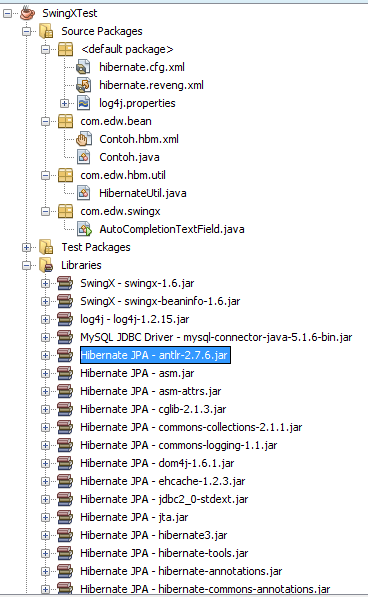
this is NetBeans 6.9 project structure,

Again, thank you Iswi for your questions. Cheers, (B)

Calling a JInternalFrame from a JDialog

Yesterday, my friend Iswi asked me a question, how can she called a JinternalFrame from a JDialog, and put it in an existing JDesktopPane? Well Iswi, here are your answers.

First i create a very simple JFrame application

package com.edw.ui;

import java.awt.BorderLayout;
import java.awt.Container;

import java.awt.event.ActionEvent;
import java.awt.event.ActionListener;
import javax.swing.JDesktopPane;
import javax.swing.JFrame;

import javax.swing.JMenu;
import javax.swing.JMenuBar;
import javax.swing.JMenuItem;
import org.apache.log4j.Logger;

/**
 *
 * @author edw
 */
public class FrameMain extends JFrame implements ActionListener {

    private JDesktopPane desktopPane = new JDesktopPane();
    private JMenuBar jMenuBar = new JMenuBar();
    private JMenu menuTest = new JMenu("Test");
    private JMenuItem jMenuItem = new JMenuItem("execute");
    private Logger logger = Logger.getLogger(this.getClass());

    public FrameMain() {
        Container con = getContentPane();  
        con.setLayout(new BorderLayout());
        con.add(desktopPane, BorderLayout.CENTER);

        menuTest.add(jMenuItem);
        jMenuBar.add(menuTest);

        setJMenuBar(jMenuBar);

        jMenuItem.addActionListener(this);
    }

    public void actionPerformed(ActionEvent e) {
        if (e.getSource() == jMenuItem) {
            logger.debug("in jmenuitem");
            InternalTestOne internalTestSatu = new InternalTestOne(this);
            internalTestSatu.setVisible(true);
            getDesktopPane().add(internalTestSatu);
        }
    }

    public static void main(String[] args) {
        FrameMain frameMain = new FrameMain();
        frameMain.setVisible(true);
        frameMain.setLocationRelativeTo(null);        
        frameMain.setSize(800, 500);
        frameMain.setDefaultCloseOperation(JFrame.EXIT_ON_CLOSE);
        frameMain.setTitle("bubu");
    }

    public JDesktopPane getDesktopPane() {
        return desktopPane;
    }

    public void setDesktopPane(JDesktopPane desktopPane) {
        this.desktopPane = desktopPane;
    }
}

and this is my first JInternalFrame, it will call a JDialog class,

package com.edw.ui;

import java.awt.Container;
import java.awt.FlowLayout;
import java.awt.event.ActionEvent;
import java.awt.event.ActionListener;
import javax.swing.JButton;

import javax.swing.JInternalFrame;
import org.apache.log4j.Logger;

/**
 *
 * @author edw
 */
public class InternalTestOne extends JInternalFrame implements ActionListener {

    private Logger logger = Logger.getLogger(this.getClass());
    private JButton button = new JButton("Klik Dialog");
    private FrameMain frameMain = new FrameMain();

    public void actionPerformed(ActionEvent e) {
        if(e.getSource() == button){
            logger.debug("in ActionPerformed InternalTestSatu");

            // show jdialog
            DialogTest dialogTest = new DialogTest(frameMain);
            dialogTest.setVisible(true);
        }
    }

    public InternalTestOne(FrameMain frameMain) {
        super("internal satu", true, true, true, true);
        this.frameMain = frameMain;
        setSize(300,300);
        logger.debug("in InternalTestSatu");

        Container con = getContentPane();
        con.setLayout(new FlowLayout());
        con.add(button);
        button.addActionListener(this);
    }

}

and this is my JDialog class

package com.edw.ui;

import java.awt.Container;
import java.awt.FlowLayout;
import java.awt.event.ActionEvent;
import java.awt.event.ActionListener;
import javax.swing.JButton;
import javax.swing.JDialog;

import org.apache.log4j.Logger;

/**
 *
 * @author edw
 */
public class DialogTest extends JDialog implements ActionListener {

    private JButton button = new JButton("call Internal Frame");
    private Logger logger = Logger.getLogger(this.getClass());
    private FrameMain frameMain = new FrameMain();

    public void actionPerformed(ActionEvent e) {
        if(e.getSource() == button){
            logger.debug("at actionPerformed "+this.getClass().getName());

            // call jinternalframe from here           
            InternalTestTwo internalTestTwo = new InternalTestTwo();
            internalTestTwo.setVisible(true);
            frameMain.getDesktopPane().add(internalTestTwo);
            this.setVisible(false);
            this.dispose();
        }
    }

    public DialogTest(FrameMain frameMain) {
        super(frameMain);
        this.frameMain = frameMain;
        setTitle("Calling JInternalFrame");
        Container con = getContentPane();
        con.setLayout(new FlowLayout());
        con.add(button);
        setLocationRelativeTo(null);
        setSize(300,200);
        pack();
        button.addActionListener(this);
    }

}

and finally, this is my second JInternalFrame , it will be called from a JDialog

package com.edw.ui;

import java.awt.Container;
import java.awt.FlowLayout;
import javax.swing.JInternalFrame;
import javax.swing.JLabel;
import org.apache.log4j.Logger;

/**
 *
 * @author edw
 */
public class InternalTestTwo extends JInternalFrame {

    private JLabel label = new JLabel("Called from JDialog");
    private Logger logger = Logger.getLogger(this.getClass());

    public InternalTestTwo() {
        super("internal Two Called from JDialog", true, true, true, true);
        setSize(300, 300);
        setLocation(100,200);
        logger.debug("constructor of "+this.getClass().getName());

        Container con = getContentPane();
        con.setLayout(new FlowLayout());
        con.add(label);
    }
}

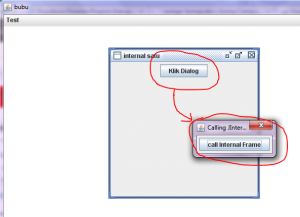
and this is how my simple app looks like,

Thanks for your questions, Iswi. Always remember, stay hungry, stay foolish.
:-[