Selamat Idul Fitri 1432H 2011AD
Mata bisa salah lihat
Kuping bisa salah dengar
Mulut bisa salah bicara
Hati bisa salah sangka
Di hari yang fitri ini
Mohon maaf lahir dan bathin.
Selamat Hari Raya Idul Fitri.


Im planning to create more than 1 WebSphere instance on my box, im using a CentOS for development, and IBM AIX for production. On this example i have an instance named “AppSrv01” and trying to create a new WebSphere instance “AppSrvTeller”. Btw, im using WAS 6.1 on my box.
Okay here we go,
first is executing manageprofiles.sh to create a new profiles, when im executing manageprofiles.sh -help -create, it will print
The following command line arguments are required for this mode.
Command-line arguments are case sensitive.
-create: Creates a new profile. Specify -help -create -templatePath <path> to get template-specific help information.
-templatePath: The fully qualified path name of the profile template that is located on the file system. The following example selects a template: -templatePath <app_server_home>/profileTemplates/<Template_name>
-profileName: The name of the profile.
-profilePath: The intended location of the profile in the file system.

The following command line arguments are optional, and have no default values.
Command-line arguments are case sensitive.
-isDefault: Make this profile the default target of commands that do not use their profile parameter.
-omitAction: Omit optional features.
you just provide the needed parameters, well in my case i’ll show you what i write on my console
[root@localhost bin]# uname -a
Linux localhost.localdomain 2.6.18-128.el5 #1 SMP Wed Jan 21 10:44:23 EST 2009 i686 i686 i386 GNU/Linux
[root@localhost bin]# pwd
/opt/IBM/WebSphere/AppServer/bin
[root@localhost bin]# sh manageprofiles.sh -create -profileName AppSrvTeller -templatePath /opt/IBM/WebSphere/AppServer/profileTemplates/default/ -profilePath /opt/IBM/WebSphere/AppServer/profiles/AppSrvTeller
INSTCONFSUCCESS: Success: Profile AppSrvTeller now exists. Please consult /opt/IBM/WebSphere/AppServer/profiles/AppSrvTeller/logs/AboutThisProfile.txt for more information about this profile.
Hope it can help others (H)
It’s actually quite easy, but a little tricky. This is how i do it,
1. Start the administrative console.
2. In the topology tree, expand Servers and click Application Servers.
3. Click the name of the application server for which you want to set the time zone.
4. On the application server page, click Process Definition.

5. On the Process Definition page, click Java Virtual Machine.
6. On the Java Virtual Machine page, click Custom Properties.
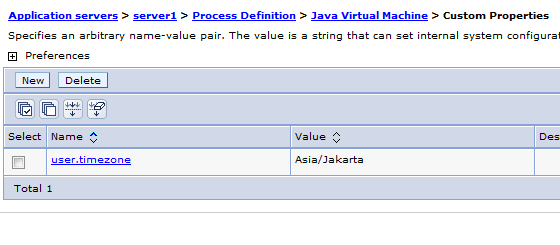
7. On the Custom Properties page, click New.
8. Specify user.timezone in the Name field and timezone in the Value field, where timezone is the supported value for your time zone.
9. Click Apply.
10. Save the configuration
In this example, i’m setting my timezone as Asia/Jakarta
user.timezone=Asia/Jakarta
Have fun with WebSphere (*)
Among dozens of usefull db2 commands, these are several most usefull db2command, well at least commands that i use the most.
db2move
A Database Movement Tool Command. This tool facilitates the movement of large numbers of tables between DB2 databases located on workstations. The tool queries the system catalog tables for a particular database and compiles a list of all user tables. It then exports these tables in PC/IXF format. The PC/IXF files can be imported or loaded to another local DB2 database on the same system, or can be transferred to another workstation platform and imported or loaded to a DB2 database on that platform.
db2batch
A Benchmark Tool Command. Reads SQL statements from either a flat file or standard input, dynamically prepares and describes the statements, and returns an answer set.
restore
The RESTORE DATABASE command rebuilds a damaged or corrupted database that has been backed up using the DB2 backup utility. The restored database is in the same state that it was in when the backup copy was made. This utility can also overwrite a database with a different image or restore the backup copy to a new database.
Sample Command
db2move sample export
This will export all tables in the SAMPLE database; default values are used for all options.
db2move sample export -tc userid1,us*rid2 -tn tbname1,*tbname2
This will export all tables created by “userid1” or user IDs LIKE “us%rid2”, and with the name “tbname1” or table names LIKE “%tbname2”.
db2move sample export -tn *cust*
This will export all tables with the name “%cust%”.
db2move sample import -io replace -u userid -p password
This will import all tables in the SAMPLE database in REPLACE mode; the specified user ID and password will be used. Parameters for io can be one of INSERT, INSERT_UPDATE, REPLACE, CREATE, and REPLACE_CREATE.
restore db rcms2 from /data/tempdb taken at 20100324184458 into RCMS3 without rolling forward
Restore the DB to another name and with a specific timestamp.
db2batch -d CSS -f insertproduct.sql
This will execute insertproduct.sql
references :
http://publib.boulder.ibm.com/infocenter/db2luw/v8/index.jsp?topic=/com.ibm.db2.udb.doc/core/r0002079.htm
http://publib.boulder.ibm.com/infocenter/db2luw/v8/index.jsp?topic=/com.ibm.db2.udb.doc/core/r0002043.htm
http://publib.boulder.ibm.com/infocenter/db2luw/v8/index.jsp?topic=/com.ibm.db2.udb.doc/core/r0001976.htm
Have Fun (@)
In this example im trying to create a simple application using Hibernate’s caching feature. What is cache anyway? A cache is designed to reduce traffic between your application and the database by conserving data already loaded from the database and put it whether in memory or in file. Database access is necessary only when retrieving data that is not currently available in the cache. So basically not all queries are taken from database, but from cache instead.
Hibernate use EHCache for default caching, but now im trying to demonstrate both OSCache and EHCache caching library. But you can only use one of it at one time. Both of them only differ in caching configuration, but the rest are still the same.
First is a simple sql file, a java bean and its hibernate xml configuration
CREATE
    TABLE matakuliah
    (
        kodematakuliah VARCHAR(10) NOT NULL,
        namamatakuliah VARCHAR(20),
        PRIMARY KEY (kodematakuliah)
    )
    ENGINE=InnoDB DEFAULT CHARSET=latin1;
INSERT
INTO
    matakuliah
    (
        kodematakuliah,
        namamatakuliah
    )
    VALUES
    (
        '123',
        'ccc'
    );
package com.edw.bean;

public class Matakuliah  implements java.io.Serializable {

     public class Matakuliah  implements java.io.Serializable {

     private String kodematakuliah;
     private String namamatakuliah;

    public Matakuliah() {
    }

    public Matakuliah(String kodematakuliah) {
        this.kodematakuliah = kodematakuliah;
    }
    public Matakuliah(String kodematakuliah, String namamatakuliah) {
       this.kodematakuliah = kodematakuliah;
       this.namamatakuliah = namamatakuliah;
    }

    // other setters and getters
}
<?xml version="1.0" encoding="UTF-8"?>
<!DOCTYPE hibernate-mapping PUBLIC "-//Hibernate/Hibernate Mapping DTD 3.0//EN" "http://hibernate.sourceforge.net/hibernate-mapping-3.0.dtd">
<hibernate-mapping>
  <class catalog="kampus" name="com.edw.bean.Matakuliah" table="matakuliah">

    <!-- caching configuration -->
    <cache usage="read-write" />

    <id name="kodematakuliah" type="string">
      <column length="10" name="kodematakuliah"/>
      <generator class="assigned"/>
    </id>

    <property name="namamatakuliah" type="string">
      <column length="20" name="namamatakuliah"/>
    </property>
  </class>
</hibernate-mapping>
please take a look at line 7, im using read-write because my data sometimes get updated. If you are planning to have static data that never changes, use read-only.
Next is registering EhCacheProvider on hibernate.cfg.xml file
<?xml version="1.0" encoding="UTF-8"?>
<!DOCTYPE hibernate-configuration PUBLIC "-//Hibernate/Hibernate Configuration DTD 3.0//EN" "http://hibernate.sourceforge.net/hibernate-configuration-3.0.dtd">
<hibernate-configuration>
  <session-factory>
    <property name="hibernate.dialect">org.hibernate.dialect.MySQLDialect</property>
    <property name="hibernate.connection.driver_class">com.mysql.jdbc.Driver</property>
    <property name="hibernate.connection.url">jdbc:mysql://localhost:3307/kampus</property>
    <property name="hibernate.connection.username">root</property>
    <property name="hibernate.connection.autocommit">true</property>
    <property name="hibernate.cache.use_second_level_cache">true</property>
    <property name="hibernate.cache.use_query_cache">true</property>
    <property name="hibernate.cache.provider_class">org.hibernate.cache.EhCacheProvider</property>
    <property name="hibernate.show_sql">true</property>
    <property name="hibernate.format_sql">true</property>
    <mapping resource="com/edw/bean/Matakuliah.hbm.xml"/>
  </session-factory>
</hibernate-configuration>
create a java file to load your hibernate configuration file
package com.edw.util;

import org.hibernate.cfg.AnnotationConfiguration;
import org.hibernate.SessionFactory;

public class HiberUtil {
    private static final SessionFactory sessionFactory;

    static {
        try {
            sessionFactory = new AnnotationConfiguration().configure().buildSessionFactory();
        } catch (Throwable ex) {
            throw new ExceptionInInitializerError(ex);
        }
    }

    public static SessionFactory getSessionFactory() {
        return sessionFactory;
    }
}
and dont forget your ehcache.xml configuration
<?xml version="1.0" encoding="UTF-8"?>
<!--
    caching configuration
-->
<ehcache>
    <defaultCache
        maxElementsInMemory="10"
        eternal="false"
        timeToIdleSeconds="0"
        timeToLiveSeconds="0"
        overflowToDisk="false"/>
</ehcache>
and this is my java file to test hibernate’s caching ability
package com.edw.main.caching;

import com.edw.bean.Matakuliah;
import com.edw.util.HiberUtil;
import java.util.Date;
import org.hibernate.Session;

public class CachingMain {

    public CachingMain() {
    }

    /**
     *  do some repeated queries for table Matakuliah
     *  query results are taken from cache memory instead of database
     */
    private void withCache() {

        Session session = null;
        try {
            for (int i = 0; i < 3; i++) {

                // open session
                session = HiberUtil.getSessionFactory().openSession();

                // time needed
                long now = new Date().getTime();

                // select
                Matakuliah matakuliah = (Matakuliah)session.load(Matakuliah.class, "123");

                // print
                System.out.println("matakuliah "+matakuliah.getNamamatakuliah());
                System.out.println("Time : " + (new Date().getTime() - now) + " ms");

                // sleep for 3seconds
                Thread.sleep(3000);
            }
        } catch (Exception e) {
            e.printStackTrace();
        } finally {
            if (session != null) {
                session.close();
            }
        }
    }

    public static void main(String[] args) {
        CachingMain main = new CachingMain();
        main.withCache();
    }
}
you can see in your console, if you use log4j, this is what happen when Hibernate is querying from cache instead of database
DEBUG org.hibernate.impl.SessionImpl:220 - opened session at timestamp: 5364197853302784
DEBUG org.hibernate.jdbc.ConnectionManager:404 - aggressively releasing JDBC connection
DEBUG org.hibernate.impl.SessionImpl:832 - initializing proxy: [com.edw.bean.Matakuliah#123]
DEBUG org.hibernate.cache.EhCache:68 - key: com.edw.bean.Matakuliah#123
DEBUG org.hibernate.engine.StatefulPersistenceContext:790 - initializing non-lazy collections
matakuliah ccc
Time : 1 ms
Moving from EhCache to OsCache is very simple, all you have to do is replacing 1 line in your xml file, and adding an oscache.properties file.
<?xml version="1.0" encoding="UTF-8"?>
<!DOCTYPE hibernate-configuration PUBLIC "-//Hibernate/Hibernate Configuration DTD 3.0//EN" "http://hibernate.sourceforge.net/hibernate-configuration-3.0.dtd">
<hibernate-configuration>
  <session-factory>
    <property name="hibernate.dialect">org.hibernate.dialect.MySQLDialect</property>
    <property name="hibernate.connection.driver_class">com.mysql.jdbc.Driver</property>
    <property name="hibernate.connection.url">jdbc:mysql://localhost:3307/kampus</property>
    <property name="hibernate.connection.username">root</property>
    <property name="hibernate.connection.autocommit">false</property>
    <property name="hibernate.cache.use_second_level_cache">true</property>
    <property name="hibernate.cache.use_query_cache">true</property>
    <property name="hibernate.cache.provider_class">org.hibernate.cache.OSCacheProvider</property>
    <property name="hibernate.show_sql">true</property>
    <property name="hibernate.format_sql">true</property>
    <mapping resource="com/edw/bean/Matakuliah.hbm.xml"/>
  </session-factory>
</hibernate-configuration>
and this is my oscache.properties
cache.capacity=1000
cache.path=c:\\cache\\
cache.persistence.class=com.opensymphony.oscache.plugins.diskpersistence.HashDiskPersistenceListener
this is what happen on my Netbeans console when im using OsCache
DEBUG org.hibernate.impl.SessionImpl:220 - opened session at timestamp: 5364208706285568
DEBUG org.hibernate.jdbc.ConnectionManager:404 - aggressively releasing JDBC connection
DEBUG org.hibernate.impl.SessionImpl:832 - initializing proxy: [com.edw.bean.Matakuliah#123]
DEBUG com.opensymphony.oscache.base.algorithm.AbstractConcurrentReadCache:694 - get called (key=com.edw.bean.Matakuliah#123.com.edw.bean.Matakuliah)
DEBUG org.hibernate.engine.StatefulPersistenceContext:790 - initializing non-lazy collections
matakuliah ccc
Time : 1 ms
This is my project structure,


Hope it can help others. Have fun. (*)