edwin

Beginning REST Using JBoss RESTEasy

On today’s demo im trying to use RESTEasy to handle multiple REST requests. According to Wikipedia, REST (Representational state transfer) is a style of software architecture for distributed hypermedia systems such as the World Wide Web. While RESTEasy is a JBoss project that provides various frameworks to help you build RESTful Web Services and RESTful Java applications. It is a fully certified and portable implementation of the JAX-RS specification. JAX-RS is a new JCP specification that provides a Java API for RESTful Web Services over the HTTP protocol.

On this project, im trying to create 2 different services. 1 service to get all objects, while another one for fetching a single objects. I create 2 different responses type for each service, JSON and XML. Okay, so lets try with 2 simple javabeans.

package com.edw.bean;

import java.util.List;
import javax.xml.bind.annotation.XmlAccessType;
import javax.xml.bind.annotation.XmlAccessorType;
import javax.xml.bind.annotation.XmlElement;
import javax.xml.bind.annotation.XmlElementWrapper;
import javax.xml.bind.annotation.XmlRootElement;

@XmlRootElement
@XmlAccessorType(XmlAccessType.FIELD)
public class Student {

    private String name;
    private String address;
    private int age;

    @XmlElement(name="book")
    @XmlElementWrapper(name = "books")
    private List<Book> books;

    public Student() {
    }

    public Student(String name, String address, int age, List<Book> books) {
        this.name = name;
        this.address = address;
        this.age = age;
        this.books = books;
    }

	// other setter getter

    @Override
    public String toString() {
        return "Student{" + "name=" + name + ", address=" + address + ", age=" + age + ", books=" + books + '}';
    }
}
package com.edw.bean;

import javax.xml.bind.annotation.XmlAccessType;
import javax.xml.bind.annotation.XmlAccessorType;
import javax.xml.bind.annotation.XmlRootElement;

@XmlRootElement
@XmlAccessorType(XmlAccessType.FIELD)
public class Book {

    private String title;
    private double price;

    public Book() {
    }

    public Book(String title, double price) {
        this.title = title;
        this.price = price;
    }

	// other setter getter

    @Override
    public String toString() {
        return "Book{" + "title=" + title + ", price=" + price + '}';
    }
}

Now, you need to create a java class to handle all REST services,

package com.edw.rest;

import com.edw.bean.Book;
import com.edw.bean.Student;
import java.util.ArrayList;
import java.util.List;
import javax.ws.rs.GET;
import javax.ws.rs.Path;
import javax.ws.rs.PathParam;
import javax.ws.rs.Produces;
import javax.ws.rs.core.MediaType;

@Path("/service/student")
public class StudentRest {

    @GET
    @Path("/json")
    @Produces(MediaType.APPLICATION_JSON)
    // path would be http://localhost:8080/YourProject/service/student/json
    public List<Student> getStudentsJSON() {
        return getStudents();
    }

    @GET
    @Path("/xml")
    @Produces(MediaType.APPLICATION_XML)
    // path would be http://localhost:8080/YourProject/service/student/xml
    public List<Student> getStudentsXML() {
        return getStudents();
    }

    @GET
    @Path("/json/{name}")
    @Produces(MediaType.APPLICATION_JSON)
    // path would be http://localhost:8080/YourProject/service/student/json/insertyournamehere
    public Student getStudentJSON(@PathParam("name") String name) {
        return new Student(name, name + " Address", 10, getBooks());
    }

    @GET
    @Path("/xml/{name}")
    @Produces(MediaType.APPLICATION_XML)
    // path would be http://localhost:8080/YourProject/service/student/xml/insertyournamehere
    public Student getStudentXML(@PathParam("name") String name) {
        return new Student(name, name + " Address", 10, getBooks());
    }

    private List<Book> getBooks() {
        List<Book> books = new ArrayList<Book>();
        books.add(new Book("Harry Potter", 100d));
        books.add(new Book("Lord of the Ring", 120d));
        books.add(new Book("Chicken Soup", 20d));
        books.add(new Book("Doraemon", 190d));
        books.add(new Book("Laskar Pelangi", 200d));
        return books;
    }

    private List<Student> getStudents() {
        List<Student> students = new ArrayList<Student>();
        students.add(new Student("Edwin", "Jakarta", 25, getBooks()));
        students.add(new Student("Kamplenk", "Ciledug", 29, getBooks()));
        students.add(new Student("Tebek", "Pamulang", 38, getBooks()));
        students.add(new Student("Syamsu", "Bandung", 60, getBooks()));
        return students;
    }
}

And dont forget to register your service class

package com.edw.config;

import com.edw.rest.StudentRest;
import java.util.Set;
import java.util.HashSet;
import javax.ws.rs.core.Application;

public class ApplicationConfig extends Application {

    private Set<Object> singletons = new HashSet<Object>();
    private Set<Class<?>> empty = new HashSet<Class<?>>();

    public ApplicationConfig() {
        singletons.add(new StudentRest());
    }

    @Override
    public Set<Class<?>> getClasses() {
        return empty;
    }

    @Override
    public Set<Object> getSingletons() {
        return singletons;
    }
}

And last, register all in your web.xml file

<?xml version="1.0" encoding="UTF-8"?>
<web-app version="2.5" xmlns="http://java.sun.com/xml/ns/javaee" xmlns:xsi="http://www.w3.org/2001/XMLSchema-instance" xsi:schemaLocation="http://java.sun.com/xml/ns/javaee http://java.sun.com/xml/ns/javaee/web-app_2_5.xsd">
    <servlet>
        <servlet-name>Resteasy</servlet-name>
        <servlet-class>
            org.jboss.resteasy.plugins.server.servlet.HttpServletDispatcher
        </servlet-class>
        <init-param>
            <param-name>javax.ws.rs.Application</param-name>
            <param-value>com.edw.config.ApplicationConfig</param-value>
        </init-param>
    </servlet>

    <servlet-mapping>
        <servlet-name>Resteasy</servlet-name>
        <url-pattern>/service/*</url-pattern>
    </servlet-mapping>

    <welcome-file-list>
        <welcome-file>index.jsp</welcome-file>
    </welcome-file-list>
</web-app>

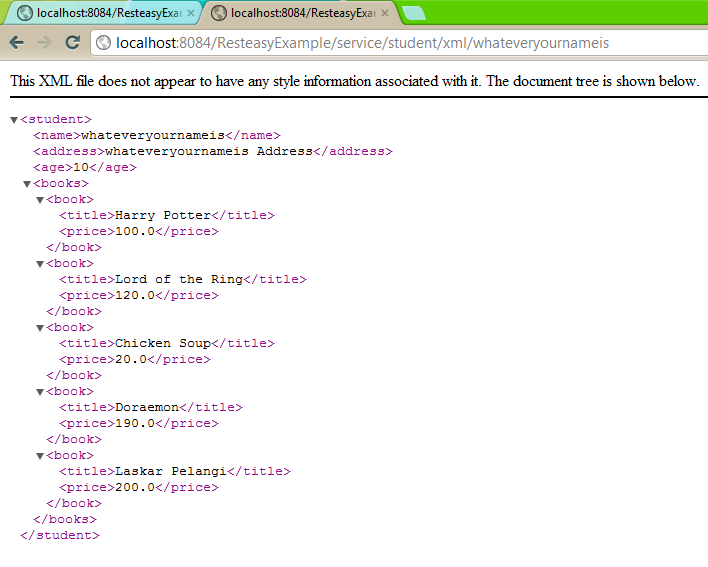
Here are some screenshots,

Have fun with RESTEasy 😉

Waspada Penipuan Lewat SMS yang Menawarkan Pulsa atau Handphone Murah

Akhir-akhir ini banyak sms spam (baca : sms sampah) yang masuk ke HP gw. Yang terbaru adalah sms spam yang menawarkan Blackberry, pulsa dan HP dengan harga miring serta menyediakan website (toko online) sebagai sarana display barang.

karena kebetulan gw lagi ga ada kerjaan, iseng-iseng gw akses web yang direferensikan oleh sms tersebut. Dalam hal ini adalah —-> http://tokoirwan.blogspot.com/. Berikut screenshot dari web tersebut :

Perhatikan foto disebelah kanan bawah, foto dari (katanya) Irwan Razid, sang pemilik toko. Foto tersebut kayaknya kok familiar yah, mungkin karena itu foto yang sama dengan di web ini —> http://f-lexible.blogspot.com/, kali ini dengan nama Fahmi Hidayat.

Hasil pencarian di google images membawa gw ke penemuan yang mengagetkan, sepertinya foto tersebut aslinya ada di –> http://www.pwc.com/id/en/about-us/thought-leaders.jhtml, namun sangat sering dipajang di Blogspot, terutama untuk web-web online shop. Nah aneh kan hahahaa 😀

Pesan moralnya, untuk pembeli : hati-hati jika membeli barang secara online, pastikan dahulu kualitas online shopnya dan jangan membeli sembarangan.
untuk penjual : coba tampilan webnya dibuat sedikit lebih bonafid lah, sewa domain atau hosting jadi ga perlu nebeng ke hosting gratisan. Pasang foto diri sendiri, klo ga pede ma muka, mending ga usah pasang foto sama sekali. Bisa dituntut loe kalo pakek foto orang sembarangan tanpa izin.

(H)

nb.
buat pemilik tokoirwan.blogspot.com, stop kirim sms spam lah. Annoying banget sms dari loe (N)

A Simple Java Desktop JasperReport Example

Hi, im currently testing the latest version of iReport, iReport 4.5.1. For the test, im trying to create a very simple reporting, consist of 2 column and without database connection. Im using a simple Array of Maps to fill my jasper report’s data using the JRMapCollectionDataSource class.

Here is my report example,

<?xml version="1.0" encoding="UTF-8"?>
<jasperReport xmlns="http://jasperreports.sourceforge.net/jasperreports" xmlns:xsi="http://www.w3.org/2001/XMLSchema-instance" xsi:schemaLocation="http://jasperreports.sourceforge.net/jasperreports http://jasperreports.sourceforge.net/xsd/jasperreport.xsd" name="report" pageWidth="595" pageHeight="842" columnWidth="555" leftMargin="20" rightMargin="20" topMargin="20" bottomMargin="20">
	<property name="ireport.zoom" value="1.0"/>
	<property name="ireport.x" value="0"/>
	<property name="ireport.y" value="0"/>
	<field name="name" class="java.lang.String"/>
	<field name="address" class="java.lang.String"/>
	<background>
		<band splitType="Stretch"/>
	</background>
	<title>
		<band height="31" splitType="Stretch">
			<staticText>
				<reportElement x="235" y="0" width="100" height="31"/>
				<textElement>
					<font size="24"/>
				</textElement>
				<text><![CDATA[Judul Saya]]></text>
			</staticText>
		</band>
	</title>
	<pageHeader>
		<band height="35" splitType="Stretch"/>
	</pageHeader>
	<columnHeader>
		<band height="22" splitType="Stretch">
			<staticText>
				<reportElement x="0" y="2" width="100" height="20"/>
				<textElement/>
				<text><![CDATA[name]]></text>
			</staticText>
			<staticText>
				<reportElement x="200" y="2" width="100" height="20"/>
				<textElement/>
				<text><![CDATA[address]]></text>
			</staticText>
		</band>
	</columnHeader>
	<detail>
		<band height="20" splitType="Stretch">
			<textField>
				<reportElement x="0" y="0" width="200" height="20"/>
				<textElement/>
				<textFieldExpression><![CDATA[$F{name}]]></textFieldExpression>
			</textField>
			<textField>
				<reportElement x="200" y="0" width="221" height="20"/>
				<textElement/>
				<textFieldExpression><![CDATA[$F{address}]]></textFieldExpression>
			</textField>
		</band>
	</detail>
	<columnFooter>
		<band height="13" splitType="Stretch"/>
	</columnFooter>
	<pageFooter>
		<band height="14" splitType="Stretch"/>
	</pageFooter>
	<summary>
		<band height="8" splitType="Stretch"/>
	</summary>
</jasperReport>

Dont forget to compile it, and this is my java code to call my report. It call for .jasper file instead of .jrxml files.

package com.edw.main;

import java.io.BufferedInputStream;
import java.io.FileInputStream;
import java.util.ArrayList;

import java.util.HashMap;
import java.util.List;
import java.util.Map;
import java.util.UUID;

import net.sf.jasperreports.engine.JasperFillManager;
import net.sf.jasperreports.engine.JasperPrint;
import net.sf.jasperreports.engine.JasperReport;
import net.sf.jasperreports.engine.data.JRMapCollectionDataSource;
import net.sf.jasperreports.engine.util.JRLoader;
import net.sf.jasperreports.view.JasperViewer;
import org.apache.log4j.Logger;

public class Main {

    private Logger logger = Logger.getLogger(Main.class);

    public Main() {
    }

    private void start() {
        try {                                            
            // load report location
            FileInputStream fis = new FileInputStream("report.jasper");
            BufferedInputStream bufferedInputStream = new BufferedInputStream(fis);

            // fill report
            List<Map<String,?>> maps = new ArrayList<Map<String, ?>> (); 
            for (int i = 0; i < 10; i++) {
                Map<String,Object> map = new HashMap<String, Object>();
                map.put("name", getRandomString());
                map.put("address", getRandomString());
                maps.add(map);
            }            
            JRMapCollectionDataSource dataSource = new JRMapCollectionDataSource(maps);
            
            // compile report
            JasperReport jasperReport = (JasperReport) JRLoader.loadObject(bufferedInputStream);
            JasperPrint jasperPrint = JasperFillManager.fillReport(jasperReport, new HashMap(), dataSource);

            // view report to UI
            JasperViewer.viewReport(jasperPrint, false);

        } catch (Exception e) {
            logger.error(e, e);
        }
    }
    
    private String getRandomString(){
        return UUID.randomUUID().toString();
    }

    public static void main(String[] args) {
        Main main = new Main();
        main.start();
    }
}

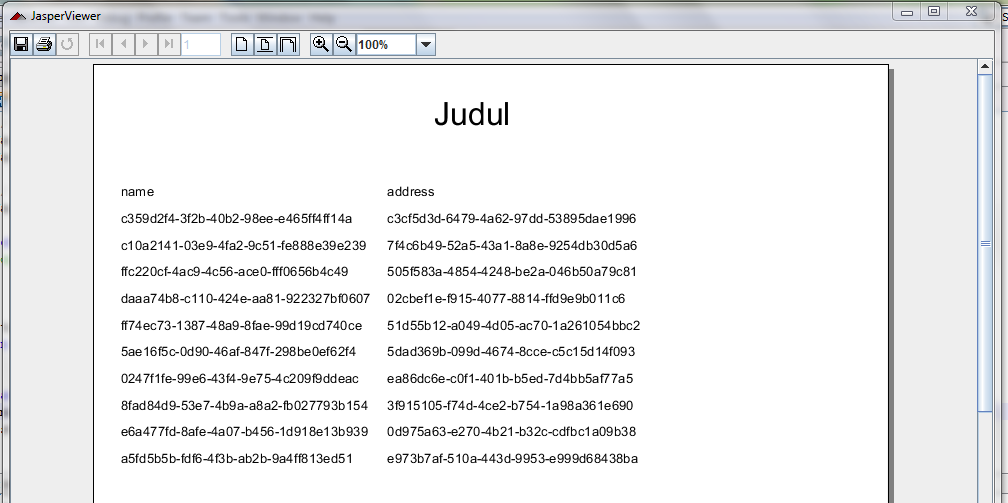
And some screenshots from my project,

Have fun with Jasper Report 😉

Legion TD Game Modes

Recently there are alot of Legion TD games created at Battle Net, but some of the server doesnt even know what is the basic game modes for this game. Thats why im trying to share my favorite gamemodes.

-hpmmhgx3

-hp : Host Pick – host pick a race, every given same race as host.
-mm : Master Mind – Restricted vision on enemy’s map and information.
-hg : Hour Glass – Receive gold for enemy leaks (that reach the King).
-x3 : 3 Time – more creeps spawn.

if you want, you could replace -hp with one of these two,
-ar : All Random – All players are given a random race.
-sd : Single Draft – All players are given 2 random races to choose.

Please enter mode in 15 seconds after game start. I hope it helps and btw, my map is Legion TD Mega 3.43.
Enjoy 🙂