Beberapa hari yang lalu, gw ditanya oleh salah seorang temen gw, Ariestania Winda. Dia nanya, gimana caranya bikin validasi login sederhana dengan Spring Security. Oke, berikut adalah tutorial yang gw kasih ke dia. Semoga bisa bermanfaat untuk yang lain.
Semua dimulai dengan konfigurasi maven sederhana, berikut pom.xml yang gw punya,
<project xmlns="http://maven.apache.org/POM/4.0.0" xmlns:xsi="http://www.w3.org/2001/XMLSchema-instance"
         xsi:schemaLocation="http://maven.apache.org/POM/4.0.0 http://maven.apache.org/xsd/maven-4.0.0.xsd">
    <modelVersion>4.0.0</modelVersion>

    <groupId>com.edw</groupId>
    <artifactId>SpringSecurityExample</artifactId>
    <version>1.0</version>
    <packaging>war</packaging>

    <name>SpringSecurityExample</name>

    <properties>
        <endorsed.dir>${project.build.directory}/endorsed</endorsed.dir>
        <project.build.sourceEncoding>UTF-8</project.build.sourceEncoding>
    </properties>

    <dependencies>
        <dependency>
            <groupId>javax</groupId>
            <artifactId>javaee-web-api</artifactId>
            <version>6.0</version>
            <scope>provided</scope>
        </dependency>
        <dependency>
            <groupId>javax.servlet</groupId>
            <artifactId>jstl</artifactId>
            <version>1.2</version>
            <scope>runtime</scope>
        </dependency>

        <!-- Spring 3 dependencies -->
        <dependency>
            <groupId>org.springframework</groupId>
            <artifactId>spring-core</artifactId>
            <version>4.1.1.RELEASE</version>
        </dependency>
        <dependency>
            <groupId>org.springframework</groupId>
            <artifactId>spring-web</artifactId>
            <version>4.1.1.RELEASE</version>
        </dependency>
        <dependency>
            <groupId>org.springframework</groupId>
            <artifactId>spring-webmvc</artifactId>
            <version>4.1.1.RELEASE</version>
        </dependency>
        <dependency>
            <groupId>org.springframework</groupId>
            <artifactId>spring-tx</artifactId>
            <version>4.1.1.RELEASE</version>
        </dependency>
        <dependency>
            <groupId>org.springframework</groupId>
            <artifactId>spring-orm</artifactId>
            <version>4.1.1.RELEASE</version>
        </dependency>
        <dependency>
            <groupId>cglib</groupId>
            <artifactId>cglib</artifactId>
            <version>2.2</version>
        </dependency>

        <!-- Spring Security -->
        <dependency>
            <groupId>org.springframework.security</groupId>
            <artifactId>spring-security-web</artifactId>
            <version>3.2.5.RELEASE</version>
        </dependency>
        <dependency>
            <groupId>org.springframework.security</groupId>
            <artifactId>spring-security-config</artifactId>
            <version>3.2.5.RELEASE</version>
        </dependency>

        <!-- slf4j -->
        <dependency>
            <groupId>org.slf4j</groupId>
            <artifactId>slf4j-log4j12</artifactId>
            <version>1.5.6</version>
        </dependency>

    </dependencies>

    <build>
        <plugins>
            <plugin>
                <groupId>org.apache.maven.plugins</groupId>
                <artifactId>maven-compiler-plugin</artifactId>
                <version>2.3.2</version>
                <configuration>
                    <source>1.6</source>
                    <target>1.6</target>
                    <compilerArguments>
                        <endorseddirs>${endorsed.dir}</endorseddirs>
                    </compilerArguments>
                </configuration>
            </plugin>
            <plugin>
                <groupId>org.apache.maven.plugins</groupId>
                <artifactId>maven-war-plugin</artifactId>
                <version>2.1.1</version>
                <configuration>
                    <failOnMissingWebXml>false</failOnMissingWebXml>
                </configuration>
            </plugin>
            <plugin>
                <groupId>org.apache.maven.plugins</groupId>
                <artifactId>maven-dependency-plugin</artifactId>
                <version>2.1</version>
                <executions>
                    <execution>
                        <phase>validate</phase>
                        <goals>
                            <goal>copy</goal>
                        </goals>
                        <configuration>
                            <outputDirectory>${endorsed.dir}</outputDirectory>
                            <silent>true</silent>
                            <artifactItems>
                                <artifactItem>
                                    <groupId>javax</groupId>
                                    <artifactId>javaee-endorsed-api</artifactId>
                                    <version>6.0</version>
                                    <type>jar</type>
                                </artifactItem>
                            </artifactItems>
                        </configuration>
                    </execution>
                </executions>
            </plugin>
        </plugins>
    </build>
</project>
Kemudian register konfigurasi spring di web.xml
<?xml version="1.0" encoding="UTF-8"?>
<web-app version="3.0" xmlns="http://java.sun.com/xml/ns/javaee" xmlns:xsi="http://www.w3.org/2001/XMLSchema-instance" xsi:schemaLocation="http://java.sun.com/xml/ns/javaee http://java.sun.com/xml/ns/javaee/web-app_3_0.xsd">
    <context-param>
        <param-name>contextConfigLocation</param-name>
        <param-value>/WEB-INF/applicationContext.xml, /WEB-INF/applicationSecurity.xml</param-value>
    </context-param>
    <listener>
        <listener-class>org.springframework.web.context.ContextLoaderListener</listener-class>
    </listener>
    <servlet>
        <servlet-name>dispatcher</servlet-name>
        <servlet-class>org.springframework.web.servlet.DispatcherServlet</servlet-class>
        <load-on-startup>2</load-on-startup>
    </servlet>
    <servlet-mapping>
        <servlet-name>dispatcher</servlet-name>
        <url-pattern>/</url-pattern>
    </servlet-mapping>

    <!-- Spring Security -->
    <filter>
        <filter-name>springSecurityFilterChain</filter-name>
        <filter-class>org.springframework.web.filter.DelegatingFilterProxy
        </filter-class>
    </filter>

    <filter-mapping>
        <filter-name>springSecurityFilterChain</filter-name>
        <url-pattern>/*</url-pattern>
    </filter-mapping>

    <session-config>
        <session-timeout>
            30
        </session-timeout>
    </session-config>
</web-app>
Dan 3 xml milik Spring, ApplicationContext.xml, dispatcher-servlet.xml dan applicationSecurity.xml
<?xml version="1.0" encoding="UTF-8"?>
<beans xmlns="http://www.springframework.org/schema/beans"
       xmlns:xsi="http://www.w3.org/2001/XMLSchema-instance"
       xmlns:p="http://www.springframework.org/schema/p"
       xmlns:aop="http://www.springframework.org/schema/aop"
       xmlns:context="http://www.springframework.org/schema/context"
       xmlns:jee="http://www.springframework.org/schema/jee"
       xmlns:tx="http://www.springframework.org/schema/tx"
       xsi:schemaLocation="http://www.springframework.org/schema/beans http://www.springframework.org/schema/beans/spring-beans-3.0.xsd
        http://www.springframework.org/schema/aop http://www.springframework.org/schema/aop/spring-aop-3.0.xsd
        http://www.springframework.org/schema/context http://www.springframework.org/schema/context/spring-context-3.0.xsd
        http://www.springframework.org/schema/jee http://www.springframework.org/schema/jee/spring-jee-3.0.xsd
        http://www.springframework.org/schema/tx http://www.springframework.org/schema/tx/spring-tx-3.0.xsd">

    <context:annotation-config/>

    <context:component-scan base-package="com.edw.springsecurityexample.controller"/>
</beans>
<?xml version="1.0" encoding="UTF-8"?>
<beans xmlns="http://www.springframework.org/schema/beans"
       xmlns:xsi="http://www.w3.org/2001/XMLSchema-instance"
       xmlns:p="http://www.springframework.org/schema/p"
       xmlns:context="http://www.springframework.org/schema/context"
       xmlns:mvc="http://www.springframework.org/schema/mvc"
       xsi:schemaLocation="http://www.springframework.org/schema/beans http://www.springframework.org/schema/beans/spring-beans-3.0.xsd
        http://www.springframework.org/schema/mvc http://www.springframework.org/schema/mvc/spring-mvc-3.0.xsd
        http://www.springframework.org/schema/context http://www.springframework.org/schema/context/spring-context-3.0.xsd">


    <!-- the mvc resources tag does the magic -->
    <mvc:resources mapping="/css/**" location="/css/" />
    <mvc:resources mapping="/js/**" location="/js/" />
    <mvc:resources mapping="/img/**" location="/img/" />

    <context:component-scan base-package="com.edw.springsecurityexample.controller" />

    <mvc:annotation-driven />

    <bean id="viewResolver"
          class="org.springframework.web.servlet.view.InternalResourceViewResolver"
          p:prefix="/WEB-INF/jsp/"
          p:suffix=".jsp" />
</beans>
<?xml version="1.0" encoding="UTF-8"?>
<beans:beans xmlns="http://www.springframework.org/schema/security"
             xmlns:beans="http://www.springframework.org/schema/beans"
             xmlns:xsi="http://www.w3.org/2001/XMLSchema-instance"
             xsi:schemaLocation="http://www.springframework.org/schema/beans
	http://www.springframework.org/schema/beans/spring-beans-4.0.xsd
	http://www.springframework.org/schema/security
	http://www.springframework.org/schema/security/spring-security-3.2.xsd">

    <http auto-config="true" use-expressions="true">
        <intercept-url pattern="/admin/**" access="hasRole('ROLE_USER')" />
        <intercept-url pattern="/" 	access="isAnonymous()"/>
        <form-login login-page="/"
                    authentication-failure-url="/?error=1"
                    default-target-url="/admin/index" always-use-default-target="true"/>
        <logout logout-url="/logout" logout-success-url="/" />
    </http>

    <authentication-manager>
        <authentication-provider>
            <user-service>
                <user name="edw" password="123456" authorities="ROLE_USER" />
            </user-service>
        </authentication-provider>
    </authentication-manager>


</beans:beans>
Lalu gw bikin satu java class sebagai controller,
package com.edw.springsecurityexample.controller;

import org.springframework.stereotype.Controller;
import org.springframework.web.bind.annotation.RequestMapping;
import org.springframework.web.bind.annotation.RequestMethod;

@Controller
public class IndexController {
    @RequestMapping(value = "/", method = RequestMethod.GET)
    public String index() {
        return "index";
    }

    @RequestMapping(value = "/admin/index", method = RequestMethod.GET)
    public String adminIndex() {
        return "adminIndex";
    }
}
Kemudian satu jsp sederhana sebagai halaman login,
<%@page contentType="text/html" pageEncoding="UTF-8"%>
<%@ taglib uri="http://java.sun.com/jsp/jstl/core" prefix="c" %>

<!DOCTYPE html>
<html>
    <head>
        <meta http-equiv="Content-Type" content="text/html; charset=UTF-8">
        <title>JSP Page</title>
    </head>
    <body>
        <h1>Hello Spring MVC!</h1>
        <h2>Tolong Login Dulu </h2>

        <c:if test="${not empty param.error}">
                <div style="color: red;">
                    Username atau Password Salah
                </div>
        </c:if>

        <form action="j_spring_security_check" method="POST">
            <table>
                <tr>
                    <td>
                        username
                    </td>
                    <td>
                        <input name="j_username" type="text" />
                    </td>
                </tr>
                <tr>
                    <td>
                        password
                    </td>
                    <td>
                        <input name="j_password" type="password" />
                    </td>
                </tr>
                <tr>
                    <td colspan="2">
                        <input name="submit" type="submit" />
                    </td>
                </tr>
            </table>
        </form>
    </body>
</html>
Dan halaman admin sederhana, yang hanya bisa diakses apabila sudah login yang isinya link logout.
<%@page contentType="text/html" pageEncoding="UTF-8"%>
<!DOCTYPE html>
<html>
    <head>
        <meta http-equiv="Content-Type" content="text/html; charset=UTF-8">
        <title>JSP Page</title>
    </head><a href="http://edwin.baculsoft.com/wp-content/uploads/2014/11/springsecurity-login-gagal.png"><img src="http://edwin.baculsoft.com/wp-content/uploads/2014/11/springsecurity-login-gagal.png" alt="springsecurity login gagal" width="458" height="287" class="aligncenter size-full wp-image-1535" /></a>
    <body>
        <h1>Selamat, anda sudah login -- admin page</h1>
        <br />
        <a href="${pageContext.request.contextPath}/logout">logout</a>
    </body>
</html>
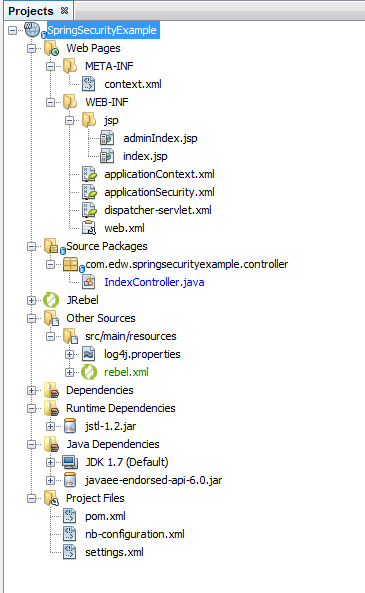
Berikut adalah tampilan struktur netbeans project
Tampilan halaman login, dan tampilan jika login gagal,


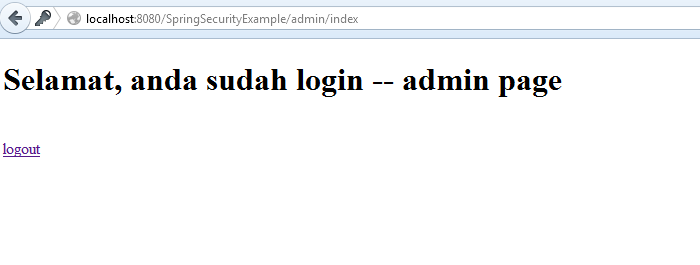
Jika login dengan username edw dan password 123456, maka akan tampil halaman seperti berikut,
Source lengkapnya, bisa diakses di github saya, di url ini.