utility

How to Setup HTTPS Connection for NginX

I just bought a new SSL Certificate from an SSL providers, and now im trying to install it on my nginx webserver. Now im trying to share the steps needed to install my ssl certificate, in case someone need it.

But first, i need to generate a .key and .csr file using openssl’s command, i will need those files to become a “secret key” or my private key.

sudo openssl req -new -newkey rsa:2048 -nodes -keyout domain.key -out domain.csr

Next is i send my .csr file to SSL providers to generate .crt files. In my case, the SSL Provider, gives me 2 .crt files. First is the “Intermediate Certificate” (my_intermediate_ca.crt) and another one is “SSL Certificate” files (domain.crt).

First, i need to join those 2 crt files,

cat domain.crt my_intermediate_ca.crt >> bundle.crt

It will look like this,

-----BEGIN CERTIFICATE-----
..... my domain.crt .......
-----END CERTIFICATE-----
-----BEGIN CERTIFICATE-----
..... my intermediate.crt .......
-----END CERTIFICATE-----

Next is registering my SSL on nginx, i just edit the ssl.conf here

sudo vi /etc/nginx/conf.d/ssl.conf

and add this lines

server {
    listen       443 default ssl;
    server_name  mydomain;

    server_tokens off;

    ssl_certificate      /crtlocation/bundle.crt;
    ssl_certificate_key  /crtlocation/domain.key;

    ssl_session_cache shared:SSL:1m;
    ssl_session_timeout  5m;

    ssl_ciphers  HIGH:!aNULL:!MD5;
    ssl_prefer_server_ciphers   on;

    location / {
        root   /usr/share/nginx/html;
        index  index.html index.htm;
	}
}

Restart nginx and check your ssl using openssl command,

openssl s_client -debug -connect localhost:443

A good SSL configuration will give this result,

Verify return code: 0 (ok)

While bad ones will create result like this,

Hope it would help others, have fun 😀

ps.
i had one weird condition on my previous ssl installation, somehow my website shows valid ssl on desktop browsers, but shows broken ssl when accessed from mobile devices and android browsers. I found out it’s due to i provide the wrong .crt file on nginx’s ssl.conf, i provide domain.crt instead of bundle.crt. 🙁

How to Log Log4J’s Message Logs Into Database

Today im going to do a simple log4j logging into mysql database, the only reason i want to log into database instead of into file is so that i could query the logs i have.

This is my java class that i use to do my testcase,

package com.edw.main;

import java.io.IOException;
import java.sql.SQLException;
import org.apache.log4j.Logger;

public class Main {

    private static Logger logger = Logger.getLogger(Main.class);

    private void doSomething() {
        logger.debug("im doing something");
        logger.error("im doing something - error -");
    }

    public static void main(String[] args) {
        Main main = new Main();
        main.doSomething();
    }
}

and my simple table, to store all my log messages

CREATE TABLE `logs` (
  `thread_id` varchar(20) NOT NULL,
  `tanggal` datetime NOT NULL,
  `kelas` varchar(50) NOT NULL,
  `level` varchar(10) NOT NULL,
  `pesan` varchar(1000) NOT NULL,
  `ID` bigint(20) NOT NULL AUTO_INCREMENT,
  PRIMARY KEY (`ID`)
) ENGINE=InnoDB AUTO_INCREMENT=9 DEFAULT CHARSET=latin1;

This is my log4j.properties,

# Define the root logger with appender file
log4j.rootLogger = DEBUG, DB

# Define the DB appender
log4j.appender.DB=org.apache.log4j.jdbc.JDBCAppender

# Set JDBC URL
log4j.appender.DB.URL=jdbc:mysql://localhost/test

# Set Database Driver
log4j.appender.DB.driver=com.mysql.jdbc.Driver

# Set database user name and password
log4j.appender.DB.user=root
log4j.appender.DB.password=password

# Set the SQL statement to be executed.
log4j.appender.DB.sql=INSERT INTO LOGS VALUES('%x',now(),'%C:%L','%p','%m', null)

# Define the layout for file appender
log4j.appender.DB.layout=org.apache.log4j.PatternLayout

And this is what the contents of my database

This is my Netbeans; Project structure, as you can see, i only need 2 jars, mysql driver and log4j jar.

Create an Expirable Token Using Java

On this article, im trying to create a simple java app that will hold a value that have an expiration time. I usually use this for handling request session or to hold a value that have a time limitation. Btw, i’m using EhCache for handling expiration time.

First is a simple pom.xml,

<project xmlns="http://maven.apache.org/POM/4.0.0" xmlns:xsi="http://www.w3.org/2001/XMLSchema-instance"
         xsi:schemaLocation="http://maven.apache.org/POM/4.0.0 http://maven.apache.org/xsd/maven-4.0.0.xsd">
    <modelVersion>4.0.0</modelVersion>

    <groupId>com.edw</groupId>
    <artifactId>ExpirableToken</artifactId>
    <version>1.0-SNAPSHOT</version>
    <packaging>jar</packaging>

    <name>ExpirableToken</name>
    <url>http://maven.apache.org</url>

    <properties>
        <project.build.sourceEncoding>UTF-8</project.build.sourceEncoding>
    </properties>

    <dependencies>
        <dependency>
            <groupId>net.sf.ehcache</groupId>
            <artifactId>ehcache</artifactId>
            <version>2.7.4</version>
        </dependency>           
    </dependencies>
</project>

And a simple xml file to hold ehcache configurations,

<ehcache updateCheck="false" monitoring="off" dynamicConfig="false">
    
    <diskStore path="java.io.tmpdir" />
    
    <defaultCache maxEntriesLocalHeap="0" eternal="false"
                  timeToIdleSeconds="1200" timeToLiveSeconds="1200">
    </defaultCache>
    
    <!-- a 3 seconds -->
    <cache name="token" maxElementsInMemory="1000" eternal="false"
           overflowToDisk="true" diskPersistent="false" timeToIdleSeconds="3" 
           timeToLiveSeconds="3" memoryStoreEvictionPolicy="LFU" statistics="false" transactionalMode="off">       
    </cache>                
    
    <!-- a 10 seconds -->
    <cache name="action" maxElementsInMemory="1000" eternal="false"
           overflowToDisk="true" diskPersistent="false" timeToIdleSeconds="10" 
           timeToLiveSeconds="10" memoryStoreEvictionPolicy="LFU" statistics="false" transactionalMode="off">       
    </cache>        
    
</ehcache>

And this is my java class that i use for testing,

package com.edw.expirabletoken;

import java.util.Date;
import net.sf.ehcache.Cache;
import net.sf.ehcache.CacheManager;
import net.sf.ehcache.Element;

public class App {

    private CacheManager cacheManager= CacheManager.create();
    private Cache tokenCache = cacheManager.getCache("token"); // a 3 seconds cache
    private Cache actionCache = cacheManager.getCache("action"); // a 10 seconds cache

    public App() {
    }

    private void action() throws Exception {
        // add into a 3 seconds cache
        Element regElement = new Element("name", "edwin 3 seconds");
        tokenCache.put(regElement);
        
        // add into a 10 seconds cache
        Element regElement2 = new Element("name", "edwin 10 seconds");
        actionCache.put(regElement2);
        
         // 2 seconds sleep
         Thread.sleep(2000);
         getCacheContent();
         
         // 5 seconds sleep
         Thread.sleep(5000);
         getCacheContent();
         
         // 10 seconds sleep
         Thread.sleep(10000);
         getCacheContent();
    }
    
    private void getCacheContent() {
        Element element3 = tokenCache.get("name"); // get value from a 3 seconds cache
        if (element3 != null) {
            String value = (String) element3.getObjectValue();
            System.out.println(new Date()+" -- "+value);    
        } else {
            System.out.println(new Date()+" -- Empty Cache");
        }
        
         Element element10 = actionCache.get("name"); // get value from a 10 seconds cache
         if (element10 != null) {
            String value = (String) element10.getObjectValue();
            System.out.println(new Date()+" -- "+value);    
        } else {
            System.out.println(new Date()+" -- Empty Cache");
        }
    }
    
    public static void main(String[] args) throws Exception {
        App app = new App();
        app.action();
    }
}

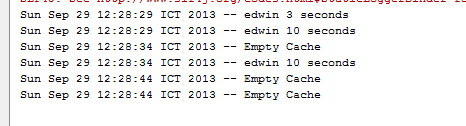
This is what the result on my Netbeans’ console,

This is my Netbeans’ project structure,

Well i hope this helped others, have fun using ehcache.

[Java] How to Convert XMLGregorianCalendar to java.util.Date and The Other Way Around

This is a simple code snippet on how to convert XMLGregorianCalendar into java.util.Date and java.util.Date into javax.xml.datatype.XMLGregorianCalendar. Usually i found XMLGregorianCalendar everytime im trying to convert java bean into webservice using wsdl2java.

But there are some time when i need to convert those XMLGregorianCalendar objects and change them into java.util.Date so i could do a much more various process on them. So this is how i convert XMLGregorianCalendar into java.util.Date,

            
            XMLGregorianCalendar calendar = responseMessage.getDate();
            java.util.Date date = calendar.toGregorianCalendar().getTime();

and this is how i convert java.util.Date into XMLGregorianCalendar

            GregorianCalendar gregorianCalendar = new GregorianCalendar();
            gregorianCalendar.setTime(new Date());
            responseMessage.setDate(new XMLGregorianCalendarImpl(gregorianCalendar));

For example, im using XMLGregorianCalendar value “2012-10-15T00:00:00”. Hope it would help others (H)

How To Change Apache Tomcat’s Server Name

On this tutorial, i’ll show you how to change Apache Tomcat’s server name. This is the screenshot from a regular Apache Tomcat,

And with a simple configuration on server.xml,

 <Connector port="8080" protocol="HTTP/1.1"
         connectionTimeout="20000"
	 server="Why So Serious"
         redirectPort="8443" />

It will change my Tomcat’s server name into,

Not hard actually 😉